
Introduction
Welcome to Web Enumeration! In this room, we'll be showcasing some of the most fundamental tools used in the enumeration stage of a web target. Good enumeration skills are vital in penetration testing -- how else are you supposed to know what you're targeting?! It is, however, rather easy to fall into rabbit holes.
The tools we'll showcase will hopefully make this process easier. You'll be able to apply the knowledge gained for each tool on an Instance dedicated to each tool.
Prerequisities for this lab
You will need to be connected to the TryHackMe network if you are not using the TryHackMe AttackBox or Kali instance. Other than that, all you need is a good posture and some willpower!
Note: This room has been written as if you were using the TryHackMe AttackBox.
Manual Enumeration
We don't need to start unrolling the fancy toolkit from the get-go. More often than not, the results of using our own initiative over automated scans bare more results. For example, we may be able to find the "golden ticket" without making all of the noise. Let's outline some fundamentals skills involving you and your browser.
Your browser is as extensive as you are (and some!) and keeps records of the data it receives and who from. We can use this for a range of activities: finding that exact photo or more usefully -- the location of certain files or assets being loaded. This could include things from scripts to page URLs.
Using our Browsers Developer Console
Modern-day browsers including Chrome and Firefox have a suite of tools located in the "Developer Tools/Console". We're going to be discussing Firefox's, however, Chrome has a very similar suite. This suite includes a range of tools including:
Viewing page source code
Finding assets
Debugging & executing code such as javascript on the client-side (our Browser)
Using "F12" on our keyboard, this is a shortcut to launch this suite of tools.
Inspecting Tool.
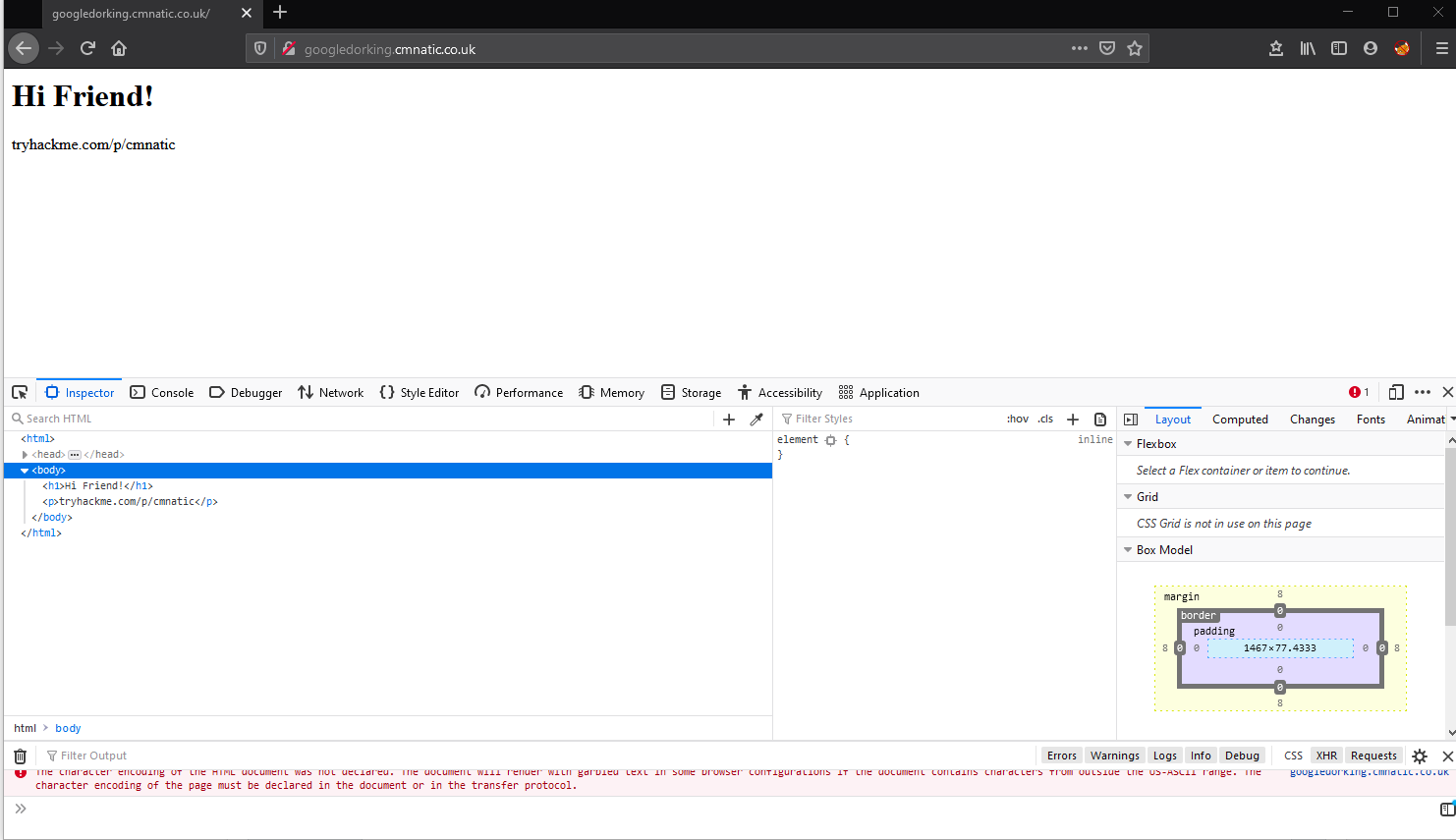
At first, we can see the web page with the heading "Hi Friend" and a section of the screen filled with the "Inspector" tool. This allows us to view the HTML source code of the webpage we have loaded in our browser. This often contains things such as developer comments, and the name to certain aspects of web page features including forms and the likes.
Developers often leave behind comments in the form of the tags...for example: which are not rendered in the browser as we can see here:
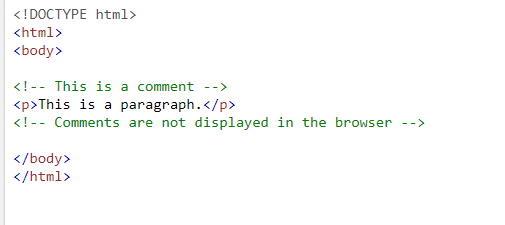

I gotcha!
1. Introduction to Gobuster
Introduction to Gobuster
Welcome to the Gobuster portion of this room! This part of the room is aimed at complete beginners to enumeration and penetration testing. By completing this portion, you will have learned:
How to install Gobuster on Kali Linux
How to use the "dir" mode to enumerate directories and several of its most useful options
How to use the "dns" mode to enumerate domains/subdomains and several of its most useful option
Where to go for help
At the end of this section, you will have the opportunity to practice what you have learned by using Gobuster on another room, Blog. This room utilizes what's called a Content Management System (CMS) in order to make things easier for the user. These typically have large and varied directory structures...perfect for directory enumeration with Gobuster!
With the introduction out of the way, let's get started! What is Gobuster? As the name implies, Gobuster is written in Go. Go is an open-source, low-level language (much like C or Rust) developed by a team at Google and other contributors. If you'd like to learn more about Go, visit the website linked above. Installing Gobuster on Kali Linux
Luckily, installing Gobuster on Kali Linux does not require any installation of Go and does not carry with it a complicated install process. This means no building from source or running any other complicated commands. Ready?
sudo apt install gobuster
Done. Useful Global Flags
There are some useful Global flags that can be used as well. I've included them in the table below. You can review these in the main documentation as well - here.
Flag Long Flag Description -t --threads Number of concurrent threads (default 10) -v --verbose Verbose output -z --no-progress Don't display progress -q --quiet Don't print the banner and other noise -o --output Output file to write results to
I will typically change the number of threads to 64 to increase the speed of my scans. If you don't change the number of threads, Gobuster can be a little slow.
1.1. Gobuster Modes
"dir" Mode
Dirbuster has a "dir" mode that allows the user to enumerate website directories. This is useful when you are performing a penetration test and would like to see what the directory structure of a website is. Often, directory structures of websites and web-apps follow a certain convention, making them susceptible to brute-forcing using wordlists. At the end of this room, you'll run Gobuster on Blog which uses WordPress, a very common Content Management System (CMS). WordPress uses a very specific directory structure for its websites.
Gobuster is powerful because it not only allows you to scan the website, but it will return the status codes as well. This will immediately let you know if you as an outside user can request that directory or not. Additional functionality of Gobuster is that it lets you search for files as well with the addition of a simple flag! Using "dir" Mode
To use "dir" mode, you start by typing gobuster dir. This isn't the full command, but just the start. This tells Gobuster that you want to perform a directory search, instead of one of its other methods (which we'll get to). It has to be written like this or else Gobuster will complain. After that, you will need to add the URL and wordlist using the -u and -w options, respectively. Like so:
gobuster dir -u http://10.10.10.10 -w /usr/share/wordlists/dirbuster/directory-list-2.3-medium.txt
Note: The URL is going to be the base path where Gobuster starts looking from. So the URL above is using the root web directory. For example, in a typical Apache installation on Linux, this is /var/www/html. So if you have a "products" directory and you want to enumerate that directory, you'd set the URL as http://10.10.10.10/products. You can also think of this like http://example.com/path/to/folder. Also notice that I specified the protocol of HTTP. This is important and required.
This is a very common, simple, and straightforward command for Gobuster. This is typically what I will run when doing capture the flag style rooms on TryHackMe. However, there are some other helpful flags that can be useful in certain scenarios
Other Useful Flags
These flags are useful in certain scenarios. Note that these are not all of the flag options, but some of the more common ones that you'll use in penetration tests and in capture the flag events. If you'd like the full list, you can see that here. Flag Long Flag Description -c --cookies Cookies to use for requests -x --extensions File extension(s) to search for -H --headers Specify HTTP headers, -H 'Header1: val1' -H 'Header2: val2' -k --no-tls-validation Skip TLS certificate verification -n --no-status Don't print status codes -P --password Password for Basic Auth -s --status-codes Positive status codes -b --status-codes-blacklist Negative status codes -U --username Username for Basic Auth
A very common use of Gobuster's "dir" mode is the ability to use it's -x or --extensions flag to search for the contents of directories that you have already enumerated by providing a list of file extensions. File extensions are generally representative of the data they may contain. For example, .conf or .config files usually contain configurations for the application - including sensitive info such as database credentials.
A few other files that you may wish to search for are .txt files or other web application pages such as .html or .php . Let's assemble a command that would allow us to search the "myfolder" directory on a webserver for the following three files:
-
html
-
js
-
css
gobuster dir -u http://10.10.252.123/myfolder -w /usr/share/wordlists/dirbuster/directory-list-2.3-medium.txt -x.html,.css,.js
The -k Flag
The -k flag is special because it has an important use during penetration tests and captures the flag events. In a capture the flag room on TryHackMe for example, if HTTPS is enabled, you will most likely encounter an invalid cert error like the one below
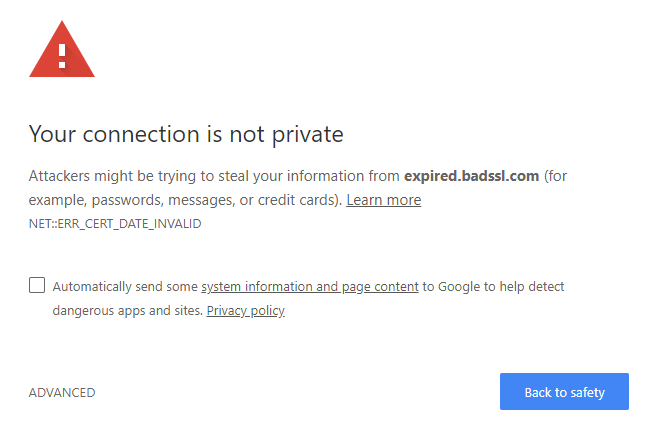
In instances like this, if you try to run Gobuster against this without the -k flag, it won't return anything and will most likely error out with something gross and will leave you sad. Don't worry though, easy fix! Just add the -k flag to your scan and it will bypass this invalid certification and continue scanning and deliver the goods!
Note: This flag can be used with "dir" mode and "vhost" modes
"dns" Mode
The next mode we'll focus on is the "dns" mode. This allows Gobuster to brute-force subdomains. During a penetration test (or capture the flag), it's important to check sub-domains of your target's top domain. Just because something is patched in the regular domain, does not mean it is patched in the sub-domain. There may be a vulnerability for you to exploit in one of these sub-domains. For example, if State Farm owns statefarm.com and mobile.statefarm.com, there may be a hole in mobile.statefarm.com that is not present in statefarm.com. This is why it is important to search for subdomains too! Using "dns" Mode
To use "dns" mode, you start by typing gobuster dns. Just like "dir" mode, this isn't the full command, but just the start. This tells Gobuster that you want to perform a sub-domain brute-force, instead of one of one of the other methods as previously mentioned. It has to be written like this or else Gobuster will complain. After that, you will need to add the domain and wordlist using the -d and -w options, respectively. Like so:
gobuster dns -d mydomain.thm -w /usr/share/wordlists/SecLists/Discovery/DNS/subdomains-top1million-5000.txt
This tells Gobuster to do a sub-domain scan on the domain "mydomain.thm". If there are any sub-domains available, Gobuster will find them and report them to you in the terminal.
Other Useful Flags
-d and -w are the main flags that you'll need for most of your scans. But there are a few others that are worth mentioning that we can go over. They are in the table below. Flag Long Flag Description -c --show-cname Show CNAME Records (cannot be used with '-i' option) -i --show-ips Show IP Addresses -r --resolver Use custom DNS server (format server.com or server.com:port)
There aren't many additional flags to be used with this mode, but these are the main useful ones that you may use from time to time. If you'd like to see the full list of flags that can be used with this mode, check out the documentation
"vhost" Mode
The last and final mode we'll focus on is the "vhost" mode. This allows Gobuster to brute-force virtual hosts. Virtual hosts are different websites on the same machine. In some instances, they can appear to look like sub-domains, but don't be deceived! Virtual Hosts are IP based and are running on the same server. This is not usually apparent to the end-user. On an engagement, it may be worthwhile to just run Gobuster in this mode to see if it comes up with anything. You never know, it might just find something! While participating in rooms on TryHackMe, virtual hosts would be a good way to hide a completely different website if nothing turned up on your main port 80/443 scan. Using "vhost" Mode
To use "vhost" mode, you start by typing gobuster vhost. Just like the other modes, this isn't the full command, but just the start. This tells Gobuster that you want to perform a virtual host brute-force, instead of one of the other methods as previously mentioned. It has to be written like this or else Gobuster will complain. After that, you will need to add the domain and wordlist using the -u and -w options, respectively. Like so:
gobuster vhost -u http://example.com -w /usr/share/wordlists/SecLists/Discovery/DNS/subdomains-top1million-5000.txt
This will tell Gobuster to do a virtual host scan http://example.com using the selected wordlist. Other Useful Flags
A lot of the same flags that are useful for "dir" mode actually still apply to virtual host mode. Please check out the "dir" mode section for these and take a look at the official documentation for the full list. There's really too many that are similar to put them back here.
I get the hang of it!
1.2. Useful Wordlists
Useful Wordlists
There are many useful wordlists to use for each mode. These may or may not come in handy later on during the VM portion of the room! I'll go over some of the ones that are on Kali by default as well as a short section on SecLists. Kali Linux Default Lists
Below you will find a useful list of wordlists that are installed on Kali Linux by default. This is as of the latest version at the time of writing which is 2020.3. Anything with a wildcard (*) character indicates there's more than one list that matches. Keep in mind, a lot of these can be interchanged between modes. For example, "dir" mode wordlists (such as ones from the dirbuster directory) will contain words like "admin", "index", "about", "events", etc. A lot of these could be subdomains as well. Give them a try with the different modes!
/usr/share/wordlists/dirbuster/directory-list-2.3-*.txt
/usr/share/wordlists/dirbuster/directory-list-1.0.txt
/usr/share/wordlists/dirb/big.txt
/usr/share/wordlists/dirb/common.txt
/usr/share/wordlists/dirb/small.txt
/usr/share/wordlists/dirb/extensions_common.txt - Useful for when fuzzing for files!
Non-Standard Lists
In addition to the above, Daniel Miessler has created an amazing GitHub repo called SecLists. It compiles many different lists used for many different things. The best part is, it's in apt! You can sudo apt install seclists and get the entire repo! We won't dive into any other lists as there are many. However, between what's installed by default on Kali and the SecLists repo, I doubt you'll need anything else.
1.3. Practical: Gobuster (Deploy #1)
Gobuster Challenges
Now's your chance to check what you've learned. Deploy the VM, allow five minutes for it to fully deploy and answer the following questions! Good luck!
You will also need to add "webenum.thm" to your /etc/hosts file to start off with like so:
echo "10.10.148.19 webenum.thm" >> /etc/hosts
You will also need to add any virtual hosts that you discover through the same way, before you can visit them in your browser i.e.:
echo "10.10.148.19 mysubdomain.webenum.thm" >> /etc/hosts
Any answer that has a list of items will have its answer formatted in the following way: ans1,ans2. Be sure to format your answers like that to get credit.
┌──(root㉿kali)-[/home/kali]
└─# echo "10.10.148.19 webenum.thm" >> /etc/hosts

┌──(root㉿kali)-[/home/kali]
└─# echo "10.10.148.19 mysubdomain.webenum.thm" >> /etc/hosts

┌──(root㉿kali)-[/home/kali]
└─# cat /etc/hosts
127.0.0.1       localhost
127.0.1.1       kali
10.10.113.254   magician
10.10.121.237   git.git-and-crumpets.thm
10.10.149.10    hipflasks.thm hipper.hipflasks.thm
10.10.91.93     raz0rblack raz0rblack.thm
10.10.234.77    lab.enterprise.thm
10.10.96.58     source
10.10.59.104    CONTROLLER.local
10.10.54.75     acmeitsupport.thm
10.10.102.33    overwrite.uploadvulns.thm shell.uploadvulns.thm java.uploadvulns.thm annex.uploadvulns.thm magic.uploadvulns.thm jewel.uploadvulns.thm demo.uploadvulns.thm
10.10.179.221   development.smag.thm
10.10.87.241    mafialive.thm
10.10.97.105    internal.thm
10.10.106.113   retro.thm
# The following lines are desirable for IPv6 capable hosts
::1     localhost ip6-localhost ip6-loopback
ff02::1 ip6-allnodes
ff02::2 ip6-allrouters


10.10.148.19 webenum.thm
10.10.148.19 mysubdomain.webenum.thm
Run a directory scan on the host. Other than the standard css, images and js directories, what other directories are available?
┌──(kali㉿kali)-[~]
└─$ gobuster dir -u http://webenum.thm -w /usr/share/wordlists/dirbuster/directory-list-2.3-medium.txt -t 64
===============================================================
Gobuster v3.1.0
by OJ Reeves (@TheColonial) & Christian Mehlmauer (@firefart)
===============================================================
[+] Url: http://webenum.thm
[+] Method: GET
[+] Threads: 64
[+] Wordlist: /usr/share/wordlists/dirbuster/directory-list-2.3-medium.txt
[+] Negative Status codes: 404
[+] User Agent: gobuster/3.1.0
[+] Timeout: 10s
===============================================================
2022/10/03 17:13:21 Starting gobuster in directory enumeration mode
===============================================================
/images (Status: 301) [Size: 311] [--> http://webenum.thm/images/]
Progress: 169 / 220561 (0.08%) /public (Status: 301) [Size: 311] [--> http://webenum.thm/public/]
Progress: 281 / 220561 (0.13%) Progress: 393 / 220561 (0.18%) Progress: 479 / 220561 (0.22%) Progress: 575 / 220561 (0.26%) /css (Status: 301) [Size: 308] [--> http://webenum.thm/css/]
Progress: 723 / 220561 (0.33%) Progress: 855 / 220561 (0.39%) Progress: 991 / 220561 (0.45%) /js (Status: 301) [Size: 307] [--> http://webenum.thm/js/]
Progress: 1163 / 220561 (0.53%) Progress: 1283 / 220561 (0.58%) Progress: 1411 / 220561 (0.64%) Progress: 1480 / 220561 (0.67%) Progress: 1620 / 220561 (0.73%) Progress: 1799 / 220561 (0.82%) Progress: 1934 / 220561 (0.88%) Progress: 2071 / 220561 (0.94%) Progress: 2254 / 220561 (1.02%) Progress: 2442 / 220561 (1.11%) Progress: 2574 / 220561 (1.17%) Progress: 2723 / 220561 (1.23%) Progress: 2891 / 220561 (1.31%) Progress: 3023 / 220561 (1.37%) Progress: 3211 / 220561 (1.46%) Progress: 3345 / 220561 (1.52%) Progress: 3532 / 220561 (1.60%) Progress: 3665 / 220561 (1.66%) Progress: 3827 / 220561 (1.74%) Progress: 4014 / 220561 (1.82%) Progress: 4151 / 220561 (1.88%) Progress: 4338 / 220561 (1.97%) Progress: 4482 / 220561 (2.03%) Progress: 4663 / 220561 (2.11%) Progress: 4829 / 220561 (2.19%) Progress: 4986 / 220561 (2.26%) Progress: 5175 / 220561 (2.35%) Progress: 5367 / 220561 (2.43%) Progress: 5498 / 220561 (2.49%) Progress: 5687 / 220561 (2.58%) Progress: 5836 / 220561 (2.65%) Progress: 6008 / 220561 (2.72%) Progress: 6198 / 220561 (2.81%) Progress: 6335 / 220561 (2.87%) Progress: 6518 / 220561 (2.96%) Progress: 6660 / 220561 (3.02%) Progress: 6842 / 220561 (3.10%) Progress: 7024 / 220561 (3.18%) Progress: 7164 / 220561 (3.25%) Progress: 7354 / 220561 (3.33%) Progress: 7489 / 220561 (3.40%) Progress: 7665 / 220561 (3.48%) Progress: 7798 / 220561 (3.54%) Progress: 7960 / 220561 (3.61%) Progress: 8116 / 220561 (3.68%) Progress: 8281 / 220561 (3.75%) Progress: 8472 / 220561 (3.84%) Progress: 8644 / 220561 (3.92%) Progress: 8793 / 220561 (3.99%) Progress: 8979 / 220561 (4.07%) Progress: 9132 / 220561 (4.14%) Progress: 9305 / 220561 (4.22%) Progress: 9496 / 220561 (4.31%) Progress: 9636 / 220561 (4.37%) Progress: 9817 / 220561 (4.45%) Progress: 10001 / 220561 (4.53%) Progress: 10137 / 220561 (4.60%) Progress: 10329 / 220561 (4.68%) Progress: 10467 / 220561 (4.75%) Progress: 10650 / 220561 (4.83%) Progress: 10841 / 220561 (4.92%) Progress: 10985 / 220561 (4.98%) Progress: 11164 / 220561 (5.06%) Progress: 11306 / 220561 (5.13%) Progress: 11484 / 220561 (5.21%) Progress: 11636 / 220561 (5.28%) Progress: 11817 / 220561 (5.36%) Progress: 11965 / 220561 (5.42%) Progress: 12148 / 220561 (5.51%) Progress: 12330 / 220561 (5.59%) Progress: 12473 / 220561 (5.66%) Progress: 12660 / 220561 (5.74%) /Changes (Status: 301) [Size: 312] [--> http://webenum.thm/Changes/]
Progress: 12811 / 220561 (5.81%) Progress: 12956 / 220561 (5.87%) Progress: 13089 / 220561 (5.93%) Progress: 13264 / 220561 (6.01%) Progress: 13441 / 220561 (6.09%) Progress: 13601 / 220561 (6.17%) Progress: 13765 / 220561 (6.24%) Progress: 13920 / 220561 (6.31%) Progress: 14102 / 220561 (6.39%) Progress: 14280 / 220561 (6.47%) Progress: 14436 / 220561 (6.55%) Progress: 14542 / 220561 (6.59%) Progress: 14662 / 220561 (6.65%) Progress: 14791 / 220561 (6.71%) Progress: 14928 / 220561 (6.77%) Progress: 15112 / 220561 (6.85%) Progress: 15249 / 220561 (6.91%) Progress: 15439 / 220561 (7.00%) Progress: 15624 / 220561 (7.08%) Progress: 15762 / 220561 (7.15%) Progress: 15952 / 220561 (7.23%) Progress: 16123 / 220561 (7.31%) Progress: 16276 / 220561 (7.38%) Progress: 16464 / 220561 (7.46%) Progress: 16646 / 220561 (7.55%) Progress: 16791 / 220561 (7.61%) Progress: 16977 / 220561 (7.70%) Progress: 17159 / 220561 (7.78%) Progress: 17316 / 220561 (7.85%) Progress: 17486 / 220561 (7.93%) Progress: 17637 / 220561 (8.00%) Progress: 17829 / 220561 (8.08%) Progress: 17996 / 220561 (8.16%) Progress: 18158 / 220561 (8.23%) Progress: 18341 / 220561 (8.32%) Progress: 18508 / 220561 (8.39%) Progress: 18670 / 220561 (8.46%) Progress: 18853 / 220561 (8.55%) Progress: 19030 / 220561 (8.63%) Progress: 19177 / 220561 (8.69%) Progress: 19357 / 220561 (8.78%) Progress: 19532 / 220561 (8.86%) Progress: 19667 / 220561 (8.92%) Progress: 19854 / 220561 (9.00%) Progress: 20046 / 220561 (9.09%) Progress: 20178 / 220561 (9.15%) Progress: 20366 / 220561 (9.23%) Progress: 20558 / 220561 (9.32%) Progress: 20690 / 220561 (9.38%) Progress: 20878 / 220561 (9.47%) Progress: 21070 / 220561 (9.55%) Progress: 21202 / 220561 (9.61%) Progress: 21332 / 220561 (9.67%) Progress: 21490 / 220561 (9.74%) Progress: 21672 / 220561 (9.83%) Progress: 21844 / 220561 (9.90%) Progress: 22005 / 220561 (9.98%) Progress: 22188 / 220561 (10.06%) Progress: 22356 / 220561 (10.14%) Progress: 22519 / 220561 (10.21%) Progress: 22696 / 220561 (10.29%) Progress: 22857 / 220561 (10.36%) Progress: 22984 / 220561 (10.42%) Progress: 23090 / 220561 (10.47%) Progress: 23282 / 220561 (10.56%) Progress: 23443 / 220561 (10.63%) Progress: 23602 / 220561 (10.70%) Progress: 23794 / 220561 (10.79%) Progress: 23951 / 220561 (10.86%) Progress: 24114 / 220561 (10.93%) Progress: 24306 / 220561 (11.02%) Progress: 24434 / 220561 (11.08%) Progress: 24495 / 220561 (11.11%) Progress: 24545 / 220561 (11.13%) Progress: 24574 / 220561 (11.14%) Progress: 24628 / 220561 (11.17%) Progress: 24703 / 220561 (11.20%) Progress: 24771 / 220561 (11.23%) Progress: 24873 / 220561 (11.28%) Progress: 24977 / 220561 (11.32%) Progress: 25039 / 220561 (11.35%) Progress: 25123 / 220561 (11.39%) Progress: 25213 / 220561 (11.43%) Progress: 25342 / 220561 (11.49%) Progress: 25519 / 220561 (11.57%) Progress: 25664 / 220561 (11.64%) Progress: 25772 / 220561 (11.68%) Progress: 25920 / 220561 (11.75%) Progress: 26087 / 220561 (11.83%) Progress: 26168 / 220561 (11.86%) Progress: 26299 / 220561 (11.92%) Progress: 26488 / 220561 (12.01%) Progress: 26555 / 220561 (12.04%) Progress: 26673 / 220561 (12.09%) Progress: 26752 / 220561 (12.13%) Progress: 26848 / 220561 (12.17%) Progress: 27009 / 220561 (12.25%) Progress: 27169 / 220561 (12.32%) Progress: 27219 / 220561 (12.34%) Progress: 27309 / 220561 (12.38%) Progress: 27359 / 220561 (12.40%) Progress: 27442 / 220561 (12.44%) Progress: 27526 / 220561 (12.48%) Progress: 27644 / 220561 (12.53%) Progress: 27753 / 220561 (12.58%) Progress: 27816 / 220561 (12.61%) Progress: 27944 / 220561 (12.67%) Progress: 28048 / 220561 (12.72%) Progress: 28113 / 220561 (12.75%) Progress: 28212 / 220561 (12.79%) Progress: 28281 / 220561 (12.82%) Progress: 28454 / 220561 (12.90%) Progress: 28539 / 220561 (12.94%) Progress: 28570 / 220561 (12.95%) Progress: 28674 / 220561 (13.00%) Progress: 28791 / 220561 (13.05%) Progress: 28927 / 220561 (13.12%) Progress: 29111 / 220561 (13.20%) Progress: 29239 / 220561 (13.26%) Progress: 29431 / 220561 (13.34%) Progress: 29569 / 220561 (13.41%) Progress: 29752 / 220561 (13.49%) Progress: 29905 / 220561 (13.56%) Progress: 30073 / 220561 (13.63%) Progress: 30252 / 220561 (13.72%) Progress: 30416 / 220561 (13.79%) Progress: 30585 / 220561 (13.87%) Progress: 30756 / 220561 (13.94%) Progress: 30918 / 220561 (14.02%) Progress: 31097 / 220561 (14.10%) Progress: 31286 / 220561 (14.18%) Progress: 31450 / 220561 (14.26%) Progress: 31612 / 220561 (14.33%) Progress: 31801 / 220561 (14.42%) Progress: 31971 / 220561 (14.50%) Progress: 32131 / 220561 (14.57%) Progress: 32305 / 220561 (14.65%) Progress: 32456 / 220561 (14.72%) Progress: 32634 / 220561 (14.80%) Progress: 32817 / 220561 (14.88%) Progress: 32952 / 220561 (14.94%) Progress: 33123 / 220561 (15.02%) Progress: 33315 / 220561 (15.10%) Progress: 33474 / 220561 (15.18%) Progress: 33644 / 220561 (15.25%) Progress: 33827 / 220561 (15.34%) Progress: 34019 / 220561 (15.42%) Progress: 34168 / 220561 (15.49%) Progress: 34339 / 220561 (15.57%) Progress: 34531 / 220561 (15.66%) Progress: 34673 / 220561 (15.72%) Progress: 34851 / 220561 (15.80%) Progress: 35043 / 220561 (15.89%) Progress: 35190 / 220561 (15.95%) Progress: 35363 / 220561 (16.03%) Progress: 35555 / 220561 (16.12%) Progress: 35708 / 220561 (16.19%) Progress: 35875 / 220561 (16.27%) Progress: 36067 / 220561 (16.35%) Progress: 36234 / 220561 (16.43%) Progress: 36390 / 220561 (16.50%) Progress: 36579 / 220561 (16.58%) Progress: 36771 / 220561 (16.67%) Progress: 36903 / 220561 (16.73%) Progress: 37091 / 220561 (16.82%) Progress: 37283 / 220561 (16.90%) Progress: 37415 / 220561 (16.96%) Progress: 37603 / 220561 (17.05%) Progress: 37795 / 220561 (17.14%) Progress: 37936 / 220561 (17.20%) Progress: 38118 / 220561 (17.28%) Progress: 38231 / 220561 (17.33%) /VIDEO (Status: 301) [Size: 310] [--> http://webenum.thm/VIDEO/]
Progress: 38365 / 220561 (17.39%) Progress: 38557 / 220561 (17.48%) Progress: 38717 / 220561 (17.55%) Progress: 38875 / 220561 (17.63%) Progress: 39066 / 220561 (17.71%) Progress: 39207 / 220561 (17.78%) Progress: 39389 / 220561 (17.86%) Progress: 39578 / 220561 (17.94%)
public,Changes,VIDEO
Run a directory scan on the host. In the "C******" directory, what file extensions exist?
You'll need to run a scan with the -x flag to look for some of the potentially interesting file types. Don't forget your wordlist!
┌──(kali㉿kali)-[~]
└─$ gobuster dir -u http://webenum.thm/Changes/ -w /usr/share/wordlists/dirb/common.txt -t 64 -x.php,.html,.conf,.txt,.js,.css,.py
===============================================================
Gobuster v3.1.0
by OJ Reeves (@TheColonial) & Christian Mehlmauer (@firefart)
===============================================================
[+] Url:                     http://webenum.thm/Changes/
[+] Method:                  GET
[+] Threads:                 64
[+] Wordlist:                /usr/share/wordlists/dirb/common.txt
[+] Negative Status codes:   404
[+] User Agent:              gobuster/3.1.0
[+] Extensions:              conf,txt,js,css,py,php,html
[+] Timeout:                 10s
===============================================================
2022/10/03 17:27:34 Starting gobuster in directory enumeration mode
===============================================================
/.htaccess.html       (Status: 403) [Size: 276]
/.hta.txt             (Status: 403) [Size: 276]
/.htaccess.conf       (Status: 403) [Size: 276]
/.hta.js              (Status: 403) [Size: 276]
/.htaccess            (Status: 403) [Size: 276]
/.hta.css             (Status: 403) [Size: 276]
/.htaccess.txt        (Status: 403) [Size: 276]
/.hta.py              (Status: 403) [Size: 276]
/.htaccess.js         (Status: 403) [Size: 276]
/.hta                 (Status: 403) [Size: 276]
/.htaccess.css        (Status: 403) [Size: 276]
/.htpasswd.html       (Status: 403) [Size: 276]
/.hta.php             (Status: 403) [Size: 276]
/.htaccess.py         (Status: 403) [Size: 276]
/.htpasswd.conf       (Status: 403) [Size: 276]
/.hta.html            (Status: 403) [Size: 276]
/.htaccess.php        (Status: 403) [Size: 276]
/.htpasswd            (Status: 403) [Size: 276]
/.hta.conf            (Status: 403) [Size: 276]
/.htpasswd.txt        (Status: 403) [Size: 276]
/.htpasswd.js         (Status: 403) [Size: 276]
/.htpasswd.css        (Status: 403) [Size: 276]
/.htpasswd.py         (Status: 403) [Size: 276]
/.htpasswd.php        (Status: 403) [Size: 276]
/changes.conf         (Status: 200) [Size: 24]

===============================================================
2022/10/03 17:29:29 Finished
conf,js
┌──(kali㉿kali)-[~]
└─$ curl -s http://10.10.148.19/VIDEO/flag.php
thm{n1c3_w0rk}
There's a flag out there that can be found by directory scanning! Find it! You can navigate to the directory or perform a directory scan with the file extension flag on this directory thm{n1c3_w0rk}
┌──(kali㉿kali)-[~]
└─$ gobuster vhost -u http://webenum.thm/ -w /usr/share/wordlists/dirb/common.txt -t 64
===============================================================
Gobuster v3.1.0
by OJ Reeves (@TheColonial) & Christian Mehlmauer (@firefart)
===============================================================
[+] Url:          http://webenum.thm/
[+] Method:       GET
[+] Threads:      64
[+] Wordlist:     /usr/share/wordlists/dirb/common.txt
[+] User Agent:   gobuster/3.1.0
[+] Timeout:      10s
===============================================================
2022/10/03 17:33:46 Starting gobuster in VHOST enumeration mode
===============================================================
Found: ~adm.webenum.thm (Status: 400) [Size: 424]
Found: ~admin.webenum.thm (Status: 400) [Size: 424]
Found: ~administrator.webenum.thm (Status: 400) [Size: 424]
Found: ~amanda.webenum.thm (Status: 400) [Size: 424]
Found: ~apache.webenum.thm (Status: 400) [Size: 424]
Found: ~bin.webenum.thm (Status: 400) [Size: 424]
Found: ~guest.webenum.thm (Status: 400) [Size: 424]
Found: ~http.webenum.thm (Status: 400) [Size: 424]
Found: ~ftp.webenum.thm (Status: 400) [Size: 424]
Found: ~httpd.webenum.thm (Status: 400) [Size: 424]
Found: ~logs.webenum.thm (Status: 400) [Size: 424]
Found: ~lp.webenum.thm (Status: 400) [Size: 424]
Found: ~mail.webenum.thm (Status: 400) [Size: 424]
Found: ~operator.webenum.thm (Status: 400) [Size: 424]
Found: ~sysadmin.webenum.thm (Status: 400) [Size: 424]
Found: ~sysadm.webenum.thm (Status: 400) [Size: 424]
Found: ~www.webenum.thm (Status: 400) [Size: 424]
Found: @.webenum.thm (Status: 400) [Size: 424]
Found: ~log.webenum.thm (Status: 400) [Size: 424]
Found: ~nobody.webenum.thm (Status: 400) [Size: 424]
Found: ~root.webenum.thm (Status: 400) [Size: 424]
Found: ~sys.webenum.thm (Status: 400) [Size: 424]
Found: ~test.webenum.thm (Status: 400) [Size: 424]
Found: ~tmp.webenum.thm (Status: 400) [Size: 424]
Found: ~user.webenum.thm (Status: 400) [Size: 424]
Found: ~webmaster.webenum.thm (Status: 400) [Size: 424]
Found: learning.webenum.thm (Status: 200) [Size: 13245]
Found: lost+found.webenum.thm (Status: 400) [Size: 424]
Found: products.webenum.thm (Status: 200) [Size: 4941]
Found: Products.webenum.thm (Status: 200) [Size: 4941]

===============================================================
2022/10/03 17:34:05 Finished
===============================================================
There are some virtual hosts running on this server. What are they? Can't find a wordlist to use? Check out SecLists learning, products
┌──(root㉿kali)-[/home/kali]
└─# echo '10.10.148.19 learning.webenum.thm' >> /etc/hosts

┌──(root㉿kali)-[/home/kali]
└─# echo '10.10.148.19 products.webenum.thm' >> /etc/hosts

┌──(root㉿kali)-[/home/kali]
└─# echo '10.10.148.19 Products.webenum.thm' >> /etc/hosts


┌──(kali㉿kali)-[~]
└─$ gobuster dir -u http://learning.webenum.thm/ -w /usr/share/wordlists/dirb/common.txt -t 64 -x.txt
===============================================================
Gobuster v3.1.0
by OJ Reeves (@TheColonial) & Christian Mehlmauer (@firefart)
===============================================================
[+] Url:                     http://learning.webenum.thm/
[+] Method:                  GET
[+] Threads:                 64
[+] Wordlist:                /usr/share/wordlists/dirb/common.txt
[+] Negative Status codes:   404
[+] User Agent:              gobuster/3.1.0
[+] Extensions:              txt
[+] Timeout:                 10s
===============================================================
2022/10/03 17:57:00 Starting gobuster in directory enumeration mode
===============================================================
/.hta                 (Status: 403) [Size: 285]
/.htaccess            (Status: 403) [Size: 285]
/.htpasswd            (Status: 403) [Size: 285]
/.hta.txt             (Status: 403) [Size: 285]
/.htpasswd.txt        (Status: 403) [Size: 285]
/.htaccess.txt        (Status: 403) [Size: 285]
/css                  (Status: 301) [Size: 326] [--> http://learning.webenum.thm/css/]
Progress: 2354 / 9230 (25.50%)                                            Progress: 2562 / 9230 (27.76%)                                            Progress: 2692 / 9230 (29.17%)                                            Progress: 2894 / 9230 (31.35%)                                            Progress: 3074 / 9230 (33.30%)                                            Progress: 3204 / 9230 (34.71%)                                            Progress: 3458 / 9230 (37.46%)                                            Progress: 3586 / 9230 (38.85%)                                            Progress: 3716 / 9230 (40.26%)                                            Progress: 3970 / 9230 (43.01%)                                            /index.html           (Status: 200) [Size: 13245]
Progress: 4098 / 9230 (44.40%)                                            Progress: 4228 / 9230 (45.81%)                                            Progress: 4482 / 9230 (48.56%)                                            /js                   (Status: 301) [Size: 325] [--> http://learning.webenum.thm/js/]
Progress: 4612 / 9230 (49.97%)                                            Progress: 4758 / 9230 (51.55%)                                            Progress: 4994 / 9230 (54.11%)                                            Progress: 5124 / 9230 (55.51%)                                            Progress: 5330 / 9230 (57.75%)                                            Progress: 5506 / 9230 (59.65%)                                            Progress: 5636 / 9230 (61.06%)                                            Progress: 5762 / 9230 (62.43%)                                            Progress: 5918 / 9230 (64.12%)                                            Progress: 6054 / 9230 (65.59%)                                            Progress: 6274 / 9230 (67.97%)                                            Progress: 6438 / 9230 (69.75%)                                            Progress: 6548 / 9230 (70.94%)                                            Progress: 6722 / 9230 (72.83%)                                            Progress: 6912 / 9230 (74.89%)                                            Progress: 7042 / 9230 (76.29%)                                            Progress: 7234 / 9230 (78.37%)                                            Progress: 7404 / 9230 (80.22%)                                            Progress: 7554 / 9230 (81.84%)                                            Progress: 7746 / 9230 (83.92%)                                            Progress: 7938 / 9230 (86.00%)                                            Progress: 8066 / 9230 (87.39%)                                            Progress: 8260 / 9230 (89.49%)                                            Progress: 8450 / 9230 (91.55%)                                            Progress: 8578 / 9230 (92.94%)                                            Progress: 8706 / 9230 (94.32%)                                            Progress: 8814 / 9230 (95.49%)                                            Progress: 8980 / 9230 (97.29%)                                            Progress: 9156 / 9230 (99.20%)                                            Progress: 9228 / 9230 (99.98%)
===============================================================
2022/10/03 17:57:29 Finished
==============================

nothing so

┌──(kali㉿kali)-[~]
└─$ gobuster dir -u http://products.webenum.thm/ -w /usr/share/wordlists/dirb/common.txt -t 64 -x.txt
===============================================================
Gobuster v3.1.0
by OJ Reeves (@TheColonial) & Christian Mehlmauer (@firefart)
===============================================================
[+] Url:                     http://products.webenum.thm/
[+] Method:                  GET
[+] Threads:                 64
[+] Wordlist:                /usr/share/wordlists/dirb/common.txt
[+] Negative Status codes:   404
[+] User Agent:              gobuster/3.1.0
[+] Extensions:              txt
[+] Timeout:                 10s
===============================================================
2022/10/03 17:57:39 Starting gobuster in directory enumeration mode
===============================================================
/.htpasswd            (Status: 403) [Size: 285]
/.hta                 (Status: 403) [Size: 285]
/.htaccess            (Status: 403) [Size: 285]
/.htpasswd.txt        (Status: 403) [Size: 285]
/.hta.txt             (Status: 403) [Size: 285]
/.htaccess.txt        (Status: 403) [Size: 285]
/css                  (Status: 301) [Size: 326] [--> http://products.webenum.thm/css/]
Progress: 2338 / 9230 (25.33%)                                            Progress: 2514 / 9230 (27.24%)                                            Progress: 2684 / 9230 (29.08%)                                            Progress: 2810 / 9230 (30.44%)                                            Progress: 2940 / 9230 (31.85%)                                            Progress: 3132 / 9230 (33.93%)                                            Progress: 3322 / 9230 (35.99%)                                            /flag.txt             (Status: 200) [Size: 21]
Progress: 3452 / 9230 (37.40%)                                            Progress: 3644 / 9230 (39.48%)                                            Progress: 3784 / 9230 (41.00%)                                            Progress: 3964 / 9230 (42.95%)                                            /index.html           (Status: 200) [Size: 4941]
Progress: 4156 / 9230 (45.03%)                                            Progress: 4304 / 9230 (46.63%)                                            /js                   (Status: 301) [Size: 325] [--> http://products.webenum.thm/js/]
Progress: 4478 / 9230 (48.52%)                                            Progress: 4668 / 9230 (50.57%)                                            Progress: 4844 / 9230 (52.48%)                                            Progress: 4990 / 9230 (54.06%)                                            Progress: 5180 / 9230 (56.12%)                                            Progress: 5372 / 9230 (58.20%)                                            Progress: 5502 / 9230 (59.61%)                                            Progress: 5696 / 9230 (61.71%)                                            Progress: 5826 / 9230 (63.12%)                                            Progress: 6014 / 9230 (65.16%)

http://products.webenum.thm/flag.txt

thm{gobuster_is_fun}
There's another flag to be found in one of the virtual hosts! Find it! Remember, you'll have to perform a dir scan on these vhosts and use the file extension flag. What file format are flags usually stored in? thm{gobuster_is_fun}
2. Introduction to WPScan

Introduction to WPScan
First released in June 2011, WPScan has survived the tests of time and stood out as a tool that every pentester should have in their toolkits.
The WPScan framework is capable of enumerating & researching a few security vulnerability categories present in WordPress sites - including - but not limited to:
Sensitive Information Disclosure (Plugin & Theme installation versions for disclosed vulnerabilities or CVE's)
Path Discovery (Looking for misconfigured file permissions i.e. wp-config.php)
Weak Password Policies (Password bruteforcing)
Presence of Default Installation (Looking for default files)
Testing Web Application Firewalls (Common WAF plugins)
Installing WPScan
Thankfully for us, WPScan comes pre-installed on the latest versions of penetration testing systems such as Kali Linux and Parrot. If you are using an older version of Kali Linux (such as 2019) for example, WPScan is in the apt repository, so can be installed by a simple sudo apt update && sudo apt install wpscan

Installing WPScan on other operating systems such as Ubuntu or Debian involves extra steps. Whilst the TryHackMe AttackBox comes pre-installed with WPScan, you can follow the developer's installation guide for your local environment. A Primer on WPScan's Database
WPScan uses information within a local database as a primary reference point when enumerating for themes and plugins. As we'll come to detail later, a technique that WPScan uses when enumerating is looking for common themes and plugins. Before using WPScan, it is highly recommended that you update this database before performing any scans.
Thankfully, this is an easy process to do. Simply run wpscan --update
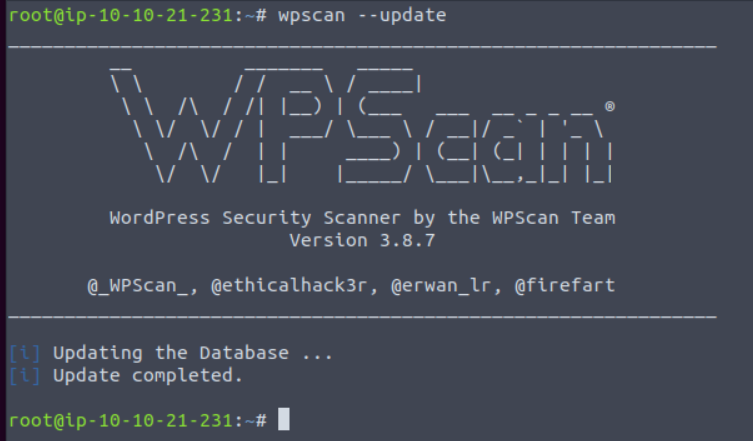
In the next task, we will explore some of the more useful features of WPScan!
2.1. WPScan Modes
We briefly discussed the various things that WPScan is capable of discovering on a system running WordPress in Task 7. However, let's dive into this a bit further, demonstrate a few examples of the various scans used to retrieve this information and highlighting how these scans work exactly.
Enumerating for Installed Themes
WPScan has a few methods of determining the active theme on a running WordPress installation. At a premise, it boils down to a technique that we can manually do ourselves. Simply, we can look at the assets our web browser loads and then looks for the location of these on the webserver. Using the "Network" tab in your web browsers developer tools, you can see what files are loaded when you visit a webpage.
Take the screenshot below, we can see many assets are loaded, some of these will be scripts & the stylings of the theme that determines how the browser renders the website. Highlighted in the screenshot below is the URL: http://redacted/wp-content/themes/twentytwentyone/assets/
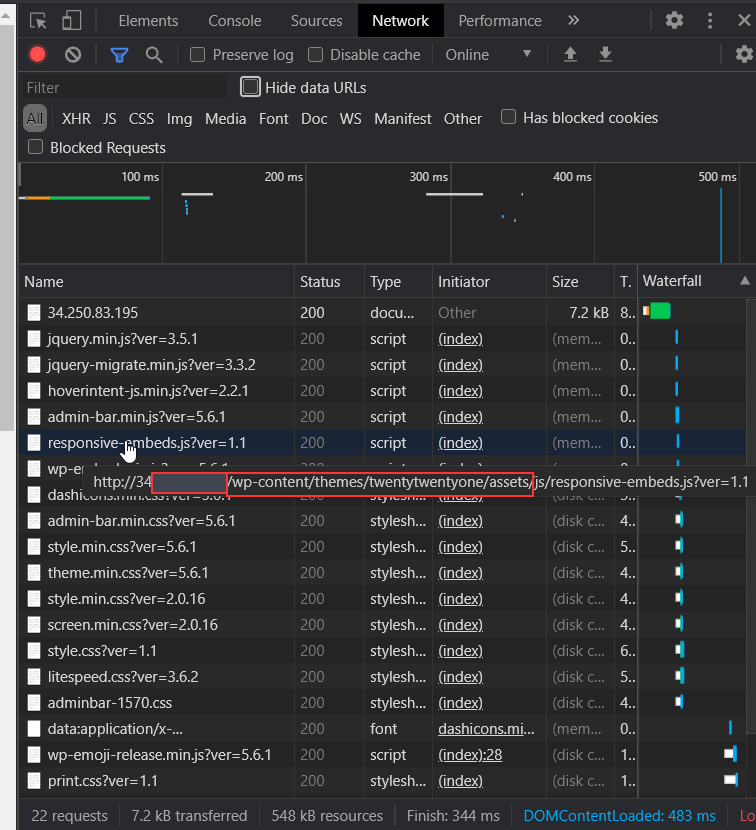
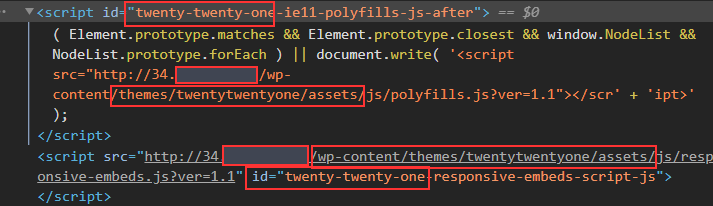
We can take a pretty good guess that the name of the current theme is "twentytwentyone". After inspecting the source code of the website, we can note additional references to "twentytwentyone"
However, let's use WPScan to speed this process up by using the --enumerate flag with the t argument like so:
wpscan --url http://cmnatics.playground/ --enumerate t
After a couple of minutes, we can begin to see some results:
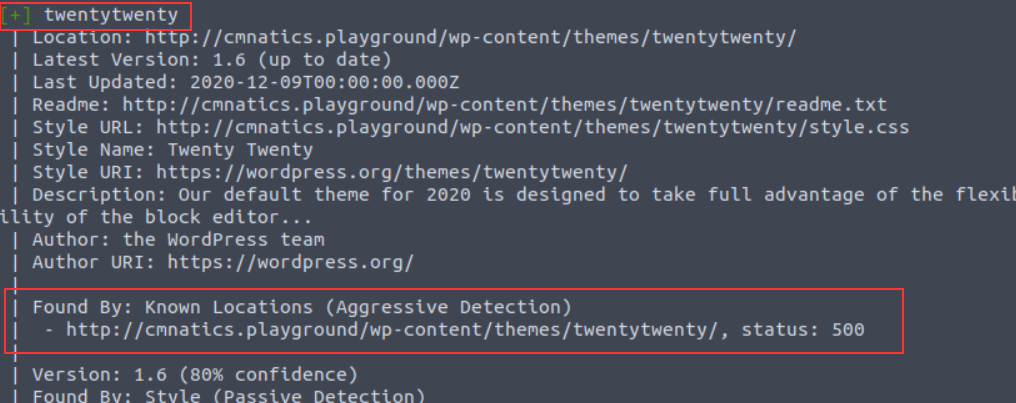
The great thing about WPScan is that the tool lets you know how it determined the results it has got. In this case, we're told that the "twentytwenty" theme was confirmed by scanning "Known Locations". The "twentytwenty" theme is the default WordPress theme for WordPress versions in 2020.
Enumerating for Installed Plugins
A very common feature of webservers is "Directory Listing" and is often enabled by default. Simply, "Directory Listing" is the listing of files in the directory that we are navigating to (just as if we were to use Windows Explorer or Linux's ls command. URL's in this context are very similar to file paths. The URL http://cmnatics.playground/a/directory is actually the configured root of the webserver/a/directory:

"Directory Listing" occurs when there is no file present that the webserver has been told to process. A very common file is "index.html" and "index.php". As these files aren't present in /a/directory, the contents are instead displayed:
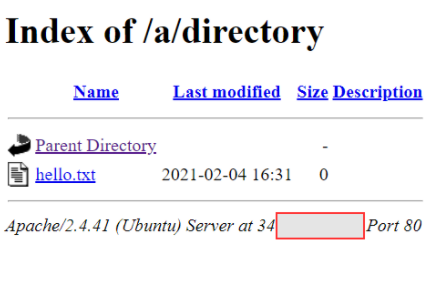
WPScan can leverage this feature as one technique to look for plugins installed. Since they will all be located in /wp-content/plugins/pluginname, WPScan can enumerate for common/known plugins.
In the screenshot below, "easy-table-of-contents" has been discovered. Great! This could be vulnerable. To determine that, we need to know the version number. Luckily, this handed to us on a plate by WordPress.
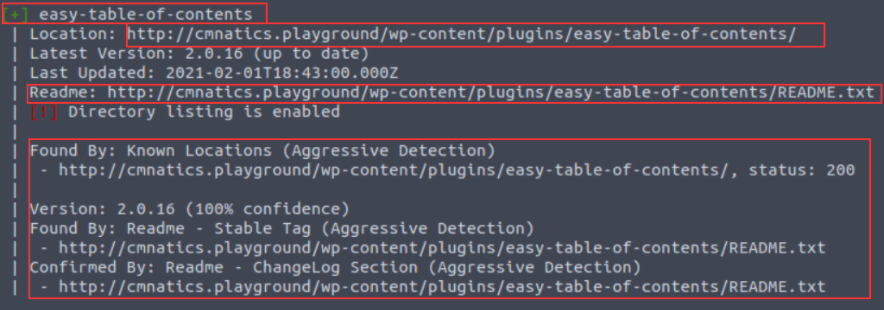
Reading through WordPress' developer documentation, we can learn about "Plugin Readme's" to figure out how WPScan determined the version number. Simply, plugins must have a "README.txt" file. This file contains meta-information such as the plugin name, the versions of WordPress it is compatible with and a description.
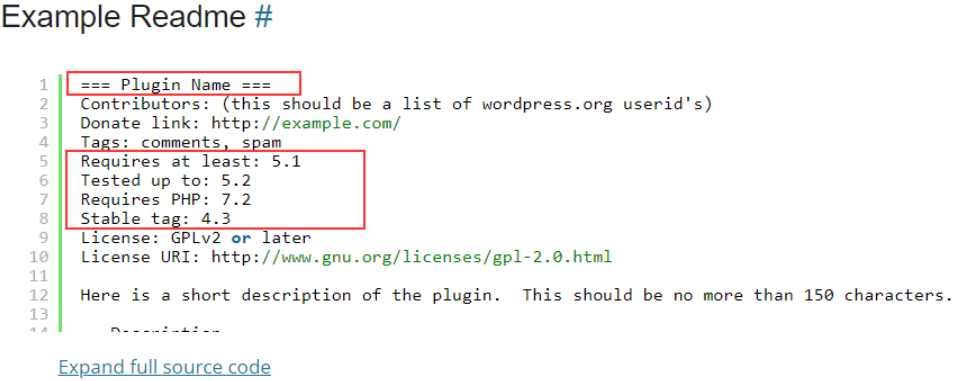
https://developer.wordpress.org/plugins/wordpress-org/how-your-readme-txt-works/#example-readme
WPScan uses additional methods to discover plugins (such as looking for references or embeds on pages for plugin assets). We can use the --enumerate flag with the p argument like so:
wpscan --url http://cmnatics.playground/ --enumerate p
Enumerating for Users
We've highlighted that WPScan is capable of performing brute-forcing attacks. Whilst we must provide a password list such as rockyou.txt, the way how WPScan enumerates for users is interestingly simple. WordPress sites use authors for posts. Authors are in fact a type of user.
 And sure enough, this author is picked up by our WPScan:

This scan was performed by using the --enumerate flag with the u argument like so:
wpscan --url http://cmnatics.playground/ --enumerate u
The "Vulnerable" Flag
In the commands so far, we have only enumerated WordPress to discover what themes, plugins and users are present. At the moment, we'd have to look at the output and use sites such as MITRE, NVD and CVEDetails to look up the names of these plugins and the version numbers to determine any vulnerabilities.
WPScan has the v argument for the --enumerate flag. We provide this argument alongside another (such as p for plugins). For example, our syntax would like so: wpscan --url http://cmnatics.playground/ --enumerate vp
Note, that this requires setting up WPScan to use the WPVulnDB API which is out-of-scope for this room.

Performing a Password Attack
After determining a list of possible usernames on the WordPress install, we can use WPScan to perform a bruteforcing technique against the username we specify and a password list that we provide. Simply, we use the output of our username enumeration to build a command like so: wpscan –-url http://cmnatics.playground –-passwords rockyou.txt –-usernames cmnatic

Adjusting WPScan's Aggressiveness (WAF) Unless specified, WPScan will try to be as least "noisy" as possible. Lots of requests to a web server can trigger things such as firewalls and ultimately result in you being blocked by the server.
This means that some plugins and themes may be missed by our WPScan. Luckily, we can use arguments such as --plugins-detection and an aggressiveness profile (passive/aggressive) to specify this. For example: --plugins-detection aggressive
Summary - Cheatsheet
Flag Description Full Example p Enumerate Plugins --enumerate p t Enumerate Themes --enumerate t u Enumerate Usernames --enumerate -u v Use WPVulnDB to cross-reference for vulnerabilities. Example command looks for vulnerable plugins (p) --enumerate vp aggressive This is an aggressiveness profile for WPScan to use. --plugins-detection aggressive
What would be the full URL for the theme "twentynineteen" installed on the WordPress site: "http://cmnatics.playground"
We detail the default location for themes & plugins throughout this task!
*http://cmnatics.playground/wp-content/themes/twentynineteen*
What argument would we provide to enumerate a WordPress site? We're looking for the keyword here enumerate
What is the name of the other aggressiveness profile that we can use in our WPScan command? This is more likely to bypass a Web Application Firewall (WAF) passive
2.2. Practical: WPScan (Deploy #2)
Deploy the Instance attached to this task. You will need to add the 10.10.67.130 and domain wpscan.thm to your /etc/hosts file like below:
Replacing "DEPLOYED_INSTANCE_IP_HERE" with 10.10.67.130 and waiting 5 minutes for the Instance to setup before scanning.
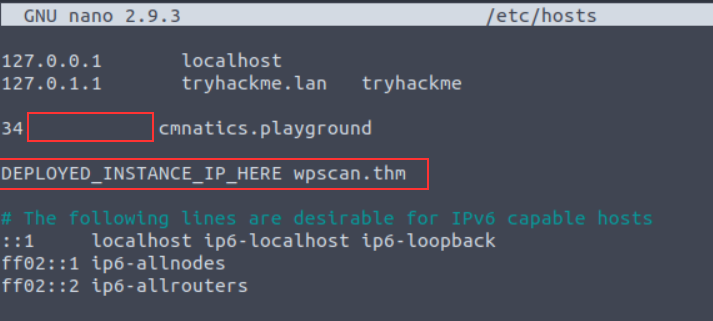
┌──(root㉿kali)-[/home/kali]
└─# echo '10.10.67.130 wpscan.thm' >> /etc/hosts


┌──(kali㉿kali)-[~]
└─$ wpscan --url http://wpscan.thm --enumerate t
_______________________________________________________________
         __          _______   _____
         \ \        / /  __ \ / ____|
          \ \  /\  / /| |__) | (___   ___  __ _ _ __ ®
           \ \/  \/ / |  ___/ \___ \ / __|/ _` | '_ \
            \  /\  /  | |     ____) | (__| (_| | | | |
             \/  \/   |_|    |_____/ \___|\__,_|_| |_|

         WordPress Security Scanner by the WPScan Team
                         Version 3.8.22
       Sponsored by Automattic - https://automattic.com/
       @_WPScan_, @ethicalhack3r, @erwan_lr, @firefart
_______________________________________________________________

[+] URL: http://wpscan.thm/ [10.10.67.130]
[+] Started: Mon Oct  3 18:58:16 2022

Interesting Finding(s):

[+] Headers
 | Interesting Entry: Server: Apache/2.4.29 (Ubuntu)
 | Found By: Headers (Passive Detection)
 | Confidence: 100%

[+] XML-RPC seems to be enabled: http://wpscan.thm/xmlrpc.php
 | Found By: Direct Access (Aggressive Detection)
 | Confidence: 100%
 | References:
 |  - http://codex.wordpress.org/XML-RPC_Pingback_API
 |  - https://www.rapid7.com/db/modules/auxiliary/scanner/http/wordpress_ghost_scanner/
 |  - https://www.rapid7.com/db/modules/auxiliary/dos/http/wordpress_xmlrpc_dos/
 |  - https://www.rapid7.com/db/modules/auxiliary/scanner/http/wordpress_xmlrpc_login/
 |  - https://www.rapid7.com/db/modules/auxiliary/scanner/http/wordpress_pingback_access/

[+] WordPress readme found: http://wpscan.thm/readme.html
 | Found By: Direct Access (Aggressive Detection)
 | Confidence: 100%

[+] The external WP-Cron seems to be enabled: http://wpscan.thm/wp-cron.php
 | Found By: Direct Access (Aggressive Detection)
 | Confidence: 60%
 | References:
 |  - https://www.iplocation.net/defend-wordpress-from-ddos
 |  - https://github.com/wpscanteam/wpscan/issues/1299

[+] WordPress version 5.0 identified (Insecure, released on 2018-12-06).
 | Found By: Rss Generator (Passive Detection)
 |  - http://wpscan.thm/?feed=rss2, <generator>https://wordpress.org/?v=5.0</generator>
 |  - http://wpscan.thm/?feed=comments-rss2, <generator>https://wordpress.org/?v=5.0</generator>

[+] WordPress theme in use: twentynineteen
 | Location: http://wpscan.thm/wp-content/themes/twentynineteen/
 | Last Updated: 2022-05-24T00:00:00.000Z
 | Readme: http://wpscan.thm/wp-content/themes/twentynineteen/readme.txt
 | [!] The version is out of date, the latest version is 2.3
 | Style URL: http://wpscan.thm/wp-content/themes/twentynineteen/style.css?ver=1.0
 | Style Name: Twenty Nineteen
 | Style URI: https://github.com/WordPress/twentynineteen
 | Description: A new Gutenberg-ready theme....
 | Author: the WordPress team
 | Author URI: https://wordpress.org/
 |
 | Found By: Css Style In Homepage (Passive Detection)
 | Confirmed By: Css Style In 404 Page (Passive Detection)
 |
 | Version: 1.0 (80% confidence)
 | Found By: Style (Passive Detection)
 |  - http://wpscan.thm/wp-content/themes/twentynineteen/style.css?ver=1.0, Match: 'Version: 1.0'

[+] Enumerating Most Popular Themes (via Passive and Aggressive Methods)
 Checking Known Locations - Time: 00:00:00 <> (0 / 399)  0.00%  ETA: ??:?? Checking Known Locations - Time: 00:00:00 <> (1 / 399)  0.25%  ETA: 00:03 Checking Known Locations - Time: 00:00:00 <> (2 / 399)  0.50%  ETA: 00:03 Checking Known Locations - Time: 00:00:01 <> (3 / 399)  0.75%  ETA: 00:02 Checking Known Locations - Time: 00:00:01 <> (4 / 399)  1.00%  ETA: 00:02 Checking Known Locations - Time: 00:00:01 <> (5 / 399)  1.25%  ETA: 00:02 Checking Known Locations - Time: 00:00:01 <> (6 / 399)  1.50%  ETA: 00:02 Checking Known Locations - Time: 00:00:02 <> (7 / 399)  1.75%  ETA: 00:01 Checking Known Locations - Time: 00:00:02 <> (8 / 399)  2.00%  ETA: 00:01 Checking Known Locations - Time: 00:00:02 <> (9 / 399)  2.25%  ETA: 00:01 Checking Known Locations - Time: 00:00:02 <> (10 / 399)  2.50%  ETA: 00:0 Checking Known Locations - Time: 00:00:02 <> (11 / 399)  2.75%  ETA: 00:0 Checking Known Locations - Time: 00:00:03 <> (12 / 399)  3.00%  ETA: 00:0 Checking Known Locations - Time: 00:00:03 <> (13 / 399)  3.25%  ETA: 00:0 Checking Known Locations - Time: 00:00:03 <> (14 / 399)  3.50%  ETA: 00:0 Checking Known Locations - Time: 00:00:03 <> (15 / 399)  3.75%  ETA: 00:0 Checking Known Locations - Time: 00:00:04 <> (16 / 399)  4.01%  ETA: 00:0 Checking Known Locations - Time: 00:00:04 <> (17 / 399)  4.26%  ETA: 00:0 Checking Known Locations - Time: 00:00:04 <> (18 / 399)  4.51%  ETA: 00:0 Checking Known Locations - Time: 00:00:04 <> (19 / 399)  4.76%  ETA: 00:0 Checking Known Locations - Time: 00:00:05 <> (20 / 399)  5.01%  ETA: 00:0 Checking Known Locations - Time: 00:00:05 <> (21 / 399)  5.26%  ETA: 00:0 Checking Known Locations - Time: 00:00:05 <> (22 / 399)  5.51%  ETA: 00:0 Checking Known Locations - Time: 00:00:05 <> (23 / 399)  5.76%  ETA: 00:0 Checking Known Locations - Time: 00:00:06 <> (24 / 399)  6.01%  ETA: 00:0 Checking Known Locations - Time: 00:00:06 <> (25 / 399)  6.26%  ETA: 00:0 Checking Known Locations - Time: 00:00:06 <> (26 / 399)  6.51%  ETA: 00:0 Checking Known Locations - Time: 00:00:06 <> (27 / 399)  6.76%  ETA: 00:0 Checking Known Locations - Time: 00:00:06 <> (28 / 399)  7.01%  ETA: 00:0 Checking Known Locations - Time: 00:00:07 <> (29 / 399)  7.26%  ETA: 00:0 Checking Known Locations - Time: 00:00:07 <> (30 / 399)  7.51%  ETA: 00:0 Checking Known Locations - Time: 00:00:07 <> (31 / 399)  7.76%  ETA: 00:0 Checking Known Locations - Time: 00:00:07 <> (32 / 399)  8.02%  ETA: 00:0 Checking Known Locations - Time: 00:00:08 <> (33 / 399)  8.27%  ETA: 00:0 Checking Known Locations - Time: 00:00:08 <> (34 / 399)  8.52%  ETA: 00:0 Checking Known Locations - Time: 00:00:08 <> (35 / 399)  8.77%  ETA: 00:0 Checking Known Locations - Time: 00:00:08 <> (36 / 399)  9.02%  ETA: 00:0 Checking Known Locations - Time: 00:00:09 <> (37 / 399)  9.27%  ETA: 00:0 Checking Known Locations - Time: 00:00:09 <> (38 / 399)  9.52%  ETA: 00:0 Checking Known Locations - Time: 00:00:09 <> (39 / 399)  9.77%  ETA: 00:0 Checking Known Locations - Time: 00:00:09 <> (40 / 399) 10.02%  ETA: 00:0 Checking Known Locations - Time: 00:00:10 <> (41 / 399) 10.27%  ETA: 00:0 Checking Known Locations - Time: 00:00:10 <> (42 / 399) 10.52%  ETA: 00:0 Checking Known Locations - Time: 00:00:10 <> (43 / 399) 10.77%  ETA: 00:0 Checking Known Locations - Time: 00:00:10 <> (44 / 399) 11.02%  ETA: 00:0 Checking Known Locations - Time: 00:00:11 <> (45 / 399) 11.27%  ETA: 00:0 Checking Known Locations - Time: 00:00:11 <> (46 / 399) 11.52%  ETA: 00:0 Checking Known Locations - Time: 00:00:11 <> (47 / 399) 11.77%  ETA: 00:0 Checking Known Locations - Time: 00:00:11 <> (48 / 399) 12.03%  ETA: 00:0 Checking Known Locations - Time: 00:00:12 <> (49 / 399) 12.28%  ETA: 00:0 Checking Known Locations - Time: 00:00:12 <> (50 / 399) 12.53%  ETA: 00:0 Checking Known Locations - Time: 00:00:12 <> (51 / 399) 12.78%  ETA: 00:0 Checking Known Locations - Time: 00:00:12 <> (52 / 399) 13.03%  ETA: 00:0 Checking Known Locations - Time: 00:00:13 <> (53 / 399) 13.28%  ETA: 00:0 Checking Known Locations - Time: 00:00:13 <> (54 / 399) 13.53%  ETA: 00:0 Checking Known Locations - Time: 00:00:13 <> (55 / 399) 13.78%  ETA: 00:0 Checking Known Locations - Time: 00:00:13 <> (56 / 399) 14.03%  ETA: 00:0 Checking Known Locations - Time: 00:00:14 <> (57 / 399) 14.28%  ETA: 00:0 Checking Known Locations - Time: 00:00:14 <> (58 / 399) 14.53%  ETA: 00:0 Checking Known Locations - Time: 00:00:14 <> (59 / 399) 14.78%  ETA: 00:0 Checking Known Locations - Time: 00:00:14 <> (60 / 399) 15.03%  ETA: 00:0 Checking Known Locations - Time: 00:00:15 <> (61 / 399) 15.28%  ETA: 00:0 Checking Known Locations - Time: 00:00:15 <> (62 / 399) 15.53%  ETA: 00:0 Checking Known Locations - Time: 00:00:15 <> (63 / 399) 15.78%  ETA: 00:0 Checking Known Locations - Time: 00:00:15 <> (64 / 399) 16.04%  ETA: 00:0 Checking Known Locations - Time: 00:00:16 <> (65 / 399) 16.29%  ETA: 00:0 Checking Known Locations - Time: 00:00:16 <> (66 / 399) 16.54%  ETA: 00:0 Checking Known Locations - Time: 00:00:16 <> (67 / 399) 16.79%  ETA: 00:0 Checking Known Locations - Time: 00:00:16 <> (68 / 399) 17.04%  ETA: 00:0 Checking Known Locations - Time: 00:00:17 <> (69 / 399) 17.29%  ETA: 00:0 Checking Known Locations - Time: 00:00:17 <> (70 / 399) 17.54%  ETA: 00:0 Checking Known Locations - Time: 00:00:17 <> (71 / 399) 17.79%  ETA: 00:0 Checking Known Locations - Time: 00:00:17 <> (72 / 399) 18.04%  ETA: 00:0 Checking Known Locations - Time: 00:00:18 <> (73 / 399) 18.29%  ETA: 00:0 Checking Known Locations - Time: 00:00:18 <> (74 / 399) 18.54%  ETA: 00:0 Checking Known Locations - Time: 00:00:18 <> (75 / 399) 18.79%  ETA: 00:0 Checking Known Locations - Time: 00:00:18 <> (76 / 399) 19.04%  ETA: 00:0 Checking Known Locations - Time: 00:00:19 <> (77 / 399) 19.29%  ETA: 00:0 Checking Known Locations - Time: 00:00:19 <> (78 / 399) 19.54%  ETA: 00:0 Checking Known Locations - Time: 00:00:19 <> (79 / 399) 19.79%  ETA: 00:0 Checking Known Locations - Time: 00:00:19 <> (80 / 399) 20.05%  ETA: 00:0 Checking Known Locations - Time: 00:00:20 <> (81 / 399) 20.30%  ETA: 00:0 Checking Known Locations - Time: 00:00:20 <> (82 / 399) 20.55%  ETA: 00:0 Checking Known Locations - Time: 00:00:20 <> (83 / 399) 20.80%  ETA: 00:0 Checking Known Locations - Time: 00:00:20 <> (84 / 399) 21.05%  ETA: 00:0 Checking Known Locations - Time: 00:00:20 <> (85 / 399) 21.30%  ETA: 00:0 Checking Known Locations - Time: 00:00:21 <> (86 / 399) 21.55%  ETA: 00:0 Checking Known Locations - Time: 00:00:21 <> (87 / 399) 21.80%  ETA: 00:0 Checking Known Locations - Time: 00:00:21 <> (88 / 399) 22.05%  ETA: 00:0 Checking Known Locations - Time: 00:00:21 <> (89 / 399) 22.30%  ETA: 00:0 Checking Known Locations - Time: 00:00:22 <> (90 / 399) 22.55%  ETA: 00:0 Checking Known Locations - Time: 00:00:22 <> (91 / 399) 22.80%  ETA: 00:0 Checking Known Locations - Time: 00:00:22 <> (92 / 399) 23.05%  ETA: 00:0 Checking Known Locations - Time: 00:00:22 <> (93 / 399) 23.30%  ETA: 00:0 Checking Known Locations - Time: 00:00:23 <> (94 / 399) 23.55%  ETA: 00:0 Checking Known Locations - Time: 00:00:23 <> (95 / 399) 23.80%  ETA: 00:0 Checking Known Locations - Time: 00:00:23 <> (96 / 399) 24.06%  ETA: 00:0 Checking Known Locations - Time: 00:00:23 <> (97 / 399) 24.31%  ETA: 00:0 Checking Known Locations - Time: 00:00:24 <> (98 / 399) 24.56%  ETA: 00:0 Checking Known Locations - Time: 00:00:24 <> (99 / 399) 24.81%  ETA: 00:0 Checking Known Locations - Time: 00:00:24 <> (100 / 399) 25.06%  ETA: 00: Checking Known Locations - Time: 00:00:24 <> (101 / 399) 25.31%  ETA: 00: Checking Known Locations - Time: 00:00:25 <> (102 / 399) 25.56%  ETA: 00: Checking Known Locations - Time: 00:00:25 <> (103 / 399) 25.81%  ETA: 00: Checking Known Locations - Time: 00:00:25 <> (104 / 399) 26.06%  ETA: 00: Checking Known Locations - Time: 00:00:25 <> (105 / 399) 26.31%  ETA: 00: Checking Known Locations - Time: 00:00:26 <> (106 / 399) 26.56%  ETA: 00: Checking Known Locations - Time: 00:00:26 <> (107 / 399) 26.81%  ETA: 00: Checking Known Locations - Time: 00:00:26 <> (108 / 399) 27.06%  ETA: 00: Checking Known Locations - Time: 00:00:26 <> (109 / 399) 27.31%  ETA: 00: Checking Known Locations - Time: 00:00:27 <> (110 / 399) 27.56%  ETA: 00: Checking Known Locations - Time: 00:00:27 <> (111 / 399) 27.81%  ETA: 00: Checking Known Locations - Time: 00:00:27 <> (112 / 399) 28.07%  ETA: 00: Checking Known Locations - Time: 00:00:27 <> (113 / 399) 28.32%  ETA: 00: Checking Known Locations - Time: 00:00:28 <> (114 / 399) 28.57%  ETA: 00: Checking Known Locations - Time: 00:00:28 <> (115 / 399) 28.82%  ETA: 00: Checking Known Locations - Time: 00:00:28 <> (116 / 399) 29.07%  ETA: 00: Checking Known Locations - Time: 00:00:28 <> (117 / 399) 29.32%  ETA: 00: Checking Known Locations - Time: 00:00:29 <> (118 / 399) 29.57%  ETA: 00: Checking Known Locations - Time: 00:00:29 <> (119 / 399) 29.82%  ETA: 00: Checking Known Locations - Time: 00:00:29 <> (120 / 399) 30.07%  ETA: 00: Checking Known Locations - Time: 00:00:29 <> (121 / 399) 30.32%  ETA: 00: Checking Known Locations - Time: 00:00:30 <> (122 / 399) 30.57%  ETA: 00: Checking Known Locations - Time: 00:00:30 <> (123 / 399) 30.82%  ETA: 00: Checking Known Locations - Time: 00:00:30 <> (124 / 399) 31.07%  ETA: 00: Checking Known Locations - Time: 00:00:30 <> (125 / 399) 31.32%  ETA: 00: Checking Known Locations - Time: 00:00:31 <> (126 / 399) 31.57%  ETA: 00: Checking Known Locations - Time: 00:00:31 <> (127 / 399) 31.82%  ETA: 00: Checking Known Locations - Time: 00:00:31 <> (128 / 399) 32.08%  ETA: 00: Checking Known Locations - Time: 00:00:31 <> (129 / 399) 32.33%  ETA: 00: Checking Known Locations - Time: 00:00:32 <> (130 / 399) 32.58%  ETA: 00: Checking Known Locations - Time: 00:00:32 <> (131 / 399) 32.83%  ETA: 00: Checking Known Locations - Time: 00:00:32 <> (132 / 399) 33.08%  ETA: 00: Checking Known Locations - Time: 00:00:32 <> (133 / 399) 33.33%  ETA: 00: Checking Known Locations - Time: 00:00:33 <> (134 / 399) 33.58%  ETA: 00: Checking Known Locations - Time: 00:00:33 <> (135 / 399) 33.83%  ETA: 00: Checking Known Locations - Time: 00:00:33 <> (136 / 399) 34.08%  ETA: 00: Checking Known Locations - Time: 00:00:33 <> (137 / 399) 34.33%  ETA: 00: Checking Known Locations - Time: 00:00:34 <> (138 / 399) 34.58%  ETA: 00: Checking Known Locations - Time: 00:00:34 <> (139 / 399) 34.83%  ETA: 00: Checking Known Locations - Time: 00:00:34 <> (140 / 399) 35.08%  ETA: 00: Checking Known Locations - Time: 00:00:34 <> (141 / 399) 35.33%  ETA: 00: Checking Known Locations - Time: 00:00:34 <> (142 / 399) 35.58%  ETA: 00: Checking Known Locations - Time: 00:00:35 <> (143 / 399) 35.83%  ETA: 00: Checking Known Locations - Time: 00:00:35 <> (144 / 399) 36.09%  ETA: 00: Checking Known Locations - Time: 00:00:35 <> (145 / 399) 36.34%  ETA: 00: Checking Known Locations - Time: 00:00:35 <> (146 / 399) 36.59%  ETA: 00: Checking Known Locations - Time: 00:00:36 <> (147 / 399) 36.84%  ETA: 00: Checking Known Locations - Time: 00:00:36 <> (148 / 399) 37.09%  ETA: 00: Checking Known Locations - Time: 00:00:36 <> (149 / 399) 37.34%  ETA: 00: Checking Known Locations - Time: 00:00:36 <> (150 / 399) 37.59%  ETA: 00: Checking Known Locations - Time: 00:00:37 <> (151 / 399) 37.84%  ETA: 00: Checking Known Locations - Time: 00:00:37 <> (152 / 399) 38.09%  ETA: 00: Checking Known Locations - Time: 00:00:37 <> (153 / 399) 38.34%  ETA: 00: Checking Known Locations - Time: 00:00:37 <> (154 / 399) 38.59%  ETA: 00: Checking Known Locations - Time: 00:00:38 <> (155 / 399) 38.84%  ETA: 00: Checking Known Locations - Time: 00:00:38 <> (156 / 399) 39.09%  ETA: 00: Checking Known Locations - Time: 00:00:38 <> (157 / 399) 39.34%  ETA: 00: Checking Known Locations - Time: 00:00:38 <> (158 / 399) 39.59%  ETA: 00: Checking Known Locations - Time: 00:00:39 <> (159 / 399) 39.84%  ETA: 00: Checking Known Locations - Time: 00:00:39 <> (160 / 399) 40.10%  ETA: 00: Checking Known Locations - Time: 00:00:39 <> (161 / 399) 40.35%  ETA: 00: Checking Known Locations - Time: 00:00:39 <> (162 / 399) 40.60%  ETA: 00: Checking Known Locations - Time: 00:00:40 <> (163 / 399) 40.85%  ETA: 00: Checking Known Locations - Time: 00:00:40 <> (164 / 399) 41.10%  ETA: 00: Checking Known Locations - Time: 00:00:40 <> (165 / 399) 41.35%  ETA: 00: Checking Known Locations - Time: 00:00:40 <> (166 / 399) 41.60%  ETA: 00: Checking Known Locations - Time: 00:00:41 <> (167 / 399) 41.85%  ETA: 00: Checking Known Locations - Time: 00:00:41 <> (168 / 399) 42.10%  ETA: 00: Checking Known Locations - Time: 00:00:41 <> (169 / 399) 42.35%  ETA: 00: Checking Known Locations - Time: 00:00:41 <> (170 / 399) 42.60%  ETA: 00: Checking Known Locations - Time: 00:00:41 <> (171 / 399) 42.85%  ETA: 00: Checking Known Locations - Time: 00:00:42 <> (172 / 399) 43.10%  ETA: 00: Checking Known Locations - Time: 00:00:42 <> (173 / 399) 43.35%  ETA: 00: Checking Known Locations - Time: 00:00:42 <> (174 / 399) 43.60%  ETA: 00: Checking Known Locations - Time: 00:00:42 <> (175 / 399) 43.85%  ETA: 00: Checking Known Locations - Time: 00:00:43 <> (176 / 399) 44.11%  ETA: 00: Checking Known Locations - Time: 00:00:43 <> (177 / 399) 44.36%  ETA: 00: Checking Known Locations - Time: 00:00:43 <> (178 / 399) 44.61%  ETA: 00: Checking Known Locations - Time: 00:00:43 <> (179 / 399) 44.86%  ETA: 00: Checking Known Locations - Time: 00:00:44 <> (180 / 399) 45.11%  ETA: 00: Checking Known Locations - Time: 00:00:44 <> (181 / 399) 45.36%  ETA: 00: Checking Known Locations - Time: 00:00:44 <> (182 / 399) 45.61%  ETA: 00: Checking Known Locations - Time: 00:00:44 <> (183 / 399) 45.86%  ETA: 00: Checking Known Locations - Time: 00:00:45 <> (184 / 399) 46.11%  ETA: 00: Checking Known Locations - Time: 00:00:45 <> (185 / 399) 46.36%  ETA: 00: Checking Known Locations - Time: 00:00:45 <> (186 / 399) 46.61%  ETA: 00: Checking Known Locations - Time: 00:00:45 <> (187 / 399) 46.86%  ETA: 00: Checking Known Locations - Time: 00:00:46 <> (188 / 399) 47.11%  ETA: 00: Checking Known Locations - Time: 00:00:46 <> (189 / 399) 47.36%  ETA: 00: Checking Known Locations - Time: 00:00:46 <> (190 / 399) 47.61%  ETA: 00: Checking Known Locations - Time: 00:00:46 <> (191 / 399) 47.86%  ETA: 00: Checking Known Locations - Time: 00:00:47 <> (192 / 399) 48.12%  ETA: 00: Checking Known Locations - Time: 00:00:47 <> (193 / 399) 48.37%  ETA: 00: Checking Known Locations - Time: 00:00:47 <> (194 / 399) 48.62%  ETA: 00: Checking Known Locations - Time: 00:00:47 <> (195 / 399) 48.87%  ETA: 00: Checking Known Locations - Time: 00:00:47 <> (196 / 399) 49.12%  ETA: 00: Checking Known Locations - Time: 00:00:48 <> (197 / 399) 49.37%  ETA: 00: Checking Known Locations - Time: 00:00:48 <> (198 / 399) 49.62%  ETA: 00: Checking Known Locations - Time: 00:00:48 <> (199 / 399) 49.87%  ETA: 00: Checking Known Locations - Time: 00:00:48 <> (200 / 399) 50.12%  ETA: 00: Checking Known Locations - Time: 00:00:49 <> (201 / 399) 50.37%  ETA: 00: Checking Known Locations - Time: 00:00:49 <> (202 / 399) 50.62%  ETA: 00: Checking Known Locations - Time: 00:00:49 <> (203 / 399) 50.87%  ETA: 00: Checking Known Locations - Time: 00:00:50 <> (204 / 399) 51.12%  ETA: 00: Checking Known Locations - Time: 00:00:50 <> (205 / 399) 51.37%  ETA: 00: Checking Known Locations - Time: 00:00:50 <> (206 / 399) 51.62%  ETA: 00: Checking Known Locations - Time: 00:00:50 <> (207 / 399) 51.87%  ETA: 00: Checking Known Locations - Time: 00:00:51 <> (208 / 399) 52.13%  ETA: 00: Checking Known Locations - Time: 00:00:51 <> (209 / 399) 52.38%  ETA: 00: Checking Known Locations - Time: 00:00:51 <> (210 / 399) 52.63%  ETA: 00: Checking Known Locations - Time: 00:00:51 <> (211 / 399) 52.88%  ETA: 00: Checking Known Locations - Time: 00:00:52 <> (212 / 399) 53.13%  ETA: 00: Checking Known Locations - Time: 00:00:52 <> (213 / 399) 53.38%  ETA: 00: Checking Known Locations - Time: 00:00:52 <> (214 / 399) 53.63%  ETA: 00: Checking Known Locations - Time: 00:00:52 <> (215 / 399) 53.88%  ETA: 00: Checking Known Locations - Time: 00:00:53 <> (216 / 399) 54.13%  ETA: 00: Checking Known Locations - Time: 00:00:53 <> (217 / 399) 54.38%  ETA: 00: Checking Known Locations - Time: 00:00:54 <> (218 / 399) 54.63%  ETA: 00: Checking Known Locations - Time: 00:00:54 <> (219 / 399) 54.88%  ETA: 00: Checking Known Locations - Time: 00:00:54 <> (220 / 399) 55.13%  ETA: 00: Checking Known Locations - Time: 00:00:54 <> (221 / 399) 55.38%  ETA: 00: Checking Known Locations - Time: 00:00:55 <> (222 / 399) 55.63%  ETA: 00: Checking Known Locations - Time: 00:00:55 <> (223 / 399) 55.88%  ETA: 00: Checking Known Locations - Time: 00:00:55 <> (224 / 399) 56.14%  ETA: 00: Checking Known Locations - Time: 00:00:55 <> (225 / 399) 56.39%  ETA: 00: Checking Known Locations - Time: 00:00:55 <> (226 / 399) 56.64%  ETA: 00: Checking Known Locations - Time: 00:00:56 <> (227 / 399) 56.89%  ETA: 00: Checking Known Locations - Time: 00:00:56 <> (228 / 399) 57.14%  ETA: 00: Checking Known Locations - Time: 00:00:56 <> (229 / 399) 57.39%  ETA: 00: Checking Known Locations - Time: 00:00:56 <> (230 / 399) 57.64%  ETA: 00: Checking Known Locations - Time: 00:00:57 <> (231 / 399) 57.89%  ETA: 00: Checking Known Locations - Time: 00:00:57 <> (232 / 399) 58.14%  ETA: 00: Checking Known Locations - Time: 00:00:57 <> (233 / 399) 58.39%  ETA: 00: Checking Known Locations - Time: 00:00:57 <> (234 / 399) 58.64%  ETA: 00: Checking Known Locations - Time: 00:00:58 <> (235 / 399) 58.89%  ETA: 00: Checking Known Locations - Time: 00:00:58 <> (236 / 399) 59.14%  ETA: 00: Checking Known Locations - Time: 00:00:58 <> (237 / 399) 59.39%  ETA: 00: Checking Known Locations - Time: 00:00:58 <> (238 / 399) 59.64%  ETA: 00: Checking Known Locations - Time: 00:00:59 <> (239 / 399) 59.89%  ETA: 00: Checking Known Locations - Time: 00:00:59 <> (240 / 399) 60.15%  ETA: 00: Checking Known Locations - Time: 00:00:59 <> (241 / 399) 60.40%  ETA: 00: Checking Known Locations - Time: 00:00:59 <> (242 / 399) 60.65%  ETA: 00: Checking Known Locations - Time: 00:01:00 <> (243 / 399) 60.90%  ETA: 00: Checking Known Locations - Time: 00:01:00 <> (244 / 399) 61.15%  ETA: 00: Checking Known Locations - Time: 00:01:00 <> (245 / 399) 61.40%  ETA: 00: Checking Known Locations - Time: 00:01:00 <> (246 / 399) 61.65%  ETA: 00: Checking Known Locations - Time: 00:01:01 <> (247 / 399) 61.90%  ETA: 00: Checking Known Locations - Time: 00:01:01 <> (248 / 399) 62.15%  ETA: 00: Checking Known Locations - Time: 00:01:01 <> (249 / 399) 62.40%  ETA: 00: Checking Known Locations - Time: 00:01:01 <> (250 / 399) 62.65%  ETA: 00: Checking Known Locations - Time: 00:01:02 <> (251 / 399) 62.90%  ETA: 00: Checking Known Locations - Time: 00:01:02 <> (252 / 399) 63.15%  ETA: 00: Checking Known Locations - Time: 00:01:02 <> (253 / 399) 63.40%  ETA: 00: Checking Known Locations - Time: 00:01:02 <> (254 / 399) 63.65%  ETA: 00: Checking Known Locations - Time: 00:01:03 <> (255 / 399) 63.90%  ETA: 00: Checking Known Locations - Time: 00:01:03 <> (256 / 399) 64.16%  ETA: 00: Checking Known Locations - Time: 00:01:03 <> (257 / 399) 64.41%  ETA: 00: Checking Known Locations - Time: 00:01:03 <> (258 / 399) 64.66%  ETA: 00: Checking Known Locations - Time: 00:01:04 <> (259 / 399) 64.91%  ETA: 00: Checking Known Locations - Time: 00:01:04 <> (260 / 399) 65.16%  ETA: 00: Checking Known Locations - Time: 00:01:04 <> (261 / 399) 65.41%  ETA: 00: Checking Known Locations - Time: 00:01:04 <> (262 / 399) 65.66%  ETA: 00: Checking Known Locations - Time: 00:01:04 <> (263 / 399) 65.91%  ETA: 00: Checking Known Locations - Time: 00:01:05 <> (264 / 399) 66.16%  ETA: 00: Checking Known Locations - Time: 00:01:05 <> (265 / 399) 66.41%  ETA: 00: Checking Known Locations - Time: 00:01:05 <> (266 / 399) 66.66%  ETA: 00: Checking Known Locations - Time: 00:01:05 <> (267 / 399) 66.91%  ETA: 00: Checking Known Locations - Time: 00:01:06 <> (268 / 399) 67.16%  ETA: 00: Checking Known Locations - Time: 00:01:06 <> (269 / 399) 67.41%  ETA: 00: Checking Known Locations - Time: 00:01:06 <> (270 / 399) 67.66%  ETA: 00: Checking Known Locations - Time: 00:01:06 <> (271 / 399) 67.91%  ETA: 00: Checking Known Locations - Time: 00:01:07 <> (272 / 399) 68.17%  ETA: 00: Checking Known Locations - Time: 00:01:07 <> (273 / 399) 68.42%  ETA: 00: Checking Known Locations - Time: 00:01:07 <> (274 / 399) 68.67%  ETA: 00: Checking Known Locations - Time: 00:01:07 <> (275 / 399) 68.92%  ETA: 00: Checking Known Locations - Time: 00:01:08 <> (276 / 399) 69.17%  ETA: 00: Checking Known Locations - Time: 00:01:08 <> (277 / 399) 69.42%  ETA: 00: Checking Known Locations - Time: 00:01:08 <> (278 / 399) 69.67%  ETA: 00: Checking Known Locations - Time: 00:01:08 <> (279 / 399) 69.92%  ETA: 00: Checking Known Locations - Time: 00:01:09 <> (280 / 399) 70.17%  ETA: 00: Checking Known Locations - Time: 00:01:09 <> (281 / 399) 70.42%  ETA: 00: Checking Known Locations - Time: 00:01:09 <> (282 / 399) 70.67%  ETA: 00: Checking Known Locations - Time: 00:01:09 <> (283 / 399) 70.92%  ETA: 00: Checking Known Locations - Time: 00:01:10 <> (284 / 399) 71.17%  ETA: 00: Checking Known Locations - Time: 00:01:10 <> (285 / 399) 71.42%  ETA: 00: Checking Known Locations - Time: 00:01:10 <> (286 / 399) 71.67%  ETA: 00: Checking Known Locations - Time: 00:01:10 <> (287 / 399) 71.92%  ETA: 00: Checking Known Locations - Time: 00:01:11 <> (288 / 399) 72.18%  ETA: 00: Checking Known Locations - Time: 00:01:11 <> (289 / 399) 72.43%  ETA: 00: Checking Known Locations - Time: 00:01:11 <> (290 / 399) 72.68%  ETA: 00: Checking Known Locations - Time: 00:01:11 <> (291 / 399) 72.93%  ETA: 00: Checking Known Locations - Time: 00:01:12 <> (292 / 399) 73.18%  ETA: 00: Checking Known Locations - Time: 00:01:12 <> (293 / 399) 73.43%  ETA: 00: Checking Known Locations - Time: 00:01:12 <> (294 / 399) 73.68%  ETA: 00: Checking Known Locations - Time: 00:01:12 <> (295 / 399) 73.93%  ETA: 00: Checking Known Locations - Time: 00:01:13 <> (296 / 399) 74.18%  ETA: 00: Checking Known Locations - Time: 00:01:13 <> (297 / 399) 74.43%  ETA: 00: Checking Known Locations - Time: 00:01:13 <> (298 / 399) 74.68%  ETA: 00: Checking Known Locations - Time: 00:01:13 <> (299 / 399) 74.93%  ETA: 00: Checking Known Locations - Time: 00:01:14 <> (300 / 399) 75.18%  ETA: 00: Checking Known Locations - Time: 00:01:14 <> (301 / 399) 75.43%  ETA: 00: Checking Known Locations - Time: 00:01:14 <> (302 / 399) 75.68%  ETA: 00: Checking Known Locations - Time: 00:01:14 <> (303 / 399) 75.93%  ETA: 00: Checking Known Locations - Time: 00:01:15 <> (304 / 399) 76.19%  ETA: 00: Checking Known Locations - Time: 00:01:15 <> (305 / 399) 76.44%  ETA: 00: Checking Known Locations - Time: 00:01:15 <> (306 / 399) 76.69%  ETA: 00: Checking Known Locations - Time: 00:01:16 <> (307 / 399) 76.94%  ETA: 00: Checking Known Locations - Time: 00:01:16 <> (308 / 399) 77.19%  ETA: 00: Checking Known Locations - Time: 00:01:16 <> (309 / 399) 77.44%  ETA: 00: Checking Known Locations - Time: 00:01:16 <> (310 / 399) 77.69%  ETA: 00: Checking Known Locations - Time: 00:01:17 <> (311 / 399) 77.94%  ETA: 00: Checking Known Locations - Time: 00:01:17 <> (312 / 399) 78.19%  ETA: 00: Checking Known Locations - Time: 00:01:17 <> (313 / 399) 78.44%  ETA: 00: Checking Known Locations - Time: 00:01:17 <> (314 / 399) 78.69%  ETA: 00: Checking Known Locations - Time: 00:01:17 <> (315 / 399) 78.94%  ETA: 00: Checking Known Locations - Time: 00:01:18 <> (316 / 399) 79.19%  ETA: 00: Checking Known Locations - Time: 00:01:18 <> (317 / 399) 79.44%  ETA: 00: Checking Known Locations - Time: 00:01:18 <> (318 / 399) 79.69%  ETA: 00: Checking Known Locations - Time: 00:01:18 <> (319 / 399) 79.94%  ETA: 00: Checking Known Locations - Time: 00:01:19 <> (320 / 399) 80.20%  ETA: 00: Checking Known Locations - Time: 00:01:19 <> (321 / 399) 80.45%  ETA: 00: Checking Known Locations - Time: 00:01:19 <> (322 / 399) 80.70%  ETA: 00: Checking Known Locations - Time: 00:01:19 <> (323 / 399) 80.95%  ETA: 00: Checking Known Locations - Time: 00:01:20 <> (324 / 399) 81.20%  ETA: 00: Checking Known Locations - Time: 00:01:20 <> (325 / 399) 81.45%  ETA: 00: Checking Known Locations - Time: 00:01:20 <> (326 / 399) 81.70%  ETA: 00: Checking Known Locations - Time: 00:01:20 <> (327 / 399) 81.95%  ETA: 00: Checking Known Locations - Time: 00:01:21 <> (328 / 399) 82.20%  ETA: 00: Checking Known Locations - Time: 00:01:21 <> (329 / 399) 82.45%  ETA: 00: Checking Known Locations - Time: 00:01:21 <> (330 / 399) 82.70%  ETA: 00: Checking Known Locations - Time: 00:01:21 <> (331 / 399) 82.95%  ETA: 00: Checking Known Locations - Time: 00:01:22 <> (332 / 399) 83.20%  ETA: 00: Checking Known Locations - Time: 00:01:22 <> (333 / 399) 83.45%  ETA: 00: Checking Known Locations - Time: 00:01:22 <> (334 / 399) 83.70%  ETA: 00: Checking Known Locations - Time: 00:01:22 <> (335 / 399) 83.95%  ETA: 00: Checking Known Locations - Time: 00:01:23 <> (336 / 399) 84.21%  ETA: 00: Checking Known Locations - Time: 00:01:23 <> (337 / 399) 84.46%  ETA: 00: Checking Known Locations - Time: 00:01:23 <> (338 / 399) 84.71%  ETA: 00: Checking Known Locations - Time: 00:01:23 <> (339 / 399) 84.96%  ETA: 00: Checking Known Locations - Time: 00:01:24 <> (340 / 399) 85.21%  ETA: 00: Checking Known Locations - Time: 00:01:24 <> (341 / 399) 85.46%  ETA: 00: Checking Known Locations - Time: 00:01:24 <> (342 / 399) 85.71%  ETA: 00: Checking Known Locations - Time: 00:01:24 <> (343 / 399) 85.96%  ETA: 00: Checking Known Locations - Time: 00:01:25 <> (344 / 399) 86.21%  ETA: 00: Checking Known Locations - Time: 00:01:25 <> (345 / 399) 86.46%  ETA: 00: Checking Known Locations - Time: 00:01:25 <> (346 / 399) 86.71%  ETA: 00: Checking Known Locations - Time: 00:01:25 <> (347 / 399) 86.96%  ETA: 00: Checking Known Locations - Time: 00:01:26 <> (348 / 399) 87.21%  ETA: 00: Checking Known Locations - Time: 00:01:26 <> (349 / 399) 87.46%  ETA: 00: Checking Known Locations - Time: 00:01:26 <> (350 / 399) 87.71%  ETA: 00: Checking Known Locations - Time: 00:01:26 <> (351 / 399) 87.96%  ETA: 00: Checking Known Locations - Time: 00:01:27 <> (352 / 399) 88.22%  ETA: 00: Checking Known Locations - Time: 00:01:27 <> (353 / 399) 88.47%  ETA: 00: Checking Known Locations - Time: 00:01:27 <> (354 / 399) 88.72%  ETA: 00: Checking Known Locations - Time: 00:01:27 <> (355 / 399) 88.97%  ETA: 00: Checking Known Locations - Time: 00:01:28 <> (356 / 399) 89.22%  ETA: 00: Checking Known Locations - Time: 00:01:28 <> (357 / 399) 89.47%  ETA: 00: Checking Known Locations - Time: 00:01:28 <> (358 / 399) 89.72%  ETA: 00: Checking Known Locations - Time: 00:01:28 <> (359 / 399) 89.97%  ETA: 00: Checking Known Locations - Time: 00:01:28 <> (360 / 399) 90.22%  ETA: 00: Checking Known Locations - Time: 00:01:29 <> (361 / 399) 90.47%  ETA: 00: Checking Known Locations - Time: 00:01:29 <> (362 / 399) 90.72%  ETA: 00: Checking Known Locations - Time: 00:01:29 <> (363 / 399) 90.97%  ETA: 00: Checking Known Locations - Time: 00:01:30 <> (364 / 399) 91.22%  ETA: 00: Checking Known Locations - Time: 00:01:31 <> (366 / 399) 91.72%  ETA: 00: Checking Known Locations - Time: 00:01:31 <> (367 / 399) 91.97%  ETA: 00: Checking Known Locations - Time: 00:01:31 <> (368 / 399) 92.23%  ETA: 00: Checking Known Locations - Time: 00:01:32 <> (369 / 399) 92.48%  ETA: 00: Checking Known Locations - Time: 00:01:32 <> (370 / 399) 92.73%  ETA: 00: Checking Known Locations - Time: 00:01:33 <> (371 / 399) 92.98%  ETA: 00: Checking Known Locations - Time: 00:01:33 <> (372 / 399) 93.23%  ETA: 00: Checking Known Locations - Time: 00:01:33 <> (373 / 399) 93.48%  ETA: 00: Checking Known Locations - Time: 00:01:33 <> (374 / 399) 93.73%  ETA: 00: Checking Known Locations - Time: 00:01:34 <> (375 / 399) 93.98%  ETA: 00: Checking Known Locations - Time: 00:01:34 <> (376 / 399) 94.23%  ETA: 00: Checking Known Locations - Time: 00:01:35 <> (377 / 399) 94.48%  ETA: 00: Checking Known Locations - Time: 00:01:35 <> (378 / 399) 94.73%  ETA: 00: Checking Known Locations - Time: 00:01:35 <> (379 / 399) 94.98%  ETA: 00: Checking Known Locations - Time: 00:01:35 <> (380 / 399) 95.23%  ETA: 00: Checking Known Locations - Time: 00:01:36 <> (381 / 399) 95.48%  ETA: 00: Checking Known Locations - Time: 00:01:36 <> (382 / 399) 95.73%  ETA: 00: Checking Known Locations - Time: 00:01:36 <> (383 / 399) 95.98%  ETA: 00: Checking Known Locations - Time: 00:01:36 <> (384 / 399) 96.24%  ETA: 00: Checking Known Locations - Time: 00:01:37 <> (385 / 399) 96.49%  ETA: 00: Checking Known Locations - Time: 00:01:37 <> (386 / 399) 96.74%  ETA: 00: Checking Known Locations - Time: 00:01:37 <> (387 / 399) 96.99%  ETA: 00: Checking Known Locations - Time: 00:01:37 <> (388 / 399) 97.24%  ETA: 00: Checking Known Locations - Time: 00:01:38 <> (389 / 399) 97.49%  ETA: 00: Checking Known Locations - Time: 00:01:38 <> (390 / 399) 97.74%  ETA: 00: Checking Known Locations - Time: 00:01:38 <> (391 / 399) 97.99%  ETA: 00: Checking Known Locations - Time: 00:01:38 <> (392 / 399) 98.24%  ETA: 00: Checking Known Locations - Time: 00:01:39 <> (393 / 399) 98.49%  ETA: 00: Checking Known Locations - Time: 00:01:39 <> (394 / 399) 98.74%  ETA: 00: Checking Known Locations - Time: 00:01:39 <> (395 / 399) 98.99%  ETA: 00: Checking Known Locations - Time: 00:01:39 <> (396 / 399) 99.24%  ETA: 00: Checking Known Locations - Time: 00:01:40 <> (397 / 399) 99.49%  ETA: 00: Checking Known Locations - Time: 00:01:40 <> (398 / 399) 99.74%  ETA: 00: Checking Known Locations - Time: 00:01:41 <> (399 / 399) 100.00% Time: 00:01:41
[+] Checking Theme Versions (via Passive and Aggressive Methods)

[i] Theme(s) Identified:

[+] twentynineteen
 | Location: http://wpscan.thm/wp-content/themes/twentynineteen/
 | Last Updated: 2022-05-24T00:00:00.000Z
 | Readme: http://wpscan.thm/wp-content/themes/twentynineteen/readme.txt
 | [!] The version is out of date, the latest version is 2.3
 | Style URL: http://wpscan.thm/wp-content/themes/twentynineteen/style.css
 | Style Name: Twenty Nineteen
 | Style URI: https://github.com/WordPress/twentynineteen
 | Description: A new Gutenberg-ready theme....
 | Author: the WordPress team
 | Author URI: https://wordpress.org/
 |
 | Found By: Urls In Homepage (Passive Detection)
 | Confirmed By: Urls In 404 Page (Passive Detection)
 |
 | Version: 1.0 (80% confidence)
 | Found By: Style (Passive Detection)
 |  - http://wpscan.thm/wp-content/themes/twentynineteen/style.css, Match: 'Version: 1.0'

[!] No WPScan API Token given, as a result vulnerability data has not been output.
[!] You can get a free API token with 25 daily requests by registering at https://wpscan.com/register

[+] Finished: Mon Oct  3 19:00:13 2022
[+] Requests Done: 830
[+] Cached Requests: 12
[+] Data Sent: 211.372 KB
[+] Data Received: 4.49 MB
[+] Memory used: 192.199 MB
[+] Elapsed time: 00:01:57


┌──(kali㉿kali)-[~]
└─$ wpscan --url http://wpscan.thm --enumerate p
_______________________________________________________________
         __          _______   _____
         \ \        / /  __ \ / ____|
          \ \  /\  / /| |__) | (___   ___  __ _ _ __ ®
           \ \/  \/ / |  ___/ \___ \ / __|/ _` | '_ \
            \  /\  /  | |     ____) | (__| (_| | | | |
             \/  \/   |_|    |_____/ \___|\__,_|_| |_|

         WordPress Security Scanner by the WPScan Team
                         Version 3.8.22
       Sponsored by Automattic - https://automattic.com/
       @_WPScan_, @ethicalhack3r, @erwan_lr, @firefart
_______________________________________________________________

[+] URL: http://wpscan.thm/ [10.10.67.130]
[+] Started: Mon Oct  3 19:14:56 2022

Interesting Finding(s):

[+] Headers
 | Interesting Entry: Server: Apache/2.4.29 (Ubuntu)
 | Found By: Headers (Passive Detection)
 | Confidence: 100%

[+] XML-RPC seems to be enabled: http://wpscan.thm/xmlrpc.php
 | Found By: Direct Access (Aggressive Detection)
 | Confidence: 100%
 | References:
 |  - http://codex.wordpress.org/XML-RPC_Pingback_API
 |  - https://www.rapid7.com/db/modules/auxiliary/scanner/http/wordpress_ghost_scanner/
 |  - https://www.rapid7.com/db/modules/auxiliary/dos/http/wordpress_xmlrpc_dos/
 |  - https://www.rapid7.com/db/modules/auxiliary/scanner/http/wordpress_xmlrpc_login/
 |  - https://www.rapid7.com/db/modules/auxiliary/scanner/http/wordpress_pingback_access/

[+] WordPress readme found: http://wpscan.thm/readme.html
 | Found By: Direct Access (Aggressive Detection)
 | Confidence: 100%

[+] The external WP-Cron seems to be enabled: http://wpscan.thm/wp-cron.php
 | Found By: Direct Access (Aggressive Detection)
 | Confidence: 60%
 | References:
 |  - https://www.iplocation.net/defend-wordpress-from-ddos
 |  - https://github.com/wpscanteam/wpscan/issues/1299

[+] WordPress version 5.0 identified (Insecure, released on 2018-12-06).
 | Found By: Rss Generator (Passive Detection)
 |  - http://wpscan.thm/?feed=rss2, <generator>https://wordpress.org/?v=5.0</generator>
 |  - http://wpscan.thm/?feed=comments-rss2, <generator>https://wordpress.org/?v=5.0</generator>

[+] WordPress theme in use: twentynineteen
 | Location: http://wpscan.thm/wp-content/themes/twentynineteen/
 | Last Updated: 2022-05-24T00:00:00.000Z
 | Readme: http://wpscan.thm/wp-content/themes/twentynineteen/readme.txt
 | [!] The version is out of date, the latest version is 2.3
 | Style URL: http://wpscan.thm/wp-content/themes/twentynineteen/style.css?ver=1.0
 | Style Name: Twenty Nineteen
 | Style URI: https://github.com/WordPress/twentynineteen
 | Description: A new Gutenberg-ready theme....
 | Author: the WordPress team
 | Author URI: https://wordpress.org/
 |
 | Found By: Css Style In Homepage (Passive Detection)
 | Confirmed By: Css Style In 404 Page (Passive Detection)
 |
 | Version: 1.0 (80% confidence)
 | Found By: Style (Passive Detection)
 |  - http://wpscan.thm/wp-content/themes/twentynineteen/style.css?ver=1.0, Match: 'Version: 1.0'

[+] Enumerating Most Popular Plugins (via Passive Methods)
[+] Checking Plugin Versions (via Passive and Aggressive Methods)

[i] Plugin(s) Identified:

[+] nextcellent-gallery-nextgen-legacy
 | Location: http://wpscan.thm/wp-content/plugins/nextcellent-gallery-nextgen-legacy/
 | Latest Version: 1.9.35 (up to date)
 | Last Updated: 2017-10-16T09:19:00.000Z
 |
 | Found By: Comment (Passive Detection)
 |
 | Version: 3.5.0 (60% confidence)
 | Found By: Comment (Passive Detection)
 |  - http://wpscan.thm/, Match: '<meta name="NextGEN" version="3.5.0"'

[+] nextgen-gallery
 | Location: http://wpscan.thm/wp-content/plugins/nextgen-gallery/
 | Last Updated: 2022-09-28T18:28:00.000Z
 | [!] The version is out of date, the latest version is 3.29
 |
 | Found By: Comment (Passive Detection)
 |
 | Version: 3.5.0 (100% confidence)
 | Found By: Comment (Passive Detection)
 |  - http://wpscan.thm/, Match: '<meta name="NextGEN" version="3.5.0"'
 | Confirmed By:
 |  Readme - Stable Tag (Aggressive Detection)
 |   - http://wpscan.thm/wp-content/plugins/nextgen-gallery/readme.txt
 |  Readme - ChangeLog Section (Aggressive Detection)
 |   - http://wpscan.thm/wp-content/plugins/nextgen-gallery/readme.txt

[!] No WPScan API Token given, as a result vulnerability data has not been output.
[!] You can get a free API token with 25 daily requests by registering at https://wpscan.com/register

[+] Finished: Mon Oct  3 19:15:14 2022
[+] Requests Done: 35
[+] Cached Requests: 6
[+] Data Sent: 9.313 KB
[+] Data Received: 303.479 KB
[+] Memory used: 235.449 MB
[+] Elapsed time: 00:00:18


┌──(kali㉿kali)-[~]
└─$ wpscan --url http://wpscan.thm --enumerate u
_______________________________________________________________
         __          _______   _____
         \ \        / /  __ \ / ____|
          \ \  /\  / /| |__) | (___   ___  __ _ _ __ ®
           \ \/  \/ / |  ___/ \___ \ / __|/ _` | '_ \
            \  /\  /  | |     ____) | (__| (_| | | | |
             \/  \/   |_|    |_____/ \___|\__,_|_| |_|

         WordPress Security Scanner by the WPScan Team
                         Version 3.8.22
       Sponsored by Automattic - https://automattic.com/
       @_WPScan_, @ethicalhack3r, @erwan_lr, @firefart
_______________________________________________________________

[+] URL: http://wpscan.thm/ [10.10.67.130]
[+] Started: Mon Oct  3 19:16:14 2022

Interesting Finding(s):

[+] Headers
 | Interesting Entry: Server: Apache/2.4.29 (Ubuntu)
 | Found By: Headers (Passive Detection)
 | Confidence: 100%

[+] XML-RPC seems to be enabled: http://wpscan.thm/xmlrpc.php
 | Found By: Direct Access (Aggressive Detection)
 | Confidence: 100%
 | References:
 |  - http://codex.wordpress.org/XML-RPC_Pingback_API
 |  - https://www.rapid7.com/db/modules/auxiliary/scanner/http/wordpress_ghost_scanner/
 |  - https://www.rapid7.com/db/modules/auxiliary/dos/http/wordpress_xmlrpc_dos/
 |  - https://www.rapid7.com/db/modules/auxiliary/scanner/http/wordpress_xmlrpc_login/
 |  - https://www.rapid7.com/db/modules/auxiliary/scanner/http/wordpress_pingback_access/

[+] WordPress readme found: http://wpscan.thm/readme.html
 | Found By: Direct Access (Aggressive Detection)
 | Confidence: 100%

[+] The external WP-Cron seems to be enabled: http://wpscan.thm/wp-cron.php
 | Found By: Direct Access (Aggressive Detection)
 | Confidence: 60%
 | References:
 |  - https://www.iplocation.net/defend-wordpress-from-ddos
 |  - https://github.com/wpscanteam/wpscan/issues/1299

[+] WordPress version 5.0 identified (Insecure, released on 2018-12-06).
 | Found By: Rss Generator (Passive Detection)
 |  - http://wpscan.thm/?feed=rss2, <generator>https://wordpress.org/?v=5.0</generator>
 |  - http://wpscan.thm/?feed=comments-rss2, <generator>https://wordpress.org/?v=5.0</generator>

[+] WordPress theme in use: twentynineteen
 | Location: http://wpscan.thm/wp-content/themes/twentynineteen/
 | Last Updated: 2022-05-24T00:00:00.000Z
 | Readme: http://wpscan.thm/wp-content/themes/twentynineteen/readme.txt
 | [!] The version is out of date, the latest version is 2.3
 | Style URL: http://wpscan.thm/wp-content/themes/twentynineteen/style.css?ver=1.0
 | Style Name: Twenty Nineteen
 | Style URI: https://github.com/WordPress/twentynineteen
 | Description: A new Gutenberg-ready theme....
 | Author: the WordPress team
 | Author URI: https://wordpress.org/
 |
 | Found By: Css Style In Homepage (Passive Detection)
 | Confirmed By: Css Style In 404 Page (Passive Detection)
 |
 | Version: 1.0 (80% confidence)
 | Found By: Style (Passive Detection)
 |  - http://wpscan.thm/wp-content/themes/twentynineteen/style.css?ver=1.0, Match: 'Version: 1.0'

[+] Enumerating Users (via Passive and Aggressive Methods)
 Brute Forcing Author IDs - Time: 00:00:00 <> (0 / 10)  0.00%  ETA: ??:??: Brute Forcing Author IDs - Time: 00:00:00 <> (1 / 10) 10.00%  ETA: 00:00: Brute Forcing Author IDs - Time: 00:00:00 <> (4 / 10) 40.00%  ETA: 00:00: Brute Forcing Author IDs - Time: 00:00:00 <> (5 / 10) 50.00%  ETA: 00:00: Brute Forcing Author IDs - Time: 00:00:01 <> (9 / 10) 90.00%  ETA: 00:00: Brute Forcing Author IDs - Time: 00:00:01 <> (10 / 10) 100.00% Time: 00:00:01

[i] User(s) Identified:

[+] Phreakazoid
 | Found By: Author Posts - Display Name (Passive Detection)
 | Confirmed By:
 |  Rss Generator (Passive Detection)
 |  Login Error Messages (Aggressive Detection)

[+] phreakazoid
 | Found By: Author Id Brute Forcing - Author Pattern (Aggressive Detection)
 | Confirmed By: Login Error Messages (Aggressive Detection)

[!] No WPScan API Token given, as a result vulnerability data has not been output.
[!] You can get a free API token with 25 daily requests by registering at https://wpscan.com/register

[+] Finished: Mon Oct  3 19:16:22 2022
[+] Requests Done: 24
[+] Cached Requests: 37
[+] Data Sent: 6.305 KB
[+] Data Received: 89.572 KB
[+] Memory used: 167.25 MB
[+] Elapsed time: 00:00:08


┌──(kali㉿kali)-[~]
└─$ wpscan --url http://wpscan.thm -U phreakazoid -P /usr/share/wordlists/rockyou.txt
_______________________________________________________________
         __          _______   _____
         \ \        / /  __ \ / ____|
          \ \  /\  / /| |__) | (___   ___  __ _ _ __ ®
           \ \/  \/ / |  ___/ \___ \ / __|/ _` | '_ \
            \  /\  /  | |     ____) | (__| (_| | | | |
             \/  \/   |_|    |_____/ \___|\__,_|_| |_|

         WordPress Security Scanner by the WPScan Team
                         Version 3.8.22
       Sponsored by Automattic - https://automattic.com/
       @_WPScan_, @ethicalhack3r, @erwan_lr, @firefart
_______________________________________________________________

[+] URL: http://wpscan.thm/ [10.10.67.130]
[+] Started: Mon Oct  3 19:20:23 2022

Interesting Finding(s):

[+] Headers
 | Interesting Entry: Server: Apache/2.4.29 (Ubuntu)
 | Found By: Headers (Passive Detection)
 | Confidence: 100%

[+] XML-RPC seems to be enabled: http://wpscan.thm/xmlrpc.php
 | Found By: Direct Access (Aggressive Detection)
 | Confidence: 100%
 | References:
 |  - http://codex.wordpress.org/XML-RPC_Pingback_API
 |  - https://www.rapid7.com/db/modules/auxiliary/scanner/http/wordpress_ghost_scanner/
 |  - https://www.rapid7.com/db/modules/auxiliary/dos/http/wordpress_xmlrpc_dos/
 |  - https://www.rapid7.com/db/modules/auxiliary/scanner/http/wordpress_xmlrpc_login/
 |  - https://www.rapid7.com/db/modules/auxiliary/scanner/http/wordpress_pingback_access/

[+] WordPress readme found: http://wpscan.thm/readme.html
 | Found By: Direct Access (Aggressive Detection)
 | Confidence: 100%

[+] The external WP-Cron seems to be enabled: http://wpscan.thm/wp-cron.php
 | Found By: Direct Access (Aggressive Detection)
 | Confidence: 60%
 | References:
 |  - https://www.iplocation.net/defend-wordpress-from-ddos
 |  - https://github.com/wpscanteam/wpscan/issues/1299

[+] WordPress version 5.0 identified (Insecure, released on 2018-12-06).
 | Found By: Rss Generator (Passive Detection)
 |  - http://wpscan.thm/?feed=rss2, <generator>https://wordpress.org/?v=5.0</generator>
 |  - http://wpscan.thm/?feed=comments-rss2, <generator>https://wordpress.org/?v=5.0</generator>

[+] WordPress theme in use: twentynineteen
 | Location: http://wpscan.thm/wp-content/themes/twentynineteen/
 | Last Updated: 2022-05-24T00:00:00.000Z
 | Readme: http://wpscan.thm/wp-content/themes/twentynineteen/readme.txt
 | [!] The version is out of date, the latest version is 2.3
 | Style URL: http://wpscan.thm/wp-content/themes/twentynineteen/style.css?ver=1.0
 | Style Name: Twenty Nineteen
 | Style URI: https://github.com/WordPress/twentynineteen
 | Description: A new Gutenberg-ready theme....
 | Author: the WordPress team
 | Author URI: https://wordpress.org/
 |
 | Found By: Css Style In Homepage (Passive Detection)
 | Confirmed By: Css Style In 404 Page (Passive Detection)
 |
 | Version: 1.0 (80% confidence)
 | Found By: Style (Passive Detection)
 |  - http://wpscan.thm/wp-content/themes/twentynineteen/style.css?ver=1.0, Match: 'Version: 1.0'

[+] Enumerating All Plugins (via Passive Methods)
[+] Checking Plugin Versions (via Passive and Aggressive Methods)

[i] Plugin(s) Identified:

[+] nextcellent-gallery-nextgen-legacy
 | Location: http://wpscan.thm/wp-content/plugins/nextcellent-gallery-nextgen-legacy/
 | Latest Version: 1.9.35 (up to date)
 | Last Updated: 2017-10-16T09:19:00.000Z
 |
 | Found By: Comment (Passive Detection)
 |
 | Version: 3.5.0 (60% confidence)
 | Found By: Comment (Passive Detection)
 |  - http://wpscan.thm/, Match: '<meta name="NextGEN" version="3.5.0"'

[+] nextgen-gallery
 | Location: http://wpscan.thm/wp-content/plugins/nextgen-gallery/
 | Last Updated: 2022-09-28T18:28:00.000Z
 | [!] The version is out of date, the latest version is 3.29
 |
 | Found By: Comment (Passive Detection)
 |
 | Version: 3.5.0 (100% confidence)
 | Found By: Comment (Passive Detection)
 |  - http://wpscan.thm/, Match: '<meta name="NextGEN" version="3.5.0"'
 | Confirmed By:
 |  Readme - Stable Tag (Aggressive Detection)
 |   - http://wpscan.thm/wp-content/plugins/nextgen-gallery/readme.txt
 |  Readme - ChangeLog Section (Aggressive Detection)
 |   - http://wpscan.thm/wp-content/plugins/nextgen-gallery/readme.txt

[+] Enumerating Config Backups (via Passive and Aggressive Methods)
 Checking Config Backups - Time: 00:00:00 <> (0 / 137)  0.00%  ETA: ??:??: Checking Config Backups - Time: 00:00:00 <> (1 / 137)  0.72%  ETA: 00:01: Checking Config Backups - Time: 00:00:00 <> (3 / 137)  2.18%  ETA: 00:00: Checking Config Backups - Time: 00:00:00 <> (6 / 137)  4.37%  ETA: 00:00: Checking Config Backups - Time: 00:00:00 <> (10 / 137)  7.29%  ETA: 00:00 Checking Config Backups - Time: 00:00:00 <> (11 / 137)  8.02%  ETA: 00:00 Checking Config Backups - Time: 00:00:00 <> (12 / 137)  8.75%  ETA: 00:00 Checking Config Backups - Time: 00:00:01 <> (16 / 137) 11.67%  ETA: 00:00 Checking Config Backups - Time: 00:00:01 <> (17 / 137) 12.40%  ETA: 00:00 Checking Config Backups - Time: 00:00:01 <> (18 / 137) 13.13%  ETA: 00:00 Checking Config Backups - Time: 00:00:01 <> (21 / 137) 15.32%  ETA: 00:00 Checking Config Backups - Time: 00:00:01 <> (22 / 137) 16.05%  ETA: 00:00 Checking Config Backups - Time: 00:00:01 <> (25 / 137) 18.24%  ETA: 00:00 Checking Config Backups - Time: 00:00:01 <> (26 / 137) 18.97%  ETA: 00:00 Checking Config Backups - Time: 00:00:01 <> (27 / 137) 19.70%  ETA: 00:00 Checking Config Backups - Time: 00:00:01 <> (28 / 137) 20.43%  ETA: 00:00 Checking Config Backups - Time: 00:00:01 <> (30 / 137) 21.89%  ETA: 00:00 Checking Config Backups - Time: 00:00:01 <> (31 / 137) 22.62%  ETA: 00:00 Checking Config Backups - Time: 00:00:01 <> (32 / 137) 23.35%  ETA: 00:00 Checking Config Backups - Time: 00:00:01 <> (33 / 137) 24.08%  ETA: 00:00 Checking Config Backups - Time: 00:00:01 <> (35 / 137) 25.54%  ETA: 00:00 Checking Config Backups - Time: 00:00:02 <> (36 / 137) 26.27%  ETA: 00:00 Checking Config Backups - Time: 00:00:02 <> (37 / 137) 27.00%  ETA: 00:00 Checking Config Backups - Time: 00:00:02 <> (41 / 137) 29.92%  ETA: 00:00 Checking Config Backups - Time: 00:00:02 <> (42 / 137) 30.65%  ETA: 00:00 Checking Config Backups - Time: 00:00:02 <> (45 / 137) 32.84%  ETA: 00:00 Checking Config Backups - Time: 00:00:02 <> (46 / 137) 33.57%  ETA: 00:00 Checking Config Backups - Time: 00:00:02 <> (47 / 137) 34.30%  ETA: 00:00 Checking Config Backups - Time: 00:00:02 <> (48 / 137) 35.03%  ETA: 00:00 Checking Config Backups - Time: 00:00:02 <> (50 / 137) 36.49%  ETA: 00:00 Checking Config Backups - Time: 00:00:03 <> (51 / 137) 37.22%  ETA: 00:00 Checking Config Backups - Time: 00:00:03 <> (52 / 137) 37.95%  ETA: 00:00 Checking Config Backups - Time: 00:00:03 <> (53 / 137) 38.68%  ETA: 00:00 Checking Config Backups - Time: 00:00:03 <> (56 / 137) 40.87%  ETA: 00:00 Checking Config Backups - Time: 00:00:03 <> (57 / 137) 41.60%  ETA: 00:00 Checking Config Backups - Time: 00:00:03 <> (58 / 137) 42.33%  ETA: 00:00 Checking Config Backups - Time: 00:00:03 <> (61 / 137) 44.52%  ETA: 00:00 Checking Config Backups - Time: 00:00:03 <> (62 / 137) 45.25%  ETA: 00:00 Checking Config Backups - Time: 00:00:03 <> (63 / 137) 45.98%  ETA: 00:00 Checking Config Backups - Time: 00:00:03 <> (66 / 137) 48.17%  ETA: 00:00 Checking Config Backups - Time: 00:00:03 <> (67 / 137) 48.90%  ETA: 00:00 Checking Config Backups - Time: 00:00:03 <> (68 / 137) 49.63%  ETA: 00:00 Checking Config Backups - Time: 00:00:03 <> (69 / 137) 50.36%  ETA: 00:00 Checking Config Backups - Time: 00:00:03 <> (70 / 137) 51.09%  ETA: 00:00 Checking Config Backups - Time: 00:00:03 <> (72 / 137) 52.55%  ETA: 00:00 Checking Config Backups - Time: 00:00:04 <> (73 / 137) 53.28%  ETA: 00:00 Checking Config Backups - Time: 00:00:04 <> (74 / 137) 54.01%  ETA: 00:00 Checking Config Backups - Time: 00:00:04 <> (75 / 137) 54.74%  ETA: 00:00 Checking Config Backups - Time: 00:00:04 <> (78 / 137) 56.93%  ETA: 00:00 Checking Config Backups - Time: 00:00:04 <> (79 / 137) 57.66%  ETA: 00:00 Checking Config Backups - Time: 00:00:04 <> (80 / 137) 58.39%  ETA: 00:00 Checking Config Backups - Time: 00:00:04 <> (83 / 137) 60.58%  ETA: 00:00 Checking Config Backups - Time: 00:00:04 <> (84 / 137) 61.31%  ETA: 00:00 Checking Config Backups - Time: 00:00:04 <> (85 / 137) 62.04%  ETA: 00:00 Checking Config Backups - Time: 00:00:04 <> (86 / 137) 62.77%  ETA: 00:00 Checking Config Backups - Time: 00:00:04 <> (88 / 137) 64.23%  ETA: 00:00 Checking Config Backups - Time: 00:00:04 <> (89 / 137) 64.96%  ETA: 00:00 Checking Config Backups - Time: 00:00:04 <> (90 / 137) 65.69%  ETA: 00:00 Checking Config Backups - Time: 00:00:04 <> (93 / 137) 67.88%  ETA: 00:00 Checking Config Backups - Time: 00:00:05 <> (94 / 137) 68.61%  ETA: 00:00 Checking Config Backups - Time: 00:00:05 <> (95 / 137) 69.34%  ETA: 00:00 Checking Config Backups - Time: 00:00:05 <> (98 / 137) 71.53%  ETA: 00:00 Checking Config Backups - Time: 00:00:05 <> (99 / 137) 72.26%  ETA: 00:00 Checking Config Backups - Time: 00:00:05 <> (100 / 137) 72.99%  ETA: 00:0 Checking Config Backups - Time: 00:00:05 <> (102 / 137) 74.45%  ETA: 00:0 Checking Config Backups - Time: 00:00:05 <> (104 / 137) 75.91%  ETA: 00:0 Checking Config Backups - Time: 00:00:05 <> (105 / 137) 76.64%  ETA: 00:0 Checking Config Backups - Time: 00:00:05 <> (106 / 137) 77.37%  ETA: 00:0 Checking Config Backups - Time: 00:00:05 <> (109 / 137) 79.56%  ETA: 00:0 Checking Config Backups - Time: 00:00:05 <> (110 / 137) 80.29%  ETA: 00:0 Checking Config Backups - Time: 00:00:05 <> (111 / 137) 81.02%  ETA: 00:0 Checking Config Backups - Time: 00:00:05 <> (114 / 137) 83.21%  ETA: 00:0 Checking Config Backups - Time: 00:00:06 <> (115 / 137) 83.94%  ETA: 00:0 Checking Config Backups - Time: 00:00:06 <> (116 / 137) 84.67%  ETA: 00:0 Checking Config Backups - Time: 00:00:06 <> (117 / 137) 85.40%  ETA: 00:0 Checking Config Backups - Time: 00:00:06 <> (120 / 137) 87.59%  ETA: 00:0 Checking Config Backups - Time: 00:00:06 <> (121 / 137) 88.32%  ETA: 00:0 Checking Config Backups - Time: 00:00:06 <> (122 / 137) 89.05%  ETA: 00:0 Checking Config Backups - Time: 00:00:06 <> (124 / 137) 90.51%  ETA: 00:0 Checking Config Backups - Time: 00:00:06 <> (125 / 137) 91.24%  ETA: 00:0 Checking Config Backups - Time: 00:00:06 <> (126 / 137) 91.97%  ETA: 00:0 Checking Config Backups - Time: 00:00:06 <> (127 / 137) 92.70%  ETA: 00:0 Checking Config Backups - Time: 00:00:06 <> (130 / 137) 94.89%  ETA: 00:0 Checking Config Backups - Time: 00:00:06 <> (131 / 137) 95.62%  ETA: 00:0 Checking Config Backups - Time: 00:00:06 <> (132 / 137) 96.35%  ETA: 00:0 Checking Config Backups - Time: 00:00:06 <> (135 / 137) 98.54%  ETA: 00:0 Checking Config Backups - Time: 00:00:06 <> (136 / 137) 99.27%  ETA: 00:0 Checking Config Backups - Time: 00:00:07 <> (137 / 137) 100.00% Time: 00:00:07

[i] No Config Backups Found.

[+] Performing password attack on Xmlrpc against 1 user/s
Trying phreakazoid / 123456789 Time: 00:00:00 <> (0 / 14344392)  0.00%  ETTrying phreakazoid / 123456 Time: 00:00:00 <> (1 / 14344392)  0.00%  ETA: Trying phreakazoid / 12345678 Time: 00:00:00 <> (5 / 14344392)  0.00%  ETATrying phreakazoid / babygirl Time: 00:00:01 <> (10 / 14344392)  0.00%  ETTrying phreakazoid / jessica Time: 00:00:01 <> (15 / 14344392)  0.00%  ETATrying phreakazoid / iloveu Time: 00:00:02 <> (20 / 14344392)  0.00%  ETA:Trying phreakazoid / 000000 Time: 00:00:02 <> (22 / 14344392)  0.00%  ETA:Trying phreakazoid / chocolate Time: 00:00:02 <> (25 / 14344392)  0.00%  ETrying phreakazoid / butterfly Time: 00:00:03 <> (30 / 14344392)  0.00%  ETrying phreakazoid / angel Time: 00:00:03 <> (33 / 14344392)  0.00%  ETA: Trying phreakazoid / 123123 Time: 00:00:03 <> (35 / 14344392)  0.00%  ETA:Trying phreakazoid / football Time: 00:00:04 <> (40 / 14344392)  0.00%  ETTrying phreakazoid / carlos Time: 00:00:04 <> (43 / 14344392)  0.00%  ETA:Trying phreakazoid / hannah Time: 00:00:04 <> (45 / 14344392)  0.00%  ETA:Trying phreakazoid / amanda Time: 00:00:05 <> (50 / 14344392)  0.00%  ETA:Trying phreakazoid / andrew Time: 00:00:05 <> (54 / 14344392)  0.00%  ETA:Trying phreakazoid / tweety Time: 00:00:05 <> (55 / 14344392)  0.00%  ETA:Trying phreakazoid / elizabeth Time: 00:00:06 <> (60 / 14344392)  0.00%  ETrying phreakazoid / charlie Time: 00:00:06 <> (63 / 14344392)  0.00%  ETATrying phreakazoid / barbie Time: 00:00:06 <> (65 / 14344392)  0.00%  ETA:Trying phreakazoid / jasmine Time: 00:00:06 <> (66 / 14344392)  0.00%  ETATrying phreakazoid / teamo Time: 00:00:06 <> (69 / 14344392)  0.00%  ETA: Trying phreakazoid / brandon Time: 00:00:07 <> (70 / 14344392)  0.00%  ETATrying phreakazoid / matthew Time: 00:00:07 <> (75 / 14344392)  0.00%  ETATrying phreakazoid / robert Time: 00:00:07 <> (79 / 14344392)  0.00%  ETA:Trying phreakazoid / 987654321 Time: 00:00:07 <> (80 / 14344392)  0.00%  ETrying phreakazoid / cookie Time: 00:00:08 <> (85 / 14344392)  0.00%  ETA:Trying phreakazoid / softball Time: 00:00:08 <> (90 / 14344392)  0.00%  ETTrying phreakazoid / joseph Time: 00:00:08 <> (92 / 14344392)  0.00%  ETA:Trying phreakazoid / princesa Time: 00:00:09 <> (95 / 14344392)  0.00%  ETTrying phreakazoid / jesus Time: 00:00:09 <> (100 / 14344392)  0.00%  ETA:Trying phreakazoid / alexandra Time: 00:00:09 <> (101 / 14344392)  0.00%  Trying phreakazoid / estrella Time: 00:00:09 <> (103 / 14344392)  0.00%  ETrying phreakazoid / angela Time: 00:00:10 <> (105 / 14344392)  0.00%  ETATrying phreakazoid / beautiful Time: 00:00:10 <> (108 / 14344392)  0.00%  Trying phreakazoid / sakura Time: 00:00:10 <> (110 / 14344392)  0.00%  ETATrying phreakazoid / patrick Time: 00:00:10 <> (112 / 14344392)  0.00%  ETTrying phreakazoid / christian Time: 00:00:11 <> (115 / 14344392)  0.00%  Trying phreakazoid / richard Time: 00:00:11 <> (120 / 14344392)  0.00%  ETTrying phreakazoid / carolina Time: 00:00:12 <> (125 / 14344392)  0.00%  ETrying phreakazoid / diamond Time: 00:00:12 <> (129 / 14344392)  0.00%  ETTrying phreakazoid / orange Time: 00:00:12 <> (130 / 14344392)  0.00%  ETATrying phreakazoid / nathan Time: 00:00:13 <> (135 / 14344392)  0.00%  ETATrying phreakazoid / killer Time: 00:00:13 <> (140 / 14344392)  0.00%  ETATrying phreakazoid / brittany Time: 00:00:14 <> (145 / 14344392)  0.00%  ETrying phreakazoid / george Time: 00:00:14 <> (147 / 14344392)  0.00%  ETATrying phreakazoid / rachel Time: 00:00:14 <> (150 / 14344392)  0.00%  ETATrying phreakazoid / 7777777 Time: 00:00:14 <> (153 / 14344392)  0.00%  ETTrying phreakazoid / dolphin Time: 00:00:14 <> (155 / 14344392)  0.00%  ETTrying phreakazoid / ginger Time: 00:00:15 <> (160 / 14344392)  0.00%  ETATrying phreakazoid / peanut Time: 00:00:15 <> (163 / 14344392)  0.00%  ETATrying phreakazoid / beauty Time: 00:00:15 <> (165 / 14344392)  0.00%  ETATrying phreakazoid / 222222 Time: 00:00:15 <> (169 / 14344392)  0.00%  ETATrying phreakazoid / corazon Time: 00:00:16 <> (170 / 14344392)  0.00%  ETTrying phreakazoid / pokemon Time: 00:00:16 <> (173 / 14344392)  0.00%  ETTrying phreakazoid / pepper Time: 00:00:16 <> (175 / 14344392)  0.00%  ETATrying phreakazoid / rebelde Time: 00:00:17 <> (180 / 14344392)  0.00%  ETTrying phreakazoid / babygurl Time: 00:00:17 <> (185 / 14344392)  0.00%  ETrying phreakazoid / 55555 Time: 00:00:17 <> (187 / 14344392)  0.00%  ETA:Trying phreakazoid / madison Time: 00:00:18 <> (190 / 14344392)  0.00%  ETTrying phreakazoid / mother Time: 00:00:18 <> (193 / 14344392)  0.00%  ETATrying phreakazoid / mahalkita Time: 00:00:18 <> (195 / 14344392)  0.00%  Trying phreakazoid / 123321 Time: 00:00:18 <> (198 / 14344392)  0.00%  ETATrying phreakazoid / maria Time: 00:00:19 <> (200 / 14344392)  0.00%  ETA:Trying phreakazoid / kimberly Time: 00:00:19 <> (205 / 14344392)  0.00%  ETrying phreakazoid / gemini Time: 00:00:20 <> (210 / 14344392)  0.00%  ETATrying phreakazoid / jessie Time: 00:00:20 <> (215 / 14344392)  0.00%  ETATrying phreakazoid / austin Time: 00:00:21 <> (220 / 14344392)  0.00%  ETATrying phreakazoid / andres Time: 00:00:21 <> (225 / 14344392)  0.00%  ETATrying phreakazoid / booboo Time: 00:00:21 <> (229 / 14344392)  0.00%  ETATrying phreakazoid / ronaldo Time: 00:00:21 <> (230 / 14344392)  0.00%  ETTrying phreakazoid / veronica Time: 00:00:22 <> (235 / 14344392)  0.00%  ETrying phreakazoid / chris Time: 00:00:22 <> (239 / 14344392)  0.00%  ETA:Trying phreakazoid / cutie Time: 00:00:22 <> (240 / 14344392)  0.00%  ETA:Trying phreakazoid / friend Time: 00:00:23 <> (245 / 14344392)  0.00%  ETATrying phreakazoid / prince Time: 00:00:23 <> (248 / 14344392)  0.00%  ETATrying phreakazoid / samsung Time: 00:00:23 <> (250 / 14344392)  0.00%  ETTrying phreakazoid / scooby Time: 00:00:24 <> (255 / 14344392)  0.00%  ETATrying phreakazoid / rebecca Time: 00:00:24 <> (260 / 14344392)  0.00%  ETTrying phreakazoid / jackie Time: 00:00:24 <> (264 / 14344392)  0.00%  ETATrying phreakazoid / christopher Time: 00:00:25 <> (265 / 14344392)  0.00%Trying phreakazoid / barcelona Time: 00:00:25 <> (270 / 14344392)  0.00%  Trying phreakazoid / monkey1 Time: 00:00:26 <> (275 / 14344392)  0.00%  ETTrying phreakazoid / cutiepie Time: 00:00:26 <> (279 / 14344392)  0.00%  ETrying phreakazoid / 50cent Time: 00:00:26 <> (280 / 14344392)  0.00%  ETATrying phreakazoid / kitten Time: 00:00:27 <> (285 / 14344392)  0.00%  ETATrying phreakazoid / adidas Time: 00:00:27 <> (289 / 14344392)  0.00%  ETATrying phreakazoid / karen Time: 00:00:27 <> (290 / 14344392)  0.00%  ETA:Trying phreakazoid / mustang Time: 00:00:27 <> (291 / 14344392)  0.00%  ETTrying phreakazoid / 123654 Time: 00:00:28 <> (295 / 14344392)  0.00%  ETATrying phreakazoid / sarah Time: 00:00:28 <> (300 / 14344392)  0.00%  ETA:Trying phreakazoid / denise Time: 00:00:28 <> (300 / 14344392)  0.00%  ETATrying phreakazoid / tigers Time: 00:00:28 <> (305 / 14344392)  0.00%  ETATrying phreakazoid / nicholas Time: 00:00:29 <> (310 / 14344392)  0.00%  ETrying phreakazoid / chrisbrown Time: 00:00:29 <> (315 / 14344392)  0.00% Trying phreakazoid / internet Time: 00:00:30 <> (320 / 14344392)  0.00%  ETrying phreakazoid / smokey Time: 00:00:30 <> (324 / 14344392)  0.00%  ETATrying phreakazoid / dennis Time: 00:00:30 <> (325 / 14344392)  0.00%  ETATrying phreakazoid / lollipop Time: 00:00:31 <> (330 / 14344392)  0.00%  ETrying phreakazoid / asdfgh Time: 00:00:31 <> (333 / 14344392)  0.00%  ETATrying phreakazoid / camila Time: 00:00:31 <> (335 / 14344392)  0.00%  ETATrying phreakazoid / charles Time: 00:00:32 <> (340 / 14344392)  0.00%  ETTrying phreakazoid / midnight Time: 00:00:32 <> (344 / 14344392)  0.00%  ETrying phreakazoid / jordan23 Time: 00:00:32 <> (345 / 14344392)  0.00%  ETrying phreakazoid / vincent Time: 00:00:32 <> (349 / 14344392)  0.00%  ETTrying phreakazoid / andreea Time: 00:00:33 <> (350 / 14344392)  0.00%  ETTrying phreakazoid / rafael Time: 00:00:33 <> (355 / 14344392)  0.00%  ETATrying phreakazoid / icecream Time: 00:00:33 <> (357 / 14344392)  0.00%  ETrying phreakazoid / pookie Time: 00:00:34 <> (360 / 14344392)  0.00%  ETATrying phreakazoid / nirvana Time: 00:00:34 <> (361 / 14344392)  0.00%  ETTrying phreakazoid / benjamin Time: 00:00:34 <> (365 / 14344392)  0.00%  ETrying phreakazoid / brooke Time: 00:00:35 <> (370 / 14344392)  0.00%  ETATrying phreakazoid / metallica Time: 00:00:36 <> (375 / 14344392)  0.00%  Trying phreakazoid / julian Time: 00:00:36 <> (378 / 14344392)  0.00%  ETATrying phreakazoid / jeffrey Time: 00:00:36 <> (380 / 14344392)  0.00%  ETTrying phreakazoid / catherine Time: 00:00:37 <> (385 / 14344392)  0.00%  Trying phreakazoid / fernanda Time: 00:00:37 <> (390 / 14344392)  0.00%  ETrying phreakazoid / smiley Time: 00:00:37 <> (393 / 14344392)  0.00%  ETATrying phreakazoid / jackson Time: 00:00:38 <> (395 / 14344392)  0.00%  ETTrying phreakazoid / ronald Time: 00:00:38 <> (400 / 14344392)  0.00%  ETATrying phreakazoid / asdfghjkl Time: 00:00:39 <> (405 / 14344392)  0.00%  Trying phreakazoid / 88888888 Time: 00:00:39 <> (410 / 14344392)  0.00%  ETrying phreakazoid / gatita Time: 00:00:40 <> (415 / 14344392)  0.00%  ETATrying phreakazoid / sweetheart Time: 00:00:40 <> (420 / 14344392)  0.00% Trying phreakazoid / 246810 Time: 00:00:40 <> (422 / 14344392)  0.00%  ETATrying phreakazoid / leslie Time: 00:00:41 <> (425 / 14344392)  0.00%  ETATrying phreakazoid / popcorn Time: 00:00:41 <> (427 / 14344392)  0.00%  ETTrying phreakazoid / leonardo Time: 00:00:41 <> (430 / 14344392)  0.00%  ETrying phreakazoid / liliana Time: 00:00:42 <> (435 / 14344392)  0.00%  ETTrying phreakazoid / rockon Time: 00:00:42 <> (440 / 14344392)  0.00%  ETATrying phreakazoid / fatima Time: 00:00:43 <> (445 / 14344392)  0.00%  ETATrying phreakazoid / lalala Time: 00:00:43 <> (450 / 14344392)  0.00%  ETATrying phreakazoid / single Time: 00:00:43 <> (454 / 14344392)  0.00%  ETATrying phreakazoid / skittles Time: 00:00:43 <> (455 / 14344392)  0.00%  ETrying phreakazoid / colombia Time: 00:00:43 <> (459 / 14344392)  0.00%  ETrying phreakazoid / teddybear Time: 00:00:44 <> (460 / 14344392)  0.00%  Trying phreakazoid / christina Time: 00:00:44 <> (465 / 14344392)  0.00%  Trying phreakazoid / mahal Time: 00:00:45 <> (470 / 14344392)  0.00%  ETA:Trying phreakazoid / london Time: 00:00:45 <> (475 / 14344392)  0.00%  ETATrying phreakazoid / francisco Time: 00:00:46 <> (480 / 14344392)  0.00%  Trying phreakazoid / natalia Time: 00:00:46 <> (484 / 14344392)  0.00%  ETTrying phreakazoid / smile Time: 00:00:46 <> (485 / 14344392)  0.00%  ETA:Trying phreakazoid / paola Time: 00:00:46 <> (488 / 14344392)  0.00%  ETA:Trying phreakazoid / hahaha Time: 00:00:47 <> (490 / 14344392)  0.00%  ETATrying phreakazoid / snickers Time: 00:00:47 <> (495 / 14344392)  0.00%  ETrying phreakazoid / turtle Time: 00:00:48 <> (500 / 14344392)  0.00%  ETA[SUCCESS] - phreakazoid / linkinpark
Trying phreakazoid / linkinpark Time: 00:00:48 <> (503 / 14344897)  0.00% Trying phreakazoid / stupid Time: 00:00:48 <> (505 / 14344897)  0.00%  ETA: ??:??:??

[!] Valid Combinations Found:
 | Username: phreakazoid, Password: linkinpark

[!] No WPScan API Token given, as a result vulnerability data has not been output.
[!] You can get a free API token with 25 daily requests by registering at https://wpscan.com/register

[+] Finished: Mon Oct  3 19:21:37 2022
[+] Requests Done: 647
[+] Cached Requests: 39
[+] Data Sent: 297.169 KB
[+] Data Received: 347.363 KB
[+] Memory used: 235.887 MB
[+] Elapsed time: 00:01:14
Enumerate the site, what is the name of the theme that is detected as running? twentynineteen
WPScan says that this theme is out of date, what does it suggest is the number of the latest version? You may need to update your WPScan version. The answer is 2.3 2.3
Enumerate the site, what is the name of the plugin that WPScan has found? You may have to use different aggressive profiles! nextgen-gallery
Enumerate the site, what username can WPScan find? phreakazoid
Construct a WPScan command to brute-force the site with this username, using the rockyou wordlist as the password list. What is the password to this user? If this password attack takes longer than 5 minutes, you are using the wrong username / password list or URL. linkinpark
3. Introduction to Nikto

Introduction to Nikto
Initially released in 2001, Nikto has made leaps and bounds over the years and has proven to be a very popular vulnerability scanner due to being both open-source nature and feature-rich. Nikto is capable of performing an assessment on all types of webservers (and isn't application-specific such as WPScan.). Nikto can be used to discover possible vulnerabilities including:
Sensitive files
Outdated servers and programs (i.e. vulnerable web server installs) https://httpd.apache.org/security/vulnerabilities_24.html
Common server and software misconfigurations (Directory indexing, cgi scripts, x-ss protections)
Installing Nikto
Thankfully for us, Nikto comes pre-installed on the latest versions of penetration testing systems such as Kali Linux and Parrot. If you are using an older version of Kali Linux (such as 2019) for example, Nikto is in the apt repository, so can be installed by a simple sudo apt update && sudo apt install nikto
Installing Nikto on other operating systems such as Ubuntu or Debian involves extra steps. Whilst the TryHackMe AttackBox comes pre-installed with Nikto, you can follow the developer's installation guide for your local environment.
In the next task, we will explore some common syntax and features of Nikto!
Let's dive into the world of Nikto
3.1. Nikto Modes
Basic Scanning
The most basic scan can be performed by using the -h flag and providing an IP address or domain name as an argument. This scan type will retrieve the headers advertised by the webserver or application (I.e. Apache2, Apache Tomcat, Jenkins or JBoss) and will look for any sensitive files or directories (i.e. login.php, /admin/, etc)
An example of this is the following: nikto -h vulnerable_ip
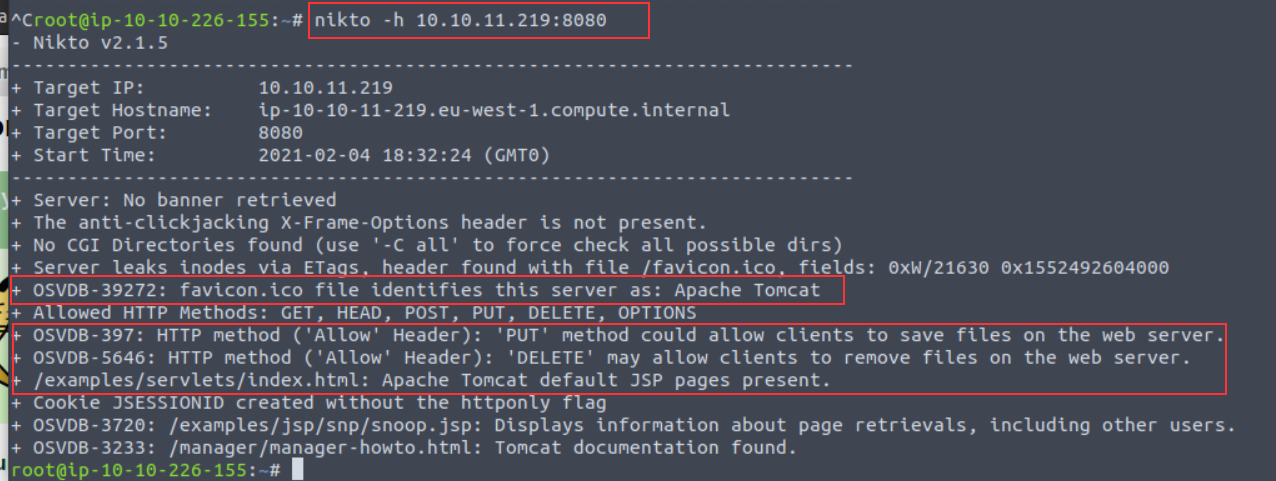
Note a few interesting things are given to us in this example:
Nikto has identified that the application is Apache Tomcat using the favicon and the presence of "/examples/servlets/index.html" which is the location for the default Apache Tomcat application.
HTTP Methods "PUT" and "DELETE" can be performed by clients - we may be able to leverage these to exploit the application by uploading or deleting files.
Scanning Multiple Hosts & Ports
Nikto is extensive in the sense that we can provide multiple arguments in a way that's similar to tools such as Nmap. In fact, so much so, we can take input directly from an Nmap scan to scan a host range. By scanning a subnet, we can look for hosts across an entire network range. We must instruct Nmap to output a scan into a format that is friendly for Nikto to read using Nmap's -oG flags
For example, we can scan 172.16.0.0/24 (subnet mask 255.255.255.0, resulting in 254 possible hosts) with Nmap (using the default web port of 80) and parse the output to Nikto like so: nmap -p80 172.16.0.0/24 -oG - | nikto -h -
There are not many circumstances where you would use this other than when you have gained access to a network. A much more common scenario will be scanning multiple ports on one specific host. We can do this by using the -p flag and providing a list of port numbers delimited by a comma - such as the following: nikto -h 10.10.10.1 -p 80,8000,8080

Introduction to Plugins
Plugins further extend the capabilities of Nikto. Using information gathered from our basic scans, we can pick and choose plugins that are appropriate to our target. You can use the --list-plugins flag with Nikto to list the plugins or view the whole list in an easier to read format online. https://github.com/sullo/nikto/wiki/Plugin-list
Some interesting plugins include:
Plugin Name Description apacheusers Attempt to enumerate Apache HTTP Authentication Users cgi Look for CGI scripts that we may be able to exploit robots Analyse the robots.txt file which dictates what files/folders we are able to navigate to dir_traversal Attempt to use a directory traversal attack (i.e. LFI) to look for system files such as /etc/passwd on Linux (http://ip_address/application.php?view=../../../../../../../etc/passwd)
We can specify the plugin we wish to use by using the -Plugin argument and the name of the plugin we wish to use...For example, to use the "apacheuser" plugin, our Nikto scan would look like so: nikto -h 10.10.10.1 -Plugin apacheuser

Verbosing our Scan
We can increase the verbosity of our Nikto scan by providing the following arguments with the -Display flag. Unless specified, the output given by Nikto is not the entire output, as it can sometimes be irrelevant (but that isn't always the case!) Argument Description Reasons for Use 1 Show any redirects that are given by the web server. Web servers may want to relocate us to a specific file or directory, so we will need to adjust our scan accordingly for this. 2 Show any cookies received Applications often use cookies as a means of storing data. For example, web servers use sessions, where e-commerce sites may store products in your basket as these cookies. Credentials can also be stored in cookies. E Output any errors This will be useful for debugging if your scan is not returning the results that you expect!
Tuning Your Scan for Vulnerability Searching
Nikto has several categories of vulnerabilities that we can specify our scan to enumerate and test for. The following list is not extensive and only include the ones that you may commonly use. We can use the -Tuning flag and provide a value in our Nikto scan: Category Name Description Tuning Option File Upload Search for anything on the web server that may permit us to upload a file. This could be used to upload a reverse shell for an application to execute. 0 Misconfigurations / Default Files Search for common files that are sensitive (and shouldn't be accessible such as configuration files) on the web server. 2 Information Disclosure Gather information about the web server or application (i.e. verison numbers, HTTP headers, or any information that may be useful to leverage in our attack later) 3 Injection Search for possible locations in which we can perform some kind of injection attack such as XSS or HTML 4 Command Execution Search for anything that permits us to execute OS commands (such as to spawn a shell) 8 SQL Injection Look for applications that have URL parameters that are vulnerable to SQL Injection 9
Saving Your Findings
Rather than working with the output on the terminal, we can instead, just dump it directly into a file for further analysis - making our lives much easier!
Nikto is capable of putting to a few file formats including:
Text File
HTML report
We can use the -o argument (short for -Output) and provide both a filename and compatible extension. We can specify the format (-f) specifically, but Nikto is smart enough to use the extension we provide in the -o argument to adjust the output accordingly.
For example, let's scan a web server and output this to "report.html": nikto -h http://ip_address -o report.html
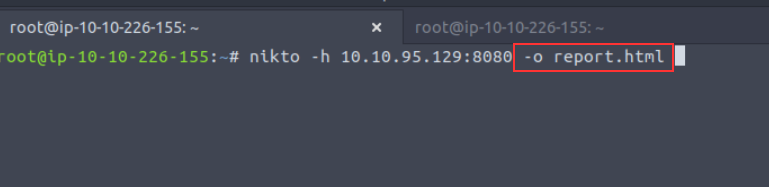
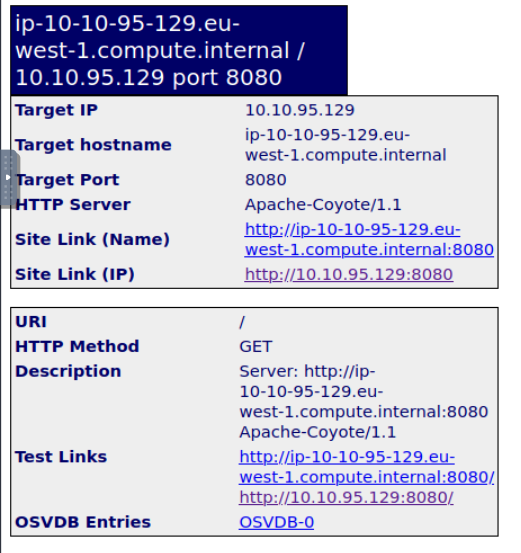
What argument would we use if we wanted to scan port 80 and 8080 on a host? Lowest port number to highest! -p 80,8080
What argument would we use if we wanted to see any cookies given by the web server? -Display 2
3.2. Nikto Practical (Deploy #3)
Deploy the Instance attached to this task. Allow five minutes for it to fully deploy before you begin your Nikto scans!
Use Nikto to assess the ports on MACHINE_IP to answer the following questions:
──(kali㉿kali)-[~]
└─$ nikto -h 10.10.233.187 -p 80
- Nikto v2.1.6
---------------------------------------------------------------------------
+ Target IP:          10.10.233.187
+ Target Hostname:    10.10.233.187
+ Target Port:        80
+ Start Time:         2022-10-03 19:46:32 (GMT-4)
---------------------------------------------------------------------------
+ Server: Apache/2.4.7 (Ubuntu)
+ The anti-clickjacking X-Frame-Options header is not present.
+ The X-XSS-Protection header is not defined. This header can hint to the user agent to protect against some forms of XSS
+ The X-Content-Type-Options header is not set. This could allow the user agent to render the content of the site in a different fashion to the MIME type


┌──(kali㉿kali)-[~]
└─$ nikto -h 10.10.233.187 -p 80,8000,8080
- Nikto v2.1.6
---------------------------------------------------------------------------
+ No web server found on 10.10.233.187:8000
---------------------------------------------------------------------------
+ Target IP:          10.10.233.187
+ Target Hostname:    10.10.233.187
+ Target Port:        80
+ Start Time:         2022-10-03 19:48:48 (GMT-4)
---------------------------------------------------------------------------
+ Server: Apache/2.4.7 (Ubuntu)
+ The anti-clickjacking X-Frame-Options header is not present.
+ The X-XSS-Protection header is not defined. This header can hint to the user agent to protect against some forms of XSS
+ The X-Content-Type-Options header is not set. This could allow the user agent to render the content of the site in a different fashion to the MIME type
+ No CGI Directories found (use '-C all' to force check all possible dirs)
+ Server may leak inodes via ETags, header found with file /, inode: 40e0, size: 5a0311fe9980a, mtime: gzip
+ Multiple index files found: /index.html, /index.xml
+ Apache/2.4.7 appears to be outdated (current is at least Apache/2.4.37). Apache 2.2.34 is the EOL for the 2.x branch.
+ Allowed HTTP Methods: POST, OPTIONS, GET, HEAD
+ OSVDB-3092: /sitemap.xml: This gives a nice listing of the site content.
+ OSVDB-3268: /css/: Directory indexing found.
+ OSVDB-3092: /css/: This might be interesting...
+ OSVDB-3268: /images/: Directory indexing found.
+ OSVDB-3233: /icons/README: Apache default file found.

Waiting a long time so


┌──(kali㉿kali)-[~]
└─$ nikto -h 10.10.233.187 -p 8080

- Nikto v2.1.6
---------------------------------------------------------------------------
+ Target IP:          10.10.233.187
+ Target Hostname:    10.10.233.187
+ Target Port:        8080
+ Start Time:         2022-10-03 20:13:30 (GMT-4)
---------------------------------------------------------------------------
+ Server: Apache-Coyote/1.1
+ Retrieved x-powered-by header: Servlet/3.0; JBossAS-6
+ The anti-clickjacking X-Frame-Options header is not present.
+ The X-XSS-Protection header is not defined. This header can hint to the user agent to protect against some forms of XSS
+ The X-Content-Type-Options header is not set. This could allow the user agent to render the content of the site in a different fashion to the MIME type
+ No CGI Directories found (use '-C all' to force check all possible dirs)
+ OSVDB-39272: /favicon.ico file identifies this app/server as: JBoss Server
+ Allowed HTTP Methods: GET, HEAD, POST, PUT, DELETE, TRACE, OPTIONS
+ OSVDB-397: HTTP method ('Allow' Header): 'PUT' method could allow clients to save files on the web server.
+ OSVDB-5646: HTTP method ('Allow' Header): 'DELETE' may allow clients to remove files on the web server.
+ Cookie JSESSIONID created without the httponly flag
+
What is the name & version of the web server that Nikto has determined running on port 80? Provide the full answer from the output Apache/2.4.7
There is another web server running on another port. What is the name & version of this web server? Ensure you have waited 5 minutes for the Instance to fully deploy Apache-Coyote/1.1
What is the name of the Cookie that this JBoss server gives? You may have to play around with how Nikto outputs the scan results to you! The answer is looking for the name of the cookie -- not the value JSESSIONID
4. Conclusion
Where to go from here (recommended rooms)
GoBuster:
OWASP Top 10 (Walkthrough)
EasyPeasyCTF (Challenge)
WPScan:
RPWebScanning (Walkthrough)
Blog (Challenge)
Nikto:
RPWebScanning (Walkthrough)
OWASP Top 10 (Walkthrough)
ToolsRUs (Walkthrough)
EasyCTF (Challenge)
I'll check these out!!
[[Avengers Blog]]