Exploit Broken Access Control: Number 1 of the Top 10 web security risks.

Task 1 Introduction
Broken access controls are a type of security vulnerability that arises when an application or system fails to properly restrict access to sensitive data or functionality. This vulnerability allows attackers to gain unauthorized access to resources that should be restricted, such as user accounts, files, databases, or administrative functions. Broken access controls can occur due to a variety of factors, including poor design, configuration errors, or coding mistakes.
Objectives that the student will learn:
- Understand what Broken Access Control is and its impact.
- Identify Broken Access Control vulnerabilities in web applications.
- Exploit these vulnerabilities in a controlled environment.
- Understand and apply measures to mitigate and prevent these vulnerabilities.
Pre-requisites:
- Basic understanding of JSON, web applications, and HTTP protocols.
- Familiarity with scripting languages such as PHP and JavaScript.
- Knowledge of web application security standards and frameworks such as OWASP Top 10.
- Basic understanding and usage of a proxy tool like Burp Suite.
Answer the questions below
Click me to proceed onto the next task.
Completed
Task 2 Broken Access Control Introduction
What is Access Control?
Access control is a security mechanism used to control which users or systems are allowed to access a particular resource or system. Access control is implemented in computer systems to ensure that only authorized users have access to resources, such as files, directories, databases, and web pages. The primary goal of access control is to protect sensitive data and ensure that it is only accessible to those who are authorized to access it.
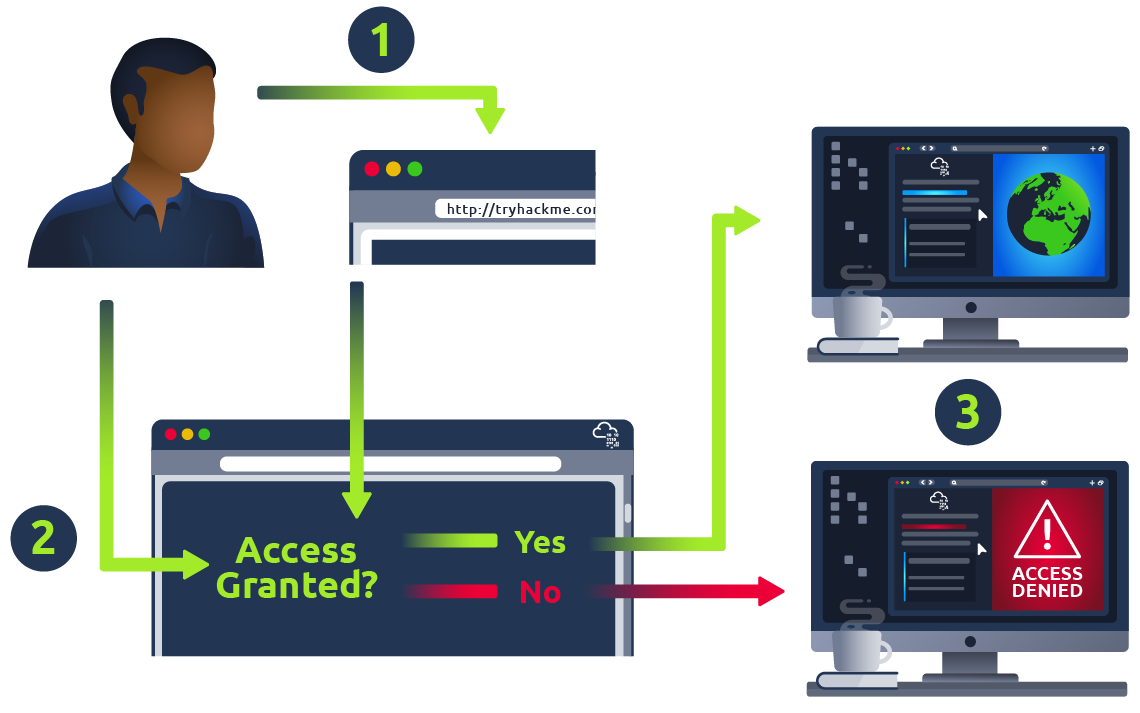
Access control can be implemented in different ways, depending on the type of resource being protected and the security requirements of the system. Some common access control mechanisms include:
-
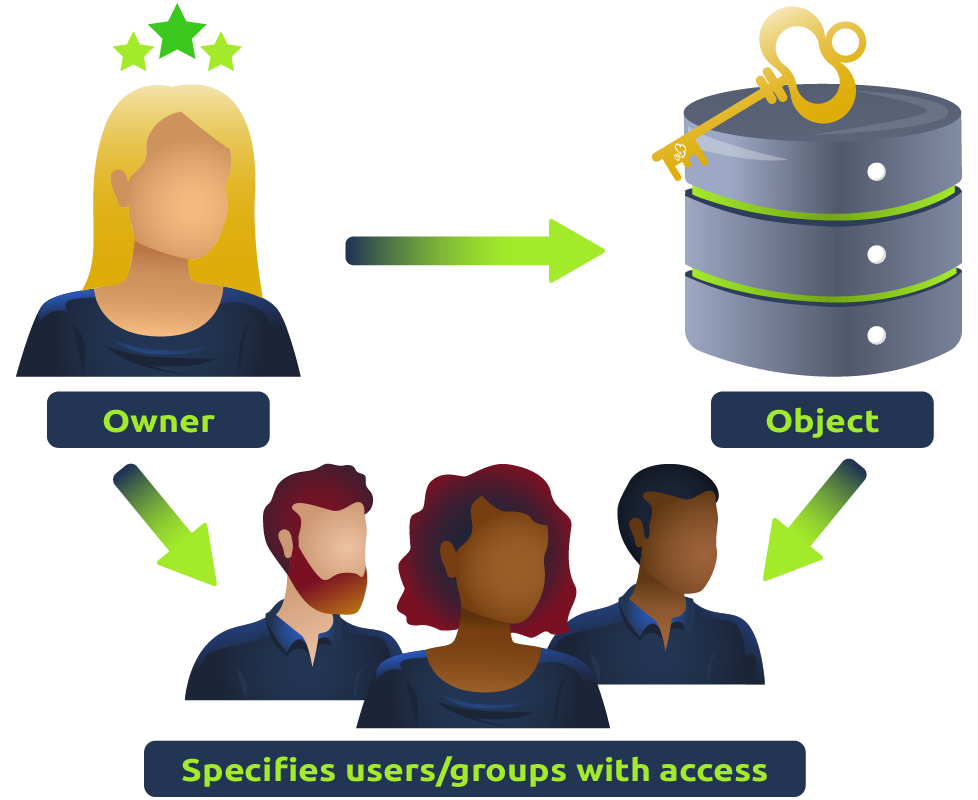
Discretionary Access Control (DAC): In this type of access control, the resource owner or administrator determines who is allowed to access a resource and what actions they are allowed to perform. DAC is commonly used in operating systems and file systems. In layman’s terms, imagine a castle where the king can give keys to his advisors, allowing them to open any doors they like, whenever they want. That’s DAC for you. It’s the liberty to control access to your own resources. The one in charge, like the king of the castle, can hand out permissions to whomever they please, dictating who can come in and out.
-
Mandatory Access Control (MAC): In this type of access control, access to resources is determined by a set of predefined rules or policies that are enforced by the system. MAC is commonly used in highly secure environments, such as government and military systems. In layman’s terms, picture a fort with an iron-clad security protocol. Only specific individuals with particular security clearances can access certain areas, and this is non-negotiable. The high commander sets the rules, and they are rigorously followed. That’s how MAC works. It’s like the stern security officer who allows no exceptions to the rule.

-
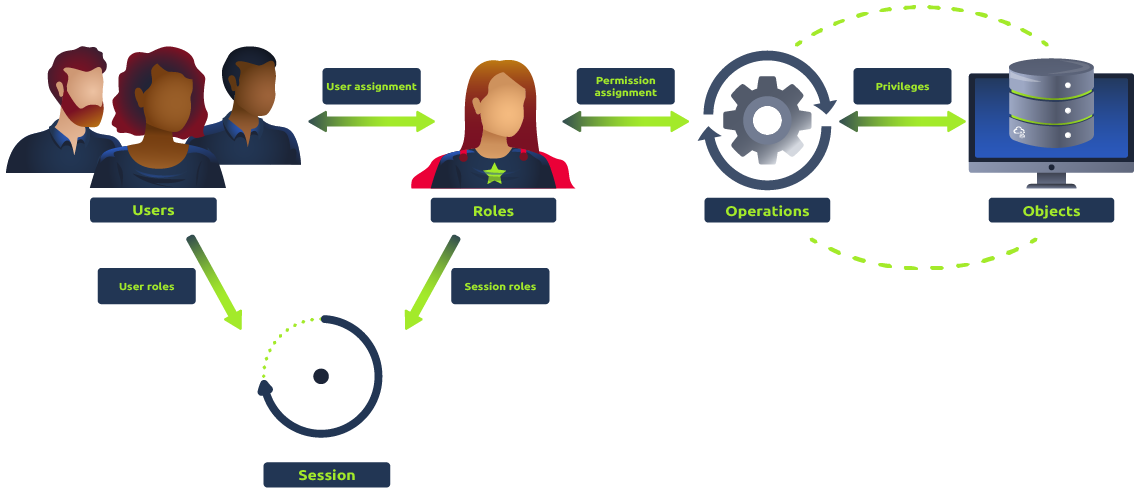
Role-Based Access Control (RBAC): In this type of access control, users are assigned roles that define their level of access to resources. RBAC is commonly used in enterprise systems, where users have different levels of authority based on their job responsibilities. In layman’s terms, imagine a modern corporation. You have your managers, your executives, your sales staff, etc. They each have different access to the building. Some can enter the boardroom, others can access the sales floor, and so on. That’s the essence of RBAC - assigning access based on a person’s role within an organization.
-
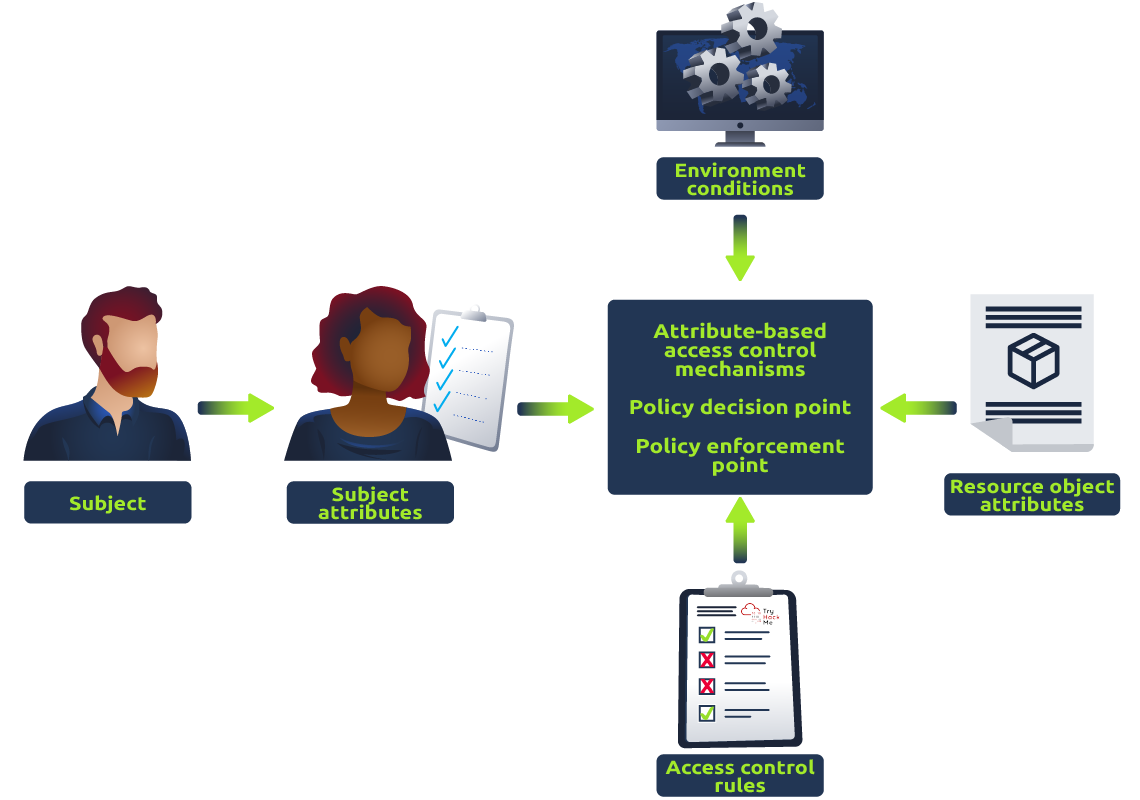
Attribute-Based Access Control (ABAC): In this type of access control, access to resources is determined by a set of attributes, such as user role, time of day, location, and device. ABAC is commonly used in cloud environments and web applications. In layman’s terms, think of a highly advanced sci-fi security system that scans individuals for certain attributes. Maybe it checks whether they’re from a particular planet, whether they’re carrying a specific device, or if they’re trying to access a resource at a specific time. That’s ABAC. It’s like the smart, flexible security of the future.
Implementing access control can help prevent security breaches and unauthorized access to sensitive data. However, access control is not foolproof and can be vulnerable to various types of attacks, such as privilege escalation and broken access control vulnerabilities. Therefore, it is important to regularly review and test access control mechanisms to ensure that they are working as intended.
Broken Access Control:
Broken access control vulnerabilities refer to situations where access control mechanisms fail to enforce proper restrictions on user access to resources or data. Here are some common exploits for broken access control and examples:
-
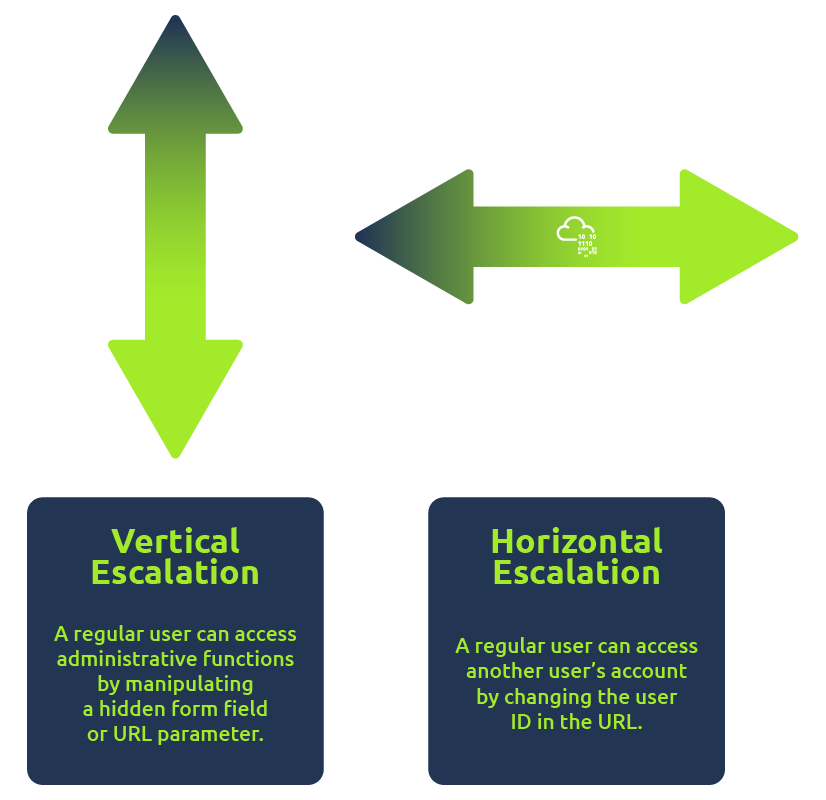
Horizontal privilege escalation occurs when an attacker can access resources or data belonging to other users with the same level of access. For example, a user might be able to access another user’s account by changing the user ID in the URL.
-
Vertical privilege escalation occurs when an attacker can access resources or data belonging to users with higher access levels. For example, a regular user can access administrative functions by manipulating a hidden form field or URL parameter.
-
Insufficient access control checks occur when access control checks are not performed correctly or consistently, allowing an attacker to bypass them. For example, an application might allow users to view sensitive data without verifying their proper permissions.
-
Insecure direct object references occur when an attacker can access a resource or data by exploiting a weakness in the application’s access control mechanisms. For example, an application might use predictable or easily guessable identifiers for sensitive data, making it easier for an attacker to access. You may refer to this room in Task #4 to learn more about this.
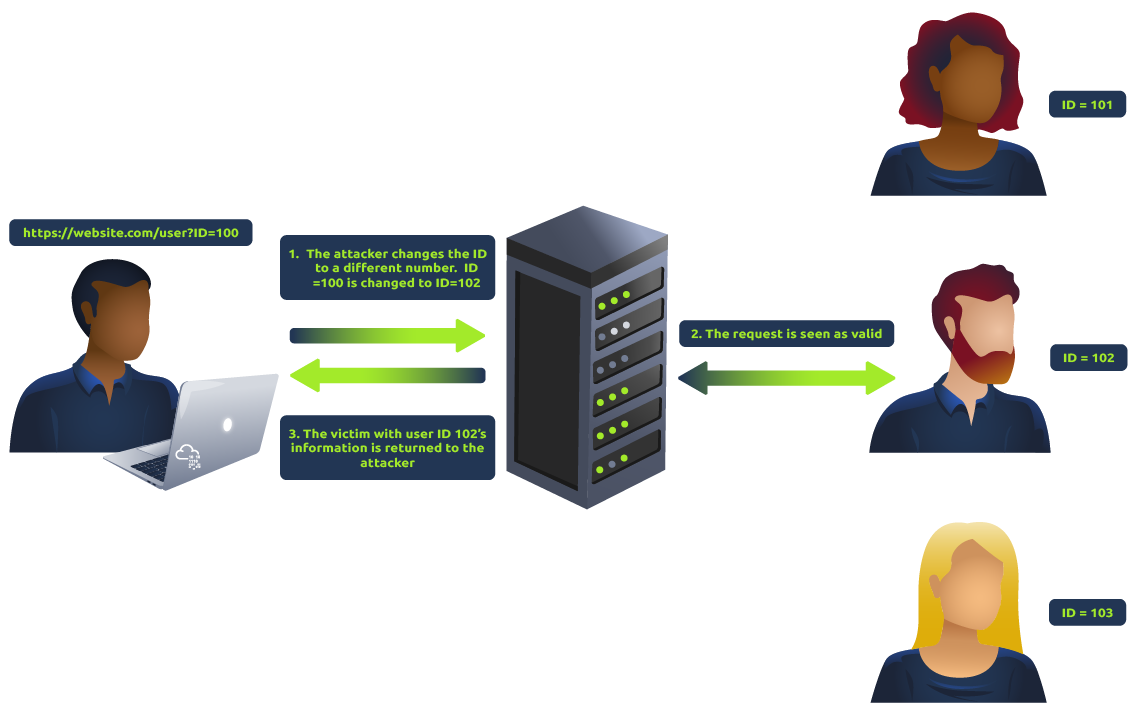
These exploits can be prevented by implementing strong access control mechanisms and regularly reviewing and testing them to ensure they are functioning as intended.
Answer the questions below
What is IDOR?
Insecure direct object references
What occurs when an attacker can access resources or data belonging to other users with the same level of access?
Horizontal privilege escalation
What occurs when an attacker can access resources or data from users with higher access levels?
Vertical privilege escalation
What is ABAC?
Attribute-Based Access Control
What is RBAC?
Role-Based Access Control
Task 3 Deploy the Machine
Start Machine
To focus on learning about the Broken Access Controls, please click on the Start Machine button located in the upper-right-hand corner of this task to deploy the virtual machine for this room.
After obtaining the machine’s generated IP address, you can either use our AttackBox or use your own VM connected to TryHackMe’s VPN to begin the attack. If you prefer to use the AttackBox, you can simply click on the Start AttackBox button located above the room name.
After starting the AttackBox or connecting your attack VM to TryHackMe’s VPN, you can now start accessing the target website application by entering http://MACHINE_IP/ into the browser.
Keep in mind that the machine may take up to 5 minutes to spawn.
Answer the questions below
I have deployed the machine attached to the task.
Completed
Task 4 Assessing the Web Application
Learning Objective:
In this task, our objective is to gain a comprehensive understanding of the web application’s functionalities. This will allow us to make the most of the application’s capabilities and achieve our desired outcomes.
Assessing the Application:
When you browse a web application as a penetration tester, imagine what the underlying code looks like and what vulnerabilities come to mind for each functionality, request, and response.
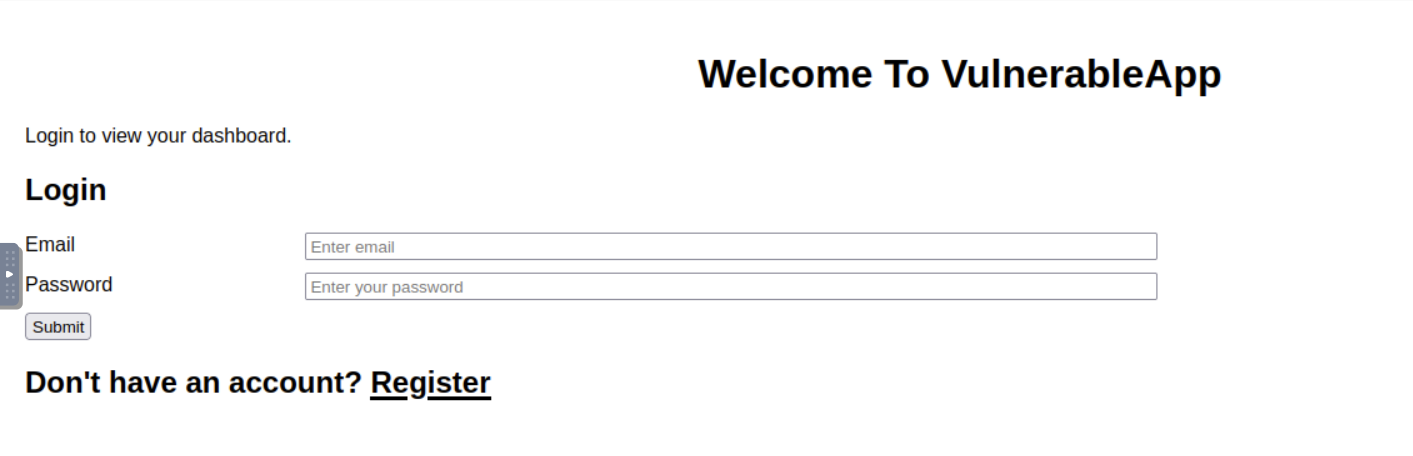
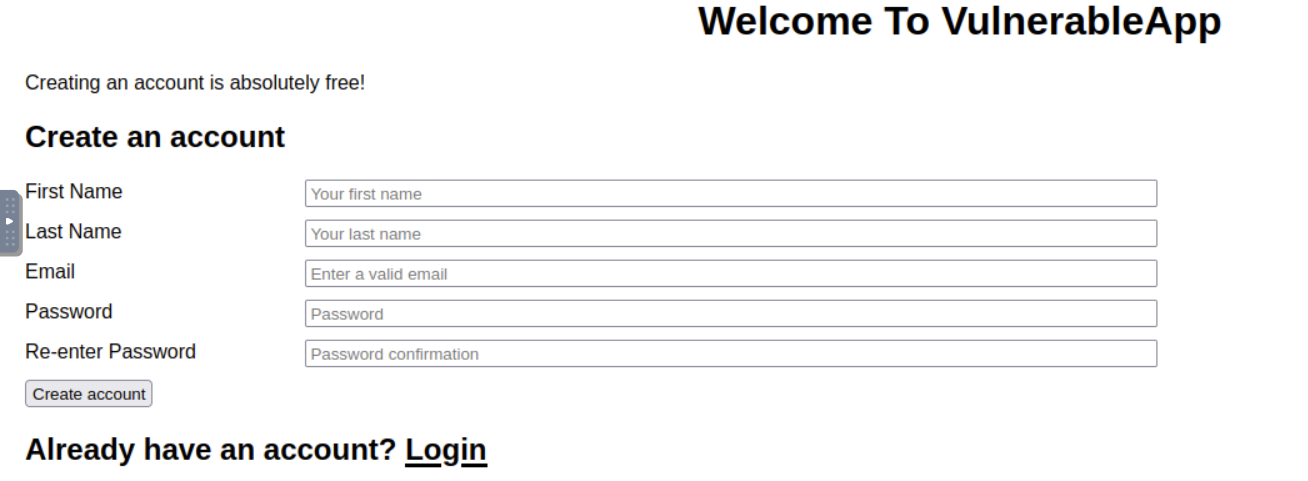
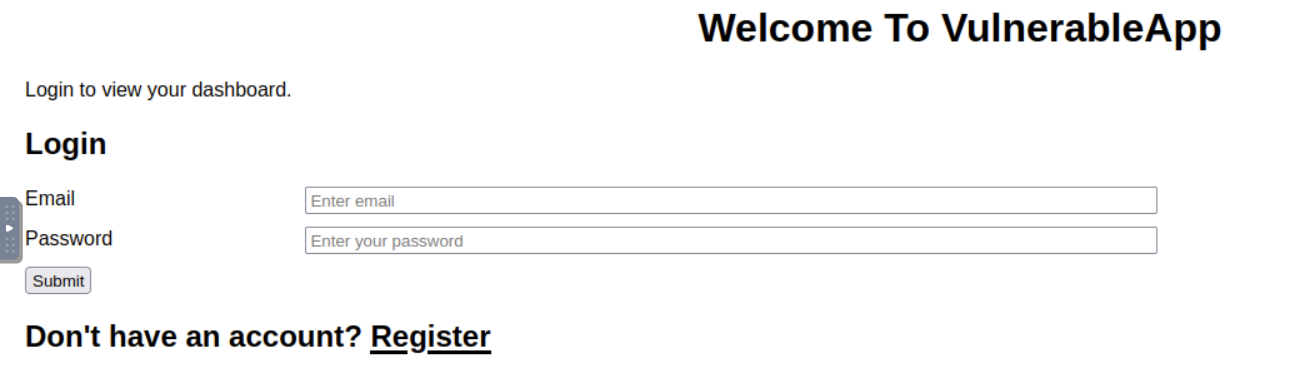
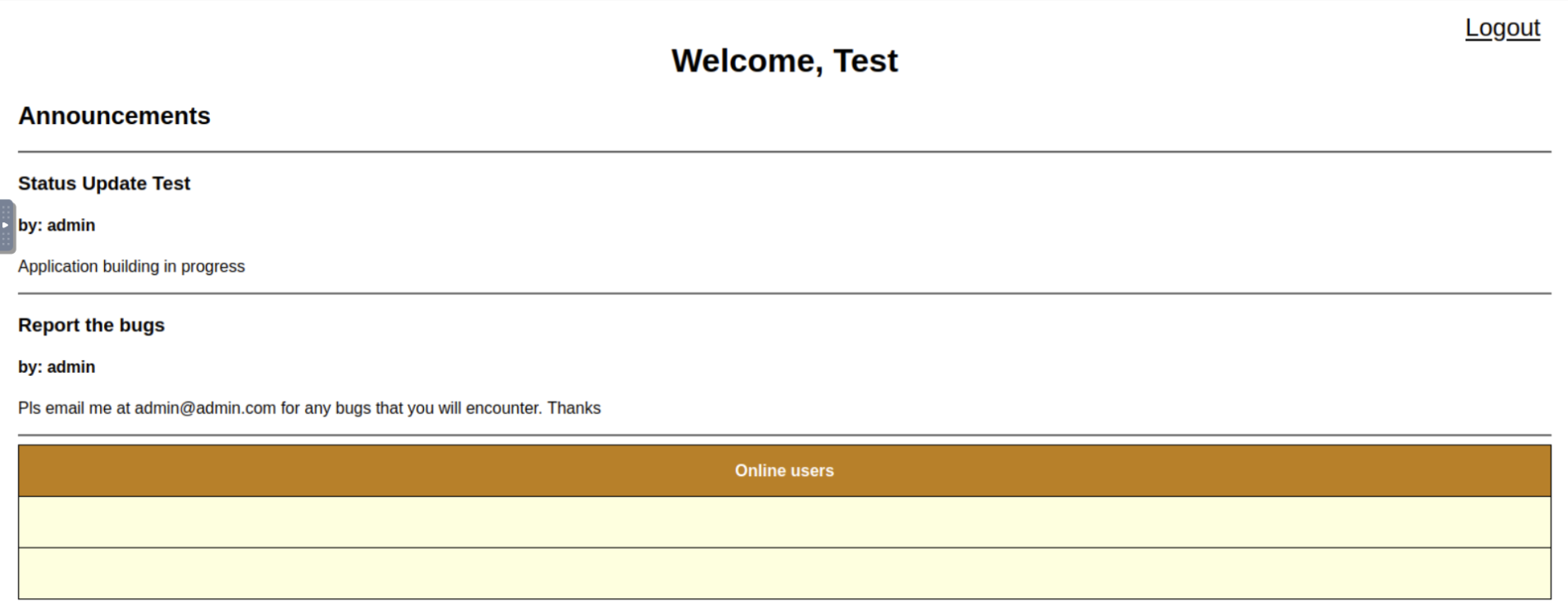
The web application for this room features a Dashboard, Login, and Registration form that enables users to access the dashboard of the website. From a web app pentester standpoint, the pentester will usually register an account. After the registration, the pentester will then try to check the login function for any access control vulnerabilities.
Below are the screenshots of each webpage:
Registration:
Login:
Dashboard:
In order for us to capture the HTTP requests being sent to the server, we can use OWASP ZAP or Burp Suite Community Edition.
To learn more about the detailed usage of Burp Suite and its functionalities, you may refer to the Burp Suite Module.
Capturing the HTTP traffic
In order for us to further analyze the requests and responses being sent and received from the server, we will use the “Proxy” module of Burp Suite to capture the HTTP traffic that is being sent to the server. The captured HTTP traffic can be used with the other modules of Burp Suite.
These can then be manipulated or sent to other tools, such as “Repeater”, for further processing before being allowed to continue to their destination.
Below is the captured HTTP traffic that is being sent to functions.php after login.
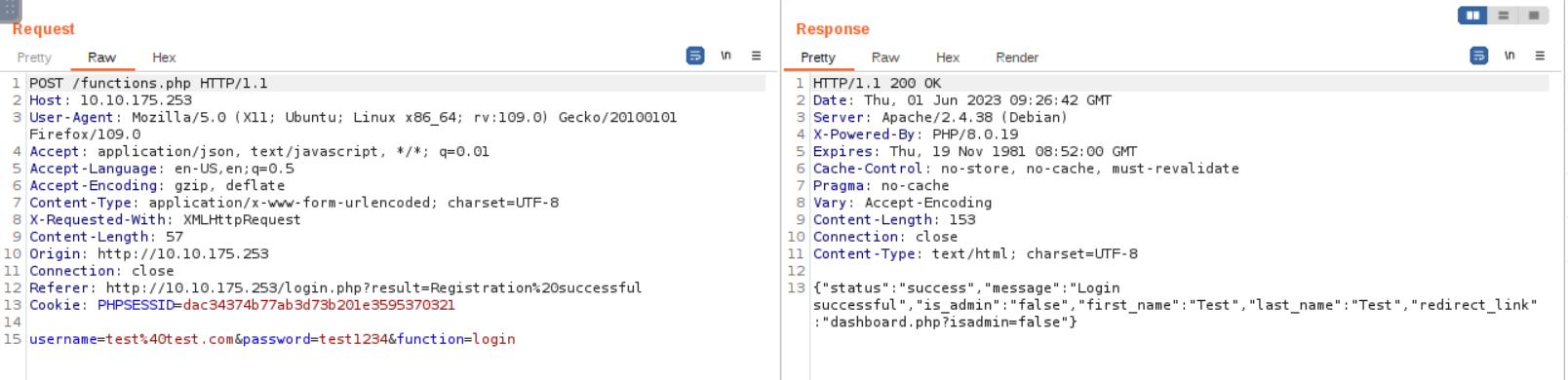
Based on the screenshot displayed above, we can observe that upon completing the login process, the web application will give us a JSON response that contains the status, message, first_name, last_name, is_admin, and redirect_link which the server uses to redirect the user to the dashboard.php with the parameter “isadmin” in the URL.
Understanding the content of the HTTP request and response:
- The target web application does not have any implemented security headers, which indicates that there are no preventative measures (like a first line of defense) in place to protect the web application against certain types of attacks.
- The target web application is running on a Linux operating system (
Debian) and is using Apache web server (Apache/2.4.38). This information can be useful in identifying potential security vulnerabilities that may exist in the target web application. - The target web application utilizes
PHP/8.0.19as its backend programming language. This information is important for understanding the technology stack of the application and identifying potential security vulnerabilities or compatibility issues that may arise with other software components. - The target web application redirects the user to the dashboard with a parameter that we can possibly test for privilege escalation vulnerabilities.
Answer the questions below
┌──(witty㉿kali)-[~/Downloads]
└─$ rustscan -a 10.10.43.212 --ulimit 5500 -b 65535 -- -A -Pn
.----. .-. .-. .----..---.  .----. .---.   .--.  .-. .-.
| {}  }| { } |{ {__ {_   _}{ {__  /  ___} / {} \ |  `| |
| .-. \| {_} |.-._} } | |  .-._} }\     }/  /\  \| |\  |
`-' `-'`-----'`----'  `-'  `----'  `---' `-'  `-'`-' `-'
The Modern Day Port Scanner.
________________________________________
: https://discord.gg/GFrQsGy           :
: https://github.com/RustScan/RustScan :
 --------------------------------------
🌍HACK THE PLANET🌍

[~] The config file is expected to be at "/home/witty/.rustscan.toml"
[~] Automatically increasing ulimit value to 5500.
[!] File limit is lower than default batch size. Consider upping with --ulimit. May cause harm to sensitive servers
Open 10.10.43.212:22
Open 10.10.43.212:80
Open 10.10.43.212:443
Open 10.10.43.212:3306
[~] Starting Script(s)
[>] Script to be run Some("nmap -vvv -p {{port}} {{ip}}")

Host discovery disabled (-Pn). All addresses will be marked 'up' and scan times may be slower.
[~] Starting Nmap 7.93 ( https://nmap.org ) at 2023-08-06 22:24 EDT
NSE: Loaded 155 scripts for scanning.
NSE: Script Pre-scanning.
NSE: Starting runlevel 1 (of 3) scan.
Initiating NSE at 22:24
Completed NSE at 22:24, 0.00s elapsed
NSE: Starting runlevel 2 (of 3) scan.
Initiating NSE at 22:24
Completed NSE at 22:24, 0.00s elapsed
NSE: Starting runlevel 3 (of 3) scan.
Initiating NSE at 22:24
Completed NSE at 22:24, 0.00s elapsed
Initiating Parallel DNS resolution of 1 host. at 22:24
Completed Parallel DNS resolution of 1 host. at 22:24, 0.01s elapsed
DNS resolution of 1 IPs took 0.02s. Mode: Async [#: 1, OK: 0, NX: 1, DR: 0, SF: 0, TR: 1, CN: 0]
Initiating Connect Scan at 22:24
Scanning 10.10.43.212 [4 ports]
Discovered open port 3306/tcp on 10.10.43.212
Discovered open port 22/tcp on 10.10.43.212
Discovered open port 80/tcp on 10.10.43.212
Discovered open port 443/tcp on 10.10.43.212
Completed Connect Scan at 22:24, 0.18s elapsed (4 total ports)
Initiating Service scan at 22:24
Scanning 4 services on 10.10.43.212
Completed Service scan at 22:24, 6.50s elapsed (4 services on 1 host)
NSE: Script scanning 10.10.43.212.
NSE: Starting runlevel 1 (of 3) scan.
Initiating NSE at 22:24
Completed NSE at 22:24, 6.74s elapsed
NSE: Starting runlevel 2 (of 3) scan.
Initiating NSE at 22:24
Completed NSE at 22:24, 4.17s elapsed
NSE: Starting runlevel 3 (of 3) scan.
Initiating NSE at 22:24
Completed NSE at 22:24, 0.00s elapsed
Nmap scan report for 10.10.43.212
Host is up, received user-set (0.18s latency).
Scanned at 2023-08-06 22:24:13 EDT for 18s

PORT     STATE SERVICE REASON  VERSION
22/tcp   open  ssh     syn-ack OpenSSH 8.2p1 Ubuntu 4ubuntu0.5 (Ubuntu Linux; protocol 2.0)
| ssh-hostkey:
|   3072 aeed1f4af4179eced83e0fcb203af9f4 (RSA)
| ssh-rsa AAAAB3NzaC1yc2EAAAADAQABAAABgQDMqEnYcxtOMr3o7KFvkC/gs1N+rmqDi2zRY96uux++t50kHep+eCVz2g9ottj0mDqbJfal9E5/I6QFgv4YpImR9uI5iD6g9CnrG+fTyj6ishJmIz91r+i/TdE0I93sEoj8O4/JhTb0lqDAMig0Ujc0OowXUwGDHk1crjutWsFGM04z1fvKz8cqGpbPL9a+8qwTI9BHHG8RDxAm4bt0WxBdn3a0jKGBpO/varyoEwYBs4FIiyDnIWdXYBjgzGSkemWFIyfjA6poTn5X8ahsUyB9u966OS21miCPg3lO9XqTrODq+lTEKDputXeXr2+xiPai1Im7wz5TDwN8Ugzrf8F3IKO/6YqlN+E5Rs7XvlvKtt1+dzNIupFSpaksIgWBrvH2MVs4kIptOHuQCsLEUJgbtnxcs30Paa3U+4bAfCmzK0h2Qh9YJIeixojtt0PG1pdTx3YCTkX4vh40obuS8uI0jFsBFlFTYMRA++Z+3njpHDfQdEPuVb0Te77gaJgydmU=
|   256 5dbdc35d880b6efb10570427af799130 (ECDSA)
| ecdsa-sha2-nistp256 AAAAE2VjZHNhLXNoYTItbmlzdHAyNTYAAAAIbmlzdHAyNTYAAABBBMFBmL6L1aO0LsYpGr7d7TwRUXuDzZ6vXzBTHbGKmOb0nD2O7n3SNUYWVl/VJpDaLWVIeCRr3098U8RaRBbgFFU=
|   256 a4041e6b1c0bf7b8ecf226ef22820591 (ED25519)
|_ssh-ed25519 AAAAC3NzaC1lZDI1NTE5AAAAIJv4fOpcujX7nG9BQqmygYK5oHJa4G7qQQ32XsbEuzIO
80/tcp   open  http    syn-ack Apache httpd 2.4.38 ((Debian))
|_http-server-header: Apache/2.4.38 (Debian)
|_http-title: Welcome to VulnerableApp
| http-cookie-flags:
|   /:
|     PHPSESSID:
|_      httponly flag not set
| http-methods:
|_  Supported Methods: GET HEAD POST OPTIONS
443/tcp  open  http    syn-ack Apache httpd 2.4.38
|_http-server-header: Apache/2.4.38 (Debian)
| http-methods:
|_  Supported Methods: GET HEAD POST OPTIONS
| http-cookie-flags:
|   /:
|     PHPSESSID:
|_      httponly flag not set
|_http-title: Welcome to VulnerableApp
3306/tcp open  mysql   syn-ack MySQL 8.0.32
|_ssl-date: TLS randomness does not represent time
| ssl-cert: Subject: commonName=MySQL_Server_8.0.32_Auto_Generated_Server_Certificate
| Issuer: commonName=MySQL_Server_8.0.32_Auto_Generated_CA_Certificate
| Public Key type: rsa
| Public Key bits: 2048
| Signature Algorithm: sha256WithRSAEncryption
| Not valid before: 2023-04-11T02:59:43
| Not valid after:  2033-04-08T02:59:43
| MD5:   08c7c59f2eb6f8116697738a91656971
| SHA-1: ad22fc9dcb5a2b64b42e6ca4d2c12b552e739895
| -----BEGIN CERTIFICATE-----
| MIIDBzCCAe+gAwIBAgIBAjANBgkqhkiG9w0BAQsFADA8MTowOAYDVQQDDDFNeVNR
| TF9TZXJ2ZXJfOC4wLjMyX0F1dG9fR2VuZXJhdGVkX0NBX0NlcnRpZmljYXRlMB4X
| DTIzMDQxMTAyNTk0M1oXDTMzMDQwODAyNTk0M1owQDE+MDwGA1UEAww1TXlTUUxf
| U2VydmVyXzguMC4zMl9BdXRvX0dlbmVyYXRlZF9TZXJ2ZXJfQ2VydGlmaWNhdGUw
| ggEiMA0GCSqGSIb3DQEBAQUAA4IBDwAwggEKAoIBAQDGcSvk6LihXJHB/vEoHREi
| qGZcHlwWx9Thj2/BMbGcfuirXFV2hSZTXPdn9+BJ8iPZD1A2l2JNAeWiQajTWuIt
| CjwobK3vvaq7nrULv+XymliwZuy4ukBYNNC6MU2oowBQUd87OgT3d92tmZDA0gRH
| 4foH9cK7Fm5DTCICPCpCkJVFYV94mEocVXCQdeuGA4bI1qFKBj50Jc7ydU8UdF26
| ODTWKpOusIbpi8BMgbUrGubjP7Y0FMD3fzX2GR3XEFtP1zms3OAsJbNEQbewuTZq
| Up4yob2SRJA3lqfox+6SZ7f5dVul8rZ3gsZ8t1c8fXTzqx1m902CJRxTjXPwiVZF
| AgMBAAGjEDAOMAwGA1UdEwEB/wQCMAAwDQYJKoZIhvcNAQELBQADggEBAMZTdDAL
| sW61/8hd4V8ICWqRbIkOJVsWPMzmRx6yEVfR1b/f6PQ1iZYp+Ss4F4uDz9vtyRXT
| yZ2AZvDIH3m9sP51eXBX5AlKI4E0f2UmuGPu8ZDlpx+pARGR30ivt/4b3J1iLneC
| N/WmoBCl6iVw8eO+4InFmKLmLX7H2pa5Qm6AJ+6lzbuGQZSQT+7y5FIep5R7sk8i
| tRQFYP8k/w7rgzqPbdgf2TW4EirBBc54HvKXgsle1o+6oCJV1iwhSHwt67K2r643
| YuI+Jw5uu44S/onsPvFN04iDTa/6h1Vx+HAPQ1WNOqX6KLp0gqou8/VEPeMHFjbL
| gNwqHEol3UNy03k=
|_-----END CERTIFICATE-----
| mysql-info:
|   Protocol: 10
|   Version: 8.0.32
|   Thread ID: 33
|   Capabilities flags: 65535
|   Some Capabilities: LongPassword, IgnoreSpaceBeforeParenthesis, SupportsTransactions, LongColumnFlag, Speaks41ProtocolOld, FoundRows, Support41Auth, ODBCClient, InteractiveClient, DontAllowDatabaseTableColumn, SwitchToSSLAfterHandshake, Speaks41ProtocolNew, SupportsLoadDataLocal, IgnoreSigpipes, SupportsCompression, ConnectWithDatabase, SupportsMultipleStatments, SupportsAuthPlugins, SupportsMultipleResults
|   Status: Autocommit
|   Salt: /\x14vs\x15YAh@HK\x0Ff"*\x15BuB\x02
|_  Auth Plugin Name: mysql_native_password
Service Info: Host: 172.18.0.2; OS: Linux; CPE: cpe:/o:linux:linux_kernel

NSE: Script Post-scanning.
NSE: Starting runlevel 1 (of 3) scan.
Initiating NSE at 22:24
Completed NSE at 22:24, 0.00s elapsed
NSE: Starting runlevel 2 (of 3) scan.
Initiating NSE at 22:24
Completed NSE at 22:24, 0.00s elapsed
NSE: Starting runlevel 3 (of 3) scan.
Initiating NSE at 22:24
Completed NSE at 22:24, 0.00s elapsed
Read data files from: /usr/bin/../share/nmap
Service detection performed. Please report any incorrect results at https://nmap.org/submit/ .
Nmap done: 1 IP address (1 host up) scanned in 20.43 seconds

Request:
POST /functions.php HTTP/1.1

Response:
HTTP/1.1 200 OK

Date: Mon, 07 Aug 2023 02:28:58 GMT

Server: Apache/2.4.38 (Debian)

X-Powered-By: PHP/8.0.19
{"status":"success","message":"Login successful","is_admin":"false","first_name":"test","last_name":"test","redirect_link":"dashboard.php?isadmin=false"}

http://10.10.43.212/dashboard.php?isadmin=true

THM{I_C4n_3xpl01t_B4c}
What is the type of server that is hosting the web application? This can be found in the response of the request in Burp Suite.
Apache
What is the name of the parameter in the JSON response from the login request that contains a redirect link?
redirect_link
What Burp Suite module allows us to capture requests and responses between ourselves and our target?
Proxy
What is the admin’s email that can be found in the online users’ table?
Task 5 Exploiting the Web Application
In the previous task, we learned that the file functions.php returns a JSON response upon login. The response contains a redirect_link with a parameter that we can test for access control vulnerabilities.
To start testing for this vulnerability, we can intercept the HTTP response and copy the value of the redirect_link parameter to our address bar.
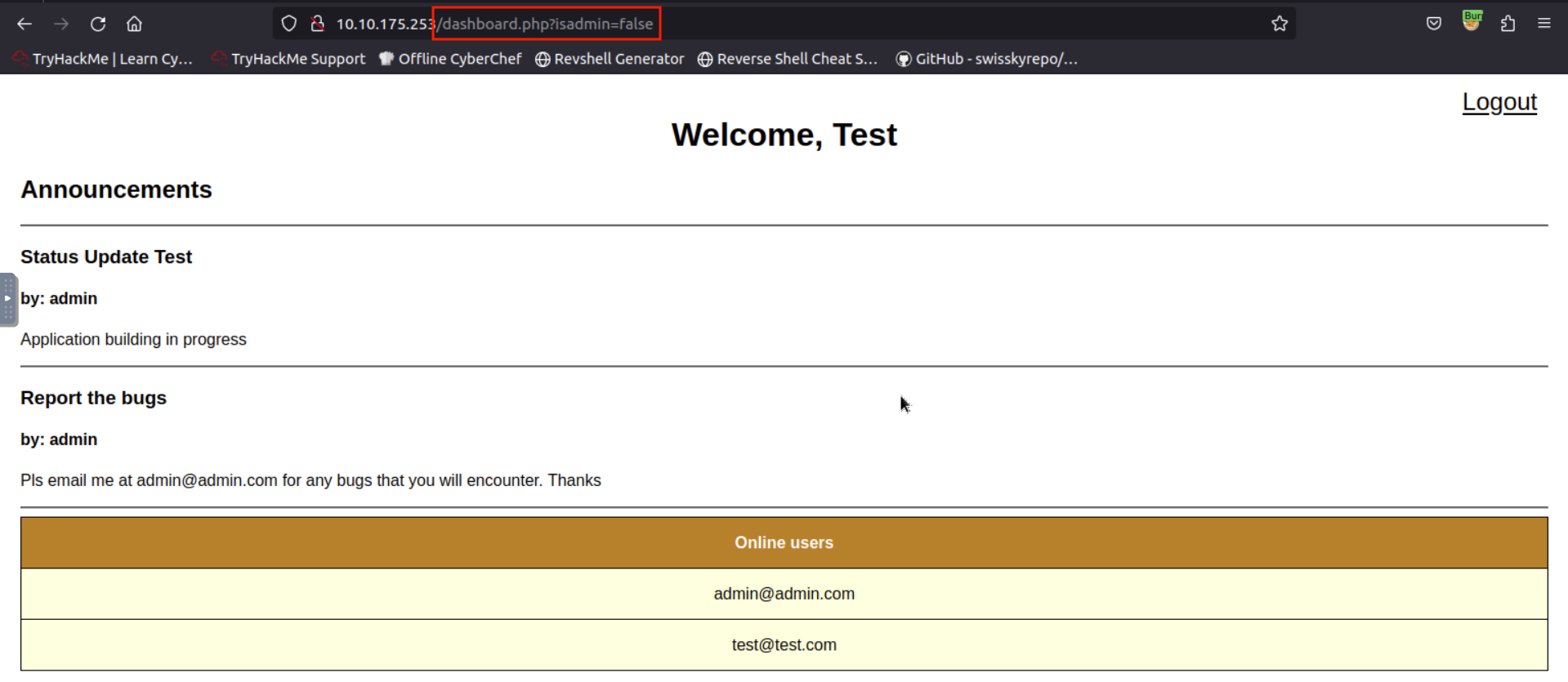
Since the application redirects the user to dashboard.php while the JSON response can only be seen by intercepting using a proxy tool, we can try changing the parameter’s value from “false” to “true” or vice versa.
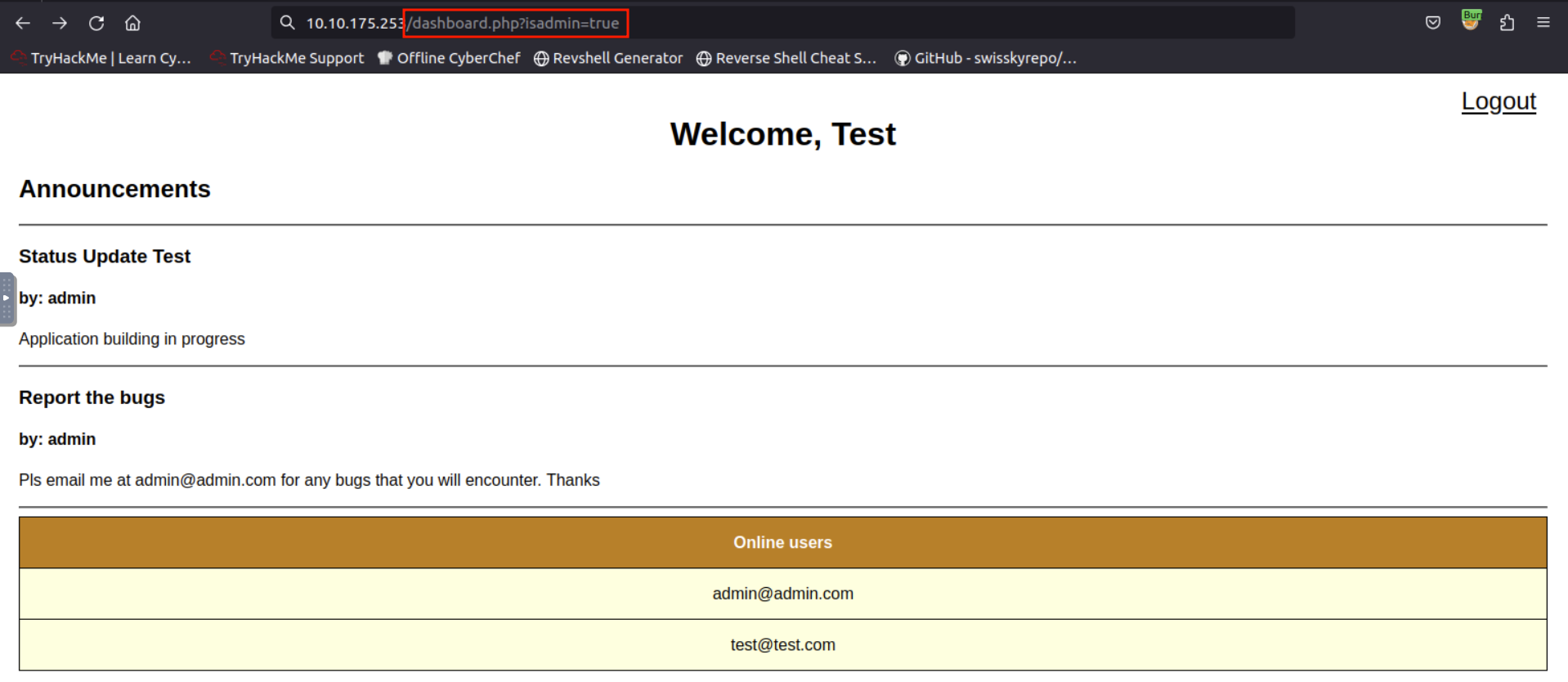
Upon changing the value from false to true, application redirects us to admin.php, which is hidden to a normal user by default. Below is the HTTP request that is captured using Burp Suite Proxy.
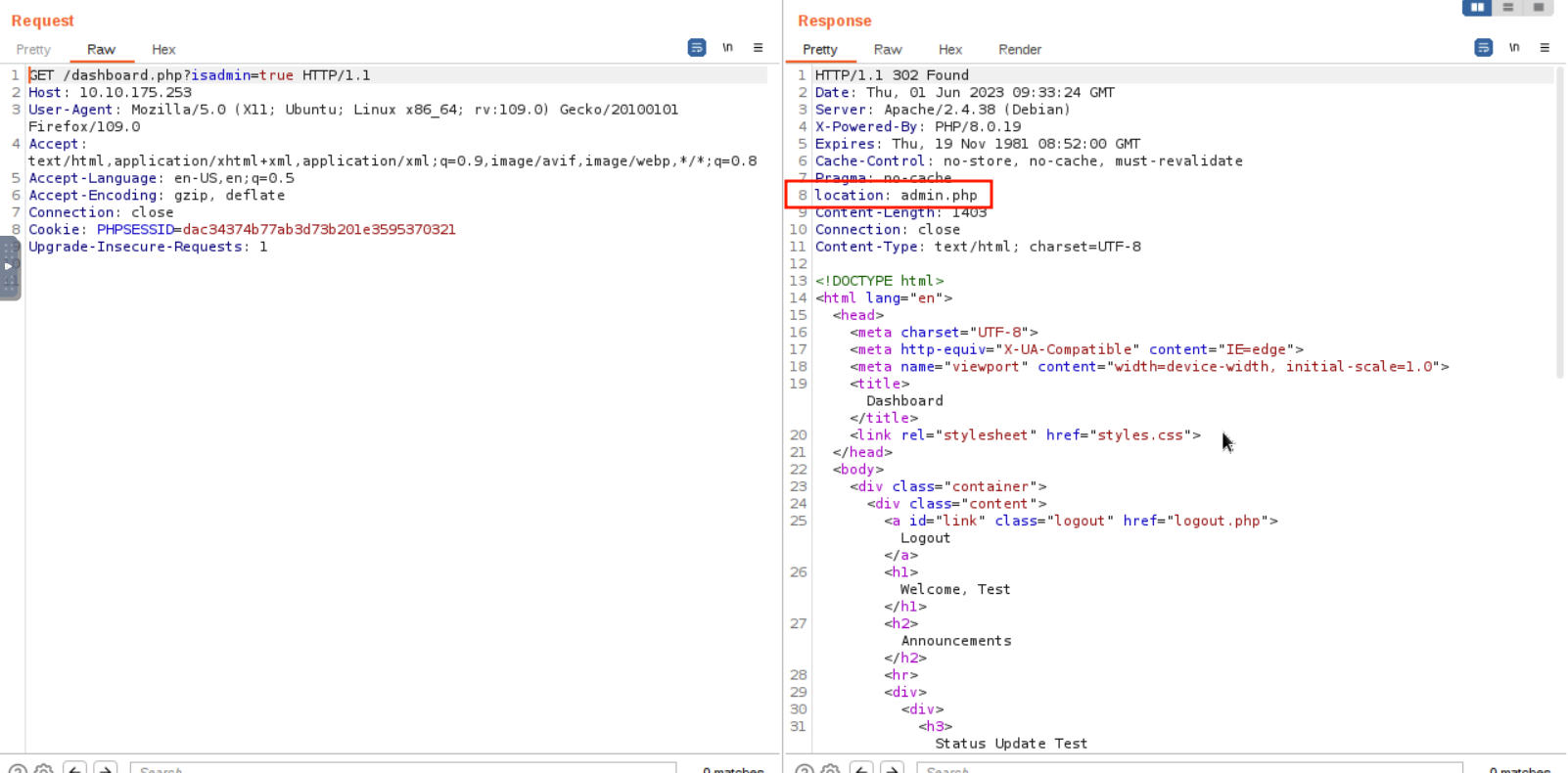
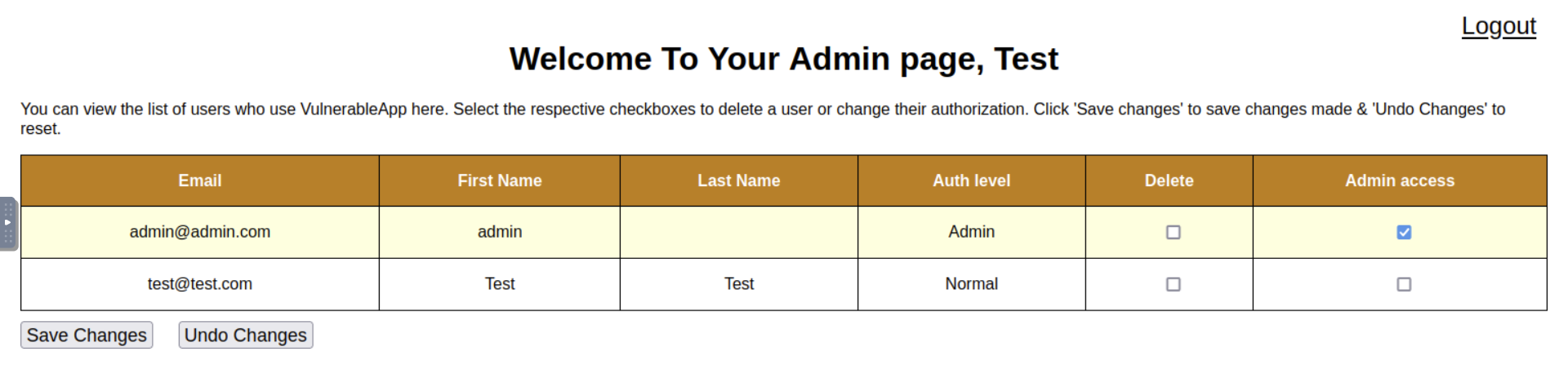
Since we have access to admin.php using a low-privilege account, we might as well check for a vertical privilege escalation attack.
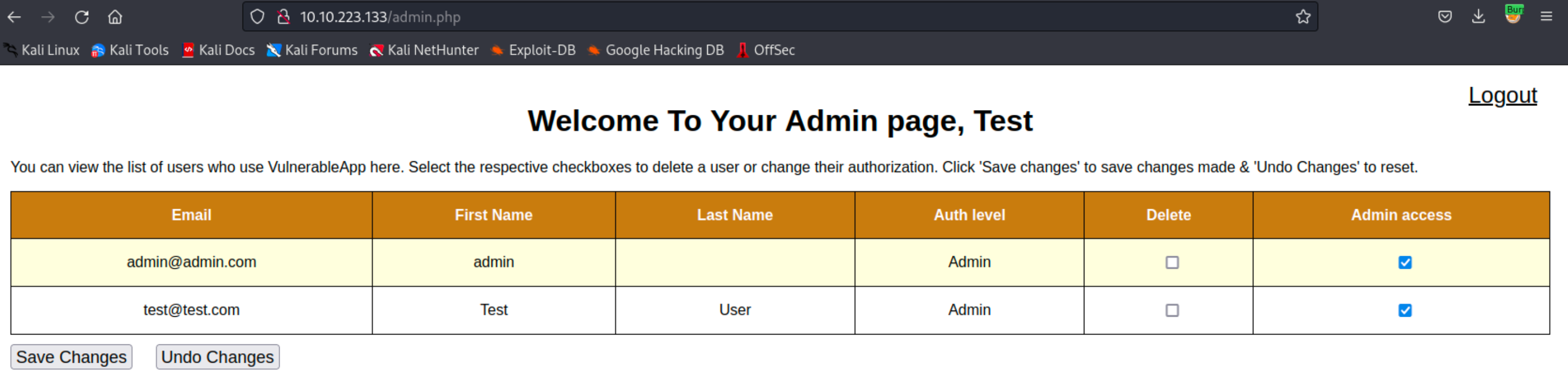
Checking the box in the “Admin access” column of the account you registered and clicking the “Save Changes” button will give us admin privileges. Which in return enables us to revoke the access of other admin users.
Answer the questions below
What kind of privilege escalation happened after accessing admin.php?
Vertical
What parameter allows the attacker to access the admin page?
isadmin
What is the flag in the admin page?
THM{I_C4n_3xpl01t_B4c}
Task 6 Mitigation
There are several steps that can be taken to mitigate the risk of broken access control vulnerabilities in PHP applications:
-
Implement Role-Based Access Control (RBAC): Role-based access control (RBAC) is a method of regulating access to computer or network resources based on the roles of individual users within an enterprise. By defining roles in an organization and assigning access rights to these roles, you can control what actions a user can perform on a system. The provided code snippet illustrates how you can define roles (such as ‘admin’, ‘editor’, or ‘user’) and the permissions associated with them. The
hasPermissionfunction checks if a user of a certain role has a specified permission.Sample Code
php// Define roles and permissions $roles = [ 'admin' => ['create', 'read', 'update', 'delete'], 'editor' => ['create', 'read', 'update'], 'user' => ['read'], ]; // Check user permissions function hasPermission($userRole, $requiredPermission) { global $roles; return in_array($requiredPermission, $roles[$userRole]); } // Example usage if (hasPermission('admin', 'delete')) { // Allow delete operation } else { // Deny delete operation } -
Use Parameterized Queries: Parameterized queries are a way to protect PHP applications from SQL Injection attacks, where malicious users could potentially gain unauthorized access to your database. By using placeholders instead of directly including user input into the SQL query, you can significantly reduce the risk of SQL Injection attacks. The provided example demonstrates how a query can be made secure using prepared statements, which separates SQL syntax from data and handles user input safely.
Sample Code
php// Example of vulnerable query $username = $_POST['username']; $password = $_POST['password']; $query = "SELECT * FROM users WHERE username='$username' AND password='$password'"; // Example of secure query using prepared statements $username = $_POST['username']; $password = $_POST['password']; $stmt = $pdo->prepare("SELECT * FROM users WHERE username=? AND password=?"); $stmt->execute([$username, $password]); $user = $stmt->fetch(); -
Proper Session Management: Proper session management ensures that authenticated users have timely and appropriate access to resources, thereby reducing the risk of unauthorized access to sensitive information. Session management includes using secure cookies, setting session timeouts, and limiting the number of active sessions a user can have. The code snippet shows how to initialize a session, set session variables and check for session validity by looking at the last activity time.
Sample Code
php// Start session session_start(); // Set session variables $_SESSION['user_id'] = $user_id; $_SESSION['last_activity'] = time(); // Check if session is still valid if (isset($_SESSION['last_activity']) && (time() - $_SESSION['last_activity'] > 1800)) { // Session has expired session_unset(); session_destroy(); } -
Use Secure Coding Practices: Secure coding practices involve methods to prevent the introduction of security vulnerabilities. Developers should sanitize and validate user input to prevent malicious data from causing harm and avoid using insecure functions or libraries. The given example shows how to sanitize user input using PHP’s
filter_inputfunction and demonstrates how to securely hash a password usingpassword_hashinstead of an insecure function likemd5.Sample Code
php// Validate user input $username = filter_input(INPUT_POST, 'username', FILTER_SANITIZE_STRING); $password = filter_input(INPUT_POST, 'password', FILTER_SANITIZE_STRING); // Avoid insecure functions // Example of vulnerable code using md5 $password = md5($password); // Example of secure code using password_hash $password = password_hash($password, PASSWORD_DEFAULT);
Answer the questions below
Click me to proceed onto the next task.
Completed
Task 7 Conclusion
Broken access control is a security vulnerability that occurs when a system fails to properly enforce access controls, which can result in unauthorized users gaining access to sensitive information or performing actions they are not authorized to do.
Horizontal privilege escalation occurs when a user is able to access data or perform actions that they are not authorized to do within their own privilege level. This can be dangerous because it can allow an attacker who has already gained access to the system to move laterally through the network and access additional resources or sensitive data.
Vertical privilege escalation occurs when a user is able to gain access to data or perform actions that are reserved for users with higher privilege levels, such as system administrators. This can be even more dangerous because it can allow an attacker to gain full control of the system and potentially take over the entire network.
The impact of these types of privilege escalation can vary depending on the specific system and the level of access that is gained. However, in general, the consequences can include unauthorized access to sensitive information, data loss or theft, disruption of critical systems or services, and even complete network compromise. Therefore, it is important to implement strong access controls and regularly monitor for any signs of unauthorized access or activity.
Here are some references that you can give to PHP developers to help them implement these mitigation strategies:
Answer the questions below
Click me to finish this room.
Completed
[[Flip]]