
Introduction
Osquery is an open-source agent created by Facebook in 2014. It converts the operating system into a relational database. It allows us to ask questions from the tables using SQL queries, like returning the list of running processes, a user account created on the host, and the process of communicating with certain suspicious domains. It is widely used by Security Analysts, Incident Responders, Threat Hunters, etc. Osquery can be installed on multiple platforms: Windows, Linux, macOS, and FreeBSD.
Learning Objective
In this introductory room, the following learning objectives are covered:
What is Osquery, and what problem it solves?
Osquery in Interactive Mode
How to use the interactive mode of Osquery to interact with the operating system
How to join two tables to get a single answer
Note: It is highly beneficial if you're already familiar with SQL queries. If not, check out this SQL Tutorial.
Connect with the Lab
The virtual machine attached to this room already has Osquery installed and configured for you on Windows and Linux. Before proceeding, start the attached VM and use the following credentials to connect. The VM will be accessible in the split screen on the right side. In case the VM is not visible, use the blue Show Split View button at the top-right of the page.
Click on the powershell terminal pinned at the taskbar and enter osqueryi to enter the interactive mode of osquery.
Machine IP: MACHINE_IP
Username: James
Password: thm_4n6
Note that it will take 3-5 minutes for the VM to boot up completely.
Osquery: Interactive Mode
One of the ways to interact with Osquery is by using the interactive mode. Open the terminal and run run osqueryi. To understand the tool, run the .help command in the interactive terminal, as shown below:
 --osquery interactive mode--


root@analyst$ osqueryi
Using a virtual database. Need help, type '.help'
osquery> .help
Welcome to the osquery shell. Please explore your OS!
You are connected to a transient 'in-memory' virtual database.

.all [TABLE]     Select all from a table
.bail ON|OFF     Stop after hitting an error
.connect PATH    Connect to an osquery extension socket
.disconnect      Disconnect from a connected extension socket
.echo ON|OFF     Turn command echo on or off
.exit            Exit this program
.features        List osquery's features and their statuses
.headers ON|OFF  Turn display of headers on or off
.help            Show this message
.mode MODE       Set output mode where MODE is one of:
                   csv      Comma-separated values
                   column   Left-aligned columns see .width
                   line     One value per line
                   list     Values delimited by .separator string
                   pretty   Pretty printed SQL results (default)
.nullvalue STR   Use STRING in place of NULL values
.print STR...    Print literal STRING
.quit            Exit this program
.schema [TABLE]  Show the CREATE statements
.separator STR   Change separator used by output mode
.socket          Show the local osquery extensions socket path
.show            Show the current values for various settings
.summary         Alias for the show meta command
.tables [TABLE]  List names of tables
.types [SQL]     Show result of getQueryColumns for the given query
.width [NUM1]+   Set column widths for "column" mode
.timer ON|OFF      Turn the CPU timer measurement on or off
Note: As per the documentation, meta-commands are prefixed with a ..
List the tables
To list all the available tables that can be queried, use the .tables meta-command.
For example, if you wish to check what tables are associated with processes, you can use .tables process.
--osquery interactive mode--


root@analyst$ osqueryi
Using a virtual database. Need help, type '.help'
osquery> .table
=> appcompat_shims
  => arp_cache
  => atom_packages
  => authenticode
  => autoexec
  => azure_instance_metadata
  => azure_instance_tags
  => background_activities_moderator
  => bitlocker_info
  => carbon_black_info
  => carves
  => certificates
  => chassis_info
  => chocolatey_packages
To list all the tables with the term user in them, we will use .tables user as shown below:
--osquery interactive mode--


root@analyst$ osqueryi
Using a virtual database. Need help, type '.help'
osquery> .table user
  => user_groups
  => user_ssh_keys
  => userassist
  => users
In the above example, four tables are returned that contain the word user.
Understanding the table Schema
Table names are not enough to know what information it contains without actually querying it. Knowledge of columns and types (known as a schema ) for each table is also helpful.
We can list a table's schema with the following meta-command: .schema table_name
Here, we are interested in understanding the columns in the user's table.
--osquery interactive mode--


root@analyst$ osqueryi
Using a virtual database. Need help, type '.help'
osquery> .schema users
CREATE TABLE users(`uid` BIGINT, `gid` BIGINT, `uid_signed` BIGINT, `gid_signed` BIGINT, `username` TEXT, `description` TEXT, `directory` TEXT, `shell` TEXT, `uuid` TEXT, `type` TEXT, `is_hidden` INTEGER HIDDEN, `pid_with_namespace` INTEGER HIDDEN, PRIMARY KEY (`uid`, `username`, `uuid`, `pid_with_namespace`)) WITHOUT ROWID;
The above result provides the column names like username, description, PID followed by respective datatypes like BIGINT, TEXT, INTEGER, etc. Let us pick a few columns from this schema and use SQL query to ask osquery to display the columns from the user table using the following syntax:
SQL QUERY SYNTAX: select column1, column2, column3 from table;
 --osquery interactive mode--


root@analyst$ osqueryi
Using a virtual database. Need help, type '.help'
osquery>select gid, uid, description, username, directory from users;
+-----+------+------------------------------------------------------------+----------------------+-------------------------------------------+
| gid | uid  | description                                                | username           | directory                                   |
+-----+------+-------------------------------------------------------------------------------------------------------------------------------+
| 544 | 500  | Built-in account for administering the computer/domain     | Administrator      |                                             |
| 581 | 503  | A user account managed by the system.                      | DefaultAccount     |                                             |
| 546 | 501  | Built-in account for guest access to the computer/domain   | Guest              |                                             |
| 544 | 1002 |                                                            | James              | C:\Users\James                              |
| 18  | 18   |                                                            | SYSTEM             | %systemroot%\system32\config\systemprofile  |
| 19  | 19   |                                                            | LOCAL SERVICE      | %systemroot%\ServiceProfiles\LocalService   |
| 20  | 20   |                                                            | NETWORK SERVICE    | %systemroot%\ServiceProfiles\NetworkService |
+-----+------+------------------------------------------------------------+--------------------+----------------
Display Mode
Osquery comes with multiple display modes to select from. Use the .help option to list the available modes or choose 1 of them as shown below:
 --osquery interactive mode--


root@analyst$ osqueryi
Using a virtual database. Need help, type '.help'
osquery>.help
Welcome to the osquery shell. Please explore your OS!
You are connected to a transient 'in-memory' virtual database.
.
.
.
.mode MODE       Set output mode where MODE is one of:
                   csv      Comma-separated values
                   column   Left-aligned columns see .width
                   line     One value per line
                   list     Values delimited by .separator string
                   pretty   Pretty printed SQL results (default)
.
.
.
The schema API online documentation can be used to view a complete list of tables, columns, types, and column descriptions.
How many tables are returned when we query "table process" in the interactive mode of Osquery?
osquery> .tables process
  => process_memory_map
  => process_open_sockets
  => processes
3
Looking at the schema of the processes table, which column displays the process id for the particular process?
osquery> .schema processes
CREATE TABLE processes(`pid` BIGINT, `name` TEXT, `path` TEXT, `cmdline` TEXT, `state` TEXT, `cwd` TEXT, `root` TEXT, `uid` BIGINT, `gid` BIGINT, `euid` BIGINT, `egid` BIGINT, `suid` BIGINT, `sgid` BIGINT, `on_disk` INTEGER, `wired_size` BIGINT, `resident_size` BIGINT, `total_size` BIGINT, `user_time` BIGINT, `system_time` BIGINT, `disk_bytes_read` BIGINT, `disk_bytes_written` BIGINT, `start_time` BIGINT, `parent` BIGINT, `pgroup` BIGINT, `threads` INTEGER, `nice` INTEGER, `elevated_token` INTEGER, `secure_process` INTEGER, `protection_type` TEXT, `virtual_process` INTEGER, `elapsed_time` BIGINT, `handle_count` BIGINT, `percent_processor_time` BIGINT, `upid` BIGINT HIDDEN, `uppid` BIGINT HIDDEN, `cpu_type` INTEGER HIDDEN, `cpu_subtype` INTEGER HIDDEN, `translated` INTEGER HIDDEN, `cgroup_path` TEXT HIDDEN, `phys_footprint` BIGINT HIDDEN, PRIMARY KEY (`pid`)) WITHOUT ROWID;
osquery> select pid from processes;
+------+
| pid  |
+------+
| 0    |
| 4    |
| 88   |
| 424  |
| 596  |
| 672  |
| 724  |
| 744  |
| 812  |
| 832  |
| 940  |
| 960  |
| 988  |
| 992  |
| 516  |
| 548  |
| 540  |
| 1064 |
| 1080 |
| 1144 |
| 1164 |
| 1232 |
| 1256 |
| 1376 |
| 1412 |
| 1428 |
| 1500 |
| 1560 |
| 1596 |
| 1604 |
| 1616 |
| 1676 |
| 1700 |
| 1780 |
| 1788 |
| 1904 |
| 1956 |
| 2000 |
| 1520 |
| 2072 |
| 2188 |
| 2196 |
| 2204 |
| 2328 |
| 2400 |
| 2476 |
| 2568 |
| 2604 |
| 2664 |
| 2676 |
| 2708 |
| 2744 |
| 2752 |
| 2768 |
| 2776 |
| 2784 |
| 2864 |
| 2976 |
| 3012 |
| 2892 |
| 3084 |
| 3776 |
| 4004 |
| 3968 |
| 4244 |
| 4252 |
| 5108 |
| 4064 |
| 3804 |
| 1396 |
| 5100 |
| 2224 |
| 1888 |
| 2836 |
| 2908 |
| 4432 |
| 4152 |
| 4532 |
| 4612 |
| 4656 |
| 4776 |
| 3464 |
| 856  |
| 2960 |
| 1640 |
| 4468 |
| 4444 |
| 2576 |
| 3136 |
| 4848 |
| 1820 |
| 5288 |
| 5648 |
| 5788 |
| 5796 |
| 6056 |
| 5720 |
| 2324 |
| 5840 |
| 6664 |
| 3452 |
| 4720 |
| 5252 |
| 6596 |
| 1052 |
| 3276 |
| 2148 |
| 5444 |
| 7096 |
| 4992 |
| 4552 |
+------+
pid
Examine the .help command, how many output display modes are available for the .mode command?
osquery> .help
Welcome to the osquery shell. Please explore your OS!
You are connected to a transient 'in-memory' virtual database.

.all [TABLE]     Select all from a table
.bail ON|OFF     Stop after hitting an error
.connect PATH    Connect to an osquery extension socket
.disconnect      Disconnect from a connected extension socket
.echo ON|OFF     Turn command echo on or off
.exit            Exit this program
.features        List osquery's features and their statuses
.headers ON|OFF  Turn display of headers on or off
.help            Show this message
.mode MODE       Set output mode where MODE is one of:
                   csv      Comma-separated values
                   column   Left-aligned columns see .width
                   line     One value per line
                   list     Values delimited by .separator string
                   pretty   Pretty printed SQL results (default)
.nullvalue STR   Use STRING in place of NULL values
.print STR...    Print literal STRING
.quit            Exit this program
.schema [TABLE]  Show the CREATE statements
.separator STR   Change separator used by output mode
.socket          Show the local osquery extensions socket path
.show            Show the current values for various settings
.summary         Alias for the show meta command
.tables [TABLE]  List names of tables
.types [SQL]     Show result of getQueryColumns for the given query
.width [NUM1]+   Set column widths for "column" mode
.timer ON|OFF      Turn the CPU timer measurement on or off
osquery> .mode pretty
5
PS C:\Users\James> osqueryi
Using a [1mvirtual database[0m. Need help, type '.help'
osquery> .help
Welcome to the osquery shell. Please explore your OS!
You are connected to a transient 'in-memory' virtual database.
.all [TABLE] Select all from a table
.bail ON|OFF Stop after hitting an error
.connect PATH Connect to an osquery extension socket
.disconnect Disconnect from a connected extension socket
.echo ON|OFF Turn command echo on or off
.exit Exit this program
.features List osquery's features and their statuses
.headers ON|OFF Turn display of headers on or off
.help Show this message
.mode MODE Set output mode where MODE is one of:
csv Comma-separated values
column Left-aligned columns see .width
line One value per line
list Values delimited by .separator string
pretty Pretty printed SQL results (default)
.nullvalue STR Use STRING in place of NULL values
.print STR... Print literal STRING
.quit Exit this program
.schema [TABLE] Show the CREATE statements
.separator STR Change separator used by output mode
.socket Show the local osquery extensions socket path
.show Show the current values for various settings
.summary Alias for the show meta command
.tables [TABLE] List names of tables
.types [SQL] Show result of getQueryColumns for the given query
.width [NUM1]+ Set column widths for "column" mode
.timer ON|OFF Turn the CPU timer measurement on or off
osquery> .tables
=> appcompat_shims
=> arp_cache
=> atom_packages
=> authenticode
=> autoexec
=> azure_instance_metadata
=> azure_instance_tags
=> background_activities_moderator
=> bitlocker_info
=> carbon_black_info
=> carves
=> certificates
=> chassis_info
=> chocolatey_packages
=> chrome_extension_content_scripts
=> chrome_extensions
=> connectivity
=> cpu_info
=> cpuid
=> curl
=> curl_certificate
=> default_environment
=> device_file
=> device_hash
=> device_partitions
=> disk_info
=> dns_cache
=> drivers
=> ec2_instance_metadata
=> ec2_instance_tags
=> etc_hosts
=> etc_protocols
=> etc_services
=> file
=> firefox_addons
=> groups
=> hash
=> hvci_status
=> ie_extensions
=> intel_me_info
=> interface_addresses
=> interface_details
=> kernel_info
=> kva_speculative_info
=> listening_ports
=> logged_in_users
=> logical_drives
=> logon_sessions
=> memory_devices
=> npm_packages
=> ntdomains
=> ntfs_acl_permissions
=> ntfs_journal_events
=> office_mru
=> os_version
=> osquery_events
=> osquery_extensions
=> osquery_flags
=> osquery_info
=> osquery_packs
=> osquery_registry
=> osquery_schedule
=> patches
=> physical_disk_performance
=> pipes
=> platform_info
=> powershell_events
=> prefetch
=> process_memory_map
=> process_open_sockets
=> processes
=> programs
=> python_packages
=> registry
=> routes
=> scheduled_tasks
=> secureboot
=> services
=> shared_resources
=> shellbags
=> shimcache
=> ssh_configs
=> startup_items
=> system_info
=> time
=> tpm_info
=> uptime
=> user_groups
=> user_ssh_keys
=> userassist
=> users
=> video_info
=> winbaseobj
=> windows_crashes
=> windows_eventlog
=> windows_events
=> windows_firewall_rules
=> windows_optional_features
=> windows_security_center
=> windows_security_products
=> windows_update_history
=> wmi_bios_info
=> wmi_cli_event_consumers
=> wmi_event_filters
=> wmi_filter_consumer_binding
=> wmi_script_event_consumers
=> yara
=> ycloud_instance_metadata
osquery> .tables process
=> process_memory_map
=> process_open_sockets
=> processes
osquery> .tables user
=> user_groups
=> user_ssh_keys
=> userassist
=> users
osquery> .schema users
CREATE TABLE users(`uid` BIGINT, `gid` BIGINT, `uid_signed` BIGINT, `gid_signed` BIGINT, `username` TEXT, `description` TEXT, `directory` TEXT, `shell` TEXT, `uuid` TEXT, `type` TEXT, `is_hidden` INTEGER HIDDEN, `pid_with_namespace` INTEGER HIDDEN, PRIMARY KEY (`uid`, `username`, `uuid`, `pid_with_namespace`)) WITHOUT ROWID;
osquery> .schema user_ssh_keys
CREATE TABLE user_ssh_keys(`uid` BIGINT, `path` TEXT, `encrypted` INTEGER, `key_type` TEXT, `pid_with_namespace` INTEGER HIDDEN, PRIMARY KEY (`uid`, `path`, `pid_with_namespace`)) WITHOUT ROWID;
osquery> .schema yara
CREATE TABLE yara(`path` TEXT, `matches` TEXT, `count` INTEGER, `sig_group` TEXT, `sigfile` TEXT, `sigrule` TEXT HIDDEN, `strings` TEXT, `tags` TEXT, `sigurl` TEXT HIDDEN, PRIMARY KEY (`path`, `sig_group`, `sigfile`, `sigrule`, `sigurl`)) WITHOUT ROWID;
osquery> select gid, uid, description, username, directory from users;
+-----+------+-------------------------------------------------------------------------------------------------+--------------------+---------------------------------------------+
| gid | uid | description | username | directory |
+-----+------+-------------------------------------------------------------------------------------------------+--------------------+---------------------------------------------+
| 544 | 1008 | | 4n6lab | |
| 544 | 500 | Built-in account for administering the computer/domain | Administrator | C:\Users\Administrator |
| 544 | 1010 | | art-test | |
| 581 | 503 | A user account managed by the system. | DefaultAccount | |
| 546 | 501 | Built-in account for guest access to the computer/domain | Guest | |
| 544 | 1009 | Creative Artist | James | C:\Users\James |
| 513 | 504 | A user account managed and used by the system for Windows Defender Application Guard scenarios. | WDAGUtilityAccount | |
| 18 | 18 | | SYSTEM | %systemroot%\system32\config\systemprofile |
| 19 | 19 | | LOCAL SERVICE | %systemroot%\ServiceProfiles\LocalService |
| 20 | 20 | | NETWORK SERVICE | %systemroot%\ServiceProfiles\NetworkService |
+-----+------+-------------------------------------------------------------------------------------------------+--------------------+---------------------------------------------+
Schema Documentation
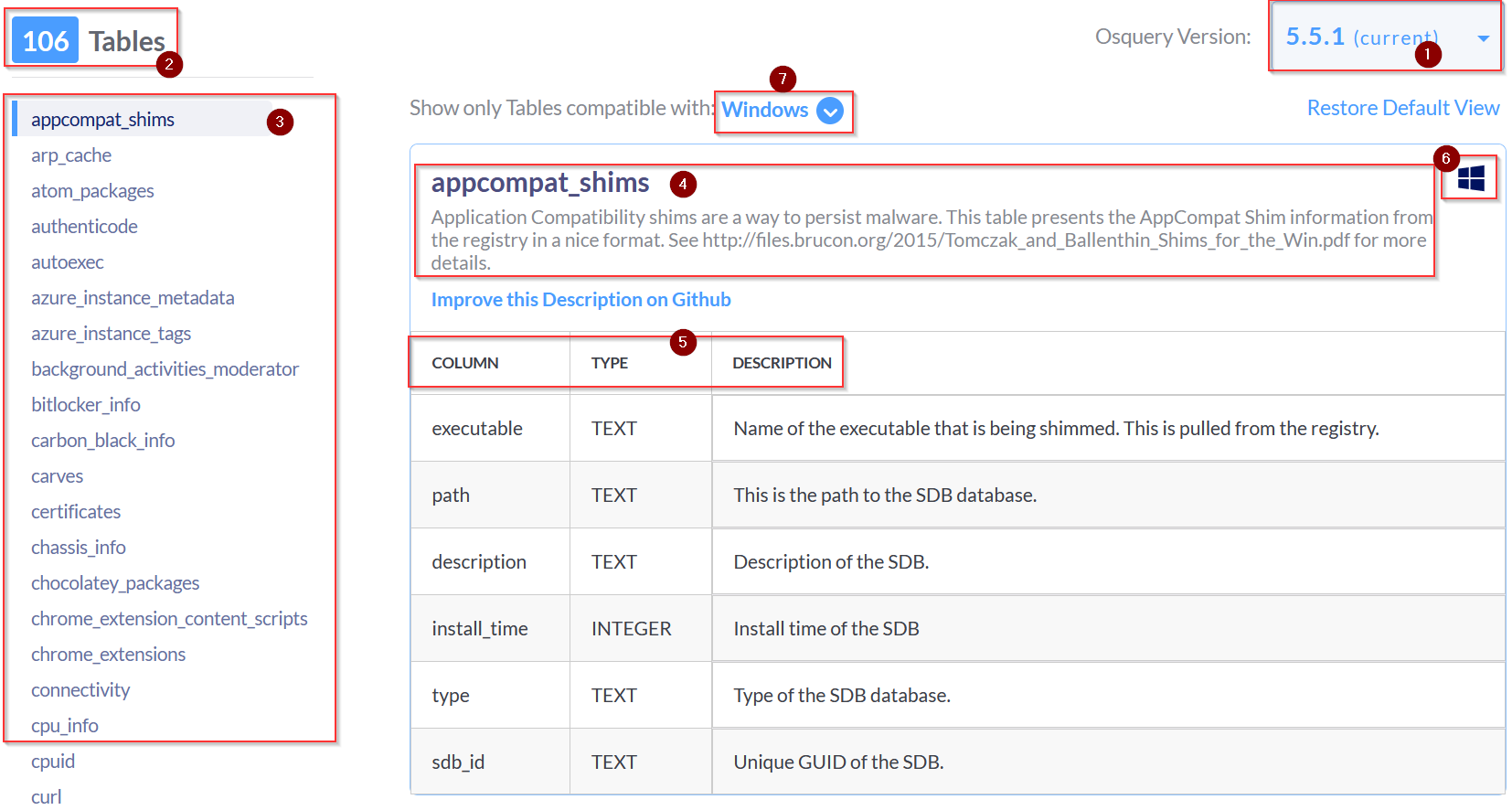
For this task, go to the schema documentation of Osquery version 5.5.1, the latest version. The schema documentation looks like the image shown below:
Breakdown
Let's break down the important information we could find in this schema documentation:
A dropdown lists various versions of Osquery. Choose the version of Osquery you wish to see schema tables for.
The number of tables within the selected version of Osquery. (In the above image, 106 tables are available).
The list of tables is listed in alphabetical order for the selected version of Osquery. This is the same result we get when we use the .table command in the interactive mode.
The name of the table and a brief description.
A detailed chart showing each table's column, type, and description.
Information to which Operating System the table applies. (In the above image, the account_policy_data table is available only for macOS)
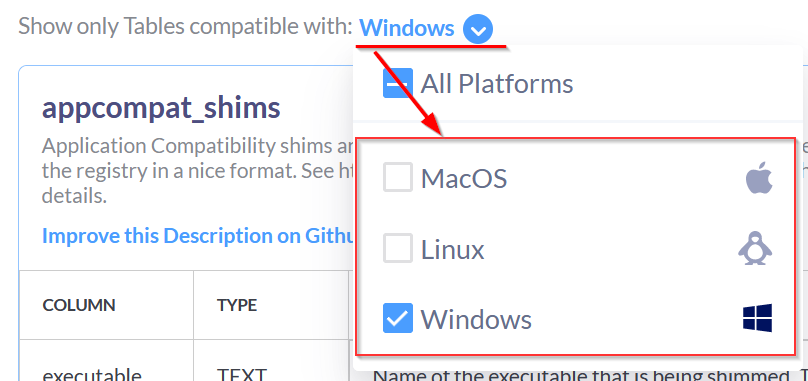
A dropdown menu to select the Operating System of choice. We can choose multiple Operating Systems, which will display the tables available for those Operating systems.
You have enough information to navigate this resource to retrieve any necessary information confidently.
106 tables in windows like documentation
osquery> .table
  => appcompat_shims
  => arp_cache
  => atom_packages
  => authenticode
  => autoexec
  => azure_instance_metadata
  => azure_instance_tags
  => background_activities_moderator
  => bitlocker_info
  => carbon_black_info
  => carves
  => certificates
  => chassis_info
  => chocolatey_packages
  => chrome_extension_content_scripts
  => chrome_extensions
  => connectivity
  => cpu_info
  => cpuid
  => curl
  => curl_certificate
  => default_environment
  => device_file
  => device_hash
  => device_partitions
  => disk_info
  => dns_cache
  => drivers
  => ec2_instance_metadata
  => ec2_instance_tags
  => etc_hosts
  => etc_protocols
  => etc_services
  => file
  => firefox_addons
  => groups
  => hash
  => hvci_status
  => ie_extensions
  => intel_me_info
  => interface_addresses
  => interface_details
  => kernel_info
  => kva_speculative_info
  => listening_ports
  => logged_in_users
  => logical_drives
  => logon_sessions
  => memory_devices
  => npm_packages
  => ntdomains
  => ntfs_acl_permissions
  => ntfs_journal_events
  => office_mru
  => os_version
  => osquery_events
  => osquery_extensions
  => osquery_flags
  => osquery_info
  => osquery_packs
  => osquery_registry
  => osquery_schedule
  => patches
  => physical_disk_performance
  => pipes
  => platform_info
  => powershell_events
  => prefetch
  => process_memory_map
  => process_open_sockets
  => processes
  => programs
  => python_packages
  => registry
  => routes
  => scheduled_tasks
  => secureboot
  => services
  => shared_resources
  => shellbags
  => shimcache
  => ssh_configs
  => startup_items
  => system_info
  => time
  => tpm_info
  => uptime
  => user_groups
  => user_ssh_keys
  => userassist
  => users
  => video_info
  => winbaseobj
  => windows_crashes
  => windows_eventlog
  => windows_events
  => windows_firewall_rules
  => windows_optional_features
  => windows_security_center
  => windows_security_products
  => windows_update_history
  => wmi_bios_info
  => wmi_cli_event_consumers
  => wmi_event_filters
  => wmi_filter_consumer_binding
  => wmi_script_event_consumers
  => yara
  => ycloud_instance_metadata
In Osquery version 5.5.1, how many common tables are returned, when we select both Linux and Window Operating system? ![[Pasted image 20221126181250.png]] 56
In Osquery version 5.5.1, how many tables for MAC OS are available? ![[Pasted image 20221126181317.png]] 180 In the Windows Operating system, which table is used to display the installed programs? ![[Pasted image 20221126181432.png]] programs
In Windows Operating system, which column contains the registry value within the registry table? ![[Pasted image 20221126181549.png]] data
Creating SQL queries
The SQL language implemented in Osquery is not an entire SQL language that you might be accustomed to, but rather it's a superset of SQLite.
Realistically all your queries will start with a SELECT statement. This makes sense because, with Osquery, you are only querying information on an endpoint. You won't be updating or deleting any information/data on the endpoint.
The exception to the rule: Using other SQL statements, such as UPDATE and DELETE, is possible, but only if you're creating run-time tables (views) or using an extension if the extension supports them.
Your queries will also include a FROM clause and end with a semicolon.
Exploring Installed Programs
If you wish to retrieve all the information about the installed programs on the endpoint, first understand the table schema either using the .schema programs command in the interactive mode or use the documentation here.
Query: SELECT * FROM programs LIMIT 1;
--osquery interactive mode--


root@analyst$ osqueryi
Using a virtual database. Need help, type '.help'
osquery>select * from programs limit 1;
              name = 7-Zip 21.07 (x64)
           version = 21.07
  install_location = C:\Program Files\7-Zip\
    install_source =
          language =
         publisher = Igor Pavlov
  uninstall_string = "C:\Program Files\7-Zip\Uninstall.exe"
      install_date =
identifying_number =
In the above example LIMIT was used followed by the number to limit the results to display.
Note: Your results will be different if you run this query in the attached VM or your local machine (if Osquery is installed). Here line mode is used to display the result.
The number of columns returned might be more than what you need. You can select specific columns rather than retrieve every column in the table.
Query: SELECT name, version, install_location, install_date from programs limit 1;
--osquery interactive mode--


root@analyst$ osqueryi
Using a virtual database. Need help, type '.help'
osquery>select name, version, install_location, install_date from programs limit 1;
            name = 7-Zip 21.07 (x64)
         version = 21.07
install_location = C:\Program Files\7-Zip\
    install_date =
The above query will list the name, version, install location, and installed date of the programs on the endpoint. This will still return many results, depending on how busy the endpoint is.
Count
To see how many programs or entries in any table are returned, we can use the count() function, as shown below:
Query: SELECT count(*) from programs;
--osquery interactive mode--


root@analyst$ osqueryi
Using a virtual database. Need help, type '.help'
osquery>select count(*) from programs;
count(*) = 160
WHERE Clause
Optionally, you can use a WHERE clause to narrow down the list of results returned based on specified criteria. The following query will first get the user table and only display the result for the user James, as shown below:
Query: SELECT * FROM users WHERE username='James';
--osquery interactive mode--


root@analyst$ osqueryi
Using a virtual database. Need help, type '.help'
osquery>SELECT * FROM users WHERE username='James';
        uid = 1002
        gid = 544
 uid_signed = 1002
 gid_signed = 544
   username = James
description =
  directory = C:\Users\James
      shell = C:\Windows\system32\cmd.exe
       uuid = S-1-5-21-605937711-2036809076-574958819-1002
       type = local
The equal sign is not the only filtering option in a WHERE clause. Below are filtering operators that can be used in a WHERE clause:
= [equal]
<>  [not equal]
>, >= [greater than, greater than, or equal to]
<, <= [less than or less than or equal to]
BETWEEN [between a range]
LIKE [pattern wildcard searches]
% [wildcard, multiple characters]
_ [wildcard, one character]
Matching Wildcard Rules
Below is a screenshot from the Osquery documentation showing examples of using wildcards when used in folder structures:
%: Match all files and folders for one level.
%%: Match all files and folders recursively.
%abc: Match all within-level ending in "abc".
abc%: Match all within-level starting with "abc".
Matching Examples
/Users/%/Library: Monitor for changes to every user's Library folder, but not the contents within.
/Users/%/Library/: Monitor for changes to files within each Library folder, but not the contents of their subdirectories.
/Users/%/Library/%: Same, changes to files within each Library folder.
/Users/%/Library/%%: Monitor changes recursively within each Library.
/bin/%sh: Monitor the bin directory for changes ending in sh.
Some tables require a WHERE clause, such as the file table, to return a value. If the required WHERE clause is not included in the query, then you will get an error.
--osquery interactive mode--


root@analyst$ osqueryi
Using a virtual database. Need help, type '.help'
osquery>select * from file;
W1017 12:38:29.730041 45744 virtual_table.cpp:965] Table file was queried without a required column in the WHERE clause
W1017 12:38:29.730041 45744 virtual_table.cpp:976] Please see the table documentation: https://osquery.io/schema/#file
Error: constraint failed
Joining Tables using JOIN Function
OSquery can also be used to join two tables based on a column that is shared by both tables. Let's look at two tables to demonstrate this further. Below is the schema for the user's table and the processes table.
--osquery interactive mode--


root@analyst$ osqueryi
Using a virtual database. Need help, type '.help'
osquery>.schema users
CREATE TABLE users(`uid` BIGINT, `gid` BIGINT, `uid_signed` BIGINT, `gid_signed` BIGINT, `username` TEXT, `description` TEXT, `directory` TEXT, `shell` TEXT, `uuid` TEXT, `type` TEXT, `is_hidden` INTEGER HIDDEN, `pid_with_namespace` INTEGER HIDDEN, PRIMARY KEY (`uid`, `username`, `uuid`, `pid_with_namespace`)) WITHOUT ROWID;

osquery>.schema processes
CREATE TABLE processes(`pid` BIGINT, `name` TEXT, `path` TEXT, `cmdline` TEXT, `state` TEXT, `cwd` TEXT, `root` TEXT, `uid` BIGINT, `gid` BIGINT, `euid` BIGINT, `egid` BIGINT, `suid` BIGINT, `sgid` BIGINT, `on_disk` INTEGER, `wired_size` BIGINT, `resident_size` BIGINT, `total_size` BIGINT, `user_time` BIGINT, `system_time` BIGINT, `disk_bytes_read` BIGINT, `disk_bytes_written` BIGINT, `start_time` BIGINT, `parent` BIGINT, `pgroup` BIGINT, `threads` INTEGER, `nice` INTEGER, `elevated_token` INTEGER, `secure_process` INTEGER, `protection_type` TEXT, `virtual_process` INTEGER, `elapsed_time` BIGINT, `handle_count` BIGINT, `percent_processor_time` BIGINT, `upid` BIGINT HIDDEN, `uppid` BIGINT HIDDEN, `cpu_type` INTEGER HIDDEN, `cpu_subtype` INTEGER HIDDEN, `translated` INTEGER HIDDEN, `cgroup_path` TEXT HIDDEN, `phys_footprint` BIGINT HIDDEN, PRIMARY KEY (`pid`)) WITHOUT ROWID;
Looking at both schemas, uid in users table is meant to identify the user record, and in the processes table, the column uid represents the user responsible for executing the particular process. We can join both tables using this uid field as shown below:
Query1: select uid, pid, name, path from processes;
Query2: select uid, username, description from users;
Joined Query: select p.pid, p.name, p.path, u.username from processes p JOIN users u on u.uid=p.uid LIMIT 10;
--osquery interactive mode--


root@analyst$ osqueryi
Using a virtual database. Need help, type '.help'
osquery>select p.pid, p.name, p.path, u.username from processes p JOIN users u on u.uid=p.uid LIMIT 10;
+-------+-------------------+---------------------------------------+----------+
| pid   | name              | path                                  | username |
+-------+-------------------+---------------------------------------+----------+
| 7560  | sihost.exe        | C:\Windows\System32\sihost.exe        | James    |
| 6984  | svchost.exe       | C:\Windows\System32\svchost.exe       | James    |
| 7100  | svchost.exe       | C:\Windows\System32\svchost.exe       | James    |
| 7144  | svchost.exe       | C:\Windows\System32\svchost.exe       | James    |
| 8636  | ctfmon.exe        | C:\Windows\System32\ctfmon.exe        | James    |
| 8712  | taskhostw.exe     | C:\Windows\System32\taskhostw.exe     | James    |
| 9260  | svchost.exe       | C:\Windows\System32\svchost.exe       | James    |
| 10168 | RuntimeBroker.exe | C:\Windows\System32\RuntimeBroker.exe | James    |
| 10232 | RuntimeBroker.exe | C:\Windows\System32\RuntimeBroker.exe | James    |
| 8924  | svchost.exe       | C:\Windows\System32\svchost.exe       | James    |
+-------+-------------------+---------------------------------------+----------+
Note: Please refer to the Osquery documentation for more information regarding SQL and creating queries specific to Osquery.
osquery> select * from programs;
+--------------------------------------------------------------------+---------------+----------------------------------------------------------+------------------------------------------------------------------------------------------------------------------------------------+----------+--------------------------------------------------------------+-----------------------------------------------------------------------------------------------------------------------------------------------------------+--------------+----------------------------------------+
| name | version | install_location | install_source | language | publisher | uninstall_string | install_date | identifying_number |
+--------------------------------------------------------------------+---------------+----------------------------------------------------------+------------------------------------------------------------------------------------------------------------------------------------+----------+--------------------------------------------------------------+-----------------------------------------------------------------------------------------------------------------------------------------------------------+--------------+----------------------------------------+
| aws-cfn-bootstrap | 2.0.5 | | C:\ProgramData\Package Cache\{2C9F7E98-B055-4344-B8E4-58996F4A3B00}v2.0.5\ | 1033 | Amazon Web Services | MsiExec.exe /X{2C9F7E98-B055-4344-B8E4-58996F4A3B00} | 20210311 | {2C9F7E98-B055-4344-B8E4-58996F4A3B00} |
| Microsoft Visual C++ 2022 X64 Minimum Runtime - 14.32.31332 | 14.32.31332 | | C:\ProgramData\Package Cache\{3407B900-37F5-4CC2-B612-5CD5D580A163}v14.32.31332\packages\vcRuntimeMinimum_amd64\ | 1033 | Microsoft Corporation | MsiExec.exe /I{3407B900-37F5-4CC2-B612-5CD5D580A163} | 20221018 | {3407B900-37F5-4CC2-B612-5CD5D580A163} |
| AWS PV Drivers | 8.3.4 | | C:\ProgramData\Amazon\SSM\Packages\_arnawsssmpackageawspvdriver_21_66XA4XBKMUL56B6HYCFMNHV3CWSN44PIP4NHKIOMCDJMKGPGJE3A====\8.3.4\ | 1033 | Amazon Web Services | MsiExec.exe /I{90C09D7C-18EB-4853-9F4F-D3040CC23924} | 20200909 | {90C09D7C-18EB-4853-9F4F-D3040CC23924} |
| osquery | 5.5.1 | C:\Program Files\osquery\ | C:\Users\James\Downloads\ | 1033 | osquery | MsiExec.exe /I{B55CDE5D-3EC9-4E57-AAD8-2B63BE889B46} | 20221018 | {B55CDE5D-3EC9-4E57-AAD8-2B63BE889B46} |
| Amazon SSM Agent | 3.0.529.0 | | C:\ProgramData\Package Cache\{C1130551-76E8-44D6-A31D-4A9D5B0817CF}v3.0.529.0\ | 1033 | Amazon Web Services | MsiExec.exe /I{C1130551-76E8-44D6-A31D-4A9D5B0817CF} | 20210311 | {C1130551-76E8-44D6-A31D-4A9D5B0817CF} |
| Microsoft Visual C++ 2022 X64 Additional Runtime - 14.32.31332 | 14.32.31332 | | C:\ProgramData\Package Cache\{F4499EE3-A166-496C-81BB-51D1BCDC70A9}v14.32.31332\packages\vcRuntimeAdditional_amd64\ | 1033 | Microsoft Corporation | MsiExec.exe /I{F4499EE3-A166-496C-81BB-51D1BCDC70A9} | 20221018 | {F4499EE3-A166-496C-81BB-51D1BCDC70A9} |
| Google Chrome | 107.0.5304.88 | C:\Program Files\Google\Chrome\Application | | | Google LLC | "C:\Program Files\Google\Chrome\Application\107.0.5304.88\Installer\setup.exe" --uninstall --channel=stable --system-level --verbose-logging | 20221104 | |
| Microsoft Edge Update | 1.3.169.31 | | | | | | | |
| Microsoft Edge WebView2 Runtime | 107.0.1418.26 | C:\Program Files (x86)\Microsoft\EdgeWebView\Application | | | Microsoft Corporation | "C:\Program Files (x86)\Microsoft\EdgeWebView\Application\107.0.1418.26\Installer\setup.exe" --uninstall --msedgewebview --system-level --verbose-logging | 20221104 | |
| Npcap | 1.60 | C:\Program Files\Npcap | | | Nmap Project | "C:\Program Files\Npcap\uninstall.exe" | | |
| ProtonVPN | 2.0.6 | C:\Program Files (x86)\Proton Technologies\ProtonVPN\ | | | Proton Technologies AG | msiexec.exe /i {E7AD46A7-6578-45D9-A690-BF58D33BA6B5} AI_UNINSTALLER_CTP=1 | | |
| Wireshark 3.6.8 64-bit | 3.6.8 | C:\Program Files\Wireshark | | | The Wireshark developer community, https://www.wireshark.org | "C:\Program Files\Wireshark\uninstall.exe" | | |
| Microsoft Visual C++ 2015-2022 Redistributable (x64) - 14.32.31332 | 14.32.31332.0 | | | | Microsoft Corporation | "C:\ProgramData\Package Cache\{3746f21b-c990-4045-bb33-1cf98cff7a68}\VC_redist.x64.exe" /uninstall | | {3746f21b-c990-4045-bb33-1cf98cff7a68} |
| Amazon SSM Agent | 3.0.529.0 | | | | Amazon Web Services | "C:\ProgramData\Package Cache\{674c5ef7-9d50-4540-a711-6b82e2469bd0}\AmazonSSMAgentSetup.exe" /uninstall | | {674c5ef7-9d50-4540-a711-6b82e2469bd0} |
| ProtonVPNTap | 1.1.4 | C:\Program Files (x86)\Proton Technologies\ProtonVPNTap\ | C:\Users\James\AppData\Local\Temp\{87BDF456-9882-44E6-8FFC-F73B83E42EAD}\3E42EAD\ | 1033 | Proton Technologies AG | MsiExec.exe /X{87BDF456-9882-44E6-8FFC-F73B83E42EAD} | 20221018 | {87BDF456-9882-44E6-8FFC-F73B83E42EAD} |
| ProtonVPNTun | 0.13.1 | C:\Program Files (x86)\Proton Technologies\ProtonVPNTun\ | C:\Users\James\AppData\Local\Temp\{B1EBF050-CC3E-45B0-9DE5-339C6241F3DA}\241F3DA\ | 1033 | Proton Technologies AG | MsiExec.exe /X{B1EBF050-CC3E-45B0-9DE5-339C6241F3DA} | 20221018 | {B1EBF050-CC3E-45B0-9DE5-339C6241F3DA} |
| aws-cfn-bootstrap | 2.0.5 | | | | Amazon Web Services | "C:\ProgramData\Package Cache\{ba1812b9-5f2c-4e6a-b720-5cdd8247ad61}\aws-cfn-bootstrap-bundle.exe" /uninstall | | {ba1812b9-5f2c-4e6a-b720-5cdd8247ad61} |
| AWS Tools for Windows | 3.15.1248 | | C:\ec2amibuild\ | 1033 | Amazon Web Services Developer Relations | MsiExec.exe /I{D08A7BB0-68D1-4A6A-B643-8A399E5CD84A} | 20210311 | {D08A7BB0-68D1-4A6A-B643-8A399E5CD84A} |
| ProtonVPN | 2.0.6 | C:\Program Files (x86)\Proton Technologies\ProtonVPN\ | C:\Users\James\AppData\Local\Temp\{E7AD46A7-6578-45D9-A690-BF58D33BA6B5}\33BA6B5\ | 1033 | Proton Technologies AG | MsiExec.exe /I{E7AD46A7-6578-45D9-A690-BF58D33BA6B5} | 20221018 | {E7AD46A7-6578-45D9-A690-BF58D33BA6B5} |
+--------------------------------------------------------------------+---------------+----------------------------------------------------------+------------------------------------------------------------------------------------------------------------------------------------+----------+--------------------------------------------------------------+-----------------------------------------------------------------------------------------------------------------------------------------------------------+--------------+----------------------------------------+
osquery> select * from programs LIMIT 1;
+-------------------+---------+------------------+----------------------------------------------------------------------------+----------+---------------------+------------------------------------------------------+--------------+----------------------------------------+
| name | version | install_location | install_source | language | publisher | uninstall_string | install_date | identifying_number |
+-------------------+---------+------------------+----------------------------------------------------------------------------+----------+---------------------+------------------------------------------------------+--------------+----------------------------------------+
| aws-cfn-bootstrap | 2.0.5 | | C:\ProgramData\Package Cache\{2C9F7E98-B055-4344-B8E4-58996F4A3B00}v2.0.5\ | 1033 | Amazon Web Services | MsiExec.exe /X{2C9F7E98-B055-4344-B8E4-58996F4A3B00} | 20210311 | {2C9F7E98-B055-4344-B8E4-58996F4A3B00} |
+-------------------+---------+------------------+----------------------------------------------------------------------------+----------+---------------------+------------------------------------------------------+--------------+----------------------------------------+
osquery> select * from programs LIMIT 1;
+-------------------+---------+------------------+----------------------------------------------------------------------------+----------+---------------------+------------------------------------------------------+--------------+----------------------------------------+
| name | version | install_location | install_source | language | publisher | uninstall_string | install_date | identifying_number |
+-------------------+---------+------------------+----------------------------------------------------------------------------+----------+---------------------+------------------------------------------------------+--------------+----------------------------------------+
| aws-cfn-bootstrap | 2.0.5 | | C:\ProgramData\Package Cache\{2C9F7E98-B055-4344-B8E4-58996F4A3B00}v2.0.5\ | 1033 | Amazon Web Services | MsiExec.exe /X{2C9F7E98-B055-4344-B8E4-58996F4A3B00} | 20210311 | {2C9F7E98-B055-4344-B8E4-58996F4A3B00} |
+-------------------+---------+------------------+----------------------------------------------------------------------------+----------+---------------------+------------------------------------------------------+--------------+----------------------------------------+
osquery> select name, version, install_location, install_dat from programs limit 1;
Error: no such column: install_dat
osquery> select name, version, install_location, install_date from programs limit 1;
+-------------------+---------+------------------+--------------+
| name | version | install_location | install_date |
+-------------------+---------+------------------+--------------+
| aws-cfn-bootstrap | 2.0.5 | | 20210311 |
+-------------------+---------+------------------+--------------+
osquery> select count(*) from programs;
+----------+
| count(*) |
+----------+
| 19 |
+----------+
osquery> select * from users;
+------+-----+------------+------------+--------------------+-------------------------------------------------------------------------------------------------+---------------------------------------------+-----------------------------+----------------------------------------------+---------+
| uid | gid | uid_signed | gid_signed | username | description | directory | shell | uuid | type |
+------+-----+------------+------------+--------------------+-------------------------------------------------------------------------------------------------+---------------------------------------------+-----------------------------+----------------------------------------------+---------+
| 1008 | 544 | 1008 | 544 | 4n6lab | | | C:\Windows\system32\cmd.exe | S-1-5-21-1966530601-3185510712-10604624-1008 | local |
| 500 | 544 | 500 | 544 | Administrator | Built-in account for administering the computer/domain | C:\Users\Administrator | C:\Windows\system32\cmd.exe | S-1-5-21-1966530601-3185510712-10604624-500 | local |
| 1010 | 544 | 1010 | 544 | art-test | | | C:\Windows\system32\cmd.exe | S-1-5-21-1966530601-3185510712-10604624-1010 | local |
| 503 | 581 | 503 | 581 | DefaultAccount | A user account managed by the system. | | C:\Windows\system32\cmd.exe | S-1-5-21-1966530601-3185510712-10604624-503 | local |
| 501 | 546 | 501 | 546 | Guest | Built-in account for guest access to the computer/domain | | C:\Windows\system32\cmd.exe | S-1-5-21-1966530601-3185510712-10604624-501 | local |
| 1009 | 544 | 1009 | 544 | James | Creative Artist | C:\Users\James | C:\Windows\system32\cmd.exe | S-1-5-21-1966530601-3185510712-10604624-1009 | local |
| 504 | 513 | 504 | 513 | WDAGUtilityAccount | A user account managed and used by the system for Windows Defender Application Guard scenarios. | | C:\Windows\system32\cmd.exe | S-1-5-21-1966530601-3185510712-10604624-504 | local |
| 18 | 18 | 18 | 18 | SYSTEM | | %systemroot%\system32\config\systemprofile | C:\Windows\system32\cmd.exe | S-1-5-18 | special |
| 19 | 19 | 19 | 19 | LOCAL SERVICE | | %systemroot%\ServiceProfiles\LocalService | C:\Windows\system32\cmd.exe | S-1-5-19 | special |
| 20 | 20 | 20 | 20 | NETWORK SERVICE | | %systemroot%\ServiceProfiles\NetworkService | C:\Windows\system32\cmd.exe | S-1-5-20 | special |
+------+-----+------------+------------+--------------------+-------------------------------------------------------------------------------------------------+---------------------------------------------+-----------------------------+----------------------------------------------+---------+
osquery> select * from users where username='James';
+------+-----+------------+------------+----------+-----------------+----------------+-----------------------------+----------------------------------------------+-------+
| uid | gid | uid_signed | gid_signed | username | description | directory | shell | uuid | type |
+------+-----+------------+------------+----------+-----------------+----------------+-----------------------------+----------------------------------------------+-------+
| 1009 | 544 | 1009 | 544 | James | Creative Artist | C:\Users\James | C:\Windows\system32\cmd.exe | S-1-5-21-1966530601-3185510712-10604624-1009 | local |
+------+-----+------------+------------+----------+-----------------+----------------+-----------------------------+----------------------------------------------+-------+
osquery> .tables processes
=> processes
osquery> .schema processes
CREATE TABLE processes(`pid` BIGINT, `name` TEXT, `path` TEXT, `cmdline` TEXT, `state` TEXT, `cwd` TEXT, `root` TEXT, `uid` BIGINT, `gid` BIGINT, `euid` BIGINT, `egid` BIGINT, `suid` BIGINT, `sgid` BIGINT, `on_disk` INTEGER, `wired_size` BIGINT, `resident_size` BIGINT, `total_size` BIGINT, `user_time` BIGINT, `system_time` BIGINT, `disk_bytes_read` BIGINT, `disk_bytes_written` BIGINT, `start_time` BIGINT, `parent` BIGINT, `pgroup` BIGINT, `threads` INTEGER, `nice` INTEGER, `elevated_token` INTEGER, `secure_process` INTEGER, `protection_type` TEXT, `virtual_process` INTEGER, `elapsed_time` BIGINT, `handle_count` BIGINT, `percent_processor_time` BIGINT, `upid` BIGINT HIDDEN, `uppid` BIGINT HIDDEN, `cpu_type` INTEGER HIDDEN, `cpu_subtype` INTEGER HIDDEN, `translated` INTEGER HIDDEN, `cgroup_path` TEXT HIDDEN, `phys_footprint` BIGINT HIDDEN, PRIMARY KEY (`pid`)) WITHOUT ROWID;
osquery> .schema users
CREATE TABLE users(`uid` BIGINT, `gid` BIGINT, `uid_signed` BIGINT, `gid_signed` BIGINT, `username` TEXT, `description` TEXT, `directory` TEXT, `shell` TEXT, `uuid` TEXT, `type` TEXT, `is_hidden` INTEGER HIDDEN, `pid_with_namespace` INTEGER HIDDEN, PRIMARY KEY (`uid`, `username`, `uuid`, `pid_with_namespace`)) WITHOUT ROWID;
osquery> select p.pid, p.name, p.path, u.username from processes p join users u on u.uid=p.uid limit 10;
+------+-------------------------+---------------------------------------------------------------------------------+----------+
| pid | name | path | username |
+------+-------------------------+---------------------------------------------------------------------------------+----------+
| 1640 | rdpclip.exe | C:\Windows\System32\rdpclip.exe | James |
| 4468 | svchost.exe | C:\Windows\System32\svchost.exe | James |
| 4444 | svchost.exe | C:\Windows\System32\svchost.exe | James |
| 2576 | taskhostw.exe | C:\Windows\System32\taskhostw.exe | James |
| 3136 | sihost.exe | C:\Windows\System32\sihost.exe | James |
| 1820 | ctfmon.exe | C:\Windows\System32\ctfmon.exe | James |
| 5288 | explorer.exe | C:\Windows\explorer.exe | James |
| 5648 | ShellExperienceHost.exe | C:\Windows\SystemApps\ShellExperienceHost_cw5n1h2txyewy\ShellExperienceHost.exe | James |
| 5788 | SearchUI.exe | C:\Windows\SystemApps\Microsoft.Windows.Cortana_cw5n1h2txyewy\SearchUI.exe | James |
| 5796 | RuntimeBroker.exe | C:\Windows\System32\RuntimeBroker.exe | James |
+------+-------------------------+---------------------------------------------------------------------------------+----------+
doing exercises
osquery> select count(*) from programs;
+----------+
| count(*) |
+----------+
| 19 |
+----------+
osquery> select description from users where username='James';
+-----------------+
| description |
+-----------------+
| Creative Artist |
+-----------------+
osquery> .schema registry
CREATE TABLE registry(`key` TEXT COLLATE NOCASE, `path` TEXT, `name` TEXT, `type` TEXT, `data` TEXT, `mtime` BIGINT, PRIMARY KEY (`key`, `path`)) WITHOUT ROWID;
osquery> select path, key, name from registry where key='HKEY_USERS';
+-----------------------------------------------------------------+------------+------------------------------------------------------+
| path | key | name |
+-----------------------------------------------------------------+------------+------------------------------------------------------+
| HKEY_USERS\.DEFAULT | HKEY_USERS | .DEFAULT |
| HKEY_USERS\S-1-5-19 | HKEY_USERS | S-1-5-19 |
| HKEY_USERS\S-1-5-20 | HKEY_USERS | S-1-5-20 |
| HKEY_USERS\S-1-5-21-1966530601-3185510712-10604624-1009 | HKEY_USERS | S-1-5-21-1966530601-3185510712-10604624-1009 |
| HKEY_USERS\S-1-5-21-1966530601-3185510712-10604624-1009_Classes | HKEY_USERS | S-1-5-21-1966530601-3185510712-10604624-1009_Classes |
| HKEY_USERS\S-1-5-18 | HKEY_USERS | S-1-5-18 |
+-----------------------------------------------------------------+------------+------------------------------------------------------+
osquery> .schema ie_extensions
CREATE TABLE ie_extensions(`name` TEXT, `registry_path` TEXT, `version` TEXT, `path` TEXT);
osquery> select * from ie_extensions;
+---------------------------+----------------------------------------------------------------------------------------------------------------------------------------------------+-----------------+---------------------------------+
| name | registry_path | version | path |
+---------------------------+----------------------------------------------------------------------------------------------------------------------------------------------------+-----------------+---------------------------------+
| Microsoft Url Search Hook | HKEY_USERS\S-1-5-21-1966530601-3185510712-10604624-1009\SOFTWARE\Microsoft\Internet Explorer\URLSearchHooks\{CFBFAE00-17A6-11D0-99CB-00C04FD64497} | 11.0.17763.3532 | C:\Windows\System32\ieframe.dll |
+---------------------------+----------------------------------------------------------------------------------------------------------------------------------------------------+-----------------+---------------------------------+
osquery> .schema programs
CREATE TABLE programs(`name` TEXT, `version` TEXT, `install_location` TEXT, `install_source` TEXT, `language` TEXT, `publisher` TEXT, `uninstall_string` TEXT, `install_date` TEXT, `identifying_number` TEXT);
osquery> select name,install_location from programs where name like %wireshark%;
Error: near "%": syntax error
osquery> select name,install_location from programs where name like '%wireshark%';
+------------------------+----------------------------+
| name | install_location |
+------------------------+----------------------------+
| Wireshark 3.6.8 64-bit | C:\Program Files\Wireshark |
+------------------------+----------------------------+
Using Osquery, how many programs are installed on this host? 19
Using Osquery, what is the description for the user James? Creative Artist
When we run the following search query, what is the full SID of the user with RID '1009'?
Query: select path, key, name from registry where key = 'HKEY_USERS'; S-1-5-21-1966530601-3185510712-10604624-1009
When we run the following search query, what is the Internet Explorer browser extension installed on this machine?
Query: select * from ie_extensions;
*C:\Windows\System32\ieframe.dll*
After running the following query, what is the full name of the program returned?
Query: select name,install_location from programs where name LIKE '%wireshark%'; Wireshark 3.6.8 64-bit
Challenge and Conclusion
Now that we have explored various tables, learned how to create search queries, and ask questions from the operating system, it's time for a challenge. Use OSquery to examine the host and answer the following questions.
userassist
UserAssist Registry Key tracks when a user executes an application from Windows Explorer.
osquery> .schema userassist
CREATE TABLE userassist(`path` TEXT, `last_execution_time` BIGINT, `count` INTEGER, `sid` TEXT);
osquery> select * from userassist;
+-------------------------------------------------------------------------------------+---------------------+-------+----------------------------------------------+
| path | last_execution_time | count | sid |
+-------------------------------------------------------------------------------------+---------------------+-------+----------------------------------------------+
| UEME_CTLCUACount:ctor | | | S-1-5-21-1966530601-3185510712-10604624-1009 |
| {1AC14E77-02E7-4E5D-B744-2EB1AE5198B7}\SnippingTool.exe | 1666104756 | 14 | S-1-5-21-1966530601-3185510712-10604624-1009 |
| UEME_CTLSESSION | | | S-1-5-21-1966530601-3185510712-10604624-1009 |
| {1AC14E77-02E7-4E5D-B744-2EB1AE5198B7}\mspaint.exe | 1666104756 | 8 | S-1-5-21-1966530601-3185510712-10604624-1009 |
| {1AC14E77-02E7-4E5D-B744-2EB1AE5198B7}\notepad.exe | 1667582559 | 3 | S-1-5-21-1966530601-3185510712-10604624-1009 |
| {1AC14E77-02E7-4E5D-B744-2EB1AE5198B7}\cmd.exe | 1666117636 | 3 | S-1-5-21-1966530601-3185510712-10604624-1009 |
| Microsoft.Windows.Explorer | 1667582545 | 12 | S-1-5-21-1966530601-3185510712-10604624-1009 |
| windows.immersivecontrolpanel_cw5n1h2txyewy!microsoft.windows.immersivecontrolpanel | 1667582946 | 3 | S-1-5-21-1966530601-3185510712-10604624-1009 |
| C:\Users\James\Downloads\tools\ChromeSetup.exe | 1666106210 | 1 | S-1-5-21-1966530601-3185510712-10604624-1009 |
| {7C5A40EF-A0FB-4BFC-874A-C0F2E0B9FA8E}\Google\Temp\GUM1145.tmp\GoogleUpdate.exe | 0 | | S-1-5-21-1966530601-3185510712-10604624-1009 |
| {7C5A40EF-A0FB-4BFC-874A-C0F2E0B9FA8E}\Google\Update\GoogleUpdate.exe | 0 | | S-1-5-21-1966530601-3185510712-10604624-1009 |
| Chrome | 1666117013 | 1 | S-1-5-21-1966530601-3185510712-10604624-1009 |
| Microsoft.Windows.Cortana_cw5n1h2txyewy!CortanaUI | 0 | | S-1-5-21-1966530601-3185510712-10604624-1009 |
| {1AC14E77-02E7-4E5D-B744-2EB1AE5198B7}\WindowsPowerShell\v1.0\powershell.exe | 1669502722 | 7 | S-1-5-21-1966530601-3185510712-10604624-1009 |
| Microsoft.Windows.ControlPanel | 0 | | S-1-5-21-1966530601-3185510712-10604624-1009 |
| {1AC14E77-02E7-4E5D-B744-2EB1AE5198B7}\msiexec.exe | 1666117106 | 2 | S-1-5-21-1966530601-3185510712-10604624-1009 |
| Microsoft.Windows.WindowsInstaller | 0 | | S-1-5-21-1966530601-3185510712-10604624-1009 |
| Microsoft.Windows.ShellExperienceHost_cw5n1h2txyewy!App | 0 | | S-1-5-21-1966530601-3185510712-10604624-1009 |
| {6D809377-6AF0-444B-8957-A3773F02200E}\osquery\osqueryi.exe | 1666117204 | 1 | S-1-5-21-1966530601-3185510712-10604624-1009 |
| Microsoft.Windows.SecHealthUI_cw5n1h2txyewy!SecHealthUI | 1666117503 | 1 | S-1-5-21-1966530601-3185510712-10604624-1009 |
| {1AC14E77-02E7-4E5D-B744-2EB1AE5198B7}\SystemPropertiesAdvanced.exe | 0 | | S-1-5-21-1966530601-3185510712-10604624-1009 |
| C:\Users\James\Downloads\tools\Wireshark-win64-3.6.8.exe | 1666118161 | 1 | S-1-5-21-1966530601-3185510712-10604624-1009 |
| {6D809377-6AF0-444B-8957-A3773F02200E}\Wireshark\npcap-1.60.exe | 0 | | S-1-5-21-1966530601-3185510712-10604624-1009 |
| {6D809377-6AF0-444B-8957-A3773F02200E}\Npcap\NPFInstall.exe | 0 | | S-1-5-21-1966530601-3185510712-10604624-1009 |
| C:\Users\James\Downloads\tools\ProtonVPN_win_v2.0.6.exe | 1666118971 | 1 | S-1-5-21-1966530601-3185510712-10604624-1009 |
| {7C5A40EF-A0FB-4BFC-874A-C0F2E0B9FA8E}\Proton Technologies\ProtonVPN\ProtonVPN.exe | 0 | | S-1-5-21-1966530601-3185510712-10604624-1009 |
| C:\Users\James\Documents\DiskWipe.exe | 1666127467 | 2 | S-1-5-21-1966530601-3185510712-10604624-1009 |
| {1AC14E77-02E7-4E5D-B744-2EB1AE5198B7}\win32calc.exe | 0 | | S-1-5-21-1966530601-3185510712-10604624-1009 |
| Microsoft.AutoGenerated.{923DD477-5846-686B-A659-0FCCD73851A8} | 1667582900 | 3 | S-1-5-21-1966530601-3185510712-10604624-1009 |
| Microsoft.Windows.Shell.RunDialog | 0 | | S-1-5-21-1966530601-3185510712-10604624-1009 |
| {0139D44E-6AFE-49F2-8690-3DAFCAE6FFB8}\StartUp\batstartup.bat | 1667582551 | 1 | S-1-5-21-1966530601-3185510712-10604624-1009 |
| {F38BF404-1D43-42F2-9305-67DE0B28FC23}\regedit.exe | 1667582840 | 2 | S-1-5-21-1966530601-3185510712-10604624-1009 |
| Microsoft.AutoGenerated.{C1C6F8AC-40A3-0F5C-146F-65A9DC70BBB4} | 1667584262 | 1 | S-1-5-21-1966530601-3185510712-10604624-1009 |
| UEME_CTLCUACount:ctor | | | S-1-5-21-1966530601-3185510712-10604624-1009 |
| {0139D44E-6AFE-49F2-8690-3DAFCAE6FFB8}\Accessories\Snipping Tool.lnk | 1666104756 | 14 | S-1-5-21-1966530601-3185510712-10604624-1009 |
| UEME_CTLSESSION | | | S-1-5-21-1966530601-3185510712-10604624-1009 |
| {0139D44E-6AFE-49F2-8690-3DAFCAE6FFB8}\Accessories\Paint.lnk | 1666104756 | 8 | S-1-5-21-1966530601-3185510712-10604624-1009 |
| {A77F5D77-2E2B-44C3-A6A2-ABA601054A51}\Accessories\Notepad.lnk | 1666104756 | 2 | S-1-5-21-1966530601-3185510712-10604624-1009 |
| {9E3995AB-1F9C-4F13-B827-48B24B6C7174}\TaskBar\File Explorer.lnk | 1666117535 | 4 | S-1-5-21-1966530601-3185510712-10604624-1009 |
| {A77F5D77-2E2B-44C3-A6A2-ABA601054A51}\Windows PowerShell\Windows PowerShell.lnk | 1666126305 | 4 | S-1-5-21-1966530601-3185510712-10604624-1009 |
| {A77F5D77-2E2B-44C3-A6A2-ABA601054A51}\System Tools\Command Prompt.lnk | 1666117636 | 3 | S-1-5-21-1966530601-3185510712-10604624-1009 |
| C:\Users\Public\Desktop\Google Chrome.lnk | 1666117013 | 1 | S-1-5-21-1966530601-3185510712-10604624-1009 |
| {9E3995AB-1F9C-4F13-B827-48B24B6C7174}\TaskBar\osquery daemon and shell.lnk | 1666117204 | 1 | S-1-5-21-1966530601-3185510712-10604624-1009 |
| {9E3995AB-1F9C-4F13-B827-48B24B6C7174}\TaskBar\Windows PowerShell.lnk | 1669502722 | 3 | S-1-5-21-1966530601-3185510712-10604624-1009 |
| {0139D44E-6AFE-49F2-8690-3DAFCAE6FFB8}\Administrative Tools\Registry Editor.lnk | 1667582840 | 2 | S-1-5-21-1966530601-3185510712-10604624-1009 |
| {0139D44E-6AFE-49F2-8690-3DAFCAE6FFB8}\System Tools\Task Manager.lnk | 1667582900 | 1 | S-1-5-21-1966530601-3185510712-10604624-1009 |
| {0139D44E-6AFE-49F2-8690-3DAFCAE6FFB8}\Administrative Tools\Task Scheduler.lnk | 1667584262 | 1 | S-1-5-21-1966530601-3185510712-10604624-1009 |
+-------------------------------------------------------------------------------------+---------------------+-------+----------------------------------------------+
osquery> select * from userassist where path like '%Disk%';
+---------------------------------------+---------------------+-------+----------------------------------------------+
| path | last_execution_time | count | sid |
+---------------------------------------+---------------------+-------+----------------------------------------------+
| C:\Users\James\Documents\DiskWipe.exe | 1666127467 | 2 | S-1-5-21-1966530601-3185510712-10604624-1009 |
+---------------------------------------+---------------------+-------+----------------------------------------------+
osquery> select * from programs;
+--------------------------------------------------------------------+---------------+----------------------------------------------------------+------------------------------------------------------------------------------------------------------------------------------------+----------+--------------------------------------------------------------+-----------------------------------------------------------------------------------------------------------------------------------------------------------+--------------+----------------------------------------+
| name | version | install_location | install_source | language | publisher | uninstall_string | install_date | identifying_number |
+--------------------------------------------------------------------+---------------+----------------------------------------------------------+------------------------------------------------------------------------------------------------------------------------------------+----------+--------------------------------------------------------------+-----------------------------------------------------------------------------------------------------------------------------------------------------------+--------------+----------------------------------------+
| aws-cfn-bootstrap | 2.0.5 | | C:\ProgramData\Package Cache\{2C9F7E98-B055-4344-B8E4-58996F4A3B00}v2.0.5\ | 1033 | Amazon Web Services | MsiExec.exe /X{2C9F7E98-B055-4344-B8E4-58996F4A3B00} | 20210311 | {2C9F7E98-B055-4344-B8E4-58996F4A3B00} |
| Microsoft Visual C++ 2022 X64 Minimum Runtime - 14.32.31332 | 14.32.31332 | | C:\ProgramData\Package Cache\{3407B900-37F5-4CC2-B612-5CD5D580A163}v14.32.31332\packages\vcRuntimeMinimum_amd64\ | 1033 | Microsoft Corporation | MsiExec.exe /I{3407B900-37F5-4CC2-B612-5CD5D580A163} | 20221018 | {3407B900-37F5-4CC2-B612-5CD5D580A163} |
| AWS PV Drivers | 8.3.4 | | C:\ProgramData\Amazon\SSM\Packages\_arnawsssmpackageawspvdriver_21_66XA4XBKMUL56B6HYCFMNHV3CWSN44PIP4NHKIOMCDJMKGPGJE3A====\8.3.4\ | 1033 | Amazon Web Services | MsiExec.exe /I{90C09D7C-18EB-4853-9F4F-D3040CC23924} | 20200909 | {90C09D7C-18EB-4853-9F4F-D3040CC23924} |
| osquery | 5.5.1 | C:\Program Files\osquery\ | C:\Users\James\Downloads\ | 1033 | osquery | MsiExec.exe /I{B55CDE5D-3EC9-4E57-AAD8-2B63BE889B46} | 20221018 | {B55CDE5D-3EC9-4E57-AAD8-2B63BE889B46} |
| Amazon SSM Agent | 3.0.529.0 | | C:\ProgramData\Package Cache\{C1130551-76E8-44D6-A31D-4A9D5B0817CF}v3.0.529.0\ | 1033 | Amazon Web Services | MsiExec.exe /I{C1130551-76E8-44D6-A31D-4A9D5B0817CF} | 20210311 | {C1130551-76E8-44D6-A31D-4A9D5B0817CF} |
| Microsoft Visual C++ 2022 X64 Additional Runtime - 14.32.31332 | 14.32.31332 | | C:\ProgramData\Package Cache\{F4499EE3-A166-496C-81BB-51D1BCDC70A9}v14.32.31332\packages\vcRuntimeAdditional_amd64\ | 1033 | Microsoft Corporation | MsiExec.exe /I{F4499EE3-A166-496C-81BB-51D1BCDC70A9} | 20221018 | {F4499EE3-A166-496C-81BB-51D1BCDC70A9} |
| Google Chrome | 107.0.5304.88 | C:\Program Files\Google\Chrome\Application | | | Google LLC | "C:\Program Files\Google\Chrome\Application\107.0.5304.88\Installer\setup.exe" --uninstall --channel=stable --system-level --verbose-logging | 20221104 | |
| Microsoft Edge Update | 1.3.169.31 | | | | | | | |
| Microsoft Edge WebView2 Runtime | 107.0.1418.26 | C:\Program Files (x86)\Microsoft\EdgeWebView\Application | | | Microsoft Corporation | "C:\Program Files (x86)\Microsoft\EdgeWebView\Application\107.0.1418.26\Installer\setup.exe" --uninstall --msedgewebview --system-level --verbose-logging | 20221104 | |
| Npcap | 1.60 | C:\Program Files\Npcap | | | Nmap Project | "C:\Program Files\Npcap\uninstall.exe" | | |
| ProtonVPN | 2.0.6 | C:\Program Files (x86)\Proton Technologies\ProtonVPN\ | | | Proton Technologies AG | msiexec.exe /i {E7AD46A7-6578-45D9-A690-BF58D33BA6B5} AI_UNINSTALLER_CTP=1 | | |
| Wireshark 3.6.8 64-bit | 3.6.8 | C:\Program Files\Wireshark | | | The Wireshark developer community, https://www.wireshark.org | "C:\Program Files\Wireshark\uninstall.exe" | | |
| Microsoft Visual C++ 2015-2022 Redistributable (x64) - 14.32.31332 | 14.32.31332.0 | | | | Microsoft Corporation | "C:\ProgramData\Package Cache\{3746f21b-c990-4045-bb33-1cf98cff7a68}\VC_redist.x64.exe" /uninstall | | {3746f21b-c990-4045-bb33-1cf98cff7a68} |
| Amazon SSM Agent | 3.0.529.0 | | | | Amazon Web Services | "C:\ProgramData\Package Cache\{674c5ef7-9d50-4540-a711-6b82e2469bd0}\AmazonSSMAgentSetup.exe" /uninstall | | {674c5ef7-9d50-4540-a711-6b82e2469bd0} |
| ProtonVPNTap | 1.1.4 | C:\Program Files (x86)\Proton Technologies\ProtonVPNTap\ | C:\Users\James\AppData\Local\Temp\{87BDF456-9882-44E6-8FFC-F73B83E42EAD}\3E42EAD\ | 1033 | Proton Technologies AG | MsiExec.exe /X{87BDF456-9882-44E6-8FFC-F73B83E42EAD} | 20221018 | {87BDF456-9882-44E6-8FFC-F73B83E42EAD} |
| ProtonVPNTun | 0.13.1 | C:\Program Files (x86)\Proton Technologies\ProtonVPNTun\ | C:\Users\James\AppData\Local\Temp\{B1EBF050-CC3E-45B0-9DE5-339C6241F3DA}\241F3DA\ | 1033 | Proton Technologies AG | MsiExec.exe /X{B1EBF050-CC3E-45B0-9DE5-339C6241F3DA} | 20221018 | {B1EBF050-CC3E-45B0-9DE5-339C6241F3DA} |
| aws-cfn-bootstrap | 2.0.5 | | | | Amazon Web Services | "C:\ProgramData\Package Cache\{ba1812b9-5f2c-4e6a-b720-5cdd8247ad61}\aws-cfn-bootstrap-bundle.exe" /uninstall | | {ba1812b9-5f2c-4e6a-b720-5cdd8247ad61} |
| AWS Tools for Windows | 3.15.1248 | | C:\ec2amibuild\ | 1033 | Amazon Web Services Developer Relations | MsiExec.exe /I{D08A7BB0-68D1-4A6A-B643-8A399E5CD84A} | 20210311 | {D08A7BB0-68D1-4A6A-B643-8A399E5CD84A} |
| ProtonVPN | 2.0.6 | C:\Program Files (x86)\Proton Technologies\ProtonVPN\ | C:\Users\James\AppData\Local\Temp\{E7AD46A7-6578-45D9-A690-BF58D33BA6B5}\33BA6B5\ | 1033 | Proton Technologies AG | MsiExec.exe /I{E7AD46A7-6578-45D9-A690-BF58D33BA6B5} | 20221018 | {E7AD46A7-6578-45D9-A690-BF58D33BA6B5} |
+--------------------------------------------------------------------+---------------+----------------------------------------------------------+------------------------------------------------------------------------------------------------------------------------------------+----------+--------------------------------------------------------------+-----------------------------------------------------------------------------------------------------------------------------------------------------------+--------------+----------------------------------------+
osquery> select * from programs where name like '%VPN';
+-----------+---------+-------------------------------------------------------+-----------------------------------------------------------------------------------+----------+------------------------+----------------------------------------------------------------------------+--------------+----------------------------------------+
| name | version | install_location | install_source | language | publisher | uninstall_string | install_date | identifying_number |
+-----------+---------+-------------------------------------------------------+-----------------------------------------------------------------------------------+----------+------------------------+----------------------------------------------------------------------------+--------------+----------------------------------------+
| ProtonVPN | 2.0.6 | C:\Program Files (x86)\Proton Technologies\ProtonVPN\ | | | Proton Technologies AG | msiexec.exe /i {E7AD46A7-6578-45D9-A690-BF58D33BA6B5} AI_UNINSTALLER_CTP=1 | | |
| ProtonVPN | 2.0.6 | C:\Program Files (x86)\Proton Technologies\ProtonVPN\ | C:\Users\James\AppData\Local\Temp\{E7AD46A7-6578-45D9-A690-BF58D33BA6B5}\33BA6B5\ | 1033 | Proton Technologies AG | MsiExec.exe /I{E7AD46A7-6578-45D9-A690-BF58D33BA6B5} | 20221018 | {E7AD46A7-6578-45D9-A690-BF58D33BA6B5} |
+-----------+---------+-------------------------------------------------------+-----------------------------------------------------------------------------------+----------+------------------------+----------------------------------------------------------------------------+--------------+----------------------------------------+
osquery> select count(*) from services;
+----------+
| count(*) |
+----------+
| 214 |
+----------+
osquery> .schema services
CREATE TABLE services(`name` TEXT, `service_type` TEXT, `display_name` TEXT, `status` TEXT, `pid` INTEGER, `start_type` TEXT, `win32_exit_code` INTEGER, `service_exit_code` INTEGER, `path` TEXT, `module_path` TEXT, `description` TEXT, `user_account` TEXT);
osquery> select * from services limit 1;
+----------+---------------+------------------------+---------+-----+--------------+-----------------+-------------------+---------------------------------------------------------------------+----------------------------------+-------------------------------------------------------------------------------------------------------------------------------------------------------------------------+---------------------------+
| name | service_type | display_name | status | pid | start_type | win32_exit_code | service_exit_code | path | module_path | description | user_account |
+----------+---------------+------------------------+---------+-----+--------------+-----------------+-------------------+---------------------------------------------------------------------+----------------------------------+-------------------------------------------------------------------------------------------------------------------------------------------------------------------------+---------------------------+
| AJRouter | SHARE_PROCESS | AllJoyn Router Service | STOPPED | 0 | DEMAND_START | 1077 | 0 | C:\Windows\system32\svchost.exe -k LocalServiceNetworkRestricted -p | C:\Windows\System32\AJRouter.dll | Routes AllJoyn messages for the local AllJoyn clients. If this service is stopped the AllJoyn clients that do not have their own bundled routers will be unable to run. | NT AUTHORITY\LocalService |
+----------+---------------+------------------------+---------+-----+--------------+-----------------+-------------------+---------------------------------------------------------------------+----------------------------------+-------------------------------------------------------------------------------------------------------------------------------------------------------------------------+---------------------------+
osquery> .schema autoexec
CREATE TABLE autoexec(`path` TEXT, `name` TEXT, `source` TEXT, PRIMARY KEY (`path`)) WITHOUT ROWID;
osquery> select name from autoexec where path like '%.bat';
+----------------+
| name |
+----------------+
| batstartup.bat |
| batstartup.bat |
+----------------+
osquery> select * from autoexec;
+---------------------------------------------------------------------------------------------------------------+------------------------------------------------+---------------+
| path | name | source |
+---------------------------------------------------------------------------------------------------------------+------------------------------------------------+---------------+
| | Local Print Queue | drivers |
| | Local Print Queue | drivers |
| | Local Print Queue | drivers |
| | Generic software device | drivers |
| C:\Windows\system32\drivers\rdpbus.sys | Remote Desktop Device Redirector Bus | drivers |
| C:\Windows\system32\drivers\ec2winutildriver.sys | EC2 Windows Utility Device | drivers |
| C:\Windows\system32\driverstore\filerepository\swenum.inf_amd64_31f554b660026323\swenum.sys | Plug and Play Software Device Enumerator | drivers |
| C:\Windows\system32\drivers\mssmbios.sys | Microsoft System Management BIOS Driver | drivers |
| C:\Windows\system32\drivers\ndisvirtualbus.sys | NDIS Virtual Network Adapter Enumerator | drivers |
| C:\Windows\system32\driverstore\filerepository\basicrender.inf_amd64_efdc64af60c69a6d\basicrender.sys | Microsoft Basic Render Driver | drivers |
| | ACPI Fixed Feature Button | drivers |
| C:\Windows\system32\drivers\intelppm.sys | Intel Processor | drivers |
| C:\Windows\system32\drivers\intelppm.sys | Intel Processor | drivers |
| | High precision event timer | drivers |
| C:\Windows\system32\drivers\xeniface.sys | AWS Interface | drivers |
| C:\Windows\system32\drivers\xennet.sys | AWS PV Network Device | drivers |
| C:\Windows\system32\drivers\xenvif.sys | AWS PV Network Class | drivers |
| C:\Windows\system32\drivers\disk.sys | Disk drive | drivers |
| C:\Windows\system32\drivers\disk.sys | Disk drive | drivers |
| C:\Windows\system32\drivers\xenvbd.sys | AWS PV Storage Host Adapter | drivers |
| C:\Windows\system32\drivers\xenbus.sys | | drivers |
| C:\Windows\system32\drivers\monitor.sys | Generic Non-PnP Monitor | drivers |
| C:\Windows\system32\driverstore\filerepository\basicdisplay.inf_amd64_5103ac179273be89\basicdisplay.sys | Microsoft Basic Display Adapter | drivers |
| C:\Windows\system32\drivers\atapi.sys | IDE Channel | drivers |
| C:\Windows\system32\drivers\atapi.sys | IDE Channel | drivers |
| C:\Windows\system32\drivers\intelide.sys | Intel(R) 82371SB PCI Bus Master IDE Controller | drivers |
| C:\Windows\system32\drivers\serial.sys | Communications Port | drivers |
| C:\Windows\system32\drivers\fdc.sys | Standard floppy disk controller | drivers |
| C:\Windows\system32\drivers\i8042prt.sys | Standard PS/2 Keyboard | drivers |
| C:\Windows\system32\drivers\i8042prt.sys | PS/2 Compatible Mouse | drivers |
| | System speaker | drivers |
| | System CMOS/real time clock | drivers |
| | System timer | drivers |
| | Direct memory access controller | drivers |
| | Programmable interrupt controller | drivers |
| | Motherboard resources | drivers |
| C:\Windows\system32\drivers\msisadrv.sys | PCI to ISA Bridge | drivers |
| | CPU to PCI Bridge | drivers |
| C:\Windows\system32\drivers\pci.sys | PCI Bus | drivers |
| | Motherboard resources | drivers |
| C:\Windows\system32\drivers\acpi.sys | Microsoft ACPI-Compliant System | drivers |
| | ACPI x64-based PC | drivers |
| C:\Windows\system32\drivers\terminpt.sys | Remote Desktop Mouse Device | drivers |
| C:\Windows\system32\drivers\terminpt.sys | Remote Desktop Keyboard Device | drivers |
| C:\Windows\system32\drivers\umbus.sys | UMBus Enumerator | drivers |
| C:\Windows\system32\drivers\umbus.sys | UMBus Root Bus Enumerator | drivers |
| C:\Windows\system32\drivers\kdnic.sys | Microsoft Kernel Debug Network Adapter | drivers |
| C:\Windows\system32\drivers\spaceport.sys | Microsoft Storage Spaces Controller | drivers |
| C:\Windows\system32\drivers\vdrvroot.sys | Microsoft Virtual Drive Enumerator | drivers |
| C:\Windows\system32\driverstore\filerepository\compositebus.inf_amd64_e4d35af746093dc3\compositebus.sys | Composite Bus Enumerator | drivers |
| C:\Windows\system32\drivers\wintun.sys | Wintun Userspace Tunnel | drivers |
| C:\Windows\system32\drivers\tapprotonvpn.sys | TAP-ProtonVPN Windows Adapter V9 | drivers |
| C:\Windows\system32\driverstore\filerepository\basicdisplay.inf_amd64_5103ac179273be89\basicdisplay.sys | Microsoft Basic Display Driver | drivers |
| C:\Windows\system32\drivers\volume.sys | Volume | drivers |
| C:\Windows\system32\drivers\volmgr.sys | Volume Manager | drivers |
| | | drivers |
| | | drivers |
| | | drivers |
| C:\Windows\System32\ieframe.dll | Microsoft Url Search Hook | ie_extensions |
| C:\Windows\System32\AJRouter.dll | AJRouter | services |
| | ALG | services |
| | AmazonSSMAgent | services |
| C:\Windows\System32\appidsvc.dll | AppIDSvc | services |
| C:\Windows\System32\appinfo.dll | Appinfo | services |
| C:\Windows\System32\appmgmts.dll | AppMgmt | services |
| | AppReadiness | services |
| | AppVClient | services |
| C:\Windows\system32\appxdeploymentserver.dll | AppXSvc | services |
| | AtomicTestService_CMD | services |
| C:\Windows\System32\AudioEndpointBuilder.dll | AudioEndpointBuilder | services |
| C:\Windows\System32\Audiosrv.dll | Audiosrv | services |
| | AWSLiteAgent | services |
| C:\Windows\System32\AxInstSV.dll | AxInstSV | services |
| C:\Windows\System32\bfe.dll | BFE | services |
| C:\Windows\System32\qmgr.dll | BITS | services |
| C:\Windows\System32\psmsrv.dll | BrokerInfrastructure | services |
| C:\Windows\System32\BTAGService.dll | BTAGService | services |
| C:\Windows\System32\BthAvctpSvc.dll | BthAvctpSvc | services |
| C:\Windows\system32\bthserv.dll | bthserv | services |
| C:\Windows\system32\CapabilityAccessManager.dll | camsvc | services |
| C:\Windows\System32\CDPSvc.dll | CDPSvc | services |
| C:\Windows\System32\certprop.dll | CertPropSvc | services |
| | cfn-hup | services |
| C:\Windows\System32\ClipSVC.dll | ClipSVC | services |
| | COMSysApp | services |
| C:\Windows\system32\coremessaging.dll | CoreMessagingRegistrar | services |
| C:\Windows\system32\cryptsvc.dll | CryptSvc | services |
| C:\Windows\System32\cscsvc.dll | CscService | services |
| C:\Windows\system32\rpcss.dll | DcomLaunch | services |
| C:\Windows\System32\defragsvc.dll | defragsvc | services |
| C:\Windows\system32\das.dll | DeviceAssociationService | services |
| C:\Windows\system32\umpnpmgr.dll | DeviceInstall | services |
| C:\Windows\system32\DevQueryBroker.dll | DevQueryBroker | services |
| C:\Windows\system32\dhcpcore.dll | Dhcp | services |
| | diagnosticshub.standardcollector.service | services |
| C:\Windows\system32\diagtrack.dll | DiagTrack | services |
| C:\Windows\system32\Windows.Internal.Management.dll | DmEnrollmentSvc | services |
| C:\Windows\system32\dmwappushsvc.dll | dmwappushservice | services |
| C:\Windows\System32\dnsrslvr.dll | Dnscache | services |
| | DoSvc | services |
| C:\Windows\System32\dot3svc.dll | dot3svc | services |
| C:\Windows\system32\dps.dll | DPS | services |
| C:\Windows\System32\DeviceSetupManager.dll | DsmSvc | services |
| C:\Windows\System32\DsSvc.dll | DsSvc | services |
| C:\Windows\System32\eapsvc.dll | Eaphost | services |
| | edgeupdate | services |
| | edgeupdatem | services |
| C:\Windows\system32\efssvc.dll | EFS | services |
| C:\Windows\System32\embeddedmodesvc.dll | embeddedmode | services |
| C:\Windows\system32\EnterpriseAppMgmtSvc.dll | EntAppSvc | services |
| | EventLog | services |
| C:\Windows\system32\es.dll | EventSystem | services |
| C:\Windows\system32\fdPHost.dll | fdPHost | services |
| C:\Windows\system32\fdrespub.dll | FDResPub | services |
| C:\Windows\system32\FntCache.dll | FontCache | services |
| C:\Windows\system32\FrameServer.dll | FrameServer | services |
| | GoogleChromeElevationService | services |
| C:\Windows\System32\gpsvc.dll | gpsvc | services |
| C:\Windows\System32\GraphicsPerfSvc.dll | GraphicsPerfSvc | services |
| | gupdate | services |
| | gupdatem | services |
| C:\Windows\system32\hidserv.dll | hidserv | services |
| C:\Windows\System32\hvhostsvc.dll | HvHost | services |
| C:\Windows\System32\tetheringservice.dll | icssvc | services |
| C:\Windows\System32\ikeext.dll | IKEEXT | services |
| C:\Windows\system32\InstallService.dll | InstallService | services |
| C:\Windows\System32\iphlpsvc.dll | iphlpsvc | services |
| C:\Windows\system32\keyiso.dll | KeyIso | services |
| C:\Windows\system32\kpssvc.dll | KPSSVC | services |
| C:\Windows\system32\msdtckrm.dll | KtmRm | services |
| C:\Windows\system32\srvsvc.dll | LanmanServer | services |
| C:\Windows\System32\wkssvc.dll | LanmanWorkstation | services |
| C:\Windows\System32\lfsvc.dll | lfsvc | services |
| C:\Windows\system32\LicenseManagerSvc.dll | LicenseManager | services |
| C:\Windows\System32\lltdsvc.dll | lltdsvc | services |
| | lmhosts | services |
| C:\Windows\System32\lsm.dll | LSM | services |
| C:\Windows\System32\moshost.dll | MapsBroker | services |
| C:\Windows\system32\mpssvc.dll | mpssvc | services |
| | MSDTC | services |
| C:\Windows\system32\iscsiexe.dll | MSiSCSI | services |
| | msiserver | services |
| C:\Windows\System32\ncasvc.dll | NcaSvc | services |
| C:\Windows\System32\ncbservice.dll | NcbService | services |
| C:\Windows\system32\netlogon.dll | Netlogon | services |
| C:\Windows\System32\netman.dll | Netman | services |
| C:\Windows\System32\netprofmsvc.dll | netprofm | services |
| C:\Windows\System32\NetSetupSvc.dll | NetSetupSvc | services |
| | NetTcpPortSharing | services |
| C:\Windows\System32\NgcCtnrSvc.dll | NgcCtnrSvc | services |
| C:\Windows\system32\ngcsvc.dll | NgcSvc | services |
| | NlaSvc | services |
| | nsi | services |
| | osqueryd | services |
| C:\Windows\System32\pcasvc.dll | PcaSvc | services |
| | PerfHost | services |
| C:\Windows\System32\PhoneService.dll | PhoneSvc | services |
| C:\Windows\system32\pla.dll | pla | services |
| C:\Windows\system32\umpnpmgr.dll | PlugPlay | services |
| C:\Windows\System32\ipsecsvc.dll | PolicyAgent | services |
| C:\Windows\system32\umpo.dll | Power | services |
| C:\Windows\system32\spool\drivers\x64\3\PrintConfig.dll | PrintNotify | services |
| C:\Windows\system32\profsvc.dll | ProfSvc | services |
| | ProtonVPN Service | services |
| C:\Windows\system32\PushToInstall.dll | PushToInstall | services |
| C:\Windows\system32\qwave.dll | QWAVE | services |
| C:\Windows\System32\rasauto.dll | RasAuto | services |
| C:\Windows\System32\rasmans.dll | RasMan | services |
| | RemoteAccess | services |
| C:\Windows\system32\regsvc.dll | RemoteRegistry | services |
| C:\Windows\System32\RMapi.dll | RmSvc | services |
| C:\Windows\System32\RpcEpMap.dll | RpcEptMapper | services |
| | RpcLocator | services |
| C:\Windows\system32\rpcss.dll | RpcSs | services |
| | RSoPProv | services |
| C:\Windows\system32\sacsvr.dll | sacsvr | services |
| | SamSs | services |
| C:\Windows\System32\SCardSvr.dll | SCardSvr | services |
| C:\Windows\System32\ScDeviceEnum.dll | ScDeviceEnum | services |
| C:\Windows\system32\schedsvc.dll | Schedule | services |
| C:\Windows\System32\certprop.dll | SCPolicySvc | services |
| C:\Windows\system32\seclogon.dll | seclogon | services |
| | SecurityHealthService | services |
| C:\Windows\system32\SEMgrSvc.dll | SEMgrSvc | services |
| C:\Windows\System32\sens.dll | SENS | services |
| | Sense | services |
| | SensorDataService | services |
| C:\Windows\system32\SensorService.dll | SensorService | services |
| C:\Windows\system32\sensrsvc.dll | SensrSvc | services |
| | SessionEnv | services |
| | SgrmBroker | services |
| C:\Windows\System32\ipnathlp.dll | SharedAccess | services |
| C:\Windows\System32\shsvcs.dll | ShellHWDetection | services |
| C:\Windows\system32\Windows.SharedPC.AccountManager.dll | shpamsvc | services |
| C:\Windows\System32\smphost.dll | smphost | services |
| | SNMPTRAP | services |
| | Spooler | services |
| | sppsvc | services |
| C:\Windows\System32\ssdpsrv.dll | SSDPSRV | services |
| | ssh-agent | services |
| C:\Windows\system32\sstpsvc.dll | SstpSvc | services |
| C:\Windows\system32\windows.staterepository.dll | StateRepository | services |
| C:\Windows\System32\wiaservc.dll | stisvc | services |
| C:\Windows\system32\storsvc.dll | StorSvc | services |
| C:\Windows\system32\svsvc.dll | svsvc | services |
| C:\Windows\System32\swprv.dll | swprv | services |
| C:\Windows\system32\sysmain.dll | SysMain | services |
| | Sysmon | services |
| C:\Windows\System32\SystemEventsBrokerServer.dll | SystemEventsBroker | services |
| C:\Windows\System32\TabSvc.dll | TabletInputService | services |
| C:\Windows\System32\tapisrv.dll | tapisrv | services |
| C:\Windows\System32\termsrv.dll | TermService | services |
| C:\Windows\system32\themeservice.dll | Themes | services |
| | TieringEngineService | services |
| C:\Windows\System32\TimeBrokerServer.dll | TimeBrokerSvc | services |
| C:\Windows\System32\TokenBroker.dll | TokenBroker | services |
| C:\Windows\System32\trkwks.dll | TrkWks | services |
| | TrustedInstaller | services |
| C:\Windows\system32\tzautoupdate.dll | tzautoupdate | services |
| C:\Windows\System32\ualsvc.dll | UALSVC | services |
| | UevAgentService | services |
| C:\Windows\System32\umrdp.dll | UmRdpService | services |
| C:\Windows\System32\upnphost.dll | upnphost | services |
| C:\Windows\System32\usermgr.dll | UserManager | services |
| C:\Windows\system32\usocore.dll | UsoSvc | services |
| C:\Windows\System32\vaultsvc.dll | VaultSvc | services |
| | vds | services |
| C:\Windows\System32\icsvc.dll | vmicguestinterface | services |
| C:\Windows\System32\icsvc.dll | vmicheartbeat | services |
| C:\Windows\System32\icsvc.dll | vmickvpexchange | services |
| C:\Windows\System32\icsvcext.dll | vmicrdv | services |
| C:\Windows\System32\icsvc.dll | vmicshutdown | services |
| C:\Windows\System32\icsvc.dll | vmictimesync | services |
| C:\Windows\System32\icsvc.dll | vmicvmsession | services |
| C:\Windows\System32\icsvcext.dll | vmicvss | services |
| | VSS | services |
| C:\Windows\system32\w32time.dll | W32Time | services |
| C:\Windows\System32\WaaSMedicSvc.dll | WaaSMedicSvc | services |
| | WalletService | services |
| C:\Windows\System32\Windows.WARP.JITService.dll | WarpJITSvc | services |
| C:\Windows\System32\wbiosrvc.dll | WbioSrvc | services |
| C:\Windows\System32\wcmsvc.dll | Wcmsvc | services |
| C:\Windows\system32\wdi.dll | WdiServiceHost | services |
| C:\Windows\system32\wdi.dll | WdiSystemHost | services |
| | WdNisSvc | services |
| C:\Windows\system32\wecsvc.dll | Wecsvc | services |
| C:\Windows\system32\wephostsvc.dll | WEPHOSTSVC | services |
| C:\Windows\System32\wercplsupport.dll | wercplsupport | services |
| C:\Windows\System32\WerSvc.dll | WerSvc | services |
| C:\Windows\System32\wiarpc.dll | WiaRpc | services |
| | WinDefend | services |
| C:\Windows\system32\winhttp.dll | WinHttpAutoProxySvc | services |
| C:\Windows\system32\wbem\WMIsvc.dll | Winmgmt | services |
| C:\Windows\system32\WsmSvc.dll | WinRM | services |
| C:\Windows\system32\flightsettings.dll | wisvc | services |
| C:\Windows\system32\wlidsvc.dll | wlidsvc | services |
| | wmiApSrv | services |
| | WMPNetworkSvc | services |
| C:\Windows\system32\wpdbusenum.dll | WPDBusEnum | services |
| C:\Windows\system32\WpnService.dll | WpnService | services |
| | WSearch | services |
| C:\Windows\system32\wuaueng.dll | wuauserv | services |
| | CaptureService_80920 | services |
| | cbdhsvc_80920 | services |
| | CDPUserSvc_80920 | services |
| | ConsentUxUserSvc_80920 | services |
| | DevicePickerUserSvc_80920 | services |
| | DevicesFlowUserSvc_80920 | services |
| | PimIndexMaintenanceSvc_80920 | services |
| | PrintWorkflowUserSvc_80920 | services |
| | UnistoreSvc_80920 | services |
| | UserDataSvc_80920 | services |
| | WpnUserService_80920 | services |
| C:\Users\Default User\AppData\Roaming\Microsoft\Windows\Start Menu\Programs\Startup\RunWallpaperSetupInit.cmd | RunWallpaperSetupInit.cmd | startup_items |
| C:\Users\Default\AppData\Roaming\Microsoft\Windows\Start Menu\Programs\Startup\RunWallpaperSetupInit.cmd | RunWallpaperSetupInit.cmd | startup_items |
| C:\Windows\system32\SecurityHealthSystray.exe | SecurityHealth | startup_items |
| C:\ProgramData\Microsoft\Windows\Start Menu\Programs\Startup\batstartup.bat | batstartup.bat | startup_items |
| C:\Users\James\AppData\Roaming\Microsoft\Windows\Start Menu\Programs\Startup\batstartup.bat | batstartup.bat | startup_items |
| C:\ProgramData\Microsoft\Windows\Start Menu\Programs\Startup\desktop.ini | desktop.ini | startup_items |
| C:\Users\James\AppData\Roaming\Microsoft\Windows\Start Menu\Programs\Startup\desktop.ini | desktop.ini | startup_items |
+---------------------------------------------------------------------------------------------------------------+------------------------------------------------+---------------+
osquery> select path from autoexec where name='batstartup.bat';
+---------------------------------------------------------------------------------------------+
| path |
+---------------------------------------------------------------------------------------------+
| C:\ProgramData\Microsoft\Windows\Start Menu\Programs\Startup\batstartup.bat |
| C:\Users\James\AppData\Roaming\Microsoft\Windows\Start Menu\Programs\Startup\batstartup.bat |
+---------------------------------------------------------------------------------------------+
Which table stores the evidence of process execution in Windows OS? userassist
One of the users seems to have executed a program to remove traces from the disk; what is the name of that program? DiskWipe.exe
Create a search query to identify the VPN installed on this host. What is name of the software? ProtonVPN
How many services are running on this host? 214
A table autoexec contains the list of executables that are automatically executed on the target machine. There seems to be a batch file that runs automatically. What is the name of that batch file (with the extension .bat)? batstartup.bat
What is the full path of the batch file found in the above question? (Last in the List)
*C:\Users\James\AppData\Roaming\Microsoft\Windows\Start Menu\Programs\Startup\batstartup.bat*
[[Splunk Basics]]