
Introduction
Osquery is an open-source tool created by Facebook. With Osquery, Security Analysts, Incident Responders, Threat Hunters, etc., can query an endpoint (or multiple endpoints) using SQL syntax. Osquery can be installed on multiple platforms: Windows, Linux, macOS, and FreeBSD.
Many well-known companies, besides Facebook, either use Osquery, utilize osquery within their tools, and/or look for individuals who know Osquery.
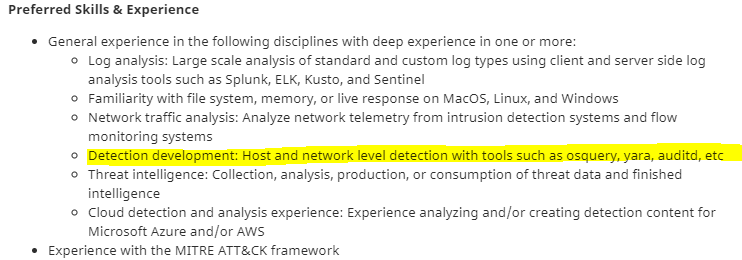
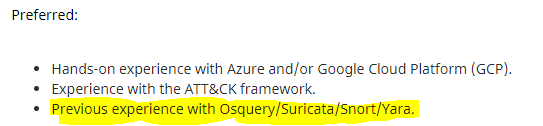
As of today (March 2021), Github and AT&T seek individuals who have experience with Osquery.
Github:
AT&T:
Some of the tools (open-source and commercial) that utilize Osquery are listed below.
Alienvault: The AlienVault agent is based on Osquery. Cisco: Cisco AMP (Advanced Malware Protection) for endpoints utilize Osquery in Cisco Orbital.
Learning Osquery will be beneficial if you are looking to enter into this field or if you're already in the field and you're looking to level up your skills.
Note: It is highly beneficial if you're already familiar with SQL queries. If not, check out this SQL Tutorial.
Ready to learn Osquery! No answer needed
Installation
The virtual machine attached to this room already has Osquery installed and configured for you on Windows and Linux.
Before proceeding start the attached VM.
Machine IP: MACHINE_IP
Username: administrator
Password: letmein123!
If you wish to install Osquery on your local machine or local virtual machine, please refer to the installation instructions.
Install on Windows Install on Linux Install on macOS Install on FreeBSD
Refer to the documentation on the Osquery daemon (osqueryd) information and all the command-line flags here.
Attached VM was started. Ready to proceed. No answer needed
Interacting with the Osquery Shell
To interact with the Osquery interactive console/shell, open CMD (or PowerShell) and run osqueryi.
As per the documentation, osqueryi is a modified version of the SQLite shell.
You'll know that you've successfully entered into the interactive shell by the new command prompt.

One way to familiarize yourself with the Osquery interactive shell, as with any new tool, is to check its help menu.
In Osquery, the help command (or meta-command) is .help.

Note: As per the documentation, meta-commands are prefixed with a '.'.
To list all the available tables that can be queried, use the .tables meta-command.
For example, if you wish to check what tables are associated with processes, you can use .tables process.
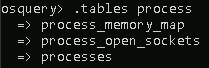
In the above image, 3 tables are returned that contain the word 'process.'
Note: Depending on the operating system, different tables will be returned when the .tables meta-command is executed.
Table names are not enough to know exactly what information is contained in any given table without actually querying it.
Knowing what columns and types, known as a schema, for each table are also useful.
You can list a table's schema with the following meta-command: .schema table_name

Looking at the above image, pid is the column, and BIGINT is the type.
Note: Any user on a system can run and interact with osqueryi, but some tables might return limited results compared to running osqueryi from an elevated shell.
If you which to check the schema for another operating system, you'll need to use the --enable_foreign command-line flag.
To read more about command-line flags, refer to this page, https://osquery.readthedocs.io/en/latest/installation/cli-flags/.
Interacting with the shell to get quick schema information for a table is good but not ideal when you want schema information for multiple tables.
For that, the schema API online documentation can be used to view a complete list of tables, columns, types, and column descriptions.
osquery> .version
osquery 4.6.0.2
using SQLite 3.34.0
What is the Osquery version? 4.6.0.2
What is the SQLite version? 3.34.0
osquery> .show
[1mosquery[0m - being built, with love.
~~~~~~~~~~~~~~~~~~~~~~~~~~~~~~~~~~~~~~~~~~~~~
osquery 4.6.0.2
using SQLite 3.34.0
General settings:
Flagfile:
Config: filesystem (\Program Files\osquery\osquery.conf)
Logger: filesystem (\Program Files\osquery\log\)
Distributed: tls
Database: ephemeral
Extensions: core
Socket: \\.\pipe\shell.em
Shell settings:
echo: off
headers: on
mode: pretty
nullvalue: ""
output: stdout
separator: "|"
width:
Non-default flags/options:
database_path: C:\Users\Administrator\.osquery\shell.db
disable_database: true
disable_events: true
disable_logging: true
disable_watchdog: true
extensions_socket: \\.\pipe\shell.em
hash_delay: 0
logtostderr: true
stderrthreshold: 0
What is the default output mode? pretty
osquery> .help
Welcome to the osquery shell. Please explore your OS!
You are connected to a transient 'in-memory' virtual database.

.all [TABLE]     Select all from a table
.bail ON|OFF     Stop after hitting an error
.echo ON|OFF     Turn command echo on or off
.exit            Exit this program
.features        List osquery's features and their statuses
.headers ON|OFF  Turn display of headers on or off
.help            Show this message
.mode MODE       Set output mode where MODE is one of:
                   csv      Comma-separated values
                   column   Left-aligned columns see .width
                   line     One value per line
                   list     Values delimited by .separator string
                   pretty   Pretty printed SQL results (default)
.nullvalue STR   Use STRING in place of NULL values
.print STR...    Print literal STRING
.quit            Exit this program
.schema [TABLE]  Show the CREATE statements
.separator STR   Change separator used by output mode
.socket          Show the osquery extensions socket path
.show            Show the current values for various settings
.summary         Alias for the show meta command
.tables [TABLE]  List names of tables
.types [SQL]     Show result of getQueryColumns for the given query
.width [NUM1]+   Set column widths for "column" mode
.timer ON|OFF      Turn the CPU timer measurement on or off
What is the meta-command to set the output to show one value per line? .mode line
What are the 2 meta-commands to exit osqueryi? .quit,.exit
Schema Documentation
Head over to the schema documentation here.
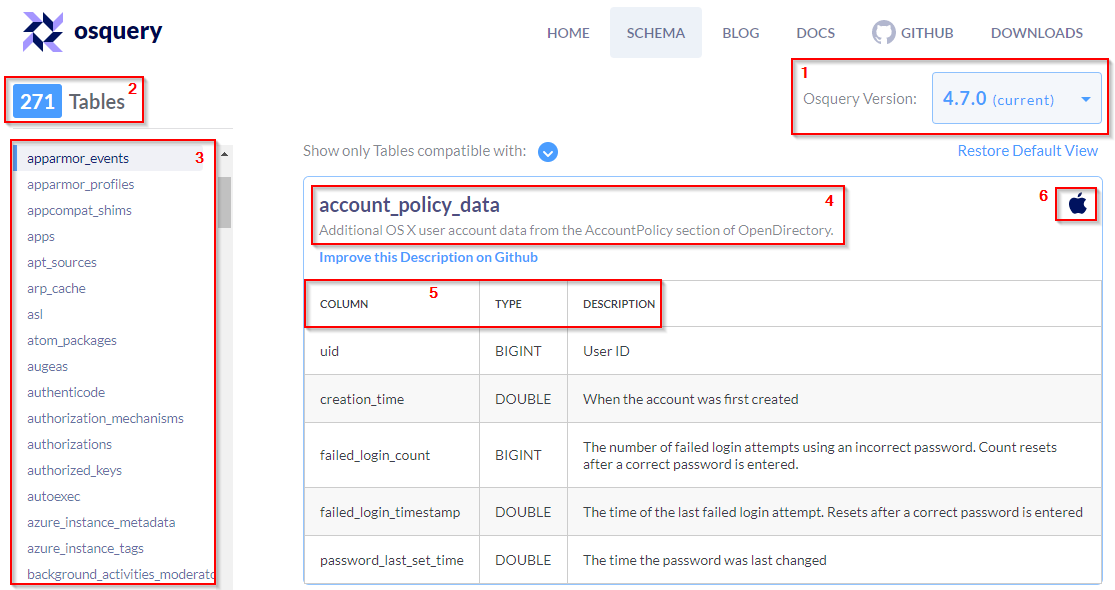
The above image is a resemblance to what you'll see when you navigate to the page.
Note: At the time of this writing, the current version for Osquery is 4.7.0.
A breakdown of the information listed on the schema API page is explained below.
A dropdown listing various versions of Osquery. Choose the version of Osquery you wish to see schema tables for.
The number of tables within the selected version of Osquery. (In the above image, 271 tables exist for Osquery 4.7.0)
The list of the tables is listed in alphabetical order for the selected version of Osquery.
The name of the table and a brief description.
A detailed chart listing the column, type, and column description for each table.
Information to which operating system the table applies to. (In the above image, the account_policy_data table is available only for macOS)
You have enough information to confidently navigate this resource to retrieve any information you'll need.
![[Pasted image 20220905130039.png]] What table would you query to get the version of Osquery installed on the Windows endpoint? osquery_info
How many tables are there for this version of Osquery? 266 (version 4.6.0)
How many of the tables for this version are compatible with Windows? 96 (Show only Tables compatible with: Windows)
How many tables are compatible with Linux? 155
What is the first table listed that is compatible with both Linux and Windows? arp_cache (Show only Tables compatible with: Windows,Linux)
Creating queries
The SQL language implemented in Osquery is not an entire SQL language that you might be accustomed to, but rather it's a superset of SQLite's.
Realistically all your queries will start with a SELECT statement. This makes sense because, with Osquery, you are only querying information on an endpoint or endpoints. You won't be updating or deleting any information/data on the endpoint.
The exception to the rule: The use of other SQL statements, such as UPDATE and DELETE, is possible, but only if you're creating run-time tables (views) or using an extension if the extension supports them.
Your queries will also include a FROM clause and end with a semicolon.
If you wish to retrieve all the information about the running processes on the endpoint: SELECT * FROM processes;
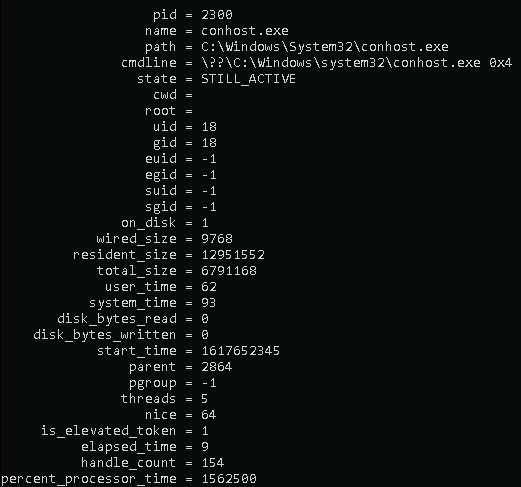
Note: The results for you will be different if you run this query in the attached VM or your local machine (if Osquery is installed).
The number of columns returned might be more than what you need. You can select specific columns rather than retrieving every column in the table.
Query: SELECT pid, name, path FROM processes;

osquery> select pid, name, path from processes;
+------+--------------------------+---------------------------------------------------------------------------------+
| pid | name | path |
+------+--------------------------+---------------------------------------------------------------------------------+
| 0 | [System Process] | |
| 4 | System | |
| 88 | Registry | |
| 432 | smss.exe | C:\Windows\System32\smss.exe |
| 592 | csrss.exe | |
| 664 | csrss.exe | |
| 684 | wininit.exe | C:\Windows\System32\wininit.exe |
| 724 | winlogon.exe | C:\Windows\System32\winlogon.exe |
| 800 | services.exe | C:\Windows\System32\services.exe |
| 808 | lsass.exe | C:\Windows\System32\lsass.exe |
| 924 | svchost.exe | C:\Windows\System32\svchost.exe |
| 944 | svchost.exe | C:\Windows\System32\svchost.exe |
| 964 | fontdrvhost.exe | |
| 972 | fontdrvhost.exe | |
| 8 | svchost.exe | C:\Windows\System32\svchost.exe |
| 596 | svchost.exe | C:\Windows\System32\svchost.exe |
| 796 | dwm.exe | |
| 1036 | svchost.exe | C:\Windows\System32\svchost.exe |
| 1048 | svchost.exe | C:\Windows\System32\svchost.exe |
| 1076 | svchost.exe | C:\Windows\System32\svchost.exe |
| 1280 | svchost.exe | C:\Windows\System32\svchost.exe |
| 1288 | svchost.exe | C:\Windows\System32\svchost.exe |
| 1340 | svchost.exe | C:\Windows\System32\svchost.exe |
| 1348 | svchost.exe | C:\Windows\System32\svchost.exe |
| 1360 | svchost.exe | C:\Windows\System32\svchost.exe |
| 1368 | svchost.exe | C:\Windows\System32\svchost.exe |
| 1440 | svchost.exe | C:\Windows\System32\svchost.exe |
| 1452 | svchost.exe | C:\Windows\System32\svchost.exe |
| 1532 | svchost.exe | C:\Windows\System32\svchost.exe |
| 1552 | svchost.exe | C:\Windows\System32\svchost.exe |
| 1580 | svchost.exe | C:\Windows\System32\svchost.exe |
| 1652 | svchost.exe | C:\Windows\System32\svchost.exe |
| 1684 | svchost.exe | C:\Windows\System32\svchost.exe |
| 1756 | svchost.exe | C:\Windows\System32\svchost.exe |
| 1788 | svchost.exe | C:\Windows\System32\svchost.exe |
| 1796 | svchost.exe | C:\Windows\System32\svchost.exe |
| 1896 | svchost.exe | C:\Windows\System32\svchost.exe |
| 1968 | svchost.exe | C:\Windows\System32\svchost.exe |
| 2028 | svchost.exe | C:\Windows\System32\svchost.exe |
| 1416 | svchost.exe | C:\Windows\System32\svchost.exe |
| 2096 | svchost.exe | C:\Windows\System32\svchost.exe |
| 2156 | svchost.exe | C:\Windows\System32\svchost.exe |
| 2168 | svchost.exe | C:\Windows\System32\svchost.exe |
| 2284 | svchost.exe | C:\Windows\System32\svchost.exe |
| 2328 | svchost.exe | C:\Windows\System32\svchost.exe |
| 2632 | spoolsv.exe | C:\Windows\System32\spoolsv.exe |
| 2684 | svchost.exe | C:\Windows\System32\svchost.exe |
| 2692 | svchost.exe | C:\Windows\System32\svchost.exe |
| 2708 | svchost.exe | C:\Windows\System32\svchost.exe |
| 2756 | svchost.exe | C:\Windows\System32\svchost.exe |
| 2824 | svchost.exe | C:\Windows\System32\svchost.exe |
| 2832 | svchost.exe | C:\Windows\System32\svchost.exe |
| 2852 | svchost.exe | C:\Windows\System32\svchost.exe |
| 2876 | svchost.exe | C:\Windows\System32\svchost.exe |
| 2952 | LiteAgent.exe | C:\Program Files\Amazon\Xentools\LiteAgent.exe |
| 2980 | vm3dservice.exe | C:\Windows\System32\vm3dservice.exe |
| 3020 | vm3dservice.exe | C:\Windows\System32\vm3dservice.exe |
| 2220 | Sysmon.exe | C:\Windows\Sysmon.exe |
| 2452 | MsMpEng.exe | C:\ProgramData\Microsoft\Windows Defender\Platform\4.18.2103.7-0\MsMpEng.exe |
| 2064 | svchost.exe | C:\Windows\System32\svchost.exe |
| 2516 | svchost.exe | C:\Windows\System32\svchost.exe |
| 3760 | LogonUI.exe | C:\Windows\System32\LogonUI.exe |
| 3956 | unsecapp.exe | |
| 4276 | NisSrv.exe | C:\ProgramData\Microsoft\Windows Defender\Platform\4.18.2103.7-0\NisSrv.exe |
| 4820 | amazon-ssm-agent.exe | C:\Program Files\Amazon\SSM\amazon-ssm-agent.exe |
| 4912 | ssm-agent-worker.exe | C:\Program Files\Amazon\SSM\ssm-agent-worker.exe |
| 4932 | conhost.exe | C:\Windows\System32\conhost.exe |
| 4928 | svchost.exe | C:\Windows\System32\svchost.exe |
| 1308 | GoogleUpdate.exe | C:\Program Files (x86)\Google\Update\GoogleUpdate.exe |
| 1400 | msdtc.exe | C:\Windows\System32\msdtc.exe |
| 1588 | GoogleCrashHandler.exe | C:\Program Files (x86)\Google\Update\1.3.36.72\GoogleCrashHandler.exe |
| 1592 | GoogleCrashHandler64.exe | C:\Program Files (x86)\Google\Update\1.3.36.72\GoogleCrashHandler64.exe |
| 2648 | svchost.exe | C:\Windows\System32\svchost.exe |
| 4292 | svchost.exe | C:\Windows\System32\svchost.exe |
| 4100 | svchost.exe | C:\Windows\System32\svchost.exe |
| 4092 | csrss.exe | |
| 3976 | winlogon.exe | C:\Windows\System32\winlogon.exe |
| 3708 | svchost.exe | C:\Windows\System32\svchost.exe |
| 2860 | fontdrvhost.exe | |
| 3196 | dwm.exe | |
| 2772 | rdpclip.exe | C:\Windows\System32\rdpclip.exe |
| 4660 | svchost.exe | C:\Windows\System32\svchost.exe |
| 2640 | svchost.exe | C:\Windows\System32\svchost.exe |
| 5080 | taskhostw.exe | C:\Windows\System32\taskhostw.exe |
| 3628 | sihost.exe | C:\Windows\System32\sihost.exe |
| 3548 | svchost.exe | C:\Windows\System32\svchost.exe |
| 1092 | svchost.exe | C:\Windows\System32\svchost.exe |
| 3100 | ctfmon.exe | C:\Windows\System32\ctfmon.exe |
| 4636 | explorer.exe | C:\Windows\explorer.exe |
| 4596 | ShellExperienceHost.exe | C:\Windows\SystemApps\ShellExperienceHost_cw5n1h2txyewy\ShellExperienceHost.exe |
| 4564 | SearchUI.exe | C:\Windows\SystemApps\Microsoft.Windows.Cortana_cw5n1h2txyewy\SearchUI.exe |
| 4156 | RuntimeBroker.exe | C:\Windows\System32\RuntimeBroker.exe |
| 5224 | RuntimeBroker.exe | C:\Windows\System32\RuntimeBroker.exe |
| 5388 | RuntimeBroker.exe | C:\Windows\System32\RuntimeBroker.exe |
| 5680 | cmd.exe | C:\Windows\System32\cmd.exe |
| 5688 | conhost.exe | C:\Windows\System32\conhost.exe |
| 5828 | osqueryi.exe | C:\ProgramData\chocolatey\bin\osqueryi.exe |
| 5880 | osqueryi.exe | C:\ProgramData\chocolatey\lib\osquery\osqueryi.exe |
| 4592 | svchost.exe | C:\Windows\System32\svchost.exe |
| 2556 | svchost.exe | C:\Windows\System32\svchost.exe |
| 1384 | svchost.exe | C:\Windows\System32\svchost.exe |
| 4020 | WmiPrvSE.exe | |
| 6088 | svchost.exe | C:\Windows\System32\svchost.exe |
+------+--------------------------+---------------------------------------------------------------------------------+
The above query will list the process id, the process's name, and the path for all running processes on the endpoint.
This will still return a large number of results, depending on how busy the endpoint is.
The count() function can be used to get exactly how many.
Query: SELECT count(*) from processes;

osquery> select count(*) from processes;
+----------+
| count(*) |
+----------+
| 103      |
+----------+
The output can be limited to the first 3 in ascending order by process name, as shown below.

osquery> select pid, name, path from processes order by name limit 3;
+------+--------------------------+-------------------------------------------------------------------------+
| pid  | name                     | path                                                                    |
+------+--------------------------+-------------------------------------------------------------------------+
| 1588 | GoogleCrashHandler.exe   | C:\Program Files (x86)\Google\Update\1.3.36.72\GoogleCrashHandler.exe   |
| 1592 | GoogleCrashHandler64.exe | C:\Program Files (x86)\Google\Update\1.3.36.72\GoogleCrashHandler64.exe |
| 1308 | GoogleUpdate.exe         | C:\Program Files (x86)\Google\Update\GoogleUpdate.exe                   |
+------+--------------------------+-------------------------------------------------------------------------+
Optionally, you can use a WHERE clause to narrow down the list of results returned based on specified criteria.
Query: SELECT pid, name, path FROM processes WHERE name='lsass.exe';

osquery> select pid, name, path from processes where name="lsass.exe";
+-----+-----------+-------------------------------+
| pid | name      | path                          |
+-----+-----------+-------------------------------+
| 808 | lsass.exe | C:\Windows\System32\lsass.exe |
+-----+-----------+-------------------------------+
The equal sign is not the only filtering option available in a WHERE clause.
Below are filtering operators that can be used in a WHERE clause:
= [equal]
<>  [not equal]
>, >= [greater than, greater than or equal to]
<, <= [less than or less than or equal to]
BETWEEN [between a range]
LIKE [pattern wildcard searches]
% [wildcard, multiple characters]
_ [wildcard, one character]
Below is a screenshot from the Osquery documentation showing examples of using wildcards when used in folder structures.
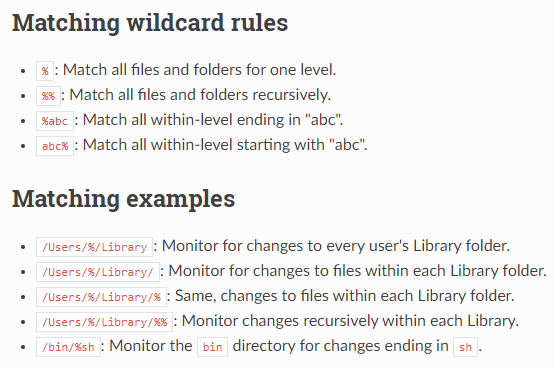
Some tables will require a WHERE clause, such as the file table, to return a value. If the required WHERE clause is not included in the query, then you will get an error.

The last concept to cover is JOIN. To join 2 or more tables, each table needs to share a column in common.
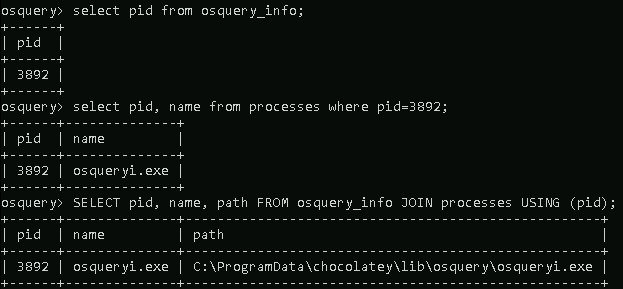
Let's look at 2 tables to demonstrate this further. Below is the schema for the osquery_info table and the processes table.
The common column in both tables is pid. A query can be constructed to use the JOIN clause to join these 2 tables USING the PID column.
Query: SELECT pid, name, path FROM osquery_info JOIN processes USING (pid);
osquery> .schema osquery_info
CREATE TABLE osquery_info(`pid` INTEGER, `uuid` TEXT, `instance_id` TEXT, `version` TEXT, `config_hash` TEXT, `config_valid` INTEGER, `extensions` TEXT, `build_platform` TEXT, `build_distro` TEXT, `start_time` INTEGER, `watcher` INTEGER, `platform_mask` INTEGER);
osquery> .schema processes
CREATE TABLE processes(`pid` BIGINT, `name` TEXT, `path` TEXT, `cmdline` TEXT, `state` TEXT, `cwd` TEXT, `root` TEXT, `uid` BIGINT, `gid` BIGINT, `euid` BIGINT, `egid` BIGINT, `suid` BIGINT, `sgid` BIGINT, `on_disk` INTEGER, `wired_size` BIGINT, `resident_size` BIGINT, `total_size` BIGINT, `user_time` BIGINT, `system_time` BIGINT, `disk_bytes_read` BIGINT, `disk_bytes_written` BIGINT, `start_time` BIGINT, `parent` BIGINT, `pgroup` BIGINT, `threads` INTEGER, `nice` INTEGER, `is_elevated_token` INTEGER, `elapsed_time` BIGINT, `handle_count` BIGINT, `percent_processor_time` BIGINT, `upid` BIGINT HIDDEN, `uppid` BIGINT HIDDEN, `cpu_type` INTEGER HIDDEN, `cpu_subtype` INTEGER HIDDEN, `phys_footprint` BIGINT HIDDEN, PRIMARY KEY (`pid`)) WITHOUT ROWID;
osquery> select pid, name, path from osquery_info join processes using (pid);
+------+--------------+----------------------------------------------------+
| pid  | name         | path                                               |
+------+--------------+----------------------------------------------------+
| 5880 | osqueryi.exe | C:\ProgramData\chocolatey\lib\osquery\osqueryi.exe |
+------+--------------+----------------------------------------------------+
Please refer to the Osquery documentation for more information regarding SQL and creating queries specific to Osquery.
What is the query to show the username field from the users table where the username is 3 characters long and ends with 'en'? (use single quotes in your answer)
select username from users where username like '%en';
Using Kolide Fleet
In this task, we will look at an open-source Osquery Fleet Manager known as Kolide Fleet.
With Kolide Fleet, instead of using Osquery locally to query an endpoint, you can query multiple endpoints from the Kolide Fleet UI.
Note: The open-source repo of Kolide Fleet is no longer supported and was retired on November 4th, 2020. A commercial version, known as Kolide K2, is available. You can view more about it here. There is a more recent repo called fleet, a fork of the original Kolide Fleet, and as per the creators of Kolide Fleet, "it appears to be the first of many promising forks."
The attached VM has Kolide Fleet installed and configured thanks to the Windows Subsystem for Linux (WSL). Steps need to be executed to start Kolide Fleet in the attached VM, though.
Open an Ubuntu terminal and enter the following commands. (sudo password is tryhackme)
Command: sudo redis-server --daemonize yes

Command: sudo service mysql start

Command:
/usr/bin/fleet serve \--mysql_address=127.0.0.1:3306 \--mysql_database=kolide \--mysql_username=root \--mysql_password=tryhackme \--redis_address=127.0.0.1:6379 \--server_cert=/home/tryhackme/server.cert \--server_key=/home/tryhackme/server.key \--auth_jwt_key=JB+wEDR4V3bbhU4OlIMcXpcBQAaZc+4r \--logging_json
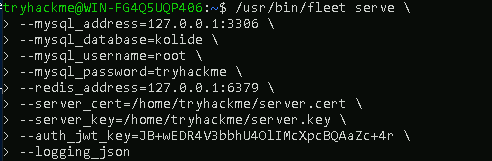
A text file with the above commands is on the desktop in a file titled kolide-commands.txt.
Open Google Chrome and navigate to https://127.0.0.1:8080. The credentials to log into Kolide Fleet are below:
Username: thmosquery
Password: tryhackme1!
If all goes well, you should be greeted with the Kolide Fleet UI, similar to the image below.
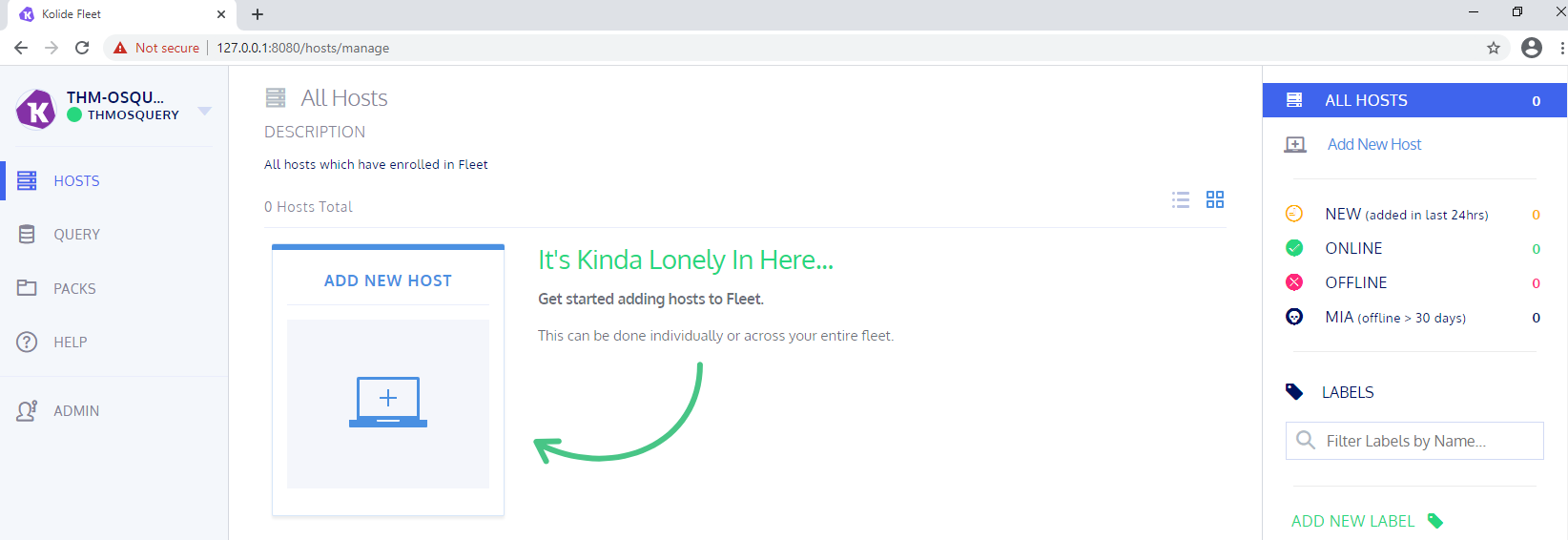
Now it's time to add a host, which will be the actual Windows machine.
Open the Windows CMD and navigate to C:\Users\Administrator\Desktop\launcher\windows.
From within that directory, run the following command:
Command: launcher.exe --hostname=127.0.0.1:8080 --enroll_secret=ENTER-SECRET-KEY --insecure
Before executing the above command, you need to replace ENTER-SECRET-KEY with the Osquery Enroll Secret.
If all goes well, you should see the machine successfully added to the fleet.
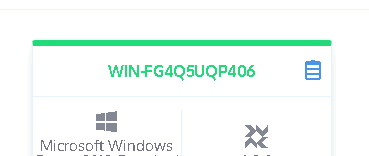
Note: You may need to refresh the page to see the machine added.
Try to run a query against the new endpoint using the Kolide Fleet UI.
Click on Query > Create New Query (or click the database icon next to the machine name).
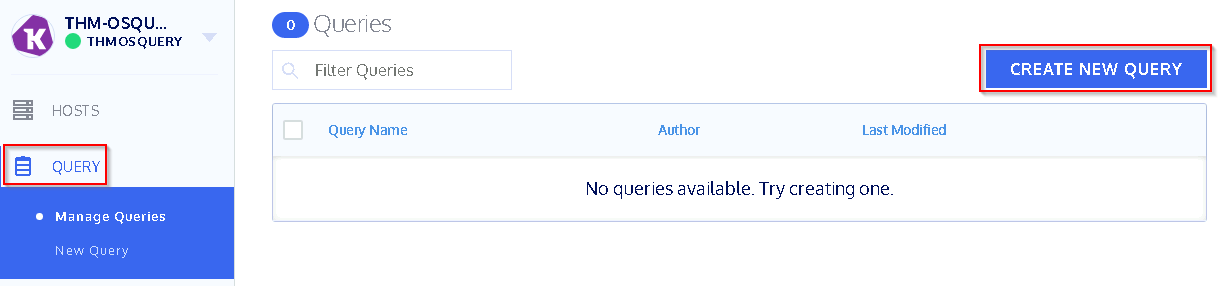
Let's look at a brief overview of the New Query page.
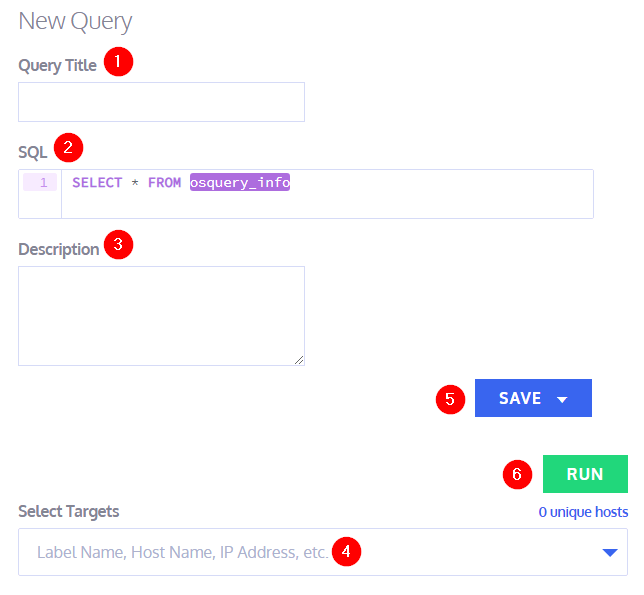
If you wish to save your query, give your query a title.
This is the SQL command to execute when this query is run.
A brief description to what is the objective of the query.
What host, or hosts, to run the query against.
Save the query for future executions.
Execute the query.
You don't have to save the query to run it. You can enter the SQL command, select the host(s), and run the command.
A few more things to mention about the UI: each column in the returned results is filterable, and information about each table is available.

The above image shows the query returned 106 results, but the output was filtered to just 1 by filtering on the cmdline column to return the results for 'lsass'.
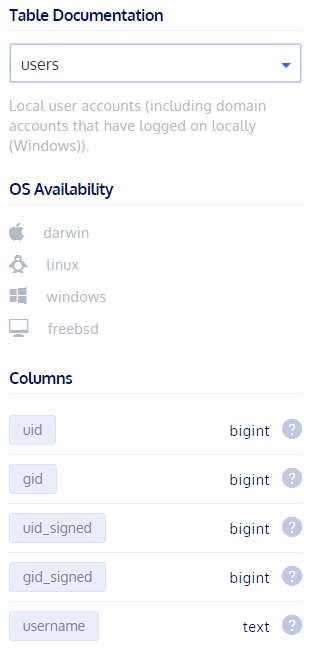
At the far right of the UI, there is a convenient Table Documentation which is essentially the schema for each table. The above screenshot shows the schema for the users table.
Feel free to explore Query Packs at your own leisure. You can read more about this here and here.
tryhackme@WIN-FG4Q5UQP406:~$ sudo redis-server --daemonize yes
[sudo] password for tryhackme:
tryhackme@WIN-FG4Q5UQP406:~$ sudo service mysql start
 * Starting MySQL database server mysqld                                                                                No directory, logging in with HOME=/
                                                                                                                 [ OK ]
tryhackme@WIN-FG4Q5UQP406:~$ /usr/bin/fleet serve \--mysql_address=127.0.0.1:3306 \--mysql_database=kolide \--mysql_username=root \--mysql_password=tryhackme \--redis_address=127.0.0.1:6379 \--server_cert=/home/tryhackme/server.cert \--server_key=/home/tryhackme/server.key \--auth_jwt_key=JB+wEDR4V3bbhU4OlIMcXpcBQAaZc+4r \--logging_json
{"component":"service","err":null,"level":"info","method":"ListUsers","took":"12.7811ms","ts":"2022-09-05T20:02:25.5627582Z","user":"none"}
{"address":"0.0.0.0:8080","msg":"listening","transport":"https","ts":"2022-09-05T20:02:25.5645175Z"}
2022/09/05 13:03:30 http: TLS handshake error from 127.0.0.1:50299: remote error: tls: unknown certificate
2022/09/05 13:03:38 http: TLS handshake error from 127.0.0.1:50320: remote error: tls: unknown certificate
{"component":"http","err":"selecting sessions: sql: no rows in result set","ts":"2022-09-05T20:03:39.1877261Z"}
2022/09/05 13:03:39 http: TLS handshake error from 127.0.0.1:50322: remote error: tls: unknown certificate
{"component":"service","err":null,"level":"info","method":"SSOSettings","took":"33.064ms","ts":"2022-09-05T20:03:39.2498031Z"}
{"component":"service","err":null,"level":"info","method":"Login","took":"383.2505ms","ts":"2022-09-05T20:04:02.7686251Z","user":"thmosquery"}
![[Pasted image 20220905150524.png]] What is the Osquery Enroll Secret? k3hFh30bUrU7nAC3DmsCCyb1mT8HoDkt
Microsoft Windows [Version 10.0.17763.737]
(c) 2018 Microsoft Corporation. All rights reserved.

C:\Users\Administrator>cd C:\Users\Administrator\Desktop\launcher\windows

C:\Users\Administrator\Desktop\launcher\windows>launcher.exe --hostname=127.0.0.1:8080 --enroll_secret=k3hFh30bUrU7nAC3DmsCCyb1mT8HoDkt --insecure
{"caller":"main.go:26","msg":"Launcher starting up","revision":"413a525d969c54a2a955e86e7a568194acfbd05b","severity":"info","ts":"2022-09-05T20:07:10.4298692Z","version":"0.11.10"}
{"caller":"launcher.go:51","msg":"using default system root directory","path":"C:\\Users\\ADMINI~1\\AppData\\Local\\Temp\\2\\launcher-root","severity":"info","ts":"2022-09-05T20:07:10.4318693Z"}
{"caller":"client_grpc.go:111","cert_pinning":false,"msg":"dialing grpc server","server":"127.0.0.1:8080","severity":"info","tls_secure":false,"transport_secure":true,"ts":"2022-09-05T20:07:10.436869Z"}
{"build":"413a525d969c54a2a955e86e7a568194acfbd05b","caller":"launcher.go:158","msg":"started kolide launcher","severity":"info","ts":"2022-09-05T20:07:10.4501547Z","version":"0.11.10"}
{"caller":"query_target_updater.go:21","msg":"query target updater started","severity":"info","ts":"2022-09-05T20:07:10.4507884Z"}
{"arg0":"osqueryd.exe","args":"osqueryd.exe --pidfile=C:\\Users\\ADMINI~1\\AppData\\Local\\Temp\\2\\672112747\\osquery.pid --database_path=C:\\Users\\ADMINI~1\\AppData\\Local\\Temp\\2\\672112747\\osquery.db --extensions_socket=\\\\.\\pipe\\kolide-osquery-01GC7M74VJ2QE1QEHPFG6DSTXB --extensions_autoload=C:\\Users\\ADMINI~1\\AppData\\Local\\Temp\\2\\672112747\\osquery.autoload --extensions_timeout=10 --config_plugin=kolide_grpc --logger_plugin=kolide_grpc --distributed_plugin=kolide_grpc --disable_distributed=false --distributed_interval=5 --pack_delimiter=: --host_identifier=uuid --force=true --disable_watchdog --utc --verbose --config_refresh=300 --config_accelerated_refresh=30 --allow_unsafe","caller":"runtime.go:558","msg":"launching osqueryd","severity":"info","ts":"2022-09-05T20:07:11.2166753Z"}
{"caller":"init.cpp:340","component":"osquery","level":"stderr","msg":"I0905 13:07:11.418467  4776 init.cpp:340] osquery initialized [version=4.2.0]","severity":"info","ts":"2022-09-05T20:07:11.4364667Z"}
{"caller":"system.cpp:362","component":"osquery","level":"stderr","msg":"I0905 13:07:11.419466  4776 system.cpp:362] Writing osqueryd pid (4148) to C:\\Users\\ADMINI~1\\AppData\\Local\\Temp\\2\\672112747\\osquery.pid\r\nI0905 13:07:11.421468  4776 extensions.cpp:400] Found autoloadable extension: C:\\Users\\Administrator\\Desktop\\launcher\\windows\\osquery-extension.exe\r\nI0905 13:07:11.422467  4776 rocksdb.cpp:131] Opening RocksDB handle: C:\\Users\\ADMINI~1\\AppData\\Local\\Temp\\2\\672112747\\osquery.db","severity":"info","ts":"2022-09-05T20:07:11.4404675Z"}
{"caller":"interface.cpp:268","component":"osquery","level":"stderr","msg":"I0905 13:07:11.491400  4552 interface.cpp:268] Extension manager service starting: \\\\.\\pipe\\kolide-osquery-01GC7M74VJ2QE1QEHPFG6DSTXB","severity":"info","ts":"2022-09-05T20:07:11.4914002Z"}
{"caller":"","component":"osquery","level":"stderr","msg":"T","severity":"info","ts":"2022-09-05T20:07:11.5679724Z"}
{"caller":"","component":"osquery","level":"stderr","msg":"hrift: Mon Sep  5 13:07:11 2022 Client connected.","severity":"info","ts":"2022-09-05T20:07:11.5679724Z"}
{"caller":"","component":"osquery","level":"stderr","msg":"T","severity":"info","ts":"2022-09-05T20:07:11.5789805Z"}
{"caller":"","component":"osquery","level":"stderr","msg":"hrift: Mon Sep  5 13:07:11 2022 Client connected.","severity":"info","ts":"2022-09-05T20:07:11.5789805Z"}
{"caller":"interface.cpp:108","component":"osquery","level":"stderr","msg":"I0905 13:07:11.625973  5620 interface.cpp:108] Registering extension (kolide, 25407, version=, sdk=)","severity":"info","ts":"2022-09-05T20:07:11.6569781Z"}
{"caller":"registry_factory.cpp:106","component":"osquery","level":"stderr","msg":"I0905 13:07:11.625973  5620 registry_factory.cpp:106] Extension 25407 registered config plugin kolide_grpc\r\nI0905 13:07:11.625973  5620 registry_factory.cpp:106] Extension 25407 registered distributed plugin kolide_grpc\r\nI0905 13:07:11.625973  5620 registry_factory.cpp:106] Extension 25407 registered logger plugin kolide_grpc\r\nI0905 13:07:11.648980  5620 registry_factory.cpp:106] Extension 25407 registered table plugin kolide_best_practices\r\nI0905 13:07:11.648980  5620 registry_factory.cpp:106] Extension 25407 registered table plugin kolide_chrome_login_data_emails\r\nI0905 13:07:11.648980  5620 registry_factory.cpp:106] Extension 25407 registered table plugin kolide_chrome_user_profiles\r\nI0905 13:07:11.648980  5620 registry_factory.cpp:106] Extension 25407 registered table plugin kolide_email_addresses\r\nI0905 13:07:11.648980  5620 registry_factory.cpp:106] Extension 25407 registered table plugin kolide_json\r\nI0905 13:07:11.648980  5620 registry_factory.cpp:106] Extension 25407 registered table plugin kolide_keyinfo\r\nI0905 13:07:11.648980  5620 registry_factory.cpp:106] Extension 25407 registered table plugin kolide_launcher_autoupdate_config\r\nI0905 13:07:11.648980  5620 registry_factory.cpp:106] Extension 25407 registered table plugin kolide_launcher_config\r\nI0905 13:07:11.648980  5620 registry_factory.cpp:106] Extension 25407 registered table plugin kolide_launcher_identifier\r\nI0905 13:07:11.648980  5620 registry_factory.cpp:106] Extension 25407 registered table plugin kolide_launcher_info\r\nI0905 13:07:11.648980  5620 registry_factory.cpp:106] Extension 25407 registered table plugin kolide_onepassword_accounts\r\nI0905 13:07:11.648980  5620 registry_factory.cpp:106] Extension 25407 registered table plugin kolide_program_icons\r\nI0905 13:07:11.648980  5620 registry_factory.cpp:106] Extension 25407 registered table plugin kolide_slack_config\r\nI0905 13:07:11.648980  5620 registry_factory.cpp:106] Extension 25407 registered table plugin kolide_ssh_keys\r\nI0905 13:07:11.648980  5620 registry_factory.cpp:106] Extension 25407 registered table plugin kolide_target_membership\r\nI0905 13:07:11.648980  5620 registry_factory.cpp:106] Extension 25407 registered table plugin kolide_wmi\r\nI0905 13:07:11.648980  5620 registry_factory.cpp:106] Extension 25407 registered table plugin kolide_xml","severity":"info","ts":"2022-09-05T20:07:11.6589803Z"}
{"caller":"auto_constructed_tables.cpp:93","component":"osquery","level":"stderr","msg":"I0905 13:07:11.671977  4776 auto_constructed_tables.cpp:93] Removing stale ATC entries","severity":"info","ts":"2022-09-05T20:07:11.6731244Z"}
{"caller":"watcher.cpp:629","component":"osquery","level":"stderr","msg":"I0905 13:07:11.894138  4540 watcher.cpp:629] Created and monitoring extension child (5496): C:\\Users\\Administrator\\Desktop\\launcher\\windows\\osquery-extension.exe","severity":"info","ts":"2022-09-05T20:07:11.9097643Z"}
{"caller":"","component":"osquery","level":"stderr","msg":"[C:\\Users\\Administrator\\Desktop\\launcher\\windows\\osquery-extension.exe --verbose --socket \\\\.\\pipe\\kolide-osquery-01GC7M74VJ2QE1QEHPFG6DSTXB --timeout 10 --interval 3]","severity":"info","ts":"2022-09-05T20:07:12.067053Z"}
{"caller":"","component":"osquery","level":"stderr","msg":"T","severity":"info","ts":"2022-09-05T20:07:13.1607449Z"}
{"caller":"","component":"osquery","level":"stderr","msg":"hrift: Mon Sep  5 13:07:13 2022 Client connected.","severity":"info","ts":"2022-09-05T20:07:13.1625871Z"}
{"caller":"","component":"osquery","level":"stderr","msg":"Thrift: Mon Sep  5 13:07:13 2022 Client connected.\r\nThrift: Mon Sep  5 13:07:13 2022 TPipe ::GetOverlappedResult errored GLE=errno = 109\r\nThrift: Mon Sep  5 13:07:13 2022 TConnectedClient died: TPipe: GetOverlappedResult failed","severity":"info","ts":"2022-09-05T20:07:13.1636432Z"}
{"caller":"","component":"osquery","level":"stderr","msg":"Thrift: Mon Sep  5 13:07:13 2022 TPipe ::GetOverlappedResult errored GLE=errno = 109\r\nThrift: Mon Sep  5 13:07:13 2022 TConnectedClient died: TPipe: GetOverlappedResult failed","severity":"info","ts":"2022-09-05T20:07:13.1646424Z"}
{"caller":"extension.go:127","msg":"extension started","severity":"info","ts":"2022-09-05T20:07:13.1822629Z"}
{"caller":"","component":"osquery","level":"stderr","msg":"T","severity":"info","ts":"2022-09-05T20:07:14.2281206Z"}
{"caller":"","component":"osquery","level":"stderr","msg":"hrift: Mon Sep  5 13:07:14 2022 Client connected.","severity":"info","ts":"2022-09-05T20:07:14.2281206Z"}
{"caller":"","component":"osquery","level":"stderr","msg":"T","severity":"info","ts":"2022-09-05T20:07:14.2356767Z"}
{"caller":"","component":"osquery","level":"stderr","msg":"hrift: Mon Sep  5 13:07:14 2022 TPipe ::GetOverlappedResult errored GLE=errno = 109\r\nThrift: Mon Sep  5 13:07:14 2022 Client connected.\r\nThrift: Mon Sep  5 13:07:14 2022 TConnectedClient died: TPi","severity":"info","ts":"2022-09-05T20:07:14.2366991Z"}
{"caller":"","component":"osquery","level":"stderr","msg":"pe: GetOverlappedResult failed\r\nThrift: Mon Sep  5 13:07:14 2022 TPipe ::GetOverlappedResult errored GLE=errno = 109\r\nThrift: Mon Sep  5 13:07:14 2022 TConnectedClient die","severity":"info","ts":"2022-09-05T20:07:14.2376971Z"}
{"caller":"","component":"osquery","level":"stderr","msg":"d: TPipe: GetOverlappedResult failed","severity":"info","ts":"2022-09-05T20:07:14.2386967Z"}
{"caller":"system.cpp:289","component":"osquery","level":"stderr","msg":"I0905 13:07:16.370159  4776 system.cpp:289] Using host identifier: EC2A2676-862D-E047-8AB3-6F2316829FE1","severity":"info","ts":"2022-09-05T20:07:16.3701602Z"}
{"caller":"events.cpp:863","component":"osquery","level":"stderr","msg":"I0905 13:07:16.499240  4776 events.cpp:863] Event publisher not enabled: ntfs_event_publisher: NTFS event publisher disabled via configuration","severity":"info","ts":"2022-09-05T20:07:16.4992413Z"}
{"caller":"events.cpp:784","component":"osquery","level":"stderr","msg":"I0905 13:07:16.502270  4176 events.cpp:784] Starting event publisher run loop: windows_events","severity":"info","ts":"2022-09-05T20:07:16.5022712Z"}
{"caller":"distributed.cpp:117","component":"osquery","level":"stderr","msg":"I0905 13:07:16.525586  1192 distributed.cpp:117] Executing distributed query: kolide_detail_query_network_interface: select address, mac\r\n                        from interface_details id join interface_addresses ia\r\n                               on ia.interface = id.interface where length(mac) \u003e 0\r\n                               order by (ibytes + obytes) desc","severity":"info","ts":"2022-09-05T20:07:16.5305896Z"}
{"caller":"interfaces.cpp:101","component":"osquery","level":"stderr","msg":"I0905 13:07:18.501881  1192 interfaces.cpp:101] Failed to retrieve network statistics for interface 5","severity":"info","ts":"2022-09-05T20:07:18.501882Z"}
{"caller":"interfaces.cpp:101","component":"osquery","level":"stderr","msg":"I0905 13:07:18.562309  1192 interfaces.cpp:101] Failed to retrieve network statistics for interface 1","severity":"info","ts":"2022-09-05T20:07:18.5623101Z"}
{"caller":"interfaces.cpp:129","component":"osquery","level":"stderr","msg":"I0905 13:07:18.586263  1192 interfaces.cpp:129] Failed to retrieve physical state for interface 1","severity":"info","ts":"2022-09-05T20:07:18.5862647Z"}
{"caller":"interfaces.cpp:156","component":"osquery","level":"stderr","msg":"I0905 13:07:18.598254  1192 interfaces.cpp:156] Failed to retrieve DHCP and DNS information for interface 1","severity":"info","ts":"2022-09-05T20:07:18.5992561Z"}
{"caller":"dynamic_table_row.cpp:123","component":"osquery","level":"stderr","msg":"I0905 13:07:18.601253  1192 dynamic_table_row.cpp:123] Error casting ibytes () to BIGINT","severity":"info","ts":"2022-09-05T20:07:18.6012544Z"}
{"caller":"dynamic_table_row.cpp:123","component":"osquery","level":"stderr","msg":"I0905 13:07:18.601253  1192 dynamic_table_row.cpp:123] Error casting obytes () to BIGINT\r\nI0905 13:07:18.601253  1192 dynamic_table_row.cpp:123] Error casting ibytes () to BIGINT\r\nI0905 13:07:18.601253  1192 dynamic_table_row.cpp:123] Error casting obytes () to BIGINT","severity":"info","ts":"2022-09-05T20:07:18.6022599Z"}
{"caller":"distributed.cpp:117","component":"osquery","level":"stderr","msg":"I0905 13:07:18.603262  1192 distributed.cpp:117] Executing distributed query: kolide_detail_query_os_version: select * from os_version limit 1","severity":"info","ts":"2022-09-05T20:07:18.6062637Z"}
{"caller":"dynamic_table_row.cpp:114","component":"osquery","level":"stderr","msg":"I0905 13:07:18.614265  1192 dynamic_table_row.cpp:114] Error casting patch () to INTEGER","severity":"info","ts":"2022-09-05T20:07:18.6142664Z"}
{"caller":"distributed.cpp:117","component":"osquery","level":"stderr","msg":"I0905 13:07:18.615267  1192 distributed.cpp:117] Executing distributed query: kolide_detail_query_osquery_flags: select name, value from osquery_flags where name in (\"distributed_interval\", \"config_tls_refresh\", \"config_refresh\", \"logger_tls_period\")","severity":"info","ts":"2022-09-05T20:07:18.6162625Z"}
{"caller":"distributed.cpp:117","component":"osquery","level":"stderr","msg":"I0905 13:07:18.620254  1192 distributed.cpp:117] Executing distributed query: kolide_detail_query_osquery_info: select * from osquery_info limit 1","severity":"info","ts":"2022-09-05T20:07:18.6202549Z"}
{"caller":"","component":"osquery","level":"stderr","msg":"Thrift: Mon Sep  5 13:07:18 2022 Client connected.","severity":"info","ts":"2022-09-05T20:07:18.6202549Z"}
{"caller":"","component":"osquery","level":"stderr","msg":"T","severity":"info","ts":"2022-09-05T20:07:18.6212628Z"}
{"caller":"","component":"osquery","level":"stderr","msg":"hrift: Mon Sep  5 13:07:18 2022 TPipe ::GetOverlappedResult errored GLE=errno = 109\r\nThrift: Mon Sep  5 13:07:18 2022 Client connected.\r\nThrift: Mon Sep  5 13:07:18 2022 TConnectedClient died: TPipe: GetOverlappedResult failed","severity":"info","ts":"2022-09-05T20:07:18.6222641Z"}
{"caller":"","component":"osquery","level":"stderr","msg":"Thrift: Mon Sep  5 13:07:18 2022 TPipe ::GetOverlappedResult errored GLE=errno = 109\r\nThrift: Mon Sep  5 13:07:18 2022 TConnectedClient died: TPipe: GetOverlappedResult failed","severity":"info","ts":"2022-09-05T20:07:18.6232427Z"}
{"caller":"distributed.cpp:117","component":"osquery","level":"stderr","msg":"I0905 13:07:18.625265  1192 distributed.cpp:117] Executing distributed query: kolide_detail_query_system_info: select * from system_info limit 1","severity":"info","ts":"2022-09-05T20:07:18.6282176Z"}
{"caller":"distributed.cpp:117","component":"osquery","level":"stderr","msg":"I0905 13:07:19.680370  1192 distributed.cpp:117] Executing distributed query: kolide_detail_query_uptime: select * from uptime limit 1","severity":"info","ts":"2022-09-05T20:07:19.6803711Z"}
{"caller":"distributed.cpp:117","component":"osquery","level":"stderr","msg":"I0905 13:07:19.682761  1192 distributed.cpp:117] Executing distributed query: kolide_label_query_6: select 1;","severity":"info","ts":"2022-09-05T20:07:19.682762Z"}
{"caller":"distributed.cpp:117","component":"osquery","level":"stderr","msg":"I0905 13:07:19.683728  1192 distributed.cpp:117] Executing distributed query: kolide_label_query_9: select 1 from os_version where platform = 'centos' or name like '%centos%'","severity":"info","ts":"2022-09-05T20:07:19.6837291Z"}
![[Pasted image 20220905150841.png]]
What is the Osquery version? 4.2.0
![[Pasted image 20220905151052.png]]
What is the path for the running osqueryd.exe process?
C:\Users\Administrator\Desktop\launcher\windows\osqueryd.exe
Osquery extensions
Extensions add functionality/features (i.e., additional tables) that are not included in the core Osquery. Anyone can create extensions for Osquery. The official documentation on this subject is here.
If you perform a search, you'll find some interesting ones that can be downloaded and implemented with Osquery with little hassle. Others might require extra steps, such as setting up additional dependencies and compiling the extension before use.
Below are 2 repos of Osquery extensions that you can play with. https://github.com/trailofbits/osquery-extensions https://github.com/polylogyx/osq-ext-bin
The Polylogyx extension is available in the attached VM, and you will load and interact with this extension in the upcoming tasks.
According to the polylogyx readme, how many 'features' does the plug-in add to the Osquery core? 25
Linux and Osquery
For this exercise, use the Ubuntu terminal and launch Osquery.
Review the On-Demand YARA scanning here to answer some of the questions below.
osquery> SELECT * FROM kernel_info;
+-----------------------+------------+---------+--------+
| version               | arguments  | path    | device |
+-----------------------+------------+---------+--------+
| 4.4.0-17763-Microsoft | init=/init | /kernel |        |
+-----------------------+------------+---------+--------+
What is the 'current_value' for kernel.osrelease? 4.4.0-17763-Microsoft
osquery> SELECT * FROM users WHERE username="bravo";
+------+------+------------+------------+----------+-------------+-------------+-----------+------+
| uid  | gid  | uid_signed | gid_signed | username | description | directory   | shell     | uuid |
+------+------+------------+------------+----------+-------------+-------------+-----------+------+
| 1002 | 1002 | 1002       | 1002       | bravo    | ,,,         | /home/bravo | /bin/bash |      |
+------+------+------------+------------+----------+-------------+-------------+-----------+------+
What is the uid for the bravo user? 1002
One of the users performed a 'Binary Padding' attack. What was the target file in the attack? (Binary padding effectively changes the checksum of the file and can also be used to avoid hash-based blocklists and static anti-virus signatures. The padding used is commonly generated by a function to create junk data and then appended to the end or applied to sections of malware.)
osquery> select * from shell_history;
+------+------+--------------------------------------------------------------------------------------------------------------------------------------------------------------------------------------------------------------------------------------------------------------------------------------------------------------+-------------------------------+
| uid  | time | command                                                                                                                                                                                                                                                                                                      | history_file                  |
+------+------+--------------------------------------------------------------------------------------------------------------------------------------------------------------------------------------------------------------------------------------------------------------------------------------------------------------+-------------------------------+
| 1000 | 0    |                                                                                                                                                                                                                                                                                                              | /home/tryhackme/.bash_history |
| 1000 | 0    | exit                                                                                                                                                                                                                                                                                                         | /home/tryhackme/.bash_history |
| 1000 | 0    | pwd                                                                                                                                                                                                                                                                                                          | /home/tryhackme/.bash_history |
| 1000 | 0    | ls                                                                                                                                                                                                                                                                                                           | /home/tryhackme/.bash_history |
| 1000 | 0    | cp ../charlie/notes .                                                                                                                                                                                                                                                                                        | /home/tryhackme/.bash_history |
| 1000 | 0    | md5sum notes                                                                                                                                                                                                                                                                                                 | /home/tryhackme/.bash_history |
| 1000 | 0    | mv notes notsus                                                                                                                                                                                                                                                                                              | /home/tryhackme/.bash_history |
| 1000 | 0    | dd if=/dev/zero bs=1 count=1 >> notsus                                                                                                                                                                                                                                                                       | /home/tryhackme/.bash_history |
| 1000 | 0    | md5sum notsus                                                                                                                                                                                                                                                                                                | /home/tryhackme/.bash_history |
| 1000 | 0    | exit                                                                                                                                                                                                                                                                                                         | /home/tryhackme/.bash_history |
| 1000 | 0    | sudo redis-server --daemonize yes                                                                                                                                                                                                                                                                            | /home/tryhackme/.bash_history |
| 1000 | 0    | sudo service mysql start                                                                                                                                                                                                                                                                                     | /home/tryhackme/.bash_history |
| 1000 | 0    | /usr/bin/fleet serve --mysql_address=127.0.0.1:3306 --mysql_database=kolide --mysql_username=root --mysql_password=tryhackme --redis_address=127.0.0.1:6379 --server_cert=/home/tryhackme/server.cert --server_key=/home/tryhackme/server.key --auth_jwt_key=JB+wEDR4V3bbhU4OlIMcXpcBQAaZc+4r --logging_json | /home/tryhackme/.bash_history |
+------+------+--------------------------------------------------------------------------------------------------------------------------------------------------------------------------------------------------------------------------------------------------------------------------------------------------------------+-------------------------------+
notsus
What is the hash value for this file?
tryhackme@WIN-FG4Q5UQP406:~$ osqueryi
W0905 13:36:32.593780   543 interface.cpp:274] Extensions disabled: cannot start extension manager (/home/tryhackme/.osquery/shell.em) (Could not set SO_LINGER: Invalid argument)
Using a virtual database. Need help, type '.help'
osquery> .exit
tryhackme@WIN-FG4Q5UQP406:~$ ls
fleet  fleet.zip  notsus  server.cert  server.csr  server.key
tryhackme@WIN-FG4Q5UQP406:~$ md5 notsus
No command 'md5' found, did you mean:
 Command 'cd5' from package 'cd5' (universe)
 Command 'mdu' from package 'mtools' (main)
 Command 'mdp' from package 'mdp' (universe)
md5: command not found
tryhackme@WIN-FG4Q5UQP406:~$ md5sum notsus
3df6a21c6d0c554719cffa6ee2ae0df7  notsus
3df6a21c6d0c554719cffa6ee2ae0df7
Check all file hashes in the home directory for each user. One file will not show any hashes. Which file is that?
osquery> select path,filename,md5 from file join hash using (path) where path like "/home/%%/%" ;
W0905 13:42:12.782673   563 filesystem.cpp:134] Cannot read file that exceeds size limit: /home/tryhackme/fleet.zip
+-----------------------------+-------------+----------------------------------+
| path                        | filename    | md5                              |
+-----------------------------+-------------+----------------------------------+
| /home/charlie/notes         | notes       | 44d88612fea8a8f36de82e1278abb02f |
| /home/tryhackme/fleet.zip   | fleet.zip   |                                  |
| /home/tryhackme/notsus      | notsus      | 3df6a21c6d0c554719cffa6ee2ae0df7 |
| /home/tryhackme/server.cert | server.cert | 8040c570590caceb9a8f12f63b6a6bd8 |
| /home/tryhackme/server.csr  | server.csr  | 100c940504d3977dd23bc93b90a127f2 |
| /home/tryhackme/server.key  | server.key  | 4d058ada6d243cb0929b0e210ba07ed0 |
+-----------------------------+-------------+----------------------------------+
fleet.zip
There is a file that is categorized as malicious in one of the home directories. Query the Yara table to find this file. Use the sigfile which is saved in '/var/osquery/yara/scanner.yara'. Which file is it?
osquery> select * from yara WHERE sigfile='/var/osquery/yara/scanner.yara' and path='/home/charlie/notes';
+---------------------+------------------------------------+-------+-----------+--------------------------------+------------------------------------+------+
| path                | matches                            | count | sig_group | sigfile                        | strings                            | tags |
+---------------------+------------------------------------+-------+-----------+--------------------------------+------------------------------------+------+
| /home/charlie/notes | eicar_av_test,eicar_substring_test | 2     |           | /var/osquery/yara/scanner.yara | $eicar_regex:0,$eicar_substring:1b |      |
+---------------------+------------------------------------+-------+-----------+--------------------------------+------------------------------------+------+
notes What were the 'matches'? eicar_av_test,eicar_substring_test
Scan the file from Q#3 with the same Yara file. What is the entry for 'strings'?
osquery> select * from yara WHERE sigfile='/var/osquery/yara/scanner.yara' and path='/home/tryhackme/notsus';
+------------------------+----------------------+-------+-----------+--------------------------------+---------------------+------+
| path                   | matches              | count | sig_group | sigfile                        | strings             | tags |
+------------------------+----------------------+-------+-----------+--------------------------------+---------------------+------+
| /home/tryhackme/notsus | eicar_substring_test | 1     |           | /var/osquery/yara/scanner.yara | $eicar_substring:1b |      |
+------------------------+----------------------+-------+-----------+--------------------------------+---------------------+------+
$eicar_substring:1b
Windows and Osquery
For this exercise, use either Kolide Fleet or the Windows CMD/PowerShell.
Note: For the questions which involve the Polylogyx osq-ext-bin extension, you'll need to interact with Osquery via the command line.
To load the extension: osqueryi --allow-unsafe --extension "C:\Program Files\osquery\extensions\osq-ext-bin\plgx_win_extension.ext.exe"
Wait for the command prompt to reflect the phrase Done StartDriver. This will indicate that the extension is fully loaded into the session.
Tip: If the phrase doesn't appear after a minute or so, hit the ENTER key. It should appear right after.
Resources for Polylogx osq-ext-bin:
https://github.com/polylogyx/osq-ext-bin/blob/master/README.md
https://github.com/polylogyx/osq-ext-bin/tree/master/tables-schema
What is the description for the Windows Defender Service?
osquery> select description from services where name="WinDefend";
+--------------------------------------------------------------------------+
| description                                                              |
+--------------------------------------------------------------------------+
| Helps protect users from malware and other potentially unwanted software |
+--------------------------------------------------------------------------+
Helps protect users from malware and other potentially unwanted software There is another security agent on the Windows endpoint. What is the name of this agent?
osquery> SELECT name,publisher from programs;
+--------------------------------------------------------------------+-----------------------+
| name                                                               | publisher             |
+--------------------------------------------------------------------+-----------------------+
| VMware Tools                                                       | VMware, Inc.          |
| AlienVault Agent                                                   | AlienVault Inc.       |
| Microsoft Visual C++ 2019 X64 Minimum Runtime - 14.24.28127        | Microsoft Corporation |
| Microsoft Visual C++ 2019 X64 Additional Runtime - 14.24.28127     | Microsoft Corporation |
| Amazon SSM Agent                                                   | Amazon Web Services   |
| Google Chrome                                                      | Google LLC            |
| Microsoft Visual C++ 2015-2019 Redistributable (x64) - 14.24.28127 | Microsoft Corporation |
| Microsoft Visual C++ 2019 X86 Minimum Runtime - 14.24.28127        | Microsoft Corporation |
| Amazon SSM Agent                                                   | Amazon Web Services   |
| Microsoft Visual C++ 2015-2019 Redistributable (x86) - 14.24.28127 | Microsoft Corporation |
| Microsoft Visual C++ 2019 X86 Additional Runtime - 14.24.28127     | Microsoft Corporation |
+--------------------------------------------------------------------+-----------------------+
AlienVault Agent What is required with win_event_log_data? source
How many sources are returned for win_event_log_channels?
osquery> select count (*) from win_event_log_channels;
+-----------+
| count (*) |
+-----------+
| 1076      |
+-----------+
1076 What is the schema for win_event_log_data?
osquery> .schema win_event_log_data
CREATE TABLE win_event_log_data(`time` BIGINT, `datetime` TEXT, `source` TEXT, `provider_name` TEXT, `provider_guid` TEXT, `eventid` INTEGER, `task` INTEGER, `level` INTEGER, `keywords` BIGINT, `data` TEXT, `eid` TEXT HIDDEN);
CREATE TABLE win_event_log_data(timeBIGINT,datetimeTEXT,sourceTEXT,provider_nameTEXT,provider_guidTEXT,eventidINTEGER,taskINTEGER,levelINTEGER,keywordsBIGINT,dataTEXT,eid TEXT HIDDEN);
The previous file scanned on the Linux endpoint with Yara is on the Windows endpoint. What date/time was this file first detected? (Answer format: YYYY-MM-DD HH:MM:SS) (https://docs.microsoft.com/en-us/windows/security/threat-protection/microsoft-defender-antivirus/troubleshoot-microsoft-defender-antivirus)
osquery> select * from win_event_log_channels where source like "%defend%";
+------------------------------------------------+
| source                                         |
+------------------------------------------------+
| Microsoft-Windows-Windows Defender/Operational |
| Microsoft-Windows-Windows Defender/WHC         |
+------------------------------------------------+

Then googling the Microsoft Defender page give us the eventid for PUA : 1116

osquery> select datetime from win_event_log_data where source="Microsoft-Windows-Windows Defender/Operational" and eventid="1116";

+--------------------------------+
| datetime                       |
+--------------------------------+
| 2021-04-01T00:50:44.637359900Z |
| 2021-04-01T00:51:09.673408800Z |
+--------------------------------+
2021-04-01 00:50:44
C:\Users\Administrator>osqueryi --allow-unsafe --extension "C:\Program Files\osquery\extensions\osq-ext-bin\plgx_win_extension.ext.exe"
Using a [1mvirtual database[0m. Need help, type '.help'
osquery> Done StartDriver.
osquery> select * from win_event_log_channels where source like "%sysmon%";
+--------------------------------------+
| source |
+--------------------------------------+
| Microsoft-Windows-Sysmon/Operational |
+--------------------------------------+
osquery> select eventid from win_event_log_data where source="Microsoft-Windows-Sysmon/Operational" ORDER BY datetime LIMIT 1;
+---------+
| eventid |
+---------+
| 16 |
+---------+
What is the query to find the first Sysmon event? Select only the event id, order by date/time, and limit the output to only 1 entry. select eventid from win_event_log_data where source="Microsoft-Windows-Sysmon/Operational" ORDER BY datetime LIMIT 1;
What is the Sysmon event id? 16
Conclusion
This was a high-level overview of Osquery. This room's goal was to introduce you to this alternate method of interacting with endpoints to extract information. There is more to Osquery than what was covered in this room.
File Integrity Monitoring: https://osquery.readthedocs.io/en/latest/deployment/file-integrity-monitoring/
Process Auditing: https://osquery.readthedocs.io/en/latest/deployment/process-auditing/
Syslog Consumption: https://osquery.readthedocs.io/en/latest/deployment/syslog/
SIEMs like ELK and Splunk can ingest Osquery logs. If you completed some of the Splunk rooms, specifically Splunk 2 and Splunk 3, you should recall that Osquery logs (osquery:info, osquery:results, and osquery:warning) were part of the various queried sources to extract information. If looking at the log data seemed foreign, now you have a better understanding of the displayed in the results.
Lastly, look at other community projects for Osquery listed at https://osquery.io/.
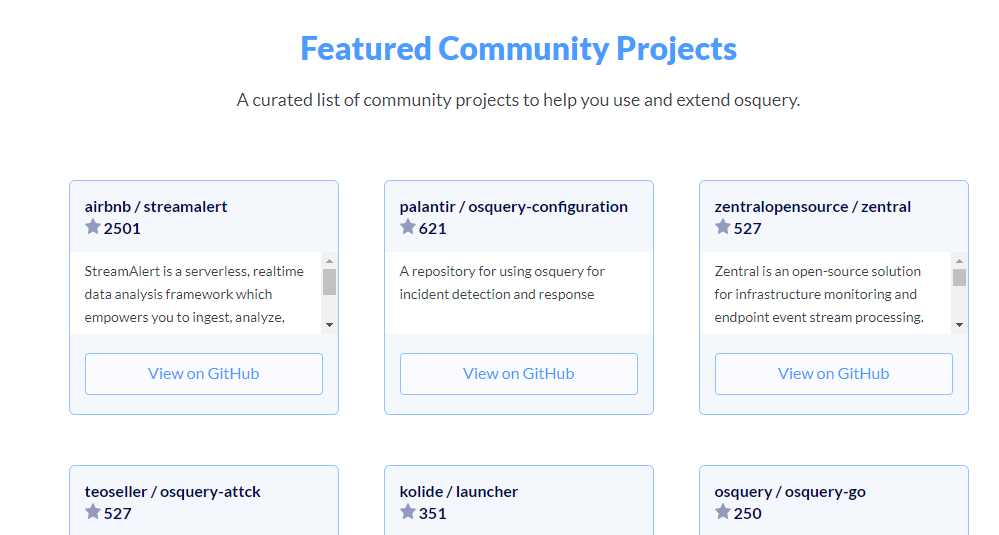
The repo on enterprise threat hunting with Osquery + MITRE ATT&CK is definitely worth your attention.
Leveled up with Osquery! No answer needed
[[Sysmon]]